---
title: Using Pulp 3 - Simpler and Faster
tags: Pulp, pulp-cli
description: With the release of Pulp 3 in Dec 2019, Pulp underwent a complete technical overhaul. Pulp 3 has increased reliability and flexibility compared to earlier versions of Pulp. Over the last few months, there's been great focus on creating a Pulp 3 CLI. In this talk, Brian Bouterse will highlight Pulp 3 featureset through the brand new Pulp 3 CLI.
---
### Using Pulp 3 - Simpler and Faster
Brian Bouterse
Senior Principal Software Engineer
bmbouter@redhat.com
slides: https://hackmd.io/@pulp/rJx0Ymdud
---
## Agenda
* What is Pulp?
* What's new with Pulp3
* Basic Terminology
* Show me the demos!
* container
* python
* ansible
* rpm
---
## What is Pulp?
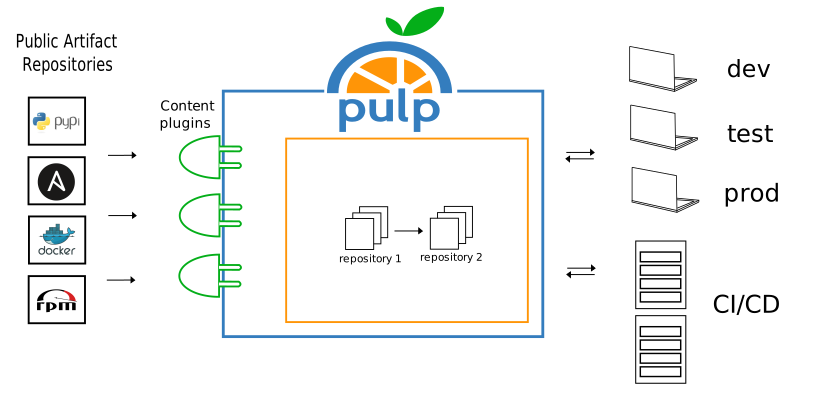
* Sync packages from public repositories
* Organize and Share Packages
* Approve and promote packages
* Upload and distribute your own private packages
---
### Usage flow
---
### What is Supported?
---
## New with Pulp3
3.0.0 released Dec 11, 2019
latest: 3.12.2 -- Apr 30, 2021
---
### Improved Performance and Data Integrity
Pulp 3 moves from MongoDB to PostgreSQL. :heart_eyes: :100:
---
### Faster Performance
:clock230: On testing, synchronizing in Pulp 3 ranges from 2x to 8x faster than Pulp 2.
---
### Versioned Repositories
:back: New ability to rollback safely to earlier versions.
---
### Disk Storage and Speed Solutions
Select from multiple synchronization options for all content types to suit specific environmental requirements.
---
### Storage Options
Can store data locally, or in the cloud with storage services like S3 and Azure. :cloud:
---
### Simplified Installation
* Use the Ansible based installer
* https://pulp-installer.readthedocs.io/en/latest/
* Or use pre-built containers
* https://pulpproject.org/pulp-in-one-container/
* Or use the operator for k8s
* https://github.com/pulp/pulp-operator
---
### Client bindings
Make Pulp’s API language agnostic, requiring no customization.
---
### Better docs
Browseable, auto-documented, OpenAPI.
---
### Better packaging
Python’s PyPI replaces RPMs as the main packaging method, which allows for easy installation across Linux distributions.
---
### Plugin API
Improvements to the Plugin API ensures compatibility with Pulp core and has led to an increasing list of Plugins.
---
## Migrating to Pulp3
* Use this migration plugin!
* https://pulp-2to3-migration.readthedocs.io/en/latest/
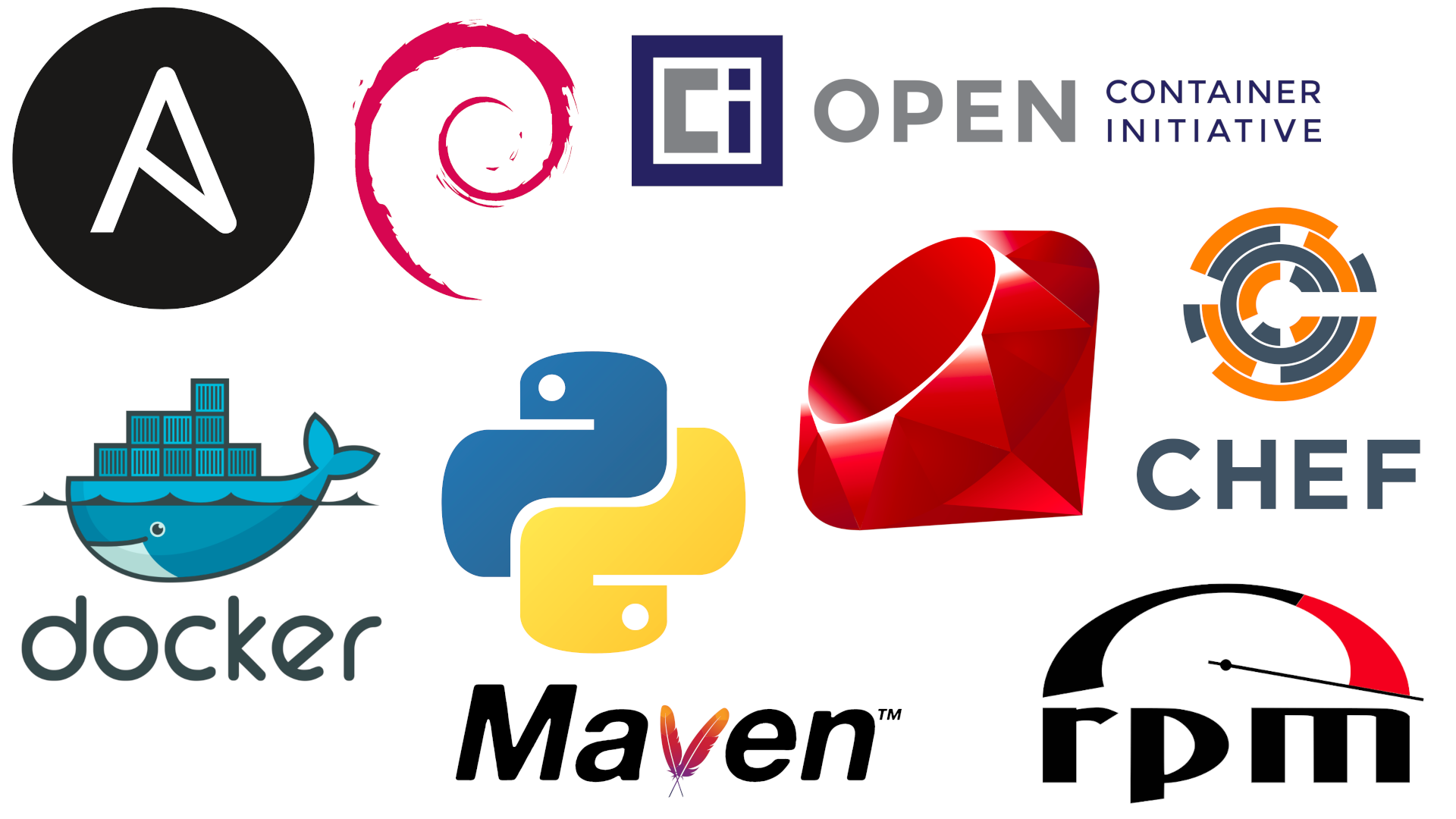
Can migrate: docker, rpm, debian, and ISO content
---
## What is a Repository
* A versioned set of packages/gems/containers/, aka content
* These are typed, e.g. RPM, python, etc
---
## What is a Remote
* Details about how to fetch content from other servers
* These are typed
---
## What is a Distribution
* Exposes a RepositoryVersion at a base path
* e.g. 'mypath' at http://localhost:8080/pulp/content/
---
## What is a Publication?
* Creates metadata for a set of content
* RPM, Python need this
* Container and Ansible don't
---
## Today's Demo
* Using the single container
* https://pulpproject.org/pulp-in-one-container/
* With the pulp-cli
* https://github.com/pulp/pulp-cli
---
### Pulling down the container
`podman pull pulp/pulp`
Or a specific version: `podman pull pulp/pulp`
---
### Create settings files
```
mkdir pulp
cd pulp
mkdir settings pulp_storage pgsql containers
```
```
echo "CONTENT_ORIGIN='http://$(hostname):8080'
ANSIBLE_API_HOSTNAME='http://$(hostname):8080'
ANSIBLE_CONTENT_HOSTNAME='http://$(hostname):8080/pulp/content'
TOKEN_AUTH_DISABLED=True" >> settings/settings.py
```
---
### Start the container with SELinux
* Running on port 8080
* http only (currently)
* Usable with either `podman` or `docker` commands
```
podman run --detach \
--publish 8080:80 \
--name pulp \
--volume ./settings:/etc/pulp:Z \
--volume ./pulp_storage:/var/lib/pulp:Z \
--volume ./pgsql:/var/lib/pgsql:Z \
--volume ./containers:/var/lib/containers:Z \
--device /dev/fuse \
pulp/pulp
```
---
### Start the container *without* SELinux
```
podman run --detach \
--publish 8080:80 \
--name pulp \
--volume ./settings:/etc/pulp \
--volume ./pulp_storage:/var/lib/pulp \
--volume ./pgsql:/var/lib/pgsql \
--volume ./containers:/var/lib/containers \
--device /dev/fuse \
pulp/pulp
```
---
### Assign an admin password
`podman exec -it pulp bash -c 'pulpcore-manager reset-admin-password'`
---
### Installing pulp-cli
`pip install pulp-cli`
https://github.com/pulp/pulp-cli
---
### Point pulp-cli at your container
`pulp config create`
`pulp config edit`
1. Point to "http://localhost:8080"
2. Add username, password
---
### Showing Container logs:
`podman logs -f pulp`
---
### Status check
`pulp status`
---
### Tasking Things
* `pulp task list --state=running`
* `pulp task list --state=failed`
* `pulp task cancel --href /pulp/api/v3/tasks/15b8608b-724a-4182-acc3-bb5eb13a8b18/`
---
### Clean up orphans
`pulp orphans delete`
---
### Interactive shell
`pulp shell`
---
### CLI Niceties
* Autocompletion
* --help` on all commands
---
### API Documentation
API Documentation: http://localhost:8080/pulp/api/v3/docs/
---
### Container Overview
Pulp3 is a registry supporting any client that adheres v2 regitry API:
* `docker`/`podman`
* `push`, `pull`, `tag` features
* https://docs.pulpproject.org/pulp_container/
---
### Container Demo
* Showing off with http, but https fully supported
* Showing off without RBAC, but RBAC fully supported
---
### Allow podman to use insecure
Add snippet to `/etc/containers/registries.conf`
```
[[registry]]
location = "localhost:8080"
insecure = true
```
---
### Login
`podman login localhost:8080 --tls-verify=false`
---
### Tag an Image
`podman tag pulp localhost:8080/asdf/pulp:latest`
---
### Push an Image
`podman push localhost:8080/asdf/pulp:latest`
---
### Pull an Image
`podman pull localhost:8080/asdf/pulp:latest`
---
### Pull Through Caching
podman <-> pulp <-> docker/quay
---
### Listing Pushes
`pulp container repository --type push list`
---
### Listing Distibutions
`pulp container distribution list`
---
### Python Overview
* Able to sync from PyPI
* `pip` compatible, `twine` compatible (soon)
* Integration with Bandersnatch
* https://pulp-python.readthedocs.io/
---
### Python Demo
* Create a repository
* Create a remote
* Sync from PyPI
---
### Create a Repository
`pulp python repository create --name pypi`
---
### PyPI mirroring
`pulp python remote create --name full-pypi --url https://pypi.org/`
---
### Sync Specific Packages
`pulp python remote create --name allowed-pypi --url https://pypi.org/ --includes '["shelf-reader", "numpy"]'`
---
### Use Package Filters
`pulp python remote update --name allowed-pypi --package-types '["bdist_wheel"]' --prereleases False`
---
### List Remotes
`pulp python remote list`
---
### Sync!
`pulp python repository sync --name pypi --remote allowed-pypi`
---
### Create Publication
`pulp python publication create --repository pypi`
---
### Publish Automatically
`pulp python repository update --name pypi --autopublish`
---
### Go live
`pulp python distribution create --name my-pypi --base-path my-pypi --publication <HREF>`
---
### Install with Pip
`pip install -i http://localhost:8080/pulp/content/my-pypi/simple/ numpy`
---
### Have pip always use Pulp
Edit `pip.conf`
```
cat <<EOT >> $VIRTUAL_ENV/pip.conf
[global]
index-url = http://localhost:8080/pulp/content/my-pypi/simple/
EOT
```
`pip install shelf-reader`
---
### Ansible Overview
* Sync's content from:
* galaxy.ansible.com
* cloud.redhat.com
* https://docs.pulpproject.org/pulp_ansible/
---
### Create an Ansible Repository
`pulp ansible repository create --name myrepo`
---
### Create an Ansible Remote
`pulp ansible remote -t collection create --name basic --url https://galaxy.ansible.com --requirements-file ~/Documents/Presentations/container_demo/basic.yml`
---
### Create an Ansible Distribution
`pulp ansible distribution create --name mydistro --base-path foo --repository myrepo`
---
### View it through the Galaxy API
http://localhost:8080/pulp_ansible/galaxy/foo/api/v3/collections/
---
### Sync content using the Remote into the Repo
`pulp ansible repository sync --name myrepo --remote basic`
---
### Installing using the CLI
1. Get the client URL for this repo from the distribution list: `pulp ansible distribution list`
2. Install with a command like: `ansible-galaxy collection install -s http://localhost:8080/pulp_ansible/galaxy/foo/ -p ./ pulp.pulp_installer`
---
### Uploading from the CLI (part 1)
* Get the client URL for this repo from the distribution list: `pulp ansible distribution list`
* Have a tarball, e.g. `https://galaxy.ansible.com/newswangerd/collection_demo`
---
### Uploading from the CLI (part 2)
* Upload the tarball with `ansible-galaxy collection publish -s http://localhost:8080/pulp_ansible/galaxy/foo/ newswangerd-collection_demo-1.0.10.tar.gz`
* View it's availability in the repository: `http://localhost:8080/pulp_ansible/galaxy/foo/api/v3/collections/`
---
### Creating a remote for Role content
1. First a word about the galaxy Role API
2. `pulp ansible remote -t role create --name someroles --url https://galaxy.ansible.com/api/v1/roles/?namespace__name=elastic`
---
### Syncing Roles
`pulp ansible repository sync --name myrepo --remote someroles`
Viewing them: http://localhost:8080/pulp_ansible/galaxy/foo/api/v1/roles/
---
### Installing Roles from the CLI
1. Get the client URL for this repo from the distribution list: `pulp ansible distribution list`
2. Install with a command like: `ansible-galaxy role install -s http://localhost.localdomain:8080/pulp_ansible/galaxy/foo/ -p ./ elasticsearch,6.2.4`
---
### Configuring the CLI permanently
Use an ansible.cfg like:
```
[galaxy]
server: http://localhost.localdomain:8080/pulp_ansible/galaxy/foo/
```
Then `ansible-galaxy role install -p ./ elasticsearch,6.2.4`
---
### Copying Content between Repositories
Not demo-ing but see these docs: https://docs.pulpproject.org/pulp_ansible/workflows/copy.html
---
### RPM Overview
* Sync and Host RPM repositories
* Supports EL5 - EL9
* `yum`/`dnf` compatible
* Lots of features
* https://docs.pulpproject.org/pulp_rpm/
---
### RPM Demo
---
### Create Repository
`pulp rpm repository create --name foo1`
---
### Create a Remote
`pulp rpm remote create --name foo --url https://fixtures.pulpproject.org/rpm-signed/ --policy on_demand`
---
### Sync
`pulp rpm repository sync --name foo1 --remote foo`
---
## Repository Versions
`pulp rpm repository version list --repository foo1`
---
### Create another Repository
`pulp rpm repository create --name foo2`
---
### Sync Again
`pulp rpm repository sync --name foo2 --remote foo`
---
### Create Repo with Remote
`pulp rpm repository create --name foo3 --remote foo`
---
### Sync that repository
`pulp rpm repository sync --name foo3`
---
### Create a publication
`pulp rpm publication create --repository foo1`
---
### Go live
`pulp rpm distribution create --name dist_bar --base-path some_rpm_content --publication <HREF>`
---
### Browse Repos
http://localhost:8080/pulp/content/
---
### Getting Help
* https://www.redhat.com/mailman/listinfo/pulp-list
* #pulp on Freenode
* See the docs for filing bugs, changes, etc.
---
### Feedback
Brian Bouterse
bmbouter@redhat.com
---
 Google Drive
Gist
Clipboard
Google Drive
Gist
Clipboard
 Sign in via Google
 Sign in via Facebook
 Sign in via X(Twitter)
 Sign in via GitHub
 Sign in via Dropbox
 Sign in with Wallet






