# Aurora
**please note**: this project is currently in beta.
- [getaurora.dev - Aurora Website](https://getaurora.dev/)
- [Announcement](https://universal-blue.discourse.group/t/aurora-announcement/767)
A familiar KDE desktop for people who love Fedora Kinoite. Aurora is a maintenance-free, reliable and fast operating system for everyone, stable like a Chromebook. It combines the power of Fedora and the beauty of a KDE desktop in a single, reliable and sleek package.
- Developers, check out [Aurora-DX](https://universal-blue.discourse.group/docs?topic=39) for developer focused images!

> "The desire to reach for the stars is ambitious. The desire to reach hearts is wise." - Maya Angelou
## Introductory Video
https://www.youtube.com/watch?v=YFXufAVdrw4
## Features
**This image heavily utilizes _cloud-native concepts_.**
System updates are image-based and automatic. Applications are logically separated from the system by using Flatpaks for graphical applications and `brew` for command line applications. Workloads for development are containerized.
## For Users
- [Ptyxis terminal](https://universal-blue.discourse.group/docs?topic=300) for container-focused workflows
- [Boxbuddy](https://flathub.org/apps/io.github.dvlv.boxbuddyrs) for container management
- [Tailscale](https://tailscale.com) - included for VPN along with `wireguard-tools`
- KDE Discover with [Flathub](https://flathub.org):
- Use a familiar software center UI to install graphical software
- [Warehouse](https://flathub.org/apps/io.github.flattool.Warehouse) included for flatpak management
- Quality of Life Features
- [Starship](https://starship.rs) terminal prompt enabled by default
- Docker & Podman Developer Edition Images contain both Docker and Podman runtimes to support your containerized needs.
- [Input Leap](https://github.com/input-leap/input-leap) built in
- [Solaar](https://github.com/pwr-Solaar/Solaar) - included for Logitech mouse
management along with `libratbagd`
- [rclone](https://rclone.org/) and [restic](https://restic.net/) included
- `zsh` and `fish` included (optional)
- Built on top of the the [Universal Blue main image](https://github.com/ublue-os/main)
- Extra udev rules for game controllers and [other devices](https://github.com/ublue-os/config) included out of the box
- All multimedia codecs included
- System designed for automatic staging of updates
- If you've never used an image-based Linux before just use your computer normally
- Don't overthink it, just shut your computer off when you're not using it
### Applications
- Mozilla Firefox, Mozilla Thunderbird, DejaDup, FontDownloader, Flatseal, and the Haruna Media Player.
- Core KDE Applications installed:
- Kcalc, kalendar, Okular, Dolphin File Manger, Kate, kWeather, Filelight, and KDE Partition Manager.
## Frequently Asked Questions
#### What about codecs?
Everything you need is included.
#### How is this different from Fedora Kinoite?
Other than the visual differences, and codecs, there are some other key differences between Bluefin and Fedora Kinoite from a usage perspective:
- Aurora takes a [greenfield approach](https://en.wikipedia.org/wiki/Greenfield_project) to Linux applications by defaulting to Flathub and `brew` by default
- Aurora doesn't recommend using Toolbx - it instead focuses on [devcontainers](https://universal-blue.discourse.group/docs?topic=39) for declarative containerized development. You can use Podman or Docker to run and bootstrap your containers.
- Aurora *tries* to remove the need for the user to use `rpm-ostree` or `bootc` directly
- Aurora focuses on automation of OS services and upgrades instead of user interaction. Upgrades are automatic and silent, so you never have to think about it again.
#### Starship is not for me, how do I disable it?
You can remove or comment the line below in `/etc/bashrc` to restore the default prompt.
```bash
eval "$(starship init bash)"
```
#### Should I trust you?
This is all hosted, built, signed, and pushed on GitHub. If you've made it this far, then welcome to the future! :smile:
#### I want it! Where do I get it?
Pick your hardware and pick the ISO to install Aurora on your hardware! [getaurora.dev - Aurora Website](https://getaurora.dev/)
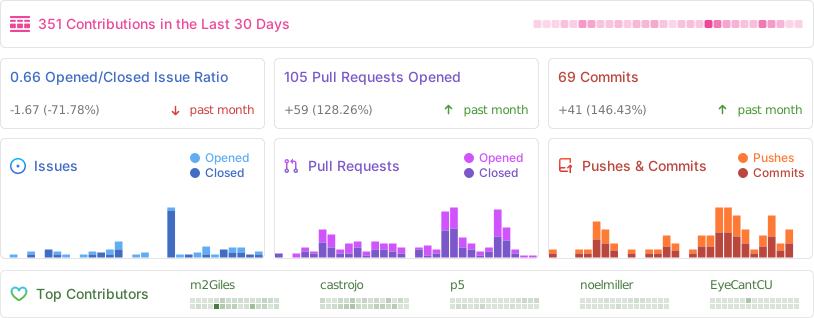
### Contributor Metrics
<hr>
**Documentation Contributors**: [Jorge Castro](https://github.com/castrojo), [Niklas Haiden](https://github.com/NiHaiden) and [Pat Connors](https://github.com/nicknamenamenick)
 Google Drive
Gist
Clipboard
Google Drive
Gist
Clipboard
 Sign in with Wallet






