# Optimizing Brainfuck JIT Compiler
contributed by <`f5120125`>, <`diana0651`> <`andy19950`>, <`TotallyWrong`>,<`cjTsai3030`>
---
[GitHub連結](https://github.com/TotallyWrong/bf-runtime)
>> Git repository 的名稱不該包含 "group",而是明確程式碼產出的簡稱,例如 `bf-jitc` 之類的名稱 [name=jserv]
>> 名稱已修改
[name=TotallyWrong]
>> 原本的程式碼太亂,難以維護,乾脆重新從 [bf-runtime](https://github.com/sysprog21/bf-runtime) fork 並且移植 DynASM 程式碼進來 [name=jserv]
>> 已經做完repository變更,將會盡速把剩下的Code移過去。
[name=TotallyWrong]
>> 很久沒看到程式碼進展,趕快跟我約時間討論 [name=jserv]
---
## 影片連結
1. [BrainF*ck 介紹及討論](https://youtu.be/1U-F7DJLG7Q) --- 林鑫宏
2. [基本編譯器架構介紹](https://youtu.be/k7RqLBU12tE) --- 蔡承哲
3. [Jit-BrainF*ck 編譯器介紹以及 IR 的優化]() --- 老師說我們先不用拍影片><
4. [C to BrainF*ck 編譯器介紹]( https://youtu.be/ml9xsnxe0Gg) --- 吳庭安
---
## 暫時溝通區塊 Group Communication
>>有任何問題或需要溝通的事請留在這區塊,內容在完成後會刪除。
1. f5120125, diana0651 我們似乎應該建立個 IR層請參考IR Section。
---
## Brainfuck compiler 共筆整理
### 預期目標
- 整理同學們的共筆,讓大家看這份文件就能了解基礎編譯器的執行過程
>> 關於共筆整理,可參考 [Brainfuck JIT Compiler in Rust](https://dontpanic.cn/brainfuck-jit-compiler-in-rust/) 文章的架構 [name=jserv]
- 研究 Brainfuck 的指令,轉成 IR 後使其最佳化
---
>> >> 還有些極端的特例,如 [movfuscator](https://github.com/xoreaxeaxeax/movfuscator), [walking drives](http://www.catb.org/jargon/html/W/walking-drives.html), [trapcc](https://github.com/jbangert/trapcc) [name=jserv]
- 實做出最基本的 C to BF 編譯器
---
>> 可從設計 macro-language 開始,參考 [afbc](https://github.com/fcostin/abfc)
- 最佳化我們的編譯器
>> 注意: 我們需要設計 dynamic compiler (或 virtual machine),而非 static optimizing compiler [name=jserv]
### 專案任務
>>把要做的事情轉換成小任務在完成後請勾選,如果任務不夠細請自行修改。
---
- [ ]整理同學們的共筆。
- [ ]建立C轉IR的Macro。
- [ ]建立BF轉IR層。
- [ ]IR優化Routine。
- [ ]BF JIT Compiler 所做出的程式 Cache優化。
- [ ]BF JIT Compiler 編譯器本身的記憶體行為。
- [ ]共同影片錄製。
---
### 內容
1. BrainF*ck 介紹
2. Compiler 介紹
3. JIT 介紹
4. 簡單介紹 BrainF*ck 編譯器設計與IR層優化
5. C to BrainF*ck
---
### 1. BrainF*ck 介紹
- [Brainf*ck wikipedia](https://en.wikipedia.org/wiki/Brainfuck)
Brain F\*ck 是一個由 Urban Müller 在 1993年所開發的[深奧的程式語言](https://zh.wikipedia.org/wiki/%E6%B7%B1%E5%A5%A5%E7%9A%84%E7%BC%96%E7%A8%8B%E8%AF%AD%E8%A8%80)而這個語言具備圖靈完備性,整個語言只有八道指令。
- 符合 Turing complete
- 一個萬能圖靈機:可以執行任何計算
- 具有無限存儲能力的通用程式語言
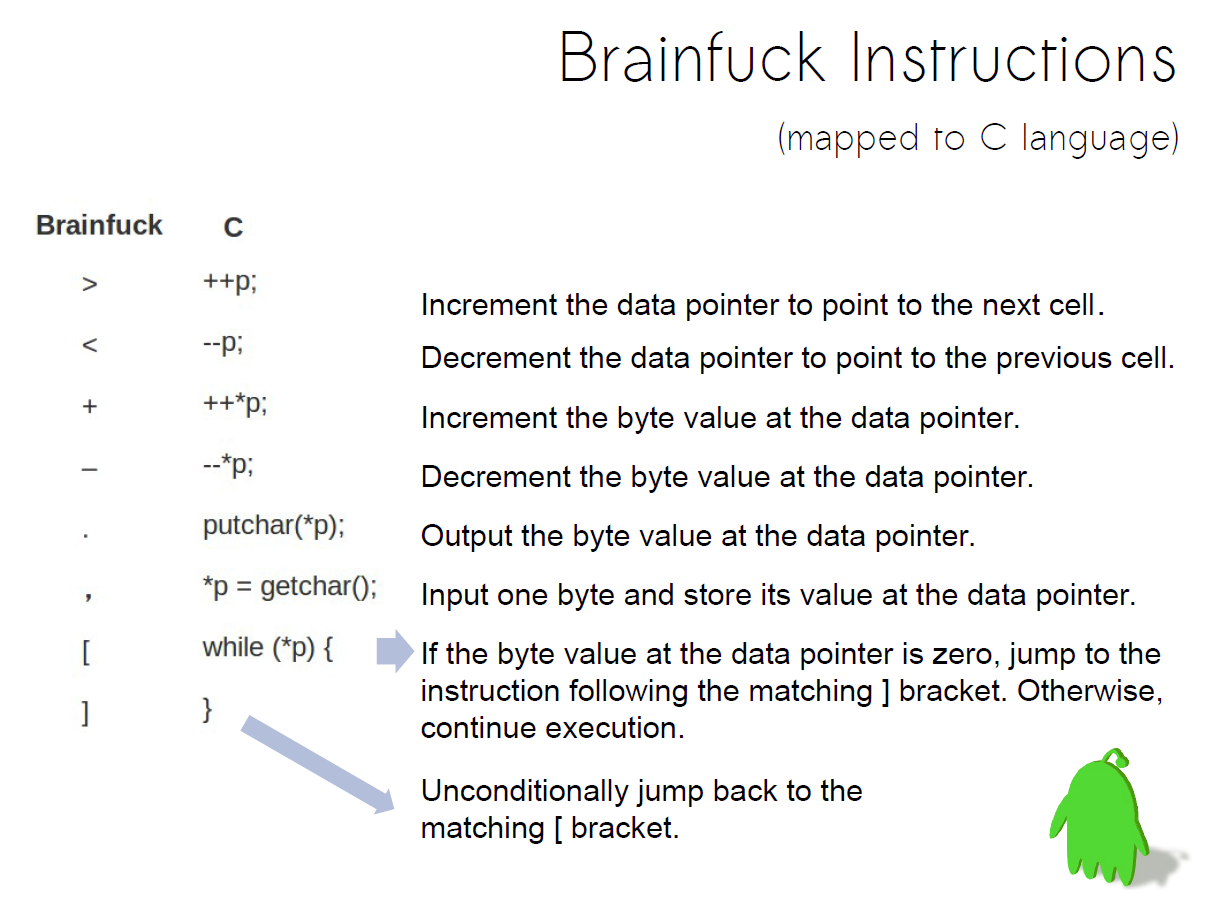
- Brainfuck 的基本模型是由一個**連續的記憶體位置**以及一個**指向記憶體的指標**所組成
---
- - 八個指令,其中兩個是 I/O 動作
- 對記憶體單元作直接的存取
- 透過 data pointer 在 data cell 中進行不同的指令
---
---
- 每個字元都是一個 token,如果 token不是這8個指令的符號之一就會背捨棄掉。
- 前進和後退跳躍運算元需要是完整的一對才是正確的指令
- 八個運算字元
- **`>` 和`<`**: 存在 **stack buffer overrun**可能性因為程式沒有進行記憶體邊界檢查.
- **`+` and `-`**: 把記憶體位置的值加一或減一
- **`.` 和 `,`**: 提供輸入和輸出功能
- 把指標所指的記憶體位置的值stdout以 ASCII code 輸出
- 以stdin 讀取一個byte以ASCII的值寫入指標所指的記憶體位置。
- **`[` and `]`**: 回圈結構
---
在操作BF的code時有很多難處需要克服。
1.BF只可以一次操作一個byte並沒有支援Int或這類比較大型態,計算的Overflow 需要克服。
2.BF一次指可以操做一個指標,所以再做值的運算時需要自行紀錄所使用參數的個數和記憶體位置。
3.BF來執行Branch或Flow Control都很不直覺因為程式中都只能對指標做操作並沒有指令跳躍的功能。
---
### 2. 編譯器架構基本介紹
- [參考投影片](http://www.slideshare.net/jserv/how-a-compiler-works-gnu-toolchain) 以及 [影片](https://www.youtube.com/watch?v=RYXFLxnLsiM)
電腦上所執行的程式都是用某種程式語言編寫的,但在程式可以執行之前它首先需要翻譯成能夠被電腦執行的型式,而完成這項翻譯工作的軟體系統稱為編譯器(Compiler)-龍書
---
---
編譯器的3個主要目標:
1. 產生正確的程式碼。
2. 編譯器應有效提高許多輸入程式的效能。
3. 需要降低編譯時間,以支援快速的開發和除錯周期。
---
#### 2.1 編譯器流程圖
一般編譯器的架構可以簡單拆成一個或數個 frontends ,以及一個或數個 backends
Frontend 先將原始碼轉換為一個或多個的 IR ,方便進行最佳化,再由 Backend 將 IR 轉換成執行程式。
---
[Intermediate Representation](https://en.wikipedia.org/wiki/Intermediate_representation)
```flow
st=>start: Source code
e=>end: Target code
op=>operation: Frontend
op2=>operation: Optimizer (IR)
op3=>operation: Backend
st->op->op2->op3->e
```
---
#### 2.2 Frontend (Parser)
- 主要做程式碼的字串切割,語意語法的偵錯
- BF 的編譯器只須逐個字讀入就好,但在實做 C to BF 的編譯器就需要 Parser 的幫助,我們會使用老師的 [AMaCC](https://github.com/jserv/amacc) 來改寫。
>> AMaCC 裡頭的技巧比較多,不容易懂,可對照其他專案:
>> * [c2bf](https://github.com/arthaud/c2bf)
>> * [Brainfuck code generation](https://esolangs.org/wiki/Brainfuck_code_generation)
>> 其中 Macro systems 很值得一看,裡頭不乏精巧的設計 [name=jserv]
1. **Lexical Analyzer**:將原始碼切成 token stream
2. **Syntax Analyzer**:將 token 帶入定義好的 identifier 最後轉成 sytax tree
3. **Semantic Analyzer**:判斷 syntax tree 是否符合 regular expression 以及檢查每個節點的型態是否合法 ( type checking )
---
### 2.3 IR (Intermediate Representation)
- 原本對於不同的 Frontend / Backend 都需要實做一個編譯器,也就是 C 對 arm, mips, x86_64 要三個編譯器,而 Java 也需要對應的另外三個編譯器
- 後來引入中間表示 (IR),只須實做一個編譯器就能夠把不同的 Frontend 對應到 不同的 Backend,達到支援各式前後端的功能
>> Reference: [bfc: An industrial-grade brainfuck compiler](https://github.com/Wilfred/bfc) [name=jserv]
- 重點是可以針對 IR 來做最佳化,讓產生的組合語言能夠更精簡,排列更有利於執行,或者刪減一些不必要產生的組語
---
### 2.4 Backend
- 對於 GCC 來說 IR 最後會產生 RTL 格式的檔案。
- Register Transfer Language(RTL) 是一種類似 LISP 的表示法
- IR 產生出來的 RTL 檔裡面使用的暫存器是無限多個的,但在現實中暫存器的個數是有限的。
- 所以會需要 Register Allocation 把原本無限多個虛擬暫存器去對應到有限個實體暫存器( ex. eax,ebx )
- 最後將目標的機械碼產生出來
---
### 3. Just-in-Time Compilter 基本介紹
[Brainfuck JIT Compiler in Rust](https://dontpanic.cn/brainfuck-jit-compiler-in-rust/)與[Just-in-time compilation](https://en.wikipedia.org/wiki/Just-in-time_compilation)
### 4.簡單介紹 BrainF*ck 編譯器設計與IR層優化
#### 4.1 BF 最佳化策略
1. **Contraction**: 連續的 `+,-,>,<` 可以被壓縮
2. **Clear loops**: `[-]` 可以直接把值歸零
3. **Copy loops**: `[->*+*<*]`有出現這種 pattern 的迴圈代表複製
- `*` 代表可以重複出現,但左右shift的次數要相等
4. **Multiplication loops**: `[->+*>*+*<*<]` 跟上面的 pattern 相似但多了一個倍數的乘法
- copy loops 算是 multiplication loops 的其中一種情況
5. **Operation offsets**: pattern 前面如果有連續的位移代表需要執行動作的 offset
- 目前沒有實做這個部份,可以參考 [BF最佳化策略](http://calmerthanyouare.org/2015/01/07/optimizing-brainfuck.html)
6. **Scan loops**: 找到左或右第一個值為零的位置
|IR |C |
|:--------|:------------------------|
|Add(x) |`mem[p] += x;` |
|Sub(x) |`mem[p] -= x;` |
|Right(x) |`p += x;` |
|Left(x) |`p -= x;` |
|Out |`putchar(mem[p]);` |
|In |`mem[p] = getchar();` |
|Open |`while(mem[p]){` |
|Add |`}` |
|Clear |`mem[p] = 0;` |
|Mul(x,y) |`mem[p+x] += mem[p] * y;`|
|ScanLeft |`p -= (long)((void *)(mem + p) - memrchr(mem, 0, p+1));` |
|ScanRight|`p += (long)(memchr(mem + p, 0, sizeof(mem)) - (void *)(mem + p));` |
#### 4.2 優化策略
- The IR code generated by the semantic routines is analyzed and transformed into functionally equivalent but improved IR code.
- This phase can be very complex and slow
- Peephole optimization
---
#### 4.3 進階的效能最佳化
[bf-runtime](https://github.com/sysprog21/bf-runtime)
老師希望我們把既有的程式整合到bf-runtime中,我們從了解bf-runtime這個程式開始:以下是 main 程式的流程圖

### 參考
team4
https://hackmd.io/s/r1pcJ0Dkx
https://hackmd.io/s/B1n0oiNxx
---
### 5. C to BrainF*ck
- 原始碼參考 [c2bf](https://github.com/arthaud/c2bf)
- 使用的語言是 [meta language (ml)](https://en.wikipedia.org/wiki/ML_(programming_language))
- 若有看不懂的語法請參考 [ML notes](http://homepages.inf.ed.ac.uk/stg/NOTES/node102.html#keywords) 搜尋關鍵字查詢使用方法
#### 5.1 Types 定義後面所需要用到的各種名稱
##### 5.1.1定義型態
- `type` 關鍵字用於定義
- `of` 關鍵字意思為 左邊繼承右邊
- `int, bool, char` 是基本型態
- 第一個字母大寫的都是自己定義的名稱,方便未來使用
```ml=
type var_type =
|Int
|Bool
|Array of var_type
type constant =
|IntConst of int
|BoolConst of bool
|CharConst of char
```
---
##### 5.1.2定義 expression
- `expression` 可以是變數,常數或者運算等
- 原始程式碼還有許多定義這邊就舉加法為例
- `Add`這種運算必須是兩種`expression`組合而成
- `*` 關鍵字代表組合而不是乘法喔
```ml=
type expression =
|Var of string
|Const of constant
|Add of expression * expression
```
---
##### 5.1.3 定義 parameters
- 必須要有變數型態以及變數名稱
- `list` 關鍵字代表前面括弧內的變數可能是多種型態的組合
```ml=
type function_parameters = (var_type * string) list
```
---
##### 5.1.4 定義 statement
- 有 Define,Assign,IF,WHILE 等等的組合
- 原程式碼還有許多定義這邊舉幾個比較關鍵的 statement
```ml=
type statement =
|Define of var_type * string * expression
|Assign of string * expression
|If of expression * statement list * statement list
|While of expression * statement list
|For of statement * expression * statement * statement list
|Function of (var_type * expression) option * string * function_parameters * statement list
(* (returned type, returned expression), name, parameters, instructions *)
```
---
##### 5.1.5 定義program
- `program`就是由許多`statement`組合而成的
- 而`statement`上面有定義過了,就是透過不斷參考上面的定義來達到了解整支程式碼的意義
```ml=
type program = statement list
```
---
##### 5.1.6 定義 Token
- 定義最基本的 digit, identifier
- identifier 是用來對應我們宣告的變數名稱,必須由一個英文字開始,後面可以接數個英文字母、數字或底線
```
digit = ['0'-'9']
ident = ['a'-'z' 'A'-'Z'] ['a'-'z' 'A'-'Z' '0'-'9' '_']*
```
- 定義未來會用到的 token 當作保留字(以大寫T當開頭)
```
rule tokenize = parse
| "void" { TVoid }
| "int" { TInt }
| "bool" { TBool }
| '(' { TLeftPar }
| ')' { TRightPar }
| '{' { TLeftBrace }
| '}' { TRightBrace }
| '[' { TOpenBracket }
| ']' { TCloseBracket }
| '+' { TPlus }
| '-' { TMinus }
| '*' { TMul }
| '/' { TDiv }
| '^' { TXor }
| '<' { TInf }
| "<=" { TInfEq }
| "==" { TEq }
| "!=" { TNotEq }
| '>' { TSup }
| ">=" { TSupEq }
| "&&" { TAnd }
| "||" { TOr }
| '!' { TNot }
| ';' { TSemicolon }
| ',' { TComma }
| '=' { TAssign }
| "if" { TIf }
| "else" { TElse }
| "while" { TWhile }
| "for" { TFor }
| "return" { TReturn }
| (digit+ as num) { TIntConst(int_of_string num) }
| "true" { TBoolConst(true) }
| "false" { TBoolConst(false) }
```
---
#### 5.2 Parser 使用上面的定義來宣告
##### 5.2.1 宣告 Token
- 宣告各種關鍵字,也是為了未來使用,看到越後面可以越了解
- 這邊原始程式都用大寫 T 開頭來代表 Token
```ml=
%token <string> TVar
%token <int> TIntConst
%token <bool> TBoolConst
%token <char> TCharConst
%token <string> TStringConst
%token TVoid TInt TBool
%token TLeftPar TRightPar TLeftBrace TRightBrace TOpenBracket TCloseBracket
%token TPlus TMinus TMul TDiv TXor
%token TInf TInfEq TEq TNotEq TSup TSupEq TAnd TOr TNot
%token TSemicolon TComma TAssign TReturn
%token TIf TElse TWhile TFor
%token TReadChar TWriteChar
%token TEOF
```
---
##### 5.2.2 定義語意 (Semantic)
- `%start` 代表 syntax tree 的 root node
- 而 `nt_program` 可以變成 `nt_statment nt_program` 以此類推完成 syntax tree
- `nt_statment` 以及 `nt_expression` 就按照上面定義的內容。
```ml=
%start nt_program
nt_program :
| TEOF { [] }
| nt_statement nt_program { $1::$2 }
;
nt_statements :
| { [] }
| nt_statement nt_statements { $1::$2 }
;
nt_function_parameters :
| { [] }
| nt_type TVar nt_function_parameters_list { ($1, $2)::$3 }
;
nt_function_parameters_list :
| { [] }
| TComma nt_type TVar nt_function_parameters_list { ($2, $3)::$4 }
;
nt_function_arguments :
| { [] }
| nt_expression nt_function_arguments_list { $1::$2 }
;
nt_function_arguments_list :
| { [] }
| TComma nt_expression nt_function_arguments_list { $2::$3 }
;
```
- compiler 會檢查程式碼是否符合定義的 syntax tree 以及檢查語法 (變數型態,重複定義或未定義的變數)
- 看不懂的話我們用一張圖來解釋若編譯器讀到其中一行程式碼的情形。
---
#### 5.3 IR 層
- 解決每行 C 程式語法的定義後,接下來要把它對應到 IR
- 這邊定義了幾個 IR
|IR |Description |
|:------------------------|:---------------------------|
|`bf_clean(x)` |`Mem[x] = 0` |
|`bf_move(src,dst)` |`Mem[dst] = Mem[src]` |
|`bf_copy(src,dst,temp)` |`Mem[dst] = Mem[src] * temp`|
|`bf_generate(value,pos)` |`Mem[pos] = value` |
|`bf_add(x,y)` |`Mem[x] += Mem[y]` |
|`bf_sub(x,y)` |`Mem[x] -= Mem[y]` |
|`bf_mul(x,y,temp1,temp2)`|`Mem[x] *= Mem[y]` |
|`bf_div(x,y,temp1~4)` |`Mem[x] /= Mem[y]` |
|`bf_minus(x,temp)` |`Mem[x] = -Mem[x]` |
|`bf_eq(x,y)` |`Mem[x] = Mem[x] == Mem[y]` |
|`bf_not(x,temp)` |`Mem[x] = !Mem[x]` |
|`bf_and(x,y,temp1,temp2)`|`Mem[x] = Mem[x] & Mem[y]` |
|`bf_or(x,y,temp)` |`Mem[x] = Mem[x] | Mem[y]` |
|`bf_inf_eq(x,y,temp)` |`Mem[x] = Mem[x] <= Mem[y]` |
|`bf_array_write(x,y,z)` |`Mem[x[y]] = Mem[z]` |
|`bf_array_access(x,y,z)` |`Mem[x] = Mem[y[z]]` |
|`bf_xor(x)` |`Mem[x] = Mem[x+1] XOR Mem[x+2]`|
---
##### 5.3.1 BF 基本指令
- 這邊定義 10 種基本指令
- 比原本的多出下列兩種
1. `GOTO(x)` : 比較 x 與現在位置 pos 的距離,使用連續的位移來移動到 x
2. `Debug(x)` : 編譯時有使用 -d (debug模式) 就會把 x 輸出到檔案內
```
|Goto(x)::q ->
if x >= pos then (String.make (x - pos) '>') ^ (aux x q)
else (String.make (pos - x) '<') ^ (aux x q)
|Debug(x)::q -> x ^ (aux pos q)
```
- 剩下的怕大家看不懂還是列舉一下
1. `Left : '<'`
2. `Right : '>'`
3. `Incr : '+'`
4. `Decr : '-'`
5. `Out : '.'`
6. `In : ','`
7. `OBrac : '['`
8. `CBrac : ']'`
---
##### 5.3.2 介紹完基本指令後就可以來看 IR 的實做了
- `bf_clean`
```
let bf_clean x = [Goto(x); OBrac; Decr; CBrac]
```
- `bf_move`
```
let bf_move src dst = [Goto(src); OBrac; Goto(dst); Incr; Goto(src); Decr; CBrac]
```
- `bf_copy`
```
let bf_copy src dst temp = [
Goto(src); OBrac; Goto(dst); Incr; Goto(temp); Incr; Goto(src); Decr; CBrac;
Goto(temp); OBrac; Goto(src); Incr; Goto(temp); Decr; CBrac]
```
---
## Reference
- [Brainfuck JIT Compiler in Rust](https://dontpanic.cn/brainfuck-jit-compiler-in-rust/)
- [memrchr 組語](http://osxr.org:8080/glibc/source/sysdeps/x86_64/memrchr.S)
- LLVM and Brain F*ck [JservBlog](http://blog.linux.org.tw/~jserv/archives/2011/04/_llvm_brainfuck.html)
###### tags:`f5120125` `diana0651` `andy19950` `TotallyWrong` `cjTsai3030`
 Google Drive
Gist
Clipboard
Google Drive
Gist
Clipboard
 Sign in via Facebook
 Sign in via X(Twitter)
 Sign in via GitHub
 Sign in via Dropbox
 Sign in with Wallet






