---
title: datdot v0.0.1
tags: presentation
slideOptions:
defaultTiming: 30
allottedMinutes: 1 # Minutes alloted for a slide.
controls: false
progress: true
previewLinks: true
viewDistance: 3
---
# shortcuts
1. `<space>` next slide
2. `<arrow keys>` navigate slides
3. `<esc>` slides overview
4. `<?>` show help
5. `<s>` show speaker notes
6. `<b>` show/hide slides
<!-- .slide: data-background="#ff00ff" -->
Note:
some example note
---
# datdot
substrate based parachain
<!-- .element: class="fragment" data-fragment-index="0" -->
offers a blockchain based data hosting system
<!-- .element: class="fragment" data-fragment-index="1" -->
for [**hyper data structures**](https://hypercore-protocol.org)
<!-- .element: class="fragment" data-fragment-index="2" -->
...
<!-- .element: class="fragment" data-fragment-index="3" -->
what are **"hyper data structures"**?
<!-- .element: class="fragment" data-fragment-index="4" -->
Note:
fragments summarize datdot
---
# [hyper stack](https://hypercore-protocol.org)
*(started in 2013 as [dat](https://dat-ecosystem.org))*
> peer-to-peer data sharing
> 1. <font color="mediumspringgreen" style="font-size:60px;">**hyper-dht**</font>
> 2. <font color="fuchsia" style="font-size:60px;">**hypercores**</font>
> 3. <font color="whitesmoke" style="font-size:60px;">**hypercore-protocol**</font>
<!-- .slide: data-background="#00000" -->
Note:
fragments summarize datdot
---
# <font color="mediumspringgreen" style="font-size:60px;">**hyper-dht** (internet of peers)</font>
1. <font size="5">focuses on performance over privacy-preservance :rocket:</font>
* <font size="5">exposes basic routing information such as IP/port</font>
* <font size="5">[`noise protocol`][3] based end-to-end encryption between peers</font>
<!-- .element: class="fragment" data-fragment-index="0" -->
2. <font size="5">supports dynamic distributed holepunching as core feature :hole: :boxing_glove:</font>
* <font size="5">enables :pear: behind hardened firewalls to conenct directly to other :pear:</font>
<!-- .element: class="fragment" data-fragment-index="1" -->
3. <font size="5">:spider_web: overlay network to enable internet of peers by combining two approaches</font>
1. <font size="5">[(kademlia)][1] global :pear: discovery via UDP protocol based distributed hash table (DHT)</font>
2. <font size="5">[(MDNS)][2] local :pear: discovery in local networks</font>
<!-- .element: class="fragment" data-fragment-index="2" -->
[1]: https://en.wikipedia.org/wiki/Kademlia "kademlia DHT"
[2]: https://en.wikipedia.org/wiki/Multicast_DNS "multicast DNS"
[3]: http://www.noiseprotocol.org/ "noise protocol"
<!-- .slide: data-background="#FA237E" -->
Note:
...
----
#### How does internet of :pear::pear::pear: work?
<font size="5"> every peer (= :pear: ):</font>
1. <font size="5">:pear: generates an identity keypair :old_key:</font>
2. <font size="5">:pear: starts and maintains connections 🫂 with other :pear::pear::pear:</font>
3. <font size="5">:pear::pear::pear: store discovery data :package: (IP + PORT) of each other</font>
4. <font size="5">:pear::pear::pear: shares discovery data 📨 with other :pear::pear::pear:</font>
5. <font size="5">:pear::pear::pear: help :pear::pear::pear: connecting directly :hole::boxing_glove: even when firewalled</font>
<!-- .slide: data-background="#FA237E" -->
Note:
----
#### (1/5) :pear: generates identity keypair :old_key:
1. <font size="5">peer generates [(ed25519)][1] **`keypair`**</font>
2. <font size="5">peer [(blake2b)][2] hashes it's public **`IP + port`** as it's **`p2p address`**</font>
4. <font size="5">peer [(blake2b)][2] hashes it's **`public key`** as it's **`topic`** (=peer discoveryKey)</font>
[1]: https://ed25519.cr.yp.to/ "elliptic curve keypair"
[2]: https://www.blake2.net/ "hash function"
<!-- .slide: data-background="#FA237E" -->
Note:
These are the credentials necessary to participate in the internet of peers
## 1. peer discovery
=> lookup blake2b topic hashes to receive peerkeys
=> lookup blake2b hashed ed25519 public peerkeys to receive peer addresses
2. distributed holepunching
=> connect end2end encrypted to peers using noise protocol
(if topic is discovery key)
0. generate noise keypair
1. find out your IP
3. connect to kademlia DHT
4. publish your address
5. lookup a peer's pubkey or a topic to get list of peer pubkeys
6. initiate distributed holepunching to establish end2end encrypted direct peer connections
----
#### (2/5) :pear: starts and maintains connections 🫂 with other :pear::pear::pear:
<font size="5">other :pear::pear::pear: verify the :pear: **`p2p address`** before accepting</font>
[<video autoplay src="https://hypercore-protocol.org/videos/dht.mp4"></video>](https://hypercore-protocol.org/videos/dht.mp4)
<!-- .slide: data-background="#FA237E" -->
Note:
click to play joining process
----
#### (3/5) :pear::pear::pear: store discovery data :package: (IP + PORT) of each other

<font size="5">new :pear: signs & publishes it's **`IP + port`** to DHT under it's **`topic`** (=peer discoveryKey)</font>
<!-- .slide: data-background="#FA237E" -->
Note:
The peers responsible for storing data are the peers with their p2p address
being most similar to the hash of the data that get's stored
----
#### (4/5) :pear::pear::pear: shares discovery data 📨 with other :pear::pear::pear:
1. <font size="5">:pear: can lookup discovery data of another :pear: using their discoveryKey</font>
2. <font size="5">:pear: can lookup text topic keys to discover :pear::pear::pear: subscribed to that topic</font>
<!-- .slide: data-background="#FA237E" -->
Note:
...
----
#### (5/5) :pear::pear::pear: help :pear::pear::pear: connecting directly :hole::boxing_glove: even when firewalled
...
**But how does it work in today's mostly IPv4 based internet?**
<!-- .element: class="fragment" data-fragment-index="0" -->
...
<!-- .element: class="fragment" data-fragment-index="1" -->
=
distributed dynamic holepunching enables direct connections between even heavily firewalled peers
<!-- .element: class="fragment" data-fragment-index="2" -->
<!-- .slide: data-background="#FA237E" -->
Note:
...
----
# How does it work?
In practice, this is a challenge due to firewalls which reject incoming connections
and NATs which mask your IP.
----
## 1. peer's address

<!-- .element: class="fragment" data-fragment-index="0" -->
Note:
An IP can simply be observed
----
## 2. peer's port (1/2)


Note:
Most ISPs assign static ports in secret
but once you know them they can be gossiped
----
## 2. peer's port (2/2)

Note:
corporate and other networks tend to randomise ports
----
# worst situation


<!-- .element: class="fragment" data-fragment-index="0" -->
----
# But it gets worse
----
#### we ran out of IPv4 addresses many times

Note:
the internet with IPv4
----
🤪 🤪 🤪
----
# is it hopeless?
----
# NEVER!

### => holepunching to the rescue!
<!-- .element: class="fragment" data-fragment-index="0" -->
Note:
Let's see how normal holepunching works
And then let's see how we deal with multiple levels of corporate firewalls
----
#### What is holepunching?
Ideal P2P networks should be able to connect any two peers together, wherever they are
<!-- .element: class="fragment" data-fragment-index="0" -->
To help “break through” firewalls, a technique called UDP holepunching is used.
<!-- .element: class="fragment" data-fragment-index="1" -->
----
#### how does normal UDP hole punching work? (1/2)
<font size="5">A sends to B</font>
<!-- .element: class="fragment" data-fragment-index="0" -->
<img src="https://imgur.com/J5Scr7M.png" alt="A sends msg1 to B" style="width:50%;">
<!-- .element: class="fragment" data-fragment-index="1" -->
<img src="https://imgur.com/NzlsUGP.png" alt="A's router allows response from B" style="width:50%;">
<!-- .element: class="fragment" data-fragment-index="2" -->
<img src="https://imgur.com/pCbOd9Q.png" alt="msg1 arrives at B's router" style="width:50%;">
<!-- .element: class="fragment" data-fragment-index="3" -->
<img src="https://imgur.com/Obe2QMz.png" alt="B's router rejects msg1" style="width:50%;">
<!-- .element: class="fragment" data-fragment-index="4" -->
Note:
1. A sends msg1 to B
2. A's router allows response from B
3. msg1 arrives at B's router
4. B's router rejects msg1
----
#### how does normal UDP hole punching work? (2/2)
<font size="5">B sends to A</font>
<!-- .element: class="fragment" data-fragment-index="0" -->
<img src="https://imgur.com/dmr4Ull.png" alt="B sends msg2 to A, B's router will let response through" style="width:50%;">
<!-- .element: class="fragment" data-fragment-index="1" -->
<img src="https://imgur.com/31M6jPB.png" alt="msg2 arrives at A's router who currently let's B's messages through" style="width:50%;">
<!-- .element: class="fragment" data-fragment-index="2" -->
<img src="https://imgur.com/aq86KsH.png" alt="A receives B's msg2" style="width:50%;">
<!-- .element: class="fragment" data-fragment-index="3" -->
<img src="https://imgur.com/auRXsSz.png" alt="Now packges can go back and forth freely" style="width:50%;">
<!-- .element: class="fragment" data-fragment-index="4" -->
<img src="https://imgur.com/v9i14YB.png" alt="normal connection is established" style="width:50%;">
<!-- .element: class="fragment" data-fragment-index="5" -->
Note:
1. B sends msg2 to A, B's router will let response through
2. msg2 arrives at A's router who currently let's B's messages through
3. A receives B's msg2
4. Now packges can go back and forth freely
5. normal connection between peers is established
----
## BUT - requirements!
requirements:
<!-- .element: class="fragment" data-fragment-index="0" -->
1. 
<!-- .element: class="fragment" data-fragment-index="1" -->
2. <font size="6">Both :pear::pear: need to participate at the same time</font>
<!-- .element: class="fragment" data-fragment-index="2" -->
Note:
require both peers to know IP + port of each other
----
## 1. How to learn ports? (1/2)
> **REQUIREMENT:**
> 
<img src="https://imgur.com/hWZM1z2.png" alt="assume IP's known, but random port" style="width:70%;">
<!-- .element: class="fragment" data-fragment-index="0" -->
<font size="4">IPs + PORTs of **initial bootstrap :pear::pear::pear:** are known</font>
<!-- .element: class="fragment" data-fragment-index="1" -->
<font size="4">also any other :pear::pear::pear: discovered in the past or later can be saved</font>
<!-- .element: class="fragment" data-fragment-index="2" -->
<font size="4">=> this also alleviates the need to ever talk to bootstrap nodes again</font>
<!-- .element: class="fragment" data-fragment-index="3" -->
<font size="4">=> so those known :pear::pear::pear: can help to guess ports of new :pear: </font>
<!-- .element: class="fragment" data-fragment-index="4" -->
Note:
new peer's who join can save addresses to all nodes they discover over time
So they don't have to talk to bootstrap nodes again
----
## 1. How to learn ports? (2/2)
**Let's start guessing!**
<img src="https://imgur.com/whb4uhQ.png" alt="all ports between 0-65536" style="width:70%;">
<!-- .element: class="fragment" data-fragment-index="1" -->
<img src="https://imgur.com/HRinWqd.png" alt="B makes it's router open a port" style="width:70%;">
<!-- .element: class="fragment" data-fragment-index="2" -->
<img src="https://imgur.com/Ki0xtRc.png" alt="A sends to random port" style="width:70%;">
<!-- .element: class="fragment" data-fragment-index="3" -->
<img src="https://imgur.com/FjkSy8M.png" alt="works 1/65536" style="width:70%;">
<!-- .element: class="fragment" data-fragment-index="4" -->
Note:
1. All ports (even random ones) are between 0-65536
2. assume :computer: knows it's IP + port
3. but :desktop_computer: is on a random network and only knows it's IP
4. Because of multiple levels of routers and corporate firewalls assume random port
5. If we guess randomly it works 1/65536 times
----
## How can we improve?

<!-- .element: class="fragment" data-fragment-index="0" -->

<!-- .element: class="fragment" data-fragment-index="1" -->
Note:
How many guesses do we need?
Luckily this is similar to the Birthday Paradox problem
=> factorial math
----
## find out random port (1/2)
<font size="4">**Instead of opening one random port we open mant! (256 to be exact)**</font>
<!-- .element: class="fragment" data-fragment-index="0" -->
<img src="https://imgur.com/L6ovaFM.png" alt="blast packages top open ports" style="width:50%;">
<!-- .element: class="fragment" data-fragment-index="1" -->
<img src="https://imgur.com/7loZbCa.png" alt="blast packages to receiver" style="width:50%;">
<!-- .element: class="fragment" data-fragment-index="2" -->
<img src="https://imgur.com/cpLd8lt.png" alt="blast packages to receiver" style="width:50%;">
<!-- .element: class="fragment" data-fragment-index="3" -->
Note:
Receiver opens ports
----
## find out random port (2/2)
<img src="https://imgur.com/APM1zLW.png" alt="sending messages1" style="width:55%;">
<!-- .element: class="fragment" data-fragment-index="0" -->
<img src="https://imgur.com/GaGeNyx.png" alt="sending messages2" style="width:55%;">
<!-- .element: class="fragment" data-fragment-index="1" -->
<img src="https://imgur.com/Eu9iXLc.png" alt="port found" style="width:55%;">
<!-- .element: class="fragment" data-fragment-index="2" -->
Note:
Sender tries to find out random ports
----
## How many guesses do we need?
<font size="5">65536 options and 256 possible correct guesses</font>
<!-- .element: class="fragment" data-fragment-index="0" -->
<font size="5">=> ~174 guesses gives 50% success probability</font>
<!-- .element: class="fragment" data-fragment-index="1" -->
<font size="5">=> ~2048 random guesses gives 99.9% probability</font>
<!-- .element: class="fragment" data-fragment-index="2" -->
<font size="5">**TLDR; it's fast enough in practice**</font>
<!-- .element: class="fragment" data-fragment-index="3" -->
...is this an attack? will firewalls block us?
<!-- .element: class="fragment" data-fragment-index="4" -->
----
### How to make it not an attack?

<!-- .element: class="fragment" data-fragment-index="0" -->
<font size="5">=> solution: send low time to live (TTL) packages</font>
<!-- .element: class="fragment" data-fragment-index="1" -->
<img src="https://imgur.com/FdS3aSc.png" alt="blast packages to receiver" style="width:60%;">
<!-- .element: class="fragment" data-fragment-index="2" -->
<img src="https://imgur.com/dDcYc0e.png" alt="packets die before they reach receiver" style="width:60%;">
<!-- .element: class="fragment" data-fragment-index="3" -->
<img src="https://imgur.com/riCW4ON.png" alt="many ports are open" style="width:60%;">
<!-- .element: class="fragment" data-fragment-index="4" -->
----
#### How do we make this decentralized?
<font size="5">Distributed P2P Holepunching :sunglasses: </font>
<!-- .element: class="fragment" data-fragment-index="0" -->
<font size="5">Traditionally UDP holepunching requires the use of centralised servers that are preknown by each peer in a network.</font>
<!-- .element: class="fragment" data-fragment-index="1" -->
<font size="5">Hyperswarm expands on holepunching by making it a first-class feature:
any peer in the DHT can help you holepunch to any other peer that it knows about.</font>
<!-- .element: class="fragment" data-fragment-index="2" -->
Note:
make it decentralized
----
### 2. How to get the timing right?
Let's not forget our second requirement :smiley:
> **REQUIREMENT:**
> <font size="6">Both :pear::pear: need to participate at the same time</font>
[<video autoplay src="https://hypercore-protocol.org/videos/dht-holepunching.mp4"></video>](https://hypercore-protocol.org/videos/dht-holepunching.mp4)
---
# <font color="fuchsia" style="font-size:60px;">**hypercores**</font>
<font size="6">["blockchain like" append only logs :chains:](https://hypercore-protocol.org/videos/aol.mp4)</font>
<!-- .element: class="fragment" data-fragment-index="0" -->
<font size="6">[`(blake2b-256)`][2] [merkleized :mountain::mountain::mountain:](https://hypercore-protocol.org/videos/merkle-trees.mp4)</font>
<!-- .element: class="fragment" data-fragment-index="1" -->
<font size="6">[signed **merkle mountain range** root :snow_capped_mountain: :lock_with_ink_pen:](https://hypercore-protocol.org/videos/growing-merkle-trees.mp4)</font>
<!-- .element: class="fragment" data-fragment-index="2" -->
<font size="6">[`(ed25519)`][1] proof of `"private key"` possession consensus</font>
<!-- .element: class="fragment" data-fragment-index="3" -->
<font size="6">=> verifiable **sparse replication** of blocks from massive datasets</font>
<img src="https://imgur.com/dontaVF.png" alt="merkle mountain range" style="width:400px;"/>
<!-- .element: class="fragment" data-fragment-index="4" -->
<font size="6">public key :old_key:[`(blake2b-256)`][2]hash **`core.discoveryKey`** address:postbox:</font>
<!-- .element: class="fragment" data-fragment-index="5" -->
<font size="5">new peer's need to proof they know public **`core.key`** before data is shared with them</font>
<!-- .element: class="fragment" data-fragment-index="6" -->
[1]: https://ed25519.cr.yp.to/ "elliptic curve keypair"
[2]: https://www.blake2.net/ "hash function"
<!-- .slide: data-background="#00FA9A" -->
Note:
1. click blockchain like to show video about appending blocks
2. click merkleized to show how merkle tree works
3. click merkle mountain range to show how merkle root updates are signed
---
# <font color="whitesmoke" style="font-size:60px;">**hypercore-protocol**</font>
<font size="5">Enables peer to peer data sharing.</font>
<!-- .element: class="fragment" data-fragment-index="0" -->
<font size="5">After discovering and the relevant peers via hyper-dht, peers end up with a reliable direct streaming connection</font>
<!-- .element: class="fragment" data-fragment-index="1" -->
<font size="5">It utilises the UTP transport protocol, they can use for replicating hypercore based datasets.</font>
<!-- .element: class="fragment" data-fragment-index="2" -->
<font size="5">Hypercore Protocol is a peer-to-peer data replication mechanism built on the Hypercore logs.</font>
<!-- .element: class="fragment" data-fragment-index="3" -->
<font size="5">As with BitTorrent, as more people "seed" a dataset it will increase the available bandwidth.</font>
<!-- .element: class="fragment" data-fragment-index="4" -->
<!-- .slide: data-autoplay style="background-color: #000000cc; border-radius: 50px;" data-background="https://blog.codinghorror.com/content/images/2019/09/bittorrent-animation.gif" -->
----
# <font color="whitesmoke" style="font-size:60px;">**hypercore-protocol**</font>
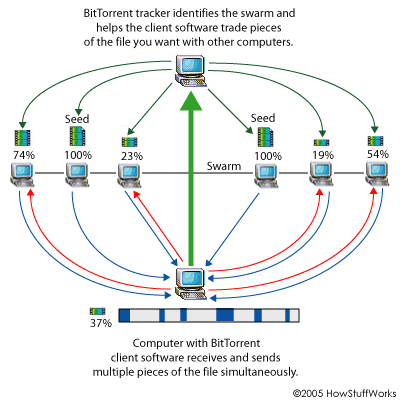
[](https://hypercore-protocol.org/videos/demo-hyp-info.mp4)
Note:
...
----
# hypercore-protocol messages
1. <font size="4">Each peer remembers which chunks the other peer wants and has.</font>
<!-- .element: class="fragment" data-fragment-index="0" -->
2. <font size="4">Wanting a chunk means “I want to download this chunk, please tell me if you have it”.</font>
<!-- .element: class="fragment" data-fragment-index="1" -->
3. <font size="4">Having a chunk means “I know you want this chunk and I will send it if you ask for it”.</font>
<!-- .element: class="fragment" data-fragment-index="2" -->
4. <font size="4">If a peer tells you they are only interested in a small range of chunks then you only have to tell them about chunks within that range.</font>
<!-- .element: class="fragment" data-fragment-index="3" -->
5. <font size="4">As peers download (or even delete) data, the list of chunks they want and have will change.</font>
<!-- .element: class="fragment" data-fragment-index="4" -->
6. <font size="4">This state is communicated with four message types:</font>
* **`want`**, **`unwant`**, **`have`**, **`and unhave`**
<!-- .element: class="fragment" data-fragment-index="5" -->
----
# hypercore-protocol messages
messages below are a bit outdated, but check the link for up to date messages

[latest message types](https://github.com/mafintosh/simple-hypercore-protocol/blob/master/schema.proto)
----
# hypercore-protocol messages

----
# done! the end!
**kthxbye**
...questions?
<!-- .element: class="fragment" data-fragment-index="0" -->
---
A world of distributed data structures
But one Hypercore is rarely used on its own -- more powerful, multi-user data structures can be created by combining multiple cores. Hypercore's main purpose is to be a building block in other things.
# hyperdrive
#### (= posix compliant file system)
Hyperdrive indexes filenames into a Hypercore. To avoid having to scan through this entire Hypercore when you want to find a specific file or folder, filenames are indexed using an append-only hash trie, which we call Hypertrie. The hash trie basically functions as a fast append-only key value store with listable folders.
operation logs
(=versioned)
----
<!-- .slide: data-background-video="https://hypercore-protocol.org/videos/trie.mp4" -->
<video autoplay src="https://hypercore-protocol.org/videos/trie.mp4"></video>
Since it builds on top of the append-only log, it inherits the same guarantees of every change being versioned by default, making it easy to see historical changes and prevent accidental data loss.
In addition to the Hypertrie, which we refer to as the metadata log, Hyperdrive uses another Hypercore to store the binary file content of each file you insert. This dual-log design makes it easy to replicate or watch only the metadata log, without content, if that is what you are interested in.
Each entry in the Hypertrie links to the content log to signal where a file's binary data starts and ends. Additionally, the entry contains all the normal POSIX data you'd be interested in, such as modification time, creation time, file modes, etc.
----
<!-- .slide: data-background-video="https://hypercore-protocol.org/videos/metadata-and-content-and-mounts.mp4" -->
<video autoplay src="https://hypercore-protocol.org/videos/metadata-and-content-and-mounts.mp4"></video>
Mounts
For better composability and collaboration, an entry can also link to a completely different Hyperdrive or Hypercore. We call this feature mounts. Even though it's ostensibly simple, it can be used to build powerful collaborative features.
Internally we have been using Hyperdrive mounts for a concept we call "groupware", where each user mounts their own drive inside a single shared one, then applications render multi-user views over the group drive. The groupware pattern can be used to build lightweight, Dropbox-like applications, among others.
We are always exploring new ways to enhance Hyperdrive! If you are interested in collobarating with us always feel free to to open an issue on Github, reach out at @hypercoreproto or join our Discord.
## author - make
```javascript=
await core.truncate(newLength, [forkId])
Truncate the core to a smaller length.
Per default this will update the fork id of the core to + 1, but you can set the fork id you prefer with the option. Note that the fork id should be monotonely incrementing.
core.id
String containing the id (z-base-32 of the public key) identifying this core.
Populated after ready has been emitted. Will be null before the event.
const hash = await core.treeHash([length])
Get the Merkle Tree hash of the core at a given length, defaulting to the current length of the core.
const range = core.download([range])
Download a range of data.
You can await when the range has been fully downloaded by doing:
await range.done()
A range can have the following properties:
{
start: startIndex,
end: nonInclusiveEndIndex,
blocks: [index1, index2, ...],
linear: false // download range linearly and not randomly
}
To download the full core continously (often referred to as non sparse mode) do
const range1 = { start: 0, end: -1 }
const range2 = { blocks: [4, 9, 7] }
// Note that this will never be consider downloaded as the range
// will keep waiting for new blocks to be appended.
core.download(range1) // To downloaded a discrete range of blocks pass a list of indices.
core.download(range2) // To cancel downloading a range simply destroy the range instance.
range.destroy() // will stop downloading now
```
# hypercore
```javascript=
const { promises: { fs } } = require('fs')
const crypto = require('hypercore-crypto')
const hypercore = require('hypercore')
const blocklist = new Set(JSON.parse(fs.readFile('./blocklist.json')))
const allowlist = new Set(JSON.parse(fs.readFile('./allowlist.json')))
const user_keypair = crypto.keyPair(await fs.readFile("./user-master-seed.txt")) // load ed25519 keypair
const feed_keypair = crypto.keyPair() // generates new random ed25519 keypair
function get_pubkey (pubkey_address) {
const b4a = require('b4a')
return b4a.from(await (await fetch(pubkey_address)).text())
}
const bob_pubkey = get_pubkey('https://bob.com/id_ed25519.pub')
const amy_pubkey = get_pubkey('https://amy.com/id_ed25519.pub')
console.log({ feed_keypair, user_keypair })
// => { feed_keypair: { publicKey, secretKey }, user_keypair: { publicKey, secretKey } }
const feed = await make_feed('./mydata', feed_keypair)
await feed.append('hyper')
await feed.append('world')
console.log(await feed.get(0)) // => 'hyper'
console.log(await feed.get(1)) // => 'world'
const start = 4
const stop = 9
await core.clear(start, stop) // clear block 4-10 from your local cache
// Clear stored blocks between start and end, reclaiming storage when possible.
// The core will also gossip to peers it is connected to, that is no longer has these blocks.
async function make_feed (path, keyPair, encryptionKey = undefined /* to enable block encryption */) {
const feed = hypercore(path, { keyPair, encryptionKey })
await feed.ready() // populates the feed attributes
const { key, keyPair, discoveryKey, encryptionKey } = feed
console.log({
key, // Buffer containing the public key identifying this core
keyPair, // Object containing buffers of the core's public and secret key
discoveryKey, // Buffer containing a key derived from the core's public key
// => this key does not allow you to verify the data but can be used
// => to announce or look for peers that are sharing the same core, without leaking the core key.
encryptionKey, // Buffer containing the optional block encryption key of this core
})
console.log(feed.length) // How many blocks of data are available on this core
const feedkey = feed_keypair.publicKey
console.log(feedkey === feed.feedKey) // => true
return feed
}
const updated = await feed.update() // subscribe
// Wait for the core to try and find a signed update to it's length. Does not download any data from peers except for a proof of the new core length.
console.log('core was updated?', updated, 'length is', core.length)
```
## author - swarm
```javascript=
// Look for peers in the DHT on the given topic
// Topic should be a 32 byte buffer (e.g. a hash of something)
const topic = DHT.hash(Buffer.from('testing...'))
const lookup_stream = node.lookup(topic, { keyPair }) // SWARM TO TOPIC
// To connect to the peers you should afterwards call connect with those public keys.
lookup_stream.on('data', ondata)
// Announce that you are listening on a key-pair to the DHT under a specific topic.
// When announcing you will send a signed proof to peers that you own the key-pair
// and wish to announce under the specific topic.
// IMPORTANT: An announce does a parallel lookup so the stream returned looks like the lookup stream.
const announce_stream = node.announce(topic, keyPair)
// await node.unannounce(topic, keyPair, [options])
announce_stream.on('data', ondata)
function ondata ({ peers }) {
for (const { publicKey } of peers) {
if (denylist.has(publicKey)) continue
connect(publicKey)
}
}
function connect (publicKey) { // SWARM TO PEER
const socket = node.connect(remotePublicKey, { keyPair })
socket.on('open', function connected (socket) { // socket fully open with the other peer
// Emitted when the encrypted connection has been fully established with the server.
const { remotePublicKey, publicKey } = socket
console.log({ // noise protocol public keys
remotePublicKey, // The public key of the remote peer
publicKey, // The public key used by local node
})
})
}
```
# hypernode
```javascript=
function hypernode (keyPair, bootstrap) {
const dht = require('@hyperswarm/dht')
const node = new DHT({ bootstrap, keyPair })
// await node.destroy()
return node
}
const bootstrap = ['node1.hyperdht.org:49737', 'node2.hyperdht.org:49737', 'node3.hyperdht.org:49737']
const node = hypernode(user_keypair, bootstrap)
const go_offline = await go_online(node)
// await go_offline()
async function go_online (node, noiseKeyPair) {
/*
Creating a server using dht.createServer automatically announces itself periodically on the key-pair
it is listening on.
When announcing the server under a specific topic,
you can access the nodes it is close to using server.nodes.
*/
const server = node.createServer({ firewall }) // create a server to listen for secure connections
// You can run servers on normal home computers, as the DHT will UDP holepunch connections for you.
server.on('listening', onready)
server.on('connection', onpeer)
server.on('close', onclosed)
await server.listen(noiseKeyPair) // make server listen on connections for keypair
return go_offline
function go_offline () {
return server.close() // Stop listening
}
function firewall (...remotepeer) {
const [publickey, info] = remotepeer
console.log(info) // contains remote peer's ip address and some more infos
const accept = true
if (allowlist.has(publickey)) return accept // accepts incoming end to end encrypted p2p connection
}
function onpeer (socket) {
// socket is E2E encrypted between you and the other peer
// pipe it somewhere like any duplex stream
//
// Emitted when a new encrypted connection has passed the firewall check.
// socket is a NoiseSecretStream instance.
// You can check who you are connected to using
// socket.remotePublicKey and socket.handshakeHash
// contains a unique hash representing this crypto session (same on both sides).
console.log('Remote public key', socket.remotePublicKey)
console.log('Local public key', socket.publicKey) // same as keyPair.publicKey
})
function onclosed () {
process.exit(0)
}
function onready () {
const { host: ip, port, publicKey } = server.address()
console.log(publicKey === noiseKeyPair, { // => true
ip, // external IP of this server
port, // external port of this server if predictable
publicKey, // use as address to connect to server
})
}
}
```
 Google Drive
Gist
Clipboard
Google Drive
Gist
Clipboard
 Sign in with Wallet






