---
title: "Type Casting in Java - Scaler Topics"
description: "Learn about Type Casting in Java by Scaler Topics. Typecasting is mainly of two types in JAVA. 1. Widening or automatic Casting 2.Narrow or explicit Casting."
author: "Aayush Kumar"
category: "Java"
---
:::section{.abstract}
## Overview
The process of converting one data-type to another data-type is termed `type casting`. Sometimes, while we are writing a program, we need to convert one data-type to another data-type. A `String` containing digits can be converted to an integer, an integer can be converted to a string, an integer can be converted to double, etc.
`Type casting` can be done both manually and automatically. Type Casting happens automatically when a value of one primitive data type is assigned to another data type. There are two types of casting: **Widening Type Casting** and **Narrowing Type Casting**.
:::
:::section{.scope}
## Scope
This article aims to:
- Explain what is type casting Java with examples and it's types
- Illustrate Widening and Narrowing Type Castings
- Explain Explicit Downcasting and Explicit Upcasting through examples
- Is type casting important in Java? we provide examples where type casting is useful
:::
:::section{.main}
## Introduction
First of all, let’s understand the literal meaning of **Type Casting** with context to programming. **Type** means the data type of a variable or entity and **Casting** means converting the data type of an entity to another data type. The compiler performs the automated conversion, and the programmer handles the manual conversion.
:::
:::section{.main}
## What is Type Casting/Conversion in Java?
The act of allocating a value from one primitive data type to another is known as **Type Casting**. You should consider the compatibility of the data type before assigning a value from one data type to another. If they are compatible, Java will automatically execute the conversion known as Automatic Type Conversion; if not, they must be cast or manually converted.
### Example
Let us see a quick example where we will convert a string to an integer using `Integer.parseInt()` method in Java.
**Code:**
```java
public class StringtoInt {
public static void main(String args[]) {
// Declaring String variable
String s = "1000";
// Convert to int using Integer.parseInt()
int i = Integer.parseInt(s);
// Printing value of i
System.out.println(i);
}
}
```
**Output:**
```java
1000
```
**Explanation:**
* We have created a String variable `s` in the code above.
* Next, we have converted the string variable to an integer using `Integer.parseInt()` method.
:::
:::section{.main}
## Types of Casting in Java
Typecasting is mainly of two types in JAVA.
1. Widening Type Casting
1. Narrow Type Casting
### Widening Type Casting
`Widening type casting` refers to the conversion of a lower data type into a higher one. It is also known as implicit type casting or casting down. It happens on its own. It is secure since there is no possibility of data loss.
Widening Type Casting happens on the following scenarios or conditions:
* **Both the data types must be compatible with each other.** For example, converting a string to an integer is not possible as the string may contain alphabets that cannot be converted to digits.
* The target variable holding the type casted value must be larger than the value being type casted.
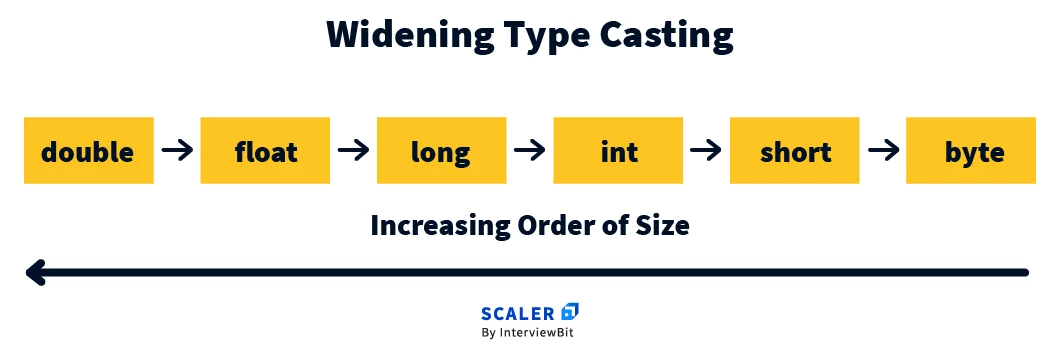
In the above image, `double` is larger data type than `float`, `long`, `int`, etc. Similarly, `int` is larger data type than `short` and `byte`. When converting from a lower data type to a larger data type, no loss of data occurs as the range of supported values is wider in the larger data type.
Let’s understand the concept of Widening Type Casting with the below examples. In the first example, the `long` datatype value is automatically cast to the `double` datatype and the `int` data type value is automatically cast to the `long` datatype by the java compiler.
### Example
```java
public class WideningTypeCastingExample {
public static void main(String[] args) {
int i = 10;
// Automatic Casting from int to long
long l = i;
// Automatic Casting from int to double
double d = i;
System.out.println("int i = " + i);
System.out.println("long l = " + l);
System.out.println("double d = " + d);
}
}
```
### Output:
```java
int i = 10
long l = 10
double d = 10.0
```
:::
:::section{.main}
## Narrow Type Casting (on default data types)
Narrowing type casting refers to the conversion of a larger data type into a lower one. It is also known as explicit type casting or casting up. It does not happen on its own. *We must do it explicitly otherwise compile-time error is thrown.*
**Narrowing type casting is not secure** as loss of data can occur due to shorter range of supported values in lower data type.
Explicit Casting is done with the help of `cast` operator.
### Syntax
```java
// var is of lowerDataType
var = (lowerDataType) expr;
```
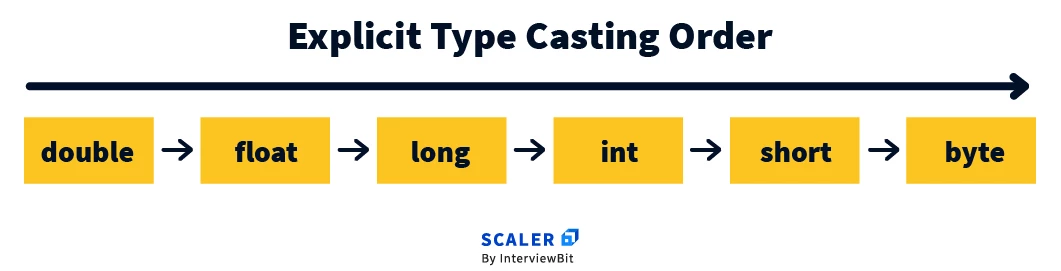
In the above image, `int` is a lower data type as compared to `double`, `float`, `long`, etc. When we convert a `long` to an `int`, it is possible that the value of the `long` variable is out of range of `int` variable.
Let’s understand the explicit casting with the help of the examples. In the first example, we explicitly convert the double data type into two small priority data types. Double data type values lose precision and the range is updated according to the short and int data types range.
### Example 1:
```java
public class NarrowingTypeCastingExample {
public static void main(String[] args) {
double a = 100.245;
// Narrowing Type Casting
short b = (short) a;
int c = (int) a;
System.out.println("Before Casting Original Value " + a);
System.out.println("After Casting to short " + b);
System.out.println("After casting to int " + c);
}
}
```
### Output:
```java
Before Casting Original Value 100.245
After Casting to short 100
After casting to int 100
```
**Explanation:**
* As it is visible in the code, there is loss of decimal digits after conversion from `double` to either `short` or `int`.
* We perform explicit type casting using the cast `()` operator and mentioning the name of target data type inside the brackets.
### Lossy Narrowing Type Casting
**Example of data loss:**
```java
long l = 2147483648L;
//
// T
// And we are trying to store a value in i
// greater than its upper limit
int i = (int) l;
```
```java
public class LossyConversion {
public static void main(String[] args) {
long l = 2147483648L;
int i = (int) l;
System.out.println(i);
}
}
```
**Output:**
```java
-2147483648
```
**Explanation:**
* As you can see the output, `i` contains **-2147483648**. This is because the range of `int` is `-2147483648` to `2147483647`.
* And we are trying to store a value in `i` greater than its upper limit resulting in overflow situation.
### Explicit Type casting on user-defined datatypes
Explicit type casting can also be used on the user-defined datatypes i.e on objects. Let’s understand with the help of the below example why we need type casting on user-defined data types.
```java
class Parent {
String name = "Parent class";
void call() {
System.out.println("This is Parent class method");
}
}
class Child extends Parent {
int number = 1;
String name = "Child class";
public static void main(String[] args) {
Parent ob = new Child();
System.out.println(ob.number);
}
}
```
**Output:**
```java
Main.java:18: error: cannot find symbol
System.out.println(ob.number);
^
symbol: variable number
location: variable ob of type Parent
1 error
```
**Explanation:**
* In the above example, we have created a reference variable `ob` of type `Parent` which is pointing to an object of `Child` class.
* Now, using ob, we cannot access the members of Child class such as number. It is because the type of reference variable is still Parent.
* Here, we have to use type casting to access the attributes of Child class.
Let's use type casting above to achieve desired results:
**Code:**
```java
class Parent {
String name = "Parent class";
void call() {
System.out.println("This is Parent class method");
}
}
class Child extends Parent {
int number = 1;
String name = "Child class";
public static void main(String[] args) {
Parent ob = new Main();
Child ch = (Child) ob;
System.out.println(ch.number);
}
}
```
**Output:**
```java
1
```
## There are two types of Explicit Casting
1. Explicit Downcasting
1. Explicit Upcasting
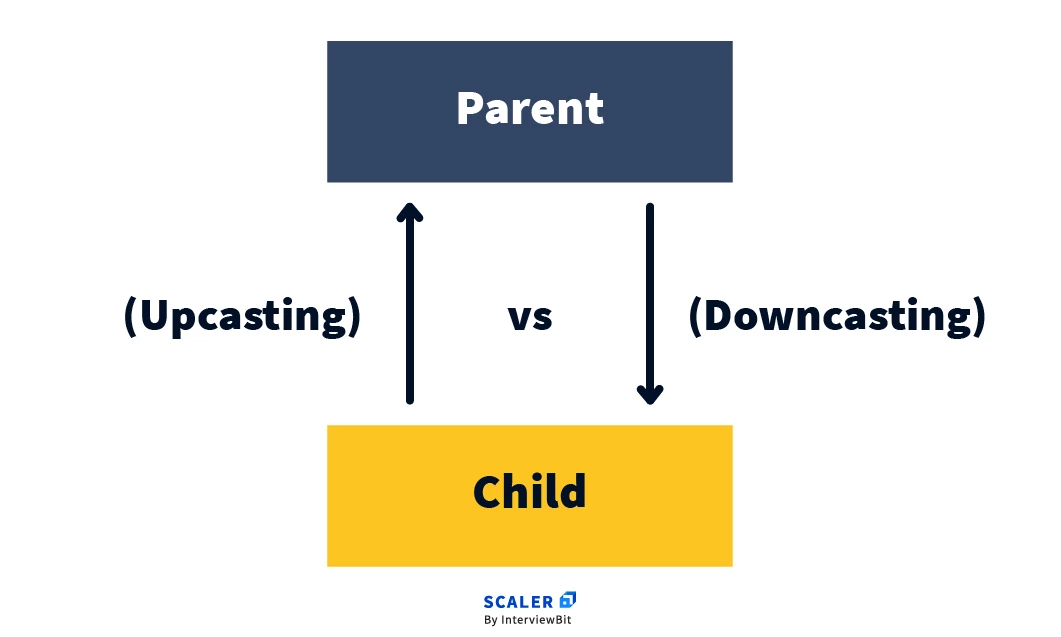
Let’s understand the working of both types of casting.
### Explicit Upcasting
In explicit upcasting, an object of `Child` class is explicitly typecast to the `Parent` class object. With the help of explicit upcasting, we can access the methods and variables of the `Parent` class to the `Child` class.
Please note we cannot access all methods and variables of the `Parent` class. This is because due to the inheritance, overriding methods still have access to the `Child` class, not the `Parent` class.
Let’s understand this concept using an example.
### Example:
```java
class Parent {
String name = "Parent class";
void call() {
System.out.println("This is Parent class method");
}
}
class Child extends Parent {
int number = 1;
String name = "Child class";
void call() {
System.out.println("This is Child class method");
}
public static void main(String[] args) {
Child ob = new Child();
// Upcasting
Parent pr = (Parent) ob;
// Calling name of Parent class
System.out.println(pr.name);
//call() method is called of Child class not Parent class
ob.call();
}
}
```
### Output:
```java
Parent class
This is Child class method
```
### Explicit Downcasting
`Explicit Downcasting` occurs when we assign a parent class reference to a child class reference. In Java, in some cases, **we can perform downcasting when a subclass object is referred through a parent class reference.** We have to explicitly assign a child class reference because if we implicitly assign the child class reference to the parent class it will be a violation of the inheritance rule and give a compilation error.
However, we can use explicit downcasting to solve this issue. Let us see an example:
### Example:
```java
class Parent {
String name = "Parent class";
void call() {
System.out.println("This is Parent class method");
}
}
class Child extends Parent {
int number = 1;
String name = "Child class";
void call() {
System.out.println("This is Child class method");
}
public static void main(String[] args) {
// Create an object of Child class and point to it
// Using reference variable of type Parent
Parent ob1 = new Child();
// Explicit downcasting
Child ob = (Child) ob1;
ob.call();
System.out.print(ob.name);
}
}
```
### Output:
```java
This is Child class method
Child class
```
### Quick understanding of upcasting and downcasting
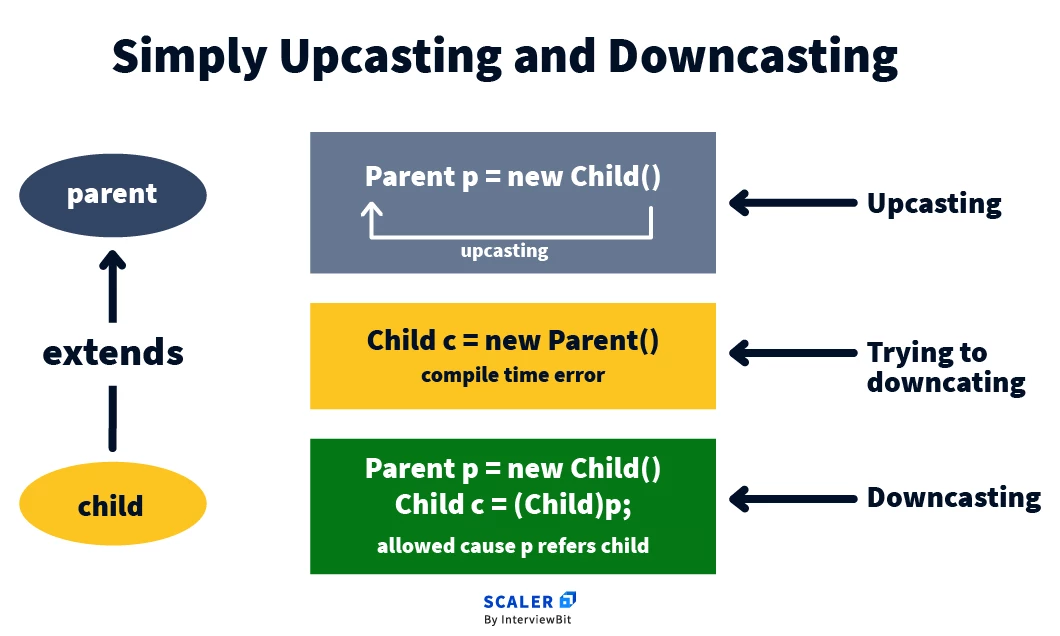
:::
:::section{.main}
### When does Automatic type conversion occur in Java?
The two types of data may not be compatible when you assign a value of one to the other. If the data types are compatible, Java will convert them automatically. This is known as **Automatic Type Conversion**. Otherwise, they must be cast or explicitly converted.
:::
:::section{.main}
## Difference between Type Casting and Type Conversion
|Type Casting |Type Conversion |
|-----|--------|
|In type casting, a programmer uses the casting operator to change one data type into another.| While a compiler transforms a data type into another data type via type conversion. |
|Both incompatible and compatible data types are subject to type casting. |Type conversion, however, can only be used with suitable datatypes. |
|A casting operator is required in type casting in order to convert one data type to another data type. |In contrast, a casting operator is not required for type conversion. |
|When typing casts a data type into another data type, the destination data type could be smaller than the source data type. |The destination data type cannot be smaller than the source data type in type conversion, though. |
|When a programmer designs a programme, type casting occurs. |Type conversion, however, happens during compilation. |
|Due to the possibility that the destination data type may be smaller than the source data type, type casting is also known as narrowing conversion. |Alternatively known as widening conversion, type conversion prevents the destination data type from being smaller than the source data type. |
|In coding and competitive programming tasks, type casting is frequently utilised. |While type conversion is less common in programming competitions since it could result in wrong answers. |
|Type casting is more dependable and efficient. |Type conversion, however, is less dependable and efficient. |
:::
:::section{.main}
## Application of Typecasting
### 1. Explicit type casting
The most common example of Explicit type casting is finding an accurate average of the given numbers. If we use widening casting the precision of the average will not be included in the average but if explicitly typecast the expression using the typecast operator, we will get an accurate average of the given numbers.
### 2. Automatic type casting
The most common example of `automatic type casting` is when we have multiple arithmetic expressions of mixed data types and we have to perform operations on them. In this case, automatic or widening type casting is used to get the accurate answer to the given expression.
:::
:::section{.summary}
## Conclusion
- Type casting refers to the process of converting one data type to another data type.
- There are mainly two types of Type Casting: Widening Type Casting and Narrow Type Casting.
- The process of conversion of higher data type to lower data type is known as narrowing typecasting. It is also known as Explicit TypeCasting as it must be done explicitly.
- The process of conversion of lower data type to higher data type is known as widening typecasting. It is also called Implicit TypeCasting as it can be done implicitly by the compiler.
- There are two types of Explicit TypeCasting: Explicit Downcasting and Explicit Upcasting that can be used on user-defined objects and classes.
- When a parent class reference is assigned to a Child class object, it is called Explicit Upcasting.
- When a parent class reference variable pointing to a Child class object is assigned to a Child class reference variable, it is called Explicit Downcasting.
:::
 Google Drive
Gist
Clipboard
Google Drive
Gist
Clipboard
 Sign in via Facebook
 Sign in via X(Twitter)
 Sign in via GitHub
 Sign in via Dropbox
 Sign in with Wallet






