---
tags: lecture
slideOptions:
theme: night
transition: slide
---
# CSS
---
## What is CSS
- **C**ascading **S**tyle **S**heet
- 用來決定html elements在網頁上的長相、位置
----
## What CSS looks like
```css=
body {
background-color: lightblue;
}
h1 {
color: white;
text-align: center;
}
p {
font-family: verdana;
font-size: 20px;
}
```
---
## 與 html 的連結
1. 寫在外部檔案 (styles/main.css)
```htmlembedded=
<head>
...
<link rel="stylesheet" type="text/css" href="./styles/main.css" />
...
</head>
```
----
2. 直接寫在 `<style></style>` tag 裡
```htmlembedded=
<head>
...
<style>
h1 {color: white;}
body {background-color: lightblue;}
</style>
...
</head>
```
----
3. 直接寫在 tag 的 attribute 裡 (Inline CSS)
```htmlembedded=
<body>
...
<h1 style="color:blue; text-align:center;">This is a heading</h1>
<p style="color:red;">This is a paragraph.</p>
...
</body>
```
---
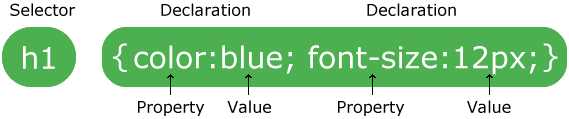
## CSS Syntax
---
## CSS Selectors
### 1. Simple selectors
- base on tag
```css=
/* Example: 所有的 <p> 都會符合受此 CSS 影響 */
p {
text-align: center;
color: red;
}
```
----
- base on id
```css=
/* id 是在 html 中獨一無二的,不該出現兩個有同樣 id 的 tag */
/* 符合此 id 的 tag 都會影響 */
/* ex. <p id="title">我想當標題</p> */
#title {
color: black;
font-size: 36px;
font-weight: bold;
}
```
----
- base on class
```css=
/* 並不唯一, 可以同時對很多有相同 class 的 tag 做調整 */
/* 符合此 class 的都會影響 */
/* ex. <p class="title">我想當標題</p> */
.title {
color: black;
font-size: 36px;
font-weight: bold;
}
/* 可同時滿足多個 class,並用空白隔開 */
```
----
- universal selector
```css=
/* 影響所有 html element */
* {
text-align: center;
color: blue;
}
```
----
- grouping selector
```css=
/* 同時影響多的 element */
h1, h2, p {
text-align: center;
color: red;
}
```
---
### 2. Combinator selectors
- Descendant Selector (space)
```css=
/* 所有在 <div> 裡面的 <p> */
div p {
background-color: yellow;
}
```
- Child Selector (>)
```css=
/* 所有在 <div> 裡面「第一層」(children) 的 <p> */
div > p {
background-color: yellow;
}
```
----
- Adjacent Sibling Selector (+)
```css=
/* 所有 與 <div> 相連的<p> (同一層) */
div + p {
background-color: yellow;
}
```
- General Sibling Selector (~)
```css=
/* <div> 之後的所有 <p> (同一層) */
div ~ p {
background-color: yellow;
}
```
----

---
### 3. Pseudo-class selectors
Define a special state of an element
**語法:**
```css=
selector:pseudo-class {
property: value;
}
```
----
**Example:**
```css=
/* unvisited link */
a:link {
color: #FF0000;
}
/* visited link */
a:visited {
color: #00FF00;
}
/* mouse over link */
/* 必須在 link, visited 之後! */
a:hover {
color: #FF00FF;
}
/* selected link */
/* 必須在 active 之後! */
a:active {
color: #0000FF;
}
```
---
### 4. Pseudo-elements selectors
- Style 某 element 第一個字母、第一行
- 在 element 的前後插入東西
**語法:**
```css=
selector::pseudo-element {
property: value;
}
```
----
**Example:**
```css=
p::first-letter { /* 第一個字母 */
color: #ff0000;
font-size: xx-large;
}
p::first-line { /* 第一行 */
color: #0000ff;
font-variant: small-caps;
}
h1::before { /* 內容之前插入 url */
content: url(smiley.gif);
}
h1::after { /* 內容之後插入 url */
content: url(smiley.gif);
}
::selection { /* 用滑鼠反白的內容 */
color: red;
background: yellow;
}
```
---
### 5. Attribute selectors
以 attribute 來分辨作用對象
**Example:**
```css=
input[type="text"] {
width: 150px;
display: block;
margin-bottom: 10px;
background-color: yellow;
}
input[type="button"] {
width: 120px;
margin-left: 35px;
display: block;
}
```
---
## CSS Comments
```css=
/* */
```
---
## CSS Colors
```css=
div {
color: blue;
background-color: rgba(79, 196, 255, 0.5);
}
```
----
色碼示方法:
```css=
blue /* 內建顏色,有140種 */
rgb(79, 196, 255) /* rgb (紅綠藍) */
#4fc4ff /* HEX (16進位表示 rgb) */
hsl(200°, 100%, 65%) /* HSL (色相、飽和度、亮度)*/
/* 多一個參數 (0~1),意思是透明度 */
rgba(79, 196, 255, 0.3)
hsla(200°, 100%, 0.2)
```
----
如何尋找喜歡的顏色?
Google 搜尋: Color picker
---
## CSS Background
```css=
body {
background-color: rgba(0, 0, 0, 0.8);
background-image: url("http://blog.hostbaby.com/wp-content/uploads/2013/07/scuffedstatic_dark1400x900.jpg");
/* 預設會 repeat 至填滿 */
/* 也可以設定縱向、橫向 repeat 即可 (repeat-y, repeat-x) */
background-repeat: no-repeat;
background-position: left top;
background-attachment: fixed; /* scroll or fixed */
background-size: cover;
}
```
---
## CSS Borders
property: **上 右 下 左** (four values)
property: **上 右左 下** (three values)
property: **上下 左右** (two values)
property: **全部** (one value)
```css=
div.border {
border-style: dotted solid;
border-width: 1px 2px 1px 6px;
border-color: white;
border-radius: 20px;
}
div.border-short {
border: 3px solid lightgray;
}
```
---
## CSS Box Model

----
### Margin
```css=
div.margin {
margin-top: 3px;
margin-right: 6px;
margin-bottom: 9px;
margin-left: 12px;
/* margin: 3px 6px 9px 12px; */
/* margin: 3px 6px 9px; */
/* margin: 3px 6px; */
}
```
----
### Padding
```css=
div.padding {
padding-top: 1px;
padding-right: 2px;
padding-bottom: 3px;
padding-left: 4px;
/* padding: 3px 6px 9px 12px; */
/* padding: 3px 6px 9px; */
/* padding: 3px 6px; */
}
```
----
### Height and Width
```css=
div {
height: 30%;
width: 500px;
}
```
----
### Element's height and width
- 預設是一個element的長寬是 height/width + padding + border
- 所以想要以 width / height 來作為排版用的長寬 `box-sizing: border-box;`
```css=
* {
box-sizing: border-box;
}
```
---
## CSS Text
```css=
p.text {
color: white;
text-align: left; /* left right */
text-decoration: underline; /* none, overline, line-through */
text-transform: uppercase; /* lowercase capitalize */
text-indent: 30px;
letter-spacing: 3px;
line-height: 1.8;
word-spacing: 10px;
white-space: nowrap;
}
```
---
## CSS Font
```css=
p {
font-family: Arial, Helvetica, sans-serif;
font-style: italic; /* normal, oblique */
font-weight: bold;
font-size: 18px;
}
```
也有其他字體,中文也有很多字體,自行 Google~
---
## CSS Display
大多是 element 預設是 block 或是 inline
----
### Block-level elements
會換行,寬度會拉到最寬
```html=
<div>
<h1> - <h6>
<p>
<form>
<header>
<footer>
<section>
...
```
----
### Inline Elements
同行,寬度會是最多他可以的量
```html=
<span>
<a>
<img>
...
```
----
### Display
- 可覆蓋 element 的預設 display
- 可配合 js 做東西的顯示跟隱藏
```css=
.hidden {
display: none; /* block, flex, inline-block ... */
}
li {
display: inline;
}
```
https://www.w3schools.com/cssref/pr_class_display.asp
---
## CSS Position
```css=
div.fixed {
postion: fixed; /* static, relative, absolute, sticky */
}
```
----
### static
- default value
- 不被 top, bottom, left, right 影響
### relative
- 與原本該在的位置做相對的移動
```css=
div.relative {
position: relative;
left: 30px;
border: 3px solid #73AD21;
}
```
----
### fixed
- 鎖定與整個視窗的相對位置
- 就算滑動頁面,也在同樣的位置
```css=
div.fixed {
position: fixed;
bottom: 0;
right: 0;
width: 300px;
border: 3px solid #73AD21;
}
```
----
### absolute
- 與最近一層 position 不是 static 的 element 做相對計算
- 若上層皆沒有設 postion,那就是與整個 body 做相對計算
- 會隨著 scroll 滑動
```css=
div.absolute {
position: absolute;
top: 80px;
right: 0;
width: 200px;
height: 100px;
border: 3px solid #73AD21;
}
```
----
### sticky
- 會跟著滑動,直到到達符合的 postion 位置
```css=
div.sticky {
position: -webkit-sticky; /* Safari */
position: sticky;
top: 0; /* 跟著滑動直到 top = 0, 此時便會黏在最上方 */
background-color: green;
border: 2px solid #4CAF50;
}
```
----
### Overlapping Elements
有東西互相蓋到 -> `z-index`
```css=
img {
z-index: -1;
}
```
---
## CSS Overflow
- visible: 預設,超出頁面的直接就超出去了
- hidden: 超出頁面的直接隱藏看不到
- scroll: 加一個 scroll bar,可以滑到超出的頁面
- auto: 在需要的時候加一個scroll bar
---
## CSS Align
各種把東西擺好的方法
https://www.w3schools.com/css/css_align.asp
---
## CSS Specificity
一個 element 被多個 selector 選擇到而有衝突順位時:
- elements < classes < id < inline styles
`Ex. div < div.hello < div#hi < <div style="color:red">`
- 同樣的設定下面的會覆蓋之上的
```css=
h1 {background-color: yellow;}
h1 {background-color: red;} /* 覆蓋上面的,所以會顯示紅色 */
```
- 越詳細的會越優先
`div#a > #a > div[id=a]`
---
## CSS Units
- Absolute Lengths 絕對長度單位
cm, mm, in(inches), **px(pixels)**, pt, pc
其中 px 會跟顯示器的解析度有關,較常用到
```css=
h1 {
font-size: 50px;
}
```
----
- Relative Lengths 相對
- **em**: 與現在所在的 element 的 font-size 相對
- **rem**: 與 root element (`<html></html>`的 font-size 相對
- vw: viewport(網頁的可視範圍) 寬度的 1%
- vh: viewport 高度的 1%
- **%**: 與上一層的 element 的相對 % 數
----
通常會用相對的單位,這樣支援不同螢幕大小可以有相對的縮放
其中 **em**, **rem** 很適合用作網頁單位,可以支援不同螢幕大小的裝置
```css=
html {
font-size: 16px;
}
h1 {
font-size: 3rem;
}
```
---
其實我們根本也不會記這麼多,都是用到了再去查,所以剩下的有興趣了解也可以自己看喔!
----
## CSS Flex
https://www.w3schools.com/css/css3_flexbox.asp
https://cythilya.github.io/2017/04/04/flexbox-basics/
- 排版神器
- 分外層內層
- 外層是 container,用來排版內層的 item (element)
- container:
- flex-direction: 主軸方向
- row(default), column, row-reverse, column-reverse
- flex-wrap: 是否換行
- wrap, nowrap
- flex-flow: 上面兩個的一行寫法
- [flex-direction], [flex-flow]
- justify-content: 主軸方向上的對齊方式
- center, flex-start, flex-end, space-around, space-between, space-evenly
- align-items: 垂直主軸方向上的對齊
- center, flex-start, flex-end, stretch(default), baseline
- align-content
- item:
- flex-grow: 每一個 item 所佔比例 (數字)
- flex-shrink: 被壓縮的比例 (數字)
- flex-basis: item 的原始長度
- flex: 上面三個的一行寫法 [flex-grow] [flex-shrink] [flex-basis]
- - order: item 的順序 (數字)
- align-self: 覆蓋原本上層的 align-items 屬性
```css=
/* css */
.flex-container {
display: flex;
background-color: DodgerBlue;
flex-direction: row;
flex-wrap: nowrap;
justify-content: center;
align-items: flex-start;
}
.flex-container > div {
background-color: #f1f1f1;
margin: 10px;
padding: 20px;
font-size: 30px;
}
```
```htmlembedded=
<!-- html -->
<div class="flex-container">
<div style="flex-grow: 3;">1</div>
<div>2</div>
<div style="align-self: flex-end">3</div>
</div>
```
## CSS Gradients 顏色漸層
- Linear Gradients
- Syntax
`background-image: linear-gradient(direction(0deg), color1, color2, color3 ...)`
- direction:
- to down (default) (上到下)
- to right (左到右)
- to bottom right (左上右下)
- 要重複的話就用 repeating-linear-gradient
- Radial Gradients
- Syntax
`background-image: linear-gradient(shape size at position, color1, color2, color3 ...)`
## CSS Shadow
- text-shadow 對文字做陰影
```css=
.text-shadow {
text-shadow: 2px 2px 15px blue; /* 橫向,縱向,模糊大小 */
}
```
- box-shadow 對整個 element 做陰影
```css=
.box-shadow {
box-shadow: 2px 2px 15px grey; /* 橫向,縱向,模糊大小 */
}
```
## CSS Transform
- transform:
- translate(x, y) 從原來位置移動 x, y
- rotate(xdeg) 順時針旋轉 x 度
- scaleX(n) x 向放大 n 倍
- scaleY(n) y 向放大 n 倍
- scale(n1, n2) x 向放大 n1 倍, y 向放大 n2 倍
- skewX(xdeg) x 向歪斜 x 度
- skewY(ydeg) y 向歪斜 y 度
- skew(x, y) 歪斜 x , y 度
- matrix(scaleX(),skewY(),skewX(),scaleY(),translateX(),translateY()
- 3D transform
https://www.w3schools.com/css/css3_3dtransforms.asp
## CSS Transition
1. 漸漸地變換 properties
2. 需要給他預計要變換的 property 跟 此效果的持續時間
- transition: property1 [n1]s, property2 [n2]s ...
- 對 property1 的變化持續時間為 n1 秒,property2 的變化持續時間為 n2 秒
- transition-delay: [n]s
- 變化 delay n 秒才開始
- transition-duration:
- 變化持續時間
- transition-property
- 預計變化的 property
- transition-timing-function (https://www.w3schools.com/css/tryit.asp?filename=trycss3_transition_speed)
- ease: 一開始慢,接著快,最後慢
- linear: 一樣的快慢
- ease-in: 一開始慢
- ease-out: 最後慢
- ease-in-out: 一開始跟最後慢
- cubic-bezier(n, n, n, n): 自己設定(https://www.w3schools.com/cssref/func_cubic-bezier.asp)
## CSS Animations
用 CSS 做動畫效果
- @keyframes
- animation-name
- animation-duration
- animation-delay
- animation-iteration-count
- animation-direction
- animation-timing-function
- animation-fill-mode
- animation
```css=
.animation {
width: 100px;
height: 100px;
background-color: red;
position: relative;
animation-name: example; /* 對應的動畫效果 */
animation-duration: 5s; /* 一次動畫的時間 */
animation-timing-function: linear; /* 動畫的變化 */
animation-delay: 2s; /* 開始動畫前的delay */
animation-iteration-count: infinite; /* 動畫循環次數 */
animation-direction: alternate; /* 動畫正轉、倒轉(reverse)、輪流 */
}
@keyframes example {
/* 動畫進展到幾%的時候會呈現的樣子 */
0% {background-color:red; left:0px; top:0px;}
25% {background-color:yellow; left:200px; top:0px;}
50% {background-color:blue; left:200px; top:200px;}
75% {background-color:green; left:0px; top:200px;}
100% {background-color:red; left:0px; top:0px;}
}
```
## CSS Media Query and responsive
可以檢查 device 的 width, height,然後做不一樣的 css,可以對應不同大小的螢幕做不一樣的調整 (Responsive)
```css=
/* 當螢幕寬度小於 600px 時, 背景變成淺藍色 */
@media screen and (max-width: 600px) {
body {
background-color: lightblue;
}
}
```
常用寬度特判:
```css=
/* Extra small devices (phones, 600px and down) */
@media only screen and (max-width: 600px) {...}
/* Small devices (portrait tablets and large phones, 600px and up) */
@media only screen and (min-width: 600px) {...}
/* Medium devices (landscape tablets, 768px and up) */
@media only screen and (min-width: 768px) {...}
/* Large devices (laptops/desktops, 992px and up) */
@media only screen and (min-width: 992px) {...}
/* Extra large devices (large laptops and desktops, 1200px and up) */
@media only screen and (min-width: 1200px) {...}
```
更多 Example: https://www.w3schools.com/css/css3_mediaqueries_ex.asp
## Templates
不想自己寫 CSS,可以去套版,然後做微調
無腦套版: https://html5up.net/
歷時很久的套版網站: https://getbootstrap.com/
長得像Google的東西: https://material.io/design/
有混合其他版型: https://semantic-ui.com/
## Reference
w3schools: 寫得很親民,還可以實作
https://www.w3schools.com/css/default.asp
MDN: 寫的比較詳細,查資料常用
https://developer.mozilla.org/en-US/docs/Learn/CSS
css tricks: 好像很多炫砲的東西
https://css-tricks.com/
cheatsheets:
https://websitesetup.org/css3-cheat-sheet/
https://htmlcheatsheet.com/css/
---
### HOMEWORK
把剛剛你的網頁用CSS變漂亮吧!
---
 Google Drive
Gist
Clipboard
Google Drive
Gist
Clipboard
 Sign in via Google
 Sign in via Facebook
 Sign in via X(Twitter)
 Sign in via GitHub
 Sign in via Dropbox
 Sign in with Wallet






