PaperBanana: Automating Academic Illustration with AI
  • NEW!
    NEW!  Connect Ideas Across Notes
    Save time and share insights. With Paragraph Citation, you can quote others’ work with source info built in. If someone cites your note, you’ll see a card showing where it’s used—bringing notes closer together.
    Got it
      • Create new note
      • Create a note from template
        • Sharing URL Link copied
        • /edit
        • View mode
          • Edit mode
          • View mode
          • Book mode
          • Slide mode
          Edit mode View mode Book mode Slide mode
        • Customize slides
        • Note Permission
        • Read
          • Only me
          • Signed-in users
          • Everyone
          Only me Signed-in users Everyone
        • Write
          • Only me
          • Signed-in users
          • Everyone
          Only me Signed-in users Everyone
        • Engagement control Commenting, Suggest edit, Emoji Reply
      • Invite by email
        Invitee

        This note has no invitees

      • Publish Note

        Share your work with the world Congratulations! 🎉 Your note is out in the world Publish Note No publishing access yet

        Your note will be visible on your profile and discoverable by anyone.
        Your note is now live.
        This note is visible on your profile and discoverable online.
        Everyone on the web can find and read all notes of this public team.

        Your account was recently created. Publishing will be available soon, allowing you to share notes on your public page and in search results.

        Your team account was recently created. Publishing will be available soon, allowing you to share notes on your public page and in search results.

        Explore these features while you wait
        Complete general settings
        Bookmark and like published notes
        Write a few more notes
        Complete general settings
        Write a few more notes
        See published notes
        Unpublish note
        Please check the box to agree to the Community Guidelines.
        View profile
      • Commenting
        Permission
        Disabled Forbidden Owners Signed-in users Everyone
      • Enable
      • Permission
        • Forbidden
        • Owners
        • Signed-in users
        • Everyone
      • Suggest edit
        Permission
        Disabled Forbidden Owners Signed-in users Everyone
      • Enable
      • Permission
        • Forbidden
        • Owners
        • Signed-in users
      • Emoji Reply
      • Enable
      • Versions and GitHub Sync
      • Note settings
      • Note Insights New
      • Engagement control
      • Make a copy
      • Transfer ownership
      • Delete this note
      • Save as template
      • Insert from template
      • Import from
        • Dropbox
        • Google Drive
        • Gist
        • Clipboard
      • Export to
        • Dropbox
        • Google Drive
        • Gist
      • Download
        • Markdown
        • HTML
        • Raw HTML
    Menu Note settings Note Insights Versions and GitHub Sync Sharing URL Create Help
    Create Create new note Create a note from template
    Menu
    Options
    Engagement control Make a copy Transfer ownership Delete this note
    Import from
    Dropbox Google Drive Gist Clipboard
    Export to
    Dropbox Google Drive Gist
    Download
    Markdown HTML Raw HTML
    Back
    Sharing URL Link copied
    /edit
    View mode
    • Edit mode
    • View mode
    • Book mode
    • Slide mode
    Edit mode View mode Book mode Slide mode
    Customize slides
    Note Permission
    Read
    Only me
    • Only me
    • Signed-in users
    • Everyone
    Only me Signed-in users Everyone
    Write
    Only me
    • Only me
    • Signed-in users
    • Everyone
    Only me Signed-in users Everyone
    Engagement control Commenting, Suggest edit, Emoji Reply
  • Invite by email
    Invitee

    This note has no invitees

  • Publish Note

    Share your work with the world Congratulations! 🎉 Your note is out in the world Publish Note No publishing access yet

    Your note will be visible on your profile and discoverable by anyone.
    Your note is now live.
    This note is visible on your profile and discoverable online.
    Everyone on the web can find and read all notes of this public team.

    Your account was recently created. Publishing will be available soon, allowing you to share notes on your public page and in search results.

    Your team account was recently created. Publishing will be available soon, allowing you to share notes on your public page and in search results.

    Explore these features while you wait
    Complete general settings
    Bookmark and like published notes
    Write a few more notes
    Complete general settings
    Write a few more notes
    See published notes
    Unpublish note
    Please check the box to agree to the Community Guidelines.
    View profile
    Engagement control
    Commenting
    Permission
    Disabled Forbidden Owners Signed-in users Everyone
    Enable
    Permission
    • Forbidden
    • Owners
    • Signed-in users
    • Everyone
    Suggest edit
    Permission
    Disabled Forbidden Owners Signed-in users Everyone
    Enable
    Permission
    • Forbidden
    • Owners
    • Signed-in users
    Emoji Reply
    Enable
    Import from Dropbox Google Drive Gist Clipboard
       Owned this note    Owned this note      
    Published Linked with GitHub
    • Any changes
      Be notified of any changes
    • Mention me
      Be notified of mention me
    • Unsubscribe
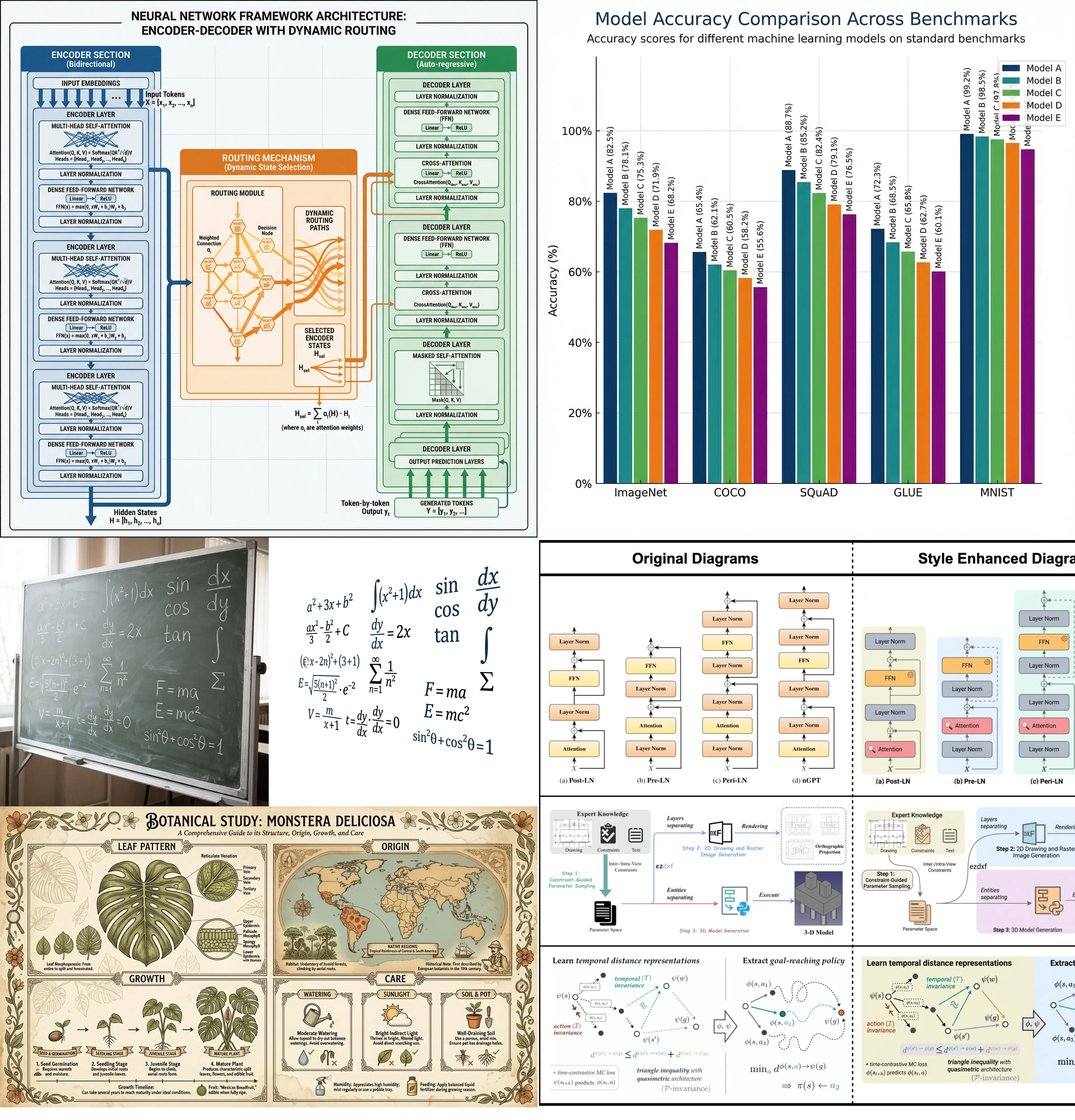
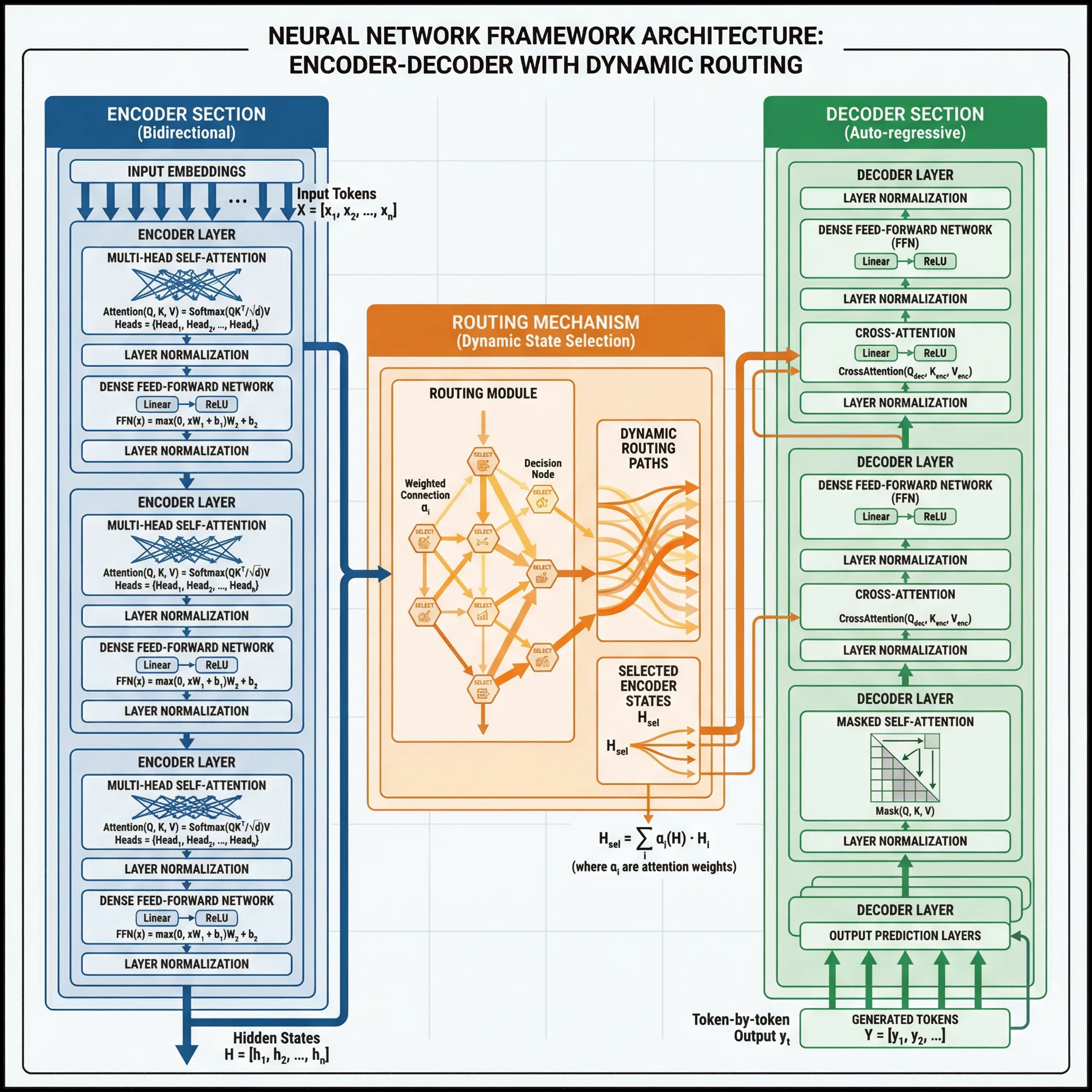
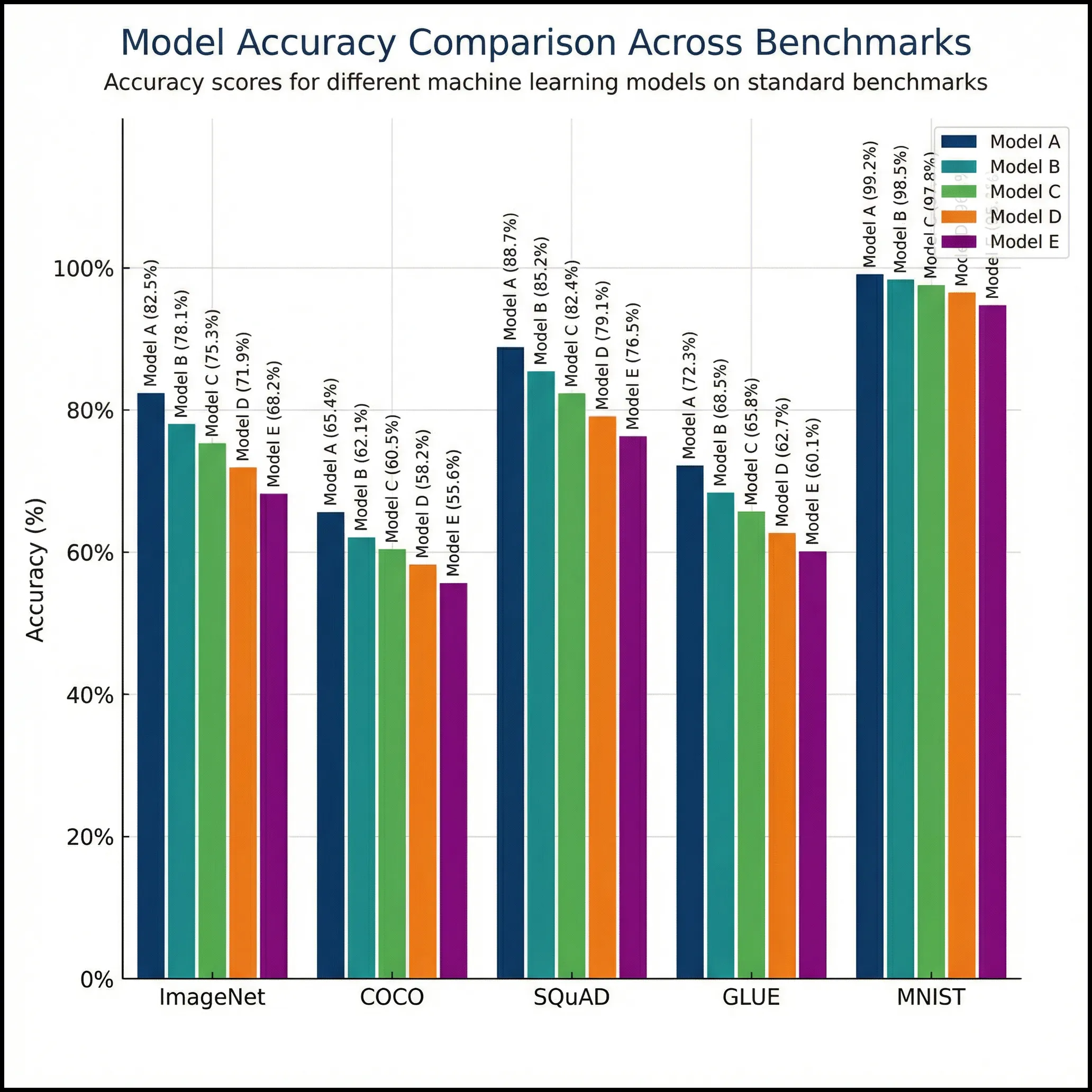
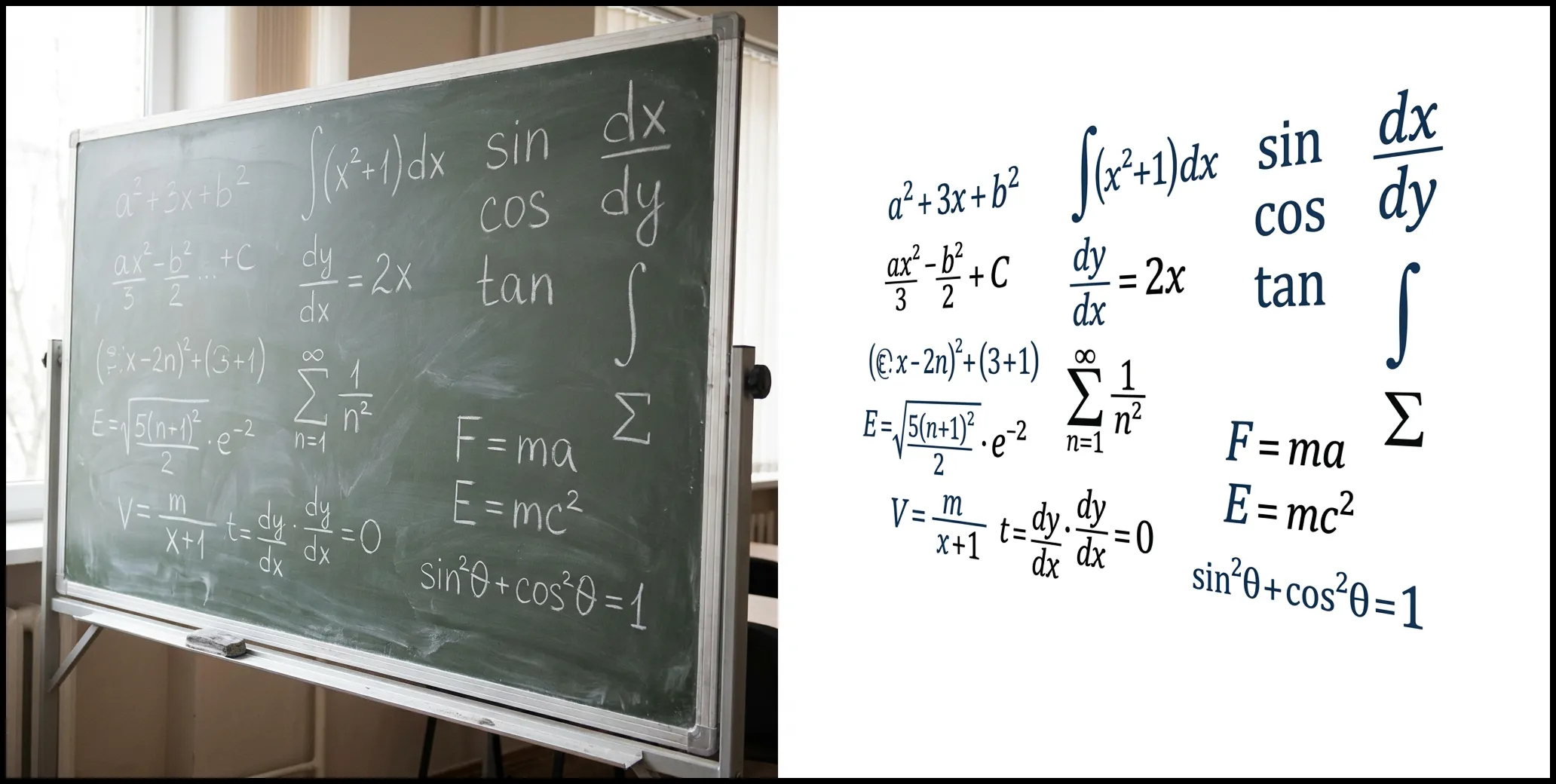
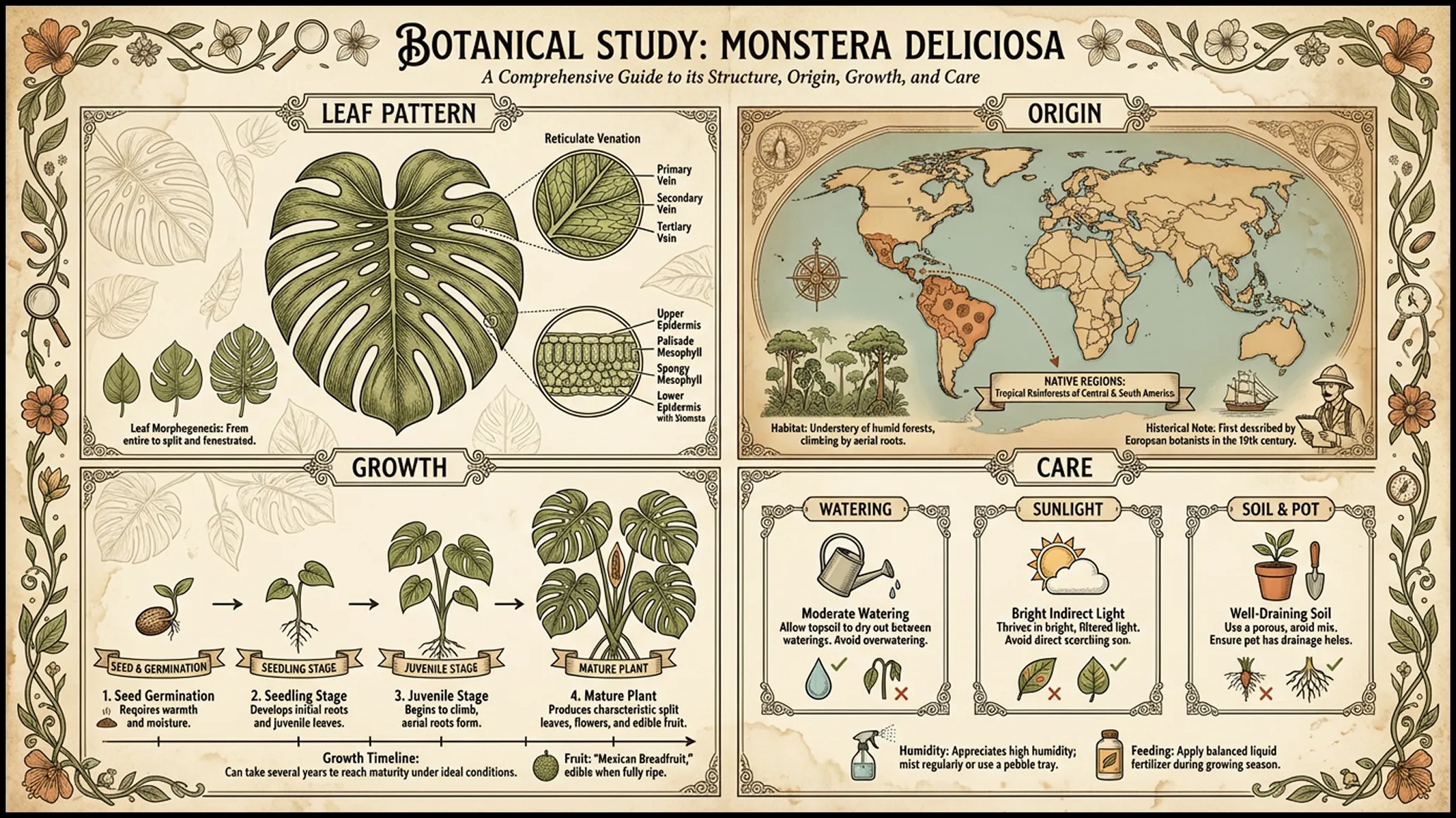
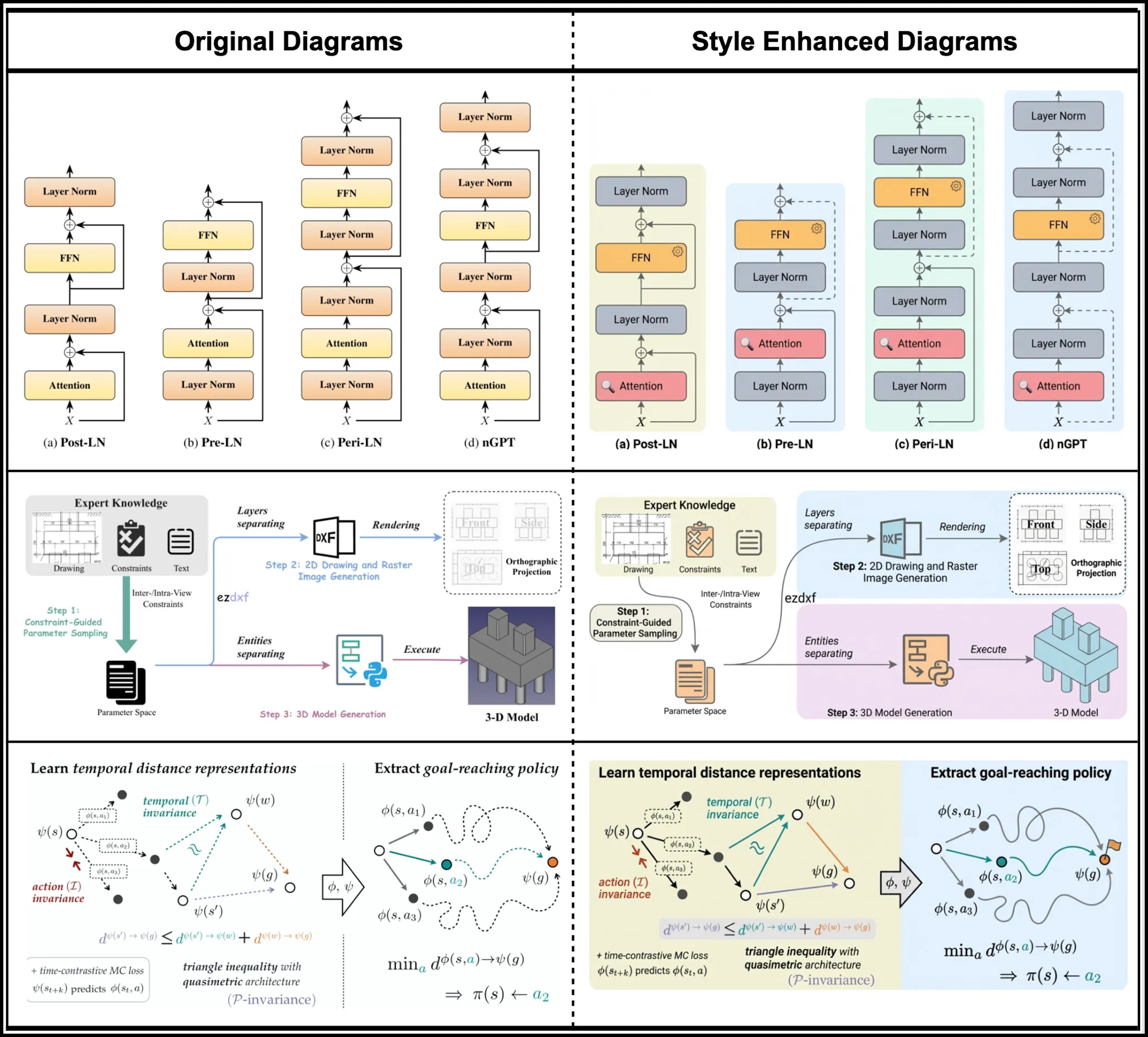
    # PaperBanana: Automating Academic Illustration with AI **Try it now:** 👉 **https://paper-banana.ai** Transform raw scientific content into publication-quality diagrams and plots automatically. [PaperBanana](https://paper-banana.ai) lifts the illustration bottleneck in your research workflow. ## PaperBanana: Create Publication-Ready Illustrations No design skills required. No complex prompts. Just provide your scientific content and let PaperBanana orchestrate specialized agents to generate publication-quality diagrams and plots. PaperBanana AI Illustration Generator Input your research content—methodology, data, or concepts—and watch PaperBanana transform it into professional academic illustrations. ### Your Academic Illustration Awaits Enter a prompt on the left and click 'Generate Images' to create your illustration. ![PaperBanana: Agentic Framework for Automated Academic Illustration](https://img.paper-banana.ai/public/paperbanana/paper-banana-ai-1-3840.webp) ## What is PaperBanana? Despite rapid advances in autonomous AI scientists, generating publication-ready illustrations remains a labor-intensive bottleneck. PaperBanana is an agentic framework that orchestrates specialized agents—Retriever, Planner, Stylist, Visualizer, and Critic—to transform raw scientific content into publication-quality diagrams and plots. [![SJ1v9T2QZl](https://hackmd.io/_uploads/HyCw4Q_v-l.png)](https://paper-banana.ai) - Reference-Driven Generation PaperBanana retrieves relevant reference examples to guide style and content, ensuring your diagrams match academic standards. - Multi-Agent Collaboration Five specialized agents work together: Retriever, Planner, Stylist, Visualizer, and Critic—each handling a critical step in the illustration pipeline. - Iterative Self-Critique The Critic agent inspects generated images against source content, providing feedback for automatic refinement until publication-ready. PaperBanana Gallery ## Explore PaperBanana's Power From methodology diagrams to statistical plots, PaperBanana handles it all. Every example below was generated directly from text descriptions by PaperBanana's multi-agent workflow—no manual editing required. ![PaperBanana: AI-Generated Methodology Diagram for Neural Network Architecture](https://img.paper-banana.ai/public/paperbanana/paper-banana-ai-2-3840.webp) ### Methodology Diagrams Whether you're illustrating a transformer architecture, a GAN training pipeline, or a multi-agent system, PaperBanana understands your technical description and produces clear, well-organized diagrams. Each component is properly labeled, connections are logically arranged, and the overall layout follows academic conventions. The output is high-resolution and ready to insert directly into your LaTeX or Word document. ![PaperBanana: AI-Generated Statistical Plot with Accurate Data Visualization](https://img.paper-banana.ai/public/paperbanana/paper-banana-ai-3-3840.webp) ### Statistical Plots Your data deserves accurate visualization. PaperBanana generates charts where every bar height, axis tick, and data point reflects your actual numbers—not AI approximations. Provide your dataset and chart requirements, and receive publication-quality plots with correct scales, proper legends, and consistent styling. Download the figure or the underlying code for further customization. ![PaperBanana: Aesthetic Enhancement of Hand-Drawn Diagrams](https://img.paper-banana.ai/public/paperbanana/paper-banana-ai-4-3840.webp) ### Aesthetic Enhancement Turn your quick sketches into figures that look like they were made by a graphic designer. PaperBanana enhances your rough diagrams with clean lines, harmonious colors, and consistent typography. The structure you drew stays the same; only the visual quality improves. Ready for your next submission. ![PaperBanana: Educational Infographics for Complex Concepts](https://img.paper-banana.ai/public/paperbanana/paper-banana-ai-5-3840.webp) ### Educational Infographics Make the complex simple. PaperBanana turns dense technical content into intuitive visual explanations—diagrams that help students grasp difficult concepts, slides that keep audiences engaged, and handouts that actually get read. Ideal for teaching, training, and science communication. ![PaperBanana: Aesthetic Refinement for Existing Diagrams](https://img.paper-banana.ai/public/paperbanana/paper-banana-ai-6-3840.webp) ### Aesthetic Refinement Your diagram works, but could look better. Upload it and PaperBanana will upgrade the visual presentation—better colors, cleaner fonts, improved spacing—without changing your content. Think of it as a professional design pass on your existing work. Same information, elevated appearance. ## PaperBanana Features Everything you need to generate publication-ready academic illustrations. PaperBanana combines cutting-edge AI with a specialized multi-agent workflow. ### Multi-Agent Workflow Five specialized agents—Retriever, Planner, Stylist, Visualizer, and Critic—collaborate to transform your content into polished illustrations. ### Reference-Driven Style PaperBanana retrieves relevant academic references to guide the visual style, ensuring your diagrams match publication standards. ### Iterative Refinement The Critic agent automatically reviews generated images and provides feedback for refinement until the result meets quality standards. ### Code-Based Statistical Plots Generate executable Python Matplotlib code for statistical plots, ensuring numerical accuracy and eliminating hallucination errors. ### Diverse Illustration Types From methodology diagrams to statistical plots, aesthetic enhancement to educational infographics—PaperBanana handles it all. ### Publication-Ready Output Download high-quality illustrations optimized for research papers, presentations, and academic posters. Ready to use directly in your publications. PaperBanana FAQ ## Frequently Asked Questions About PaperBanana Learn how PaperBanana works, what types of illustrations it can generate, and how to get the best results for your academic publications. ### 1、What types of illustrations can PaperBanana generate? PaperBanana supports five main illustration types: Methodology Diagrams (neural network architectures, algorithm flowcharts, system pipelines), Statistical Plots (bar charts, line graphs, scatter plots with accurate data), Aesthetic Enhancement (polishing rough sketches into publication-quality graphics), Educational Infographics (visual explanations for lectures and tutorials), and Aesthetic Refinement (improving existing diagrams' visual quality). ### 2、How does PaperBanana ensure illustration quality? PaperBanana uses a multi-agent workflow with five specialized agents. The Retriever finds relevant reference examples, the Planner translates your content into detailed descriptions, the Stylist ensures adherence to academic aesthetic standards, the Visualizer renders the images, and the Critic inspects and provides feedback for iterative refinement. ### 3、What input does PaperBanana need to generate illustrations? PaperBanana works with text descriptions of your research content. You can provide methodology descriptions, data for statistical plots, or descriptions of concepts you want to visualize. The more detailed your input, the better the results. You can also upload reference images for style guidance. ### 4、Can I edit or refine the generated images? Yes. If the first result isn't perfect, you can adjust your prompt and regenerate. You can also use PaperBanana's Aesthetic Refinement feature to polish specific visual elements like colors, fonts, or layout while keeping your original structure. ### 5、Can I use PaperBanana illustrations in my publications? Yes, all illustrations generated by PaperBanana are yours to use in research papers, presentations, posters, and other academic materials. The output is optimized to meet the aesthetic standards of top-tier venues like NeurIPS, ICML, and ICLR. ### 6、What file formats does PaperBanana support? PaperBanana outputs high-resolution images suitable for publication. For statistical plots, you can also download the generated Python code to further customize the visualization in your preferred environment. ## Ready to Transform Your Academic Illustrations? Stop spending hours on manual diagram design. Let PaperBanana's multi-agent AI generate publication-ready academic illustrations from your research content. github: **https://github.com/Paper-Banana** producthunt: **https://www.producthunt.com/products/paperbanana** pintrest: **https://www.pinterest.com/paperbananaai/** medium: **https://medium.com/@paperbanana**

    Import from clipboard

    Paste your markdown or webpage here...

    Advanced permission required

    Your current role can only read. Ask the system administrator to acquire write and comment permission.

    This team is disabled

    Sorry, this team is disabled. You can't edit this note.

    This note is locked

    Sorry, only owner can edit this note.

    Reach the limit

    Sorry, you've reached the max length this note can be.
    Please reduce the content or divide it to more notes, thank you!

    Import from Gist

    Import from Snippet

    or

    Export to Snippet

    Are you sure?

    Do you really want to delete this note?
    All users will lose their connection.

    Create a note from template

    Create a note from template

    Oops...
    This template has been removed or transferred.
    Upgrade
    All
    • All
    • Team
    No template.

    Create a template

    Upgrade

    Delete template

    Do you really want to delete this template?
    Turn this template into a regular note and keep its content, versions, and comments.

    This page need refresh

    You have an incompatible client version.
    Refresh to update.
    New version available!
    See releases notes here
    Refresh to enjoy new features.
    Your user state has changed.
    Refresh to load new user state.

    Sign in

    Forgot password
    or
    Sign in via Google Sign in via Facebook Sign in via X(Twitter) Sign in via GitHub Sign in via Dropbox Sign in with Wallet
    Wallet ( )
    Connect another wallet

    New to HackMD? Sign up

    By signing in, you agree to our terms of service.

    Help

    • English
    • 中文
    • Français
    • Deutsch
    • 日本語
    • Español
    • Català
    • Ελληνικά
    • Português
    • italiano
    • Türkçe
    • Русский
    • Nederlands
    • hrvatski jezik
    • język polski
    • Українська
    • हिन्दी
    • svenska
    • Esperanto
    • dansk

    Documents

    Help & Tutorial

    How to use Book mode

    Slide Example

    API Docs

    Edit in VSCode

    Install browser extension

    Contacts

    Feedback

    Discord

    Send us email

    Resources

    Releases

    Pricing

    Blog

    Policy

    Terms

    Privacy

    Cheatsheet

    Syntax Example Reference
    # Header Header 基本排版
    - Unordered List
    • Unordered List
    1. Ordered List
    1. Ordered List
    - [ ] Todo List
    • Todo List
    > Blockquote
    Blockquote
    **Bold font** Bold font
    *Italics font* Italics font
    ~~Strikethrough~~ Strikethrough
    19^th^ 19th
    H~2~O H2O
    ++Inserted text++ Inserted text
    ==Marked text== Marked text
    [link text](https:// "title") Link
    ![image alt](https:// "title") Image
    `Code` Code 在筆記中貼入程式碼
    ```javascript
    var i = 0;
    ```
    var i = 0;
    :smile: :smile: Emoji list
    {%youtube youtube_id %} Externals
    $L^aT_eX$ LaTeX
    :::info
    This is a alert area.
    :::

    This is a alert area.

    Versions and GitHub Sync
    Get Full History Access

    • Edit version name
    • Delete

    revision author avatar     named on  

    More Less

    Note content is identical to the latest version.
    Compare
      Choose a version
      No search result
      Version not found
    Sign in to link this note to GitHub
    Learn more
    This note is not linked with GitHub
     

    Feedback

    Submission failed, please try again

    Thanks for your support.

    On a scale of 0-10, how likely is it that you would recommend HackMD to your friends, family or business associates?

    Please give us some advice and help us improve HackMD.


    Thanks for your feedback

    Remove version name

    Do you want to remove this version name and description?

    Transfer ownership

    Transfer to
      Warning: is a public team. If you transfer note to this team, everyone on the web can find and read this note.

        Link with GitHub

        Please authorize HackMD on GitHub
        • Please sign in to GitHub and install the HackMD app on your GitHub repo.
        • HackMD links with GitHub through a GitHub App. You can choose which repo to install our App.
        Learn more  Sign in to GitHub

        Push the note to GitHub Push to GitHub Pull a file from GitHub

          Authorize again
         

        Choose which file to push to

        Select repo
        Refresh Authorize more repos
        Select branch
        Select file
        Select branch
        Choose version(s) to push
        • Save a new version and push
        • Choose from existing versions
        Include title and tags
        Available push count

        Pull from GitHub

         
        File from GitHub
        File from HackMD

        GitHub Link Settings

        File linked

        Linked by
        File path
        Last synced branch
        Available push count

        Danger Zone

        Unlink
        You will no longer receive notification when GitHub file changes after unlink.

        Syncing

        Push failed

        Push successfully

