# concurrent B+ tree
contributed by <`vic85821`>, <`snoopy831002`>, <`ruby0109`>, <`jkrvivian`>
###### tags: `B+tree` `database`
## 研究動機
提出一個並行化 (concurrent) 的 B+ tree 實作,並且探討其中資料結構設計、read-write lock,以及該如何延展為一個高效能的資料庫系統
## 預期目標
* 延續春季班 [concurrent B+ tree](https://embedded2016.hackpad.com/concurrent-B-tree-p459m7tm2Ea) 成果,回頭研究程式行為和深入效能分析
* 提出 lock contention 的解決機制
## 產出
* [程式碼](https://github.com/sysprog-Concurrent-BTree/bplus-tree)
* [影片](https://www.youtube.com/watch?v=cmou2DCU4PI&index=2&list=PLjavDKFcyCOkeIJbh1vJKk8KFh5EyymV_)
* [共同討論區](https://hackmd.io/JwdgJgDAHFDMBMBaARgYyhRAWAhgNh0SkiQEYBTKUgMxGVIlmWCA?view)
## What is a concurrent B+ tree
### B-tree
* 相關名詞[^閱讀與整理]:
* **node** :節點, 包含不同數目的 key
* **leaf**:沒有 child 的 node(External node)
* **Internal node**: 最少有一個 child 的 node
* B-tree 特性[^B-tree]
* 二元樹:每個節點最多有兩個子樹的樹結構
* 平衡的搜尋樹 : 所有的 leaf 在同一個階層上
* B-tree 的設計取決於兩個參數 M 和 L,分別是根據 data records 的大小和 block 的大小找到效能最好的值
* internal node 的 children 個數要介於 $\lceil$$\frac{M}{2}$$\rceil$~M
* leaf 內 data records 個數要介於 $\lceil$$\frac{L}{2}$$\rceil$~L
* 除了 M, B-tree 也會用 branch factor B 表示
B <= number of children < 2B
B-1 <= number of keys < 2B-1
* **Self-rebalancing** : 避免 skew (傾斜), 如果傾斜, 尋找的時間可能比 linked list 還長
* B-tree 存的為 data records, 每個 data record 都有一個獨特的 key (e.g. integer) plus additional data,可以依循 key 在樹中搜尋[^Lecture_16_Btree_property]
* M=4, L=3, B-tree範例

* 一個 leaf 存有 L/2 到 L 個data records (inclusive)
* 一個 internal node 有 M/2 到 M 個children (inclusive)
* 每個 internal node 一定存有 2, 3, or 4 children
* 操作:
* Search:
* 從 root node 開始依照 key 值比較大小,依序往下尋找
* 操作模式:
(1) 從 disk 讀取 root node 到記憶體中,先尋找此 key 屬於哪個 internal node
(2) 進入此 internal node
(3) load 整個 internal node 所屬的 leaf 的 key 進入記憶體中
(4) 在此 leaf 裡面做搜尋(可以使用 binary search)
* Insertion
* 範例圖:
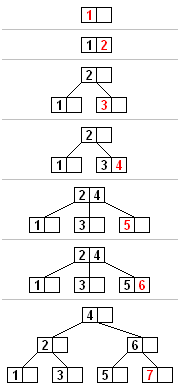
* 步驟解釋:
* 找尋新的 key 在 leaf node 應該插入的位置
* 插入的 node 如果沒有滿(插入後 key 小於等於 2B-1 個),直接插入
* 如果滿了
* 從要插入的 node 中和新的 key 選一個中間值送到 parent node 中
* 如果 parent node 也滿了, 從 parent node 中和要傳進去的 key 值選中間值, 並把中間值繼續往上傳
* 重複步驟上一步直到每個 internal node 皆符合規則
* 如果沒有 parent node 則另建一個 parent node, 原本的 parent node 則依值大小 split
* Deletion[^B-tree_deletion]


圖片參考[^deletion_pic]
* **從 leaf node 刪除**
* 若無 underflow (刪除後 key 大於 B-1 個) 則直接刪除
* 若有 underflow, 要 rebalance
* **從 internal node 刪除**
* 原本的 internal node 中的 key 值是底下的 seperator
* 若刪去則要從 child node 中找右子樹的最小值或是左子樹的最大值補原本的 internal node key 值
* 一直從下往上補到 leaf node, 若 leaf node underflow, 一樣要 rebalance
* **Rebalance after deletion**
* 如果 deficient node ( underflow 的 node ) 的右子樹存在而且有超過最少數量的key 值則左旋
* 把右子樹的最小值轉到 parent node 中
* 如果 deficient node ( underflow 的 node ) 的左子樹存在而且有超過最少數量的 key 值則右旋
* 把左子樹的最大值轉到 parent node 中
* 如果左子樹和右子樹原本都只有最少個數的 key 值
* 左子樹, deficient node 和右子樹 merge
* 為什麼要使用 B-tree?
* 存取 disk 中的資料需要耗費很長的時間
* key 可以幫助尋找資料, 可是大量資料的 key 會太大, 需要有效率的方法搜尋 key
* 相較於 Binary tree, B-tree 有許多 branch 因此深度不深, 可以減少往下找尋的時間( B+ tree 通常只有三到四層 level)
### B+ tree
* B+ tree特性[^b+tree]
* B+ tree 的 internal node 只有放 index
* 資料都放在 leaf node
* leaf node 彼此之間以 linked list 串連
* 所有 leaf node 在同一個 level
* B+ tree 的 leaf node 會有 internal node 的 key 值
* B+ tree 的 order, 或稱 branching factor, 控制 children node 的最大個數
摘自Wikipedia圖如下:

* Time Complexity: $O(logn)$
* B tree 與 B+ tree
* 參考[^comparison]

* B tree 資料直接放在 internal node, 所以 leaf node 不會有 internal node 的 key 值; B+ tree 的 leaf node 則會有 internal node 的 key 值
* 操作:
* Search:
* 概念大致和 B-tree 相同
* 不過因為資料都在 leaf node, 所以都要走到最下層
* Insertion:
* 概念大致和 B-tree 相同
* 不過如果 node 滿了, leaf node 是把中間值複製傳到 parent node ; internal node 則是把中間值直接移動到 parent node
* Deletion
* 概念大致和 B-tree 相同
* 不過因為 internal node 是 leaf node 的 copy, 所以 rebalance 方法不太一樣
* 為什麼要使用 B+ tree?
* 因為 B+ tree 的 internal node 沒有放置資料, 所以一個 page memory 可以放更多的 key 值, 可以有較少的 cache miss。
* 當需要走訪所有資料時, 因為 leaf node 彼此相連接所以直接線性的走訪 (leaf nodes 之間是一條 linked list); B tree 則需要走訪 tree 的每一個 level, 可能會有較多的cache miss
* 不過 B tree 因為 internal 可以連接到資料, 常用到的 node 會比較接近 root, search 時可能可以較快找到
* B+ tree 應用
* 通常用於資料庫和作業系統的檔案系統中
* 核心數量增加,throughput 也有可能增加
### B+ tree implementation in C
B+ tree 程式有不同實作的 benchmark 測試,包含 `bench-basic`, `bench-bulk`,`bench-multithreaded`,以下為測試結果
* 安裝所需的套件
* `$ sudo apt-get install automake`
* `$ sudo apt-get install libtool`
* 編譯
* `$ make MODE=release`
* Benchmarks
* 執行 bench-basic
* 結果
```
-- basic benchmark --
0 items in db
write : 41056.296394 ops/sec
read : 176397.953784 ops/sec
20000 items in db
write : 37656.698938 ops/sec
read : 170695.798750 ops/sec
40000 items in db
write : 35896.589106 ops/sec
read : 172093.343429 ops/sec
60000 items in db
write : 33229.325544 ops/sec
read : 130221.686143 ops/sec
80000 items in db
write : 29975.569911 ops/sec
read : 124544.013232 ops/sec
100000 items in db
write : 31257.667897 ops/sec
read : 121469.907349 ops/sec
120000 items in db
write : 29781.448838 ops/sec
read : 126126.921521 ops/sec
140000 items in db
write : 30671.083303 ops/sec
read : 122893.528120 ops/sec
160000 items in db
write : 30173.285177 ops/sec
read : 126731.201010 ops/sec
180000 items in db
write : 30057.786094 ops/sec
read : 124198.454226 ops/sec
200000 items in db
write : 27118.276362 ops/sec
read : 127897.384440 ops/sec
220000 items in db
write : 26180.032228 ops/sec
read : 122599.351449 ops/sec
240000 items in db
write : 30706.070744 ops/sec
read : 127651.530959 ops/sec
260000 items in db
write : 29897.779492 ops/sec
read : 129733.837133 ops/sec
280000 items in db
write : 29910.612136 ops/sec
read : 122661.258668 ops/sec
300000 items in db
write : 29868.756683 ops/sec
read : 129111.338760 ops/sec
320000 items in db
write : 29684.821409 ops/sec
read : 126493.365795 ops/sec
340000 items in db
write : 29846.425219 ops/sec
read : 128427.910382 ops/sec
360000 items in db
write : 29220.926274 ops/sec
read : 130370.984359 ops/sec
380000 items in db
write : 26437.087003 ops/sec
read : 128875.404226 ops/sec
400000 items in db
write : 29018.268451 ops/sec
read : 130044.769460 ops/sec
420000 items in db
write : 28444.848993 ops/sec
read : 131498.412456 ops/sec
440000 items in db
write : 26472.885147 ops/sec
read : 131911.177895 ops/sec
460000 items in db
write : 29744.022939 ops/sec
read : 131058.092045 ops/sec
480000 items in db
write : 25876.367889 ops/sec
read : 95427.040779 ops/sec
compact : 9.484728s
read_after_compact : 134711.957545 ops/sec
read_after_compact_with_os_cache : 134900.517613 ops/sec
remove : 49887.643050 ops/sec
```
* 執行 bench-bulk
* 結果
```
-- bulk set benchmark --
0 items in db
bulk : 130260.064218 ops/sec
20000 items in db
bulk : 134681.041623 ops/sec
40000 items in db
bulk : 133731.854259 ops/sec
60000 items in db
bulk : 134107.581102 ops/sec
80000 items in db
bulk : 135155.225777 ops/sec
100000 items in db
bulk : 134989.200864 ops/sec
120000 items in db
bulk : 134148.059213 ops/sec
140000 items in db
bulk : 134671.065921 ops/sec
160000 items in db
bulk : 134590.407742 ops/sec
180000 items in db
bulk : 134418.539005 ops/sec
200000 items in db
bulk : 134908.161269 ops/sec
220000 items in db
bulk : 134883.595457 ops/sec
240000 items in db
bulk : 134897.242026 ops/sec
260000 items in db
bulk : 134239.900126 ops/sec
280000 items in db
bulk : 135067.601334 ops/sec
300000 items in db
bulk : 134938.198305 ops/sec
320000 items in db
bulk : 134256.120401 ops/sec
340000 items in db
bulk : 134908.161269 ops/sec
360000 items in db
bulk : 134975.535684 ops/sec
380000 items in db
bulk : 133141.609416 ops/sec
400000 items in db
bulk : 134733.665227 ops/sec
420000 items in db
bulk : 134433.898852 ops/sec
440000 items in db
bulk : 134024.901827 ops/sec
460000 items in db
bulk : 134015.921091 ops/sec
480000 items in db
bulk : 134883.595457 ops/sec
```
* 執行 bench-multithread-get
* 結果
```
-- multi-threaded get benchmark --
get : 208163.874929 ops/sec
```
## Phonebook 程式以 B+tree 實作
將 b+ tree 套用到作業一的 phonebook 程式,直接引用所需的函式庫並測試效能。測試資料為 phonebook 中的 `words.txt`
### 實作版本: basic
basic 版本為每讀入一筆資料就 append 到 b+ tree 中。
* 在原本的 phonebook 程式中加入下列主要操作
```clike=
/* 打開存放資料庫的檔案 BP_FILE */
bp_open(&db, BP_FILE);
/* append 資料建樹 */
bp_sets(&db, index, line);
/* findName */
bp_gets(&db, input, &foundName);
```
#### 效能比較
使用不同的資料形式進行比較
* **排序的 `words.txt`**
B+ tree 在 append() 的時期費了相當多的時間,findName() 的時間縮短近 146 倍,充分顯現 B+ tree 的查詢效能

上圖為 B+ tree basic 與 linked list 效能比較圖
> TODO: 圖應該重繪,且應加入 unsorted 一同比較
> [name=vivian][color=red]
### 實作版本: bulk[^bulk]
先排序部分資料,再一起插入樹中。由於資料已依大小排序,因此每次插入都往樹的右邊填入。


上圖為 bulk 插入資料的示意圖
* 把資料分批放進 buffer 中再一起插入,每 20000 筆為一批[^ktvexe作法]
```clike=
char *bulk_buffer, *bulk_data[BULK_SIZE];
/* buffer 裡的資料數 */
int bulk_data_count = 0;
bulk_buffer = (char*) malloc(BULK_SIZE * MAX_LAST_NAME_SIZE);
for(i=0; i < BULK_SIZE; i++) {
bulk_data[i] = bulk_buffer + MAX_LAST_NAME_SIZE * i;
}
strcpy(bulk_data[bulk_data_count++],line);
/* 一次插入 20000 筆 */
if(bulk_data_count == BULK_SIZE) {
bp_bulk_sets(&db,
bulk_data_count,
(const char**) bulk_data,
(const char**) bulk_data);
bulk_data_count = 0;
}
/* 檢查 buffer 內的資料是否全數插入 */
if(bulk_data_count != 0){
bp_bulk_sets(&db,
bulk_data_count,
(const char**) bulk_data,
(const char**) bulk_data);
bulk_data_count = 0;
}
```
* bulk with mmap
推測直接一次完成資料插入會縮短 append() 時間。
```clike=
#if !defined(BULK)
/* check file opening */
fp = fopen(DICT_FILE, "r");
if (fp == NULL) {
printf("cannot open the file\n");
return -1;
}
#else
/* Align data file to MAX_LAST_NAME_SIZE one line*/
file_align(DICT_FILE, ALIGN_FILE, MAX_LAST_NAME_SIZE);
int fd = open(ALIGN_FILE, O_RDONLY | O_NONBLOCK);
off_t fs = fsize(ALIGN_FILE);
#endif
```
上面程式碼為 align file,使每筆資料的大小都相同
```clike=
/* mmap for data file*/
char *map = (char*) mmap(NULL, fs, PROT_READ | PROT_WRITE, MAP_PRIVATE, fd, 0);
assert(map && "mmap error");
char *bulk_data[BULK_SIZE];
int bulk_data_count = fs / MAX_LAST_NAME_SIZE;
for(i=0; i < bulk_data_count; i++) {
bulk_data[i] = map + MAX_LAST_NAME_SIZE * i;
}
bp_bulk_sets(&db,
bulk_data_count,
(const char**) bulk_data,
(const char**) bulk_data);
```
#### 效能比較
使用 mmap 插入 append() 反而變慢
>TODO: 圖要重畫 未標明使用sorted 或 unsorted 資料[color=red][name=Vivian]
* With snappy

* Without Snappy

* with Snappy

-----
==以下還在更新中 未統整==
## B+ Tree 效能比較與探討
### 紅黑樹
**動機**
閱讀春季班的實驗結果發現,紅黑樹的時間比 B+ tree 的時間還短,又紅黑樹和 B+ tree 的時間複雜度都是 O(log n),為何選擇使用 B+ tree 而非紅黑數?
**紅黑樹簡介**
* 特性:
* 平衡的二元樹
* 平衡樹:左右兩個子樹的高度差絕對不超過 1
* 每個 node 不是黑色就是紅色
* root 是黑色
* leaves 是黑色
* 如果某個 node 是紅色,那麼他的小孩全部都會是黑色
* 保證每個 node 從自己到 leaf node 會經過一樣多的黑色 node
* $bh(x)$: black-height,從 x 到任何一個它的子孫葉子 node 遇到的 black node 個數,不包含 x
* 整棵 rb-tree 的 bh() 為 root 的 bh
### range search
### Compact
在`./test/original_test/bench-basic.cc`中,關於compact時間的計算
```c==
BENCH_START(compact, 0)
bp_compact(&db);
BENCH_END(compact, 0)
```
先了解 `BENCH_START` , `BENCH_END` 的實作
* BENCH_START
```c==
#define BENCH_START(name, num) \
timeval __bench_##name##_start; \
gettimeofday(&__bench_##name##_start, NULL);
```
* BENCH_END
```c==
#define BENCH_END(name, num) \
timeval __bench_##name##_end; \
gettimeofday(&__bench_##name##_end, NULL); \
double __bench_##name##_total = \
__bench_##name##_end.tv_sec - \
__bench_##name##_start.tv_sec + \
__bench_##name##_end.tv_usec * 1e-6 - \
__bench_##name##_start.tv_usec * 1e-6; \
if ((num) != 0) { \
fprintf(stdout, #name " : %f ops/sec\n", \
(num) / __bench_##name##_total); \
} else { \
fprintf(stdout, #name " : %fs\n", \
__bench_##name##_total); \
}
```
透過linux `sys/time.h` 提供的
`int gettimeofday(struct timeval *tv, struct timezone *tz)` 在`bp_compact(&db);`前後各取時間, 然後因為struct timeval的結構包含`tv_sec`及`tv_usec`, 因此計算上也要一併考慮
```c==
struct timeval {
time_t tv_sec; /* seconds */
suseconds_t tv_usec; /* microseconds */
};
```
參考資料 : [Linux Programmer's Manual](http://man7.org/linux/man-pages/man2/gettimeofday.2.html)
* bp_compact
> 看不太懂怎麼實作壓縮的, 還在研究 [name=vic85821]
## 建立 server/client 模擬真實世界資料庫
* server
* 根據字典檔的資料建立資料庫( b+tree )
* 監聽是否有 client 進入
* 當有新的 client 進入時,以 pthread 去接受每個 client 的 request
```c==
c_fd = accept(s_fd, (struct sockaddr *) &c_addr, &c_addr_len);
if(c_fd > 0) {
printf("client request\n");
int tmp = thread_num;
pthread_create(&tid[tmp], NULL, serve_request, (void *)c_fd);
thread_num = (thread_num++) % MAX_CLIENT_NUM;
}
```
* client
* default : IP **127.0.0.1** port **12345**
* 隨機產生 FIND/INSERT/REMOVE 的 request,並傳送給server
* request 類別 (case_sensetive)
* FIND : 查詢 Data 是否存在於資料庫中
* INSERT : 插入單筆資料
* REMOVE : 移除單筆資料
## 改善B+ Tree
### 導入真實世界人名
* 我們藉由在 github 上的開源專案取得真實世界的人名資料,總共 160 萬筆人名且沒有重複。
* 此時必須更改 main.c 中所尋找的名字` char input[MAX_LAST_NAME_SIZE] = "資料中的人名";`
* 可藉由亂數排列增加實驗的準確性
* 對 35 萬筆資料 (words.txt) 做sort 資料輸入
指令:`uniq words.txt | sort -R > input.txt`
`uniq` 可以去掉資料中重複的部份,而`sort`則可以-R(random)做隨機排序。`sort -R` 也可用 `shuf` 代替
* 結果
* 執行時間

由實驗結果,在 b+tree 中使用 bulk 可以大幅減少 append 的時間。只不過將會消耗很多記憶體(使用空間換取時間)
* cache miss
* original
```
408,341 cache-misses # 62.186 % of all cache refs( +- 0.74% )
656,647 cache-references ( +- 1.66% )
900,837,598 instructions # 1.65 insns per cycle ( +- 0.02% )
544,609,222 cycles ( +- 0.39% )
0.188644139 seconds time elapsed ( +- 0.42% )
```
* opt
```
80,260 cache-misses # 36.833 % of all cache refs ( +- 0.73% )
217,901 cache-references ( +- 0.64% )
397,626,962 instructions # 1.87 insns per cycle ( +- 0.00% )
212,462,379 cycles ( +- 0.72% )
0.073879177 seconds time elapsed
```
* bptree
```
44,390,741 cache-misses # 12.859 % of all cache refs ( +- 0.18% )
345,217,948 cache-references ( +- 9.43% )
861,488,647,030 instructions # 1.75 insns per cycle ( +- 5.57% )
493,026,082,909 cycles ( +- 4.63% )
206.798540293 seconds time elapsed
```
* bulk
```
300,646,774 cache-misses # 11.745 % of all cache refs ( +- 2.61% )
2,559,844,765 cache-references ( +- 15.13% )
4,620,076,805,164 instructions # 1.83 insns per cycle ( +- 61.48% )
2,524,078,084,786 cycles ( +- 60.01% )
1345.465512628 seconds time elapsed
```
此次的名字查找是以 dataset 中的 "May" 作為實驗對象。由此次結果可以知道 b+ tree 花了很多時間在建立樹,而在查找名字的時候效能也不是最快的。但是,如果使用 b+ tree 或是 bulk 可以顯著的減少 cache-miss 的發生。這個實驗結果與預期符合,b + tree 在查找資料時因為只要引入資料的 index 而不是資料本身,故可以減少 cache-miss 的產生。
* TODO:
- [ ] 嘗試尋找不同的名子,比較bptree與其他之效能上的差異
`
## lock contention解決機制
* 什麼是lock contention?
* 參考[Lock Contention](https://www.jetbrains.com/help/profiler/10.0/Lock_Contention.html)和[What is thread contention?](http://stackoverflow.com/questions/1970345/what-is-thread-contention)
* lock contention 是 thread 因為等待 lock 被 block 的時間, 換句話說也是 waiting 的時間, 要注意的是 contention 不限於 lock
* 在[What is thread contention?](http://stackoverflow.com/questions/1970345/what-is-thread-contention)提到 若 atomic 的 operation 中有經常使用的參數, threads 的 core 的 cache 間會競爭那個參數的 memory holding 持有權, 因此也會變慢
* 用 mutrace 看 test-threaded-rw 的 lock-contention:
$ mutrace --all test/original_test/test-threaded-rw
```
mutrace: Showing 101 most contended mutexes:
Mutex # Locked Changed Cont. tot.Time[ms] avg.Time[ms] max.Time[ms] Flags
100 402201 394865 30226 12505.551 0.031 0.497 Wx...r
89 1 0 0 0.005 0.005 0.005 Wx...r
90 1 0 0 0.004 0.004 0.004 Wx...r
91 1 0 0 0.004 0.004 0.004 Wx...r
92 1 0 0 0.004 0.004 0.004 Wx...r
54 1 0 0 0.004 0.004 0.004 Wx...r
93 1 0 0 0.004 0.004 0.004 Wx...r
59 1 0 0 0.003 0.003 0.003 Wx...r
25 1 0 0 0.003 0.003 0.003 Wx...
```
有lock contention的mutex共 lock 402201 次, 而且lock持有權的轉換有394865次, 造成thread等待的次數則有30226次, waiting的時間總共12505.551(ms)。
* 如何減少 lock contention?
[Resolving lock contention](http://www.ibm.com/support/knowledgecenter/SS3KLZ/com.ibm.java.diagnostics.healthcenter.doc/topics/resolving.html)簡介減少 lock contention 的方式, 包括:
* 減少 lock 持有的時間
* 移動不會用到共同資源的程式碼到lock外
* 移動造成 blocking 的 process 到 lock 外
* 縮小 lock 保護的資料範圍, 才不會有太多 thread 一起 access 到同一個 lock
* [10 ways to reduce lock contention](http://www.thinkingparallel.com/2007/07/31/10-ways-to-reduce-lock-contention-in-threaded-programs/)
* 本程式用的 lock - pthread_rwlock
* 什麼是 readers-writer lock? 參考[Readers–writer lock](https://en.wikipedia.org/wiki/Readers%E2%80%93writer_lock)
* multiple threads can read the data in parallel but an exclusive lock is needed for writing or modifying data
* When a writer is writing the data, all other writers or readers will be blocked until the writer is finished writing.
* 先找出是哪個lock造成contention:
* addr2line:
* 輸入
$ addr2line -e bench-bulk 0x25
* 結果
??:0
* 後來Vivian 大大發現是應該要輸入中括號中的地址ˊˇˋ
```
Mutex #100 (0x0x7ffe42eaf2f8) first referenced by:
/usr/lib/mutrace/libmutrace.so(pthread_rwlock_init+0xd0) [0x7f70b12aacb0]
test/original_test/test-threaded-rw(bp_open+0x25) [0x409923]
test/original_test/test-threaded-rw(main+0xe8) [0x40953a]
/lib/x86_64-linux-gnu/libc.so.6(__libc_start_main+0xf5) [0x7f70b07bcf45]
```
轉換後:
```
bplus-tree_bulktest/src/bplus.c:12
bplus-tree_bulktest/test/original_test/test-threaded-rw.cc:71
```
pthread_rwlock(&tree->rwlock,...)造成contention
* 先只看test-threaded-rw中的reader和writer 的 lock contention
```
Mutex # Locked Changed Cont. tot.Time[ms] avg.Time[ms] max.Time[ms] Flags
0 400001 381593 5198 7299.340 0.018 33.485 Wx...r
||||||
/|||||
Object: M = Mutex, W = RWLock /||||
State: x = dead, ! = inconsistent /|||
Use: R = used in realtime thread /||
Mutex Type: r = RECURSIVE, e = ERRRORCHECK, a = ADAPTIVE /|
Mutex Protocol: i = INHERIT, p = PROTECT /
RWLock Kind: r = PREFER_READER, w = PREFER_WRITER, W = PREFER_WRITER_NONREC
mutrace: Note that the flags column R is only valid in --track-rt mode!
mutrace: Total runtime is 12860.705 ms.
```
* 用grof 下去看各函式執行時間:
* 未更改前reader和writer
```
Each sample counts as 0.01 seconds.
% cumulative self self total
time seconds seconds calls us/call us/call name
17.57 0.23 0.23 399876 0.58 1.09 bp__page_save
13.75 0.41 0.18 39584322 0.00 0.00 htonll
13.36 0.59 0.18 29578508 0.01 0.01 ntohll
11.46 0.74 0.15 304389 0.49 1.13 bp__page_read
9.16 0.86 0.12 9323000 0.01 0.01 bp__default_compare_cb
8.40 0.97 0.11 612972 0.18 0.94 bp__page_search
7.64 1.07 0.10 295594 0.34 0.34 bp__page_destroy
4.58 1.13 0.06 799792 0.08 0.08 bp__writer_write
3.82 1.18 0.05 6784627 0.01 0.01 bp__kv_copy
2.29 1.21 0.03 199993 0.15 0.23 bp__value_save
2.29 1.24 0.03 198997 0.15 0.27 bp__page_shiftl
1.53 1.26 0.02 295568 0.07 0.07 bp__writer_read
0.76 1.27 0.01 399780 0.03 0.03 bp__compute_hash
0.76 1.28 0.01 199997 0.05 0.68 bp__page_save_value
0.76 1.29 0.01 199880 0.05 0.22 bp__tree_write_head
0.76 1.30 0.01 199400 0.05 5.36 bp_sets
0.76 1.31 0.01 149736 0.07 1.62 bp_gets
0.38 1.31 0.01 199885 0.03 0.08 bp__compute_hashl
0.00 1.31 0.00 599835 0.00 0.00 bp__compress
0.00 1.31 0.00 599829 0.00 0.00 bp__max_compressed_size
0.00 1.31 0.00 339619 0.00 0.00 bp__uncompressed_length
0.00 1.31 0.00 335393 0.00 0.00 bp__uncompress
0.00 1.31 0.00 296420 0.00 0.00 bp__page_create
0.00 1.31 0.00 294996 0.00 1.17 bp__page_load
0.00 1.31 0.00 200025 0.00 0.12 bp__page_shiftr
0.00 1.31 0.00 199985 0.00 5.07 bp__page_insert
0.00 1.31 0.00 199062 0.00 5.31 bp_updates
0.00 1.31 0.00 198997 0.00 0.27 bp__page_remove_idx
0.00 1.31 0.00 198928 0.00 5.32 bp_update
0.00 1.31 0.00 108897 0.00 2.14 bp__page_get
0.00 1.31 0.00 102639 0.00 2.27 bp_get
0.00 1.31 0.00 7393 0.00 0.07 bp__page_load_value
0.00 1.31 0.00 6583 0.00 0.08 bp__value_load
0.00 1.31 0.00 29 0.00 3.46 bp__page_split
0.00 1.31 0.00 1 0.00 0.34 bp__destroy
0.00 1.31 0.00 1 0.00 0.29 bp__init
0.00 1.31 0.00 1 0.00 3.80 bp__page_split_head
0.00 1.31 0.00 1 0.00 0.00 bp__writer_create
0.00 1.31 0.00 1 0.00 0.00 bp__writer_destroy
0.00 1.31 0.00 1 0.00 0.29 bp__writer_find
0.00 1.31 0.00 1 0.00 0.34 bp_close
0.00 1.31 0.00 1 0.00 0.29 bp_open
0.00 1.31 0.00 1 0.00 0.00 bp_set_compare_cb
```
去掉-pg 的執行時間:Execution time: 11.953273 sec
可以看出ntohll和htonll佔了相當多時間, 可是這兩個函式看程式碼並沒有涉及到共同資源, 包含ntohll和htonll的bp__page_read和bp__page_save也佔了相當多時間。換句話說,如果可以把這兩個函式拿出lock鎖住的資源, 就可以省掉相當多時間。
可是實作上我發現若把lock 拆開, 可能會讓原本的資料被改掉, 原本應該在某一個函式中完成的程序結果卻會改變, 而且頻繁的lock unlock 還會增加時間。
因此試試看老師說的不要鎖住整個tree, 先分析key, value放入B+ plus tree的過程
* bp__sets >> bp__page_update
```clike=
ret = bp__page_insert(tree, tree->head.page, key, value, update_cb, arg);
if (ret == BP_OK) {
ret = bp__tree_write_head((bp__writer_t*) tree, NULL);
}
```
從head.page insert
* bp__page_insert
* search 用 type == kload帶入, 把 page 從disk帶到記憶體中
```clike=
ret = bp__page_search(t, page, key, kLoad, &res);
```
* bp__page_load
```clike
if (type == kLoad) {
ret = bp__page_load(t,
page->keys[i].offset,
page->keys[i].config,
&child);
if (ret != BP_OK) return ret;
```
* 如果不是 leaf (底下有child), 把key 和 value 往child page 帶, 如果找到地方插入可是 page 滿了則split
```clike=
if (res.child == NULL) {
...
} else {
/* Insert kv in child page */
ret = bp__page_insert(t, res.child, key, value, update_cb, arg);
/* kv was inserted but page is full now */
if (ret == BP_ESPLITPAGE) {
ret = bp__page_split(t, page, res.index, res.child);
} else if (ret == BP_OK) {
/* Update offsets in page */
page->keys[res.index].offset = res.child->offset;
page->keys[res.index].config = res.child->config;
}
```
找到一篇相關的論文:
[Performance of B + Tree Concurrency Control Algorithms ](http://citeseerx.ist.psu.edu/viewdoc/download?doi=10.1.1.217.4343&rep=rep1&type=pdf)
先閱讀之前春季班和lock contention相關的論文
> 我之前打的亂七八糟, 很可能有錯的紀錄在[這裡](https://hackmd.io/MwFgjARgHAhgbAdgLQwMZhEkAGC2kSoJxIJQAmM8FATAgKwhA===?both)
> [name=Ruby]
* 參考資料
* [Measuring Lock Contention](http://0pointer.de/blog/projects/mutrace.html)
* [Locks Aren't Slow; Lock Contention Is](http://preshing.com/20111118/locks-arent-slow-lock-contention-is/)
* [Helgrind: a thread error detector](http://valgrind.org/docs/manual/hg-manual.html#hg-manual.data-races)
## Cache Craftiness for Fast Multicore Key-Value Storage筆記
> 程式想不出來的時候一邊看個~
> [name=Ruby][color=lightblue]
* 程式碼:[masstree](https://github.com/rmind/masstree)
* 論文連結:https://pdos.csail.mit.edu/papers/masstree:eurosys12.pdf
* [閱讀筆記](https://hackmd.io/BwFg7MAMBMBGDMBaYBGApmRJbQJyIENgxpEAzAgvAs6NWCIA)
## 閱讀資料與整理
>> 善用 `- [ ]` 而避免提高縮排的深度 [name=jserv]
>>> 加了~
>>> [name=Ruby] [color=lightblue]
* B-tree 基礎知識參考來源與整理
* [R2. 2-3 Trees and B-Trees](https://www.youtube.com/watch?v=TOb1tuEZ2X4)
* 裡面一開始提到了為什麼要使用 B-tree 是因為 memory hierarchy, 可是還是不太明白, 所以又找到了下面的投影片
* [Lecture 16](http://cseweb.ucsd.edu/~kube/cls/100/Lectures/lec16.btree/lec16.pdf)
- [ ] Sophisticated cost analysis
- [ ] self-adjusting 的結構在一個 operation 下 worst-case 的效能可能很差, 可是在一連串 operation 的總表現很好。
- [ ] Amortized cost analysis 在這種情況下較適合拿來分析
- [ ] 在普通的演算法分析中,往往假設 memory access 時間相同, 可是這樣的方法在實際上可能行不通。
- [ ] Memory hierarchy
- [ ] Access 一個參數的時間取決參數存在memory hierarchy的哪裡
- [ ] Consequences of the memory hierarchy
- [ ] 因為有 cache, 被存取過的參數再被存取時會快很多
- [ ] Accesssing data on disk
- [ ] 資料在 disk 中是以 block 為單位
- [ ] 因為讀取整個 block 和讀取部份 block 的時間是相仿的
- [ ] 所以當我們要存取一個 block 中的某個參數時, operating system 會把整個 block 搬到 semiconductor memory 中(cache 就是一種高速的 semiconductor memory)
- [ ] 因為讀取 disk 的時間比讀取 cache 慢很多, 所以要減少讀取 disk 的次數
- [ ] B-tree 可以讓 disk 的存取很有效率
## 其他參考資料
* 名詞補充 [Tree (data structure)](https://en.wikipedia.org/wiki/Tree_(data_structure)#Leaf)
* [Trie](https://en.wikipedia.org/wiki/Trie)
* [B+ tree time complexity](https://www.cs.helsinki.fi/u/mluukkai/tirak2010/B-tree.pdf)
* [rbtree](https://www.youtube.com/watch?v=axa2g5oOzCE)
[^B-tree]:[B-tree Wikipedia](https://en.wikipedia.org/wiki/B-tree)
[B-tree 視覺化網站](https://www.cs.usfca.edu/~galles/visualization/BTree.html)
[^Lecture_16_Btree_property]:[Lecture_16_B-tree_property](http://cseweb.ucsd.edu/~kube/cls/100/Lectures/lec16.btree/lec16.pdf)
[^B-tree_deletion]:[B-tree deletion](https://en.wikipedia.org/wiki/B-tree#Deletion)
[B-Tree | Set 3 (Delete)](http://www.geeksforgeeks.org/b-tree-set-3delete/)
[^deletion_pic]:[CS241 -- Lecture Notes: B-Trees](https://www.cpp.edu/~ftang/courses/CS241/notes/b-tree.htm)
[^b+tree]:[B+ tree Wikipedia](https://en.wikipedia.org/wiki/B%2B_tree#cite_note-Navathe-1)
[Data Structures: B+ Trees](https://www.youtube.com/watch?v=2q9UYVLSNeI)
[視覺化網站](https://www.cs.usfca.edu/~galles/visualization/BPlusTree.html)
[^comparison]: [Differences between B trees and B+ trees-Stackoverflow](http://stackoverflow.com/questions/870218/differences-between-b-trees-and-b-trees)
[^bulk]:[ECS Database System Implementation
Lecture](http://web.cs.ucdavis.edu/~green/courses/ecs165b-s10/Lecture6.pdf)
[^ktvexe作法]:[ktvexe同學](https://github.com/ktvexe/bplus-tree)
[^閱讀與整理]:[閱讀與整理](https://hackmd.io/EYTgJiCs4AwLQDZgDNJwCwEYCG24gGMBmYOYAdmQQXWAuDAKA===?both#閱讀資料與整理)
 Google Drive
Gist
Clipboard
Google Drive
Gist
Clipboard
 Sign in via Facebook
 Sign in via X(Twitter)
 Sign in via GitHub
 Sign in via Dropbox
 Sign in with Wallet






