---
slideOptions:
transition: slide
title: Web Backend
description: The handout for web backend lesson in 2020 winter training
tags: nodejs, shortener-url, mongoose, expressjs, CKCSC, INFOR, ZCISC, CMIOC
# image: https://imgur.com/a/zDD4YcV
---
# Web Backend
## 網頁後端
<!-- ### 短網址服務 -->
講師:陳柏諭、陳宏彰
---
# 後端? 前端?
----
## 什麼是後端,什麼是前端?
----
> 前端是軟體系統中直接和用戶互動的部分,而後端控制著軟體的輸出。
> [name=Wiki]
---

----
後端泛稱一切發生在伺服器的事情,例如資料庫存取,使用者系統。
前端則指和用戶互動的部份,例如網頁呈現,使用介面,輸入
而前端常被稱為客戶端client,後端常被稱為伺服端server。
----
## 前端和後端的差別
----
通常使用者無法看到後端的程式,但是卻可以輕易的拿到前端的程式
後端注重的是資料如何被處理。
而前端比較注重的是使用者界面(UI)和使用者體驗(UX),這個部份須要一些美感(我沒有)
----
## 什麼程式語言可以寫後端?
----
眾所皆知網頁前端的語言只有HTML/CSS/JavaScript(還有沒人用的flash),但是後端沒有這個限制,所有的程式語言都可以寫後端,只是方便性(套件的支援度)和效能的差異而已
----

---
# 在開始之前所需的背景知識
~~沒有也是你家的事,誤~~
----
## html
----
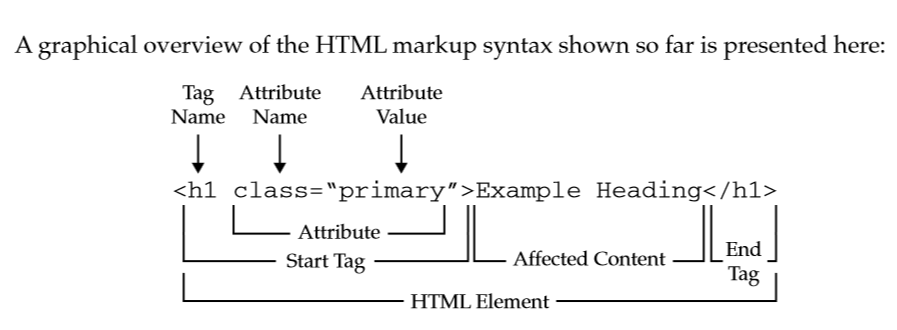
----

----
```
- <html> : the outer-most element
- <head> : the first element in <html>, contains invisible components, such as scripts or stylesheets.
- <title> : the "title"
- <script> : where scripts (JS) go
- <link> : links to "outer resources" (mainly stylesheets for today)
- <meta> : describes metadata (charset, viewport, etc.)
- <body> : the second and last element in <html>, mainly contains visible components.
- <div> : a division of contents
- <p> : a paragraph
- <span> : inline div
- <a> : anchor (links)
- <input> : inputs (textboxes, buttons, switches, etc.)
- <button> : a button
```
----
## css
----
| Function | Format | Example |
| ---------- | -------- | -------- |
|select tag |TAG |div |
|select id |#ID |#myID |
|select class|.CLASS |.my-class |
|select child|SELECTOR SELECTOR|body #myID|
|combine selector (and)|SELECTORSELECTOR |div#myDiv |
|combine selector (or)|SELECTOR, SELECTOR |#myInput, #myBtn |
|select attribute|[ATTRIBUTE]|[selected] |
|select attribute value|[ATTRIBUTE=VALUE]| [type=text]|
----
# CSS Properities
- height, width
- position, left, right, up, down
- padding, margin
---
## javascript
----
```javascript
// variables
var x = 7122;
// array
var myArray = [7, 1, 2, 2];
console.log(myArray);
myArray[0] = 1;
console.log(myArray);
// if
if (x == "infor")
console.log("jizz");
//while
while (x < 7122)
console.log(x++);
//for
for (var i = 0; i < 7122; i++)
console.log("hello");
for (var i in myArray)
console.log(i);
for (var i of myArray)
console.log(i);
//function
function jizz () {
console.log("jizz the world");
}
var jizz2 = function () {
console.log("jizz the world again");
}
//objects
var object1 = new Object();
object1.club = "infor";
var object2 = { club : "infor" };
//strings
var str1 = "jizz";
var str2 = 'infor';
```
----
```javascript
// ES6 const, let
let x = 4;
const jizz = 7122;
// ES6 template literals
var str =
`I am from ${x}.
And I am happy.`;
//ES6 Arrow functions
var sqare = x => x * x;
// = function sqare(x){
// return x*x;
// }
var f = (x,y) => {
return x*y
}
//= function f(x,y){
// return x*y
//}
// ES6 Promises
var myPromise = new Promise((res, rej)=>{
setTimeout(()=>res(), 1000);
});
// ES7 Async, Await
async function sleep (time) {
return new Promise((res, rej)=>{
setTimeout(()=>res(), time);
});
}
await sleep(1000);
```
---
# node.js
----
Node.js 是 Ryan Dahl 基於 Google 的 V8 引擎於 2009 年釋出的一個 JavaScript 開發平台,主要聚焦於 Web 程式的開發,通常用被來寫網站。
----
# 優點
- 可自己寫 web server
- 高效能「非同步IO」不會延遲等待
- 低耗能(需要時再取得資源)
- 第三方模組支援
- 入門簡單
----
> Node.js 是基於非同步與事件迴圈的javascript runtime
----
# 同步? 非同步? 事件迴圈?
----

----
# 同步
同步就是做完一個指令後才去執行下一個指令
----
# 非同步
非同步就是不需要等到一個指令完成後才可以執行下一個指令
----
```javascript
// ES6 Promises
var myPromise = new Promise((res, rej)=>{
setTimeout(()=>res(), 1000);
});
//res => then
//rej => cath
myPromise.then(()=>console.log("jizz"));
// ES7 Async, Await
function sleep (time) {
return new Promise((res, rej)=>{
setTimeout(()=>res(), time);
});
}
async function countDown(number){
console.log("start!")
for(let i=number;i>=0;i--){
console.log(i);
await sleep(1000);
}
console.log("jizzzzzzz!")
}
countDown(3);
```
----
# 事件迴圈
事件迴圈是一種類似佇列(queue)的機制,用來管理何時執行哪一個函式。當要執行這個函式時,就將它放到事件迴圈中等候執行。例如:發送 ajax 後要執行某個 callback,於是告訴宿主環境在收到回應時將這個 callback 放到 queue 中準備執行。另外,每一次 loop 稱為一個 tick,每個 tick 會取出 queue 中的 job,也就是要執行的函式來執行。
----
# hello world!
----
```javascript
const http = require('http');
const hostname = '127.0.0.1';
const port = 3000;
const server = http.createServer((req, res) => {
res.statusCode = 200;
res.setHeader('Content-Type', 'text/plain');
res.end('hello world\n jizz!\n');
});
server.listen(port, hostname, () => {
console.log(`Server running at http://${hostname}:${port}/`);
});
```
----
# hostname
是你的主機的ip位置
127.0.0.1也就是loaclhost是指你的本機
----
# Content-Type
內容類型,一般是指網頁中存在的Content-Type,用於定義網絡文件的類型和網頁的編碼,決定瀏覽器將以什麽形式、什麽編碼讀取這個文件
Content-Type:表示內容格式
- text/html 網頁
- application/json JSON 資料
- image/jpg 圖片 JPEG
----
# statusCode
以對伺服器發出一個request,最後結果到底如何,有個標準是狀態碼,透過數字我們就能大概了解這次的request結果如何,也就是所謂的statusCode。
```
- 200:OK
- 400:Bad Request,要求有問題,例如參數錯誤
- 401:Unauthorized,沒有認證資訊
- 403:Forbidden,禁止要求
- 404:Not Found,找不到該路徑
- 500:Internal Server Error,伺服器內部錯誤
- 501:Not Implemented,未實作
- 503:Service Unavailable,伺服器目前沒辦法回應,可能是過載或是正在維修
```
----
## 什麼是port,可以吃嗎?
電腦的IP就像是電腦的地址一樣,別人可以透過網路連到你家的地址,但是你的電腦上可能有很多服務,比如說網站、Email、FTP,他們分別架設在不同的port上,這就像是銀行中的不同的服務窗口,每個窗口都有一個特定的服務,如果我電腦的的IP是140.115.75.5,軟體服務開在port 3000上,那麼對別人來說就是http//:140.115.75.5:3000
常看到的預設port
```
- 80 - 用於網頁瀏覽,如果你的網站架設在http://127.0.0.1:80等同於http://127.0.0.1
- 22 - 用於SSH連線,一種比較安全的連線方式,很多線上的機器都要用ssh的方式才能連線
- 443 - 用於https,https是加過密的http,這僅一個字母S的差別代表「安全(secure)」,沒有https的網站,你傳輸的資料內容有可能遭攔截竊聽,如果線上刷卡的資料被盜取就會很慘,所以線上銀行一定都是https
```
---
# npm
#### Node Package Manager
----
```
$ npm init
$ npm install {package} --save
```
- package.json
- package-lock.json
- node_modules
----
# package.json
```json
{
"name": "practice",
"version": "1.0.0",
"description": "",
"main": "index.js",
"scripts": {
"test": "echo \"Error: no test specified\" && exit 1"
},
"author": "",
"license": "ISC"
}
```
---
# express.js
----
> express 是基於middleware 的輕型框架
----
# [middileware](https://hackmd.io/@izccwinter/express#/7)
中介軟體是指從接收請求(Request)到發出回應(Response)這段來回的途徑上,
用來處理特定用途的程式。
比較常見的Middleware有身份驗證(Identity)、路由(Routing)等。
----
`$ npm i express --save`
----
```javascript
var express = require('express');
var app = express();
app.get('/', function (req, res) {
res.send('hello world\n jizz!\n');
});
app.listen(3000, function () {
console.log(`Server running at http://localhost:3000/`);
});
```
----
#### router
```javascript
app.METHOD(PATH, HANDLER)
```
app 是 express 的實例。
METHOD 是 HTTP 要求方法。
PATH 是伺服器上的路徑。
HANDLER 是當路由相符時要執行的函數。
---
# mvc
----
- Model 模型 - 程式設計師編寫程式應有的功能(實現演算法等等)、資料庫專家進行資料管理和資料庫設計(可以實現具體的功能)。
- View 視圖 - 介面設計人員進行圖形介面設計。
- Controller 控制器 - 負責轉發請求,對請求進行處理。
----
# express generator
----
`$ npm install express-generator -g`
----
```
$ express -h
Usage: express [options][dir]
Options:
-h, --help output usage information
--version output the version number
-e, --ejs add ejs engine support
--hbs add handlebars engine support
--pug add pug engine support
-H, --hogan add hogan.js engine support
--no-view generate without view engine
-v, --view <engine> add view <engine> support (ejs|hbs|hjs|jade|pug|twig|vash) (defaults to jade)
-c, --css <engine> add stylesheet <engine> support (less|stylus|compass|sass) (defaults to plain css)
--git add .gitignore
-f, --force force on non-empty directory
```
`express -e --git <name>`
----
```
├── app.js
├── bin
│ └── www
├── package.json
├── public
│ ├── images
│ ├── javascripts
│ └── stylesheets
│ └── style.css
├── routes
│ ├── index.js
│ └── users.js
└── views
├── error.ejs
├── index.ejs
└── layout.ejs
```
----
# tempelate engine
> 樣板處理器(又稱為樣板引擎或者樣板分析器是一套設計用來將樣板與資料結合來產生最終文件的軟體,撰寫樣板所使用的語言稱為樣板語言。最後產出的結果可以是任何一種格式,包括文件、網頁或原始碼。
> [name=Wiki]
----
# ejs
https://ejs.co/
---
# 資料庫
----
關聯式資料庫? 非關聯式資料庫?
SQL? NOSQL?
----
SQL
SQL是一種特定目的程式語言,用於管理關聯式資料庫管理系統
----
SQL
- mysql
- sqlite
- MariaDB
- PostgreSQL
NOSQL
- MongoDB
- bigtable
---
# mongoose
----
```javascript
mongoose.connect(process.env.DB,
{ useNewUrlParser: true,useUnifiedTopology: true },
()=>console.log("connected"));
```
----
```javascript
router.post('/', async function(req, res, next) {
const user = new User({
name:req.body.name,
email:req.body.email
});
const saveduser = await user.save();
res.send(saveduser)
});
```
----
schema/model.js
```javascript
const mongoose = require("mongoose");
const schema = new mongoose.Schema({
name: {
type: String,
required: true,
min: 6,
max: 200
},
email: {
type: String,
required: true,
min: 5,
max: 10
},
date:{
type: Date,
default: Date.now
}
});
module.exports = mongoose.model("users",schema);
```
----
routes/index.js
```javascript
var express = require('express');
var router = express.Router();
var mongoose = require("mongoose")
var User = require('../schema/model')
require('dotenv').config();
/* GET home page. */
mongoose.connect(prosess.env.DB,
{ useNewUrlParser: true,useUnifiedTopology: true },
()=>console.log("connected"));
router.get('/', function(req, res, next) {
res.render('index', { title: 'Express' });
});
router.post('/', async function(req, res, next) {
const user = new User({
name:req.body.name,
email:req.body.email
});
const saveduser = await user.save();
res.send(saveduser)
});
module.exports = router;
```
---
# 所以,這到底可以拿來幹嘛?
 Google Drive
Gist
Clipboard
Google Drive
Gist
Clipboard
 Sign in with Wallet






