# openai-reasoning
Reasoning models
================
Explore advanced reasoning and problem-solving models.
**Reasoning models** like o3 and o4-mini are LLMs trained with reinforcement learning to perform reasoning. Reasoning models [think before they answer](https://openai.com/index/introducing-openai-o1-preview/), producing a long internal chain of thought before responding to the user. Reasoning models excel in complex problem solving, coding, scientific reasoning, and multi-step planning for agentic workflows. They're also the best models for [Codex CLI](https://github.com/openai/codex), our lightweight coding agent.
As with our GPT series, we provide smaller, faster models (`o4-mini` and `o3-mini`) that are less expensive per token. The larger models (`o3` and `o1`) are slower and more expensive but often generate better responses for complex tasks and broad domains.
To ensure safe deployment of our latest reasoning models [`o3`](/docs/models/o3) and [`o4-mini`](/docs/models/o4-mini), some developers may need to complete [organization verification](https://help.openai.com/en/articles/10910291-api-organization-verification) before accessing these models. Get started with verification on the [platform settings page](https://platform.openai.com/settings/organization/general).
Get started with reasoning
--------------------------
Reasoning models can be used through the [Responses API](/docs/api-reference/responses/create) as seen here.
Using a reasoning model in the Responses API
```javascript
import OpenAI from "openai";
const openai = new OpenAI();
const prompt = `
Write a bash script that takes a matrix represented as a string with
format '[1,2],[3,4],[5,6]' and prints the transpose in the same format.
`;
const response = await openai.responses.create({
model: "o4-mini",
reasoning: { effort: "medium" },
input: [
{
role: "user",
content: prompt,
},
],
});
console.log(response.output_text);
```
```python
from openai import OpenAI
client = OpenAI()
prompt = """
Write a bash script that takes a matrix represented as a string with
format '[1,2],[3,4],[5,6]' and prints the transpose in the same format.
"""
response = client.responses.create(
model="o4-mini",
reasoning={"effort": "medium"},
input=[
{
"role": "user",
"content": prompt
}
]
)
print(response.output_text)
```
```bash
curl https://api.openai.com/v1/responses \
-H "Content-Type: application/json" \
-H "Authorization: Bearer $OPENAI_API_KEY" \
-d '{
"model": "o4-mini",
"reasoning": {"effort": "medium"},
"input": [
{
"role": "user",
"content": "Write a bash script that takes a matrix represented as a string with format \"[1,2],[3,4],[5,6]\" and prints the transpose in the same format."
}
]
}'
```
In the example above, the `reasoning.effort` parameter guides the model on how many reasoning tokens to generate before creating a response to the prompt.
Specify `low`, `medium`, or `high` for this parameter, where `low` favors speed and economical token usage, and `high` favors more complete reasoning. The default value is `medium`, which is a balance between speed and reasoning accuracy.
How reasoning works
-------------------
Reasoning models introduce **reasoning tokens** in addition to input and output tokens. The models use these reasoning tokens to "think," breaking down the prompt and considering multiple approaches to generating a response. After generating reasoning tokens, the model produces an answer as visible completion tokens and discards the reasoning tokens from its context.
Here is an example of a multi-step conversation between a user and an assistant. Input and output tokens from each step are carried over, while reasoning tokens are discarded.
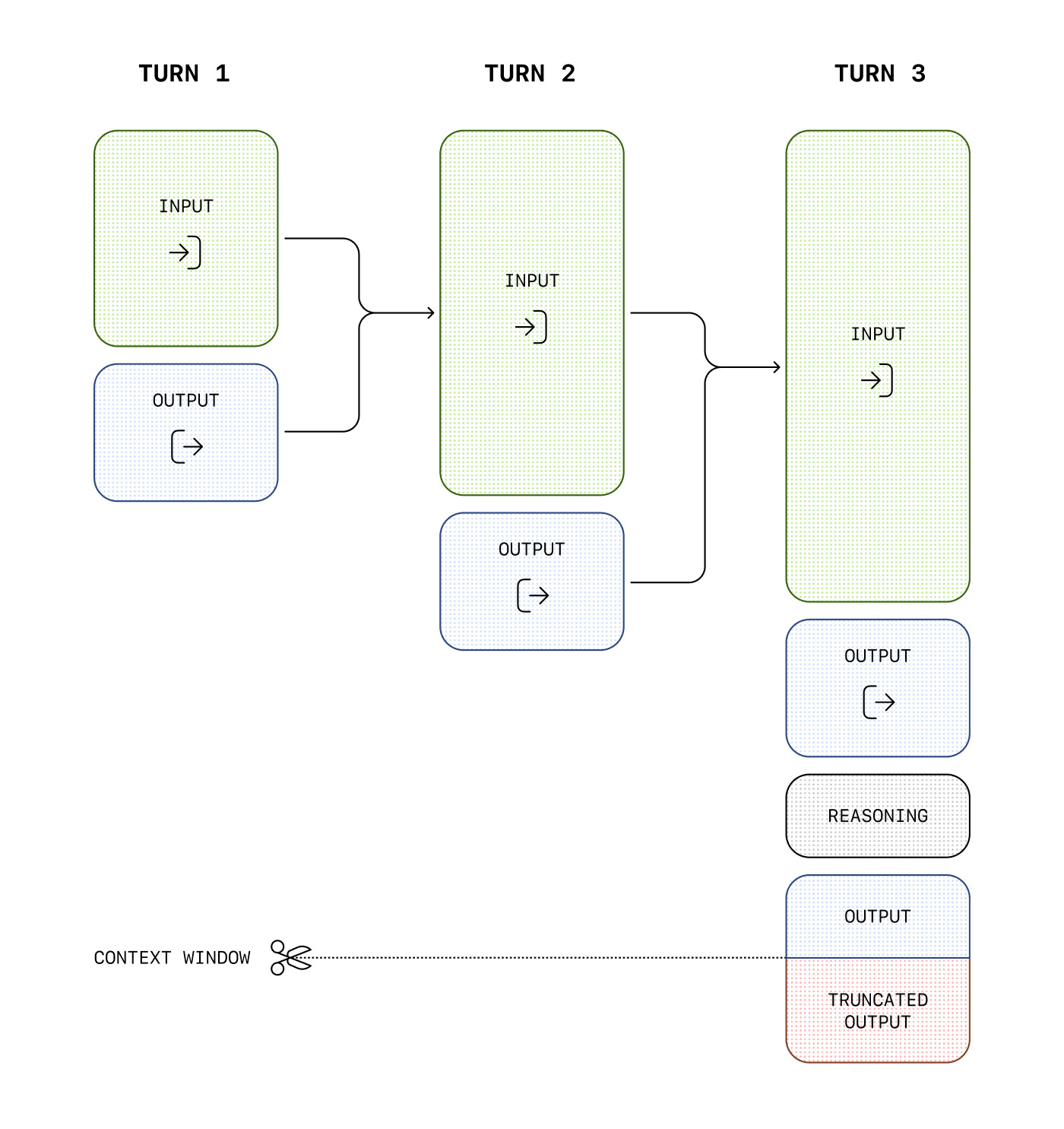
While reasoning tokens are not visible via the API, they still occupy space in the model's context window and are billed as [output tokens](https://openai.com/api/pricing).
### Managing the context window
It's important to ensure there's enough space in the context window for reasoning tokens when creating responses. Depending on the problem's complexity, the models may generate anywhere from a few hundred to tens of thousands of reasoning tokens. The exact number of reasoning tokens used is visible in the [usage object of the response object](/docs/api-reference/responses/object), under `output_tokens_details`:
```json
{
"usage": {
"input_tokens": 75,
"input_tokens_details": {
"cached_tokens": 0
},
"output_tokens": 1186,
"output_tokens_details": {
"reasoning_tokens": 1024
},
"total_tokens": 1261
}
}
```
Context window lengths are found on the [model reference page](/docs/models), and will differ across model snapshots.
### Controlling costs
If you're managing context manually across model turns, you can discard older reasoning items _unless_ you're responding to a function call, in which case you must include all reasoning items between the function call and the last user message.
To manage costs with reasoning models, you can limit the total number of tokens the model generates (including both reasoning and final output tokens) by using the [`max_output_tokens`](/docs/api-reference/responses/create#responses-create-max_output_tokens) parameter.
### Allocating space for reasoning
If the generated tokens reach the context window limit or the `max_output_tokens` value you've set, you'll receive a response with a `status` of `incomplete` and `incomplete_details` with `reason` set to `max_output_tokens`. This might occur before any visible output tokens are produced, meaning you could incur costs for input and reasoning tokens without receiving a visible response.
To prevent this, ensure there's sufficient space in the context window or adjust the `max_output_tokens` value to a higher number. OpenAI recommends reserving at least 25,000 tokens for reasoning and outputs when you start experimenting with these models. As you become familiar with the number of reasoning tokens your prompts require, you can adjust this buffer accordingly.
Handling incomplete responses
```javascript
import OpenAI from "openai";
const openai = new OpenAI();
const prompt = `
Write a bash script that takes a matrix represented as a string with
format '[1,2],[3,4],[5,6]' and prints the transpose in the same format.
`;
const response = await openai.responses.create({
model: "o4-mini",
reasoning: { effort: "medium" },
input: [
{
role: "user",
content: prompt,
},
],
max_output_tokens: 300,
});
if (
response.status === "incomplete" &&
response.incomplete_details.reason === "max_output_tokens"
) {
console.log("Ran out of tokens");
if (response.output_text?.length > 0) {
console.log("Partial output:", response.output_text);
} else {
console.log("Ran out of tokens during reasoning");
}
}
```
```python
from openai import OpenAI
client = OpenAI()
prompt = """
Write a bash script that takes a matrix represented as a string with
format '[1,2],[3,4],[5,6]' and prints the transpose in the same format.
"""
response = client.responses.create(
model="o4-mini",
reasoning={"effort": "medium"},
input=[
{
"role": "user",
"content": prompt
}
],
max_output_tokens=300,
)
if response.status == "incomplete" and response.incomplete_details.reason == "max_output_tokens":
print("Ran out of tokens")
if response.output_text:
print("Partial output:", response.output_text)
else:
print("Ran out of tokens during reasoning")
```
### Keeping reasoning items in context
When doing [function calling](/docs/guides/function-calling) with a reasoning model in the [Responses API](/docs/apit-reference/responses), we highly recommend you pass back any reasoning items returned with the last function call (in addition to the output of your function). If the model calls multiple functions consecutively, you should pass back all reasoning items, function call items, and function call output items, since the last `user` message. This allows the model to continue its reasoning process to produce better results in the most token-efficient manner.
The simplest way to do this is to pass in all reasoning items from a previous response into the next one. Our systems will smartly ignore any reasoning items that aren't relevant to your functions, and only retain those in context that are relevant. You can pass reasoning items from previous responses either using the `previous_response_id` parameter, or by manually passing in all the [output](/docs/api-reference/responses/object#responses/object-output) items from a past response into the [input](/docs/api-reference/responses/create#responses-create-input) of a new one.
For advanced use-cases where you might be truncating and optimizing parts of the context window before passing them on to the next response, just ensure all items between the last user message and your function call output are passed into the next response untouched. This will ensure that the model has all the context it needs.
Check out [this guide](/docs/guides/conversation-state) to learn more about manual context management.
Reasoning summaries
-------------------
While we don't expose the raw reasoning tokens emitted by the model, you can view a summary of the model's reasoning using the the `summary` parameter.
Different models support different reasoning summarizers—for example, our computer use model supports the `concise` summarizer, while o4-mini supports `detailed`. To simply access the most detailed summarizer available, set the value of this parameter to `auto` and view the reasoning summary as part of the `summary` array in the `reasoning` [output](/docs/api-reference/responses/object#responses/object-output) item.
This feature is also supported with streaming, and across the following reasoning models: `o4-mini`, `o3`, `o3-mini` and `o1`.
Before using summarizers with our latest reasoning models, you may need to complete [organization verification](https://help.openai.com/en/articles/10910291-api-organization-verification) to ensure safe deployment. Get started with verification on the [platform settings page](https://platform.openai.com/settings/organization/general).
Generate a summary of the reasoning
```json
reasoning: {
effort: "medium", // unchanged
summary: "auto" // auto gives you the best available summary (detailed > auto > None)
}
```
Advice on prompting
-------------------
There are some differences to consider when prompting a reasoning model. Reasoning models provide better results on tasks with only high-level guidance, while GPT models often benefit from very precise instructions.
* A reasoning model is like a senior co-worker—you can give them a goal to achieve and trust them to work out the details.
* A GPT model is like a junior coworker—they'll perform best with explicit instructions to create a specific output.
For more information on best practices when using reasoning models, [refer to this guide](/docs/guides/reasoning-best-practices).
### Prompt examples
Coding (refactoring)
OpenAI o-series models are able to implement complex algorithms and produce code. This prompt asks o1 to refactor a React component based on some specific criteria.
Refactor code
```javascript
import OpenAI from "openai";
const openai = new OpenAI();
const prompt = `
Instructions:
- Given the React component below, change it so that nonfiction books have red
text.
- Return only the code in your reply
- Do not include any additional formatting, such as markdown code blocks
- For formatting, use four space tabs, and do not allow any lines of code to
exceed 80 columns
const books = [
{ title: 'Dune', category: 'fiction', id: 1 },
{ title: 'Frankenstein', category: 'fiction', id: 2 },
{ title: 'Moneyball', category: 'nonfiction', id: 3 },
];
export default function BookList() {
const listItems = books.map(book =>
<li>
{book.title}
</li>
);
return (
<ul>{listItems}</ul>
);
}
`.trim();
const response = await openai.responses.create({
model: "o4-mini",
input: [
{
role: "user",
content: prompt,
},
],
});
console.log(response.output_text);
```
```python
from openai import OpenAI
client = OpenAI()
prompt = """
Instructions:
- Given the React component below, change it so that nonfiction books have red
text.
- Return only the code in your reply
- Do not include any additional formatting, such as markdown code blocks
- For formatting, use four space tabs, and do not allow any lines of code to
exceed 80 columns
const books = [
{ title: 'Dune', category: 'fiction', id: 1 },
{ title: 'Frankenstein', category: 'fiction', id: 2 },
{ title: 'Moneyball', category: 'nonfiction', id: 3 },
];
export default function BookList() {
const listItems = books.map(book =>
<li>
{book.title}
</li>
);
return (
<ul>{listItems}</ul>
);
}
"""
response = client.responses.create(
model="o4-mini",
input=[
{
"role": "user",
"content": prompt,
}
]
)
print(response.output_text)
```
Coding (planning)
OpenAI o-series models are also adept in creating multi-step plans. This example prompt asks o1 to create a filesystem structure for a full solution, along with Python code that implements the desired use case.
Plan and create a Python project
```javascript
import OpenAI from "openai";
const openai = new OpenAI();
const prompt = `
I want to build a Python app that takes user questions and looks
them up in a database where they are mapped to answers. If there
is close match, it retrieves the matched answer. If there isn't,
it asks the user to provide an answer and stores the
question/answer pair in the database. Make a plan for the directory
structure you'll need, then return each file in full. Only supply
your reasoning at the beginning and end, not throughout the code.
`.trim();
const response = await openai.responses.create({
model: "o4-mini",
input: [
{
role: "user",
content: prompt,
},
],
});
console.log(response.output_text);
```
```python
from openai import OpenAI
client = OpenAI()
prompt = """
I want to build a Python app that takes user questions and looks
them up in a database where they are mapped to answers. If there
is close match, it retrieves the matched answer. If there isn't,
it asks the user to provide an answer and stores the
question/answer pair in the database. Make a plan for the directory
structure you'll need, then return each file in full. Only supply
your reasoning at the beginning and end, not throughout the code.
"""
response = client.responses.create(
model="o4-mini",
input=[
{
"role": "user",
"content": prompt,
}
]
)
print(response.output_text)
```
STEM Research
OpenAI o-series models have shown excellent performance in STEM research. Prompts asking for support of basic research tasks should show strong results.
Ask questions related to basic scientific research
```javascript
import OpenAI from "openai";
const openai = new OpenAI();
const prompt = `
What are three compounds we should consider investigating to
advance research into new antibiotics? Why should we consider
them?
`;
const response = await openai.responses.create({
model: "o4-mini",
input: [
{
role: "user",
content: prompt,
},
],
});
console.log(response.output_text);
```
```python
from openai import OpenAI
client = OpenAI()
prompt = """
What are three compounds we should consider investigating to
advance research into new antibiotics? Why should we consider
them?
"""
response = client.responses.create(
model="o4-mini",
input=[
{
"role": "user",
"content": prompt
}
]
)
print(response.output_text)
```
Use case examples
-----------------
Some examples of using reasoning models for real-world use cases can be found in [the cookbook](https://cookbook.openai.com).
[](https://cookbook.openai.com/examples/o1/using_reasoning_for_data_validation)
[](https://cookbook.openai.com/examples/o1/using_reasoning_for_data_validation)
[Using reasoning for data validation](https://cookbook.openai.com/examples/o1/using_reasoning_for_data_validation)
[](https://cookbook.openai.com/examples/o1/using_reasoning_for_data_validation)
[Evaluate a synthetic medical data set for discrepancies.](https://cookbook.openai.com/examples/o1/using_reasoning_for_data_validation)
[](https://cookbook.openai.com/examples/o1/using_reasoning_for_routine_generation)
[](https://cookbook.openai.com/examples/o1/using_reasoning_for_routine_generation)
[Using reasoning for routine generation](https://cookbook.openai.com/examples/o1/using_reasoning_for_routine_generation)
[](https://cookbook.openai.com/examples/o1/using_reasoning_for_routine_generation)
[Use help center articles to generate actions that an agent could perform.](https://cookbook.openai.com/examples/o1/using_reasoning_for_routine_generation)
 Google Drive
Gist
Clipboard
Google Drive
Gist
Clipboard
 Sign in via Google
 Sign in via Facebook
 Sign in via X(Twitter)
 Sign in via GitHub
 Sign in via Dropbox
 Sign in with Wallet






