---
title: CULT 401
date: March 15, 2022
author: Mathew Vis-Dunbar
slideOptions:
theme: serif
---
<style>
hr {
border: 3px solid #fff;
}
.reveal pre {
font-size: 20% !important;
}
.small img {
width: 50% !important;
}
.small p, .small ul {
text-align: left;
font-size: 50%;
}
.reveal blockquote {
box-shadow: none;
}
.left {
text-align: left;
font-size: 80%;
border: 3px solid hotpink;
border-radius: 10px;
padding: 30px;
}
.left a {
color: hotpink;
}
.first-letter {
color: hotpink;
font-size: 350%;
line-height: 1;
float: left;
font-family: "IBM Plex Mono"
}
.hotpink {
color: hotpink;
}
</style>
## CULT 401
### Webscraping & the Wayback Machine
---
Mathew Vis-Dunbar
Data & Digital Scholarship Librarian
<br /><hr /><br />
mathew.vis-dunbar@ubc.ca
2023-03-08
---
## Internet ≠ World Wide Web
<!-- .slide: data-background="https://i.imgur.com/pVjRmwE.png" -->
Note:
It's probably worth noting, initially, that the Internet and World Wide Web are not synonymous. The Internet simply refers to the networked infrastrcuture on which the World Wide Web sits. Many other services also leverage the internet. The Web uses the http - hypertext transfer protocol - to communicate aross computers. And the basic infrastructure that enables all this to happen is the connection of servers and clients connected through the internet. Ther server holds the information that is the web resource and serves it to the client, which is generally you on a web browser. Other transfer protocols use this same infrastructure, but speak an entirely different language from http. One that you might be familiar with is ftp - the file transfer protocol, used for tansfering files between computers.
---
## Crawling & Scraping
----

----
```html
<html>
<script type="text/javascript" src="/_static/js/bundle-playback.js?v=21L7o4JU" charset="utf-8"></script>
<script type="text/javascript" src="/_static/js/wombat.js?v=Jjml7g96" charset="utf-8"></script>
<script type="text/javascript">
__wm.init("https://web.archive.org/web");
__wm.wombat("http://femfilm.ca:80/index.php?lang=e","20180113015447","https://web.archive.org/","web","/_static/",
"1515808487");
</script>
<link rel="stylesheet" type="text/css" href="/_static/css/banner-styles.css?v=S1zqJCYt" />
<link rel="stylesheet" type="text/css" href="/_static/css/iconochive.css?v=qtvMKcIJ" />
<!-- End Wayback Rewrite JS Include -->
<meta http-equiv="Content-Type" content="text/html;charset=iso-8859-9">
<body bgcolor="FAF1FA"><!-- BEGIN WAYBACK TOOLBAR INSERT -->
<style type="text/css">
body {
margin-top:0 !important;
padding-top:0 !important;
/*min-width:800px !important;*/
}
</style>
<script>__wm.rw(0);</script>
<div id="wm-ipp-base" lang="en" style="display:none;direction:ltr;">
<div id="wm-ipp" style="position:fixed;left:0;top:0;right:0;">
<div id="donato" style="position:relative;width:100%;">
<div id="donato-base">
<iframe id="donato-if" src="https://archive.org/includes/donate.php?as_page=1&platform=wb&referer=https%3A//web.archive.org/web/20180113015447/http%3A//femfilm.ca/index.php%3Flang%3De"
scrolling="no" frameborder="0" style="width:100%; height:100%">
</iframe>
</div>
</div><div id="wm-ipp-inside">
<div id="wm-toolbar" style="position:relative;display:flex;flex-flow:row nowrap;justify-content:space-between;">
<div id="wm-logo" style="/*width:110px;*/padding-top:12px;">
<a href="/web/" title="Wayback Machine home page"><img src="/_static/images/toolbar/wayback-toolbar-logo-200.png" srcset="/_static/images/toolbar/wayback-toolbar-logo-100.png, /_static/images/toolbar/wayback-toolbar-logo-150.png 1.5x, /_static/images/toolbar/wayback-toolbar-logo-200.png 2x" alt="Wayback Machine" style="width:100px" border="0" /></a>
</div>
<div class="c" style="display:flex;flex-flow:column nowrap;justify-content:space-between;flex:1;">
<form class="u" style="display:flex;flex-direction:row;flex-wrap:nowrap;" target="_top" method="get" action="/web/submit" name="wmtb" id="wmtb"><input type="text" name="url" id="wmtbURL" value="http://femfilm.ca/index.php?lang=e" onfocus="this.focus();this.select();" style="flex:1;"/><input type="hidden" name="type" value="replay" /><input type="hidden" name="date" value="20180113015447" /><input type="submit" value="Go" />
</form>
<div style="display:flex;flex-flow:row nowrap;align-items:flex-end;">
<div class="s" id="wm-nav-captures" style="flex:1;">
<a class="t" href="/web/20180113015447*/http://femfilm.ca/index.php?lang=e" title="See a list of every capture for this URL">70 captures</a>
<div class="r" title="Timespan for captures of this URL">16 Dec 2007 - 16 Oct 2022</div>
</div>
<div class="k">
<a href="" id="wm-graph-anchor">
<div id="wm-ipp-sparkline" title="Explore captures for this URL" style="position: relative">
<canvas id="wm-sparkline-canvas" width="700" height="27" border="0"></canvas>
</div>
</a>
</div>
</div>
</div>
<div class="n">
<table>
<tbody>
<!-- NEXT/PREV MONTH NAV AND MONTH INDICATOR -->
<tr class="m">
<td class="b" nowrap="nowrap"><a href="https://web.archive.org/web/20171111070723/http://femfilm.ca:80/index.php?lang=e" title="11 Nov 2017"><strong>Nov</strong></a></td>
<td class="c" id="displayMonthEl" title="You are here: 01:54:47 Jan 13, 2018">JAN</td>
<td class="f" nowrap="nowrap"><a href="https://web.archive.org/web/20180315133241/http://femfilm.ca:80/index.php?lang=e" title="15 Mar 2018"><strong>Mar</strong></a></td>
</tr>
<!-- NEXT/PREV CAPTURE NAV AND DAY OF MONTH INDICATOR -->
<tr class="d">
<td class="b" nowrap="nowrap"><a href="https://web.archive.org/web/20171111070723/http://femfilm.ca:80/index.php?lang=e" title="07:07:23 Nov 11, 2017"><img src="/_static/images/toolbar/wm_tb_prv_on.png" alt="Previous capture" width="14" height="16" border="0" /></a></td>
<td class="c" id="displayDayEl" style="width:34px;font-size:22px;white-space:nowrap;" title="You are here: 01:54:47 Jan 13, 2018">13</td>
<td class="f" nowrap="nowrap"><a href="https://web.archive.org/web/20180315133241/http://femfilm.ca:80/index.php?lang=e" title="13:32:41 Mar 15, 2018"><img src="/_static/images/toolbar/wm_tb_nxt_on.png" alt="Next capture" width="14" height="16" border="0" /></a></td>
</tr>
<!-- NEXT/PREV YEAR NAV AND YEAR INDICATOR -->
<tr class="y">
<td class="b" nowrap="nowrap"><a href="https://web.archive.org/web/20161130184504/http://femfilm.ca:80/index.php?lang=e" title="30 Nov 2016"><strong>2016</strong></a></td>
<td class="c" id="displayYearEl" title="You are here: 01:54:47 Jan 13, 2018">2018</td>
<td class="f" nowrap="nowrap"><a href="https://web.archive.org/web/20190116013422/http://femfilm.ca:80/index.php?lang=e" title="16 Jan 2019"><strong>2019</strong></a></td>
</tr>
</tbody>
</table>
</div>
<div class="r" style="display:flex;flex-flow:column nowrap;align-items:flex-end;justify-content:space-between;">
<div id="wm-btns" style="text-align:right;height:23px;">
<span class="xxs">
<div id="wm-save-snapshot-success">success</div>
<div id="wm-save-snapshot-fail">fail</div>
<a id="wm-save-snapshot-open" href="#" title="Share via My Web Archive" >
<span class="iconochive-web"></span>
</a>
<a href="https://archive.org/account/login.php" title="Sign In" id="wm-sign-in">
<span class="iconochive-person"></span>
</a>
<span id="wm-save-snapshot-in-progress" class="iconochive-web"></span>
</span>
<a class="xxs" href="http://faq.web.archive.org/" title="Get some help using the Wayback Machine" style="top:-6px;"><span class="iconochive-question" style="color:rgb(87,186,244);font-size:160%;"></span></a>
<a id="wm-tb-close" href="#close" style="top:-2px;" title="Close the toolbar"><span class="iconochive-remove-circle" style="color:#888888;font-size:240%;"></span></a>
</div>
<div id="wm-share" class="xxs">
<a href="/web/20180113015447/http://web.archive.org/screenshot/http://femfilm.ca/index.php?lang=e"
id="wm-screenshot"
title="screenshot">
<span class="wm-icon-screen-shot"></span>
</a>
<a href="#" id="wm-video" title="video">
<span class="iconochive-movies"></span>
</a>
<a id="wm-share-facebook" href="#" data-url="https://web.archive.org/web/20180113015447/http://femfilm.ca:80/index.php?lang=e" title="Share on Facebook" style="margin-right:5px;" target="_blank"><span class="iconochive-facebook" style="color:#3b5998;font-size:160%;"></span></a>
<a id="wm-share-twitter" href="#" data-url="https://web.archive.org/web/20180113015447/http://femfilm.ca:80/index.php?lang=e" title="Share on Twitter" style="margin-right:5px;" target="_blank"><span class="iconochive-twitter" style="color:#1dcaff;font-size:160%;"></span></a>
</div>
<div style="padding-right:2px;text-align:right;white-space:nowrap;">
<a id="wm-expand" class="wm-btn wm-closed" href="#expand" onclick="__wm.ex(event);return false;"><span id="wm-expand-icon" class="iconochive-down-solid"></span> <span class="xxs" style="font-size:80%;">About this capture</span></a>
</div>
</div>
</div>
<div id="wm-capinfo" style="border-top:1px solid #777;display:none; overflow: hidden">
<div id="wm-capinfo-collected-by">
<div style="background-color:#666;color:#fff;font-weight:bold;text-align:center">COLLECTED BY</div>
<div style="padding:3px;position:relative" id="wm-collected-by-content">
<div style="display:inline-block;vertical-align:top;width:50%;">
<span class="c-logo" style="background-image:url(https://archive.org/services/img/alexacrawls);"></span>
Organization: <a style="color:#33f;" href="https://archive.org/details/alexacrawls" target="_new"><span class="wm-title">Alexa Crawls</span></a>
<div style="max-height:75px;overflow:hidden;position:relative;">
<div style="position:absolute;top:0;left:0;width:100%;height:75px;background:linear-gradient(to bottom,rgba(255,255,255,0) 0%,rgba(255,255,255,0) 90%,rgba(255,255,255,255) 100%);"></div>
Starting in 1996, <a href="http://www.alexa.com/">Alexa Internet</a> has been donating their crawl data to the Internet Archive. Flowing in every day, these data are added to the <a href="http://web.archive.org/">Wayback Machine</a> after an embargo period.
</div>
</div>
<div style="display:inline-block;vertical-align:top;width:49%;">
<span class="c-logo" style="background-image:url(https://archive.org/services/img/alexacrawls)"></span>
<div>Collection: <a style="color:#33f;" href="https://archive.org/details/alexacrawls" target="_new"><span class="wm-title">Alexa Crawls</span></a></div>
<div style="max-height:75px;overflow:hidden;position:relative;">
<div style="position:absolute;top:0;left:0;width:100%;height:75px;background:linear-gradient(to bottom,rgba(255,255,255,0) 0%,rgba(255,255,255,0) 90%,rgba(255,255,255,255) 100%);"></div>
Starting in 1996, <a href="http://www.alexa.com/">Alexa Internet</a> has been donating their crawl data to the Internet Archive. Flowing in every day, these data are added to the <a href="http://web.archive.org/">Wayback Machine</a> after an embargo period.
</div>
</div>
</div>
</div>
<div id="wm-capinfo-timestamps">
<div style="background-color:#666;color:#fff;font-weight:bold;text-align:center" title="Timestamps for the elements of this page">TIMESTAMPS</div>
<div>
<div id="wm-capresources" style="margin:0 5px 5px 5px;max-height:250px;overflow-y:scroll !important"></div>
<div id="wm-capresources-loading" style="text-align:left;margin:0 20px 5px 5px;display:none"><img src="/_static/images/loading.gif" alt="loading" /></div>
</div>
</div>
</div></div></div></div><div id="wm-ipp-print">The Wayback Machine - https://web.archive.org/web/20180113015447/http://femfilm.ca:80/index.php?lang=e</div>
<script type="text/javascript">//<![CDATA[
__wm.bt(700,27,25,2,"web","http://femfilm.ca/index.php?lang=e","20180113015447",1996,"/_static/",["/_static/css/banner-styles.css?v=S1zqJCYt","/_static/css/iconochive.css?v=qtvMKcIJ"], false);
__wm.rw(1);
//]]></script>
<!-- END WAYBACK TOOLBAR INSERT -->
<head><title>femfilm.ca: Canadian Women Film Directors Database</title></head>
<table width="100%" cellspacing="0" cellpadding="0" bgcolor="#F5E3F5">
<tr>
<td colspan="6" valign="bottom" align="center">
<a href="index.php?lang=e"><img src="/web/20180113015447im_/http://femfilm.ca/wdgraphics/cwfdd.gif" alt="Canadian Women Film Directors Database" width="790" height="50" border="0"></a>
</td>
</tr>
<tr>
<td colspan="1" valign="top" align="center">
<a href="index.php?lang=e"><img src="/web/20180113015447im_/http://femfilm.ca/wdgraphics/home.gif" alt="home" width="130" height="30" border="0"></a>
</td>
<td colspan="1" valign="top" align="center">
<a href="search.php?lang=e"><img src="/web/20180113015447im_/http://femfilm.ca/wdgraphics/search.gif" alt="search" width="130" height="30" border="0"></a>
</td><td colspan="1" valign="top" align="center">
<a href="browse.php?lang=e"><img src="/web/20180113015447im_/http://femfilm.ca/wdgraphics/browse.gif" alt="browse" width="130" height="30" border="0"></a>
</td>
<td colspan="1" valign="top" align="center">
<a href="about.php?lang=e"><img src="/web/20180113015447im_/http://femfilm.ca/wdgraphics/about.gif" alt="about" width="130" height="30" border="0"></a>
</td><td colspan="1" valign="top" align="center">
<a href="contact.php?lang=e"><img src="/web/20180113015447im_/http://femfilm.ca/wdgraphics/contact.gif" alt="contact" width="130" height="30" border="0"></a>
</td>
<td colspan="1" valign="top" align="center">
<a href="index.php?lang=f"><img src="/web/20180113015447im_/http://femfilm.ca/wdgraphics/francais.gif" alt="français" width="130" height="30" border="0"></a>
</td>
</tr></table>
<p>
<form method="get" action="director_surname_contains_get.php"><small>Quick search by surname</small>
<input name="surname_entered" type="text" size="14">
<input name="lang" type="hidden" value="e">
<input type="submit" value="Search">
</form>
<p>
<table width="100%" border="0" cellspacing="0" cellpadding="5"><tr><td width="64%" valign="top">Welcome to <strong><big>femfilm.ca</big></strong>, a bilingual research tool about Canadian women directors and their films. The Database contains (so far) <strong>4,145 bibliographic references</strong>, <strong>1,606 quotations</strong>, information about <strong>1,532 films</strong> (1920-2017), and the names of <strong>1,204 directors</strong>.
<ul>
<li><big><strong>DIRECTORS</strong>:</big> You can <a href="search.php?lang=e"><strong>search for a director</strong></a> by first or last name, <a href="directors_list.php?lang=e"><strong>browse data about 463 directors</strong></a>, or
<a href="all_directors_list.php?lang=e"><strong>view the names of 1,204 directors</strong></a>.</li>
<li>
<big><strong>FILMS</strong>:</big> You can <a href="search.php?lang=e"><strong>search</strong></a> by film title, year, or length, or you can <a href="browse.php?lang=e"><strong>browse 1,532 films</strong></a> by title, year, category, or award.</li>
<li>
<big><strong>BIBLIOGRAPHY</strong>:</big> A bibliography of <a href="general_bibliography.php?lang=e"><strong>241 publications about Canadian women film directors in general</strong></a>, with a quotation from each publication (in chronological order, 1946-2017).</li>
<li>
<big><strong>AWARD WINNERS</strong>:</big> <strong><a href="awards.php?lang=e">337 awards</a></strong> given to films by Canadian women (1948-2016).</li>
<li>
<big><strong>PIONEERS</strong>:</big> View a <a href="firsts.php?lang=e"><strong>Chronology of "Firsts"</strong></a> or browse films of the <a href="film_year_range_get.php?year_range_start=1920&year_range_end=1929&lang=e"><strong>1920s</strong></a>, <a href="film_year_range_get.php?year_range_start=1930&year_range_end=1939&lang=e"><strong>1930s</strong></a>, <a href="film_year_range_get.php?year_range_start=1940&year_range_end=1949&lang=e"><strong>1940s</strong></a>, <a href="film_year_range_get.php?year_range_start=1950&year_range_end=1959&lang=e"><strong>1950s</strong></a>, <a href="film_year_range_get.php?year_range_start=1960&year_range_end=1969&lang=e"><strong>1960s</strong></a>, or <a href="film_year_range_get.php?year_range_start=1970&year_range_end=1979&lang=e"><strong>1970s</strong></a> (films by pioneering directors such as <a href="director_search.php?director=nell-shipman&lang=e">Nell Shipman</a>, <a href="director_search.php?director=jane-marsh&lang=e">Jane Marsh</a>, <a href="director_search.php?director=joyce-wieland&lang=e">Joyce Wieland</a>, <a href="director_search.php?director=anne-claire-poirier&lang=e">Anne Claire Poirier</a>, and <a href="director_search.php?director=mireille-dansereau&lang=e">Mireille Dansereau</a>).</li></ul>
<strong>femfilm.ca</strong> was created by Margaret Fulford, a librarian at the University of Toronto. For more information, see <a href="about.php?lang=e">About the Database</a>. Your <a href="contact.php?lang=e">feedback</a> is welcome.
<p>
</td><td width="6%" valign="top"> </td><td width="30%" valign="top"><strong><big>Featured Directors:</big></strong>
<br>
<a href="director_search.php?director=paule-baillargeon&lang=e"><strong>Paule Baillargeon</strong></a><br>
<a href="director_search.php?director=sophie-bissonnette&lang=e"><strong>Sophie Bissonnette</strong></a><br>
<a href="director_search.php?director=janis-cole&lang=e"><strong>Janis Cole</strong></a><br>
<a href="director_search.php?director=holly-dale&lang=e"><strong>Holly Dale</strong></a><br>
<a href="director_search.php?director=mireille-dansereau&lang=e"><strong>Mireille Dansereau</strong></a><br>
<a href="director_search.php?director=evelyn-lambart&lang=e"><strong>Evelyn Lambart</strong></a><br>
<a href="director_search.php?director=micheline-lanctôt&lang=e"><strong>Micheline Lanctôt</strong></a><br>
<a href="director_search.php?director=caroline-leaf&lang=e"><strong>Caroline Leaf</strong></a><br>
<a href="director_search.php?director=jane-marsh&lang=e"><strong>Jane Marsh</strong></a><br>
<a href="director_search.php?director=deepa-mehta&lang=e"><strong>Deepa Mehta</strong></a><br>
<a href="director_search.php?director=ruba-nadda&lang=e"><strong>Ruba Nadda</strong></a><br>
<a href="director_search.php?director=alanis-obomsawin&lang=e"><strong>Alanis Obomsawin</strong></a><br>
<a href="director_search.php?director=anne-claire-poirier&lang=e"><strong>Anne Claire Poirier</strong></a><br>
<a href="director_search.php?director=sarah-polley&lang=e"><strong>Sarah Polley</strong></a><br>
<a href="director_search.php?director=léa-pool&lang=e"><strong>Léa Pool</strong></a><br>
<a href="director_search.php?director=patricia-rozema&lang=e"><strong>Patricia Rozema</strong></a><br>
<a href="director_search.php?director=cynthia-scott&lang=e"><strong>Cynthia Scott</strong></a><br>
<a href="director_search.php?director=bonnie-sherr-klein&lang=e"><strong>Bonnie Sherr Klein</strong></a><br>
<a href="director_search.php?director=nell-shipman&lang=e"><strong>Nell Shipman</strong></a><br>
<a href="director_search.php?director=mina-shum&lang=e"><strong>Mina Shum</strong></a><br>
<a href="director_search.php?director=anne-wheeler&lang=e"><strong>Anne Wheeler</strong></a><br>
<a href="director_search.php?director=joyce-wieland&lang=e"><strong>Joyce Wieland</strong></a><br>
<a href="director_search.php?director=sandy-wilson&lang=e"><strong>Sandy Wilson</strong></a><br>
</td></tr></table><p><hr size="2" noshade><center>
<table width="100%" cellspacing="0" cellpadding="0" bgcolor="#F5E3F5">
<tr>
<td colspan="1" valign="top" align="center">
<a href="index.php?lang=e"><img src="/web/20180113015447im_/http://femfilm.ca/wdgraphics/home.gif" alt="home" width="130" height="30" border="0"></a>
</td>
<td colspan="1" valign="top" align="center">
<a href="search.php?lang=e"><img src="/web/20180113015447im_/http://femfilm.ca/wdgraphics/search.gif" alt="search" width="130" height="30" border="0"></a>
</td><td colspan="1" valign="top" align="center">
<a href="browse.php?lang=e"><img src="/web/20180113015447im_/http://femfilm.ca/wdgraphics/browse.gif" alt="browse" width="130" height="30" border="0"></a>
</td>
<td colspan="1" valign="top" align="center">
<a href="about.php?lang=e"><img src="/web/20180113015447im_/http://femfilm.ca/wdgraphics/about.gif" alt="about" width="130" height="30" border="0"></a>
</td><td colspan="1" valign="top" align="center">
<a href="contact.php?lang=e"><img src="/web/20180113015447im_/http://femfilm.ca/wdgraphics/contact.gif" alt="contact" width="130" height="30" border="0"></a>
</td>
<td colspan="1" valign="top" align="center">
<a href="index.php?lang=f"><img src="/web/20180113015447im_/http://femfilm.ca/wdgraphics/francais.gif" alt="français" width="130" height="30" border="0"></a>
</td>
</tr></table>
</center>
<p>
</body>
</html>
<!--
FILE ARCHIVED ON 01:54:47 Jan 13, 2018 AND RETRIEVED FROM THE
INTERNET ARCHIVE ON 18:25:56 Jan 31, 2023.
JAVASCRIPT APPENDED BY WAYBACK MACHINE, COPYRIGHT INTERNET ARCHIVE.
ALL OTHER CONTENT MAY ALSO BE PROTECTED BY COPYRIGHT (17 U.S.C.
SECTION 108(a)(3)).
-->
<!--
playback timings (ms):
captures_list: 842.637
exclusion.robots: 0.273
exclusion.robots.policy: 0.262
RedisCDXSource: 0.802
esindex: 0.012
LoadShardBlock: 821.388 (3)
PetaboxLoader3.datanode: 319.748 (4)
CDXLines.iter: 16.641 (3)
load_resource: 165.765
PetaboxLoader3.resolve: 107.758
-->
```
Note:
Services like Google, DuckDuckGo, Bing, and the Wayback Machine all do the same thing, but for different ends. They produce programs that follow links around the Web and gather webpages, generally full webpages and occassionaly full websites. This is an attempt to capture a copy of what you would see if you rendered a webpage in your web browser.
Scraping generally refers to a subset of what crawling is doing; web scrapes crawl, but are generally interested in extracting information from a web page as opposed to pulling the web page in its entirety. From an archival stand point, the difference here is one of preserving an object and one of preserving the information from an object. And for the purposes of researh, either may have value.
---
## Tools for Scraping
----
<span class = "small">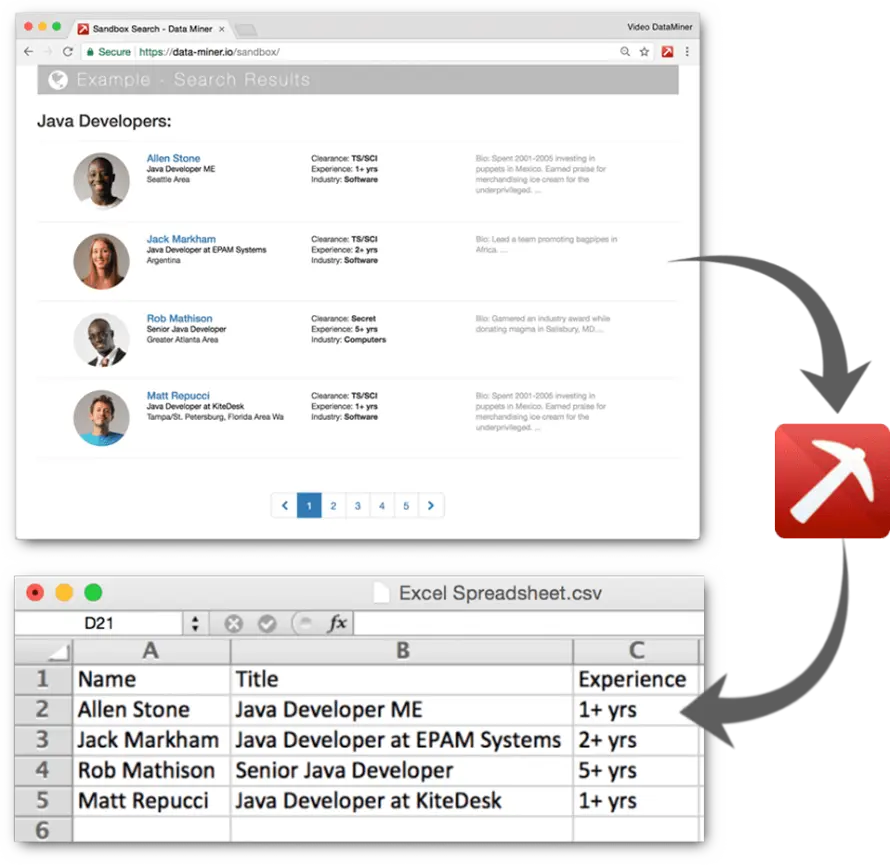</span>
----
```python
from bs4 import BeautifulSoup
import requests as rq
import json
from time import sleep
from random import randint
import pandas as pd
# store the request for available time stamps between 2018-01-01 and 2019-04-31
# with output to a json data structure in a variable called fem_film
fem_film = 'http://web.archive.org/cdx/search/cdx?url=femfilm.ca/&from=20180101&to=20190431&output=json'
# pass the above url to the internet archive and store the results locally
# in a variable called urls
fem_film_data = rq.get(fem_film).text
# print the fem_film_data
print(fem_film_data)
#convert fem_film_data from json to python dictionary
parse_fem_film_data = json.loads(fem_film_data)
print(parse_fem_film_data)
# list only the relevant pieces
for i in range(1, len(parse_fem_film_data)):
print(parse_fem_film_data[i][2],parse_fem_film_data[i][1], sep='')
# build a list of urls from the data we have. We start with an empty list object
url_list = []
# then we iterate through our response from the IA and build the urls we want to scrape
for i in range(1, len(parse_fem_film_data)):
prepend = 'https://web.archive.org/web/'
orig_url = parse_fem_film_data[i][2]
tstamp = parse_fem_film_data[i][1]
wayback_link = prepend + tstamp + '/'+orig_url + 'index.php?lang=e'
url_list.append(wayback_link)
# print the list for review
url_list
# start a counter
reqs = 0
# build empty lists to hold the repsective data
references = []
quotations = []
films = []
directors = []
for link in range(len(url_list)): # start a loop to iterate over our urls
url = url_list[link]
response = rq.get(url)
sleep(randint(5,10))
reqs += 1
if response.status_code == 404:
reference = "NA"
quotation = "NA"
film = "NA"
director = "NA"
else:
page = response.text
page_bs = BeautifulSoup(page, 'html.parser')
tables = page_bs.find_all('table')
tables_strong = tables[1].find_all('strong')
for content in tables_strong: # start a loop to interate over the tables_strong content
reference = tables_strong[1].text
quotation = tables_strong[2].text
film = tables_strong[3].text
director = tables_strong[4].text
print(url, reference, quotation, film, director, sep = '\n')
references.append(reference)
quotations.append(quotation)
films.append(film)
directors.append(director)
wb_output = pd.DataFrame({'url':url_list
,'references':references
,'quotations':quotations
,'films':films
,'directors':directors})
wb_output.to_csv('~/Desktop/fem_film_data.csv',index=False)
```
Note:
Web scraping requires a program. Some of these come packaged, ready for you to interact with with your mouse and web browser, and while they don't require you to learn a programming language, all require some knowledge of how web pages and web sites are structured.
A more powerful way to scrape web pages is to write a program for your specific needs. In an academic context, this is most frequently done using either Python or R and there are dedicated tools for both languages that help to simplify the task for you.
What might some of the advantages be of using a scripting language, like Python or R over a web browser plugin like Data Miner (https://dataminer.io) or Web scraper (https://webscraper.io)?
* automation
* customizable
* extensible to other research activities
* research transparency and reproducibility
* time saving in the long run
---
## Terms of Use, Copyright, Robots.txt
----
> Access to the Archive’s Collections is provided at no cost to you and is granted for scholarship and research purposes only.
----
> Some of the content available through the Archive may be governed by local, national, and/or international laws and regulations, and your use of such content is solely at your own risk.
----
Robots.txt...
* IA: https://archive.org/robots.txt
* UBC: https://www.ubc.ca/robots.txt
* Smithsonian: https://www.si.edu/robots.txt
* Mukurtu: https://mukurtu.org/robots.txt
Note:
A lot of tutorials that you'll encounter for webscraping are woefully - either intentionally or not so - void of a discussion of copyright and terms of use. Simply because information is distributed through a web page does not make it available for you to reuse and distribute any of that content.
The question here is then twofold: what does this mean to you as a researcher and what does it mean to the Internet Archive and it's bots crawling the Web?
Two tools are used to help researchers and collectors navigate this issue. For people, you'll generally want to find the terms of use for the site you plan to crawl. But navigating a terms of use statement and copyright is not a simple issue, and likeliy you'll want to consult with someone before proceeding.
For programs, there's a convention to use a file called robots.txt that indicates which directories within a website crawlers are permitted. There is absolutely nothing stopping a crawler from going into these directories, but it's best practice to respect them, and a scraping script should be written to ignore content in these directories.
Links:
* IA Terms of Use: https://archive.org/about/terms.php
---
## Scraping: Webpages vs APIs
Note:
There are two different ways to gather data from webpages and websites.
The first is to simply load a webpage and pull the content you want. This is the general defintion of what it means to crawl and scrape. This presents some issues for web servers however. Web crawlers are designed to make repetitive tasks simple, like clicking on every single link on a web page, following it, scraping it, clicking on every link in those pages and so on. But web servers are only designed to handle so much traffic; they anticipate the amount of volume they'll encounter by the number of users they expect and their systems are designed to handle this. Many servers, when they encounter this rapid bot extraction of data do one of two things, they crash and or they identify the ip address that is sending the request and block it from accessing their domain. In either case, the results aren't amenable to gathering data!
Two solutions are available for this. The first is to program in delays - retrieve a webpage, extrat the data you want, exam the links, prepare to retrieve the webpages from those links, but pause and wait; make it appear as though you're a human clicking throught the site and not a bot.
The second is to leverage APIs - Application Program Interfaces. APIs are controlled interfaces that certain websites develop for accessing information; they set rules for what data and how frequently that data can be retrieved. The kinds of websites that generally invest in this are sites that expect to see large amounts of scraping, like Facebook, Twitter, Good Reads, and of course, the Internet Archive. We'll see shortly how we use the IA's API as well as scraping to pull data from arhived pages.
---
## What is a Website?
----
### Content
<div class = "small">
Welcome to femfilm.ca, a bilingual research tool about Canadian women directors and their films. The Database contains (so far) 4,145 bibliographic references, 1,606 quotations, information about 1,532 films (1920-2017), and the names of 1,204 directors.
DIRECTORS: You can search for a director by first or last name, browse data about 463 directors, or view the names of 1,204 directors.
FILMS: You can search by film title, year, or length, or you can browse 1,532 films by title, year, category, or award.
BIBLIOGRAPHY: A bibliography of 241 publications about Canadian women film directors in general, with a quotation from each publication (in chronological order, 1946-2017).
AWARD WINNERS: 337 awards given to films by Canadian women (1948-2016).
PIONEERS: View a Chronology of "Firsts" or browse films of the 1920s, 1930s, 1940s, 1950s, 1960s, or 1970s (films by pioneering directors such as Nell Shipman, Jane Marsh, Joyce Wieland, Anne Claire Poirier, and Mireille Dansereau).
femfilm.ca was created by Margaret Fulford, a librarian at the University of Toronto. For more information, see About the Database. Your feedback is welcome.
</div>
----
### Structure

----
### html
```html
<head>
</head>
<body>
<div id = 'wrapper'>
<div id = "header">
<ul id = "nav" role = "navigation">
<li>Link 1</li>
<li>Link 2</li>
<li>Link 3</li>
</ul>
</div>
<div id = "body">
<h1 id = title>My Web Page!</h1>
<h2 class = "level_2">A Subtitle</h2>
<article class = "left_align">
<p>Some text here</p>
</article>
<article class = "right_align">
<p>Some text here</p>
</article>
</div>
<div id = "footer">
<ul id = "contact">
<li>Name</li>
<li>Address</li>
<li>email</li>
</ul>
</div>
</div>
</body>
```
----
### Style
<br />
<div class = "left">
<span class = 'first-letter'>W</span>elcome to [femfilm.ca](https://web.archive.org/web/20180113015447/http://femfilm.ca/index.php?lang=e), a bilingual research tool about Canadian women directors and their films. The Database contains (so far) **4,145** bibliographic references, **1,606** quotations, information about **1,532** films (1920-2017), and the names of **1,204** directors.
</div>
Note:
A web site is an almagation of web pages! So the better question in the context of scraping, is, what is a web page.
Webpages - most any document really - can be divided into three components:
* Content
* Struture
* Style
Your content is simply the words, prose et on the page. The structure is provided by html and the layout and formatting by creative style sheets. So most web pages are, at the very least, made up of two documents, an html document and a css document. When looking at older records on the web, you may find just html with formtting intermixed with the markup, but we'll ignore those cases for the moment.
Part of what this means, is that if your interest in preserving the 'object', you need to pull both the html file and the css file. If you're interest is only accessing the content of the web page, you need only pull the html.
----
### css
```css
.wrapper {
margin: auto;
max-width: 1200px;
min-width: 800px;
}
.header {
background-color: #078902;
}
.nav ul {
display: inline-block;
}
.nav ul li {
background-color: #000000;
color: #FFFFFF;
}
article .left-align {
width: 50%;
float: left;
}
article .right-align {
width: 50%;
float: right;
}
```
----
```html
<head>
<link rel = "stylesheet" href = "styles.css">
</head>
<body>
<div id = 'wrapper'>
<div id = "header">
<ul id = "nav" role = "navigation">
<li>Link 1</li>
<li>Link 2</li>
<li>Link 3</li>
</ul>
</div>
<div id = "body">
<h1 id = title>My Web Page!</h1>
<h2 class = "level_2">A Subtitle</h2>
<article class = "left_align">
<p>Some text here</p>
</article>
<article class = "right_align">
<p>Some text here</p>
</article>
</div>
<div id = "footer">
<ul id = "contact">
<li>Name</li>
<li>Address</li>
<li>email</li>
</ul>
</div>
</div>
</body>
```
```css
.wrapper {
margin: auto;
max-width: 1200px;
min-width: 800px;
}
.header {
background-color: #078902;
}
.nav ul {
display: inline-block;
}
.nav ul li {
background-color: #000000;
color: #FFFFFF;
}
article .left-align {
width: 50%;
float: left;
}
article .right-align {
width: 50%;
float: right;
}
```
---
## So Much More Than html and css
----
Static vs Dynamic content vs Applications
----
JavaScript
php
SQL
python
Note:
Two additional things should be considered in the context of preserving, crawling, and scraping web pages, and which make the work of organizations like the Internet Archive difficult.
The first is that things are no longer so simple as just html and css. When a webpage is composed of only html and css, we call the site static; it is simply a document of formatted text. However, a lot of content these days is dynamic. When a site is dynamic, things like javascript work locally on your computer to update content while things like php generate html on the fly on the server and send to your computer based on variables, like what site you came from, if you're logged in or not etc. Sometimes these updates, using things like Ajax, update your page as you're looking at it; think the search prompts in a Google searh.
This does beg the question, what is a webpage?
Websites also frequently employ forms, either for things like logins, accessing paid content etc. crawlers can't get through these, so there are immense parts of the web that aren't cralwed.
Lastly, crawlers, and scraping, rely on hyperlinks. If a web page is not linked from anywhere, only the person who created it knows it exists.
---
## Take Aways
Note:
So there are a lot of limits on what's 'preserved' from a website. Robots.txt limit the resources that can be extracted, copyright limits what we can copy and for what purposes, dynamic web content means that what we see is not what someone else sees, raising issues of ephemerality that may not exist in the traditional print world.
It is for this reason that what is on the Internet Archive and in the Wayback Machine is simply a series of snapshots of some of the accessible, more stable content on the internet.
---
## Parsing html
Note:
That's the lead up. We'll need to dig in a little to html and css to talk more about how crawling and scraping work.
Scraping relies on structure - or patterns - to be effective. html provides one aspect of these patterns, and calls to a style sheet provide the second.
html uses markup to identify header levels, to build lists and tables, to identify links, to divide pages into blocks, and to create place holders for things like images and videos.
demo: a basic, valid, html page with no markup index_1.html
demo: a basic html page, with markup index_2.html
---
## Parsing html with css
Note:
html is connected to css through the assignment of specific attributes, namely classes and ids. Ids may only be used once on a webpage, so indicate something which is unique, whereas a class can be repeated.
demo: a css markup with ids and classes
demo: a basic, valid, html page with id's and classes
---
## A Note on Historical, Niche or Bespoke Web Content
Note:
This can be particularly problematic for those sights generated by individuals with a passion for a topic but not a lot of web development experience. html is not terribly strict and web browsers have been developped to accomodate really bad mark up - really poorl document structure.
---
## Inspecting html structure
Note:
Use 'inspect element' to see the document structure and any classes or ids assigned to an element.
---
## Sample Webscrape in Python
 Google Drive
Gist
Clipboard
Google Drive
Gist
Clipboard
 Sign in with Wallet






