# 2016 homework 1 Phonebook
## 開發環境
我是用ubuntu15.04 LTS 電腦架構如下:
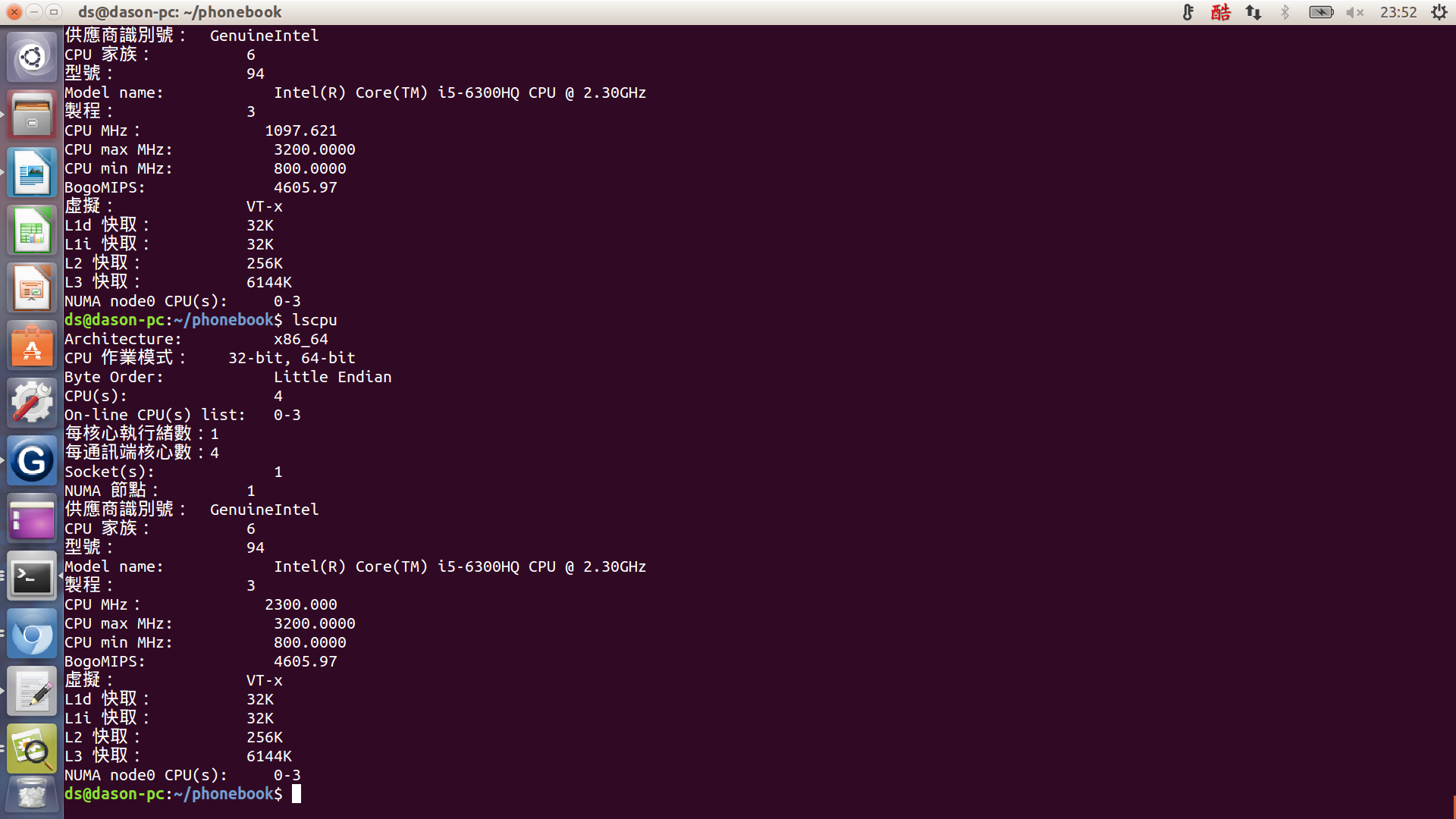
L1 cache 32K
L2 cache 256K
## Git & GitHub
* 首先在網頁上fork老師的phonebook,然後用:
* `$ git clone your git url_ ` _//譬如:git clone [](https://github.com/workfunction/phonebook.git)[https://github.com/workfunction/phonebook.git](https://github.com/workfunction/phonebook.git)
* 先clone下來你自己的repository到你的電腦裏面,之後開始修改你要修改的檔案
* 接下來要對每個修改過的檔案用:
* `$ git add file you edit ` //譬如: git add phonebook_opt.c 或是用:git add . 提交全部的檔案進索引
* 這一步就是在把檔案註冊至索引中。
* 接著提交修改版本到git中(這裡都是在本地電腦裏面clone下來的repository做修改)用:
* `$ git commit -m "your change log title" ` //譬如: git commit -m "1st opt"
* 這樣一來你就在電腦裡做好一個修訂版本囉!
* 注意一點如果打了上面的跳出:
```
* On branch master
* Your branch is up-to-date with ’origin/master’.
* Changes not staged for commit:
* modified: main.c
* modified: phonebook_opt.c
* modified: phonebook_opt.h
* no changes added to commit
```
* 代表他列的那些檔案被修改過可是你忘記add囉,所以就在把他列的檔案add進去吧!
* 最後就是上傳回去GitHub啦,用下面指令:
* $ git push origin master
* 這樣就可以把你電腦裏面的修訂版本放到GitHub裏面了喔!
* push前記得先做astyle再add喔!!`astyle --style=kr --indent=spaces=4 --indent-switches --suffix=none *.[ch]`
* 老師說要避免使用 git commit -m,而直接用 `git commit -a`,然後把 git commit messages 寫好~
## Makefile
```cmake=
target:
~~~~rule
target2:
~~~~rule line 1; \
~~~~~~~~rule line 2
```
#### Targets and Prerequisites
```cmake=
target: prereq1 prereq2
commands
```
1\. `?=` 是一個簡化的語法:若變數未定義,則替它指定新的值。否則,採用原有的值
2.` +=` 語法CFLAGS = -Wall -g CFLAGS += -O2 此時 CFLAGS 的值就變成 -Wall -g -O2 了
3.若該項目並非檔案,則為 fake 項目。如此一來將不會建立 target 檔案。但為了避免 make 有時會無去判斷 target 是否為檔案或 fake 項目,建議利用 .PHONY 來指定該項目為 fake 項目。例:
```
* .PHONY: clean
* clean:
* rm *.o
```
在上例中,若不使用 .PHONY 來指定 clean 為 fake 項目的話,若目錄中同時存在了一個名為 clean 的檔案,則 clean 這個項目將被視為**要建立 clean 這個檔案**,但 clean 這個項目卻又沒有任何的 dependencies,也因此,clean 項目將永遠被視為 up-to-date,**永遠不會被執行**。
因為利用了 .PHONY 來指定 clean 為 fake 項目,所以 make 不會去檢查目錄中是否存在了一個名為 clean 的檔案。如此也可以提昇 make 的執行效率。
4.特別字元:
@:不要**顯示**執行的指令。
-:表示即使該行指令出錯,也不會中斷執行。
5.內部變數:
`$?`:代表已被更新的 dependencies 的值,就是 dependencies 中,比 targets 還新的值。
`$@`:代表 targets 的值
`$<`:代表第一個 dependencies 的值。
`$*` :代表 targets 所指定的檔案,但不包含副檔名。
`$^` :代表規則中所有相關的檔名,The names of all the prerequisites
```
* CC ?= gcc
* CFLAGS_common ?= -Wall -std=gnu99 -g
* CFLAGS_orig = -O0
* CFLAGS_opt = -O0
* EXEC = phonebook_orig phonebook_opt phonebook_hash
* all: $(EXEC)
* SRCS_common = main.c
* phonebook_orig: $(SRCS_common) phonebook_orig.c phonebook_orig.h
* $(CC) $(CFLAGS_common) $(CFLAGS_orig) \
* -DIMPL="\"$@.h\"" -o $@ \
* $(SRCS_common) $@.c
* phonebook_opt: $(SRCS_common) phonebook_opt.c phonebook_opt.h
* $(CC) $(CFLAGS_common) $(CFLAGS_opt) \
* -DIMPL="\"$@.h\"" -o $@ \
* -DOPT=1\
* $(SRCS_common) $@.c
````
* -D 後面設定macro. 以phonebook 的makefile為例, (-D 是gcc 的option).
* -DIMPL="\"$@.h\"" 會設定IMPL 為"\"phonebook_orig.h\""
* 這裡定義的macro 等同於在source code 中的 [#define](https://embedded2016.hackpad.com/ep/search/?q=%23define&via=DS2HMWxjXky) xx
* 可用 gcc -E 觀察輸出
關於assert 參考(http://linux.die.net/man/3/assert)
* 不需要移除,只要變更編譯參數即可,請見 `man assert(http://linux.die.net/man/3/assert)`
* 在Makefile中新增: CFLAGS_common ?= -Wall -std=gnu99 -DNDEBUG
清空cache
其中有1 , 2 , 3三個值能修改
* `echo 3 > /proc/sys/vm/drop_caches`
-釋放pagecache、dentries與inodes,也就是釋放所有的cache
* `echo 2 > /proc/sys/vm/drop_caches`
-釋放dentries與inodes
* `echo 1 > /proc/sys/vm/drop_caches`
* -釋放pagecache
接下來這裡有點奇怪 make run時有先清空cache,不過當make plot時卻沒有`echo 3 | sudo tee /proc/sys/vm/drop_caches` 這樣在執行時cache miss 不是就不準了嗎?@@
```
* run: $(EXEC)
* echo 3 | sudo tee /proc/sys/vm/drop_caches
* **watch** -d -t "./phonebook_orig && echo 3 | sudo tee /proc/sys/vm/drop_caches"
```
* //watch 這個指令預設是2秒,會去輸出後面給定的指令
```
* cache-test: $(EXEC)
* perf stat --repeat 100 \
* -e cache-misses,cache-references,instructions,cycles \
* ./phonebook_orig
* perf stat --repeat 100 \
* -e cache-misses,cache-references,instructions,cycles \
* ./phonebook_opt
* perf stat --repeat 100 \
* -e cache-misses,cache-references,instructions,cycles \
* ./phonebook_hash
* Performance counter stats for ’./phonebook_orig’ (100 runs):
* 5,729,901 cache-misses # 91.576 % of all cache refs
* 6,229,665 cache-references
* 322,355,316 instructions # 1.57 insns per cycle
* 204,877,372 cycles
* 0.069412000 seconds time elapsed ( +- 0.21% )
* Performance counter stats for ’./phonebook_opt’ (100 runs):
* 1,286,653 cache-misses # 64.048 % of all cache refs
* 2,062,259 cache-references
* 281,251,581 instructions # 2.35 insns per cycle
* 118,253,700 cycles
* 0.042995290 seconds time elapsed ( +- 5.16% )
* Performance counter stats for ’./phonebook_hash’ (100 runs):
* 1,533,017 cache-misses # 42.857 % of all cache refs
* 3,566,290 cache-references
* 278,984,877 instructions # 1.54 insns per cycle
* 180,660,117 cycles
* 0.061307312 seconds time elapsed ( +- 0.86% )
```
這次每個執行前都先清空cache 加入`echo 3 | sudo tee /proc/sys/vm/drop_caches`
```
* Performance counter stats for ’./phonebook_orig’ (100 runs):
* 5,619,307 cache-misses # 90.254 % of all cache refs
* 6,146,948 cache-references
* 322,041,533 instructions # 1.57 insns per cycle
* 202,699,556 cycles
* 0.069857174 seconds time elapsed ( +- 0.70% )
* Performance counter stats for ’./phonebook_opt’ (100 runs):
* 1,205,436 cache-misses # 59.680 % of all cache refs
* 1,986,346 cache-references
* 281,165,328 instructions # 2.35 insns per cycle
* 118,036,954 cycles
* 0.041230124 seconds time elapsed ( +- 0.95% )
* Performance counter stats for ’./phonebook_hash’ (100 runs):
* 1,502,643 cache-misses # 42.097 % of all cache refs
* 3,596,799 cache-references
* 277,942,427 instructions # 1.53 insns per cycle
* 180,447,629 cycles
* 0.061681775 seconds time elapsed ( +- 0.95% )
```
果然先清空cache後每個部份cache-miss都有下降大約好幾萬次~
<table style="color: rgb(0, 0, 0); font-family: Helvetica; letter-spacing: normal; line-height: normal; font-size: 13px;">
<tbody>
<tr>
<td class="added" style="border: 1px solid rgb(153, 153, 153); min-width: 50px; height: 22px; line-height: 16px; padding-right: 4px; padding-left: 4px;"></td>
<td class="added" style="border: 1px solid rgb(153, 153, 153); min-width: 50px; height: 22px; line-height: 16px; padding-right: 4px; padding-left: 4px;">沒清cache</td>
<td class="added" style="border: 1px solid rgb(153, 153, 153); min-width: 50px; height: 22px; line-height: 16px; padding-right: 4px; padding-left: 4px;">有清cache</td>
</tr>
<tr>
<td class="added" style="border: 1px solid rgb(153, 153, 153); min-width: 50px; height: 22px; line-height: 16px; padding-right: 4px; padding-left: 4px;">phonebook_orig</td>
<td class="added" style="border: 1px solid rgb(153, 153, 153); min-width: 50px; height: 22px; line-height: 16px; padding-right: 4px; padding-left: 4px;">5,729,901</td>
<td class="added" style="border: 1px solid rgb(153, 153, 153); min-width: 50px; height: 22px; line-height: 16px; padding-right: 4px; padding-left: 4px;">5,619,307</td>
</tr>
<tr>
<td class="added" style="border: 1px solid rgb(153, 153, 153); min-width: 50px; height: 22px; line-height: 16px; padding-right: 4px; padding-left: 4px;">phonebook_opt</td>
<td class="added" style="border: 1px solid rgb(153, 153, 153); min-width: 50px; height: 22px; line-height: 16px; padding-right: 4px; padding-left: 4px;">1,286,653</td>
<td class="added" style="border: 1px solid rgb(153, 153, 153); min-width: 50px; height: 22px; line-height: 16px; padding-right: 4px; padding-left: 4px;">1,205,436</td>
</tr>
<tr>
<td class="added" style="border: 1px solid rgb(153, 153, 153); min-width: 50px; height: 22px; line-height: 16px; padding-right: 4px; padding-left: 4px;">phonebook_hash</td>
<td class="added" style="border: 1px solid rgb(153, 153, 153); min-width: 50px; height: 22px; line-height: 16px; padding-right: 4px; padding-left: 4px;">1,533,017</td>
<td class="added" style="border: 1px solid rgb(153, 153, 153); min-width: 50px; height: 22px; line-height: 16px; padding-right: 4px; padding-left: 4px;">1,502,643</td>
</tr>
</tbody>
</table>
## 學習perf
[NCKU wiki](http://wiki.csie.ncku.edu.tw/embedded/perf-tutorial)
kernel.perf_event_paranoid 是用來決定你在沒有 root 權限下 (Normal User) 使用 perf 時,你可以取得哪些 event data。預設值是 1 ,你可以輸入
* `$ cat /proc/sys/kernel/perf_event_paranoid`
來查看權限值。一共有四種權限值:
* `2 `: 不允許任何量測。但部份用來查看或分析已存在的紀錄的指令仍可使用,如 perf ls、perf report、perf timechart、 perf trace。
* `1` : 不允許 CPU events data。但可以使用 perf stat、perf record 並取得 Kernel profiling data。
* `0` : 不允許 raw tracepoint access。但可以使用 perf stat、perf record 並取得 CPU events data。
* `-1`: 權限全開。
最後如果要檢測 cache miss event ,需要先取消 kernel pointer 的禁用。
* `$ sudo sh -c " echo 0 > /proc/sys/kernel/kptr_restrict"`
## Perf 基本使用
**<u>Perf 能觸發的事件分為三類:</u>**
* **hardware** : 由 PMU 產生的事件,比如 cache-misses、cpu-cycles、instructions、branch-misses …等等,通常是當需要瞭解程序對硬體特性的使用情況時會使用。
* **software** : 是核心程式產生的事件,比如 context-switches、page-faults、cpu-clock、cpu-migrations …等等。
* **tracepoint** : 是核心中的靜態 tracepoint 所觸發的事件,這些 tracepoint 用來判斷在程式執行時期,核心的行為細節,比如 slab 記憶體配置器的配置次數等。
**<u>perf 指令:</u>**
* `$ perf top `可以觀察是什麼程序吃掉系統效能,導致系統異常變慢。符號旁顯示**[.]**表示其位於 User mode,**[k]**則為 kernel mode。
* $ perf top -e cache-misses -c 5000 //-e表示所要查看的 event, -c 表示取樣頻率 預設每秒4000次
* `perf stat` 主要是已經有個要優化的目標,對這個目標進行特定或一系列的 event 檢查,進而了解該程序的效能概況。
* `$ perf stat --repeat 5 -e cache-misses,cache-references,instructions,cycles `
* `./perf_stat_cache_miss /--repeat <n>`或是-r <n> 可以重複執行 n 次該程序,並顯示每個 event 的變化區間。 cache-misses,cache-references和 instructions,cycles類似這種成對的 event,若同時出現 perf 會很貼心幫你計算比例
* usage: `perf stat [<options>] [<command>]`
* -e, --event <event> event selector. use ’perf list’ to list available events
* -i, --no-inherit child tasks do not inherit counters
* -p, --pid <n> stat events on existing process id
* -t, --tid <n> stat events on existing thread id
* -a, --all-cpus system-wide collection from all CPUs
* -c, --scale scale/normalize counters
* -v, --verbose be more verbose (show counter open errors, etc)
* -r, --repeat <n> repeat command and print average + stddev (max: 100)
* -n, --null null run - dont start any counters
* -B, --big-num print large numbers with thousands’ separators
**<u>範例測試:</u>**
```
static char array[10000][10000];
int main (void){
int i, j;
for (i = 0; i < 10000; i++)
for(j = 0; j < 10000; j++)
array[j][i]++;
return 0;
}
```
```
* Performance counter stats for ’./cache_miss_test’ (5 runs):
* 5,155,920 cache-misses # 2.112 % of all cache refs
* 243,761,851 cache-references
* 2,105,970,720 instructions # 2.02 insns per cycle
* 1,050,026,358 cycles
* 0.334916064 seconds time elapsed ( +- 1.17% )
```
如果我們利用cache存取的空間區域性(spatial locality),將array[j][i] 改成 array[i][j] 則效果如下:
```
* Performance counter stats for ’./cache_miss_test2’ (5 runs):
* 1,947,714 cache-misses # 37.618 % of all cache refs
* 5,249,712 cache-references
* 2,105,898,778 instructions # 2.60 insns per cycle
* 811,120,056 cycles
* 0.258861416 seconds time elapsed ( +- 0.83% )
```
cache-references從243,761,851 降到5,249,712 差了快50倍,時間也減少了0.08秒
**<u>先練習範例pi</u>**
* 查看pi這個程式那個部份消耗作多的cpu週期,執行./pi & sudo perf top -p $!,結果顯示compute_pi_baseline函式佔了程式99.78%
* 
**<u>看原本Orig的code:</u>**
**$./phonebook_orig & perf top -p $! **$!代表最後一個執行的程式
這樣可以讓程式執行並且讓perf可以取的程式的pid去追蹤熱點,不過這邊要輸入三次才會跑出來下面的結果,不知道為什麼?以下可以看到熱點都是在stracasecmp, findName,還有malloc函式

## phonebook 優化辦法
原本程式:
1.先把word.txt name 讀到每一個memory entry, 每個entry 用一個struct來建立,裡面有last name、first name、email..etc. 每個entry是用一個link list串起來
2.append()就是將last Name放入每個entry,每次新增一個entry就放在上一個entry後面
3.fineName()就是去搜尋
可能的效能改進方向:
* 改寫 struct __PHONE_BOOK_ENTRY 的成員,搬動到新的結構中
* 使用 hash function 來加速查詢
* 既然 first name, last name, address 都是合法的英文 (可假設成立),使用[字串壓縮的演算法](http://stackoverflow.com/questions/1138345/best-compression-algorithm-for-short-text-strings),降低資料表示的成本
* 使用 binary search tree 改寫演算法
* memory pool, work thread
## 優化方法一(縮小entry)
**未優化前:**
原本的struct entry 大小136 bytes, trace code可以發現都只有在找lastName,其他欄位沒用到。
```
* typedef struct __PHONE_BOOK_ENTRY {
* char lastName[MAX_LAST_NAME_SIZE];
* char firstName[16];
* char email[16];
* char phone[10];
* char cell[10];
* char addr1[16];
* char addr2[16];
* char city[16];
* char state[2];
* char zip[5];
* struct __PHONE_BOOK_ENTRY *pNext;
* } entry;
```
```
* size of entry : 136 bytes
* execution time of append() : 0.039642 sec
* execution time of findName() : 0.005316 sec
* Performance counter stats for ’./phonebook_orig’ (100 runs):
* 4,706,050 cache-misses # 94.734 % of all cache refs
* 4,979,890 cache-references
* 262,661,724 instructions # 1.49 insns per cycle
* 176,517,399 cycles
* 0.060470353 seconds time elapsed ( +- 0.32% )
```
**優化後:**
這邊採用的方法是讓struct entry size變小,讓更多的entry可以進到cache裡面增加cache-hit機率,原本的size為136 bytes,縮小後變為24 bytes,方法是將struct entry 內的其他欄位註解掉。
```
* typedef struct __PHONE_BOOK_ENTRY {
* char lastName[MAX_LAST_NAME_SIZE];
* /* char firstName[16];
* char email[16];
* char phone[10];
* char cell[10];
* char addr1[16];
* char addr2[16];
* char city[16];
* char state[2];
* char zip[5];*/
* struct __PHONE_BOOK_ENTRY *pNext;
* } entry;
```
```
* size of entry : 24 bytes
* execution time of append() : 0.031647 sec
* execution time of findName() : 0.002120 sec
* Performance counter stats for ’./phonebook_opt’ (100 runs):
* 1,045,759 cache-misses # 64.812 % of all cache refs
* 1,606,542 cache-references
* 240,996,877 instructions # 2.20 insns per cycle
* 110,814,772 cycles
* 0.038158386 seconds time elapsed ( +- 0.31% )
```

Cache miss 由原本的94.734 % 下降了64.812 % 效果不錯~!!
## 優化方法二(用hash table)
這邊參考了許多同學筆記,決定用djb2的hash funtion, 我先一開始就宣告一個指標陣列,讓它們先指向null,然後每個字串在經過hash funtion 轉成key值之後, 再malloc一個entry給它,這邊我bucket大小先選**3733**
djb2 hash funtion:
```
unsigned int hash(char *str) {
unsigned int hash=0;
while(*str){
hash=((hash<<5)+hash)+(*str++);
}
return (hash % SIZE);
}
```
```
orig opt hash
append() 0.042059 0.030150 0.038795
findName() 0.005248 0.001807 0.000001
```
bucket:**3733**
* 

可以看到分佈還算滿均勻的~
bucket:**5381**


跟3733的分佈差不多也是滿均勻的~~
## 優化方法三(memory pool+hash table)
因為一直動態配置記憶體會消耗很多時間,所以老師有建議可以用memory pool 方式 ,我這邊是一開始就把memory pool 讓它具有40萬個enrty 的空間 ,這樣malloc 時間應該可以大幅下降
```
* Performance counter stats for ’./phonebook_orig’ (100 runs):
* 5,605,583 cache-misses # 90.168 % of all cache refs
* 6,146,299 cache-references
* 321,993,358 instructions # 1.55 insns per cycle
* 204,993,902 cycles
* 0.071643834 seconds time elapsed ( +- 0.57% )
* Performance counter stats for ’./phonebook_opt’ (100 runs):
* 1,315,058 cache-misses # 65.543 % of all cache refs
* 1,988,104 cache-references
* 281,276,423 instructions # 2.33 insns per cycle
* 121,999,410 cycles
* 0.042034001 seconds time elapsed ( +- 0.82% )
* Performance counter stats for ’./phonebook_hash’ (100 runs):
* 1,565,930 cache-misses # 41.414 % of all cache refs
* 3,708,770 cache-references
* 278,921,792 instructions # 1.49 insns per cycle
* 186,693,421 cycles
* 0.063751001 seconds time elapsed ( +- 0.54% )
* Performance counter stats for ’./memory_pool’ (100 runs):
* 1,236,034 cache-misses # 44.846 % of all cache refs
* 2,710,477 cache-references
* 307,346,935 instructions # 2.35 insns per cycle
* 127,654,988 cycles
* 0.044987982 seconds time elapsed ( +- 0.82% )
```

**Performance:**
```
orig opt hash hash+memor_ypool
append() 0.041559 0.030556 0.038795 0.027478
findName() 0.005302 0.001871 0.000001 0.000001
speed up
append() 1.36x 1.07x 1.51x
findName() 2.83x 5302x 5302x
```
**cache miss:**
<table style="color: rgb(0, 0, 0); font-family: Helvetica; letter-spacing: normal; line-height: normal; font-size: 13px;">
<tbody>
<tr>
<td class="added" style="border: 1px solid rgb(153, 153, 153); min-width: 50px; height: 22px; line-height: 16px; padding-right: 4px; padding-left: 4px;"></td>
<td class="added" style="border: 1px solid rgb(153, 153, 153); min-width: 50px; height: 22px; line-height: 16px; padding-right: 4px; padding-left: 4px;">phonebook_orig</td>
<td class="added" style="border: 1px solid rgb(153, 153, 153); min-width: 50px; height: 22px; line-height: 16px; padding-right: 4px; padding-left: 4px;">phonebook_opt</td>
<td class="added" style="border: 1px solid rgb(153, 153, 153); min-width: 50px; height: 22px; line-height: 16px; padding-right: 4px; padding-left: 4px;">phonebook_hash</td>
<td class="added" style="border: 1px solid rgb(153, 153, 153); min-width: 50px; height: 22px; line-height: 16px; padding-right: 4px; padding-left: 4px;">memory_pool</td>
</tr>
<tr>
<td class="added" style="border: 1px solid rgb(153, 153, 153); min-width: 50px; height: 22px; line-height: 16px; padding-right: 4px; padding-left: 4px;">cache-misses</td>
<td class="added" style="border: 1px solid rgb(153, 153, 153); min-width: 50px; height: 22px; line-height: 16px; padding-right: 4px; padding-left: 4px;">5,605,583</td>
<td class="added" style="border: 1px solid rgb(153, 153, 153); min-width: 50px; height: 22px; line-height: 16px; padding-right: 4px; padding-left: 4px;">1,315,058</td>
<td class="added" style="border: 1px solid rgb(153, 153, 153); min-width: 50px; height: 22px; line-height: 16px; padding-right: 4px; padding-left: 4px;">1,565,930</td>
<td class="added" style="border: 1px solid rgb(153, 153, 153); min-width: 50px; height: 22px; line-height: 16px; padding-right: 4px; padding-left: 4px;">1,236,034</td>
</tr>
<tr>
<td class="added" style="border: 1px solid rgb(153, 153, 153); min-width: 50px; height: 22px; line-height: 16px; padding-right: 4px; padding-left: 4px;">cache-reference</td>
<td class="added" style="border: 1px solid rgb(153, 153, 153); min-width: 50px; height: 22px; line-height: 16px; padding-right: 4px; padding-left: 4px;">6,146,299</td>
<td class="added" style="border: 1px solid rgb(153, 153, 153); min-width: 50px; height: 22px; line-height: 16px; padding-right: 4px; padding-left: 4px;">1,988,104</td>
<td class="added" style="border: 1px solid rgb(153, 153, 153); min-width: 50px; height: 22px; line-height: 16px; padding-right: 4px; padding-left: 4px;">3,708,770</td>
<td class="added" style="border: 1px solid rgb(153, 153, 153); min-width: 50px; height: 22px; line-height: 16px; padding-right: 4px; padding-left: 4px;">2,710,477</td>
</tr>
<tr>
<td class="added" style="border: 1px solid rgb(153, 153, 153); min-width: 50px; height: 22px; line-height: 16px; padding-right: 4px; padding-left: 4px;">of all cache refs</td>
<td class="added" style="border: 1px solid rgb(153, 153, 153); min-width: 50px; height: 22px; line-height: 16px; padding-right: 4px; padding-left: 4px;">90.168 %</td>
<td class="added" style="border: 1px solid rgb(153, 153, 153); min-width: 50px; height: 22px; line-height: 16px; padding-right: 4px; padding-left: 4px;">65.543 %</td>
<td class="added" style="border: 1px solid rgb(153, 153, 153); min-width: 50px; height: 22px; line-height: 16px; padding-right: 4px; padding-left: 4px;">41.414 %</td>
<td class="added" style="border: 1px solid rgb(153, 153, 153); min-width: 50px; height: 22px; line-height: 16px; padding-right: 4px; padding-left: 4px;">44.846 %</td>
</tr>
</tbody>
</table>
## Gnuplot 學習
參考JASON H同學的詳細解說如下:
```
* reset
* set ylabel ’time(sec)’ `設定Y軸名稱`
* set style fill solid `設定圖形屬性 fill solid是直方圖`
* set title ’perfomance comparison’ `設定設定圖片標題`
* set term png enhanced font ’Verdana,10’ `設定圖片的字體`
* set output ’runtime.png’ `設定輸出檔名`
* plot [:][:0.060]'output.txt' using 2:xtic(1) with histogram title 'original' , \
* '' using ($0-0.1):($2+0.002):2 with labels title ' ' , \
* '' using 3:xtic(1) with histogram title ’'optimized' , \
* '' using ($0+0.1):($3+0.002):3 with labels title ' ' , \
* '' using 4:xtic(1) with histogram title 'hashed' , \
* '' using ($0+0.3):($4+0.0015):4 with labels title ' '
```
基本語法:`using 2:xtic(1) with histogram title ’original’, ` `’’ using ($0-0.1):($2+0.002):2 with labels title ’ ’,`
* 單引號表示與前面一個檔案相同
* 第一行`using 2`的意思是以output.txt的第二行當作資料, `xtic(1)` 是用第一行當作X軸的標題(就是append()跟findname())
* 第二行是來設定直方圖上面的顯示數字位置(x軸位置):(y軸位置)
* $0=column(0) 虛擬的行,可以當作檔案中紀錄「列號」的一行
* (x-座標):(y-座標):(這裡的數字表示要用那一行的資料) with labels 把數字標在直方圖上,上面有對座標平移避免讓數字不會疊在長條圖上,後方的 title ’ ’可以用 notitle取代
## 參考資料
1. [畫圖工具Graphviz](http://www.graphviz.org/)
2. [詹志鴻同學](https://hackpad.com/Embedded-System-2-11ezKKob2aT)(提到gnuplot使用,multithread實做)
3. [有沒有發現 `strcasecmp` 用到 Intel AVX SIMD 來加速呢?](https://sourceware.org/ml/libc-alpha/2015-06/msg00799.html)
4. [林郁寧同學](https://embedded2015.hackpad.com/-Homework2-7UYo4wcPhd7)(實做4種hash function,透過abstraction的方式把function包裝成API)
5. [楊永平同學](https://mimihalo.hackpad.com/HW2--D5sU0CfNmJH)(字串壓縮有解說,也有分析hash funtion圖表不錯)
6. [GCC Optimize-Options](https://gcc.gnu.org/onlinedocs/gcc/Optimize-Options.html)
7. [大量 String 資料結構 : Trie](http://www.csie.ntnu.edu.tw/~u91029/String.html#5)
8. [GALI 同學](https://embedded2015.hackpad.com/-Homework-2-BcviLIydq9w) / [github](https://github.com/GaliTW/phonebook) (有實做 AVL ,BST,RB 樹)
9. [Charles同學](https://charles620016.hackpad.com/ep/pad/static/Japi4qFyAzt)(實做fuzzy search)
10. [陳品睿同學](https://embedded2016.hackpad.com/2016q1-Homework1-utBhpkDFVMh)(實做memory pool)
11. [ RINC同學](https://embedded2016.hackpad.com/2016q1-Homework-1-9eSkToGwJvZ)(有用圖表表示hash collision)
12. [安正同學](https://embedded2016.hackpad.com/2016q1-Homework-1-eNBItF9WQqY)(改變struct大小為二維陣列)
 Sign in via Google
 Sign in via Facebook
 Sign in via X(Twitter)
 Sign in via GitHub
 Sign in via Dropbox
 Sign in with Wallet
Connect another wallet
Sign in with Wallet
Connect another wallet