<style>
.icon{
position: absolute;
bottom: -20;
left: 0;
width: 400px
}
</style>
# Introduction to NLP with Hugging Face
>[name=醫學一 蕭名凱][time=Mar 6, 2025]
<img class="icon" src="https://hackmd.io/_uploads/B1g7Bq_qJe.png">
----
# 自我介紹 <img src="https://hackmd.io/_uploads/HyACJlv5Je.jpg" alt="drawing" width="400"/>
----
> [name=臺中人 蕭名凱]
- TCFSH TCIRC 第39屆副社長
https://tcirc.tw/
- GDSC Core Team Member 2024-now <img src="https://hackmd.io/_uploads/S1hAmxD91g.png" width=50>
https://gdg.community.dev/gdg-on-campus-taipei-medical-university-taipei-taiwan/
- Developer/Maintainer of College TW <img src="https://college-tw.hsiaoeric.org/static/apply/images/college.tw_bg_removed2.png" width=50>
https://college-tw.hsiaoeric.org/
---
簡報qr code:

---
# Introduction
[Slido](https://wall.sli.do/event/qEQwebvuSpz2uAXbfKAGeK?section=0566e76a-32d3-4e07-be77-7b20af7ca274)

----
## TODOs:
- setting up development environment:
Python, VS code <img src="https://code.visualstudio.com/assets/favicon.ico" width=50> , Jupyter notebook<img src="https://hackmd.io/_uploads/S1hBk7D5Jx.png" width=70>
- learning about NLP, transformers architecture
- hand-ons with HF packages
- integration with Telegram (Bonus?)
---
## Setting up <img src="https://hackmd.io/_uploads/ByHBMQv9Jx.png" width=100>
----
## Download Python

https://www.python.org/downloads/
----
## 確認在Windows的安裝路徑:選擇Customize installation

(為了方便指令執行python)
----
## Next

(為了方便指令執行python)
----
## 先把安裝位置`Ctrl+c`

然後install
(為了方便指令執行python)
----
## press `Windows`
then type "系統變數"

(為了方便指令執行python)
----
## 編輯系統變數`Path`

(為了方便指令執行python)
----
## 新增 then `Ctrl+v`

(為了方便指令執行python)
----
## 如下圖表示成功~

- Linux: `python3`
- Windows: `python`
---
## Required Python packages
`pip install "transformers[sentencepiece]"`
- transformers, datasets, evaluate 
- tensorflow<2.11, tf_keras 
- torch, torchvision, torchaudio 
- not include (bonus?): python-telegram-bot 
---
## Setting up VS code <img src="https://code.visualstudio.com/assets/favicon.ico" width=100> , <img src="https://hackmd.io/_uploads/S1hBk7D5Jx.png" width=100>
----

https://code.visualstudio.com/
----
## Install and open

select folder -> create a __himom.ipynb__
----
## Select kernel

----
## Install Jupyter kernel

ps. 會花一點時間
----
## Google Colab

https://colab.research.google.com/
---
## Useful hotkeys
- run focused cell: `⌘/Ctrl+Enter`
- for Colab
- insert cell: `⌘/Ctrl+m` + `b`
- delete cell(Colab): `⌘/Ctrl+m` + `d`
- run CLI: `![command]`
- for VS code
- 加油~要自訂)
---
## What is NLP
----
## 自然語言處理 natural language processing
- linguistics and machine learning
- everything about human language
----
## Common tasks
- Classifying whole sentences
- Classifying each word in a sentence
- Generating text content
- Extracting an answer from a text
- Generating a new sentence from an input text
- speech recognition and computer vision
----
## Challenging?
- Computers don’t process information in the same way as humans
- Computers process information in __numbers__
---
## What can Transformers do
----
### Transformer, deep learning architecture
- It is used to solve all kinds of NLP tasks
- Some of the companies, organizations using it:

----
## Transformers library
provides the functionality to create and use those shared models
----
The most basic object: `pipeline()`
```
from transformers import pipeline
classifier = pipeline("sentiment-analysis")
classifier("Hi, mom.")
```
ps. to run the cell: `Ctrl+Enter`
pps. for multiple inputs: use `[a, b, c, ...]`
----
output:
```
# 單一輸入:
[{'label': 'POSITIVE', 'score': 0.9598047137260437}]
# 多輸入的話:
[{'label': 'POSITIVE', 'score': 0.9598047137260437},
{'label': 'NEGATIVE', 'score': 0.9994558095932007}]
```
----
不過第一次跑會需要等一下

----
- By default, `pipeline` selects a particular __pretrained model__ that has been __fine-tuned__ for __sentiment analysis__ in English.
- When you run:
`pipeline("sentiment-analysis")`
for the first time
model was downloaded and cached
----
## 其他`pipeline["選項"]`
- `feature-extraction` (get the vector representation of a text)
- `fill-mask`
- `ner` (named entity recognition)
- `question-answering`
- `sentiment-analysis`
- `summarization`
- `text-generation`
- `translation`
- `zero-shot-classification`
----
## Zero-shot classification
```
classifier = pipeline("zero-shot-classification")
classifier(
"This is a course about the Transformers library",
candidate_labels=["education", "politics", "business"],
)
```
----
output:
```
{'sequence': 'This is a course about the Transformers library',
'labels': ['education', 'business', 'politics'],
'scores': [0.8445963859558105, 0.111976258456707, 0.043427448719739914]}
```
----
## Text generation
```
generator = pipeline("text-generation")
generator("Hi, mom.")
```
----
output:
```
[{'generated_text': 'In this course, we will teach you how to understand and use '
'data flow and data interchange when handling user data. We '
'will be working with one or more of the most commonly used '
'data flows — data flows of various types, as seen by the '
'HTTP'}]
```
其他參數:
`num_return_sequences`
`max_length`
----
## etc...
https://huggingface.co/learn/nlp-course/chapter1/3
---
## Transformers
----
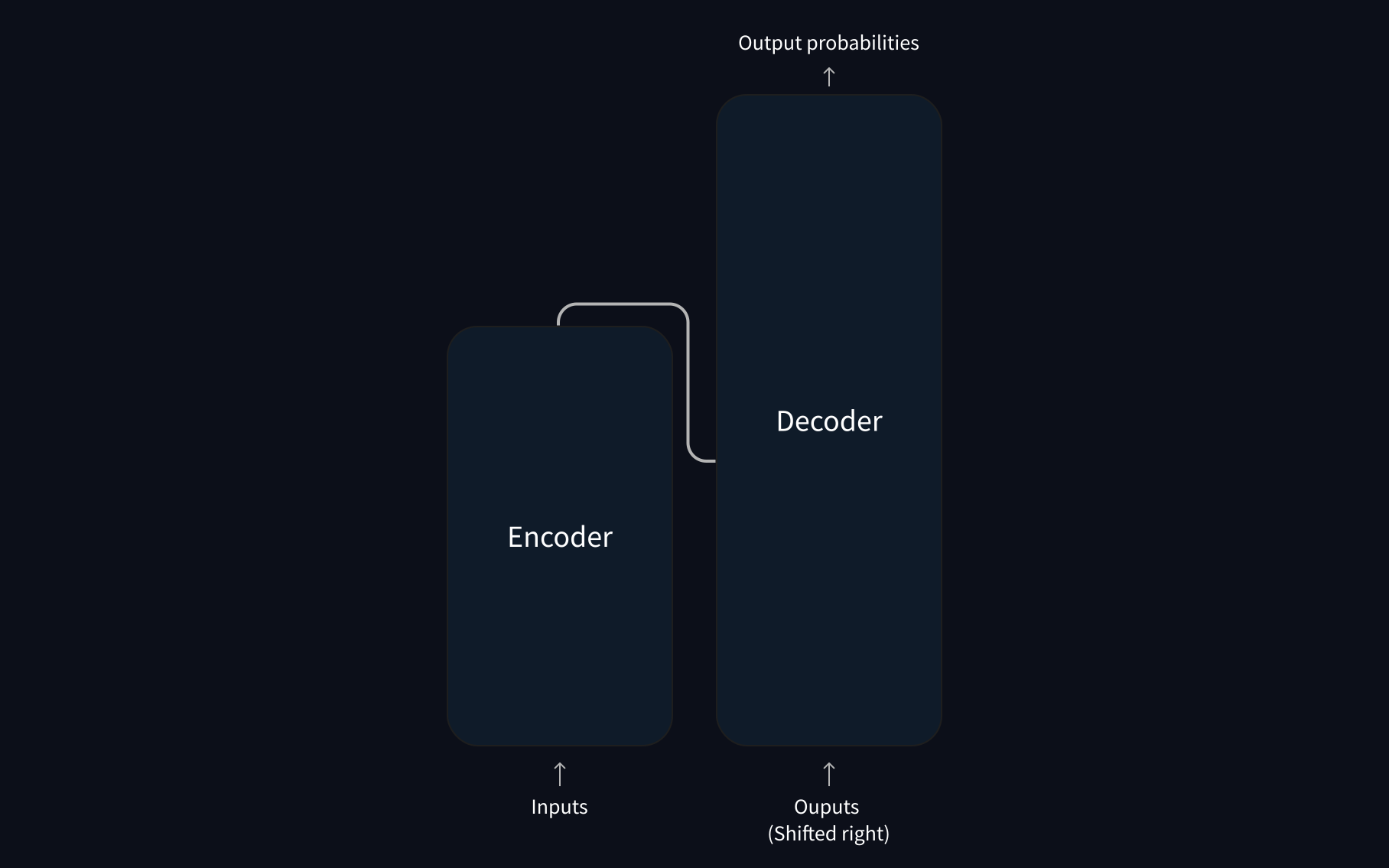
General architecture:
----
+ Encoder:
+ receives an input and builds a representation of it (its features)
+ optimized to understand the input
+ Decoder:
+ uses the encoder’s representation (features) and other inputs to generate a target sequence
+ optimized for generating outputs
----
### Transformers categories
+ Auto-regressive = decoder-only: [GPT](https://cdn.openai.com/research-covers/language-unsupervised/language_understanding_paper.pdf)-like
+ Auto-encoding = encoder-only: [BERT](https://arxiv.org/abs/1810.04805)-like
+ sequence-to-sequence: [BART](https://arxiv.org/abs/1910.13461)/[T5](https://arxiv.org/abs/1910.10683)-like
the above examples all LLM
----
LLM(large language model):
+ self-supervised:
+ objective automatically computed from the inputs
+ no need for manual labeling
+ large amounts of raw text:
+ developing statistical understanding
+ not very useful for specific __practical tasks__
----
An example of task: __causal language modelling__

----
Another one: __mask language modelling__

----

__Large__ LM:
----
Pretraining: training a model from scratch -- __weights are randomly initialized__

----
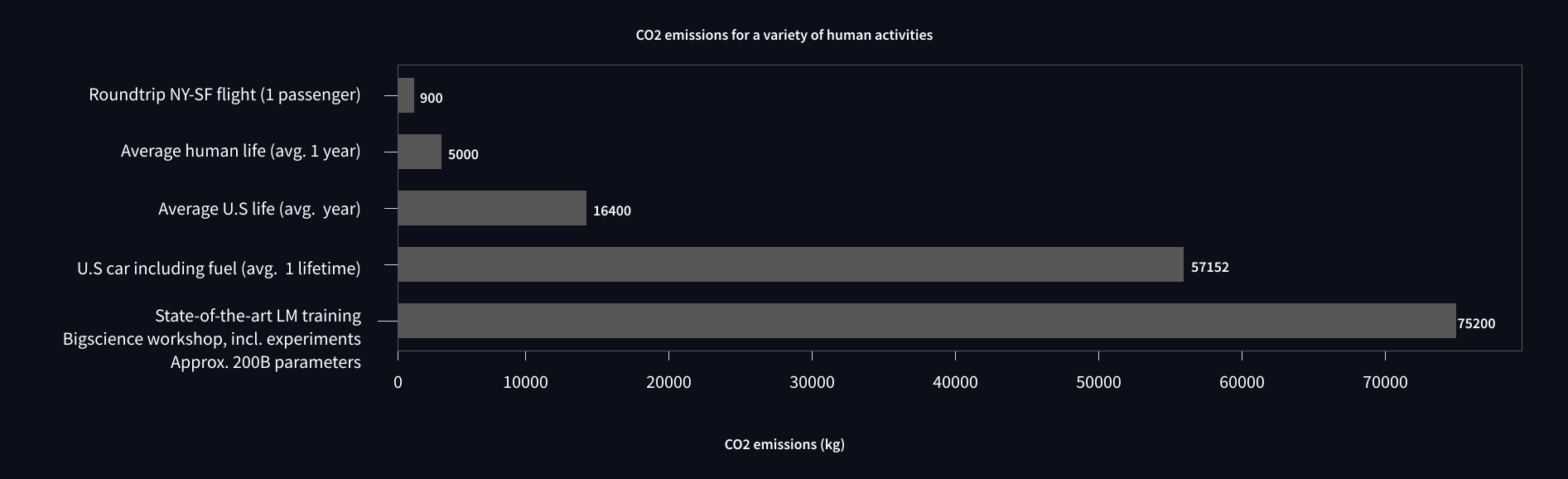
Evironmental cost:
----
### Transfer learning(Fine-tuning)
based on pretrained model
----
To perform fine-tuning:
1. acquire a pretrained language model
2. train with a dataset specific to your task: possibly __supervised training__
----
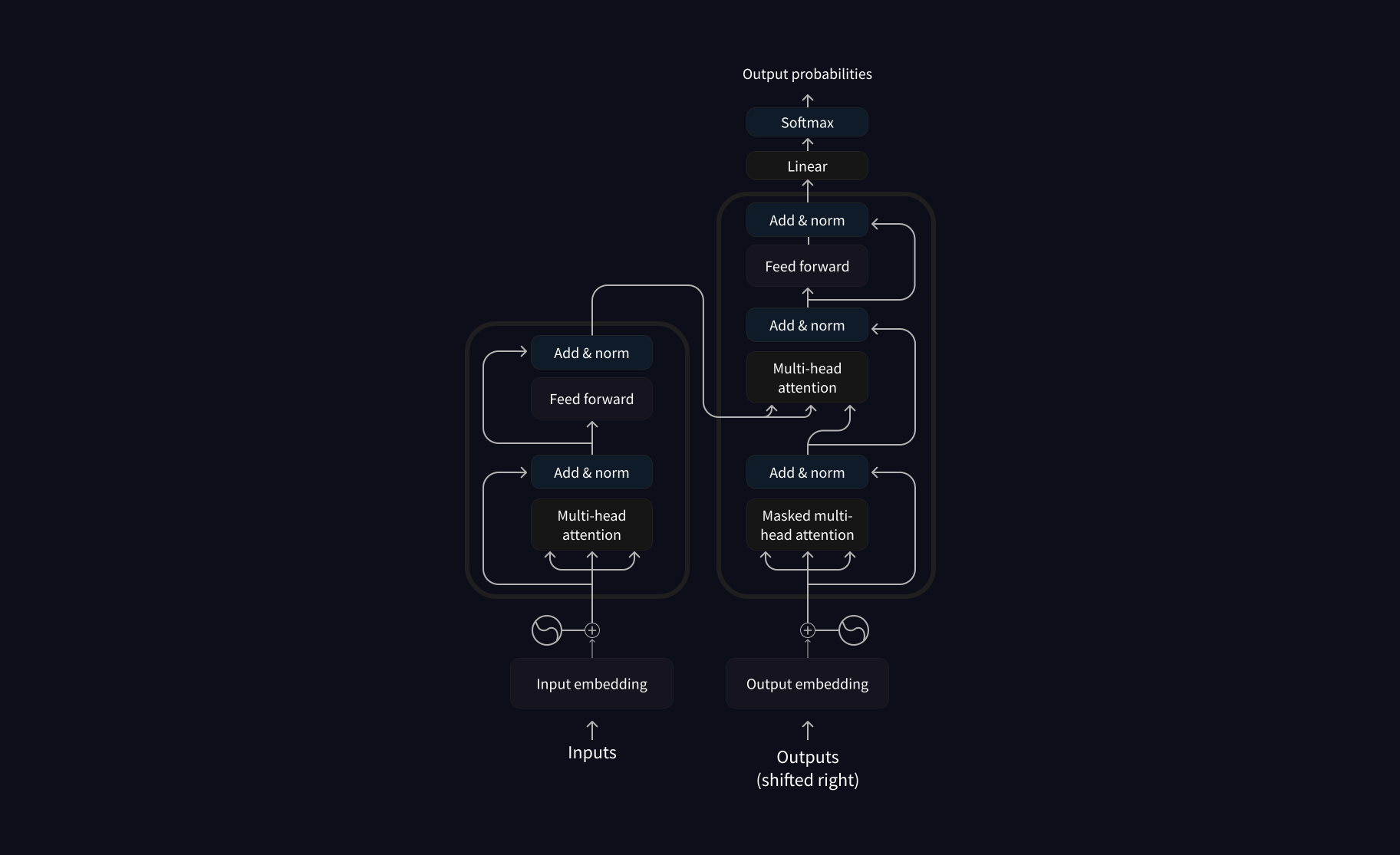
Original Transformer architecture:
----
recommend StatQuest!
{%youtube zxQyTK8quyY %}
----
+ Attention layers:
+ pay specific attention to certain words
+ more or less ignore the others
the first paper introduce Transformer:
[Attention is All You Need](https://arxiv.org/abs/1706.03762)
(published in 2017 by researchers at Google)
----
### Bias and limitations
```
from transformers import pipeline
unmasker = pipeline("fill-mask", model="bert-base-uncased")
result = unmasker("This man works as a [MASK].")
print([r["token_str"] for r in result])
result = unmasker("This woman works as a [MASK].")
print([r["token_str"] for r in result])
```
----
output:
```
['lawyer', 'carpenter', 'doctor', 'waiter', 'mechanic']
['nurse', 'waitress', 'teacher', 'maid', 'prostitute']
```
> beware of generate sexist, racist, or homophobic content when using these tools
---
<!-- .slide: style="text-align: left" -->
### In Terms of a model
+ <ins>Architecture</ins>: definition of layers and operations
+ <ins>Checkpoints</ins>: weights loaded given the architecture
+ <ins>Model</ins>: umbrella term that can mean both
For example:
+ GPT-2 is an architecture from OpenAI
+ `sst-gpt2` is a checkpoint - a set of weights trained by someone with Stanford Sentiment Treebank datasets
---
## Behind the pipeline

----
### Preprocessing: Tokenizer
```
from transformers import AutoTokenizer
checkpoint = "distilbert-base-uncased-finetuned-sst-2-english"
tokenizer = AutoTokenizer.from_pretrained(checkpoint)
raw_inputs = [
"I've been waiting for a HuggingFace course my whole life.",
"Hi, mom!",
]
inputs = tokenizer(raw_inputs, padding=True, truncation=True, return_tensors="pt")
```
----
output:
```
{
'input_ids': tensor([
[ 101, 1045, 1005, 2310, 2042, 3403, 2005, 1037, 17662, 12172, 2607, 2026, 2878, 2166, 1012, 102],
[ 101, 7632, 1010, 3566, 999, 102, 0, 0, 0, 0, 0, 0, 0, 0, 0, 0]
]),
'attention_mask': tensor([
[1, 1, 1, 1, 1, 1, 1, 1, 1, 1, 1, 1, 1, 1, 1, 1],
[1, 1, 1, 1, 1, 1, 0, 0, 0, 0, 0, 0, 0, 0, 0, 0]])
}
```
----
### Going through the model
```
from transformers import AutoModel
model = AutoModel.from_pretrained(checkpoint)
outputs = model(**inputs)
print(outputs.last_hidden_state.shape)
```
output:
```
torch.Size([2, 16, 768])
```
----
### A high-dimensional vector?
+ Batch size: The number of sequences processed at a time (2 in our example).
+ Sequence length: The length of the numerical representation of the sequence (16 in our example).
+ Hidden size: The vector dimension of each model input.
----
### Model heads
making sense out of numbers
```
from transformers import AutoModelForSequenceClassification
checkpoint = "distilbert-base-uncased-finetuned-sst-2-english"
model = AutoModelForSequenceClassification.from_pretrained(checkpoint)
outputs = model(**inputs)
print(outputs.logits.shape)
```
ex: AutoModel`ForSequenceClassification`
output:
```
torch.Size([2, 2])
```
----
### logits
```
print(outputs.logits)
```
output:
```
tensor([[-1.5607, 1.6123],
[ 4.1692, -3.3464]], grad_fn=<AddmmBackward>)
```
----
### Softmax function
```
import torch
predictions = torch.nn.functional.softmax(outputs.logits, dim=-1)
print(predictions)
```

```
tensor([[4.0195e-02, 9.5980e-01],
[9.9946e-01, 5.4418e-04]], grad_fn=<SoftmaxBackward>)
```
----
### Softmax function with temperature

----
```
model.config.id2label
```
output:
```
{0: 'NEGATIVE', 1: 'POSITIVE'}
```
----

---
## Tokenizer
1. tokenize
2. convert to ids
3. pad, truncate, produce attention masks
----
1. tokenize
```
sequence = "Using a Transformer network is simple"
tokens = tokenizer.tokenize(sequence)
print(tokens)
```
output:
```
['Using', 'a', 'transform', '##er', 'network', 'is', 'simple']
```
----
2. From tokens to input IDs
```
ids = tokenizer.convert_tokens_to_ids(tokens)
print(ids)
```
output:
```
[7993, 170, 11303, 1200, 2443, 1110, 3014]
```
----
2. -> 1. decoding
```
decoded_string = tokenizer.decode([7993, 170, 11303, 1200, 2443, 1110, 3014])
print(decoded_string)
```
output:
```
'Using a Transformer network is simple'
```
----
3. handling multiple sequence
```
sequence = "I've been waiting for a HuggingFace course my whole life."
tokens = tokenizer.tokenize(sequence)
ids = tokenizer.convert_tokens_to_ids(tokens)
input_ids = torch.tensor(ids)
# This line will fail.
model(input_ids)
```
output:
```
IndexError: Dimension out of range (expected to be in range of [-1, 0], but got 1)
```
----
### Why
because Transformers models expect multiple sentences
+ the `tokenizer` didn’t just
+ convert the list of input IDs into a tensor
+ but also __added a dimension__ on top of it
----
### Hence
```
input_ids = torch.tensor([ids]) #this "[]" is needed
```
output:
```
Logits: [[-2.7276, 2.8789]]
```
----
### Batching
+ the act of sending multiple sentences through the model
+ maximizing the utilization of computational resources like GPUs
> but with issues
----
```
batched_ids = [
[200, 200, 200],
[200, 200]
]
# This will not work
outputs = model(torch.tensor(batched_ids)
```
they need to be of rectangular shape, like this:
```
batched_ids = [
[200, 200, 200],
[200, 200, tokenizer.pad_token_id],
]
attention_mask = [
[1, 1, 1],
[1, 1, 0],
]
```
----
```
outputs = model(torch.tensor(batched_ids), attention_mask=torch.tensor(attention_mask))
print(outputs.logits)
```
output:
```
tensor([[ 1.5694, -1.3895],
[ 0.5803, -0.4125]], grad_fn=<AddmmBackward>)
```
---
## Fine-tuning
(preprocessing part)
----
Same:
```
import torch
from transformers import AdamW, AutoTokenizer, AutoModelForSequenceClassification
# Same as before
checkpoint = "bert-base-uncased"
tokenizer = AutoTokenizer.from_pretrained(checkpoint)
model = AutoModelForSequenceClassification.from_pretrained(checkpoint)
sequences = [
"I've been waiting for a HuggingFace course my whole life.",
"Hi, mom!",
]
```
----
Preprocessing and training:
```
batch = tokenizer(sequences, padding=True,
truncation=True, return_tensors="pt")
# This is new
batch["labels"] = torch.tensor([1, 1])
optimizer = AdamW(model.parameters())
loss = model(**batch).loss
loss.backward()
optimizer.step()
```
----
Loading a dataset from the Hub:
```
from datasets import load_dataset
raw_datasets = load_dataset("glue", "mrpc")
raw_datasets
```
----
```
DatasetDict({
train: Dataset({
features: ['sentence1', 'sentence2', 'label', 'idx'],
num_rows: 3668
})
validation: Dataset({
features: ['sentence1', 'sentence2', 'label', 'idx'],
num_rows: 408
})
test: Dataset({
features: ['sentence1', 'sentence2', 'label', 'idx'],
num_rows: 1725
})
})
```
----
```
raw_train_dataset = raw_datasets["train"]
raw_train_dataset[0]
```
output:
```
{'idx': 0,
'label': 1,
'sentence1': 'Amrozi accused his brother , whom he called " the witness " , of deliberately distorting his evidence .',
'sentence2': 'Referring to him as only " the witness " , Amrozi accused his brother of deliberately distorting his evidence .'}
```
----
```
raw_train_dataset.features
```
output:
```
'sentence1': Value(dtype='string', id=None),
'sentence2': Value(dtype='string', id=None),
'label': ClassLabel(num_classes=2, names=['not_equivalent', 'equivalent'], names_file=None, id=None),
'idx': Value(dtype='int32', id=None)}
```
----
```
raw_train_dataset.features
```
output:
```
{'sentence1': Value(dtype='string', id=None),
'sentence2': Value(dtype='string', id=None),
'label': ClassLabel(num_classes=2, names=['not_equivalent', 'equivalent'], names_file=None, id=None),
'idx': Value(dtype='int32', id=None)}
```
----
### Preprocessing a dataset
```python=
from transformers import AutoTokenizer
checkpoint = "bert-base-uncased"
tokenizer = AutoTokenizer.from_pretrained(checkpoint)
# This will not work
tokenized_sentences_1 = tokenizer(raw_datasets["train"]["sentence1"])
tokenized_sentences_2 = tokenizer(raw_datasets["train"]["sentence2"])
```
----
### Handling two sentences as a pair:
```python=
inputs = tokenizer("This is the first sentence.", "This is the second one.")
inputs
```
```python=
{
'input_ids': [101, 2023, 2003, 1996, 2034, 6251, 1012, 102, 2023, 2003, 1996, 2117, 2028, 1012, 102],
'token_type_ids': [0, 0, 0, 0, 0, 0, 0, 0, 1, 1, 1, 1, 1, 1, 1],
'attention_mask': [1, 1, 1, 1, 1, 1, 1, 1, 1, 1, 1, 1, 1, 1, 1]
}
```
`token_type_ids`?
----
Decoding to figure it out:
```
tokenizer.convert_ids_to_tokens(inputs["input_ids"])
```
```python=
['[CLS]', 'this', 'is', 'the', 'first', 'sentence', '.', '[SEP]', 'this', 'is', 'the', 'second', 'one', '.', '[SEP]']
# align with token type ids
[ 0, 0, 0, 0, 0, 0, 0, 0, 1, 1, 1, 1, 1, 1, 1]
```
----
```python=
tokenized_dataset = tokenizer(
raw_datasets["train"]["sentence1"],
raw_datasets["train"]["sentence2"],
padding=True,
truncation=True,
)
```
Only works if you have enough RAM to store your whole dataset:
----
`Dataset.map()`
```python=
def tokenize_function(example):
return tokenizer(example["sentence1"], example["sentence2"], truncation=True)
```
```python=
tokenized_datasets = raw_datasets.map(tokenize_function, batched=True)
tokenized_datasets
```
----
Datasets library applies this processing is by adding new fields: `input_ids`, `attention_mask`, `token_type_ids`
output:
```
DatasetDict({
train: Dataset({
features: ['attention_mask', 'idx', 'input_ids', 'label', 'sentence1', 'sentence2', 'token_type_ids'],
num_rows: 3668
})
validation: Dataset({
features: ['attention_mask', 'idx', 'input_ids', 'label', 'sentence1', 'sentence2', 'token_type_ids'],
num_rows: 408
})
test: Dataset({
features: ['attention_mask', 'idx', 'input_ids', 'label', 'sentence1', 'sentence2', 'token_type_ids'],
num_rows: 1725
})
})
```
----
### Dynamic padding
+ collate function: put together samples inside a batch
----
```python=
samples = tokenized_datasets["train"][:8]
samples = {k: v for k, v in samples.items() if k not in ["idx", "sentence1", "sentence2"]}
[len(x) for x in samples["input_ids"]]
```
output:
```
[50, 59, 47, 67, 59, 50, 62, 32]
```
varying length, from 32 to 67
----
Use `DataCollatorWithPadding`:
```
from transformers import DataCollatorWithPadding
data_collator = DataCollatorWithPadding(tokenizer=tokenizer)
batch = data_collator(samples)
{k: v.shape for k, v in batch.items()}
```
output:
```
{'attention_mask': torch.Size([8, 67]),
'input_ids': torch.Size([8, 67]),
'token_type_ids': torch.Size([8, 67]),
'labels': torch.Size([8])}
```
---
## Fine-tuning
(training part)
----
### Trainer API
for training and evaluation
----
`TrainingArguments`
contains all the hyperparameters for Trainer
```
from transformers import TrainingArguments
# For now, just provide the directory path to save the model
training_args = TrainingArguments("test-trainer")
```
----
Prepare the pretrained model:
```
from transformers import AutoModelForSequenceClassification
checkpoint = "bert-base-uncased"
model = AutoModelForSequenceClassification.from_pretrained(checkpoint, num_labels=2)
```
ps. 有警告是正常的
Because:
+ BERT has not been pretrained on classifying pairs of sentences
+ a new head suitable for sequence classification has been added
----
```python=
from transformers import Trainer
trainer = Trainer(
model,
training_args,
train_dataset=tokenized_datasets["train"],
eval_dataset=tokenized_datasets["validation"],
data_collator=data_collator,
tokenizer=tokenizer,
)
trainer.train()
```
----
### No percentage?
telling you how well (or badly) your model is performing
----
## Evaluation
```
predictions = trainer.predict(tokenized_datasets["validation"])
print(predictions.predictions.shape, predictions.label_ids.shape)
```
```
(408, 2) (408,)
```
----
```
import numpy as np
preds = np.argmax(predictions.predictions, axis=-1)
```
```
import evaluate
metric = evaluate.load("glue", "mrpc")
metric.compute(predictions=preds, references=predictions.label_ids)
```
```
{'accuracy': 0.8578431372549019, 'f1': 0.8996539792387542}
```
----
Wrapping together: `compute_metrics()`
```python=
def compute_metrics(eval_preds):
metric = evaluate.load("glue", "mrpc")
logits, labels = eval_preds
predictions = np.argmax(logits, axis=-1)
return metric.compute(predictions=predictions, references=labels)
```
----
```python=
trainer = Trainer(
model,
training_args,
train_dataset=tokenized_datasets["train"],
eval_dataset=tokenized_datasets["validation"],
data_collator=data_collator,
tokenizer=tokenizer,
compute_metrics=compute_metrics,
)
trainer.train()
```
----
```
{'eval_loss': 0.5678262114524841, 'eval_accuracy': 0.7107843137254902, 'eval_f1': 0.8254437869822485, 'eval_runtime': 4.4943, 'eval_samples_per_second': 90.782, 'eval_steps_per_second': 11.348, 'epoch': 1.0}
{'loss': 0.6119, 'grad_norm': 2.493729591369629, 'learning_rate': 3.184458968772695e-05, 'epoch': 1.09}
{'eval_loss': 0.4424363076686859, 'eval_accuracy': 0.8357843137254902, 'eval_f1': 0.8818342151675485, 'eval_runtime': 5.1014, 'eval_samples_per_second': 79.977, 'eval_steps_per_second': 9.997, 'epoch': 2.0}
{'loss': 0.5049, 'grad_norm': 5.123687267303467, 'learning_rate': 1.3689179375453886e-05, 'epoch': 2.18}
...
```
---
## Deploying on Telegram(bonus?)
----
## BotFather


----
進口所需套件
```python=
import logging
from telegram import Update
from telegram.ext import ApplicationBuilder, ContextTypes, CommandHandler
```
----
Setting up logging module:
```python=
logging.basicConfig(
# 輸出log的格式
format='%(asctime)s - %(name)s - %(levelname)s - %(message)s',
# 選擇logging的等級下限
level=logging.INFO
)
```
----
### 'TOKEN'

```
application = ApplicationBuilder().token('TOKEN').build()
```
----
定義收到特定指令要做的事: `/start` (使用者輸入)
```python=
async def start(update: Update, context: ContextTypes.DEFAULT_TYPE):
await context.bot.send_message(
chat_id=update.effective_chat.id,
text="I'm a bot, please talk to me!")
```
----
整合在一起:
```python=
if __name__ == '__main__':
application = ApplicationBuilder().token('TOKEN').build()
# 把前面定義的start()註冊到application
start_handler = CommandHandler('start', start)
application.add_handler(start_handler)
# runs the bot until you hit CTRL+C
application.run_polling()
```
----
For regular message:
```python=
async def echo(update: Update, context: ContextTypes.DEFAULT_TYPE):
await context.bot.send_message(
chat_id=update.effective_chat.id,
text=update.message.text)
```
----
整合在一起:
```python=
if __name__ == '__main__':
...
echo_handler = MessageHandler(filters.TEXT & (~filters.COMMAND), echo)
application.add_handler(start_handler)
application.add_handler(echo_handler)
application.run_polling()
```
---
## Reference
- Hugging Face(HF) NLP course: https://huggingface.co/learn/nlp-course/chapter1/1
- HF docs: https://huggingface.co/docs/transformers/en/pad_truncation
- ChatGPT: https://chatgpt.com/
---
回饋表單(拜偷拜偷):

 Google Drive
Gist
Clipboard
Google Drive
Gist
Clipboard
 Sign in with Wallet






