# 自然人眼中的 GPU 通訊技術
## 前言
工作上需要用到單計算機多 GPU 的運算推論 LLM,但是在 AMD R9700 下需要 `NCCL_P2P_DISABLE=1`,因此來探討 GPU 彼此之間是如何通訊的?
## GPUDirect
根據 [NVDAI 敘述](https://developer.nvidia.com/gpudirect) GPUDirect 可以讓 network adapters 跟 storage drives 直接讀/寫 GPU memory。這不需要大量的資料搬運,因此減輕了 CPU 的負擔也就是能夠變相提升 CPU 效能。技術內容包涵:
### GPUDirect Storage: 單機多卡,GPU <-> storage
模型可以直接從 storage 透過 NVMe(非揮發性記憶體快遞,一種本地內部儲存協定)經 PCIe switch 把模型傳到 GPU,如果模型在外部就是透過 NICs(網路介面卡)接著一樣經 PCIe switch 把模型傳到 GPU(->綠線),而不再需要搬運到 system memory(->粉紅線)。

[reference]: https://nvdam.widen.net/s/k8vrp9xkft/tech-overview-magnum-io-1790750-r5-web
[reference]: https://docs.nvidia.com/gpudirect-storage/design-guide/index.html#
### GPUDirect RDMA: 多機多卡,GPU <-> NICs/device
GPUDirect Remote Direct Memory Access (RDMA) 能夠讓 NVIDIA GPU 在遠端系統之間進行直接通訊,兩系統皆無需透過 CPU 或在系統 memory 中進行額外的資料緩衝複製,能提供高達 10 倍的效能提升。

### GPUDirect Peer to Peer (P2P):GPU <-> GPU
GPUDirect P2P 讓同一台主機內的 GPU 彼此直接搬資料,可以透過 NVLink 也可以是 PCIe。NVIDIA 開發的 NCCL 也提供針對 GPUDirect P2P 的特別優化。
[NVDIA 2012 GPUDirect report](https://developer.download.nvidia.com/devzone/devcenter/cuda/docs/GPUDirect_Technology_Overview.pdf)
### NVLink
#### 歷史產品
NVLink 由 NVIDIA 於 2014 年正式發布,並在 2016 年隨 Pascal 世代的 Tesla P100 首度商用落地。這技術的革新在於能夠在多 GPU 與 CPU 之間實現跳躍級的 bandwidth,以當時的第一個搭載 NVlink 的產品 P100 為例,單 GPU 的NVLink 總雙向 bandwidth 最高可以達到 160 GB/s,相當於 PCIe Gen3 * 16 的五倍;到了 2017 的 Volta Tesla V100,NVlink2.0 更是來到 300 GB/s bandwidth,快約等於PCIe Gen3 x16 的十倍。
[reference]:https://github.com/bbw7561135/ParallelComputing/blob/master/notes/gpus_communication.md
其後 A100(NVLink3.0) 提升到 600 GB/s,H100/H200 的 NVLink4.0 提升到 900 GB/s,而 B200/GB200(Blackwell) 世代第五代 NVLink 則達到 1.8 TB/s。
NVIDIA 也已公布 Rubin 平台將採用第六代 NVLink,單顆 GPU 頻寬可達 3.6 TB/s。
#### DGX-1 topology
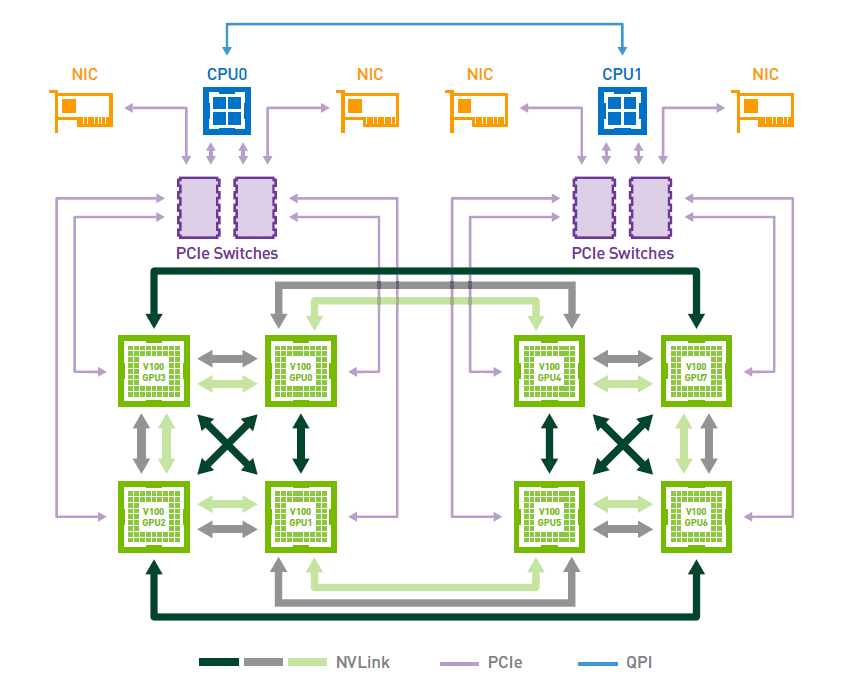
下圖展示的是 HGX-1 / DGX-1 採用 8 張 Tesla V100 時的 Hybrid Cube Mesh 拓樸。每張 V100 配備 6 條第二代 NVLink,單顆 GPU 的 NVLink 總雙向頻寬最高可達 300 GB/s。不過,這並不代表每兩張 GPU 都能彼此直接全連接;在這個拓樸中,只有部分 GPU pair 是直接相連,而且直接相連的兩張 GPU 最多共享 2 條 NVLink,因此單一 GPU pair 之間的直接頻寬最高約為 50 GB/s 單向、100 GB/s 雙向。GPU 與 CPU 之間的資料傳輸仍然是透過 PCIe,雙路 CPU 之間則是透過 Intel 的 UPI 互連。雖然這種拓樸不是全連接設計,但相較於純 PCIe 架構,仍大幅提升了同一台系統內 GPU 彼此之間的通訊頻寬及擴展效率。
[reference]: https://images.nvidia.com/content/pdf/dgx1-v100-system-architecture-whitepaper.pdf?utm_source=chatgpt.com
### NVSwitch
如果說 PCIe 是通用道路(正式應該說通用型 I/O 匯流排)、NVLink 是 GPU 之間的高速專用道路,那 NVSwitch 就像是把很多條 NVLink 組成大型交換網路的交換器(switch fabric)。
它的用途不是取代 NVLink,而是把多顆 GPU 透過 NVLink 連成更大、近似全互連的拓樸,讓每顆 GPU 不必只依賴少數直連鄰居。
以 NVIDIA 早期的技術文件來看,NVSwitch 本質上是一個 NVLink switch chip。第一代 NVSwitch 有 18 個 NVLink ports,內部是 18×18 fully connected crossbar;任一 port 都能以完整 NVLink 速度和其他 port 通訊。官方文件給出的數字是每個 port 50 GB/s(雙向總計),整顆 switch 的 aggregate bandwidth 為 900 GB/s
[reference]: https://images.nvidia.com/content/pdf/nvswitch-technical-overview.pdf?utm_source=chatgpt.com
## AMD 工作站實驗
因為筆者的實驗機器是主板[WRX90 WS EVO](https://www.asrock.com/mb/AMD/WRX90%20WS%20EVO/index.tw.asp)+[AMD Radeon™ AI PRO R9700](https://www.amd.com/zh-tw/products/graphics/workstations/radeon-ai-pro/ai-9000-series/amd-radeon-ai-pro-r9700.html) x4,沒有 NVLink 做加速,因此 GPU 之間的傳輸只能是透過 P2P,先用 [AMD SMI CLI tool](https://rocm.docs.amd.com/projects/amdsmi/en/latest/how-to/amdsmi-cli-tool.html?utm_source=chatgpt.com#amd-smi-topology) 來觀察 GPUs 之間的 topology。
使用 AMD SMI CLI tool 指令:`amd-smi topology --json` 並總結:
<details><summary>amd-smi topology --json</summary>
```json
[
{
"gpu": 0,
"bdf": "0000:03:00.0",
"links": [
{
"gpu": 0,
"bdf": "0000:03:00.0",
"weight": 0,
"link_status": "ENABLED",
"link_type": "SELF",
"num_hops": 0,
"bandwidth": "N/A",
"coherent": "SELF",
"atomics": "SELF",
"dma": "SELF",
"bi_dir": "SELF"
},
{
"gpu": 1,
"bdf": "0000:06:00.0",
"weight": 40,
"link_status": "ENABLED",
"link_type": "PCIE",
"num_hops": 2,
"bandwidth": "N/A",
"coherent": "NC",
"atomics": "64,32",
"dma": "T",
"bi_dir": "F"
},
{
"gpu": 2,
"bdf": "0000:e3:00.0",
"weight": 40,
"link_status": "ENABLED",
"link_type": "PCIE",
"num_hops": 2,
"bandwidth": "N/A",
"coherent": "NC",
"atomics": "64,32",
"dma": "T",
"bi_dir": "F"
},
{
"gpu": 3,
"bdf": "0000:e6:00.0",
"weight": 40,
"link_status": "ENABLED",
"link_type": "PCIE",
"num_hops": 2,
"bandwidth": "N/A",
"coherent": "NC",
"atomics": "64,32",
"dma": "T",
"bi_dir": "F"
}
]
},
{
"gpu": 1,
"bdf": "0000:06:00.0",
"links": [
{
"gpu": 0,
"bdf": "0000:03:00.0",
"weight": 40,
"link_status": "ENABLED",
"link_type": "PCIE",
"num_hops": 2,
"bandwidth": "N/A",
"coherent": "NC",
"atomics": "64,32",
"dma": "T",
"bi_dir": "F"
},
{
"gpu": 1,
"bdf": "0000:06:00.0",
"weight": 0,
"link_status": "ENABLED",
"link_type": "SELF",
"num_hops": 0,
"bandwidth": "N/A",
"coherent": "SELF",
"atomics": "SELF",
"dma": "SELF",
"bi_dir": "SELF"
},
{
"gpu": 2,
"bdf": "0000:e3:00.0",
"weight": 40,
"link_status": "ENABLED",
"link_type": "PCIE",
"num_hops": 2,
"bandwidth": "N/A",
"coherent": "NC",
"atomics": "64,32",
"dma": "T",
"bi_dir": "F"
},
{
"gpu": 3,
"bdf": "0000:e6:00.0",
"weight": 40,
"link_status": "ENABLED",
"link_type": "PCIE",
"num_hops": 2,
"bandwidth": "N/A",
"coherent": "NC",
"atomics": "64,32",
"dma": "T",
"bi_dir": "F"
}
]
},
{
"gpu": 2,
"bdf": "0000:e3:00.0",
"links": [
{
"gpu": 0,
"bdf": "0000:03:00.0",
"weight": 40,
"link_status": "ENABLED",
"link_type": "PCIE",
"num_hops": 2,
"bandwidth": "N/A",
"coherent": "NC",
"atomics": "64,32",
"dma": "T",
"bi_dir": "F"
},
{
"gpu": 1,
"bdf": "0000:06:00.0",
"weight": 40,
"link_status": "ENABLED",
"link_type": "PCIE",
"num_hops": 2,
"bandwidth": "N/A",
"coherent": "NC",
"atomics": "64,32",
"dma": "T",
"bi_dir": "F"
},
{
"gpu": 2,
"bdf": "0000:e3:00.0",
"weight": 0,
"link_status": "ENABLED",
"link_type": "SELF",
"num_hops": 0,
"bandwidth": "N/A",
"coherent": "SELF",
"atomics": "SELF",
"dma": "SELF",
"bi_dir": "SELF"
},
{
"gpu": 3,
"bdf": "0000:e6:00.0",
"weight": 40,
"link_status": "ENABLED",
"link_type": "PCIE",
"num_hops": 2,
"bandwidth": "N/A",
"coherent": "NC",
"atomics": "64,32",
"dma": "T",
"bi_dir": "F"
}
]
},
{
"gpu": 3,
"bdf": "0000:e6:00.0",
"links": [
{
"gpu": 0,
"bdf": "0000:03:00.0",
"weight": 40,
"link_status": "ENABLED",
"link_type": "PCIE",
"num_hops": 2,
"bandwidth": "N/A",
"coherent": "NC",
"atomics": "64,32",
"dma": "T",
"bi_dir": "F"
},
{
"gpu": 1,
"bdf": "0000:06:00.0",
"weight": 40,
"link_status": "ENABLED",
"link_type": "PCIE",
"num_hops": 2,
"bandwidth": "N/A",
"coherent": "NC",
"atomics": "64,32",
"dma": "T",
"bi_dir": "F"
},
{
"gpu": 2,
"bdf": "0000:e3:00.0",
"weight": 40,
"link_status": "ENABLED",
"link_type": "PCIE",
"num_hops": 2,
"bandwidth": "N/A",
"coherent": "NC",
"atomics": "64,32",
"dma": "T",
"bi_dir": "F"
},
{
"gpu": 3,
"bdf": "0000:e6:00.0",
"weight": 0,
"link_status": "ENABLED",
"link_type": "SELF",
"num_hops": 0,
"bandwidth": "N/A",
"coherent": "SELF",
"atomics": "SELF",
"dma": "SELF",
"bi_dir": "SELF"
}
]
}
]
```
</details>
### GPU List
> `BDF` = `domain:bus:device.function`,用來唯一識別 PCIe 裝置的位置。
| GPU | BDF |
|---|---|
| GPU 0 | `0000:03:00.0` |
| GPU 1 | `0000:06:00.0` |
| GPU 2 | `0000:e3:00.0` |
| GPU 3 | `0000:e6:00.0` |
### Topology Matrix
> 所有跨 GPU 連線皆為 PCIe,且屬性一致:
> `2 hops`:GPU 間透過 PCIe fabric 溝通,路徑需跨越 2 個 PCIe hop,並非直接互連。
> `coherent: "NC"`:不提供 cache coherence,一端改了資料,不代表另一端 cache 會自動一致
> `atomics: "64,32"`:表示這條路支援 64-bit 與 32-bit atomic 操作。
> `dma: "T"`:支援 DMA,可以由 DMA engine 直接搬 GPU 之間的 memory
| From \ To | GPU 0 | GPU 1 | GPU 2 | GPU 3 |
|---|---|---|---|---|
| **GPU 0** | SELF | PCIE<br>`2 hops, NC, atomic 64/32, DMA` | PCIE<br>`2 hops, NC, atomic 64/32, DMA` | PCIE<br>`2 hops, NC, atomic 64/32, DMA` |
| **GPU 1** | PCIE<br>`2 hops, NC, atomic 64/32, DMA` | SELF | PCIE<br>`2 hops, NC, atomic 64/32, DMA` | PCIE<br>`2 hops, NC, atomic 64/32, DMA` |
| **GPU 2** | PCIE<br>`2 hops, NC, atomic 64/32, DMA` | PCIE<br>`2 hops, NC, atomic 64/32, DMA` | SELF | PCIE<br>`2 hops, NC, atomic 64/32, DMA` |
| **GPU 3** | PCIE<br>`2 hops, NC, atomic 64/32, DMA` | PCIE<br>`2 hops, NC, atomic 64/32, DMA` | PCIE<br>`2 hops, NC, atomic 64/32, DMA` | SELF |
### HIP runtime
硬體的部分確定是可以用 PCIe 做連通,接下來就是看 HIP runtime 能不能用
```cpp=
#include <hip/hip_runtime.h>
#include <cstdio>
#include <cstdlib>
#include <iostream>
#define HIP_CHECK(cmd) \
do { \
hipError_t e = (cmd); \
if (e != hipSuccess) { \
std::cerr << "HIP error: " << hipGetErrorString(e) \
<< " at " << __FILE__ << ":" << __LINE__ << "\n"; \
std::exit(EXIT_FAILURE); \
} \
} while (0)
int main() {
int count = 0;
HIP_CHECK(hipGetDeviceCount(&count));
std::cout << "GPU count: " << count << "\n";
if (count < 2) {
std::cout << "Need at least 2 GPUs.\n";
return 0;
}
std::cout << "\n[Step 1] hipDeviceCanAccessPeer matrix\n";
for (int i = 0; i < count; ++i) {
for (int j = 0; j < count; ++j) {
int can = 0;
HIP_CHECK(hipDeviceCanAccessPeer(&can, i, j));
std::cout << i << " -> " << j << " : " << can << "\n";
}
}
// 先拿 GPU0 與 GPU1 示範
int src = 0;
int dst = 1;
std::cout << "\n[Step 2] Enable peer access\n";
// 讓 GPU0 可以看 GPU1
HIP_CHECK(hipSetDevice(src));
hipError_t e1 = hipDeviceEnablePeerAccess(dst, 0);
if (e1 == hipSuccess) {
std::cout << "Enabled peer access from GPU " << src
<< " to GPU " << dst << "\n";
} else if (e1 == hipErrorPeerAccessAlreadyEnabled) {
std::cout << "Peer access already enabled from GPU " << src
<< " to GPU " << dst << "\n";
} else {
std::cerr << "Enable failed: " << hipGetErrorString(e1) << "\n";
return 1;
}
// 也讓 GPU1 可以看 GPU0
HIP_CHECK(hipSetDevice(dst));
hipError_t e2 = hipDeviceEnablePeerAccess(src, 0);
if (e2 == hipSuccess) {
std::cout << "Enabled peer access from GPU " << dst
<< " to GPU " << src << "\n";
} else if (e2 == hipErrorPeerAccessAlreadyEnabled) {
std::cout << "Peer access already enabled from GPU " << dst
<< " to GPU " << src << "\n";
} else {
std::cerr << "Enable failed: " << hipGetErrorString(e2) << "\n";
return 1;
}
std::cout << "\n[Step 3] Do one hipMemcpyPeerAsync\n";
const size_t bytes = 64 * 1024 * 1024; // 64 MiB
void* src_ptr = nullptr;
void* dst_ptr = nullptr;
hipStream_t stream;
HIP_CHECK(hipSetDevice(src));
HIP_CHECK(hipMalloc(&src_ptr, bytes));
HIP_CHECK(hipMemset(src_ptr, 0x5A, bytes));
HIP_CHECK(hipSetDevice(dst));
HIP_CHECK(hipMalloc(&dst_ptr, bytes));
HIP_CHECK(hipMemset(dst_ptr, 0x00, bytes));
HIP_CHECK(hipStreamCreate(&stream));
HIP_CHECK(hipMemcpyPeerAsync(dst_ptr, dst, src_ptr, src, bytes, stream));
HIP_CHECK(hipStreamSynchronize(stream));
std::cout << "P2P copy success: GPU " << src << " -> GPU " << dst
<< ", bytes = " << bytes << "\n";
HIP_CHECK(hipStreamDestroy(stream));
HIP_CHECK(hipSetDevice(dst));
HIP_CHECK(hipFree(dst_ptr));
HIP_CHECK(hipSetDevice(src));
HIP_CHECK(hipFree(src_ptr));
return 0;
}
```
結果 HIP 已經能在系統上啟用 GPU-to-GPU 的 peer memory access,並且成功做跨單向 GPU copy。
```bash
❯ ./hip_p2p_min
GPU count: 4
[Step 1] hipDeviceCanAccessPeer matrix
0 -> 0 : 0
0 -> 1 : 1
0 -> 2 : 1
0 -> 3 : 1
1 -> 0 : 1
1 -> 1 : 0
1 -> 2 : 1
1 -> 3 : 1
2 -> 0 : 1
2 -> 1 : 1
2 -> 2 : 0
2 -> 3 : 1
3 -> 0 : 1
3 -> 1 : 1
3 -> 2 : 1
3 -> 3 : 0
[Step 2] Enable peer access
Enabled peer access from GPU 0 to GPU 1
Enabled peer access from GPU 1 to GPU 0
[Step 3] Do one hipMemcpyPeerAsync
P2P copy success: GPU 0 -> GPU 1, bytes = 67108864
```
### vLLM / NCCL / ROCm 上的實際應用
目前(2026/3/9)在 vllm 上嘗試 serve `qwen3.5-27B-FP8` 模型服務,必須要有環境變數 `NCCL_P2P_DISABLE=1`,才能成功運行於我們的工作站。推測與 [RCCL libary](https://github.com/ROCm/rocm-systems) 有關,vLLM 在 tensor parallel 等多卡情境下,通常不是自己直接呼叫 `hipMemcpyPeerAsync()` 來完成所有跨卡通訊,而是依賴 RCCL 來做 collective communication。
[NVIDA ](https://docs.nvidia.com/deeplearning/nccl/user-guide/docs/env.html)寫得很直接:`NCCL_P2P_DISABLE` 停用的是 P2P transport,而這個 transport 使用的是 GPU 之間的 direct access,介質可以是 NVLink 或 PCI。如果設了環境變數 `NCCL_P2P_DISABLE=1` 之後是不走 direct P2P,會改走 host/shared memory 的替代路徑,也就是可以退回 SHM 等其他 transport
 Google Drive
Gist
Clipboard
Google Drive
Gist
Clipboard
 Sign in via Google
 Sign in via Facebook
 Sign in via X(Twitter)
 Sign in via GitHub
 Sign in via Dropbox
 Sign in with Wallet






