# Python Backend Developer Roadmap
## 1. Basic Internet, Operating System and Frontend Knowledge
Whether you’re a software developer, a data scientist, an IT infrastructure manager, or just a geek, knowing how to use a terminal in Linux and macOS is a must. The problem is that there are too many commands to remember. Unless you have a prodigious memory, you’ll need to search on the Internet for this or that command from time to time.
[Essential Bash Cheat Sheet](https://betterprogramming.pub/the-essential-bash-cheat-sheet-e1c3df06560)
### 1.1 Bash/Terminal
- SSH
- ["Mastering Linux shell scripting a practical guide to Linux command- line, Bash scripting, and Shell programming"](https://www.goodreads.com/book/show/40615121-mastering-linux-shell-scripting)
### 1.2 Basic Internet
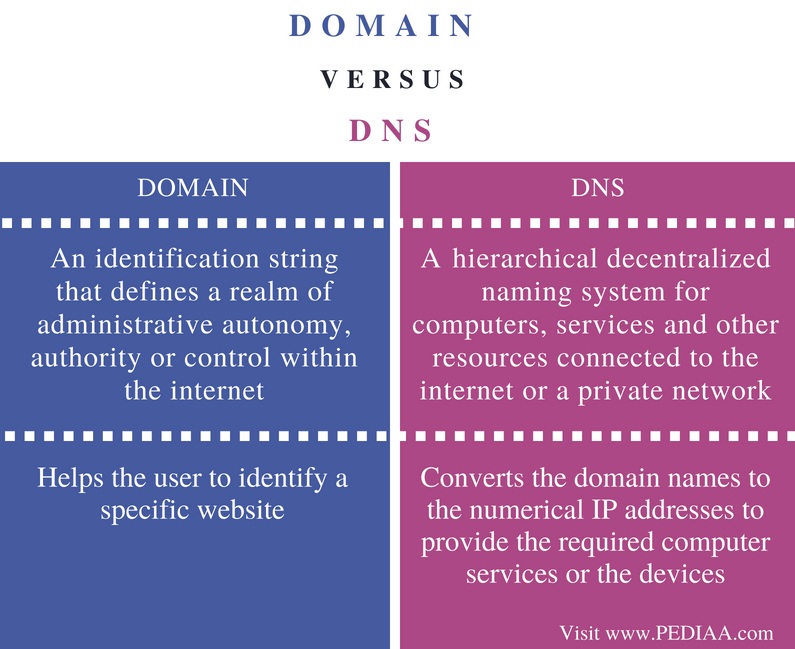
- DNS
- Domain
- Hosting
- Cloud service
- resources
- [DNS & Domain](https://pediaa.com/difference-between-domain-and-dns/)
- [Cloud & Hosting](https://cloudacademy.com/blog/web-hosting-vs-cloud-hosting-whats-the-difference/)
### 1.3 Web server
One of the most common uses for a server is to host websites. When you view a web page online, a piece of software on the target host, called a web server, delivers the page content to the viewer.
Operating systems do not typically come with a default web server, so it is up to the system administrator to install one. Two of the most popular web server installations are Nginx and Apache.
- Nginx, Apache, Tomcat
- Reverse Proxy
- Load balancer
- WSGI & ASGI
- Resources
- [Nginx](https://www.nginx.com/resources/glossary/nginx/)
- [Reverse Proxy](https://docs.nginx.com/nginx/admin-guide/web-server/reverse-proxy/)
- [Load Balancer](https://docs.nginx.com/nginx/admin-guide/load-balancer/http-load-balancer/)
- [WSGI & ASGI](https://medium.com/analytics-vidhya/difference-between-wsgi-and-asgi-807158ed1d4c)
## 2. Programming language (Python)
### 2.1 Basic Data Structure & Algorithm
Python, Java, Golang, and Node.js are popular backend choices. They empower globally successful brands like Google, Wikipedia, Netflix, LinkedIn, even NASA. All three enjoy a prominent market status, millions of developers, and billions worth of project development.
- Resources
- [Python Basic](https://books.goalkicker.com/PythonBook/)
- [Data Structure with Python](https://www.geeksforgeeks.org/data-structures/)
### 2.2 Python2 vs Python3
- Resource
- [Python2 vs python3](https://www.guru99.com/python-2-vs-python-3.html)
### 2.3 OOP
- class
- Inheritance
- etc..
- resources
- [Python 3 Object Oriented Programming](https://www.goodreads.com/book/show/8679996-python-3-object-oriented-programming)
### 2.4 Python data type
- **list**
- **queue**
- **stack**
- **tree**
- **dictionary**
- **tuple**
- **hash map**
- **set**
- Resources
- [Python Basic](https://books.goalkicker.com/PythonBook/)
### 2.5 Environment & environment manager
Everyone who touches code has different preferences when it comes to their programming environment. Vim versus emacs. Tabs versus spaces. Virtualenv versus Anaconda.
- pip
- env & venv
- conda
- resources
- [python environment manager](https://www.section.io/engineering-education/introduction-to-virtual-environments-and-dependency-managers/)
- [env](https://docs.python.org/3/tutorial/venv.html)
- [conda cheat sheet](https://docs.conda.io/projects/conda/en/4.6.0/_downloads/52a95608c49671267e40c689e0bc00ca/conda-cheatsheet.pdf)
### 2.6 Python IDE
One of the questions that programmers ask themselves, especially at the beginning of their career after what programming language to use, is what IDE or text editor will make their life better and more efficient. Regardless of the division of programming you do, whether it be [web development]( https://www.knowledgehut.com/web-development-courses), [mobile/ desktop app development](https://hyscaler.com/insights/mobile-app-development-trends/), or data science, your choice of IDE can make a huge difference in your ability to perform your job perfectly.
- [Visual studio Code](https://code.visualstudio.com/)
- [Pycharm](https://www.jetbrains.com/pycharm/)
- [Sublime](https://www.sublimetext.com/)
- Other Text Editor
### 2.7 SOLID Principe
The principle of SOLID coding is an acronym originated by Robert C. Martin, and it stands for five different conventions of coding.
* The SOLID principles are:
* The Single-Responsibility Principle (SRP)
* The Open-Closed Principle (OCP)
* The Liskov Substitution Principle (LSP)
* The Interface Segregation Principle (ISP)
* The Dependency inversion Principle (DIP)
- [Solid principe with python](https://towardsdatascience.com/solid-coding-in-python-1281392a6a94)
### 2.8 Python Framework (web)
A web framework is a collection of packages and modules made up of pre-written, standardized code that supports the development of web applications, making development faster and easier, and your programs more reliable and scalable. In other words, frameworks already have built-in components that “set up” your project, so you have to do less grunt work.
Python web frameworks are only utilized in the backend for server-side technology, aiding in URL routing, HTTP requests and responses, accessing databases, and web security. While it is not required to use a web framework, it is extremely recommended because it helps you develop complex applications in significantly less time.
- [FastAPI](https://fastapi.tiangolo.com/)
- [Flask ](https://flask.palletsprojects.com/en/2.0.x/tutorial/index.html)
- Django
### 2.9 Unit Testing
Both unittest and pytest are testing frameworks in python. Unittest is the testing framework set in python by default. In unittest, we create classes that are derived from the unittest.TestCase module. It comes in handy because it is universally understood.
Whereas using pytest involves a compact piece of code. Pytest has rich inbuilt features which require less piece of code compared to unittest. In the case of unittest, we have to import a module, create a class and then define testing functions inside the class. But in the case of pytest, we have to define the functions and assert the conditions inside them.
- [pytest](https://docs.pytest.org/en/6.2.x/)
- [unittest](https://docs.python.org/3/library/unittest.html)
### 2.10 Important Library
- numpy (enhance function)
- requests (http request)
- socket.io (TCP connection)
- psycopg2 (Postgresql database connection)
- bcrypt (password encryption)
- aioredis (Redis library for python)
- stomp.py (STOMP protocol connection)
- json (json manipulation)
- asyncio (Asynchronous function)
- time (time manipulation)
- logging (logging library )
- typing (enhance typing in python)
- sqlalchemy (ORM library in python)
- gunicorn (ASGI web server)
- urllib (url sanitazion)
- matrix_client (python matrix sdk)
- matrix-nio (python matrix sdk, support asyncio)
- pyyaml (yaml reader / manipulation)
- pandas (data manipulation)
- pytest (unit test library)
### 2.11 Python ASGI
Three prominent ASGI servers are all good options for testing and running your ASGI app: Uvicorn, Hypercorn, and Daphne.
- [gunicorn](https://docs.gunicorn.org/en/stable/)
- [uvicorn](https://www.uvicorn.org/settings/)
- hypercorn
- daphne
### 2.12 Data Model
An object-relational mapper (ORM) is a code library that automates the transfer of data stored in relational database tables into objects that are more commonly used in application code.
- ORM (Object Relational Mapping)
- [SQLAlchemy](https://docs.sqlalchemy.org/en/14/)
- Resources
- [ORM](https://www.fullstackpython.com/object-relational-mappers-orms.html)
### 2.9 Advanced Concept
- Decorator / Property (@) [tutorial](https://www.programiz.com/python-programming/decorator) [tutorial2](https://www.datacamp.com/community/tutorials/decorators-python)
- Synchronous & Asynchronous [Asyncio Python](https://docs.python.org/3/library/asyncio.html)
- Multithreading [python Multithreading](https://www.tutorialspoint.com/python/python_multithreading.htm)
- python modules [modules & package](https://realpython.com/python-modules-packages/)
## 3. Version Control
Version control is a system that records changes to a file or set of files over time so that you can recall specific versions later. For the examples in this book, you will use software source code as the files being version controlled, though in reality you can do this with nearly any type of file on a computer.
### 3.1 Git/Github
- resources
- [Git documentation](https://git-scm.com/docs)
- "Pragmatic version control using Git"
## 4. Database
### 4.1 Posgresql
- Resource
- [Postgresql tutorial](https://www.postgresqltutorial.com/)
### 4.2 [Databse Index](https://www.postgresql.org/docs/9.1/indexes.html)
### 4.3 SQL (Query Language) [tutorial](https://www.tutorialspoint.com/sql/index.htm)
### 4.4 [Normalization](https://www.guru99.com/database-normalization.html)
### 4.5 [ACID](https://henriquesd.medium.com/acid-properties-43e146b21e0d)
### 4.6 [ORM](https://medium.com/@haataa/orm-for-python-sqlalchemy-101-with-code-example-60868e65b0c)
### 4.7 [NoSQL](https://towardsdatascience.com/datastore-choices-sql-vs-nosql-database-ebec24d56106)
- MongoDB
- Elastic Search
- InfluxDB
- DynamoDB
## 5. [APIs](https://medium.com/@perrysetgo/what-exactly-is-an-api-69f36968a41f)
A communication API is a type of application programming interface (API) that adds communications channels to particular software.
### 5.1 [Rest API](https://medium.com/edureka/what-is-rest-api-d26ea9000ee6)
### 5.2 [Json](https://restfulapi.net/introduction-to-json/)
### 5.3 [GraphQL](https://graphql.org/)
## 6. [Caching](https://aws.amazon.com/caching/)
Caching is the operation of storing some results/data to memory (non-volatile: hard-disk drives and SSDs, or volatile: RAMs and CPU cache) to retrieve them very quickly next time they are needed (without necessarily recomputing the result).
### 6.1 In Memory caching
- Redis [tutorial](https://aws.amazon.com/redis/) [Redis python](https://realpython.com/python-redis/)
- [memcached](https://memcached.org/)
### 6.2 Content caching
- [CDN](https://www.cloudflare.com/learning/cdn/what-is-a-cdn/)
## 7. Testing
### 7.1 [Unit testing](https://www.guru99.com/unit-testing-guide.html)
### 7.2 Tools
- pytest
- unittest
- [Postman](https://www.postman.com/)
## 8. [CI / CD](https://medium.com/devops-dudes/what-is-ci-cd-continuous-integration-continuous-delivery-in-2020-988765f5d116)
CI CD Pipeline implementation or the Continuous Integration/Continuous Deployment software is the backbone of the modern DevOps environment. You can find the requirement of Continuous Integration & Continuous Deployment skills in various job roles such as Data Engineer, Cloud Architect, Data Scientist, etc. CI/CD bridges the gap between development and operations teams by automating build, test, and deployment of applications. In this blog, we will know What is CI CD pipeline and how it works.
### 8.1 Version Control
### 8.2 Github/Gitlab
### 8.3 CI/CD tools
- [github action ](https://docs.github.com/en/actions/learn-github-actions/understanding-github-actions)
- [jenkins](https://www.jenkins.io/)
- [travis](https://travis-ci.org/)
## 9. Architectural Patterns
### 9.1 [Monolithic](https://microservices.io/patterns/monolithic.html)
### 9.2 [Microservice](https://microservices.io/)
### 9.3 Patterns
- [SAGA](https://microservices.io/patterns/data/saga.html)
- [Circuit breaker](https://microservices.io/patterns/reliability/circuit-breaker.html)
### 9.4 Design Pattern
OOP provides the design to do that, but as I said earlier we need a pattern to achieve a long-lasting one. Problems might arise in our OOP-designed app which might lead to decay.
As such, these problems have been cataloged overtime and elegant solutions for each of them have been described by experienced early Software Developers. These solutions are known as the Design Patterns.
To date, there are 24 design patterns, as described in the original book, `Design Patterns: Elements of Reusable Object-Oriented Software`. Each of these patterns provides a set of solution to a particular problem.
- Singleton
- Strategy
- Command
- Observer
- Resources
- [Design Pattern](https://refactoring.guru/design-patterns)
## 10. [Message Broker](https://www.ibm.com/cloud/learn/message-brokers)
Message Queue, hereinafter referred to as MQ, is a cross-process communication mechanism for delivering messages upstream and downstream.
In the Internet architecture, MQ is a very common messaging service for upstream and downstream “logical decoupling + object understanding coupling”.
After using MQ, the upstream of the message transmission only needs to rely on MQ, and it does not depend on other services logically and physically.
### 10.1 Communication concept
- Producer & consumer
- publisher & subscriber
- topic
- queue
### 10.2 Engine
- [ActiveMQ](https://activemq.apache.org/)
- [ActiveMQ in Action](https://github.com/ontiyonke/book-1/blob/master/%5BJAVA%5D%5BActiveMQ%20in%20Action%5D.pdf)
- [RabbitMQ](https://www.rabbitmq.com/)
- [Kafka](https://kafka.apache.org/)
## 11. Containerization
Containerization, Docker, and Kubernetes are now well-known words in the software industry.
Containers are a solution to the problem of how to reliably run the software when moving from one computing environment to another. It can range from a developer’s laptop to a test environment, from a staging environment to a product, perhaps from a physical machine in a data center to a virtual machine in a private or public cloud.
[Introduction to Contenerization](https://medium.com/crossml/introduction-to-containerization-and-kubernetes-294d1f9b4aa8)
### 11.1 [Docker](https://docs.docker.com/)
### 11.2 [Kubernetes](https://kubernetes.io/docs/home/)
## 12. Authentication
### 12.1 [JWT](https://auth0.com/blog/how-to-handle-jwt-in-python/)
### 12.2 [OAuth2](https://testdriven.io/blog/oauth-python/)
- [tutorial](https://developer.byu.edu/docs/consume-api/use-api/oauth-20/oauth-20-python-sample-code)
### 12.3 hash function
- sha
- [bcrypt](https://zetcode.com/python/bcrypt/)
## 13. Communication Protocol
A microservice-based application will often use a combination of these communication styles. The most common type is single-receiver communication with a synchronous protocol like HTTP/HTTPS when invoking a regular Web API HTTP service. Microservices also typically use messaging protocols for asynchronous communication between microservices.
### 13.1 [Websocket](https://www.html5rocks.com/en/tutorials/websockets/basics/)
### 13.2 TCP
### 13.3 [STOMP](https://jasonrbriggs.github.io/stomp.py/)
### 13.4 WEbRTC
### 13.5 Http Request
### 13.6 GRPC
## 14. [Monitoring](https://www.pcwdld.com/best-python-monitoring-tools)
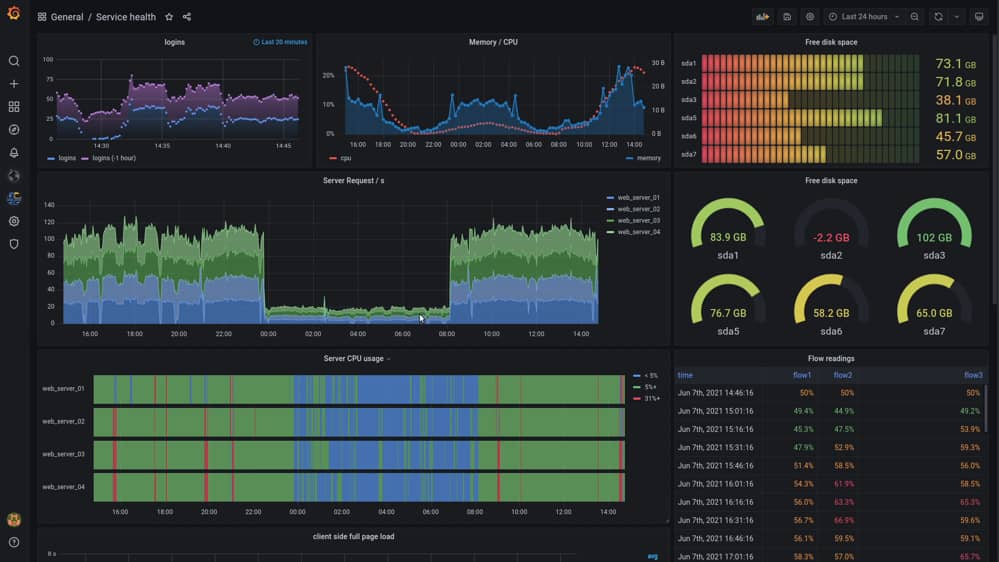
Monitoring tools can proactively capture, analyze, trace, and display information related to Python-developed applications. They provide full-stack visibility, which can ultimately help identify and fix application performance bottlenecks and improve the user’s experience.
These tools can provide the transparency needed so that developers, operators, and DevOps teams can respond quickly and proactively to issues.
### 14.1 Engine
- [Grafana](https://grafana.com/)
- [Datadog](https://www.datadoghq.com/)
- [Prometheus](https://prometheus.io/)
 Google Drive
Gist
Clipboard
Google Drive
Gist
Clipboard
 Sign in via Facebook
 Sign in via X(Twitter)
 Sign in via GitHub
 Sign in via Dropbox
 Sign in with Wallet






