# 初探 RxJS(上)
> 預計簡介相關的設計模式中的 Behavioral Pattern,再介紹 RxJS(先講 Observable),後面再帶到 redux-observable(會分次分享
## 先介紹一下相關的 Behavioral Pattern...
### Observer Pattern 觀察者模式
* 定義物件間(Subject 目標和 Observer 觀察者)的一種**一對多**的依賴關係,當一個物件的狀態發生變化時,所有依賴於它的物件都得到通知並被自動更新。
* 觀察者和目標是**單向依賴**的,只有觀察者依賴於目標,聯繫的主動權也是在目標手中
* 觀察者和目標是松耦合 loosely coupled 聯繫,彼此不需知道內部的細節,就可以通信
* 此處一對多是抽象概念,例如一位 YouTuber 可以被很多觀眾訂閱
* 觀察者模式由 Subject 目標和 Observer 觀察者(訂閱者)組成。

* Subject 負責發布事件、增加或減少訂閱者
* Observer 負責訂閱這些事件來觀察 Subject,提供 Subject 通知時對應的更新方法,Subject 可以被多個 Observer 訂閱
* 舉例:
喜歡某 YouTuber 並訂閱他影片加進訂閱者清單,有新影片就會通知這些訂閱者,不喜歡時可以取消訂閱移出清單就不會再接受通知。
* 角色
* YouTuber → 目標 Subject
* 會有三個行為:「加入訂閱」、「移除訂閱」、「通知訂閱的人」
* 訂閱的人 → 觀察者 Observer
* 情況
* 一個 YouTuber 可以有多個訂閱者
* 用戶(訂閱者)可以同時訂閱多位 YouTuber
* 基本實作需實現:
* Subject 要能維護 Observer 的註冊信息
* Subject 要能維護引起通知的狀態
* Observer 要能接收 Subject 的通知
* 如果是一個 Observer 訂閱多個 Subject,Observer 的更新方法中要判斷是來自哪個 Subject
### Pub-Sub Pattern 發布訂閱模式
* 也擁有訂閱與被訂閱的關係,Pub-Sub Pattern 是由 Publisher 發布者和 Subscriber 訂閱者組成。
但和觀察者模式不同的是,Publisher 和 Subscriber 間是**透過第三者 Broker / message broker / event bus 中間人來溝通**。
* Pub-Sub Pattern 不是松耦合,是完全解偶的,Publisher 和 Subscriber 間不存在耦合

* 實作上較常見 Broker 以 Topic-based 和 Content-based 作為 filter 方式
* 舉例:
當 Publisher 發布主旨為 A 的消息,Broker 就會將消息推送給有訂閱了主旨為 A 的 Subscriber。
* 也可以實現成 Subscriber 主動來拉取
* 適合用於不相知的相異系統間的溝通方式

兩模式的訂閱者與被訂閱者間差異概述:
| Observer Pattern | Pub-Sub Pattern |
| -------- | -------- |
| Subject 直接通知 Observer | 由 Broker 推送消息給 Subscriber |
|松耦合|無耦合關係|
|較常以同步方式實作|較常以非同步方式實作|
|較常 single application 應用|較常 cross-application 應用|
### Iterator Pattern 迭代器模式
* 讓一個集合,例如 list, stack, tree 等等,不用暴露裡面的實作細節,就可以遍歷其各個元素。
* Iterator 提供外部訪問資料的方法:
* `current()`: 取得當前訪問的資料元素
* `next()`: 取得下一個資料元素
* `key()`: 取得當前訪問資料元素的key值
* `hasNext()`: 是否還有下一個資料元素
* `rewind()`: 回到第一個資料元素
* 擁有漸進式取得資料的特性,可以拿來做延遲運算(Lazy evaluation 或 call-by-need)
* iterator 本身是序列,所以可以實作所有陣列的運算方法像 map, filter... 等
---
### RxJS 簡介
* [Reactive Extensions (Rx)](https://github.com/dotnet/reactive) is a library for composing asynchronous and event-based programs using observable sequences and LINQ-style query operators.
→ 使用 Observables 序列來編寫異步和基於事件的程序的 library
→ 處理事件的 lodash 角色
* Rx = Observables + LINQ + Schedulers
* Observables 代表異步的 data stream 資料流
* LINQ operators 則是 query 異步資料流的方式(幫助控制事件如何流經 Observables)
* Schedulers 是將**並發性**的異步資料流參數化的方式
* 並發性 Concurrency:Multi-thread,會將工作拆成數個子任務並分派給多個 thread 同時運行([Concurrency 與 Parallelism 的不同之處](https://medium.com/mr-efacani-teatime/concurrency%E8%88%87parallelism%E7%9A%84%E4%B8%8D%E5%90%8C%E4%B9%8B%E8%99%95-1b212a020e30)有時間可看)
* 核心觀念
* Thinking Reactively:Reactive Programming 響應式編程
當事件發生(變數或資源發生變動)能反應,asynchronous data streams 為中心思想出發的程式撰寫方式,適合解決複雜的非同步行為。
* 容易搞混的 Observable 可被觀察的、Observer 觀察者
→ 當**可被觀察的東西**有事情發生,**觀察者**就可以做出反應
→ 當訂閱了某個 Observable,只要事件發生就會執行傳進去的 function
:::warning
可以把 Observable 想成是 stream 資料流
→ 時間序列上的一連串資料事件
→ 會一直增加元素的陣列
→ 多了時間維度的陣列
:::
* Functional Programming(FP)
* Expression, no Statement → 只有表達式
* 函式為一等公民 (First Class) → 函式能夠被賦值給變數,也能夠被當作參數傳入另一個函式,也可當作一個函式的回傳值
* Pure Function → 相同輸入、相同輸出,沒有 Side Effect(例如:Array 中的 `slice` 是,但 `splice` 不是)
* 優點:可讀性高、好維護、易於並行處理
* 所以在進入 RxJS 前讓我們先了解一下其所擁有的角色與觀念,可列為下:
* Observable 可觀察對象
* Observer 觀察者
* Subscription 訂閱
* Operators 操作符
* Subject 主體
* Schedulers 調度器
這次分享主要是前面三個
[Operators](https://rxjs-cn.github.io/learn-rxjs-operators/about/) 有興趣可以先自己略看個,先了解手上有哪些工具可用(?
> 每個 Operator 都會回傳一個新的 Observable
RxJS 5.5 後官方建議改成 [Pipeable](https://github.com/ReactiveX/rxjs/blob/master/doc/pipeable-operators.md) 寫法,用到的 `pipe` operator 會留到下次說明,先知道這篇的寫法都可以改成 Pipeable 寫法
它可以使得可讀性更高、打包後更小
* [RxJS 中文文檔-Pipeable 操作符](https://cn.rx.js.org/manual/usage.html#h11)
* [stack overflow - What is pipe for in rxJS](https://stackoverflow.com/questions/48668701/what-is-pipe-for-in-rxjs)
#### Observable 可觀察對象(被觀察的)
* 可以想成是多了時間維度的陣列
* 可以同時處理同步跟非同步,並推送零個或多個值給觀察者的行為
* 由於有時候是非同步有時候是同步,使得常搞不清楚 Observable 何時送元素,也不好除錯,而 Scheduler 可以處理此問題
* 被訂閱時才會執行(要提供 Observer),同個 Observable 可以被多次訂閱
* Observable 跟 Observer Pattern 是不同的,Observable 內部並沒有管理一份訂閱清單
* 核心週期:創建、訂閱、執行、清理
* Marble diagrams 彈珠圖可以幫助我們更容易地了解抽象的 observable operator 是如何處理資料流的
* [RxJS Marbles](https://rxmarbles.com/)
先快速介紹一些 Operator,沒講到的可以去看看 [學習RxJS操作符](https://rxjs-cn.github.io/learn-rxjs-operators/)
##### 創建 Observable - [Creation Operators](https://rxjs-cn.github.io/learn-rxjs-operators/operators/creation/)
* `create(subscribe: function)` 是 Observable 構造函數的別名,接收一個參數:接受 observer 的 subscribe 函數(定義 observable 將會如何發送值,後面介紹)
* Observable 可以被 observer 觀察者訂閱
```javascript
var observable = Rx.Observable.create(function subscribe(observer) {
// 可同步或異步的以 observer.next() 傳遞一或多個值
observer.next(100);
setInterval(() => {
observer.next('hi')
}, 1000);
});
```
* `of(...values, scheduler: Scheduler)`
按順序發出任意數量的值 [Example](https://jsbin.com/lugayujohu/1/edit?js,console)
* `from(ish: ObservableInput, mapFn: function, thisArg: any, scheduler: Scheduler)`
可直接接收下列形式參數轉成 observable [Example](https://jsbin.com/mudebiluru/1/edit?js,console)
1. 可列舉的參數(ex. Array, Set, WeakSet, Iterator)
2. 或 單純字串(會拆成字元)
3. 或 Promise(也可用 `fromPromise` operator,同結果)
* Promise 被 resovle 的時候就發送一個資料,被 reject 的時候就終止 `fromPromise`
* `fromEvent(target: EventTargetLike, eventName: string, selector: function)`
可以將事件轉換成 observable
```javascript
Rx.Observable.fromEvent(DOM, 'click');
```
* 適合搭配 takeUntil 來訂立釋放資源條件
* `timer(initialDelay: number | Date, period: number, scheduler: Scheduler)`
給定持續時間後,再按照指定間隔時間依次發出數字 [Example](https://jsbin.com/qapovaguco/1/edit?js,console)
等待時間可以是 ms 或 Date
* `interval(period: number, scheduler: Scheduler)`
基於給定時間間隔發出從 0 開始數字序列
...
##### 轉換 Observable - [Transformation Operators](https://rxjs-cn.github.io/learn-rxjs-operators/operators/transformation/)
* `map(callback function)`
callback function 會帶入每次發送元素,再回傳改變後的新元素
* `mapTo(value)`
可以把傳進來的值改變成固定值
* `filter(callback function)`
* `take(取前n個)`
* `first()` = take(1)
* `skip(忽略前n個)`
* `takeLast(取最後n個)`
必須等到整個 observable 完成(complete),才能知道最後的元素有哪些,並且同步送出

* `last()` = takeLast(1)
* [`takeUntil(Observable)`](https://rxmarbles.com/#takeUntil)
當某件事情發生時complete
```javascript
var click = Rx.Observable.fromEvent(document.body, 'click');
var example = source.takeUntil(click);
```
...
#### 組合 Observable - [Combination Operators](https://rxjs-cn.github.io/learn-rxjs-operators/operators/combination/)
* [`concatAll()`](https://jsbin.com/lenahaxoze/edit?js,console,output)
會**依序**處理待合併的 observable [Example](https://jsbin.com/cibikiwale/1/edit?js,console,output)
* `concatMap(callback function)`
當 map 加上 concatAll 就可以使用簡化寫法的 `concatMap` [Example](https://jsbin.com/sovadefexe/1/edit?js,console,output)

* `concat(observable arguments...)`
可以把多個 observable 實例合併成一個,跟 concatAll 一樣,必須先等前一個 observable 完成(complete),才會繼續下一個
```javascript
var source = Rx.Observable.interval(1000).take(3);
var source2 = Rx.Observable.of(3)
var source3 = Rx.Observable.of(4,5,6)
var example = source.concat(source2, source3);
```

* `startWith(初始要發送的元素)`
一開始就同步發出,常被用來保存程式的起始狀態

* `merge(Observable)` 似 OR
merge 跟 concat 一樣都是用來合併 observable,差在 ==merge 是同時處理行為,而 concat 是一個一個依序處理==
* [`zip(observable arguments..., callback function)`](https://jsbin.com/posutey/2/edit?js,console)
取每個 observable 相同順位的元素並傳入 callback

```javascript
var source = Rx.Observable.interval(500).take(3);
var newest = Rx.Observable.interval(300).take(6);
var example = source.zip(newest, (x, y) => x + y);
example.subscribe({
next: (value) => { console.log(value); },
error: (err) => { console.log('Error: ' + err); },
complete: () => { console.log('complete'); }
});
// 0
// 2
// 4
// complete
```

zip 注意:因為 zip 要 cache 為處理的元素,當 observable 快慢差很大時由於會 cache 大量元素就可能造成記憶體相關問題
...
還有很多 Operator 這邊就不繼續贅述了⋯⋯
補充:Observable 較 Array 不同的特性
* 延遲運算(Lazy evaluation 或 call-by-need):
Observable 會等到訂閱後才開始對元素做運算,如果沒有訂閱就不會有運算的行為
* 函數和 Observables 都是惰性運算(需要調用才執行)
* 漸進式取值:
陣列的 operators 都必須完整的運算出每個元素的返回值並組成一個陣列,再做下一個 operator 的運算
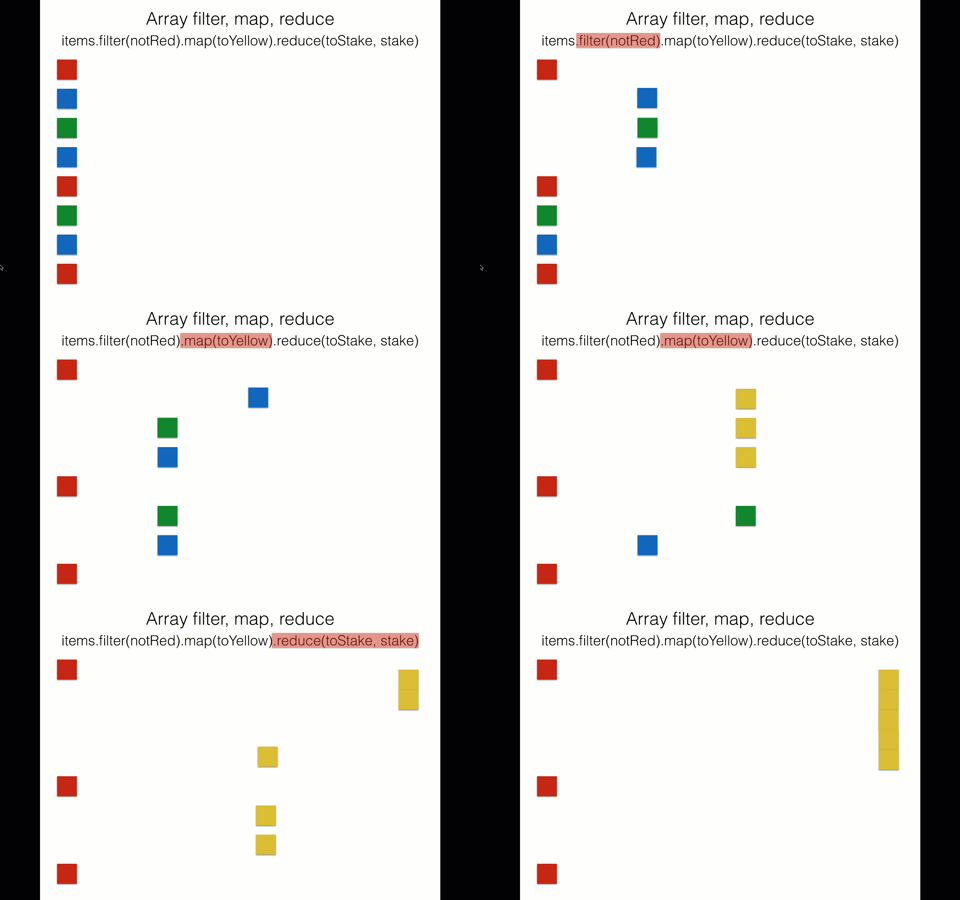
Observable 每次的運算是一個元素運算到底再返回(漸進式取值)
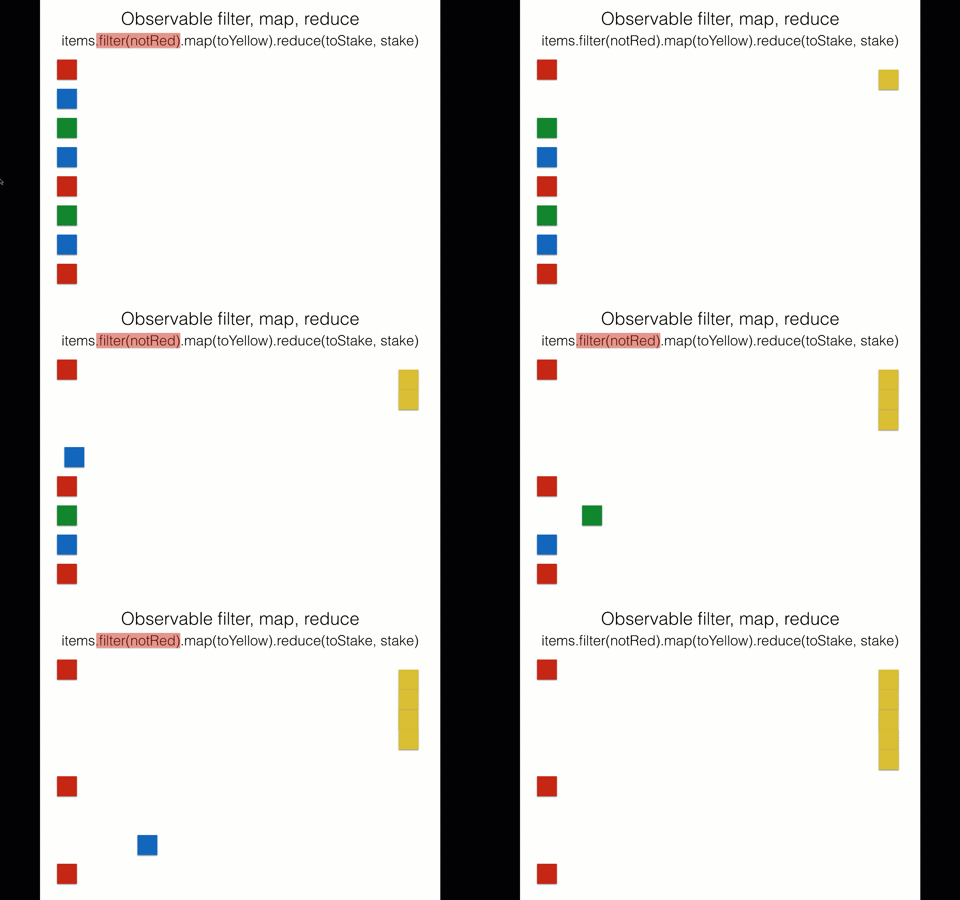
* Iterator Pattern & Observer Pattern 都是漸進式取值為共同特性
* 但 Observer 是 Producer push 資料;Iterator 是 Consumer pull 資料
* Observable 是兩模式思想的結合
* 漸進式取值特性在處理大量資料時也會比要高效
#### Observer 觀察者
* 用來訂閱 Observable 的物件(回調函數的集合)
* 定義 next, error, complete 三方法的行為
* [Example](https://jsbin.com/fuxeleyudi/1/edit?js,console)

* 訂閱 Observable 不一定要用 Observer 物件訂閱,也可以將三方法依照 next, error, complete 順序直接代入,它會自動內部生成 Observer
#### [動作] Subscribe 訂閱
* 創建的 Observable 被 subscribe 時才會執行 → 訂閱一個 Observable 就像是執行一個 function
* [Example](https://jsbin.com/cexadakijo/1/edit?js,console)
```javascript=
// observable 可以同時處理異步或同步
var observable = Rx.Observable
.create(function(observer) {
observer.next('Apple');
observer.next('Peach');
setTimeout(() => {
observer.next('Strawberry');
}, 30)
})
console.log('start');
observable.subscribe((value) => {
console.log(value);
});
console.log('end');
```
Question.
ps. subscribe 本身是同步
```javascript=
var observable = Rx.Observable.create(function (observer) {
observer.next(1);
observer.next(2);
observer.next(3);
setTimeout(() => {
observer.next(4);
observer.complete();
observer.next(5);
}, 1000);
observer.next(6);
});
console.log('just before subscribe');
observable.subscribe({
next: x => console.log('got value ' + x),
error: err => console.error('something wrong occurred: ' + err),
complete: () => console.log('done'),
});
console.log('just after subscribe');
```
[jsbin](https://jsbin.com/wugahevoxu/1/edit?js,console)
#### Subscription 訂閱(舊版 RxJS 叫 Disposable)
* `observable.subscribe()` 調用 Observable 時會返回的一個 Subscription 訂閱對象(Observable 的執行)
* 可被清理資源的對象:當中有 `unsubscribe()` 方法可以清理由 Subscription 所佔用的資源
* Subscription 還可以合體成 Subscriptions,可以一起取消訂閱或取消已添加的其中一個訂閱 `remove(otherSubscription)`
```javascript
var observable1 = Rx.Observable.interval(500);
var observable2 = Rx.Observable.interval(800);
var subscription = observable1.subscribe(x => console.log('first: ' + x));
var childSubscription = observable2.subscribe(x => console.log('second: ' + x));
subscription.add(childSubscription);
setTimeout(() => {
// subscription 和 childSubscription 一起被清理
subscription.unsubscribe();
}, 1000);
```
* 若希望第二次訂閱 source 不會從頭開始接收元素,而是從第一次訂閱到當前處理的元素開始發送,我們把這種處理方式稱為組播(multicast)(下次再分享
* 訂閱 Observable 跟 addEventListener 在實作上其實有非常大的不同,Observable 並沒有管理一個訂閱的清單
#### [動作] Unsubscribe 清理(退訂)
* 用 Subscription 的 `unsubscribe()` 函數去取消 Observable 執行來釋放資源,避免浪費計算能力或內存資源
今天先介紹最基本主要的這三個角色
知道 Observable 中最基本角色與行為後,就來個實作結尾吧~
1. 實作 Auto complete
* input 輸入時下方有建議列表並可點選取代 input 值,且期望輸入停頓隔 100ms 再 call 列表 api
* 用 wiki 開放 api `https://zh.wikipedia.org/w/api.php?action=opensearch&format=json&limit=5&origin=*&search=`關鍵字
* 回來結果會是陣列,第一個是 string keyword,第二個是 string array 結果,後面不管
* 需使用的 Operators 提示
* [`filter`](https://rxjs-cn.github.io/learn-rxjs-operators/operators/filtering/filter.html)
* [`map`](https://rxjs-cn.github.io/learn-rxjs-operators/operators/transformation/map.html)
* [`fromEvent`](https://rxjs-cn.github.io/learn-rxjs-operators/operators/creation/fromevent.html)
* [`switchMap`](https://rxjs-cn.github.io/learn-rxjs-operators/operators/transformation/switchmap.html)
* 在每次發出時,會取消前一個內部 observable(你所提供的函數的結果)的訂閱,然後訂閱一個新的 observable
* [`debounceTime`](https://rxjs-cn.github.io/learn-rxjs-operators/operators/transformation/switchmap.html)
* 會捨棄掉在兩次輸出之間小於指定時間的發出值
* [codepen](https://codepen.io/shiruco/pen/zYYBRZO?editors=0111)
2. 實作 拖拉 dom
* 首先畫面上有一個元件(#drag)
* 當滑鼠在元件(#drag)上按下左鍵(mousedown)時,開始監聽滑鼠移動(mousemove)的位置
* 當滑鼠左鍵放掉(mouseup)時,結束監聽滑鼠移動
* 當滑鼠移動(mousemove)被監聽時,跟著修改元件的樣式屬性
* 需使用的 Operators 提示
* `fromEvent`
* `map`
* `takeUntil`
* `concatAll`
* [jsbin](https://jsbin.com/kiwolitixo/edit?js,console,output)
3. 實作 Canvas 畫畫
* 可以左鍵按著畫出線條,放開就停畫
* 需使用的 Operators 提示
* `fromEvent`
* `do`
* 執行某些操作或副作用
* [`mergeMap`](https://rxjs-cn.github.io/learn-rxjs-operators/operators/transformation/mergemap.html)(`flatMap`)
* 映射成observable 並發出值
* `mapTo`
* `takeUntil`
* [codepen](https://codepen.io/shiruco/pen/yLLJdoY?editors=1011)
---
### Reference
* [Design Pattern | 只要你想知道,我就告訴你 - 觀察者模式( Observer Pattern ) feat. TypeScript](https://medium.com/enjoy-life-enjoy-coding/design-pattern-%E5%8F%AA%E8%A6%81%E4%BD%A0%E6%83%B3%E7%9F%A5%E9%81%93-%E6%88%91%E5%B0%B1%E5%91%8A%E8%A8%B4%E4%BD%A0-%E8%A7%80%E5%AF%9F%E8%80%85%E6%A8%A1%E5%BC%8F-observer-pattern-feat-typescript-8c15dcb21622)
* [【行为型模式十八】观察者模式(Observer)](https://www.jianshu.com/p/aa7ee3c96986)
* [Observer vs Pub-Sub pattern](https://hackernoon.com/observer-vs-pub-sub-pattern-50d3b27f838c)
* [[Day28] 操作大量資料的好幫手 ─ 迭代器(Iterator) <模式篇>](https://ithelp.ithome.com.tw/articles/10227583)
* [希望是最淺顯易懂的 RxJS 教學](https://blog.techbridge.cc/2017/12/08/rxjs/)
* [教程| RxJS 中文文档](https://cn.rx.js.org/manual/tutorial.html)
* [30 天精通 RxJS](https://ithelp.ithome.com.tw/users/20103367/ironman/1199)
* [学习 RxJS 操作符](https://rxjs-cn.github.io/learn-rxjs-operators/about/)
 Google Drive
Gist
Clipboard
Google Drive
Gist
Clipboard
 Sign in via Facebook
 Sign in via X(Twitter)
 Sign in via GitHub
 Sign in via Dropbox
 Sign in with Wallet






