# Digital Calendar Wall: The Smart Family Organizer
It's Monday morning, and the kitchen counter is buried under permission slips, soccer schedules, and sticky notes about dentist appointments nobody remembers making. One child has a science fair project due Thursday, another needs a ride to piano at the same time as your work meeting, and somehow your partner forgot about the in-laws visiting this weekend. Sound familiar? For busy families juggling school events, extracurriculars, work commitments, and household chores, keeping everyone on the same page can feel impossible. Enter the [digital calendar wall](https://www.apolosign.com/collections/digital-calendar) — a modern family organizer that transforms scheduling chaos into streamlined harmony. Mounted in a central spot in your home, this interactive display gives every family member instant visibility into what's happening and when. Beyond simplified scheduling, it doubles as a platform for chore charts, reminders, and shared to-do lists that teach kids responsibility while keeping parents sane. In this guide, we'll explore what a digital calendar wall is, why your family needs one, how to set it up step by step, and ways to integrate it into your smart home for effortless organization.
## What is a Digital Calendar Wall?
A digital calendar wall is a large, interactive display mounted in a common area of your home — typically the kitchen, hallway, or family room — that serves as a centralized hub for everyone's schedules, tasks, and reminders. Unlike a traditional paper calendar tacked to the fridge, which quickly becomes cluttered with crossed-out entries and illegible handwriting, a digital calendar wall updates in real time, syncs across devices, and presents information in a clean, easy-to-read format.
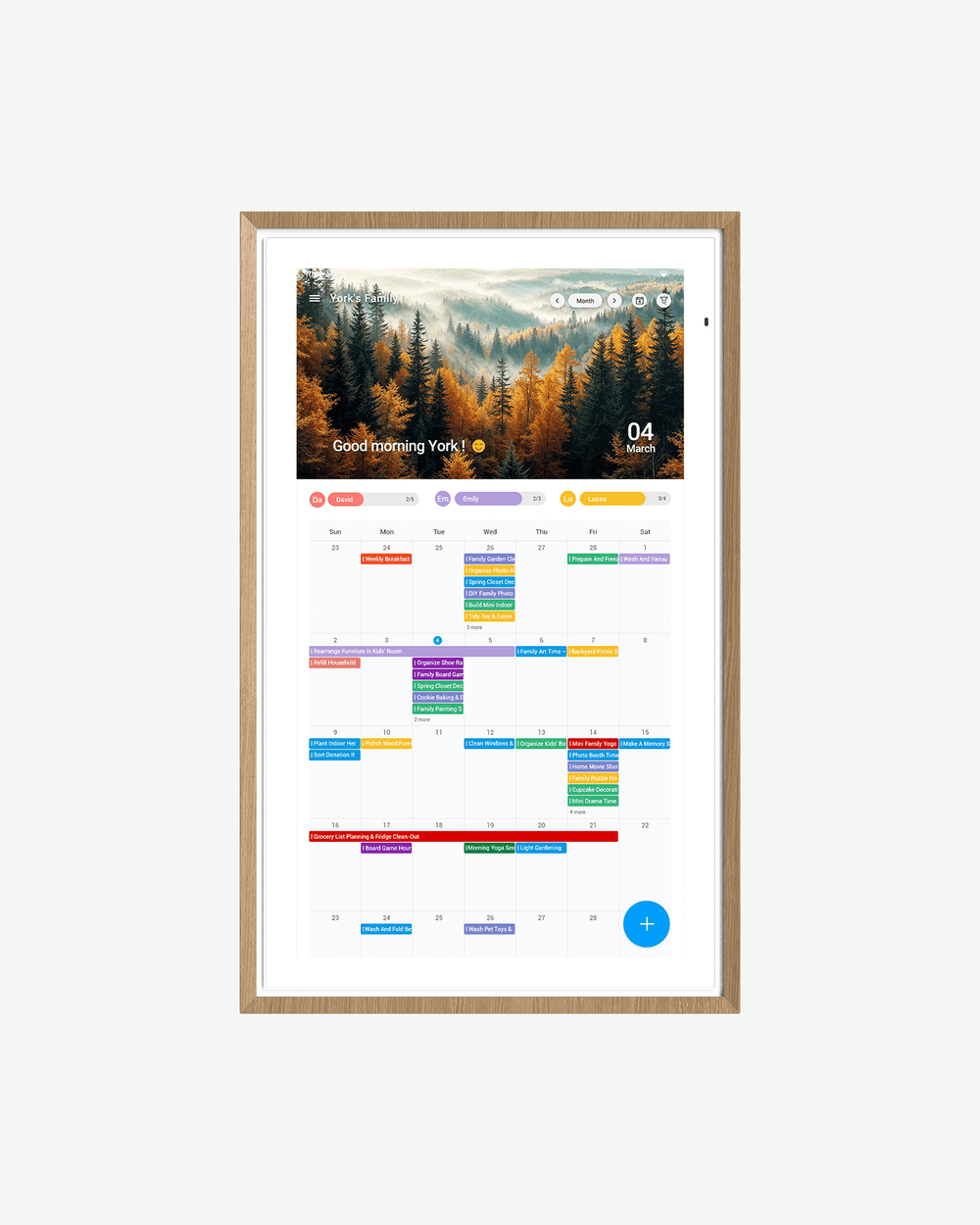
At its core, the system consists of three components: a screen (ranging from a repurposed tablet to a wall-mounted monitor), calendar software or a dedicated family organizer app, and a reliable internet connection that keeps everything synchronized. Family members can add events from their phones, and changes appear on the wall display instantly. The concept evolved from basic digital calendars on personal devices, but the key difference is shared visibility — nobody has to ask "what's happening Saturday?" because the answer is always right there on the wall. Modern versions integrate with smart home devices, support voice commands, and offer features like weather forecasts and traffic updates alongside your family's agenda, making them far more powerful than any refrigerator magnet calendar could ever be.
## Why Every Family Needs a Digital Calendar Organizer
Every parent knows the frustration of double-booked evenings, forgotten permission slips, and the constant refrain of "I didn't know about that." Traditional scheduling methods — whether it's a paper planner, a whiteboard, or a chain of group texts — inevitably break down when five people lead five different lives under one roof. A digital calendar organizer eliminates these pain points by creating centralized visibility that the whole family can access at a glance. When every soccer practice, parent-teacher conference, work deadline, and family dinner is displayed in one place, scheduling conflicts get caught before they become crises. Communication improves naturally because the information isn't trapped in one person's phone or head — it belongs to everyone. Parents spend less time playing dispatcher, and kids begin to internalize their own commitments rather than relying on constant reminders. Perhaps most importantly, a family organizer like this becomes a platform for teaching responsibility through visual task management, turning abstract obligations into concrete, trackable actions that even young children can understand and own.
### Simplifying Family Event Scheduling
The real magic of a digital calendar wall lies in how it streamlines the logistics of daily life. Assign each family member a unique color — blue for Dad's work meetings, green for Mom's gym classes, orange for your daughter's dance rehearsals, purple for your son's tutoring sessions — and suddenly a packed week becomes visually intuitive. Instead of mentally cross-referencing three different schedules to figure out who can handle the Thursday afternoon carpool, you see the overlap instantly. Automated reminders push notifications to individual phones thirty minutes before departure, so nobody walks in the door claiming they "forgot." Shared access means a teenager can add a study group to the calendar from school, and both parents see it immediately without a single text message. For families who crave simplified scheduling, this kind of real-time coordination replaces the nightly kitchen-table debrief with a system that works passively in the background, freeing up evenings for actual quality time together.
### Fostering Accountability with Visual Tools
Beyond scheduling, a digital calendar wall becomes a powerful accountability tool when you layer in chore charts and task tracking. Children respond remarkably well to visual systems — seeing their name next to "empty dishwasher" with a clear deadline and a satisfying checkmark upon completion gives them a sense of ownership that verbal reminders never achieve. You can set up recurring daily tasks like making beds and feeding pets, weekly responsibilities like taking out trash, and even tie completion to a simple rewards tracker visible on the same screen. Over time, kids develop genuine time management skills as they learn to plan homework around chores and activities. The wall becomes a mirror reflecting their growing independence, and parents find themselves nagging far less because the expectations are transparent, consistent, and impossible to claim ignorance about. It shifts the dynamic from "Mom told me to" to "the board says it's my turn," which makes a bigger difference in household harmony than most families expect.

## Step-by-Step Guide to Setting Up Your Digital Calendar Wall
Getting your digital calendar wall up and running is simpler than you might think, and the entire process can be completed in a single afternoon. Start by choosing a location that every family member passes multiple times a day — the kitchen wall near the breakfast table, the hallway by the front door, or a family room wall at eye level all work well. Once you've picked your spot, you'll work through hardware selection, software setup, and family onboarding in that order.
### Hardware and Software Recommendations
For a budget-friendly approach, repurpose an old tablet and mount it with an adhesive wall dock — this works well for smaller families who just need a quick-glance display. If you want something more impactful, a wall-mounted monitor in the 15- to 24-inch range offers better visibility from across the room, and many families use a compact all-in-one computer or a smart display designed for kitchen use. Solutions like ApoloSign offer purpose-built digital calendar displays that simplify the hardware decision for families who prefer an all-in-one approach. On the software side, Google Calendar remains a strong free option because nearly every device syncs with it natively. Dedicated family organizer apps like Cozi, FamilyWall, or TimeTree add features specifically designed for households, including grocery lists, chore assignments, and meal planning alongside the calendar view. Choose software that's compatible with the phones your family already carries — if everyone uses iPhones, Apple's shared calendar ecosystem works seamlessly, while mixed-device households benefit from cross-platform apps.
### Configuration and Family Onboarding
With hardware mounted and software installed, create individual profiles for each family member and assign distinct color codes so events are instantly recognizable. Input recurring commitments first — school hours, work schedules, weekly practices — then layer in one-time events like doctor visits and birthday parties. Enable push notifications on each person's phone so reminders travel with them when they leave the house. The critical step most families skip is onboarding: sit everyone down for a ten-minute walkthrough showing how to add an event, mark a task complete, and check the next day's agenda. For younger children who can't type efficiently, teach them to use voice input or designate a parent as their calendar proxy until they're comfortable. Set a simple household rule — if it's not on the wall, it's not happening — and within a week, checking the display becomes as automatic as glancing at the clock.
## Integrating Chore Charts for Teaching Responsibility
A digital calendar wall becomes a genuine parenting ally when you embed chore charts directly into the daily view. Rather than maintaining a separate whiteboard or printable chart that kids conveniently "don't see," placing chores alongside soccer games and family outings signals that responsibilities carry the same weight as fun activities. Start by listing age-appropriate tasks — younger children might handle feeding pets and putting away toys, while teens take on laundry, cooking simple meals, or mowing the lawn. Assign each task a specific day and time window so expectations are concrete, not vague. Most family organizer apps let you set recurring tasks with built-in completion toggles, meaning your child taps a checkmark when finished and everyone in the household can verify it. This transparency eliminates the daily "did you do it?" back-and-forth that wears parents down. You can also build in a simple rewards layer — perhaps a visible points tracker where completed chores accumulate toward a family movie night or extra screen time. Over weeks, children stop viewing chores as punishments imposed by parents and start treating them as non-negotiable parts of their routine, much like brushing teeth. The digital format reinforces this shift because tasks reset automatically, deadlines are clear, and progress is always visible. What you're really building isn't just a cleaner house — it's a framework where kids practice planning, follow-through, and ownership of their contributions to the family.
## Enhancing Your Smart Home Hub with a Calendar Wall
A digital calendar wall truly comes into its own when it connects to your broader smart home hub. Link it to a voice assistant like Alexa or Google Assistant, and anyone in the family can say "what's on the schedule tomorrow?" while packing lunches or tying shoes — no hands required. Voice commands also let you add events on the fly: "Add Emma's volleyball tournament Saturday at nine" updates the wall and every synced phone simultaneously. Beyond voice control, integration with smart home devices opens up practical automations. Program your smart lights to flash gently five minutes before a departure time, or have your smart speaker announce upcoming events each morning during breakfast. Connect it to a smart lock so you can see when the kids arrive home from school alongside their afternoon task list. Some families sync weather and traffic data directly into the calendar view, adjusting commute reminders automatically when conditions change. As smart home ecosystems continue to expand, your calendar wall becomes the central nervous system of the household — coordinating not just people but the devices and routines that support them, future-proofing your family's organization for years to come.
## Best Practices for Maintaining Your Family Organizer System
Even the best digital calendar wall loses its power if the family stops trusting it. Schedule a brief weekly review — Sunday evenings work well — where everyone gathers for five minutes to confirm the upcoming week's events, flag conflicts, and update any changes. This ritual keeps the data accurate and reinforces the habit of checking the display. Involve children in maintenance by rotating who leads the weekly review; this builds ownership and ensures they stay engaged with the system rather than tuning it out. When something breaks down — a syncing glitch, a forgotten entry that caused a missed event — treat it as a quick troubleshooting moment rather than a reason to abandon the tool. Most issues resolve by refreshing the app or re-syncing accounts. As your family evolves, adapt the system accordingly: add new activity categories when a child picks up a sport, adjust chore assignments as kids grow older, or expand notification settings during particularly hectic seasons like back-to-school. A family organizer only works when it reflects your household's current reality, so revisit your setup every few months and prune what no longer serves you. Consistency and flexibility together keep the system alive.
## Transform Your Family's Organization with a Digital Calendar Wall
A digital calendar wall transforms the way families communicate, plan, and share responsibility under one roof. By centralizing every schedule, task, and reminder on a single visible display, it eliminates the miscommunication and forgotten commitments that create daily stress. Integrated chore charts turn household duties into teachable moments, helping children develop accountability and time management skills they'll carry into adulthood. When connected to a smart home hub, the system extends beyond scheduling into genuine household automation — voice-controlled updates, intelligent reminders, and seamless device coordination that saves time without demanding extra effort. The families who thrive with this tool are those who commit to a simple principle: if it matters, it goes on the wall. Whether you start with a repurposed tablet or invest in a dedicated display, the act of making your family's life visible and shared changes the household dynamic in ways that paper calendars and group texts never could. Modern family life demands modern organization — and a digital calendar wall delivers exactly that.
 Google Drive
Gist
Clipboard
Google Drive
Gist
Clipboard
 Sign in via Google
 Sign in via Facebook
 Sign in via X(Twitter)
 Sign in via GitHub
 Sign in via Dropbox
 Sign in with Wallet






