# A03: compute-pi
:::info
主講人: [jserv](http://wiki.csie.ncku.edu.tw/User/jserv) / 課程討論區: [2016 年系統軟體課程](https://www.facebook.com/groups/system.software2016/)
:mega: 返回「[進階電腦系統理論與實作](http://wiki.csie.ncku.edu.tw/sysprog/schedule)」課程進度表
:::
## 目標
* 學習透過離散微積分求圓周率
* [Leibniz formula for π](https://en.wikipedia.org/wiki/Leibniz_formula_for_%CF%80)
* [積分計算圓周率π](http://book.51cto.com/art/201506/480985.htm)
* [Function](http://www.csie.ntnu.edu.tw/~u91029/Function2.html)
* 著手透過 SIMD 指令作效能最佳化
## 複習[黎曼積分](https://zh.wikipedia.org/wiki/%E9%BB%8E%E6%9B%BC%E7%A7%AF%E5%88%86)
如果你真的忘記微積分,趕快透過均一教育平台學習「[微積分概論](https://www.junyiacademy.org/junyi-pre-univ/root/junyi-math/mu-cal-ch1)」。
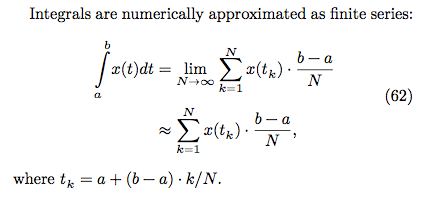
N 越大(切的越細),數值越精確。
## baseline 版本
* 根據上述數學式轉換成 baseline.c
* 修改變數,將傳入的參數改為 N,比較直覺
* N 越大,dt 越小,切割越細
```c
double computePi_v1(size_t N)
{
double pi = 0.0;
double dt = 1.0 / N; // dt = (b-a)/N, b = 1, a = 0
for (size_t i = 0; i < N; i++) {
double x = (double) i / N; // x = ti = a+(b-a)*i/N = i/N
pi += dt / (1.0 + x * x); // integrate 1/(1+x^2), i = 0....N
}
return pi * 4.0;
}
```
## AVX SIMD 版本
AVX (Advanced Vector Extensions) 是 Intel 一套用來作 Single Instruction Multiple Data 的指令集
* 128 位 SIMD 暫存器 xmm0 - xmm15 擴展為 256 位的 ymm0 - ymm15 暫存器
* 支持 256 位的向量運算,由原來 128 位擴展為 256 位
* 指令可支持最多 4 個 operand,實現目標操作數無需損毀原來的內容
* 引進新的 AVX 指令,非 Legacy SSE 指令移植
* 新增 FMA 指令子集 (fused multiply-add/subtract 類運算)
* 可用`$ cat /proc/cpuinfo | grep flags` 尋找是否存在 `fma`關鍵字
* 像是`Intel(R) Core(TM) i5-3317U CPU` 等級的電腦就沒支援,這樣的話可用[模擬器](https://software.intel.com/en-us/articles/intel-software-development-emulator)
* 引進新的指令編碼模式,使用 VEX prefix 來設計指令編碼
`__m256d` 並不是一種暫存器,是指可以用來載入到 AVX 暫存器的 "Data type"
後面程式中用到了`__attribute__ `機制,可以用來設置函數屬性(Function Attribute)、變數屬性(Variable Attribute)和類型屬性(Type Attribute)。`aligned` 則規定變數或結構的最小對齊格式,以 Byte 為單位。
## AVX SIMD + Unroll looping
[source](https://www.facebook.com/groups/ncku.embedded2015/permalink/771193856360435/)
為何 AVX SIMD 的版本沒辦法達到預期 4x 效能提昇呢?
因為浮點 scalar 除法和 vector 除法的延遲,導致沒辦法有效率的執行。考慮到填充 vector instruction 的 pipeline 未能充分使用,我們可以預先展開迴圈,以便使用更多的 scalar 暫存器,從而減少資料相依性。
```c
for (int i = 0; i <= dt - 4; i += 4) {
ymm3 = _mm256_set1_pd(i * delta);
ymm3 = _mm256_add_pd(ymm3, ymm2);
ymm3 = _mm256_mul_pd(ymm3, ymm3);
ymm3 = _mm256_add_pd(ymm0, ymm3);
ymm3 = _mm256_div_pd(ymm1, ymm3);
ymm4 = _mm256_add_pd(ymm4, ymm3);
}
```
可以看到 ymm3 有很強的相依性,而且看起來無法在縮得更小了。
嘗試使用更多的 AVX 暫存器來作 unroll looping 的優化,從原本的 ymm0~ymm4,增加到 ymm0~ymm14。但這種寫法的缺點就是程式碼遍得很龐大,而且不易閱讀。實驗結果在最下面。
# OpenMP 版本
除了AVX SIMD 版本外,也使用 OpenMP 對的 for 迴圈作平行處理,而為了使編譯器能後成功的將順序執行轉為平行執行,運行系統必須確定循環的次數,因此 for 迴圈內不可以包含讓迴圈提前退出的關鍵字,例如 break、return、exit、goto,不過允許 continue 的存在。
以下是 openmp 語法,大概長這樣。詳情可參閱最後面的參考資料
```c
#pragma omp <directive> [clause]
```
對於簡單的 for 迴圈的平行處理例子:
```c
#pragma omp parallel for
for (int i = 0; i < 10; ++i)
test(i);
```
不過因為這個式子`pi += dt / (1.0 + x * x);`的存在,每次迭代都會讀取 pi 值並更新 pi 值,不同次的迴圈中並不相互獨立。因此不能簡單加上`#pragma omp parallel for` 就好,還要作些處理。
1. 可以使用 atmoic、critical,防止變數同時被多個執行緒修改,但速度就會慢上許多,因為一次只允許一個執行續進行存取。
2. 針對這種情境,可以使用 reduction。語法如下
```
reduction(<op>:<variable>)
```
支援的運算元有 +, *, –, &, ^, |, &&, ||,它讓各個執行緒針對指定的變數擁有一份有起始值的複本(起始值是運算元而定,像 +, – 的話就是 0,* 就是 1),平行化計算時,以各自複本做運算,等到最後再以指定的運算元,將各執行緒的複本合在一起。
* 
```c
#pragma omp parallel num_threads(omp_get_max_threads())
{
#pragma omp for private(x) reduction(+:pi)
for (size_t i = 0; i < N; i++) {
x = (double) i / N;
pi += dt / (1.0 + x * x);
}
return pi * 4.0;
}
```
## 結果與分析
* 注意 `Makefile` 裡頭有 `-fopenmp -mavx`,指定開啟 OpenMP 和 AVX
* `CFLAGS = -O0 -std=gnu99 -Wall -fopenmp -mavx`
* 取得原始程式碼並編譯:
```
$ git clone https://github.com/sysprog21/compute-pi
$ cd compute-pi
$ make check
```
* 使用 clock_gettime() 來測量不同實做的執行時間
* 需要等待,保持耐心!
```
$ make gencsv
```
之後可用 [LibreOffice](https://zh-tw.libreoffice.org/) 建立圖表,如下所示:

## 時間處理與 time 函式使用
兩種不同的測量時間的函式,一個是 `clock()`,另一個則是 `clock_gettime()`,而在圖表上也呈現了兩種截然不同的結果。
進入實驗討論前,先了解一下時間觀念和如何使用 C 語言進行時間處理。畢竟要作 Performance Benchmarking,沒有正確使用 time 函式,可能就會導致錯誤的結果和結論。
撰寫時間量測程式前,先評估情況,問問自己幾個問題:
1. 使用什麼 clock 測量?(Real, User, System, Wall-clock....?)
2. clock 的精確度?(s, ms, µs, or faster ?)
3. 需要多久時間你的 clock 會 wrap around?有什麼方法可以避免或處理?
4. clock 是不是 monotonic (單調遞增)?還是會隨著系統時間改變 (NTP, time zone, daylight savings time, by the user...?)
5. 使用的函式使否已經過時、或不是標準函式庫?
## Wall-clock time vs. CPU time
通常我們在計算一個程序的 "Duration time",常常有可能是以下兩個意思,一個是「Wall-clock time」,另一個則是 「CPU time」,根據不同的情況和需求來選擇使用哪一個當作衡量標準。
**1\. Wall-clock time** 顧名思義就是掛鐘時間,也就是現實世界中實際經過的時間,是由 kernel 裡的 xtime 來紀錄,系統每次啟動時會先從設備上的 [RTC](https://zh.wikipedia.org/wiki/%E5%AF%A6%E6%99%82%E6%99%82%E9%90%98) 上讀入 xtime。
```c
struct timespec xtime __attribute__ ((aligned (16)));
struct timespec {
__kernel_time_t tv_sec; /* seconds */
long tv_nsec; /* nanoseconds */
};
```
這個值是自 1970-01-01 起經歷的秒數,另外 Linux 核心也會決定每秒要發生幾次中斷 (透過常數 HZ) ,每次 timer interrupt,就會去更新 `xtime`。
許多說明文件或問答網站常將 System time 和真實世界的 Wall-clock time 混用,System time 是指系統上的時間,開機時它會讀取 RTC 來設定,可能過程中還會有時區換算等之類的設置。一般說來 System time 就是我們執行 `date` 命令看到的時間,Linux 系統下所有的時間調用都是使用這個 (除非直接存取 RTC)。然後 Kernel 會有個全域變數 Jiffies 來紀錄系統開幾以來,經過多少個 tick。每發生一次 timer interrupt,jiffies 會加 1 ( xtime 和 jiffies 很相似,但其實完全不一樣,可參閱 [容易混淆 LINUX 時鐘的 xtime 和 jiffies](http://www.coctec.com/docs/linux/show-post-186188.html) )。
另外注意,有時系統要與網絡中某個節點時間同步,那這個 Wall-clock time 可能會和 [NTP 伺服器](http://linux.vbird.org/linux_server/0440ntp.php)、[時區](https://zh.wikipedia.org/wiki/%E6%97%B6%E5%8C%BA)、[日光節約時間](https://zh.wikipedia.org/wiki/%E5%A4%8F%E6%97%B6%E5%88%B6)同步或使用者自己調整。所以「通常」不建議拿來量測程式時間,因為它不是一個穩定的時間,用專業一點的用語講,Wall-clock time 不一定是單調遞增 (monotonic)。
不過在這裡因為量測過程中沒有涉及到 NTP、時區改變之類的問題,Wall-clock time 是單調遞增,所以在電腦上所經過的 system time (elapsed time) 基本上會等於真實走過的時間。
**2\. CPU time** 指的是程序在 CPU 上面運行消耗 (佔用) 的時間,clock() 就是很典型用來計算 CPU time 的時間函式,但要注意的是,如果有多條 threads,那 CPU time 算的是「每條 thread 的使用時間加總」,所以如果我們發現 CPU time 竟然比 Wall-clock time 還大!這可能是個很重要的原因。
另外很多時候只計算 CPU time 是不夠的,因為執行時間可能還包括 I/O time、 communication channel delay、synchronization overhead....等等。
* **Real time , User CPU time , System CPU time ( Linux 的 time 指令 )**
在今日的 UNIX 系統內事實上存在兩個 time 指令,一個是系統所提供的 /usr/bin/time,這個 time 指令是 System V 版本所提供的工具,這是為了 Bourne shell 使用者所寫的工具;而另一個則是 C shell 內建指令 time。
`$ time` 會報告實際時間,也就是程式從開始到結束的經歷時間,另外還會計算程式使用處理器時間量。
1. **real** time : 也就是 Wall-clock time,當然若有其他程式同時在執行,必定會影響到。
2. **user** time : 表示程式在 user mode 佔用所有的 CPU time 總和。
3. **sys** time : 表示程式在 kernel mode 佔用所有的 CPU time 總和 ( 直接或間接的系統呼叫 )。
在單一處理器的情況下,可以使用 `real - (user + sys)` 來計算 Wall-clock time 與 CPU time 的差異。可以理解「所有」可以延遲程式的因子的總和。在 [SMP](https://en.wikipedia.org/wiki/Symmetric_multiprocessing) 底下可以近似成 `(real * 處理器數目) - (user + sys)`。而這些因子可能是:
1. 將文字或資料輸程式所需的 I/O ( 如 Network I/O, Disk I/O....)
2. 取得實際記憶體供程式使用所需的 I/O
3. 其他程式所使用的 CPU 的時間
4. 作業系統所使用的 CPU 的時間
[CPU bound](https://en.wikipedia.org/wiki/CPU-bound) 與 [I/O bound](https://en.wikipedia.org/wiki/I/O_bound)
所謂 CPU bound,指的是程序需要大量的 CPU computation (對 CPU time 需求量大),相比之下僅需少量的 I/O operation,效能取決於 CPU 速度。
所謂 I/O bound,需要大量 I/O operation (I/O request 的頻率很高或一次 I/O request 成本很高),但僅需少量的 CPU computation,效能取決於 I/O device 速度。
很多時候我們可以使用 time 判斷程式是 CPU bound 還是 I/O bound。
1. `real < user`: 表示程式是 CPU bound,使用平行處理有得到好處,效能有提昇。
2. `real ≒ user`: 表示程式是 CPU bound,即使使用平行處理,效能也沒有明顯提昇,常見的原因有可能是其實計算量沒有很大,生成、處理、結束多執行緒的 overhead 吃掉所有平行處理的好處,或是程式相依性太高,不適合拿來作平行處理。
3. `real > user`: 表示程式是 I/O bound,成本大部分為 I/O操作,使得平行處理無法帶來顯著的效能提昇 ( 或沒有提昇)。
延伸思考:
* clock(), clock_gettime() 的使用
* time(), gettimeofday() 的使用
* 為什麼 clock_gettime() 結果飄忽不定?
* 為什麼 time() 和 gettimeofday() 不適合拿來作 benchmark ?
## 作業要求
* 在 GitHub 上 fork [compute-pi](https://github.com/sysprog21/compute-pi),嘗試重現實驗,包含分析輸出
* 注意: 要增加圓周率計算過程中迭代的數量,否則時間太短就看不出差異
* 詳閱廖健富提供的[詳盡分析](https://hackpad.com/Hw1-Extcompute_pi-geXUeYjdv1I),研究 error rate 的計算,以及為何思考我們該留意後者
* 用 [phonebok](/s/S1RVdgza) 提到的 gnuplot 作為 `$ make gencsv` 以外的輸出機制,預期執行 `$ make plot` 後,可透過 gnuplot 產生前述多種實做的效能分析比較圖表
* 可善用 [rayatracing](/s/B1W5AWza) 提到的 OpenMP, software pipelining, 以及 loop unrolling 一類的技巧來加速程式運作
* 詳閱前方 "Wall-clock time vs. CPU time",思考如何精準計算時間
* 除了研究程式以外,請證明 [Leibniz formula for π](https://en.wikipedia.org/wiki/Leibniz_formula_for_%CF%80),並且找出其他計算圓周率的方法
* 請詳閱[許元杰的共筆](https://embedded2015.hackpad.com/-Ext1-Week-1-5rm31U3BOmh)
* 將你的觀察、分析,以及各式效能改善過程,並善用 gnuplot 製圖,紀錄於「[作業區](https://hackmd.io/s/H1B7-hGp)」
## 參考資料
* Intel AVX Official Document
* [Introduction to Intel® Advanced Vector Extensions](https://software.intel.com/en-us/articles/introduction-to-intel-advanced-vector-extensions)
* [Intrinsics for Arithmetic Operations](https://software.intel.com/en-us/node/524041) , [Intrinsics for Miscellaneous Operations](https://software.intel.com/en-us/node/524118)
* [Optimizations For Intel® AVX, FMA AND AVX2 (chapter 11)](http://www.intel.com/content/dam/www/public/us/en/documents/manuals/64-ia-32-architectures-optimization-manual.pdf) [PDF]
* [Intrinsics Guide](https://software.intel.com/sites/landingpage/IntrinsicsGuide/#expand=579,2050&techs=AVX)
* [How do I achieve the theoretical maximum of 4 FLOPs per cycle?](http://stackoverflow.com/questions/8389648/how-do-i-achieve-the-theoretical-maximum-of-4-flops-per-cycle) [Stackoverflow]
* [nanoant / flops](https://github.com/nanoant/flops) , [Mysticial / Flops](https://github.com/Mysticial/Flops) [GitHub]
* [MPI与OpenMP并行程序设计:C语言版](http://pan.baidu.com/s/1tIXm8) [PDF]
* [Common Variable Attributes](https://gcc.gnu.org/onlinedocs/gcc/Common-Variable-Attributes.html#Common-Variable-Attributes) [gcc.gnu.org]
* 時間處理與 time 函式使用
* [Measure time in Linux - getrusage vs clock_gettime vs clock vs gettimeofday?](http://stackoverflow.com/questions/12392278/measure-time-in-linux-getrusage-vs-clock-gettime-vs-clock-vs-gettimeofday) [Stackoverflow]
* [Timer Interrupt](http://opencsl.openfoundry.org/Lab07_timer_interrupt.rst.html) [Openfoundry]
* [Wall clock time](https://wall-clock%20time/) [Whatis.com]
* [Why real time can be lower than user time](http://unix.stackexchange.com/questions/40694/why-real-time-can-be-lower-than-user-time) [stackexchange]
* [Why is clock_gettime so erratic?](http://stackoverflow.com/questions/6814792/why-is-clock-gettime-so-erratic) [Stackoverflow]
* [gettimeofday() should never be used to measure time](https://blog.habets.se/2010/09/gettimeofday-should-never-be-used-to-measure-time)
* [效能管理](http://www-01.ibm.com/support/knowledgecenter/ssw_aix_53/com.ibm.aix.prftungd/doc/prftungd/performance_management-kickoff.htm?lang=zh-tw) [IBM Knowledge Center]
* [linux 系統時間和硬件時鐘問題 ( date 和 hwclock )](http://blog.gesha.net/archives/221/)
* [linux 墙上时间 xtime 与高精度时钟 gettimeofday](http://blog.chinaunix.net/uid-20727076-id-3086954.html)
 Google Drive
Gist
Clipboard
Google Drive
Gist
Clipboard
 Sign in with Wallet






