---
title: ConcurrentHashMap in Java - Scaler Topics
description: Learn about ConcurrentHashMap in Java, along with its functions, examples, and code explanations on Scaler Topics.
category: Java
author: Shubhanshu Sharma
---
:::section{.abstract}
ConcurrentHashMap, in Java, improves performance by using a locking strategy different from HashTable or Synchronized HashMap. It's thread-safe, allowing multiple threads to work on a single object. The map can be initialized with various options, such as initial capacity, concurrency level, and load factor. The class provides methods for safe insertion and deletion of elements, as well as bulk operations like `foreach()`, `search()`, and `reduce()`. It implements the Serializable interface and ConcurrentMap.
The ConcurrentHashMap class, which is new in JDK 1.5, is a part of the `java.util.concurrent `package, which also implements the Serializable interface and ConcurrentMap. ConcurrentHashMap in java is an improvement on HashMap because it is well known that HashMap is not a good option when dealing with Threads in our application due to poor performance.
Key points of ConcurrentHashMap in java:
* The Hashtable data structure is a key component of ConcurrentHashMap in Java.
* Because the ConcurrentHashMap class is thread-safe, several threads can work together seamlessly on a single object.
* Unlike HashMap, which lacks the ConcurrentHashMap object, any number of threads may be active during a read operation.
* According to the concurrency level, the Object is divided into several segments in ConcurrentHashMap in java.
* ConcurrentHashMap's default concurrency level is 16.
* Any number of threads may execute retrieval operations on a ConcurrentHashMap at once. Still, in order to change an object, a thread must lock the specific segment in which it wishes to operate. Segment locking or bucket locking are two names for this kind of locking mechanism. Consequently, threads can handle 16 update actions concurrently.
* It is not feasible to insert null objects into ConcurrentHashMap as a key or value.
### Simple Example of How to Use a ConcurrentHashMap
The below code creates a ConcurrentHashMap in Java with String keys and Double values. Similar to the previous example, it adds elements to the map, retrieves a value by key, and removes an element from the map.
```java
import java.util.concurrent.ConcurrentHashMap;
public class Main {
public static void main(String[] args) {
ConcurrentHashMap<String, Double> map = new ConcurrentHashMap<>();
// Adding elements to the map
map.put("X", 4.5);
map.put("Y", 6.7);
map.put("Z", 8.9);
System.out.println("Map size: " + map.size());
// Getting values from the map
double valueX = map.get("X");
System.out.println("Value of X: " + valueX);
// Removing elements from the map
map.remove("Y");
System.out.println("Map size: " + map.size());
}
}
```
**Output:**
```
Map size: 3
Value of X: 4.5
Map size: 2
```
:::
:::section{.main}
## Java ConcurrentHashMap Class Declaration
```java
public class ConcurrentHashMap<K,V> extends AbstractMap<K,V> implements ConcurrentMap<K,V>, Serializable
```
Here, K is the key Object type, and V is the value Object type.
`ConcurrentHashMap` in java is inherited from AbstractMap.That means that AbstractMap is the parent class and ConcurrentHashMap is the child class. All methods of AbstractMap can be used in ConcurrentHashMap. ConcurrentMap also implements ConcurrentMap and Serializable interfaces.
:::
:::section{.main}
## Hierarchy of ConcurrentHashMap
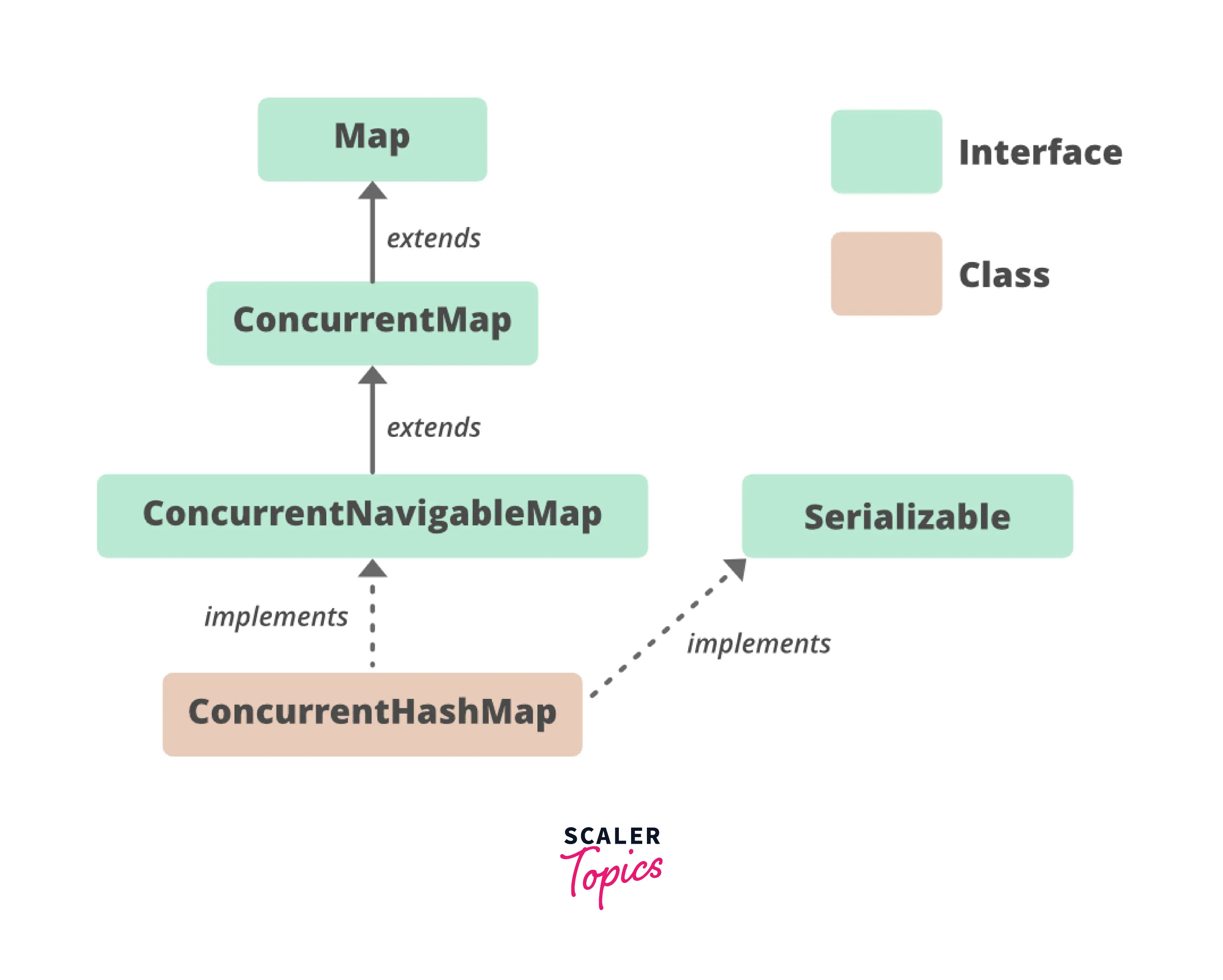
ConcurrentHashMap in java implements Serializable, ConcurrentMap<K,V>, Map<K,V> interfaces and extends AbstractMap<K,V> class.
:::
:::section{.main}
## Constructors of ConcurrentHashMap
**Concurrency-Level**: It is the number of threads that are simultaneously updating the map. The implementation tries to handle this many threads by performing internal scaling.
**Load-Factor**: It is a threshold that regulates resizing. When the average number of elements per bin exceeds this limit, resizing may be done. This means if the load factor of Concurrent HashMap is 0.50 mean, if our Map is filled 50%, then values will be moved to a new ConcurrentMap with double size.
**Initial Capacity**: Initial Capacity of Map. The map can be dynamically resized if more of the initial capacity is filled in the map. If the capacity of this map is 5. It means that it can store five entries.
### 1. ConcurrentHashMap():
Generates a new, empty map with the default initial concurrency level (16), load factor (0.75), and capacity (16).
**Syntax**
```java
ConcurrentHashMap<K, V> chm = new ConcurrentHashMap<>();
```
**Example**
In this example, we will create a ConcurrentHashmap with the constructor we just discussed above.
```java
ConcurrentHashMap<String,Integer> c=new ConcurrentHashMap<String,Integer>();
c.put("a",1);
c.put("b",2);
```
**Code Explanation**
The above Code will create a ConurrentHashMap with the default initial concurrency level (16), load factor (0.75), and capacity (16).
### 2. ConcurrentHashMap(int initialCapacity):
Generates a new, empty map with the initial capacity, the default load factor (0.75), and the concurrencyLevel (16).
**Syntax**
```java
ConcurrentHashMap<K, V> chm = new ConcurrentHashMap<>(int initialCapacity);
```
**Example**
In this example, we are going to create a ConcurrentHashmap in java with the constructor that we just discussed above
```java
ConcurrentHashMap<String,Integer> c=new ConcurrentHashMap<String,Integer>(1);
c.put("a",1);
c.put("b",2);
System.out.println(c.size());
```
**Output**
```plaintext
2
```
**Code Explanation**
The above Code will create a ConcurrentHashMap with an initial capacity of 1.
Note that 1 will not be the final capacity of ConcurrentHashMap. As in the above code, we have created ConcurrentHashMap with initial capacity 1, but adding 2 elements is perfectly valid.
### 3. ConcurrentHashMap(int initialCapacity, float loadFactor):
The function generates a new, empty map with the given initial capacity, load factor, and concurrencyLevel (16).
**Syntax**
```java
ConcurrentHashMap<K, V> chm = new ConcurrentHashMap<>(int initialCapacity, float loadFactor);
```
**Example**
In this example, we are going to create a ConcurrentHashmap with the constructor that we just discussed above.
```java
ConcurrentHashMap<String, Integer> c = new ConcurrentHashMap<String, Integer>(1,0.20f);
c.put("a", 1);
c.put("b", 2);
```
**Code Explanation**
Here, we have created a ConcurrentHashMap With an initial capacity of size 1 and a load factor of 0.20.
### 4. ConcurrentHashMap(int initialCapacity, float loadFactor, int concurrencyLevel):
creates a new, empty map with the given capacity, load factor, and concurrency level that are supplied.
**Syntax**
```java
ConcurrentHashMap<K, V> a = new ConcurrentHashMap<>(int initialCapacity, float loadFactor, int concurrencyLevel);
```
**Example**
In this example, we are going to create a ConcurrentHashmap with the constructor that we just discussed above
```java
ConcurrentHashMap<String, Integer> c = new ConcurrentHashMap<String, Integer>(1, 0.20f, 10);
c.put("a", 1);
c.put("b", 2);
```
**Code Explanation**
In the Code Above, we have created a ConcurrentHashMap with an initial capacity 1 load factor of 0.20 and concurrencyLevel 10.
### 5. ConcurrentHashMap(Map m):
Generate a new map with the same mappings as the specified map.
**Syntax**
```java
ConcurrentHashMap<K, V> chm = new ConcurrentHashMap<>(Map m);
```
**Example**
In this example, we will create a ConcurrentHashmap with the constructor we just discussed above. First, we will create a Map and then create a ConcurrentHashmap from Map.
```java
// Create a HashMap
Map<String, Integer> hm = new HashMap<String, Integer>();
// Put elements to the HashMap
hm.put("a", 1);
hm.put("b", 2);
ConcurrentHashMap<String, Integer> c = new ConcurrentHashMap<String, Integer>(hm);
// Display the HashMap
System.out.println(c);
```
**Output**
```plaintext
{a=1, b=2}
```
**Code Explanation**
In the Code Above, we first created a map with some values. Then Created a ConcurrentHashMap by passing HashMap that we just created.
**Example: **
```java
import java.util.concurrent.ConcurrentHashMap;
class StudentDatabase {
public static void main(String[] args) {
// Create an instance of ConcurrentHashMap
ConcurrentHashMap<String, Integer> studentScores = new ConcurrentHashMap<>();
// Insert mappings using the put method
studentScores.put("Alice", 85);
studentScores.put("Bob", 92);
studentScores.put("Charlie", 78);
// Here we can't add "Alice" with a new score because the key "Alice" is already present
studentScores.putIfAbsent("Alice", 90);
// We can remove an entry because "Bob" is associated with the value 92
studentScores.remove("Bob", 92);
// Now we can add a new student with their score
studentScores.putIfAbsent("David", 88);
// We can replace the score of "Charlie" from 78 to 80
studentScores.replace("Charlie", 78, 80);
System.out.println("Student scores: " + studentScores);
}
}
```
**Output:**
```
Student scores: {Alice=85, Charlie=80, David=88}
```
:::
:::section{.main}
## Various Operations on ConcurrentHashmap
### Adding Elements
**1. put()**
adds a key-value pair with the provided values to the map.
**Example**
In the code below, we are going to create a concurrent hashmap and add some elements to it using the put method.
```java
import java.util.HashMap;
import java.util.Map;
import java.util.Set;
import java.util.Map.Entry;
import java.util.concurrent.ConcurrentHashMap;
/**
* classA
*/
public class classA {
public static void main(String[] args) {
ConcurrentHashMap<String, String> map = new ConcurrentHashMap<>(4,0.5f);
map.put("key1", "value1");
map.put("key2", "value2");
map.put("key3", "value3");
System.out.println(map);
}
}
```
**Output**
```plaintext
{key1=value1, key2=value2, key3=value3}
```
**2. putAll()**
adds every entry from a given map to the current map.
**Example**
In the code below, we are going to create a concurrent hashmap and add elements of another map by using the putAll() method.
```java
import java.util.HashMap;
import java.util.Map;
import java.util.Set;
import java.util.Map.Entry;
import java.util.concurrent.ConcurrentHashMap;
/**
* classA
*/
public class classA {
public static void main(String[] args) {
HashMap<String, String> hashMap = new HashMap<String, String>();
hashMap.put("key1", "value1");
hashMap.put("key2", "value2");
hashMap.put("key3", "value3");
hashMap.put("key4", "value4");
ConcurrentHashMap<String, String> map = new ConcurrentHashMap<>(4,0.5f);
map.putAll(hashMap);
System.out.println(map);
}
}
```
**Output**
```plaintext
{key1=value1, key2=value2, key3=value3, key4=value4}
```
**3. putIfAbsent()**
if the key supplied does not exist in the map, put the specified key/value mapping into the map.
**Example**
In this example, we are going to create a ConcurrentHashmap and only add elements if they are not present in the map using the putIfAbsent() method.
```java
import java.util.HashMap;
import java.util.Map;
import java.util.Set;
import java.util.Map.Entry;
import java.util.concurrent.ConcurrentHashMap;
/**
* classA
*/
public class classA {
public static void main(String[] args) {
ConcurrentHashMap<String, String> map = new ConcurrentHashMap<>(4,0.5f);
map.put("1", "1");
map.put("2", "2");
map.put("3", "8");
map.put("4", "4");
map.putIfAbsent("3", "3");
map.putIfAbsent("4", "4");
// map.
System.out.print(map);
}
}
```
**Output**
```plaintext
{1=1, 2=2, 3=8, 4=4}
```
### Removing Elements
**1. remove(key**
returns and deletes the entry from the map that corresponds to the key supplied.
**Example**
In this example, we are going to remove an element from ConcurrentMap using the remove() method.
```java
import java.util.HashMap;
import java.util.Map;
import java.util.Set;
import java.util.Map.Entry;
import java.util.concurrent.ConcurrentHashMap;
/**
* classA
*/
public class classA {
public static void main(String[] args) {
ConcurrentHashMap<String, String> map = new ConcurrentHashMap<>(4,0.5f);
map.put("1", "1");
map.put("2", "2");
map.put("3", "8");
map.put("4", "4");
System.out.println(map.remove("3"));
}}
```
**Output**
```plaintext
8
```
**2. remove(key, value)**
Only removes the entry from the map if the key and value match and returns a boolean value.
**Example**
In this example, we will remove an element from ConcurrentHashmap using the remove() method.
```java
import java.util.HashMap;
import java.util.Map;
import java.util.Set;
import java.util.Map.Entry;
import java.util.concurrent.ConcurrentHashMap;
/**
* classA
*/
public class classA {
public static void main(String[] args) {
ConcurrentHashMap<String, String> map = new ConcurrentHashMap<>(4,0.5f);
map.put("1", "1");
map.put("2", "2");
map.put("3", "8");
map.put("4", "4");
System.out.println(map.remove("3","8"));
System.out.println(map.remove("3","22"));
}
}
```
**Output**
```plaintext
true
false
```
### Accessing the Elements
**1. entrySet()**
Returns a set of all of the map's key/value mappings.
**Example**
In this example, we are going to print a Set of Entries in ConcurrentHashMap using the entry set method.
```java
import java.util.HashMap;
import java.util.Map;
import java.util.Set;
import java.util.Map.Entry;
import java.util.concurrent.ConcurrentHashMap;
/**
* classA
*/
public class classA {
public static void main(String[] args) {
ConcurrentHashMap<String, String> map = new ConcurrentHashMap<>(4,0.5f);
map.put("1", "1");
map.put("2", "2");
map.put("3", "8");
map.put("4", "4");
System.out.println(map.entrySet());
}
}
```
**Output**
```plaintext
[1=1, 2=2, 3=8, 4=4]
```
**2. keySet()**
provides a Set of all the map's keys.
**Example**
In this example, we are going to print a Set of Keys in the map using the keyset() method.
```java
import java.util.HashMap;
import java.util.Map;
import java.util.Set;
import java.util.Map.Entry;
import java.util.concurrent.ConcurrentHashMap;
/**
* classA
*/
public class classA {
public static void main(String[] args) {
ConcurrentHashMap<String, String> map = new ConcurrentHashMap<>(4,0.5f);
map.put("1", "1");
map.put("2", "2");
map.put("3", "8");
map.put("4", "4");
System.out.println(map.keySet());
}}
```
**Output**
```plaintext
[1, 2, 3, 4]
```
**3. values()**
Returns a Set of all the map's values.
**Example**
In this example, we are going to print a set of values in ConcurrentHashMap using the values() method.
```java
import java.util.HashMap;
import java.util.Map;
import java.util.Set;
import java.util.Map.Entry;
import java.util.concurrent.ConcurrentHashMap;
/**
* classA
*/
public class classA {
public static void main(String[] args) {
ConcurrentHashMap<String, String> map = new ConcurrentHashMap<>(4,0.5f);
map.put("1", "1");
map.put("2", "2");
map.put("3", "8");
map.put("4", "4");
System.out.println(map.values());
}}
```
**Output**
```plaintext
[1, 2, 8, 4]
```
**4. get()**
Returns the value corresponding to the key supplied. If the key cannot be located, it returns null.
**Example**
In this example, we are going to print the value corresponding to the key.
```java
import java.util.HashMap;
import java.util.Map;
import java.util.Set;
import java.util.Map.Entry;
import java.util.concurrent.ConcurrentHashMap;
/**
* classA
*/
public class classA {
public static void main(String[] args) {
ConcurrentHashMap<String, String> map = new ConcurrentHashMap<>(4,0.5f);
map.put("1", "1");
map.put("2", "2");
map.put("3", "8");
map.put("4", "4");
System.out.println(map.get("4"));
System.out.println(map.get("86"));
}}
```
**Output**
```plaintext
4
null
```
**5. getOrDefault()**
Returns the value corresponding to the key supplied. If the key cannot be found, it returns the provided default value.
**Example**
In this example, we are going to print the value corresponding to a key using the getOrDefault() method.
```java
import java.util.HashMap;
import java.util.Map;
import java.util.Set;
import java.util.Map.Entry;
import java.util.concurrent.ConcurrentHashMap;
/**
* classA
*/
public class classA {
public static void main(String[] args) {
ConcurrentHashMap<String, String> map = new ConcurrentHashMap<>(4,0.5f);
map.put("1", "1");
map.put("2", "2");
map.put("3", "8");
map.put("4", "4");
System.out.println(map.getOrDefault("4","Not Found"));
System.out.println(map.getOrDefault("86","Not Found"));
}}
```
**Output**
```plaintext
4
Not Found
```
### Traversing
Different bulk operations can be securely applied to concurrent maps using the ConcurrentHashMap class.
**1. forEach() Method**
The supplied function is carried out by the `forEach()` method while iterating through our entries.
There are two parameters in it.
**The parallelismThreshold** sets the number of items at which operations in a map begin to run concurrently.
**transformer**: Before the data is delivered to the specified function, it will be transformed.
**Example**
In this example, we are going to print each key-value pair using the for each method.
```java
import java.util.HashMap;
import java.util.Map;
import java.util.Set;
import java.util.Map.Entry;
import java.util.concurrent.ConcurrentHashMap;
/**
* classA
*/
public class classA {
public static void main(String[] args) {
ConcurrentHashMap<String, Integer> map = new ConcurrentHashMap<>(4,0.5f);
map.put("1", 1);
map.put("2", 2);
map.put("3", 8);
map.put("4", 4);
map.forEach(80, (k,v) -> System.out.println(k+" "+v));
System.out.println(map);
}}
```
**Output**
```plaintext
1 1
2 2
3 8
4 4
{1=1, 2=2, 3=8, 4=4}
```
In the programme mentioned above, parallel threshold 4 was given. This indicates that the procedure will be carried out simultaneously if the map has four entries.
**2. search()**
The `search() method` looks up the element in the map using the given function, and then it returns it.
In this case, the entry to be searched is decided by the supplied function.
Additionally, parallelThreshold, an optional parameter, is included. The parallel threshold indicates how many map components must pass before an operation is carried out in parallel.
**Example**
In this example, we are going to search for the key from ConcurrentHashMap that has a value of 3.
```java
import java.util.concurrent.ConcurrentHashMap;
class classA {
public static void main(String[] args) {
ConcurrentHashMap<String, Integer> numbers = new ConcurrentHashMap<>();
numbers.put("One", 1);
numbers.put("Two", 2);
numbers.put("Three", 3);
System.out.println("ConcurrentHashMap: " + numbers);
// Using search()
String key = numbers.search(4, (k, v) -> {return v == 3 ? k: null;});
String key2 = numbers.search(4, (k, v) -> {return v == 8 ? k: null;});
System.out.println("key having value 3 is " + key);
System.out.println(key2);
}
}
```
**Output**
```plaintext
key having value 3 Three
null
```
**3. reduce() Method**
The `reduce() method` accumulates (combines) each entry in a map. This method can be used to add all the values in a map, for example.
There are two parameters in it.
**The parallelismThreshold** sets the number of items at which operations in a map begin to run concurrently.
**Transformer**: Before the data is delivered to the specified function, it will be transformed.
**Example**
In this example, we are going to find the sum of the map using reduce method.
```java
import java.util.concurrent.ConcurrentHashMap;
class classA {
public static void main(String[] args) {
ConcurrentHashMap<String, Integer> numbers = new ConcurrentHashMap<>();
numbers.put("One", 1);
numbers.put("Two", 2);
numbers.put("Three", 3);
System.out.println("ConcurrentHashMap: " + numbers);
int sum = numbers.reduce(4, (k, v) -> v, (v1, v2) -> v1 + v2);
System.out.println("Sum of all values: " + sum);
System.out.println(numbers);
}
}
```
**Output**
```plaintext
ConcurrentHashMap: {One=1, Two=2, Three=3}
Sum of all values: 6
{One=1, Two=2, Three=3}
```
**Code Explanation**
4 is a parallel threshold here
(k, v) -> v is a transformer function. It transfers the key/value mappings into values only.
(v1, v2) -> v1+v2 is a reducer function. It gathers together all the values and adds all values.
In this case, (k, v) -> v is a transformer function, and 4 is a parallel threshold. The key/value mappings are converted into values alone.
A reducer function is (v1, v2) -> v1+v2. It compiles all the values and adds them all.
:::
:::section{.main}
## List of ConcurrentHashMap Class Methods
| Methods | description | code |
|:------------------:|:-------------------------------------------------------------------------------------------------------------------------------------------------------------------------:|:---------------------------------------------------------------------------------:|
| put() | add the given key/value mapping to the map | ```map.put(key,value)``` |
| putAll() | add all the entries from given map to this map | ```ConcurrentHashMap.putAll(AnotherMap);``` |
| putIfAbsent() | add the given key/value mapping to the map if the given key is not present in the map | ```ConcurrentHashMap.putIfAbsent(key, value);``` |
| entrySet() | returns a set of all the key/value mapping of the map | ```Set<Entry<String,String>> entry = map.entrySet();``` |
| keySet() | return a set of all keys in map | ```Map.keySet()``` |
| values() | return a set of all values in map | ```Map.values()``` |
| get() | returns the value corresponding to the key supplied. If the key cannot be located, it returns null. | ```map.get(value);``` |
| getOrDefault() | returns the value corresponding to the key supplied. If the key cannot be located, it returns the default value. | ```map.getOrDefault(key, value);``` |
| remove(key) | returns and deletes the entry from the map that corresponds to the key supplied. | ```value=Map.remove(key);``` |
| remove(key, value) | only removes the entry from the map if the key and value match and returns a boolean value. | ``` boolean result = Map.remove(key, value);``` |
| forEach() | The supplied function is carried out by the forEach() method while iterating through our entries. | ```map.forEach(4, (k, v) -> System.out.println("key: " + k + " value: " + v));``` |
| search() | The search() method looks up the element in the map using the given function, then it returns it. | ``` map.search(4, (k, v) -> {return v == 3 ? k: null;});``` |
| reduce() | Each entry in a map is accumulated (combined) via the reduce() method. For example, when we need to add all the values to a map, this can be used to add all the entries. | ```map.reduce(4, (k, v) -> v, (v1, v2) -> v1 + v2)``` |
:::
:::section{.main}
## ConcurrentHashMap vs Hashtable
| Parameter | ConcurrentHashMap | HashMap |
|----------------------------|------------------------|--------------------------|
| Synchronization | Synchronized | Not synchronized |
| Thread Safety | Thread-safe | Not thread-safe |
| Null values | Not allowed (NPE) | Allowed |
| Performance | Slower than HashMap | Faster than ConcurrentHashMap |
| Java Version | Since 1.5 | Since 1.2 |
| Multi-threaded Environment | Performs better | Not scalable |
| Single-threaded Environment| Slightly lower | Slightly better |
<!-- |ConcurrentHashmap | HashMap | | | | |
|:----------------------------------:|:----------------------------: | :--------------------------------------------------------------------------------------------------------------: | :--------------------------: | :-------------------------------------------------------------------------------------------------: | :-----------------------------------------------------------------------------------------------------------------------------------------: |
| ConcurrentHashmap is synchronized. | HashMap is not synchronized. | ConcurrentHashMap is thread-safe and can be used in a concurrent environment without external synchronization. | HashMap is not threadsafe. | ConcurrentHashMap is fail-safe and never throws ConcurrentModificationException during iteration. | A HashMap iterator is fail-fast and an ArrayList throws a ConcurrentModificationException if changes occur concurrently during iteration. |
Null keys and values are not allowed in ConcurrentHashMap. NullPointerException will be thrown. | HashMaps allow keys and values to be null. |
| ConcurrentHashMap is slower than HashMap | HashMap is faster. |
| since java version 1.5| since java version 1.2 |
In a multi-threaded environment, Concurrent HashMap performs better than Synchronized HashMap | In a multi-threaded environment, HashMap is not that scalable as compared to Concurrent HashMap|The performance of Concurrent HashMap in a single thread environment is slightly lower than HashMap |In a single thread environment HashMap performs slightly better than ConcurrentHashMap
fddf -->
:::
:::section{.main}
## Advantages and Disadvantages of ConcurrentHashMap
**Advantages:**
* ConcurrentHashMap offers a robust application solution requiring simultaneous access from multiple threads. Its design ensures thread safety, making it a reliable choice for concurrent data access scenarios.
* Utilizing fine-grained locking, ConcurrentHashMap optimizes performance by only locking the specific portions of the map that are being modified rather than the entire structure. This approach enhances scalability and efficiency, even in situations with extensive concurrent operations.
* ConcurrentHashMap provides atomic operations like putIfAbsent(), replace(), and remove(), which enable seamless execution of complex concurrent algorithms. These atomic methods ensure that operations are performed consistently and reliably in multi-threaded environments.
* ConcurrentHashMap stands out for its combination of thread safety, fine-grained locking, atomic operations, and high performance, making it a valuable tool for efficiently and reliably handling concurrent data access.
**Disadvantages:**
* **Increased Memory Usage:** ConcurrentHashMap's fine-grained locking approach demands extra memory, contributing to higher overhead than alternative synchronization methods.
* **Added Complexity:** The fine-grained locking mechanism employed by ConcurrentHashMap can introduce complexity to the codebase. This complexity may pose challenges, particularly for developers inexperienced in concurrent programming, as they navigate the nuances of managing concurrent access to shared resources.
:::
:::section{.summary}
## Conclusion
* `ConcurrentHashMap` in java is a part of the `java.util.concurrent` package
* It also implements the Serializable interface and ConcurrentMap
* Because the ConcurrentHashMap class is thread-safe, several threads can work together seamlessly on a single object.
* ConcurrentHashMap provides a variety of constructors by which we can initialize a map with a given initial capacity, concurrency level, and load factor.
* ConcurrentHashMap provides different method by which we can insert, delete elements
* The ConcurrentHashMap class provides different operations that can be applied safely to concurrent maps.
* Different bulk operations can be securely applied to concurrent maps using the ConcurrentHashMap class.
:::
 Google Drive
Gist
Clipboard
Google Drive
Gist
Clipboard
 Sign in with Wallet






