---
tags: AWS Reference
---
# SAA NOTES
AWS Red Shift
----------
- 資料儲存在data warehouse的方式有三種
- ROLAP 資料庫
- MOLAP 用陣列形式儲存
- HOLAP 結合上述兩種
- JDBC(Java database connectivity) : 大多走這
- ODBC : Fully manage 、High performance、column-based(行式儲存)
- RDS 屬於row-based(列式儲存)
- RedShift 與 RDS 的 差異 :
- 除 資料量的多寡 外,前者資料較偏向歷史資料比較不會變動並拿來大數據分析;後者資料常常變動
- 可以 Cross-Region Snapshot
AWS Auto Scaling
----------
- 可監控應用程式並 自動調整容量(數量),盡可能以最低成本維持穩定可預測效能。
- 快速設定擴展,明智的擴展決策(Scaling policy)、自動維護效能(透過持續監控維持你所設定的效能狀態)、按需求付費。
- Scaling policy : Target Value、CloudWatch
- 這兩個是一樣的,前者是懶人包只要設定一點東西剩下CloudWatch幫做;後者可以做更為精細的設定。
- **Auto Scaling scale-in(減機器)** :
- 預設 :
- 第一步 找哪個AZ中的EC2最多且可以刪掉(平衡AZ)。
- 第二步 找舊Configuration的EC2。
- 第三步 找下一個最快被算錢的EC2。
- 第四步 隨便找一個衰鬼刪掉。
- 自己設定
- Auto Scaling Lifecycle Hooks : 決定關機後會進入lifecycle,可在這設定一段時間,讓你的機器先做完手邊工作在關機。
怎麼啟用 Auto Scaling?
- Launch Configuration : EC2 Type、VPC&Subnet、User date。
- 用以創建好的EC2。
Amazon RDS
----------
- 關連式資料庫 --> Schema 固定
Read Replica
- 可創立唯讀副本讓使用者讀取(可跨region抄寫,但有延遲),讓Master專心在寫入。
- Replica 可晉升成master於其他region中獨立運作。
- Amazon RDS、Mysql、MarineDB、PostreSql才有。
- Configure option 可設定maintenance時間,可選擇星期、時間。
- RDS會自動備份,會從 standby 備份。
- 在master寫入的資料會 自動同步 到standby中,但只能 near real time,無法達到real time。
- Aurora的Multi-Master(preview階段)是為了讓不同region的使用者在寫入的時候降低latency而想要在不同region建立 可寫入的Master。
AWS IAM
----------
- IAM User : 給予個別user不同的權限。
- IAM Group : 定義好權限,把可擁有此權限的user加進來。
- IAM Roles : 讓你的應用程式(服務)可以允許存取其他服務(服務與服務對接)。
- 經過sts.assumeRole
- sts.assumeRole會產生暫時的accessKey並和role所給的policy尬在一起。
- Permissions : Deny > Allow。
- IAM Policy :
- Effect : Allow or deny
- resoures : server ex. s3 bucket
- action
- condition
- Cross Account Role :
- temporary access key
- AWS STS : temporary security credentials
- AWS CloudTrail : 可監控IAM的log紀錄(always on 不用特別啟用),這些log可使用KMS進行加密(本身會自己加密)。
- AWS MFA : 綁定額外的登入條件。
AWS VPC
----------
- 路徑轉移
- Public subnet中的EC2要出去網路:
- EC2 -> SG(EC2的防火牆) -> NACL(subnet的防火牆) -> Route table ->IGW -> internet
- Private subnet中的EC2要出去網路:
- EC2 -> SG -> NACL -> Route table -> NAT ->Route table ->IGW -> Route table -> internet
- IP 預留 : 前四後一。
- 10.0.0.0 : 網路地址
- 10.0.0.1 : VPC路由器預留
- 10.0.0.2 : AWS預留,DNS
- 10.0.0.3 : AWS預留,備用
- 10.0.0.255 : 網路廣播地址
## AWS SQS
Fully managed message queueing service
----------
- Type
- SQS Standard:
- 無傳輸量上限
- At-Least-Once-Delivery 至少傳遞一次 : 確保接收到資料
- 不一定會有順序
- SQS FIFO :
- 有傳輸量上限
- Exactly-Once Processing 恰好一次
- 資料有順序姓
- 通常使用於一個步驟中有順序性的情況
- 例如 : 演唱會搶票,一個座位,時間先後決定誰搶到座位。
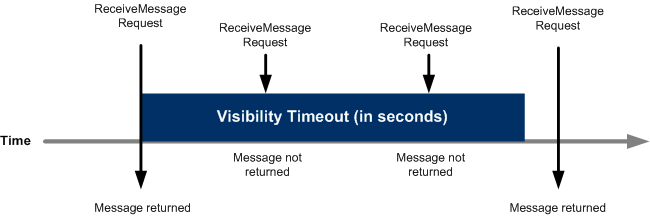
- Visibility Timeout 可見性逾時
- 當使用者 request 訊息時, 訊息仍會在此期間保留於佇列當中
- 這此期間中,佇列會防止其他服務接收或處理此訊息
- Dead-Letter Queues
- 當佇列無法成功處理訊息時,會將該訊息傳送至此佇列
- 必須先建立一個佇列,並指派此佇列為 Dead-Letter queue
- FIFO 的無效佇列也必須是 FIFO ; Standard 的無效佇列也必須是 Standard
## Container & Docker
為ECS做鋪墊
----------
- 輕量化的 VM (虛擬機器)
- 容器化技術,對系統層做虛擬化
- container 優點
- container 可節省虛擬機運作OS的時間
- 比 VM 的容量還小
- 可以開更多台
- 缺點
- container 要執行的應用程式,需與Host OS 相同
- 共享 Host OS
- 資安比較差
- Docker
- 開源專案
- 透過 Container 自動化部署應用程式
- 三個觀念
- docker image : 唯讀模板,包含應用程式啟動所需環境
- 可用 image 運行 container
- 多層式架構(?)
- docker container : image 執行實例
- docker registries : 放置 docker image 的倉庫
- Amazon 自己也做了一個倉庫 : ECR
- 優點 : DevOps 方便
- 可攜性高
- 支援多項雲端服務(包括AWS)
- Docker Swarm
- 將多台實體機器上執行 docker container ,組合成一個叢集(Cluster)
Amazon ECS
----------
- 高效能容器協調服務,負責管理並擴展叢集內的容器服務及工作。
- ECS cluster (EC2 or Fargate)
- Service : 叢集上運行的服務
- Service Scheduler : 服務排程
- Task Definition : 定義要執行的任務,包含container資訊及任務大小
- container agents : 容器代理程式
- 優點 :
- 可整合 AWS
- 安全 : 在自己的 VPC 下使用
- 支援 __Private Link__ : 用 endpoint 連線
- 可用 __CloudWatch 監控__ 狀態
- 可以 Auto Scaling
- Fargate : 適用於 Amazon ECS 的運算引擎
- use case
- Microservice
- Continuous Delivery to ECS with codepipeline
## AWS Machine Learning Services
----------
- sagemaker :
- 全託管
- sagemaker marketplace : 有賣演算法
- hyperparameter tuning : 可調整訓練參數(?)
- 可以用較複雜的演算法
- EMR :
- 全託管
- EMR notebook :
- Jupyter
- Zeppelin
- 分散式處理資料
- Amazon Machine Learning :
- 在做預測可選擇 :
- real time
- batch
- 不用寫演算法,資料丟進去就可以了
- Amazon Forecast:
- 和 AML 一樣可自動建模
- Time series data (時間序列資料)
- 時間會影響資料之間的相關
AWS S3
----------
- 當災難發生時,RPO表示你可以允許多少資料損失、RTO表示你花多久時間災難復原

- 用來做 RTO(Recovery Time Objective)、RPO(Recovery Point Object)
use case :
- data lake
版本 :
- 上傳 : Read After Write
- 更新 or 刪除 : 直到上傳完成才會是新版 (上傳中會拿到舊版本)
- Object-based
- 可以存放的總資料量和物件數量不受限制
- 個別物件最大檔案限制 5 TB,但單一 PUT 可上傳的最大物件為 5 GB
- 分段式上傳 ( Multi-part upload ) :
- 優點 : 改善傳輸量 (Improved throughput) 、如果網路問題導致上傳中斷可快速復原 (Quick recovery from any network issues)、你可以暫停正在上傳的物件 (Pause and resume object uploads)
- 作法 : 當你決定要使用分段式上傳後,你必須在一開始就將這個要上傳物件的metadata 附上,S3 會給你一個 “upload ID” (每一筆分段上傳都有一個 ID),當你對這個上傳做了任何動作都需要用這個 ID 。
- 儲存於 Bucket 中
- bucket 名稱需獨一無二 → 產生一串獨一無二的 ARN ex :
Type
- S3 Standard
- Reduced Redundancy Storage (RRS)
- 資料沒那麼重要,他不會幫你備份很多
- 價錢較低
Storage classes
- 小於 128KB 的物件不符合自動分層的資格
- S3 Intelligent Tiering :
- Frequent access tier (常使用層)
- S3 Standard :
- Infrequent access tier (不常使用層)
- Standard IA
- 備援在不同地區
- One Zone IA
- 儲存於單一 AZ 中
- 便宜
- Glacier
- 取用檔案需花費 3 ~ 5 分鐘
- Versioning
- 待補
- Object Lock
- Rentention periods : 設定此期間將不會被複寫或刪除
- Legal Holds :
- 加密方式 :
- 上傳檔案可選擇加密,下載可解密
- 傳輸中 : SSL/TLS
- At rest (service side) :
- SSE-S3
- SSE-KMS
- SSE-c
- Client side 加密

- bucket policy & user policy
- Resources : 可存取的資源
- Action : 可以做的動作(只能上傳...)
- Effect : Allow or Deny
- Principal : bucket arn
- ACL (access control list)
- S3 Transfer Acceleration (傳輸加速)
- 會給一個 URL 用來上傳
- edge location
- Cross-Region Replication (CRR) : 跨區複寫
- Lifecycle
AWS Storage Gateway
----------
- use cases :
backup 、archiving,、disaster recovery, moving data to S3 for in-cloud workloads, and tiered storage
- Type :
- File gateway : 用NFS這個通訊協定來儲存或擷取S3的資料。
- Volum gateway :
- Tape gateway :
## Amazon EBS
EC2 的硬碟
----------
- Volume Type & Use Case:
- SSD (gp2)
- 一般用途,IOPS 16000
- dev & test
- $$$
- SSD (io1)
- IOPS 64000 最高
- key word : high I/O
- NoSQL & RDS
- $$$$
- HDD (st1)
- big data
- Thrughput 第二
- data warehouse
- log processing
- $$
- HDD (sc1)
- cold data
- $
- EBS Optimization 優化
- 可完全發揮 EBS 效能
- 某些 EC2 不支援,某些支援但須手動勾選
- Snapshots (重要!!!!!!!!!!!!!!!!!)
- 會丟到 S3 ,但使用者看不到
- 針對同一個 EBS, 倘若已經有備份 A,第二份備份 B 不會有與 A 相同的東西。(他們相同的東西C)
- 刪除 :

- Encryption 加密
- 只有在建立時能選擇加密
- 加密的 EBS --備份(自動加密)-- > 加密的 snapshot
- 沒加密的 snapshot --複製copy(可勾選加密)-- > 加密的 snapshot
- 加密的 snapshot --打開-- > 加密的 EBS
- 有加密的 snapshot --在加密-- > 兩層加密的 snapshot
- 補充 :
- Cloud storage types :
- object storage : good at scale
- key word : backup
- S3
- file storage
- Key word : share
- EFS
- block storage
- key word : I/O 、 throughput
- EBS
AWS Lambda
----------
Advantage
- no server to manage
- continuous scaling
- lower cost
Lambda Versioning
- lambda 被創建後,版本為 $LATEST(未 publish) ; Publish 後第一次版本為 1
- 更新 code 後重新 publish 可以發布新版本
- 每個版本有自己的 ARN ,可透過 ARN 選用版本

- Lambda Layer
- Zip 檔
- 可將 libraries 、 custom runtime、或其他包成一包
- 優點 :
- 可將程式瘦身
- 限制 :
- 一個 Lambda Function 最多用 5 個 Layer
- Function 和 Layer 解壓縮後全部大小不能超過 250MB
- Custom runtime
- 是一執行環境,透過 AWS custom runtime 支援各種語言
- 可將 runtime 連同 code 一起部署,或是將 runtime 部署至 Layer ,在從 Layer 引用
- Serverless
- 建立應用程式無須管理基礎設施,所有 Server 皆由 AWS 管理
- 透過事件觸發程式碼執行,稱為 Function as a Service (FaaS)
- AWS Serverless Application Model (SAM)
- is an open-source framwork
- 由兩種 元件組成
- Template specification :
- 使用語法定義Serverless Application所需的資源,Ex: DynamoDB Table, API Gateway, IAM Permission, Lambda Function
- Command line interface :
- 使用指令在本地端測試Lambda、建置、部署
- 切換到 GitLab
Use case

- Pricing
- 每個月前一百萬個 request 免費
- 每秒四十萬 GB 內免費
Glacier
----------
主要設計給長久儲存的服務,所以如果在三個月內刪除檔案須酌收費用
- Type
- Standard retrievals : 可在 3~5 hr 內解凍
- Bulk retrieval : 可在 6~12 hr 內解凍
- Expedited retrievals : 可在 1~5min內解凍
- on-demand : 隨時可以使用 ,like EC2 on-demand
- provisioned :
AWS CloudFormation
----------
Ifrastructure as a code.
- Template (JSON、YAML)

-

-

- Mapping : 不同服務可能有不同region , 需要透過 mapping
AWS Elastic Beanstalk
----------
- PAAS
- Advantage :
- upload your code
- complete
- Deployment
- Linear / Rolling (If 你有五台機器)
- All at once (五台全部更新)
- Rolling (一次更新某幾台)
- Rolling with additinal batch (一次更新某幾台,會幫你維持五台可用,例如 兩台在更新,它會自動幫你開兩台,確保有五台運作。)
- Immutable ()
# SAA_STUDY
## Route53
- Define
- 可用性高、可擴展性強的**網域名稱系統 (DNS)** Web 服務。
- use route 53 to static web site (best answer )
- 跨區域region 可以比跨AZ更有效
- 主要功能:
- Register domain names
- domain name
- domain registrar : ICANN 認可的公司 (在處理特定頂層網域 (TLD) 的網域註冊)
- domain registry : 有權銷售具有特定頂層網域之網域的公司
- domain reseller : 為domain registrar 販售網域名稱的公司
- top-level domain (TLD):例如 .com、.org 或 .ninja
- generic top-level domains:會讓使用者知道他們能夠在網站上找到什麼內容 ex : .bike
- geographic top-level domains:TLD 與地理區域 (如國家/地區或城市) 相關聯
- Route internet traffic to the resources for your domain
- alias record
- Health check
- DNS failover
- 從狀況不良的資源路由到正常運作的資源的一種方法
- endpoint
- 將運作狀態檢查設為監控其運作狀態的資源
- health check
- 監控指定的端點 (例如 Web 伺服器) 是否正常運作
- (選用) 當某個端點狀況不良時收到通知
- (選用) 設定 DNS 備援,以便將網際網路流量從狀況不良的資源路由到正常的資源
- 預設為三次運作狀態檢查觀察
- 每隔 30 秒執行一次
- Route 53 運作狀態檢查是監控
- 不能強制變更運作狀態檢查的狀態
- Routing policy
- Simple Routing
- 用於為網域執行指定功能的單一資源
- Mulitvaluing Routing : 8個 / random
- 最多8個 ,雖然無法取代負載平衡器,回應 DNS 查詢時傳回多個可檢查運作狀態 IP 地址的能力可透過 DNS 提高可用性和負載平衡
- Failover Routing
- 如果要設定主動-被動容錯移轉時使用
- Weight Rouing : 通常可以來做 a/b test
- 以依照權重分配要導入的流量,可以執行 A/B 測試
- Blue-Green deployments
- Geolocation Routing : based on user
- 根據請求發出的地理位置將其送至特定的端點,用於根據*使用者位置*來路由流量
- Geoproximity Routing : based on data
- 用於*根據資源位置*路由流量,以及 (選用) 將流量從某個位置中的資源,轉移到另一個位置中的資源。
- bias :可以選擇將更多或更少的流量路由至指定資源
- based on the bias
- 依照bias 來分配,在特定區域中有更多資源/更大的實例大小,因此您希望將用戶引導到該區域而不是其他區域
- 如果您使用 AWS 資源,則是您在其中建立資源的 AWS 區域
- 如果您使用非 AWS 資源,則是資源的經緯度
- Latency Routing
- 有助於您為全球用戶提高應用程式的效能,使用遍佈全球各地的數十個節點,將最終使用者路由到可提供最低延遲性的 AWS 區域
- DNS
- cname : domain name
- 收費
- A
- AAAA
- alais : AWS reousrce
## S3
- Intro
- 提供一個URL
- 雲端儲存裝置
- Object level
- *不提供lock *的機制,他會依照最後一個人編輯的東西為基準,而如果要用lock 機制,要去S3 app layer 去設定
- Component
- Bucket
- Bucket name : unique
- Max : 100 bukcet
- Region
- 3 AZ (backup for durability)
- Can save log in S3 (CloudTrail...) / save Snapshot (EBS/RDS) in S3 for backup
- Cross Region (Read Replicas )
- s3 可以跨區域 replicate
- Object
- Upload :
- 0 byte ~ 5T (spliting file)
- 0 byte ~ 5G (update only once)
- Multi part
- URL
- Static website hosting
- Presign URL
- 可以設定expire 時間
- (所有物件與儲存貯體預設皆為私有。如果您希望使用者/客戶能夠將特定物件上傳至儲存貯體,但不想讓他們具備 AWS 安全登入資料或許可, 指定儲存貯體名稱、物件金鑰、HTTP 方法 (上傳物件時為 PUT),以及過期日期與時)
- case
- Certain specified customers can upload images to S3 bucket for a certain period of time. As as architect what is your suggestion
- Formate
- http://bucket.s3.amazonaws.com
- http://bucket.s3.aws-region.amazonaws.com
- http://s3.amazonaws.com/bucket
- http://s3.aws-region.amazonaws.com/bucket
- Consistency
- Eventual consistency
- 要當資料完全更新後,end user 才可以取得最新版的資料
- Read after write
- 當全部寫入進去後,user才可以去讀取
- managed service
- 如果不要透過Internet -> use VPC endpoint
- Transfer acceleration : 加速
- [Version](https://docs.aws.amazon.com/AmazonS3/latest/dev/ObjectVersioning.html)
- Delete Marker
- S3裡面有分show and hide ,在show 裡面刪除(有開version)會有delete marker 會有delete marker ,但在hide 刪除資料會之地把資料刪除掉
- 提供Version ID(unique )
- 利用堆疊方式
- 避免誤刪方法
- Enable versioning (enable versioning for the underlying S3 bucket)
- Enable MFA delete
- IAM
- enable an IAM policy which does not allow deletion of any document from the S3 bucket
- Storage class
- Standard
- Intelligent-Tiering
- 對於你的資料看使用的頻率去放置不同的class
- Standard-IA
- One Zone-IA
- Glacier
- Glacier Deep Archive
- Security
- CORS : 破圖
- 在 CORS 組態中,可以指定下列數值
- GET
- PUT
- POST
- DELETE
- HEAD
- Bucket Policy : 層級在Bucket
- 是否要public or private (read or write)
- 防呆機制 - 幫你把預設為private ,因為怕公開後,一堆人會去裡面下載你的檔案,導致你的錢QQ
- ACL : 層級在Object
- Performance
- 3,500 requests per second to add data
- 5,500 requests per second to retrieve data
- Prefix :
- 增加搜尋速度
- Hash 方式
- LifeCycle
- transition action
- 可以去設定說你要幾天後把bucket放入standard or IA or glacier .....
- expiration action
- 可以決定說過期時間與永久刪除時間
- Encryption
- At rest
- SSE-S3: Data and master keys managed by S3.
- SSE-C: The user manages the encryption keys.
- SSE-KMS: Master key / Data key
- in transite
- 透過 AWS SSL API endpoints 存取 S3 (HTTPS),存取的流量都會被加密
- S3 event notification targets —
- SQS
- SNS
- Lambda
- AWS Glacier
- Vault (Bucket)
- 每個region下面最多只能有1000個vault
- Achive (Object)
- Achive Retrieval
- Expedited: Costly, 1-5 minutes.
- Bulk: Default, 5-12 hours.
- Standard: Cheapest, 3-5 hours.
- cost-effectiveness
- Vault Lock
- 會把Vault 上鎖, 防止他人修改
- 因為Log 要做合規來使用, 不能讓他人任意修改
- Transfer Accelerating : 加速提取
- Glacier 可以搭配CloudTrail 稽核記錄
- SnowBall
- 收費方式
- 傳輸上去資料,AWS是不收錢的,下載才要收錢
- 可以設定說下載的人付錢, 不是由資料擁有者付費
- 跟Route 53結合
- 如果不能使用, 可能是因為CORS
- 不能使用, 可能名稱不對
- https://yoursite.com
- http://yoursite.com
## RDS
- Intro
- Relational DB
- EC2
- Storage Types
- General Purpose SSD
- Provisioned IOPS
- Magnetic
- DB Engines
- Amazon Aurora
- Aurora: 64 TB
- 8 Read replicas
- Others: 16 TB.
- IOPS: 也高
- 相容MySQL and PostgreSQL
- 橫跨多個 AWS 區域
- Aurora Cross-Region Replication
- MySQL
- PostgreSQL
- MariaDB
- Oracle
- SQL Server
- Backup
- Automated backup -> Snapshot (save in S3, then 可以 cross region)
- 必須處於 ACTIVE 狀態才能進行自動備份
- 執行個體的儲存磁碟區快照,並備份整個資料庫執行個體而不單是個別的資料庫。
- point-in-time 恢復
- When you disable automated backups for AWS RDS,
- your are disabling the point-in-time recovery
- 預設為 7 天,但最長可設定為 35 天
- once in a day
- Captures Transactions logs every 5 minutes
- Manual backup -> Snapshot
- 保留到您明確將其刪除為止
- 靜態資料,及自動備份、僅供讀取複本和快照都可以加密
- 重要特性
- Read Replicas
- Synced asynchronously, so it can have replication lag.
- 非同步
- 是專門被讀取用的,預設不會開啟, 不一定要跨AZ,可增強讀取擴展,僅供讀取複本按標準資料庫執行個體計費,而且費率相同
- Standby
- For failover
- 同步,不能讀取,預設會開啟,需要跨AZ,增強的資料庫可用性和持久性
- asynchronously : Read Replicas
- synchronously : Standby / Multi AZ
- Modify RDS:
- subnet group
- security group
- instance type
- storage : IOPS , SSD , Disk
- Encryption
- Only on database creation
- RDS 不是所有都可以加密, 資料加密後,Amazon RDS 將以透明的方式處理存取身份驗證和資料解密,同時將對效能的影響降至最小
- 針對加密和未加密的資料庫執行個體,在來源和僅供讀取複本間傳輸的資料會經過加密,即使是跨 AWS 區域複寫也一樣。
- 建立了加密資料庫執行個體,您就無法變更該資料庫執行個體的加密金鑰
- 未加密資料庫執行個體不可以有加密僅供讀取複本
- 減輕讀取負擔
- ElastiCache
- Read replicas
- ASG
- Application shard your data
- 將資料拆成更小的shard -> 讀取速度會更快
- Advantage
- easy to administer
- highly scalable 擴長運算資源
- available and durable 只讀取副本(很重要,可以分成Master and slave)
- fast
- secure
- 不開ec2 自己架DB,用RDS 好處=> 不用從細節做,比較方便,還有備份的部分很方便,但是比較貴
- 可以跟elastic Cache 搭配,以便處理大量流量進來,可以降低workload
- 未指定偏好的每週維護時段,則會指派 30 分鐘的預設值
- Amazon RDS 預留執行個體(RI) : 比較省錢
- Other
- 新版的有支援ASG
- 如果要降低價格→ 可以取消Multi AZ
- production:要保留
- development : 可以取消掉
- consider not using a Multi AZ RDS deployment for the development DB
- Matadata 會存取在DynamoDB
- 要注意題目是否用RDS or EC2 host MySQL -> 有時候會騙你
- EC2 host MySQL -> Default : no read Replicas and no Multi AZ for DB
- create new parameter group, attach it to DB and change the setting
- 將資料庫執行個體建立關聯,以管理資料庫組
- increase number of connect
## Redshift
- Intro
- 使用標準 SQL 及現有的商業智慧 (BI) 工具,以簡單且經濟實惠的方式分析所有資料
- 使用精密的查詢優化、高效能本機磁碟的單欄式儲存及大規模平衡查詢執行,對數 PB 的結構化資料執行複雜的分析查詢。大部分的結果幾秒鐘內即可傳回。
- object level
- audit capabilities 審計能力
- 一項在雲端中完全受管的 PB 級資料倉儲服務。您可以從數百 GB 資料開始,並擴展至 1 PB 或更多
- Redshift Spectrum : 可以直接query S3裡面的東西
- 跟 Athena 功能一樣
- block size of 1 MB
- 但一般的DB 都是2-32MB 所以沒辦法比redshift 快速
- Redshift encryption
- Using AWS KMS to encrypt the underlying data.
- 自動或手動快照輪換 CEK
- Using S3 and its encryption.
- HSM
- Redshift Enhanced VPC Routing
- VPC resources the access to Redshift
- 強制叢集與資料儲存庫之間所有的 COPY 與 UNLOAD 流量通過 Amazon VPC
- 如果未啟用增強型 VPC 路由,Amazon Redshift 會透過網際網路來路由流量,包括流向 AWS 網路中其他服務的流量。
- or use VPC endpoint
- Cross-region replication
- can be setup for Redshift Clusters.
- Backup
- Automated snapshot retention period
- 1 day to 35 days.
- 持續備份至 S3
- 可將 Amazon Redshift 設定為自動複製叢集快照 (自動或手動) 到另一區域
- Instance type
- spot instances are not an option.
- WLM (Workload Management) 動態記憶體配置
- 管理查詢並行和記憶體配置
- Cost effective
- 評估保留快照所需天數、設定相應的保留期間,並刪除手動快照
- 買Reserved Instances
- Enhanced VPC Routing
- 由無需額外付費。某些操作可能需要額外的數據傳輸費, 所以不是cost effective
- 減少overall
- Disable automated and manual snapshots on the cluster
- Best performance
- CloudWatch
- AWS trusted Advisor
- Other
- 連不進去
- Modify the VPC Security Groups

## ElastiCache
- Type :
- Redis
- use redis AUTH with in-transit encryption, enabled for clusters
- 增加安全性
- Create an VPC Peering connection between 2 VPC
- 增加兩個VPC可以使用的權限
- Memcached
- Node
- - Read replicas
- in-transit encryption must be enabled for clusters.
- Other
- Session data -> elastiCache or DynamoDB
## EC2
- AMI
- Regional.
- Can copy images to other region.
- 避免單點錯誤
- Type
- On-Demand
- Reserved
- Scheduled
- Spot
- Dedicated hosts
- Dedicated instances
- Capacity Reservations
- 結合CloudWatch
- monitor and store logs from EC2 instances
- Alarm : start, stop or reboot EC2 instances
- Others
- You can change the instance type when the instance is stopped.
- instances need to be monitored and each state change need to be recored
- CloudWatch log
- CloudWatch alarm
- Config
- run script
- cloud-init
- user data
- create a golden image and then create a launch then create a launch configuration
- 因為當EC2 stopped or started 會重新 assign new IP
- placement groups
- EC2 服務置放此執行個體的方法是試著讓所有執行個體分散到底層硬體,使相互關聯的故障減到最少。
- 不過,您可以使用「置放群組」來影響一組「互相依存」執行個體的置放,以符合您的工作負載需求。
- 叢集 – 會將執行個體緊密地包裝在一個可用區域內。此策略可讓工作負載達到 HPC 應用程式典型緊密耦合節點對節點通訊所需的低延遲網路效能。
- 分區 – 會將執行個體分散到邏輯分區,使一個分區中的執行個體群組不會與不同分區中的執行個體群組共用底層硬體。大量分散和複寫的工作負載 (例如 Hadoop、Cassandra 和 Kafka) 通常採取此策略。
- 分散 – 嚴格地將一小組執行個體分散到不同的底層硬體,以減少相互關聯的故障。
## EBS
- Instance Storage : when EC2 關機, Data就消失
- Type :
- General purpose SSD.
- For web applications // most use cases.
- 針對各種交易工作負載平衡價格效能的一般用途 SSD 磁碟區
- IOPS : 16000
- Throughput : 250 MiB/s
- Provisioned IOPS SSD.
- For critical high performing databases.
- 專為對延遲敏感的交易工作負載而設計的最高效能 SSD 磁碟區
- IOPS : 64000
- Throughput : 1000 MiB/s
- Throughput optimized HDD.
- For Big Data.
- 專為經常存取、輸送量密集型工作負載而設計的低成本 HDD 磁碟區
- IOPS : 500
- Throughput : 500 MiB/s
- Cold HDD.
- For infrequently accessed data.
- 專為存取頻率較低工作負載而設計的最低成本 HDD 磁碟區
- IOPS : 250
- Throughput : 250 MiB/s
- Encryption
- KMS
- AWS KMS 會產生新的資料金鑰、使用指定的 CMK 將它加密,然後傳送加密的資料金鑰給 Amazon EBS,與磁碟區中繼資料一起存放。
- 可以針對 EBS 磁碟區和快照進行加密
- 一共有三種加密:
- Encrypted 參數
- 預設加密
- 預設 (未指定 CMK)
- 符合一項, 新產生出來的EBs 就為加密
- EBS-optimized EC2 instances
- 可以provide additional ENI, 讓分工變得更有效率
- ex : 一張ENI 負責EC2, 另一張負責EBS連線
- Snapshot
- save in s3
- Incremental versioning
- 可以共享(多個 AWS 帳戶都可共享該快照), cross region, encryption, lifecycle
- 可以設定排程
- Best practice
- copy the snapshot to new region (不用在透過S3 )
- Block level
- 遞增式存取 incremental
- S3 is objec level
- Max: 16TB
- Other
- EBS volumes can only be attached to an EC2 instance in the same Availability Zone.
- ensure that redundancy
- nothing to do
- default EBS volumes are replicated within their AZ

## EFS
- mount point in each availability zone.
- File sharing
- supports cross availability zone
- Cross VPC
- VPC peering connection
- NFS port 2049 for EFS.
- Throughput mode
- Bursting
- Provisioned
- Performance mode
- General Purpose
- Max I/O
- Lifecycle
- Encryption
- at transit
- Use EFS mount helper to encrypt data in transit
- SSL to encrypt the connection.
## ELB
- Metric
- Request count per target.
- Average CPU utlization.
- Network in.
- Network out.
- Type
- ALB (Application Load Balancer)
- Protocols: HTTP, HTTPS
- Application Layer
- NLB (Network Load Balancer)
- Protocols: TCP, UDP, TLS
- No sticky session
- Network Layer
- IP
- 網路效能較佳, 可提供低延遲
- 使用 TLS 交涉組態 (稱為安全政策),在用戶端與負載平衡器之間交涉 TLS 連線。安全政策為通訊協定與加密的組合。通訊協定會在用戶端與伺服器之間建立安全連線,並確保在用戶端與負載平衡器之間傳遞的所有資料為私有。
- ELBSecurityPolicy-2016-08 安全政策一律用於後端連線。Network Load Balancers 不支援自訂安全政策。
- TLS 通訊協定 protocols
- TLS 加密 ciphers
- Use single certificate per TLS listener provided by AWS certificate Manger
- CLB (Classic Load Balancer)
- Protocols: TCP, SSL/TLS, HTTP, HTTPS
- Both Application and Network Layer
- Health Check
- Failover
- Sticky Sessions
- 就是有些顧客端的連線還是要連到特定一台ec2,不能分散到不同ec2,要Sticky Sessions必須SSL traffic should be terminated on the ELB。因為ELB要讀HTTP headers才能知道要到哪一台特定的主機
- Access logging
- 每個日誌包含收到請求的時間、用戶端的 IP 地址、延遲、請求路徑和伺服器回應等資訊
- 存放於 S3 儲存貯體之前會自動加密,並於您存取它時解密
- Other
- 面向網際網路負載平衡器的節點具有公有 IP 地址
- node 節點會消耗IP數量
- 監控log, 當如果有問題時候要看log 檔案 use access logging (不要去選擇enable cloudwatch log....)
- Use cloudWatch for monitoring
- Enable the logs on the ELB with Latency Alarm that sends an email and then investigate the logs whenever there is an issue
## Autoscaling
- Type
- Configuration
- Template
- lifecycle hooks
- 在 Auto Scaling start or terminate時,藉由暫停執行個體來執行自訂動作。當執行個體被暫停時,將停留在wait state
- Default wait period is 1 hour.
- 可以保護資料損失,以防所需的資料不見,而設計的
- Suspend terminate : administrative suspension
- 可以針對一直無法啟動執行個體的 Auto Scaling 群組,暫停其處理程序
- Scaling Policies
- 手動
- Schedule
- 針對可預測的負載變化設定自己的擴展排程
- Dynamic Scaling Policies
- Target tracking scaling
- 讓CPU保持在想要的狀態
- an utilization metric (依據使用率)
- Step scaling
- 可以指定所需的秒數,為新啟動的執行個體 warm up
- Simple scaling
- cooldown
- 不會一直開開關關的
- sufficient time to stabilize without executing another scaling action
- ASG termination policy
- 平衡AZ裡面的instance
- Oldest launch configuration.
- Closest to next billing hour.
- Random.
- Other
- 如果一直scaling up and down -> use cooldown or modify scaling policy Terminate 的選擇
- 如果ASG 不正常
- use auto scaling for the proxy server
- use AS for backend instance
- 省錢方式
- mix of on-demand & spot instance
- improve number of users accessing the application increases
- use ASG / 不是改換成ALB
- 結合CloudWatch
- Alarm
- 好處
- Fault tolerance
- Availability
## SQS
- Intro
- Consumers must delete an SQS message manually after it has done processing the message.
- 從佇列接收和處理訊息時,訊息會保留在佇列中。Amazon SQS 不會自動刪除訊息
- Dead letter queues
- isolate messages that can't be processed right now.
- Visibility timeout
- Default : 30s
- 訊息接收後,會立刻保留在佇列中。為了避免其他消費者再次處理該訊息,Amazon SQS 會設定可見性逾時,在這段期間中 Amazon SQS 會避免其他消費者接收或處理該訊息
- Type :
- Standard
- at least once delivery
- Best-Effort-Ordering 盡量會按照順序
- 因為會先把資料備份在很多bucket 裡面(確保資料的完整性),然後拿取的時候會隨機從裡面拿,所以才不按照順序
- Max messages: 12,000
- FIFO
- Exactly once processing (處理完後會刪除)
- Max messages: 2,000
- 比較沒有durability
- Message Deduplication ID & Message Group ID per message.
- 每則傳送至 FIFO 佇列的訊息都需要一個訊息群組 ID
- Message Deduplication ID is used as a token while sending messages.
- Message Group ID is used as a tag based upon various groups, so that messages in a group are process in an orderly manner.
- each trade should be stateful & needs to process independently.
- POLLING
- short polling
- 不斷的詢問 可以保證最新的訊息
- long polling (recevice wait time )
- 除非timeout或是queue裡面有訊息
- Case
- SQS Queues can be used to store the pending database writes
- 優先度
- use tow SQS queues, one for high priority messages, the other for default priority . Transformation instance first poor the high priority queue; if there is no message, they poll the default priority queue
- 結合Lambda
- An IAM role with the required permissions
:::info
Visibility Timeout
:::
## SNS
- Topic
- HTTP // HTTPS
- Email
- Email-JSON
- SQS
- Application
- Lambda
- SMS
- Group
- Define messages used to send
- It doesn’t store messages
- No Recall
- Fan-out: push a message to many targets.
## API Gateway
- integrate with any HTTP based operations
- Integration types
- Lambda function, can be **from another AWS account** as well.
- HTTP
- Mock
- AWS Service
- VPC Link
- API Gateway Throttling
- 調節 API 請求以獲得較佳輸送
- Burst limit refers to the first millisecond.
- Steady-state limit refers to an one second interval.
- Throttling behaviors
- If an user exceeds the steady-state limit, AWS returns 429 Too Many Requests error.
- Stages
- Like: development, testing, and production.
- API Keys
- API Gateway Cache
- 結合IAM
- use IAM policies to create different policies for different types of users
## Lambda
- Concepts
- Function
- Runtimes
- Layers
- Event source
- Downstream resources
- Log streams
- Versioning
- AWS SAM
- Intro
- Max : 15 minutes
- can be run within a private VPC.
- Ephemeral storage of 512 MB
- AWS CodePipeline and AWS OpsWorks can't invoke lambda functions.
- [Limits](https://docs.aws.amazon.com/lambda/latest/dg/limits.html)
- Monitoring
- X-Ray
- For tracing the event source that invoked your Lambda function, or tracing downstream calls that your function made
- use cloudWatch and logs to watch for errors
- Case
- Item 被修改後,immediate entry is made to the associating APP
- DynamoDB streams to monitor the changes to the DynamoDB table
- Trigger a Lambda function to make an associated entry in APP as soon as the DynamoDB streams are modified
- 您可以撰寫 Lambda 函數僅將每筆串流記錄複製到持久性儲存,例如 Amazon Simple Storage Service (Amazon S3),在您的資料表中建立永久的寫入活動稽核線索
- 跟S3 結合
- Create Lambda function to insert the reqqired entry for each uploaded file
- add an event in s3 with notification send to Lambda
## VPC
- Subnet
- type
- public
- private
- Route Table
- NACL
- Subnet level
- stateless
- allow or Deny
- Change the inbound NACL to deny access from the suspecting IP
- 可以預防DDOS
- 有大小順序之分
- 由最小的數字開始看起
- SG
- Instance level
- stateful
- 會記憶, 繼進來的狀態,出去就不用在驗證
- only allow
- Internet GW
- let your VPC can connect Internet
- Nat GW
- let your private subnet can connect Internet
- in public subnet
- Bandwidth : 45 Gbps
- Nat instance
- Can portwarding
- in public subnet
- Bandwidth : choose your type
- NAT instance change to NAT GW
- Migrate the NAT instance to Nat GW and host the NAT GW in the public subnet
- VPN
- side to side VPN
- VPC Cloudhub
- 有多個客戶閘道的虛擬私有閘道。針對每個客戶閘道,您必須使用唯一的邊界閘道協定 (BGP) 自發系統編號 (ASN)
- 客戶閘道公告其 Site-to-Site VPN 連接上的適當路由 (BGP 前綴)。
- 注意事項
- Non-overlapping IP address pool should be configured at each of regional office
- router needs to have BGP peering only with VGW & not with routers in other location.
- BGP ASN should be unique at these regional offices
- advertise公告
- VPN vs VPC peering
- VPN
- VPN 是需要透過網路
- There is a single point of failure
- Same AWS Account
- Inter-region
- Prevent CIDR overlapping
- VPC peering
- through AWS Backbone
- offer the best throughput, security, and infrastructure redundancy
- Both VPC must be in the same AWS Region
- Avoid VPC CIDR overlapping
- VPC peering
- can connect VPC which is in another region
- can cross region
- access data in another account in another VPC in the same region
- 可以取得所有的AWS resource in VPC, 所以要看題目的要求, 要考慮到VPC privateLink - 可以針對想要的Resource and VPN的情況
- 無效
- 重疊的 CIDR 區塊
- 轉移互連 Transitive Peering
- 使用 AWS Transit Gateway 來取代 VPC 互連,前者具有網路傳輸中樞的功能,可將其用來互相連接 VPC 和現場部署網路
- 透過閘道或私有連線的邊緣至邊緣路由 Edge to Edge Routing Through a Gateway or Private Connection
- 與企業網路的 VPN 連接或 AWS Direct Connect 連線
- 透過網際網路閘道的網際網路連線
- 透過 NAT 裝置,未於私有子網路內的網際網路連線
- 通往 AWS 服務的 VPC 端點;例如:通往 Amazon S3 的端點。
- 簡單來說, 就是不能以為兩個用peering, 表示第三方也可以透過相同方式去連線
- https://docs.aws.amazon.com/zh_tw/vpc/latest/peering/images/edge-to-edge-igw-diagram.png
- VPC transit
- VPC HUB
- VPC endpoint
- 利用內網, 連到AWS resource
- Type
- VPC PrivateLink
- 藉由網卡的方式, 來達到連內網的方式
- case :
- NLB with VPC privateLink
- VPC endpoint
- AWS resource : S3 / DynamoDB
- VPC flow logs
- Intro
- capture information about the IP traffic going to and from network interfaces in your VPC.
- 存在CloudWatch
- VPC連線
- VPC peering : 兩個VPC之間的互相溝通
- Direct connection : 不透過internet, 也是地端到AWS上面, 直接牽線, 速度會更快
- Virtual private gateway : 在side to side VPN 裡面, 是在AWS 裡面設定(AWS的門) customer gateway 才是on premise 的門
## DynamoDB
- Intro
- NoSQL
- Have Primary Key
- each item大小上限 400 KB
- Performance
- RCU/WCU
- Consistency
- Eventually Consistent Reads (最終一致性, ECR): 每秒可以讀 2 次, 每次 4KB 大小。
- Strongly Consistent Reads (強制一致性, SCR): 每秒可以讀 1 次, 每次 4KB 大小。
- ECR 不會反映最近完成的寫入操作結果,而 SCR 則一定會反應最近寫入的結果。
- DynamoDB Global Tables
- deploy a multi region
- DynamoDB 會執行在這些區域建立同樣資料表所需的所有必要工作,並將持續進行的資料變更傳播至所有資料表
- 以部署多個區域和多個主要資料庫, 而不需要建置和維護您自己的複寫解決方案
- 一致性:最後寫入者獲勝
- DynamoDB streams
- monitor changes made to a database
- 可以記錄DB裡面改變過的東西
- 擷取資料表中資料項目的每項修改資訊
- 修改的資訊存放於日誌中長達 24 小時
- DynamoDB Accelerator, DAX
- an in-memory cache for DynamoDB that reduces response time from milliseconds to microseconds.
- 做為記憶體內快取,DAX 會以十倍為單位 (從個位數毫秒到微秒) 來縮短最終一致讀取工作負載的回應時間
- 針對需要大量讀取或突發性的工作負載
- Other
- multiple schema changes -> DynamoDB
- APP accesses a DynamoDB, serving production users, secure way to access DynamoDB
- ensure IAM role is attached to the lambda which has the require DynamoDB privileges
- Cost effective
- use SQS to reduce write ...
## ECS
- Launch types
- Fargate
- AWS Fargate 是一項技術,您可以用來搭配 Amazon ECS 執行容器而不需管理 Amazon EC2 執行個體的伺服器或叢集
- 就不再需要佈建、設定或擴展虛擬機器的叢集來執行容器
- EC2
- cost-effective
- use ECS for container orchestration and combination of spot and RI for the underlying instance
- Container registry : Amazon ECR
- ECS 可以透過IAM 來做安全性的管理
- Mirco server
- Auto Scaling
- ECS
- API GW
- Lambda
- SQS
- Container
## Elastic Beanstalk
- can be used to host **Docker containers**.
- Elastic Beanstalk 支援自 Docker 容器部署 Web 應用程式。透過 Docker 容器,即可定義自己的執行時間環境
- 也可以用EC2 -> 不過要使用ECS 去做管理環境
- Blue / Green test
- 有順序性
- CloudFormation
- 沒有
- 可以用
- web app using RDS
- long running worker process
- capacity provisioning and ELB of website
## Storage Gateway
- Intro
- on premise to cloud
- iSCSI
- Type
- File gateway
- Volume gateway: Cached volumes
- 常常都是答案
- 將擴展儲存的需求降到最低。您也可以保留對經常存取資料的低延遲存取。
- Gateway-cached volumes with snapshot scheduled to S3
- 低延遲部分數據
- 本地保留經常訪問的數據子集的副本
- Volume gateway: Stored volumes
- while asynchronously backed up to AWS S3.
- 對整個數據集進行低延遲訪問
- Tape gateway
- 耐久的方式存檔備份資料。磁帶閘道提供虛擬磁帶基礎設施,以與您的業務需求無縫擴展,並去除實體磁帶基礎設施佈建、擴展和維護的操作負擔。
## IAM
- User
- AK/SK
- MFA
- Group
- Role
- STS
- 15 分鐘到36 hr
- default : 1 hr
- 如果程式在規定時間內沒有完成,會自動幫你的role 延期
- Switch role
- 可以幫讓你在兩個獨立的帳號做快速地切換,取用不同的資源
- Identity provider
- 主要是來認證user, not service
- SSO
- SMAL
- Provider third party federation
- Like Cognito user pool
- sign-in via Cognito user pools and sign-in via federated identity providers are independent of one another
- Case :
- 當 their access to some AWS resource has been restricted -> 資源的IAM策略已更改,從而限制了對AWS資源的訪問
- 一般來說, 一開始可以使用, 但後來permission 被拒絕通常是policy 被改變, 而導致的下場
- Policy
-
## Cognito
- User pool
- 主要是來認證user, not service
- 幫你的app提供身份驗證,註冊or登入不用去管理(不限制amazon resource )
- 可以直接用S3 / API gateway / Lambda (其他不能)
- Identity pool
- Sign in via third party federation
- 主要是來認證service
- 第三方交換idp token 然後就有credential --- 也是STS
- Other
- 支援authenticated and unauthenticated users 提供臨時 AWS 登入資料
- Amazon Cognito Sync 同步使用者資料
- Cognito identity supports guest user for the ability to enter the app and have limited access
- 可以限制說user 要填啥啥東西
## Directory Services
- AWS Managed Microsoft AD
- Active Directory工作負載和 AWS 資源在 AWS 雲端中使用受管
- 身分識別和存取管理服務,可協助員工登入及存取以下資源:外部資源, 內部資源
- 宗旨是減少管理工作
- can be used as the Active Directory over VPN or Direct Connect
- While data can be synchronized from on-premises to the cloud, it is not required
- Once you’ve been able to consolidate 鞏固 services to AWS, you won’t have to create new credentials, you’ll be able to let the users use their existing username/password.
- reduce the number of username and password
- AD Connector
- Simple AD
- Amazon Cloud Directory
- Amazon Cognito
## KMS
- Master key
- master keys are region specific.
- customer manager
- 可以自訂
- AWS manager
- 檢視您的帳戶中的 AWS 帳戶 CMK,檢視其金鑰政策,以及在其 AWS CloudTrail 日誌中稽核其使用方式。
- 不過,您無法管理這些 CMK 或變更其許可
- AWS 擁有的 CMK
- AWS 擁有的 CMK 不屬於您的 AWS 帳戶。它們為 AWS 擁有和管理的 CMK 的一部分,用於多個 AWS 帳戶。
- AWS 服務可以使用 AWS 擁有的 CMK,以保護您的資料。
- 您無法檢視、管理或使用 AWS 擁有的 CMK,或稽核其使用方式
- Data key
- 選擇讓 AWS KMS 每年自動輪換金鑰
- KMS, as a managed service, will keep old keys and perform operations based on the appropriate key
- 不用再次加密
- 結合IAM
- 定義哪些 IAM 使用者和角色可以管理金鑰
- 定義哪些 IAM 使用者和角色可以使用金鑰來加密和解密資料
- 過程:
- Generate data key using Customer managed CMK’s. Encrypt data with data key & delete data keys. Store encrypted data keys & dat in S3. For decryption use CMK to decrypt dat key into plain text & then decrypt data using plain text data key
## CloudHSM
- Ephemeral backup key (EBK) is used to encrypt data
- Like data key
- Persistent backup key (PBK) is used to encrypt EBK
- like master key
- Intro
- 輕鬆生成和使用自己的加密密鑰
- 跟KMS 不同的是HSM 可以有自己的管理權限, KMS是由AWS所管理
## Kinesis
- type
- Kinesis Data Streams
- 擷取、處理和存放資料串流
- capture, process and store data streams (即時收集並處理大型資料記錄串流)
- 能即時擷取大量資料、長期存放資料並使資料可供取用
- shard具有一連串位於串流中的資料記錄
- Kinesis Firehose
- 可將即時串流資料交付到目的地
- S3
- Redshift
- Amazon Elasticsearch Service
- Splunk
- Kinesis Data Analytics
- 使用標準 SQL 分析資料串流
- Kinesis Video Streams
- 擷取、處理和存放影片串流
- 變更資料保留期間
- Amazon Kinesis Data Streams 支援對串流的資料記錄保留期間進行變更
- 資料記錄會暫時存放在串流中的碎片
- 存放記錄的時間為 24 小時,最多到 168 小時。
- Case
- Clickstream data on a website
- Less cost-effective solution
- Cloudwatch alarms + API Gateway + Lambda function.
## EMR
- EMR can be used to process applications with data-intensive workloads.
- 有spot node可以使用
## Misc
### AWS STS
- temporary credentials
### AWS VM Import
- 將Local 的VM 用到AWS 上面運行
### AWS Trusted Advisor
- helps users with cost management, performance and security.
- 幫助user 最佳化(cost, performance, security)
- Cost Optimization
- Fault Tolerance
- Performance
- Service Limits
- Security
### CloudFormation
- Drift Detection
- Drift Detection
- 可以使用在個別or整體的stack resources , 可以去偵測外部改變的資料,他會去跟實際與預期的資源去做比較, 如果不一樣就是偏離, 可以去恢復他的資源
- only checks property values which are explicitly set by stack templates or by specifying template parameters.
- Template
- 可以可以重複使用automatically creat
- but AWS Beanstalk can't
### AWS Server Migration Service (SMS)
- migrate thousands of on-premise workloads to AWS.
- an agentless 無代理
- 以更輕鬆快速的方式將數千個現場部署工作負載移轉到 AWS
- 可自動化、排程和追蹤即時伺服器磁碟區的遞增複寫
### AWS Athena
- search queries to S3 data.
- Other
- 當while running queries, you are observing Amazon S3 exception errors.
- 常見做法是根據時間來分割資料
- 如果您對 Amazon S3 儲存貯體發出具有大量物件的查詢,並且未將資料分割,這類查詢可能會影響 Amazon S3 中的 Get 請求速率限制
- Partition data based upon date & location
- create a separate Workgroups based upon user groups
### Amazon Inspector
- security assessment service, which helps improve security and compliance of applications.
- 自動化的安全性評估服務,可協助改善在 AWS 上部署之應用程式的安全及合規
- checks the design of EC2 cases
-
### AWS Opsworks
- Type
- Chef
- Puppet
- AWS Stack
### CloudTrail
- Intro
- 簡化合規, 查看使用者和資源活動, 安全分析和故障診斷
- Monitors all AWS API calls
- Tracks IAM users' actions
- Log
- across all regions.
- Cloudwatch 不能
- encrypted using S3 server-side encryption (SSE)
- Default 會自動加密
- CloudTrail Log file Integrity
- Enable CloudTrail log file integrity validation feature
- 可以幫忙整合log 檔案
- 日誌檔案是否已修改、已刪除或保持不變
- 避免duplicate Amazon CloudFront events,可以disble these events from delivering to cloudTrail trails in all region & enable in onlye one region
- 如果您將線索的組態從記錄所有區域變更為記錄單一區域,則會自動關閉該線索的全球服務事件記錄日誌。
### Amazon ECS for Kubernetes (EKS)
### CloudFront
- Intro
- CDN
- Ability to cache data
- Deter DDOS attacks
- Web content cache
- Query string forwarding
- the parameter names and values used are case sensitive.
- 假設您的網站提供五種語言。網站所有五種版本的目錄結構和檔案名稱都相同。當使用者檢視網站時,轉送給 CloudFront 的請求包含一個根據使用者所選語言的語言查詢字串參數。可以設定 CloudFront 轉送查詢字串到原始伺服器,並根據語言參數快取。
- 如果您設定 Web 伺服器來傳回與所選語言對應的指定頁面版本,則 CloudFront 會根據語言查詢字串參數的值分別快取每個語言版本。
- 字串可包含以 & 字元分隔的一或多個參數
- in Web service
- Forward cookies to the origin
- 可以設定 CloudFront 將檢視器請求中的部分或所有 Cookie 轉送至原始伺服器,並根據檢視器請求中的 Cookie 值快取個別物件版本
- Cookie Values
- 設定 CloudFront 只轉送指定的 Cookie,而不是轉送所有 Cookie。
- 針對特殊的人才可進行存取
- sign url or sign cookies
- url
- 使用 RTMP、限制對個別檔案的存取、不支援 Cookie 的用戶端
- cookies
- 提供對多個限制檔案的存取
- OAI
- 跟S3 結合
- 通常要限制別人要用 -> 利用sign url / OAI ...
- increase performace
- Increase the cache expiration time
- Compliance
- cloudfront access logs
- capture requests that are sent to the cloudfront API
### AWS Polly
- 文字轉換成逼真說話方式
### Amazon Quicksight
- creating dashboards with data visualization.
### AWS CloudSearch
- add search to our website or application
- Like Elasticsearch.
### AWS Glue
- managed ETL service
- track of processed data using Job Bookmark
- scan only changes since last bookmark
- decrease scanning time while scanning data in S3 buckets, you need to ensure only changes in datasets are scanned
### AWS X-Ray
- analyze microservices architecture
- 對於量非常大的只讀調用,例如後台輪詢,運行狀況檢查或連接維護,您採用較低的採樣率仍可獲取足夠的數據來了解出現的任何問題。
### Amazon WorkDocs
- 可以建立、編輯和共享內容
- For external users to use WorkDocs site allow permission only to power user to invite new externals users
- For sending publicly shareable links, grant permission only to power users to share publicly
- 設置外部共享和可公開共享的鏈接選項,並為用戶邀請,新用戶和已啟用的用戶配置默認設置。
### AWS Data Pipeline
- 以指定的間隔, 資料來源之間處理和移動資料。從資料的存放處直接存取、大規模轉換和處理這些資料,並將結果有效率地傳輸到 Amazon S3、Amazon RDS、Amazon DynamoDB 和 Amazon EMR 等 AWS 服務。
### AWS Config
- Shows activities of services.
- 查看合規-> 通常會用CloudTrail
- 功能
- 評估您的AWS資源配置以獲取所需的設置。
- 獲取與您的AWS賬戶支持資源的當前配置的快照。
- 檢索帳戶中存在的一個或多個資源的配置。
- 檢索一個或多個資源的歷史配置。
- 每當創建,修改或刪除資源時都會收到通知。
- 查看資源之間的關係。 例如,您可能希望查找使用特定安全組的所有資源。
### Consolidated Billing
- 合併多個 AWS 帳戶的計費和付款
### CodePipeline
- A fully-managed continuous delivery service.
- Automatically build, test, and deploy your project when your source changed or committed.
### Amazon Data Lifecycle Manage
- used for creation, retention and deletion of EBS snapshots.
### AWS WAF
- Protects CloudFront, ELB, etc. from malicious layer-7 attacks
- Prevent various kinds of attacks like SQL Injection, Cross-site script, CSRF, DDOS, etc.
### AWS Managed Blockchain network
- A managed blockchain service
### AWS Budgets
- 可以設定自訂預算,並在成本或用量超過 (或是預測超過) 預算金額時提醒
### AWS Organization
- manage policies across multiple AWS accounts
### Service Control Policies
- ensure security policies are in place.
### AWS Cost Explorer
- 管理您的 AWS 成本以及隨時間的用量
- 可以以視覺化的方式呈現
### Amazon MQ
- 透過管理 ActiveMQ 的佈建、設定及維護作業來減少您的操作負載
- 中介訊息處理服務
- JMS、NMS、AMQP、STOMP、MQTT
- 它可讓您從使用上述標準的任何訊息中介裝置移到 Amazon MQ,通常不必重新撰寫任何簡訊程式碼。
- like SQS (只是Amazon MQ 適合用在地端到雲端)
### AWS Shield
- Specialized to deter DDOS attacks
### AWS IoT Core
### AWS SWF
- 協助開發人員建置、執行和調整以平行或連續步驟進行的背景任務。
- 在雲端中全受管的狀態追蹤器和任務協調器
### Perfect Forward Secrecy
- Cloudfront
- Elastic Load Balancing
Encryption at rest by default
- AWS Glacier
- Storage Gateway in S3
### SQL queries directly against S3 data
- AWS Athena
- Redshift Spectrum
- S3 Select
### Workspaces
- 佈建 Windows 或 Linux 桌面
### Simple WorkFlow service
- 可協助開發人員建置、執行和調整以平行或連續步驟進行的背景任務
### SES
- Intro
- Amazon Simple Email Service (Amazon SES) 是電子郵件傳送服務,旨在協助數位行銷商和應用程式開發人員傳送行銷、通知和交易電子郵件。這是一個可靠且經濟實惠的服務,適合透過電子郵件與客戶保持聯繫的所有規模公司使用。
### Polly
- Managing Lexicons管理語彙
- 發音語彙可讓您自訂文字發音
- 用來將語彙存放於 AWS 區域。之後這些語彙為該特定區域專屬
### AWS Batch
- job_states
- SUBMITTED
- 任務已提交至佇列,但尚未經排程器評估
- PENDING
- 因為相依於另一個任務或資源而無法執行
- RUNNABLE
- 佇列中的某一任務沒有未完成的相依性,因此已準備好排程傳送到主機
- 可能問題
- 未設定 awslogs 日誌驅動程式
- 資源不足
- 無運算資源的網際網路存取
- 達到 Amazon EC2 執行個體限制
- STARTING
- 這些任務已排程傳送到主機,且相關的容器初始化作業正在進行中
- RUNNING
- 務將做為運算環境內 Amazon ECS 容器任務執行。
- SUCCEEDED
- 已成功完成任務
- FAILED
- 任務所有的可用嘗試都失敗
- Create multiple Job Queues with on Queue having EC2 on demand & having higher priority while another queue having spot & lower priority
### Backup and Restore
### AWS CodePipeline
- AWS CodeDeploy可自動將軟體部署到各種運算服務,快速地發佈新功能、協助您避免在部署應用程式時停機,並處理複雜的應用程式更新。
- CodeCommit 是由 AWS 代管的版本控制服務
- CodeBuild 是雲端中的全受管建置服務
- CodeDeploy 會將應用程式部署協調到 Amazon EC2 執行個體、現場部署執行個體或兩者 (要先建立要在階段的部署動作中使用的 CodeDeploy 應用程式、部署和部署群組。)
-> Use CodePipleline with source sttage as CodeCommit & deploy stage using AWS elastic Beanstalk
- 在 CodePipeline 中啟動管道執行
- 自動:使用您指定的變更偵測方法,您可以在變更儲存庫時啟動管道
- CodeCommit 來源儲存庫或 Amazon S3 來源儲存貯體的管道時,CodePipeline 會建立 Amazon CloudWatch Events 規則,以在來源變更時啟動管道。這是建議的變更偵測方法。
- 如果您使用 AWS CLI 來建立管道,則變更偵測方法會預設為定期檢查來源 (限 CodeCommit、Amazon S3 和 GitHub 來源供應商) 來啟動管道。建議您停用定期檢查period check,並手動建立變更偵測資源。
- 比定期檢查更為快速且更容易設定。
- 手動
### Data lifecycle manager
- to schedule EBS snapshots and delete old snapshots as per retention policy
### AWS Organizations
服務控制政策 (SCP) 是一種政策類型,可讓您用來管理您的組織。SCP 提供組織中所有帳戶所能使用許可數量上限的集中控制,讓您可以確保您的帳戶符合您組織的存取控制準則
講到Organization 通常會用到SCP 不太會去講到IAM policy
### Serverless :
- Lambda
- S3
- EFS
- DynamoDB
- Aurora
- API GW
- SQS
- SNS
## Well Architecture
- use public subnet for the web tier and private subnet for the DB layer
- place Ec2 with the DB in separate private subnet / create DB security group allows incoming traffic only from the WB security group
- EC2 instance running in multiple AZ. Have NAT GW defined for your private instances and you want to make this highly available
- -> create a NAT GW in another AZ
- EC2 are launch via an ASG and EC2 sit behind a classic ELB, to well architected framework
- -> add or spread existing instance across multiple AZ
- ensure the web server security group allows MySQL port 3306 inbound traffic from anywhere 0.0.0.0/0 and apply it to the web servers
- an IAM role allowing the app to have access to dynamoDb
- Use AMI to recreate the EC2 instance in another region
- S3, users spread across the globe have been complaining of slow response times. Cost—effective
- -> Amazon CloudFront 或 Amazon ElastiCache
- S3 Transfer acceleration
- 讓用戶端與 S3 儲存貯體間的長距離檔案傳輸變得迅速、簡單又安全。Transfer Acceleration 會善用 Amazon CloudFront 遍佈全球的節點。資料到達節點時,資料會經由最佳化的網路路徑路由至 Amazon S3。
- more fault tolerant -> Ensure the instances are placed in separate AZ, User an AWS Load Balancer to distribute the traffic
- Company is building a 2 tier web APP to serve dynamic transaction-based content. Leverage to enable an elastic and scalable web tier -> ELB, EC2 and ASG
- Create a private subnet and move the DB server to a private subnet
- remove public read access and use signed URLs with expiry dates
- create EBS snapshots and then cop them to destination region / create AMI for the underlying instances
- when you create 3 AZs with minimum 50% load on each, If any failure occurs in one AZ then
50% + 50% =100% . Here you can handle full load i.e 100%.
- 合規and monitor
- CloudWatch
- CloudTrail
- **production and development在同一個VPC, responsible for better security**
- 定義 tags on the Development and production servers 和 使用 IAM Policy which allows access to specific tags
- **Best practice of the Security pillar**
- Monitoring and using alerts using CloudTrail and CloudWatch
- Don’t save your API credentials. Instead create a role in IAM and assign this role to an EC2 instance when you first create it
- IAM 給權限
- Add tags to the instances marking each environment and then segregate access using IAM Policies
- load a lot of data from your on-premises network on to AWS S3. data transfer
- Snowball / Direct Connect
- Pipeline 不是透過Internet
- web and MySQL database application in an AWS VPC. The database should only be accessible by the web server.
- SG
- uploaded to an S3 bucket, and you need to provide access to users to view the same. What is the best way to do so, while maintaining a good user experience for all users regardless of the region in which they are located?
- -> use CloudFront with S3 as the source
- 最好的選項 感覺應該是可以用Cross region .. 不過要開public 感覺就不好
- 切割EC2 developers could potentially delete production-based EC2 resources.
- 加上Tag, level permissions
- create 不同account
- 如果開發人員不推薦使用的MFA代碼來限制刪除AWS資源。
- secure data at rest and in transit
- Encrypt all EBS volumes attached to EC2
- Use SSE -S3
- Use SSL/HTTPS when using the ELB
- self-healing in nature architecture
- Use CLoudWatch metrics to check the utilization of the web layer. Use ASG to scale the web instance accordingly based on the CloudWatch metrics
- Utilized the Multi-AZ feature for the RDS layer
- EC2 的EBS 給其他AZ instance 使用
- Create a role which has the necessary permissions and can be assumed by the EC2 instance
-
allowing their users to upload and read objects from an S3 bucket. Due to the numerous amount of users, the read/write traffic will be very high.
-> Prefix each object name with random string
- 433 for 0.0.0.0/0 https
- 執行個體中繼資料與使用者資料 meta-data
執行個體中繼資料」是關於您執行個體的資料,您可以用來設定或管理執行中的執行個體
http://169.254.169.254/latest/meta-data/
若要從執行中的執行個體檢視所有分類的執行個體中繼資料
- EC2 Instances hosted on the AWS Cloud. status of any of instances is related to a failure, then the instances are automatically restarted.
-> create cloudwatch alarms that stop and start the instance based off of status check alarms
- EBS
- maintain a single snapshot: the latest snapshot is both incremental and complete
- Stateless V.S. Stateful Web Service
->A ***stateful web service*** will ***keep track of the "state" of a client's connection and data over several requests***. So for example, the client might login, select a users account data, update their address, attach a photo, and change the status flag, then disconnect.
->In a ***stateless web service***, ***the server doesn't keep any information from one request to the next***. The client needs to do it's work in a series of simple transactions, and the client has to keep track of what happens between requests. So in the above example, the client needs to do each operation separately: connect and update the address, disconnect. Connect and attach the photo, disconnect. Connect and change the status flag, disconnect.
- ***Server Name Indication***(SNI), an extension to the SSL/TLS protocol, ***allows multiple SSL certificates to be hosted on a single unique IP address***. SNI does this by inserting the HTTP header (virtual domain) in the SSL/TLS handshake. As the server is able to see the virtual domain, it serves the client with the website he/she requested.
## 騙人題目
- What changes need to be done related to the EC2 instances so that the traffic can flow between the instances in each subnet?
- -> Ensure that SG have the required rules defined to allow traffic
- 因為一般來說Route table 不用去特別設定, 但是SG 是需要去設定開特定port DB 才可以去被Web 存取
### English
- invoke 調用
- Mandates 任務, 要求
- accommodate 容納
- NGINX ( web framework )
- Bottleneck 瓶頸
- audit
- Legacy 遺產
- Consultant
- Estate 房地產
- Prospective 預期
- intensive 集約
- subsequently purge 隨後清除
- influx 大量
- Underlying 深層的;潛在的, 以…為基礎的
- orchestration 編排
- Inter-region 跨區域
- unintended 意外
- utmost importance 最重要的
- duplicate 重複
- excessive過多
- circumstance 環境
- backlog 積壓
- facilitate 促进
- consolidate 鞏固
- accommodate 容納
- slacking 墮怠
- mandate 要求
- overhead 上面
- Offload 卸載
- Degraded 退化
- Alleviate 緩解
- slightly stale data有點老舊的數據
- degrading 退化
- last up 持續
- embedded in 嵌入
- delimiter分隔符
- alternate備用
- all subsequent 所有後續
- spikes 尖峰
- relevant 相應
- segregate 分離
- reproducible 重複性
- overall 總體
- prospective 預期
- irrespective 不管
- roll out 推出
- Resilient
- regardless 不管
- decouple 減低或吸收
- SNS /SQS
- investigate 調查
- reselling 轉售
- guidelines 方針
- in Hibernate state 休眠狀態
 Google Drive
Gist
Clipboard
Google Drive
Gist
Clipboard
 Sign in via Google
 Sign in via Facebook
 Sign in via X(Twitter)
 Sign in via GitHub
 Sign in via Dropbox
 Sign in with Wallet






