owned this note
owned this note
Published
Linked with GitHub
# openai-embeddings
Vector embeddings
=================
Learn how to turn text into numbers, unlocking use cases like search.
New embedding models
`text-embedding-3-small` and `text-embedding-3-large`, our newest and most performant embedding models, are now available. They feature lower costs, higher multilingual performance, and new parameters to control the overall size.
What are embeddings?
--------------------
OpenAI’s text embeddings measure the relatedness of text strings. Embeddings are commonly used for:
* **Search** (where results are ranked by relevance to a query string)
* **Clustering** (where text strings are grouped by similarity)
* **Recommendations** (where items with related text strings are recommended)
* **Anomaly detection** (where outliers with little relatedness are identified)
* **Diversity measurement** (where similarity distributions are analyzed)
* **Classification** (where text strings are classified by their most similar label)
An embedding is a vector (list) of floating point numbers. The [distance](#which-distance-function-should-i-use) between two vectors measures their relatedness. Small distances suggest high relatedness and large distances suggest low relatedness.
Visit our [pricing page](https://openai.com/api/pricing/) to learn about embeddings pricing. Requests are billed based on the number of [tokens](/tokenizer) in the [input](/docs/api-reference/embeddings/create#embeddings/create-input).
How to get embeddings
---------------------
To get an embedding, send your text string to the [embeddings API endpoint](/docs/api-reference/embeddings) along with the embedding model name (e.g., `text-embedding-3-small`):
Example: Getting embeddings
```javascript
import OpenAI from "openai";
const openai = new OpenAI();
const embedding = await openai.embeddings.create({
model: "text-embedding-3-small",
input: "Your text string goes here",
encoding_format: "float",
});
console.log(embedding);
```
```python
from openai import OpenAI
client = OpenAI()
response = client.embeddings.create(
input="Your text string goes here",
model="text-embedding-3-small"
)
print(response.data[0].embedding)
```
```bash
curl https://api.openai.com/v1/embeddings \
-H "Content-Type: application/json" \
-H "Authorization: Bearer $OPENAI_API_KEY" \
-d '{
"input": "Your text string goes here",
"model": "text-embedding-3-small"
}'
```
The response contains the embedding vector (list of floating point numbers) along with some additional metadata. You can extract the embedding vector, save it in a vector database, and use for many different use cases.
```json
{
"object": "list",
"data": [
{
"object": "embedding",
"index": 0,
"embedding": [
-0.006929283495992422,
-0.005336422007530928,
-4.547132266452536e-05,
-0.024047505110502243
],
}
],
"model": "text-embedding-3-small",
"usage": {
"prompt_tokens": 5,
"total_tokens": 5
}
}
```
By default, the length of the embedding vector is `1536` for `text-embedding-3-small` or `3072` for `text-embedding-3-large`. To reduce the embedding's dimensions without losing its concept-representing properties, pass in the [dimensions parameter](/docs/api-reference/embeddings/create#embeddings-create-dimensions). Find more detail on embedding dimensions in the [embedding use case section](#use-cases).
Embedding models
----------------
OpenAI offers two powerful third-generation embedding model (denoted by `-3` in the model ID). Read the embedding v3 [announcement blog post](https://openai.com/blog/new-embedding-models-and-api-updates) for more details.
Usage is priced per input token. Below is an example of pricing pages of text per US dollar (assuming ~800 tokens per page):
|Model|~ Pages per dollar|Performance on MTEB eval|Max input|
|---|---|---|---|
|text-embedding-3-small|62,500|62.3%|8191|
|text-embedding-3-large|9,615|64.6%|8191|
|text-embedding-ada-002|12,500|61.0%|8191|
Use cases
---------
Here we show some representative use cases, using the [Amazon fine-food reviews dataset](https://www.kaggle.com/snap/amazon-fine-food-reviews).
### Obtaining the embeddings
The dataset contains a total of 568,454 food reviews left by Amazon users up to October 2012. We use a subset of the 1000 most recent reviews for illustration purposes. The reviews are in English and tend to be positive or negative. Each review has a `ProductId`, `UserId`, `Score`, review title (`Summary`) and review body (`Text`). For example:
|Product Id|User Id|Score|Summary|Text|
|---|---|---|---|---|
|B001E4KFG0|A3SGXH7AUHU8GW|5|Good Quality Dog Food|I have bought several of the Vitality canned...|
|B00813GRG4|A1D87F6ZCVE5NK|1|Not as Advertised|Product arrived labeled as Jumbo Salted Peanut...|
Below, we combine the review summary and review text into a single combined text. The model encodes this combined text and output a single vector embedding.
[Get\_embeddings\_from\_dataset.ipynb](https://cookbook.openai.com/examples/get_embeddings_from_dataset)
```python
from openai import OpenAI
client = OpenAI()
def get_embedding(text, model="text-embedding-3-small"):
text = text.replace("\n", " ")
return client.embeddings.create(input = [text], model=model).data[0].embedding
df['ada_embedding'] = df.combined.apply(lambda x: get_embedding(x, model='text-embedding-3-small'))
df.to_csv('output/embedded_1k_reviews.csv', index=False)
```
To load the data from a saved file, you can run the following:
```python
import pandas as pd
df = pd.read_csv('output/embedded_1k_reviews.csv')
df['ada_embedding'] = df.ada_embedding.apply(eval).apply(np.array)
```
Reducing embedding dimensions
Using larger embeddings, for example storing them in a vector store for retrieval, generally costs more and consumes more compute, memory and storage than using smaller embeddings.
Both of our new embedding models were trained [with a technique](https://arxiv.org/abs/2205.13147) that allows developers to trade-off performance and cost of using embeddings. Specifically, developers can shorten embeddings (i.e. remove some numbers from the end of the sequence) without the embedding losing its concept-representing properties by passing in the [`dimensions` API parameter](/docs/api-reference/embeddings/create#embeddings-create-dimensions). For example, on the MTEB benchmark, a `text-embedding-3-large` embedding can be shortened to a size of 256 while still outperforming an unshortened `text-embedding-ada-002` embedding with a size of 1536. You can read more about how changing the dimensions impacts performance in our [embeddings v3 launch blog post](https://openai.com/blog/new-embedding-models-and-api-updates#:~:text=Native%20support%20for%20shortening%20embeddings).
In general, using the `dimensions` parameter when creating the embedding is the suggested approach. In certain cases, you may need to change the embedding dimension after you generate it. When you change the dimension manually, you need to be sure to normalize the dimensions of the embedding as is shown below.
```python
from openai import OpenAI
import numpy as np
client = OpenAI()
def normalize_l2(x):
x = np.array(x)
if x.ndim == 1:
norm = np.linalg.norm(x)
if norm == 0:
return x
return x / norm
else:
norm = np.linalg.norm(x, 2, axis=1, keepdims=True)
return np.where(norm == 0, x, x / norm)
response = client.embeddings.create(
model="text-embedding-3-small", input="Testing 123", encoding_format="float"
)
cut_dim = response.data[0].embedding[:256]
norm_dim = normalize_l2(cut_dim)
print(norm_dim)
```
Dynamically changing the dimensions enables very flexible usage. For example, when using a vector data store that only supports embeddings up to 1024 dimensions long, developers can now still use our best embedding model `text-embedding-3-large` and specify a value of 1024 for the `dimensions` API parameter, which will shorten the embedding down from 3072 dimensions, trading off some accuracy in exchange for the smaller vector size.
Question answering using embeddings-based search
[Question\_answering\_using\_embeddings.ipynb](https://cookbook.openai.com/examples/question_answering_using_embeddings)
There are many common cases where the model is not trained on data which contains key facts and information you want to make accessible when generating responses to a user query. One way of solving this, as shown below, is to put additional information into the context window of the model. This is effective in many use cases but leads to higher token costs. In this notebook, we explore the tradeoff between this approach and embeddings bases search.
```python
query = f"""Use the below article on the 2022 Winter Olympics to answer the subsequent question. If the answer cannot be found, write "I don't know."
Article:
\"\"\"
{wikipedia_article_on_curling}
\"\"\"
Question: Which athletes won the gold medal in curling at the 2022 Winter Olympics?"""
response = client.chat.completions.create(
messages=[
{'role': 'system', 'content': 'You answer questions about the 2022 Winter Olympics.'},
{'role': 'user', 'content': query},
],
model=GPT_MODEL,
temperature=0,
)
print(response.choices[0].message.content)
```
Text search using embeddings
[Semantic\_text\_search\_using\_embeddings.ipynb](https://cookbook.openai.com/examples/semantic_text_search_using_embeddings)
To retrieve the most relevant documents we use the cosine similarity between the embedding vectors of the query and each document, and return the highest scored documents.
```python
from openai.embeddings_utils import get_embedding, cosine_similarity
def search_reviews(df, product_description, n=3, pprint=True):
embedding = get_embedding(product_description, model='text-embedding-3-small')
df['similarities'] = df.ada_embedding.apply(lambda x: cosine_similarity(x, embedding))
res = df.sort_values('similarities', ascending=False).head(n)
return res
res = search_reviews(df, 'delicious beans', n=3)
```
Code search using embeddings
[Code\_search.ipynb](https://cookbook.openai.com/examples/code_search_using_embeddings)
Code search works similarly to embedding-based text search. We provide a method to extract Python functions from all the Python files in a given repository. Each function is then indexed by the `text-embedding-3-small` model.
To perform a code search, we embed the query in natural language using the same model. Then we calculate cosine similarity between the resulting query embedding and each of the function embeddings. The highest cosine similarity results are most relevant.
```python
from openai.embeddings_utils import get_embedding, cosine_similarity
df['code_embedding'] = df['code'].apply(lambda x: get_embedding(x, model='text-embedding-3-small'))
def search_functions(df, code_query, n=3, pprint=True, n_lines=7):
embedding = get_embedding(code_query, model='text-embedding-3-small')
df['similarities'] = df.code_embedding.apply(lambda x: cosine_similarity(x, embedding))
res = df.sort_values('similarities', ascending=False).head(n)
return res
res = search_functions(df, 'Completions API tests', n=3)
```
Recommendations using embeddings
[Recommendation\_using\_embeddings.ipynb](https://cookbook.openai.com/examples/recommendation_using_embeddings)
Because shorter distances between embedding vectors represent greater similarity, embeddings can be useful for recommendation.
Below, we illustrate a basic recommender. It takes in a list of strings and one 'source' string, computes their embeddings, and then returns a ranking of the strings, ranked from most similar to least similar. As a concrete example, the linked notebook below applies a version of this function to the [AG news dataset](http://groups.di.unipi.it/~gulli/AG_corpus_of_news_articles.html) (sampled down to 2,000 news article descriptions) to return the top 5 most similar articles to any given source article.
```python
def recommendations_from_strings(
strings: List[str],
index_of_source_string: int,
model="text-embedding-3-small",
) -> List[int]:
"""Return nearest neighbors of a given string."""
# get embeddings for all strings
embeddings = [embedding_from_string(string, model=model) for string in strings]
# get the embedding of the source string
query_embedding = embeddings[index_of_source_string]
# get distances between the source embedding and other embeddings (function from embeddings_utils.py)
distances = distances_from_embeddings(query_embedding, embeddings, distance_metric="cosine")
# get indices of nearest neighbors (function from embeddings_utils.py)
indices_of_nearest_neighbors = indices_of_nearest_neighbors_from_distances(distances)
return indices_of_nearest_neighbors
```
Data visualization in 2D
[Visualizing\_embeddings\_in\_2D.ipynb](https://cookbook.openai.com/examples/visualizing_embeddings_in_2d)
The size of the embeddings varies with the complexity of the underlying model. In order to visualize this high dimensional data we use the t-SNE algorithm to transform the data into two dimensions.
We color the individual reviews based on the star rating which the reviewer has given:
* 1-star: red
* 2-star: dark orange
* 3-star: gold
* 4-star: turquoise
* 5-star: dark green
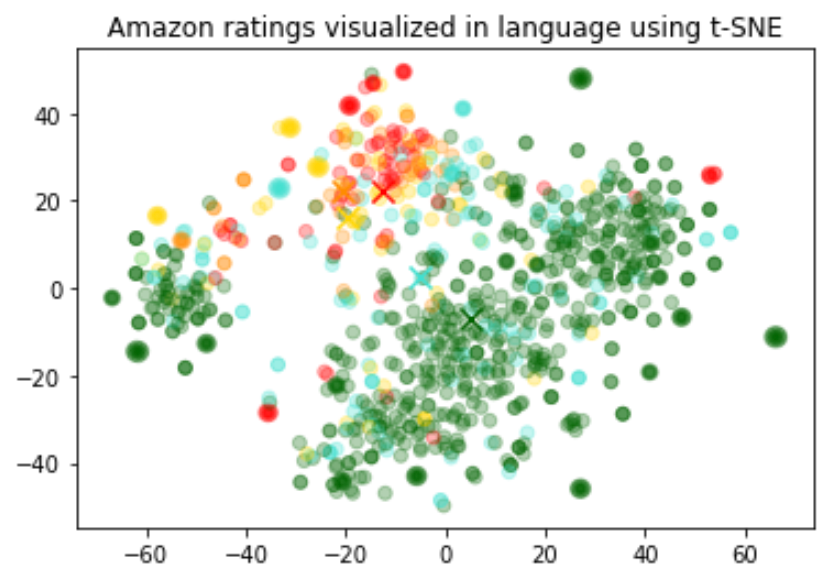
The visualization seems to have produced roughly 3 clusters, one of which has mostly negative reviews.
```python
import pandas as pd
from sklearn.manifold import TSNE
import matplotlib.pyplot as plt
import matplotlib
df = pd.read_csv('output/embedded_1k_reviews.csv')
matrix = df.ada_embedding.apply(eval).to_list()
# Create a t-SNE model and transform the data
tsne = TSNE(n_components=2, perplexity=15, random_state=42, init='random', learning_rate=200)
vis_dims = tsne.fit_transform(matrix)
colors = ["red", "darkorange", "gold", "turquiose", "darkgreen"]
x = [x for x,y in vis_dims]
y = [y for x,y in vis_dims]
color_indices = df.Score.values - 1
colormap = matplotlib.colors.ListedColormap(colors)
plt.scatter(x, y, c=color_indices, cmap=colormap, alpha=0.3)
plt.title("Amazon ratings visualized in language using t-SNE")
```
Embedding as a text feature encoder for ML algorithms
[Regression\_using\_embeddings.ipynb](https://cookbook.openai.com/examples/regression_using_embeddings)
An embedding can be used as a general free-text feature encoder within a machine learning model. Incorporating embeddings will improve the performance of any machine learning model, if some of the relevant inputs are free text. An embedding can also be used as a categorical feature encoder within a ML model. This adds most value if the names of categorical variables are meaningful and numerous, such as job titles. Similarity embeddings generally perform better than search embeddings for this task.
We observed that generally the embedding representation is very rich and information dense. For example, reducing the dimensionality of the inputs using SVD or PCA, even by 10%, generally results in worse downstream performance on specific tasks.
This code splits the data into a training set and a testing set, which will be used by the following two use cases, namely regression and classification.
```python
from sklearn.model_selection import train_test_split
X_train, X_test, y_train, y_test = train_test_split(
list(df.ada_embedding.values),
df.Score,
test_size = 0.2,
random_state=42
)
```
#### Regression using the embedding features
Embeddings present an elegant way of predicting a numerical value. In this example we predict the reviewer’s star rating, based on the text of their review. Because the semantic information contained within embeddings is high, the prediction is decent even with very few reviews.
We assume the score is a continuous variable between 1 and 5, and allow the algorithm to predict any floating point value. The ML algorithm minimizes the distance of the predicted value to the true score, and achieves a mean absolute error of 0.39, which means that on average the prediction is off by less than half a star.
```python
from sklearn.ensemble import RandomForestRegressor
rfr = RandomForestRegressor(n_estimators=100)
rfr.fit(X_train, y_train)
preds = rfr.predict(X_test)
```
Classification using the embedding features
[Classification\_using\_embeddings.ipynb](https://cookbook.openai.com/examples/classification_using_embeddings)
This time, instead of having the algorithm predict a value anywhere between 1 and 5, we will attempt to classify the exact number of stars for a review into 5 buckets, ranging from 1 to 5 stars.
After the training, the model learns to predict 1 and 5-star reviews much better than the more nuanced reviews (2-4 stars), likely due to more extreme sentiment expression.
```python
from sklearn.ensemble import RandomForestClassifier
from sklearn.metrics import classification_report, accuracy_score
clf = RandomForestClassifier(n_estimators=100)
clf.fit(X_train, y_train)
preds = clf.predict(X_test)
```
Zero-shot classification
[Zero-shot\_classification\_with\_embeddings.ipynb](https://cookbook.openai.com/examples/zero-shot_classification_with_embeddings)
We can use embeddings for zero shot classification without any labeled training data. For each class, we embed the class name or a short description of the class. To classify some new text in a zero-shot manner, we compare its embedding to all class embeddings and predict the class with the highest similarity.
```python
from openai.embeddings_utils import cosine_similarity, get_embedding
df= df[df.Score!=3]
df['sentiment'] = df.Score.replace({1:'negative', 2:'negative', 4:'positive', 5:'positive'})
labels = ['negative', 'positive']
label_embeddings = [get_embedding(label, model=model) for label in labels]
def label_score(review_embedding, label_embeddings):
return cosine_similarity(review_embedding, label_embeddings[1]) - cosine_similarity(review_embedding, label_embeddings[0])
prediction = 'positive' if label_score('Sample Review', label_embeddings) > 0 else 'negative'
```
Obtaining user and product embeddings for cold-start recommendation
[User\_and\_product\_embeddings.ipynb](https://cookbook.openai.com/examples/user_and_product_embeddings)
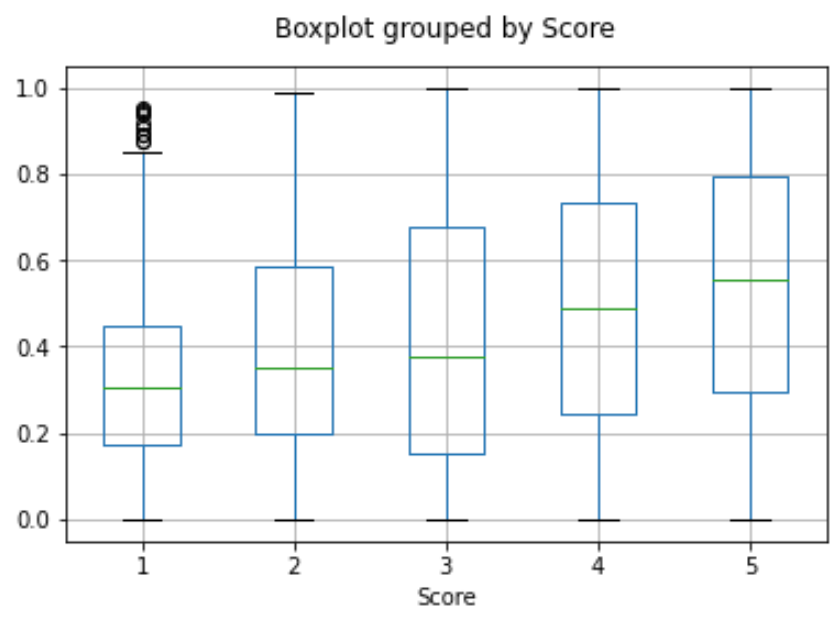
We can obtain a user embedding by averaging over all of their reviews. Similarly, we can obtain a product embedding by averaging over all the reviews about that product. In order to showcase the usefulness of this approach we use a subset of 50k reviews to cover more reviews per user and per product.
We evaluate the usefulness of these embeddings on a separate test set, where we plot similarity of the user and product embedding as a function of the rating. Interestingly, based on this approach, even before the user receives the product we can predict better than random whether they would like the product.
```python
user_embeddings = df.groupby('UserId').ada_embedding.apply(np.mean)
prod_embeddings = df.groupby('ProductId').ada_embedding.apply(np.mean)
```
Clustering
[Clustering.ipynb](https://cookbook.openai.com/examples/clustering)
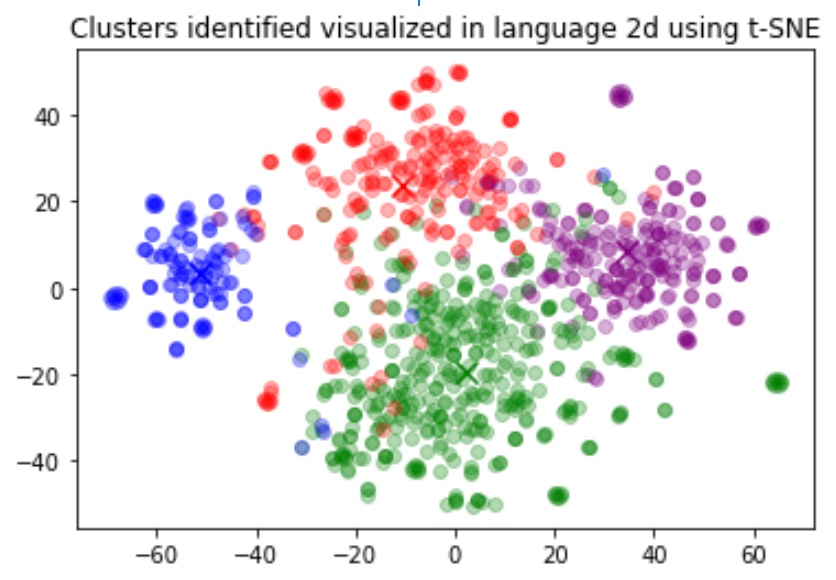
Clustering is one way of making sense of a large volume of textual data. Embeddings are useful for this task, as they provide semantically meaningful vector representations of each text. Thus, in an unsupervised way, clustering will uncover hidden groupings in our dataset.
In this example, we discover four distinct clusters: one focusing on dog food, one on negative reviews, and two on positive reviews.
```python
import numpy as np
from sklearn.cluster import KMeans
matrix = np.vstack(df.ada_embedding.values)
n_clusters = 4
kmeans = KMeans(n_clusters = n_clusters, init='k-means++', random_state=42)
kmeans.fit(matrix)
df['Cluster'] = kmeans.labels_
```
FAQ
---
### How can I tell how many tokens a string has before I embed it?
In Python, you can split a string into tokens with OpenAI's tokenizer [`tiktoken`](https://github.com/openai/tiktoken).
Example code:
```python
import tiktoken
def num_tokens_from_string(string: str, encoding_name: str) -> int:
"""Returns the number of tokens in a text string."""
encoding = tiktoken.get_encoding(encoding_name)
num_tokens = len(encoding.encode(string))
return num_tokens
num_tokens_from_string("tiktoken is great!", "cl100k_base")
```
For third-generation embedding models like `text-embedding-3-small`, use the `cl100k_base` encoding.
More details and example code are in the OpenAI Cookbook guide [how to count tokens with tiktoken](https://cookbook.openai.com/examples/how_to_count_tokens_with_tiktoken).
### How can I retrieve K nearest embedding vectors quickly?
For searching over many vectors quickly, we recommend using a vector database. You can find examples of working with vector databases and the OpenAI API [in our Cookbook](https://cookbook.openai.com/examples/vector_databases/readme) on GitHub.
### Which distance function should I use?
We recommend [cosine similarity](https://en.wikipedia.org/wiki/Cosine_similarity). The choice of distance function typically doesn't matter much.
OpenAI embeddings are normalized to length 1, which means that:
* Cosine similarity can be computed slightly faster using just a dot product
* Cosine similarity and Euclidean distance will result in the identical rankings
### Can I share my embeddings online?
Yes, customers own their input and output from our models, including in the case of embeddings. You are responsible for ensuring that the content you input to our API does not violate any applicable law or our [Terms of Use](https://openai.com/policies/terms-of-use).
### Do V3 embedding models know about recent events?
No, the `text-embedding-3-large` and `text-embedding-3-small` models lack knowledge of events that occurred after September 2021. This is generally not as much of a limitation as it would be for text generation models but in certain edge cases it can reduce performance.
 Google Drive
Gist
Clipboard
Google Drive
Gist
Clipboard
 Sign in with Wallet






