# Kube-node-red(en)
[](https://hackmd.io/cocSOGQMR-qzo7DHdwgRsQ)
Kube-node-red is aiming to integrate Kubeflow/Kubebeters with node-red, leveraging node-red's low-code modules, and using Kubeflow resources (e.g. Kubeflow pipeline, Kserve) to enhance its AI/ML ability.
## Table of Contents
<!-- toc -->
- [Installation](#installation)
* [Prerequisites](#Prerequisites)
* [Building](#Building)
* [Install dependencies](#Install-dependencies)
- [Using our nodes](#Using-our-nodes)
- [Test python files to interact with kubeflow](#Test-python-files-to-interact-with-kubeflow)
- [possible problems and solution](#possible-problems-and-solution)
- [Modify your own custom nodes/pipeline](#Modify-your-own-custom-nodes/pipeline)
* [Kubeflow part](#Kubeflow-part)
* [Node-red part](#Node-red-part)
- [Architecture](#Architecture)
- [Demo](#Demo)
- [Reference](#Reference)
<!-- tocstop -->
# Installation
## Prerequisites
- `Kubeflow`
As this project focused on the node-red integration with Kubeflow, one running Kubeflow instance should be ready on a publicly available network.
(If you need to provision your own Kubeflow instance, you could refer to our [mulitkf](https://github.com/footprintai/multikf) project to allocate one instance for developing.)
- [`WSL`](https://learn.microsoft.com/en-us/windows/wsl/install) If you are Windows OS.
- [`Docker`](https://www.docker.com)
## Building
We organized some examples under examples folder, and make sensitive information pass via environment variables. Please refer the following example to launch an individual example:
1. In terminal (If you on Windows system, please use WSL)
```
$ git clone https://github.com/NightLightTw/kube-nodered.git
```
2. Enter target folder
```
cd kube-nodered/examples
```
3. Enter account information and start
```
KUBEFLOW_HOST=<your-kubeflow-instance-endpoint> \
KUBEFLOW_USERNAME=<your-username-account> \
KUBEFLOW_PASSWORD=<your-password> \
./run.sh <example-index>
```
> **Info:** Here <example-index> please use 1.connect-kubeflow
## Install dependencies
1. Then you can go to UI, check it out: http://127.0.0.1:1880/

2. Click the “install dependency” button to install dependency items such as specific python libraries and wait for its completion

3. Click the “list experiments” button to test the environment work!

## Using our nodes
Switch to the "three-pipeline" flow and press the button to trigger the pipeline process

On kubeflow:

> **Info:** If the environment variable does not work, please fill in the account password directly in the python file
## Test python files to interact with kubeflow
```
# Open another terminal and check docker status
docker ps
#enter container
docker exec -it <containerID> bash
#enter document folder
cd /data/1.connect-kubeflow/py/api_examples
#execute function
python3 <file-name>
```
You can test the file in api_example
> **Info:** Some of these files require a custom name, description, or assigned id in <change yours>
## Possible problems and solution
Q1: MissingSchema Invalid URL ''
A1: This problem means that the login information is not accessed correctly, which may be caused by the environment variable not being read.
You can directly override the login information of the specified file
ex:
Change to your own login information
```
host = "https://example@test.com"
username = "test01"
password = "123456"
```
# Modify your own custom nodes/pipeline

## Kubeflow part
### Custom make pipeline’s yaml file
Please refer to [Kubeflow implementation:add Random Forest algorithm](https://hackmd.io/@Nhi7So-lTz2m5R6pHyCLcA/Sk1eZFTbh)
### Take changing randomForest.py as an example
Modify using your own yaml file path
> **Info:** Line 66: uploadfile='pipelines/only_randomforest.yaml'
> **Info:** Line 122~129 use json parser for filtering different outputs from get_run()
```python=
from __future__ import print_function
import time
import kfp_server_api
import os
import requests
import string
import random
import json
from kfp_server_api.rest import ApiException
from pprint import pprint
from kfp_login import get_istio_auth_session
from kfp_namespace import retrieve_namespaces
host = os.getenv("KUBEFLOW_HOST")
username = os.getenv("KUBEFLOW_USERNAME")
password = os.getenv("KUBEFLOW_PASSWORD")
auth_session = get_istio_auth_session(
url=host,
username=username,
password=password
)
# The client must configure the authentication and authorization parameters
# in accordance with the API server security policy.
# Examples for each auth method are provided below, use the example that
# satisfies your auth use case.
# Configure API key authorization: Bearer
configuration = kfp_server_api.Configuration(
host = os.path.join(host, "pipeline"),
)
configuration.debug = True
namespaces = retrieve_namespaces(host, auth_session)
#print("available namespace: {}".format(namespaces))
def random_suffix() -> string:
return ''.join(random.choices(string.ascii_lowercase + string.digits, k=10))
# Enter a context with an instance of the API client
with kfp_server_api.ApiClient(configuration, cookie=auth_session["session_cookie"]) as api_client:
# Create an instance of the Experiment API class
experiment_api_instance = kfp_server_api.ExperimentServiceApi(api_client)
name="experiment-" + random_suffix()
description="This is a experiment for only_randomforest."
resource_reference_key_id = namespaces[0]
resource_references=[kfp_server_api.models.ApiResourceReference(
key=kfp_server_api.models.ApiResourceKey(
type=kfp_server_api.models.ApiResourceType.NAMESPACE,
id=resource_reference_key_id
),
relationship=kfp_server_api.models.ApiRelationship.OWNER
)]
body = kfp_server_api.ApiExperiment(name=name, description=description, resource_references=resource_references) # ApiExperiment | The experiment to be created.
try:
# Creates a new experiment.
experiment_api_response = experiment_api_instance.create_experiment(body)
experiment_id = experiment_api_response.id # str | The ID of the run to be retrieved.
except ApiException as e:
print("Exception when calling ExperimentServiceApi->create_experiment: %s\n" % e)
# Create an instance of the pipeline API class
api_instance = kfp_server_api.PipelineUploadServiceApi(api_client)
uploadfile='pipelines/only_randomforest.yaml'
name='pipeline-' + random_suffix()
description="This is a only_randomForest pipline."
try:
pipeline_api_response = api_instance.upload_pipeline(uploadfile, name=name, description=description)
pipeline_id = pipeline_api_response.id # str | The ID of the run to be retrieved.
except ApiException as e:
print("Exception when calling PipelineUploadServiceApi->upload_pipeline: %s\n" % e)
# Create an instance of the run API class
run_api_instance = kfp_server_api.RunServiceApi(api_client)
display_name = 'run_only_randomForest' + random_suffix()
description = "This is a only_randomForest run."
pipeline_spec = kfp_server_api.ApiPipelineSpec(pipeline_id=pipeline_id)
resource_reference_key_id = namespaces[0]
resource_references=[kfp_server_api.models.ApiResourceReference(
key=kfp_server_api.models.ApiResourceKey(id=experiment_id, type=kfp_server_api.models.ApiResourceType.EXPERIMENT),
relationship=kfp_server_api.models.ApiRelationship.OWNER )]
body = kfp_server_api.ApiRun(name=display_name, description=description, pipeline_spec=pipeline_spec, resource_references=resource_references) # ApiRun |
try:
# Creates a new run.
run_api_response = run_api_instance.create_run(body)
run_id = run_api_response.run.id # str | The ID of the run to be retrieved.
except ApiException as e:
print("Exception when calling RunServiceApi->create_run: %s\n" % e)
Completed_flag = False
polling_interval = 10 # Time in seconds between polls
while not Completed_flag:
try:
time.sleep(1)
# Finds a specific run by ID.
api_instance = run_api_instance.get_run(run_id)
output = api_instance.pipeline_runtime.workflow_manifest
output = json.loads(output)
try:
nodes = output['status']['nodes']
conditions = output['status']['conditions'] # Comfirm completion.
except KeyError:
nodes = {}
conditions = []
output_value = None
Completed_flag = conditions[1]['status'] if len(conditions) > 1 else False
except ApiException as e:
print("Exception when calling RunServiceApi->get_run: %s\n" % e)
break
if not Completed_flag:
print("Pipeline is still running. Waiting...")
time.sleep(polling_interval-1)
for node_id, node in nodes.items():
if 'inputs' in node and 'parameters' in node['inputs']:
for parameter in node['inputs']['parameters']:
if parameter['name'] == 'random-forest-classifier-Accuracy': #change parameter
output_value = parameter['value']
if output_value is not None:
print(f"Random Forest Classifier Accuracy: {output_value}")
else:
print("Parameter not found.")
print(nodes)
```
## Node-red part
**Package nodered pyshell node**
**A node mainly consists of two files**
* **Javascript file(.js)**
define what the node does
* **HTML file(.html)**
Define the properties of the node and the windows and help messages in the Node-RED editor
**When finally package into npm module, will need package.json**
### **package.json**
A standard file for describing the content of node.js modules
A standard package.json can be generated using npm init. This command will ask a series of questions to find a reasonable default value. When asked for the name of the module name:<default value> enter the example name node-red-contrib-<self_defined>
When it is established, you need to manually add the node-red attribute
*p.s. Where the example files need to be changed *
```json=
{
"name": "node-red-contrib-pythonshell-custom",
...
"node-red": {
"nodes": {
"decisionTree": "decisiontree.js",
"randomForest": "randomforest.js",
"logisticRegression": "logisticregression.js"
"<self_defined>":"<self_defined.js>"
}
},
...
}
```
### **HTML**
```javascript=
<script type="text/javascript">
# Replace the node name displayed/registered in the palette
RED.nodes.registerType('decisionTree',{
category: 'input',
defaults: {
name: {required: false},
# Replace the .py path to be used
pyfile: {value: "/data/1.connect-kubeflow/py/decisionTree.py"},
virtualenv: {required: false},
continuous: {required: false},
stdInData: {required: false},
python3: {required: false}
},
```
### **Javascript(main function)**
1.Open decisionTree.js
```javascript=
function PythonshellInNode(config) {
if (!config.pyfile){
throw 'pyfile not present';
}
this.pythonExec = config.python3 ? "python3" : "python";
# Replace the path or change the following path to config.pyfile
this.pyfile = "/data/1.connect-kubeflow/py/decisionTree.py";
this.virtualenv = config.virtualenv;
```
2.Open deccisiontree.js
```javascript=
var util = require("util");
var httpclient;
#change the path/file name of the module file
var PythonshellNode = require('./decisionTree');
# To change the name to be registered, it must be consistent with the change of .html
RED.nodes.registerType("decisionTree", PythonshellInNode);
```
### Connect nodered
Import the folder where the above file is located to the node_modules directory of the container
e.g. docker desktop

e.g. wsl

## Architecture

## Demo
[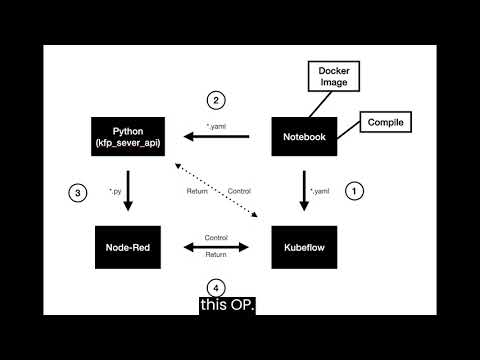](https://youtu.be/72tXYl6FcvU)
## Reference
https://github.com/NightLightTw/kube-nodered
https://github.com/kubeflow/pipelines/tree/1.8.21/backend/api/python_http_client
[Kubeflow implementation:add Random Forest algorithm](https://hackmd.io/@ZJ2023/BJYQGMvJ6)
 Google Drive
Gist
Clipboard
Google Drive
Gist
Clipboard
 Sign in with Wallet






