# Container Basics 2023: March 6-8
:::info
**Date**: `2023-03-06`
**Zoom Link:** https://arizona.zoom.us/j/85985751105
**Today's Instructors:** Carlos, Tyson, Michele
**Helpers:** Greg, Heidi, Tina
**Course Schedule**
https://hackmd.io/c64Ed_SoRn-Ua6mwruJPjw?both# https://container-camp.cyverse.org/getting_started/schedule/
**Code of Conduct**
[ - https://cyverse-learning-materials.github.io/container-camp/getting_started/code_conduct/](https://container-camp.cyverse.org/getting_started/code_conduct/)
**Instant Feedback**
https://docs.google.com/forms/d/e/1FAIpQLSfD75LlhawNFdx2ByhIjJpaBlAAHFYBcLjKGUgB2Y9ZWS5kXA/viewform?usp=sf_link
:::
----
## :stopwatch: Agenda
## Topic: Intro2Docker
:clipboard: Prerequisites
Before attending Container Basics, please do the following:
[Create a GitHub Account](https://github.com)
[Create a Docker Hub Account](https://hub.docker.com)
[Create a CyVerse Account](https://user.cyverse.org)
---
### GitHub Usernames
We need your username to connect you to the [CodeSpaces](https://github.com/codespaces) we're going to be using today:
- tyson-swetnam
- cosimichele
- dkangsim-ehg
- BioInf2305
- sjwerts
- hidyverse
- meghavarshini
- souradeep-scs
- CDeMasi
- hjy77
- jaydeepradeJD
- anthonysnead
- linaben900118
- humosaic
- xinformatics
- LucaGhi
- andreascorsoglio
- zahid-isu
- mehdishaa
- davidlope
- Gchism94
- jimeneznr
- TTAyanlade
- juearcilaga
- HosseinZareM
- ajignasu
- felixgrewe
- Mkhosravi91
- LorenzoFederici
- yksun
- smazhar1
- Peeyush2
- devesh-iastate
## CodeSpaces Repository:
https://github.com/cyverse-education/intro2docker
---
### Please Introduce Yourself
Name: Souradeep Chattopadhyay
Research Interests: Machine Learning for agricultural systems, Machine Learning for astronomical data, Time Series.
Camp Goals: Gain good insight into docker containers.
:tea:
___
Name: Ajay Perumbeti,
Research Interests: Iron deficiency models, build containers for experiments and models
---
Name: Jaydeep Rade
Research Interests: Deep Learning/Computer Vision
Camp Goals:Learn more about Dockers
:coffee: and :tea:
---
Name: Hsin-Jung Yang
Research Interests: Reinforcement learning, Robotics
Camp Goals: Learn more about Docker
:tea:
---
Name: Anthony Snead
Research Interests: Urban Evolution, Ecological Modeling, Population Genetics
Camp Goals: Learn about Docker
:tea:
---
Name: Samantha Werts
Research Interests: Cancer Survivorship, mHealth, lifestyle behavior change
Camp Goals: Learn more about creating containers
:tea:
---
Name: Caroline DeMasi
Research Interests: Bioinformatics, Genomics, Transcriptomics
Camp Goals: Learn more about what containers are, figure out how I can apply them to the research in my lab
:tea:
---
Name: Eastern Kang
Research Interests: Health Behavior/Statistical analyss
Camp Goals: Explore different applications
:coffee: or :tea:
---
Name: Andrea Scorsoglio
Research Interests: Reinforcement Learning for spacecraft gudance and navigation
Camp Goals: Be able to launch simulations thrfor scale and automation
:coffee:
---
Name: Luca
Research Interests: Computer vision, image processing, machine learning, lunar l
Camp Goals:
:coffee: or :tea:
---
Name: Shashank
Research Interests: EHRs, Representation Learning
Camp Goals: Create own container, use others containers.
:coffee: or :tea: :None
---
Name: Lina Benitez
Research Interests: Environmental Justice, Water Economics
Camp Goals: Learn how to create my own containers
:coffee:
---
Name: Megh Krishnaswamy
Research Interests: Experimental linguistics, speech processing, neural
Camp Goals: Learn how to create a container for depreciated
:tea:
---
Name: Maulik Upadhyay
Research Interests: Bioinformatics, genomics
Camp Goals: Learning to use docker aneproducible research
:coffee:
___
Name: Felix Grewe
Research Interest: Genomes, Bioinformatics, Molecular Evolution
Camp Goal: Learnign how to use and build Docker images/comtainers
:tea:
---
Name: Nicole Jimenez
Research Interests: Women's Health, Microbiome, Metabolome, Health Disparities
Camp Goals: Learn more about containers and how to utilize for research projects
:coffee:
---
Name: David Lopez
Research Interests: Anything that will get me a publication
---
Name: Anushrut Jignasu
Research Interests: Computer Graphics, Computer Vision, Geometry, and Deep Learning
Camp Goals: Learn about using docker images for my research projects
:coffee:
---
Name: Ajay Perumbeti,
Research Interests: Iron deficiency models
build containers for experiments and models,
always coffee and exploring tea.
---
Name: Juliana Arcila,
Research Interests: Data analysis, applied to health research.
Camp Goals: learn how to create my own docker iamgesfor my research projects
:coffee: and :tea:
---
Name: Peter Echieh
Research interest: cardiothoracic surgery
Coffee
---
Name: Mahsa khosravi
Research Interests: Reinforcement Learnin
Camp Goals: learn how to create my own docker iamgesfor my research projects
:coffee:
---
Name: Yukun Sun
Research Interests: Genomics
Camp Goals: learn how to create my own docker iamgesfor my research projects
:coffee:
---
Name: Mehdi Shadkhah
Research Interests: Computational Fluid Dynamics
Camp Goals: learn how to create my own docker images for my research projects
:coffee:
---
Name: Zahid Hasan
Research Interests: Computer vision, Multimodal learning
Camp Goals: learn how to create my own docker images for my research projects
:coffee:
---
## Discussion and Notes (Day1):
["Why Containers" slides](https://drive.google.com/file/d/108sWxVoU_t0zSCxxGP5OZVHWu0Svi-JB/view?usp=sharing)
**General notes:**
*Q: What is an image?*
A: A file that lives in the cache on your computer... \
where 'cache' can be thought of like a desk. It's faster to retrieve a file from your desk than from the filing cabinet
*Q: What is a container?*
A: It's a virtualized run-time environment which starts from the image. A docker image is what you build. It has all of the software necessary to run the code. The Container is when you "activate" the image, an extra layer where you can work on top of the software you put in the image.
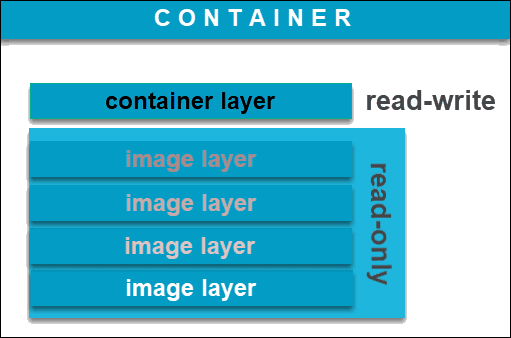
The built image will contain its own OS - it will make no difference where you build your container.
When you build an image, you can specify the architecture of the machine you want it to run on.
Manage resources for your container by using commands to stop, pause, restart, remove a container.
*Q: How do I work with data and containers?*
A: Containers do not contain large amounts of data, as these will take space in the writable layer of the container (see above image). Instead, it is suggested to use **Volumes** as a best practice. A Volume is a directory that lives outside of the container that can be *attached* to said container. Once attached, the contents of the directory will be viewable and accessible to the container. In order to attach the volume, one must specify the directory on the computer AND the destination folder, separated by a colon (:). The format is as follows `-v <directory on computer>:<directory in container>`.
*Q: Ports. What are ports and why do we need them?*
A: Ports are where network connections start and end. These are not physical, and these allow software to connect to a network. Our computers run hundreds of processes, and chance is a lot of these processes require a connection to the network. In order for these processes to access the network, ports are required. A single process is assigned a single port - and this is how these software can connect to the internet. The reason why we need to open a port for Docker, is because the Docker container is trying to communicate with the network, however it requires us, the user, to assign a port for it. Without us assigning the port to the Docker container, the connection to the network cannot happen.
List of registered IP Ports: https://en.wikipedia.org/wiki/List_of_TCP_and_UDP_port_numbers#Registered_ports
### Docker Commands Cheat Sheets:
- https://cyverse-learning-materials.github.io/container-camp/docker/intro/#docker-commands
- https://dockerlabs.collabnix.com/docker/cheatsheet/
- https://github.com/wsargent/docker-cheat-sheet
---
### End of Day 1 Inquiries:
Q: What is Docker's relationship with things like networking, ethernet, USB, HDMI? Are these things naturally closed or naturally open? Are there interfaces that you cannot access from docker?
A: Docker is able to do Networking as it has its own networking subsystem (and commands). As this is an advanced topic, let me direct you to the official networking documentation here: https://docs.docker.com/network/
Q: Is there a way to emulate a display in Docker so that certain rendering code (like the plotting libraries in python) don't break when run in a container?
A: [unsure if this is what you were looking for] Docker is able to run GUI applications; A display can be specified using the `-e` (environment) flag such as `-e DISPLAY=$DISPLAY`. `$DISPLAY` can usually be specified to `$0`, targeting the primary display.[ This little blog post](https://leimao.github.io/blog/Docker-Container-GUI-Display/) may be able to help you further.
Q: What should we know about accessing GPUs from docker? Won't the hardware you're running on affect the runnability of a container, despite the containerization of the image?
A: Tyson has experience running Docker images and GPUs, I will bring this up prior to tomorrow's planned schedule.
A: NVIDIA Docker now uses a special flag for Docker (rather than needing its own installation) https://github.com/NVIDIA/nvidia-docker -- we will be able to use this next week in Advanced Camp when we use Jetstream-2 GPU VMs with Docker.

Q: How can we share Docker images we build on Docker Hub?
A: We will be touching on this topic when we will talk about Registries.
Q: Is malware ever a problem with Dockerfiles? Can you run a malicious image?
A: It seems that [Docker (and Kubernetes) related malware](https://www.zdnet.com/article/docker-malware-is-now-common-so-devs-need-to-take-docker-security-seriously/) are now a thing. From personal experience, I have never run into issues.
Thanks!
---
## Discussion and Notes (Day 2):
- Return to [intro2docker](https://github.com/cyverse-education/intro2docker) and restart your CodeSpaces.
**Q**: _Why would you want to use a latest vs versioned?_
**A**: Latest is the latest update, useful for working. Once publishing is ready, make sure you tell what version you used (even "latest" calls to a version).
**Q**: _How do I know what is the latest version?_
**A**: Go to [Docker Hub](https://hub.docker.com/) and search for the image you're looking for. Then, look at the latest digests.
**Q**: _How do we decide on the PATH when installing things in Docker?_
**A**: the PATH will always have certain locations indicated; If your package is installing outside of the "default" places, you need to add to the PATH (e.g., `export PATH="/path/to/dir:$PATH"`).
**Q**: _What is the difference between ARG and ENV?_
**A** ARG is for command execution _whilst building the container_, whilst ENV is for execution _after_ the container is built.
**Q**: _... then what about ENTRYPOINT vs CMD?_
**A**: CMD is for a more interactive option, whilst ENTRYPOINT is created for "fixed" commands.
**Q**: Assuming that the base image already has an ENTRYPOINT, what happens if you do not specifiy the ENTRYPOINT in your Dockerfile?
**A**: It will default to the base image's ENTRYPOINT.
### Questions from Day 1:
### Insights from Day 1:
### Containers of Interest
Name: Siddiqua Mazhar
Container: ubuntu with mongodb , installing mongo in ubuntu:22.04 inside dokcer file
Link:
Purpose:
Tyson -- check out https://dev.to/sonyarianto/how-to-spin-mongodb-server-with-docker-and-docker-compose-2lef
---
Name: Anthony Snead
Container: Rstudio with R and Python (reticulate)
Link:
Purpose:
---
Name: Zahid Hasan
Container: Jupyter notebook with python
Link:
Purpose:
---
Name: Juliana Arcila
Container: Python with basic packages to learn AI
Link:
Purpose:
---
Name: Jaydeep Rade
Container: deep learning code
Link:
Purpose:
---
Name: Megh Krishnaswamy
Container: Python code for training a neural network
Link: https://github.com/nasir0md/unsupervised-learning-entrainment
Purpose: Theccode is stored as a github repository- and I would like to learn how to run this as a docker container
---
Name: Souradeep Chattopadhyay
Container: Multimodal model framework for soybean yield prediction (Using python)
Link:
Purpose: Having a container which will have all the framework for the different models for the multimodal framework in one space.
---
Name: Yukun Sun
Container: Genome Annotation Pipline
Link:
Purpose: prebuilt a container with build-in database
---
Name: Caroline DeMasi
Container: Bioinformatics pipeline
Link:
Purpose: Having a container with all the packages I use in my analysis in one place
---
Name: Ajay Perumbeti
Container: R studio RMD microarray analysis pipeline
Link: github.com/humosaic/P4_XY-Fe_Perumbeti
Purpose: Container with packages for analysis build
---
Name: Nicole Jimenez
Container: R studio
Link: Found this -> https://github.com/microbiome/docker
Purpose: to build a container to hold packages for microbiome analyses
---
Name: Maulik Upadhyay
Container: jbrowse
Link: https://github.com/GMOD/jbrowse
Purpose: visualize bam files and vcf files
---
Name: Timilehin Ayanlade
Container: heartexlabs label-studio
Link: https://hub.docker.com/r/heartexlabs/label-studio
Purpose: for data annotation for ML projects
---
Name: Anushrut Jignasu
Container: Robot Operating System
Link: https://hub.docker.com/_/ros
Purpose: Simulation
---
Name: Lorenzo Federici
Container: python + Ray
Link: https://hub.docker.com/r/rayproject/ray-ml
Purpose: Deep Learning / reinforcement learning applications
---
### Notes
```
# uses a platform
FROM ubuntu:22.04
LABEL author="tyson-swetnam"
LABEL email="tswetnam@arizona.edu"
LABEL version="v1.0"
LABEL description="COWSAY MOO!"
LABEL date_created="2023-03-07"
ARG DEBIAN_FRONTEND=noninteractive
RUN apt-get update && \
apt-get install -y \
fortune \
cowsay \
lolcat
ENV PATH=/usr/games:${PATH}
ENV LC_ALL=C
ENTRYPOINT fortune | cowsay | lolcat
```
**Day 2 General Notes & Inquiries**
### What is a port?
[CloudFlare: Understanding Ports](https://www.cloudflare.com/learning/network-layer/what-is-a-computer-port/)
[Internet Assigned Numbers Authority Port List](http://www.iana.org/assignments/service-names-port-numbers/service-names-port-numbers.xhtml)
[List of TCP and UDP port numbers](https://en.wikipedia.org/wiki/List_of_TCP_and_UDP_port_numbers)
*Q: If containers are software, why should I bother using a container instead of the software itself?*
A: Containers offer ~~2~~ 3 great solutions to common problems: (1) reproducibility (2) version control. Docker images contain all of the required software in the form of layers, including specific versions of libraries. This allows to easily share your image and software without worring about collaborators having to install the correct software and version. (3) portability, so you can run it anywhere.
---
## Hands-on with Dockerfiles
Go to an example directory in the `intro2docker` repository with a `Dockerfile`
```
cd alpine
```
Build the container using the `build` command. Make sure to include the `.`
```
docker build -t test/alpine .
```
note: the container should get the default `latest` tag if it is not specified in the `docker build` command with the name `test/alpine`
Start the container using the `run` command.
```
docker run --rm test/alpine:latest
```
To run the container and override its CMD, it will use its own shell `sh`:
```
docker run -it --rm test/alpine:latest sh
```
Dockerfiles are like your recipie book, and like every recipie book you have instructions. The instructions aren't for the user, but for Docker itself. These instruction are the capitalized commands you see at the beginning of lines, and these tell Docker what to do:
| Instruction | Command |
|---|---|
| FROM | Instructs to use a specific Docker image|
| LABEL | Adds metadata to the image|
| RUN | Executes a specific command|
| ENV | Sets environmental variables|
| COPY | Copies a file from a specified location to the image|
| CMD | Sets a command to be executed when running a container|
| ENTRYPOINT | Configures and run a container as an executable|
| USER | Used to set User specific information|
| EXPOSE | exposes a specific port |
*the above list is nonexhaustive, visit the [official Docker documentation](https://docs.docker.com/engine/reference/builder/) for more information and further instructions.
### Pushing to DockerHub
Build your docker image with
```
docker build -t <Dockerhub username>/<Docker image>:<version> .
```
then, log in to Docker with
```
docker login -u <username>
```
This will then ask for your Password; type in your password (*it will NOT show you the password*).
If it does not login automatically, please follow the instructions [here](https://docs.docker.com/engine/reference/commandline/login/).
Once you have logged in, push your docker to the DockerHub registry with
```
docker push <Dockerhub username>/<Docker image>:<version>
```
Your newly built Docker image now lives on DockerHub. You can view it at `https://hub.docker.com/r/<username>/<Docker image>`
## Dockerfile for Ubuntu (assigning users)
Create a new folder called `ubuntu`
```
mkdir ubuntu
```
Change into the folder
```
cd ubuntu
```
Create a `Dockerfile`
```
ARG VERSION=18.04
FROM ubuntu:$VERSION
RUN apt-get update -y && apt-get install -y gnupg wget python3 python3-distro && \
wget -qO - https://packages.irods.org/irods-signing-key.asc | apt-key add - && \
echo "deb [arch=amd64] https://packages.irods.org/apt/ $(lsb_release -sc) main" >> /etc/apt/sources.list.d/renci-irods.list && \
apt-get update && apt-get install irods-icommands -y
COPY irods_environment.json /home/ubuntu/.irods/
RUN useradd ubuntu && \
chown -R ubuntu:ubuntu /home/ubuntu
USER ubuntu
```
Create a file called
`irods_environment.json`
```
{
"irods_host": "data.cyverse.org",
"irods_port": 1247,
"irods_zone_name": "iplant"
}
```
Build the container using your dockerhub username
```
docker build -t <yourusername>/ubuntu-irods:18.04 .
```
Run with
```
docker run -it --rm <yourusername>/ubuntu-irods:18.04
```
*Q: What did we do?*
A: We created an image whose the user is specified.
*Q: Why?*
A: When creating interactive containers, these containers are not built with root privileges. Assigning a specific user helps with defining the priviledges you want users to have.
*Q: Wait, what?*
A: When pulling a base image with the `FROM` instruction, sometimes the user is already defined. The only user with priviledges will be that already defined user. Therefore, in order to have the "right" priviledges, you have to *assign the right user* in your `Dockerfile`.
---
## RStudio Dockerfile
The above steps where necessary in order to understand *why* in this following step we need to define a user.
Navigate to `rstudio/verse` with
```
cd rstudio/verse
```
and create a Dockerfile:
```
FROM rocker/verse:4.2.0
# Install your own stuff below
RUN install2.r --error \
# Added Packages
PerformanceAnalytics \
boot \
devtools \
dlm \
dplyr \
foreign \
lubridate \
plotly \
truncreg \
ggridges
```
Build the Docker image with:
```
docker build -t <yourusername>/rstudio:tag .
```
Execute with
```
docker run --rm -p 8787:8787 -e DISABLE_AUTH=true <username>/rstudio:<version>
```
---
# Day 3. SingularityCE Introduction
https://container-camp.cyverse.org/singularity/intro/
#### Comments & Questions from Days 1 & 2
### Discussion and Notes
To install conda in your codespace:
```
conda install -c conda-forge singularityce
```
---
#### Day 3 links:
https://github.com/codespaces
https://cloud.sylabs.io/library/library/default/ubuntu
Singularity pull library: https://library/default/ubuntu:jammy
SingularityCE User Guide: https://docs.sylabs.io/guides/main/user-guide/
### Homework
----
----
 Google Drive
Gist
Clipboard
Google Drive
Gist
Clipboard
 Sign in with Wallet






