---
tags: C#
---
# C#設計模式
[TOC]
使用 ORID 的方式分享讀後心得
* 「Objective」指了解客觀事實的問句
* 在這個章節上,你看到了什麼?還記得哪些段落?
* 「Reflective」喚起情緒與感受的問句
* 這章有哪些部份是讓你印象深刻的嗎?
* 讀完這個章節的感受是什麼?
* 「Interpretive」尋找解釋前述感受的問句
* 為什麼書中的這些部份讓你印象深刻?
* 為什麼會帶給你這樣的感受(感動/驚訝/難過/開心)?
* 引發你想到了什麼經驗?重要的意義是什麼?
* 「Decisional」找出決議和行動的問句
* 這個章節有帶給我們可以改變或應用的地方嗎?
* 接下來你的行動/計劃會是什麼?
詳細內容可以參考這個 -> [焦點討論法 (ORID)](http://kojenchieh.pixnet.net/blog/post/391843868-%E7%84%A6%E9%BB%9E%E8%A8%8E%E8%AB%96%E6%B3%95-(orid))
主持人輪流做,負責發會議通知、訂會議室,時間是每週二下午五點。
在參與的過程中讓由主持人先進行分享,在由其他人分享自己共筆中所記錄到遺漏的部份,並提出問題
用開放式的討論:
* 不要怕自己問蠢問題
* 不要用批評或攻擊的
## SOLID
### Yusheng
#### S - 單一職責
```C#
public class Journal
{
private readonly List<string> entries = new List<string>();
public int AddEntry()
public void RemoveEntry()
public void Save(string filename, bool overwrite = false)
}
public class Persistence
{
public void SaveToFile(Journal journal, string filename, bool overwrite = false);
}
```
- 上例Journal class應該只需要專注在Journal的事,save就違反SRP的原則,所以把save抽到別的class
#### O - 開放封閉原則
```C#
interface IShape
{
double GetArea();
}
class Square : IShape
{
public Square(double width)
{
this.Width = width;
}
public double Width { get; }
public double GetArea()
{
---
return Math.Pow(Width, 2);
}
}
class Circle : IShape
{
public Circle(double radius)
{
this.Radius = radius;
}
public double Radius { get; }
public double GetArea()
{
return Math.Pow(Radius, 2) * Math.PI;
}
}
static void Main(string[] args)
{
var shapes = new IShape[] { new Square(2), new Traingle(2, 3) };
foreach (var shape in shapes)
//GetArea(shape).Dump();
shape.GetArea().Dump();
}
static double GetArea(IShape shape)
{
....
}
```
- 上例是理想的例子,透過實作IShape.GetArea方法,我們可以不用每增加shape就需要修改原本的GetArea方法,但實際上我們的code裡有大量的switch case,不太可能把所有case封裝成單一class
#### L - 里氏替換原則
- 子類別必須能夠替換父類別,並且行為正常
[referece](https://medium.com/@f40507777/%E9%87%8C%E6%B0%8F%E6%9B%BF%E6%8F%9B%E5%8E%9F%E5%89%87-liskov-substitution-principle-adc1650ada53)
```C#
public class Rectangle
{
public virtual int Width { get; set; }
public virtual int Height { get; set; }
public Rectangle()
{
}
public Rectangle(int width, int height)
{
Width = width;
Height = height;
}
}
public class Square : Rectangle
{
public override int Width
{
set { base.Width = base.Height = value; }
}
public override int Height
{
set { base.Width = base.Height = value; }
}
}
```

- 上例錯誤的使用繼承,違反里氏替換原則,正方型不適合做為長方形的子類別
#### I - Interface Segregation Principle
```C#
public interface IMachine
{
void Print(Document d);
void Fax(Document d);
void Scan(Document d);
}
public class OldFashionedPrinter : IMachine
{
public void Print(Document d)
{
}
public void Fax(Document d)
{
throw new System.NotImplementedException();
}
public void Scan(Document d)
{
throw new System.NotImplementedException();
}
}
public interface IPrinter
{
void Print(Document d);
}
public interface IScanner
{
void Scan(Document d);
}
public interface IFaxer
{
void Fax(Document d);
}
```
- 上例中IMachine的介面太多功能,造成Class有介面卻沒有實作的困擾,應該要將介面拆分
#### D - Dependency Inversion Principle
```C#
public class Relationships // low-level
{
private List<(Person,Relationship,Person)> relations
= new List<(Person, Relationship, Person)>();
public void AddParentAndChild(Person parent, Person child)
{
relations.Add((parent, Relationship.Parent, child));
relations.Add((child, Relationship.Child, parent));
}
public List<(Person, Relationship, Person)> Relations => relations;
}
public class Research
{
public Research(Relationships relationships)
{
var relations = relationships.Relations;
foreach (var r in relations
.Where(x => x.Item1.Name == "John"
&& x.Item2 == Relationship.Parent))
{
WriteLine($"John has a child called {r.Item3.Name}");
}
}
}
static void Main(string[] args)
{
var parent = new Person {Name = "John"};
var child1 = new Person {Name = "Chris"};
var child2 = new Person {Name = "Matt"};
var relationships = new Relationships();
relationships.AddParentAndChild(parent, child1);
relationships.AddParentAndChild(parent, child2);
new Research(relationships);
}
```
- High Level module不需要知道太多low level module實做的資料結構和細節,上例Research是High Level但它卻必需知道Low level的Relationships的資料結構才有辦法做Research
```C#
public interface IRelationshipBrowser
{
IEnumerable<Person> FindAllChildrenOf(string name);
}
public class Relationships : IRelationshipBrowser // low-level
{
public IEnumerable<Person> FindAllChildrenOf(string name)
{
return relations
.Where(x => x.Item1.Name == name
&& x.Item2 == Relationship.Parent).Select(r => r.Item3);
}
}
public class Research
{
public Research(IRelationshipBrowser browser)
{
foreach (var p in browser.FindAllChildrenOf("John"))
{
WriteLine($"John has a child called {p.Name}");
}
}
}
```
**反轉**由low level module實作FindAllChildrenOf邏輯
## 單例模式(Singleton Pattern)
### Terence
#### 目的 : 由於只產生一個實例,可節省資源,和更容易控制在整個系統上的使用
#### 使用情境 : 資料庫連線,日誌列印
#### 做法 :
1. 保證一個類別只會產生一個實例,並且提供存取該實例的方法
2. 將constructor宣告為private,使其他程式無法呼叫
3. 提供一個public static getInstance()的方法,讓其他程式可以取得此物件
4. 只有在第一次呼叫getInstance()時,由於物件還沒被生成,這時才會建立物件
5. 若系統為multi-thread情況下,需要實作Double-checked locking來確保只會產生一個實例
```C#
public class Singleton {
private static Singleton instance;
static readonly object padlock = new object(); //用來LOCK建立instance的程序。
private Singleton(){
// 初始化物件,可能會耗用許多資源
}
public static Singleton getInstance(){
// 第一次被呼叫的時候再建立物件
if (instance == null)
{
lock (padlock) //在此上鎖,其他Thread無法進入
{
if (instance == null)
{
instance = new Singleton();
}
}
}
return instance;
}
}
```
#### 缺點
##### 可測試性降低
由於Singleton的呼叫都是寫死直接呼叫(hard code reference singleton instance),
而不是透過interface注入,所以導致寫單元測試時無法直接產生假物件來抽換。
## Min
### SOLID
#### S - 單一職責
AOP是一個可以提昇單一職責的工具
ex. service要enter result, enter result就是這個service的職責
如果想加上一個服務太慢要寄信出來的功能時
加到enter result的服務裡,就會讓他變成不是單一職責
這時把寄信功能弄成aop,掛在服務上,就很適合
#### O - 開放封閉原則
NBG的Result strategy和AutoScrap Template Pattern就很符合開放封閉原則
不過通常是已存在有好多個case都符合這個pattern時才有可能會做設計
如果只有兩、三個case…我應該還是if else or switch case吧…
#### L - 里氏替換原則
沒啥感想
#### I - Interface Segregation Principle
(物件)介面要切到剛剛好的大小,職責過多就要再切
寫測試時最明顯,一個bll相依一堆service,測試很難寫
#### D - Dependency Inversion Principle
IOC...不過如果沒有必要,不一定要把注入的物件抽成介面
現在IDE很方便,所以真的有抽換物件需求時,再抽也不晚
### 單例模式(Singleton Pattern)
1. 不要用...不好測試
2. 真的要測試的話,可以用setProperty的方式注入假物件,雖然不大符合OOP的封裝原則,但起碼能測試
3. 影片中用到的ThreadLocal要小心,async await後thread會變,可以用autofac做到一樣的效果
4. 自己實作Lazy SingleTon的話要注意可能會有Race condition,生成多個實體,要上lock,or 用c#的`Lazy <T>`去實作
## 工廠模式(Factory)
### Kevin
#### 簡單工廠模式 :
* 目的 : 定義一個簡單工廠,傳入不同的參數取得不同的類別物件
* 考量 : 當需要新增回傳物件時,必須在參數與回傳物件的地方新增判斷,將會牴觸開放封閉原則
```C#
public class ParserFactory
{
public static IParser GetParser(ParserEnum para)
{
switch (para)
{
case ParserEnum.A:
return new AParser();
break;
case ParserEnum.B:
return new BParser();
break;
}
return new AParser();
}
}
```
#### 工廠模式 :
* 目的 : 提供一個工廠介面,將產生實體的程式碼交由子類別各自實現。消滅Switch Case達到開放封閉原則
```C#
public class Main
{
private IParser _parser;
public Main()
{
IBaseFactory _parserFactory = new AParserFactory();
_parser = _parserFactory.GetParserFactory();
_parser.Execute();
}
}
public interface IBaseFactory
{
IParser GetParserFactory();
}
public class AParserFactory : IBaseFactory
{
public IParser GetParserFactory()
{
return new AParser();
}
}
public class BParserFactory : IBaseFactory
{
public IParser GetParserFactory()
{
return new BParser();
}
}
```
#### 抽象工廠模式 :
* 目的 : 用一個工廠介面來產生一系列相關的物件,但實際建立哪些物件由實作工廠的子類別來實現。把相關工廠再用一個工廠介面關聯起來。
```C#
public class Main
{
private IParser _parser;
private IResult _result;
public Main()
{
IFactory factory = new AFactory();
IParserBaseFactory _parserFactory = factory.CreateParserFactory();
_parser = _parserFactory.GetParserFactory();
_parser.Execute();
IResultBaseFactory _resultFactory = factory.CreateResultFactory();
_result = _resultFactory.GetResultFactory();
_result.GetWinner();
}
}
public interface IFactory
{
IParserBaseFactory CreateParserFactory();
IResultBaseFactory CreateResultFactory();
}
public class AFactory : IFactory
{
public IParserBaseFactory CreateParserFactory()
{
return new AParserFactory();
}
public IResultBaseFactory CreateResultFactory()
{
return new AResultFactory();
}
}
```
#### 使用專案 : CP.TXN, NBG.AutoScrap
NBG AutoScrap 根據不同的網站資料有不同的抓取方法
```C#
builder.RegisterType<CrawlWithHttpRequest>().Keyed<ICrawlService>((short) ScrapeModeEnum.HttpRequest)
.As<ICrawlService>().SingleInstance();
builder.RegisterType<CrawlWithChrome>().Keyed<ICrawlService>((short) ScrapeModeEnum.Chrome)
.As<ICrawlService>().SingleInstance();
builder.RegisterType<MaltaCrawlService>().Keyed<ICrawlService>((short) OfficialSiteEnum.Malta_MALTCO)
.As<ICrawlService>().SingleInstance();
```
```C#
public async Task<CrawlWebsiteResponseModel> Execute(CrawlWebsiteParamModel model)
{
try
{
switch (model.ScrapeSetting.ScrapeMode)
{
case ScrapeModeEnum.HttpRequest:
return await resolver.ResolveKeyed<ICrawlService>((short) ScrapeModeEnum.HttpRequest)
.Crawl(model);
case ScrapeModeEnum.Chrome:
case ScrapeModeEnum.ChromeWithRecaptcha:
return await GetService(model).Crawl(model);
}
}
catch (Exception e)
{
logger.Error(e);
throw;
}
throw new Exception($"Does not support this mode: {model.ScrapeSetting.ScrapeMode}");
}
```
根據Html的內容會有各自的parser
```C#
foreach (var officialSite in (OfficialSiteEnum[]) Enum.GetValues(typeof(OfficialSiteEnum)))
{
var temp = GetTypeByName($"Parser_{officialSite.ToString()}");
if (temp != null)
{
builder.RegisterType(temp)
.As<IParser>()
.Keyed<IParser>(officialSite)
.SingleInstance()
.AsSelf()
.SingleInstance();
}
}
```
```C#
var parser = _resolver.ResolveKeyed<IParser>(officialSite);
parser.CharacteristicCheck(htmlOrApi);
parser.Execute(htmlOrApi);
```
NBG AutoScrap 根據不同的網站資料有不同的抓取方法
```C#
public CPTxnParserBase GetTxnParser(ProductEnum.ProductGroup productGroupId)
{
var betHelper = _betHelperFactory.GetBetHelper(productGroupId);
switch (productGroupId)
{
case ProductEnum.ProductGroup.AgileDeal:
return new AgileDealTxnParser(Cache,SequenceNumber,betHelper);
case ProductEnum.ProductGroup.AgileSlot:
return new AgileSlotTxnParser(Cache,SequenceNumber,betHelper);
case ProductEnum.ProductGroup.AllBetDeal:
return new AllBetDealTxnParser(Cache,SequenceNumber,betHelper);
case ProductEnum.ProductGroup.WM:
return new WMTxnParser(Cache,SequenceNumber,betHelper);
default:
throw new NullReferenceException("Can't find TxnParser");
}
}
```
CP TXN 使用簡單工廠模式
```C#
public CPTxnParserBase GetTxnParser(ProductEnum.ProductGroup productGroupId)
{
var betHelper = _betHelperFactory.GetBetHelper(productGroupId);
switch (productGroupId)
{
case ProductEnum.ProductGroup.AgileDeal:
return new AgileDealTxnParser(Cache,SequenceNumber,betHelper);
case ProductEnum.ProductGroup.AgileSlot:
return new AgileSlotTxnParser(Cache,SequenceNumber,betHelper);
case ProductEnum.ProductGroup.AllBetDeal:
return new AllBetDealTxnParser(Cache,SequenceNumber,betHelper);
case ProductEnum.ProductGroup.WM:
return new WMTxnParser(Cache,SequenceNumber,betHelper);
default:
throw new NullReferenceException("Can't find TxnParser");
}
}
```
```C#
protected WagerBaseService()
{
try
{
BetHelper = BetHelperFactory.GetBetHelper(ProductGroupID);
TxnParser = txnParserFactory.GetTxnParser(ProductGroupID);
}
catch (Exception e)
{
Log.Exception($"Get convertHelper error. Message: {e.Message}", e);
}
}
```
## Min
### Builder(建造者模式)
#### 名詞解釋
**Gof(Gang of Four)**: ErichGamma, RichardHelm, RalphJohnson, JohnVlissides
**Gamma Categorization**
1. Creational Patterns
創建型模式是跟物件創立(object creation)的過程有關的模式。
Abstract Factory
Builder Pattern
Factory Method pattern
Prototype pattern
Singleton pattern
2. Structural Patterns
結構型模式是跟類別/物件的組成(classes/objects composition)有關的模式。
Adapter pattern
Bridge pattern
Composite pattern
Decorator pattern
Facade pattern
Flyweight pattern
Proxy pattern
3. Behavioral Patterns
行為型模式是跟類別/物件之間的互動與職責分配有關的模式。
Chain-of-responsibility pattern
Command pattern
Interpreter pattern
Iterator pattern
Mediator pattern
Memento pattern
Observer pattern
State pattern
Strategy pattern
Template method pattern
Visitor
#### Fluent InterFace
fluent interface 是軟體工程中物件導向API的一種實現方式,以提供更為可讀的原始碼。最早由Eric Evans與Martin Fowler於2005年提出
**JavaScript**
```javascript=
client.getItem('user-table')
.setHashKey('userId', 'userA')
.setRangeKey('column', '@')
.execute()
.then(function(data) {
// data.result: the resulting object
})
```
**C# Linq**
```C#
var translations = new Dictionary<string, string>
{
{"cat", "chat"},
{"dog", "chien"},
{"fish", "poisson"},
{"bird", "oiseau"}
};
// Find translations for English words containing the letter "a",
// sorted by length and displayed in uppercase
IEnumerable<string> query = translations
.Where (t => t.Key.Contains("a"))
.OrderBy (t => t.Value.Length)
.Select (t => t.Value.ToUpper());
```
#### Builder
```C#
public class Person
{
public string CompanyName, Position;
public int AnnualIncome;
public override string ToString()
{
return $" {nameof(CompanyName)}: {CompanyName}, {nameof(Position)}: {Position}, {nameof(AnnualIncome)}: {AnnualIncome}";
}
}
public class PersonBuilder
{
private readonly Person _person = new Person();
public PersonBuilder WorkAt(string companyName)
{
_person.CompanyName = companyName;
return this;
}
public PersonBuilder Earns(int salary)
{
_person.AnnualIncome = salary;
return this;
}
public Person Build()
{
return _person;
}
}
public class Demo
{
static void Main(string[] args)
{
var person = new PersonBuilder().WorkAt("Xuenn").Earns(9999999).Build();
Console.WriteLine(person);
}
}
```
實務上的應用
1. .net core IConfigurationBuilder
```C#
var build = new ConfigurationBuilder()
.SetBasePath($@"{AppDomain.CurrentDomain.BaseDirectory}\\Configurations\\")
.AddXmlFile("DBConnectionString.config")
.AddXmlFile("SystemSetting.config")
.Build();
builder.Register(
context => build )
.As<IConfigurationRoot>()
.SingleInstance();
```
2. AutoFac Container
```C#
var builder = new ContainerBuilder();
builder.RegisterSingleInstances();
builder.RegisterProduct();
builder.RegisterType<UserSettingBLL>().AsSelf();
builder.RegisterType<UserManagementBLL>().AsSelf();
Container = builder.Build();
```
#### Stepwise Builder
1. Stepwise Builder 可規範使用者By step build object
2. 能在每個step裡加Validation(property get/set也行就真的)
```C#
class Program
{
static void Main(string[] args)
{
var flow = FlowBuilder.Create().SetA(1).SetB(2).SetC(3).Build();
var flow2 = new Flow()
{
A = 11,
B = 12,
C = 3
};
var flow3 =new Flow(1,2,3);
Console.WriteLine(flow);
}
}
```
#### Functional Builder
用Action去塞值給object,最後build object時,foreach action回傳物件
```C#
public class Person
{
public string Name, Position;
}
public sealed class PersonBuilder
{
public readonly List<Action<Person>> Actions
= new List<Action<Person>>();
public PersonBuilder Called(string name)
{
Actions.Add(p => { p.Name = name; });
return this;
}
public Person Build()
{
var p = new Person();
Actions.ForEach(a => a(p));
return p;
}
}
public static class PersonBuilderExtensions
{
public static PersonBuilder WorksAsA
(this PersonBuilder builder, string position)
{
builder.Actions.Add(p =>
{
p.Position = position;
});
return builder;
}
}
public class FunctionalBuilder
{
public static void Main(string[] args)
{
var pb = new PersonBuilder();
var person = pb.Called("Dmitri").WorksAsA("Programmer").Build();
}
}
```
#### Faceted Builder
外觀模式,透過Facade builder來操作sub module
public static implicit operator Person(PersonBuilder pb)
遇到轉型時,會tigger這個method,但不是非常的直覺,用build比較直覺
```C#
public class Person
{
// address
public string StreetAddress, Postcode, City;
// employment
public string CompanyName, Position;
public int AnnualIncome;
public override string ToString()
{
return $"{nameof(StreetAddress)}: {StreetAddress}, {nameof(Postcode)}: {Postcode}, {nameof(City)}: {City}, {nameof(CompanyName)}: {CompanyName}, {nameof(Position)}: {Position}, {nameof(AnnualIncome)}: {AnnualIncome}";
}
}
public class PersonBuilder // facade
{
// the object we're going to build
protected Person person = new Person(); // this is a reference!
public PersonAddressBuilder Lives => new PersonAddressBuilder(person);
public PersonJobBuilder Works => new PersonJobBuilder(person);
public static implicit operator Person(PersonBuilder pb)
{
{
//pb.person.AnnualIncome = 99999;
return pb.person;
}
}
public Person Build()
{
return person;
}
}
public class PersonJobBuilder : PersonBuilder
{
public PersonJobBuilder(Person person)
{
this.person = person;
}
public PersonJobBuilder At(string companyName)
{
person.CompanyName = companyName;
return this;
}
public PersonJobBuilder AsA(string position)
{
person.Position = position;
return this;
}
public PersonJobBuilder Earning(int annualIncome)
{
person.AnnualIncome = annualIncome;
return this;
}
}
public class PersonAddressBuilder : PersonBuilder
{
// might not work with a value type!
public PersonAddressBuilder(Person person)
{
this.person = person;
}
public PersonAddressBuilder At(string streetAddress)
{
person.StreetAddress = streetAddress;
return this;
}
public PersonAddressBuilder WithPostcode(string postcode)
{
person.Postcode = postcode;
return this;
}
public PersonAddressBuilder In(string city)
{
person.City = city;
return this;
}
}
public class Demo
{
static void Main(string[] args)
{
var pb = new PersonBuilder();
Person person = pb
.Lives
.At("123 London Road")
.In("London")
.WithPostcode("SW12BC")
.Works
.At("Fabrikam")
.AsA("Engineer")
.Earning(123000);
WriteLine(person);
}
}
```
#### Generic Builder
利用單一Builder產生物件,會有違反開放封閉原則的問題
1. 要修改Builder新增SetXXX的方法
2. 要修改物品,新增屬性
如果利用多個Builder,因為多個Builder間不認識彼此
return this時,會無法使用其他Builder的方法
這邊使用了 T + 繼承…並透過StepWise,讓fluent interface可以在多個Builder間運作,且符合開放封閉原則
1. 加新的Builder
2. 修改物件,新增屬性
```C#
public static void Main(string[] args)
{
var me = Person.New
.Called("Dmitri")
.WorksAsA("Quant")
.Born(DateTime.UtcNow)
.Build();
Console.WriteLine(me);
Person.Builder level1 = Person.New;
PersonJobBuilder<PersonBirthDateBuilder<PersonNickNameBuilder<Person.Builder>>> level2 =
Person.New
.Called("Dmitri");
PersonBirthDateBuilder<PersonNickNameBuilder<Person.Builder>> level3 =
Person.New
.Called("Dmitri")
.WorksAsA("Quant");
PersonNickNameBuilder<Person.Builder> level4 = Person.New
.Called("Dmitri")
.WorksAsA("Quant")
.Born(DateTime.UtcNow);
Person.Builder level5 = Person.New
.Called("Dmitri")
.WorksAsA("Quant")
.Born(DateTime.UtcNow)
.SetNickName("Min");
}
```
## 原型模式(Prototype Pattern)
### Wayne
####
* 目的 : 一種建立型設計模式,能夠複製物件而且不需要知道物件的細節
* 優點 :
1.降低產生物件的消耗(記憶體、IO)
2.複製的物件可以修改全部的值(包含Referencetype的變數)
#### 案例
```C#
public class Address : ICloneable
{
public string StreetName;
public int HouseNumber;
public Address(string streetName, int houseNumber)
{
StreetName = streetName;
HouseNumber = houseNumber;
}
public override string ToString()
{
return $"{nameof(StreetName)}: {StreetName}, {nameof(HouseNumber)}: {HouseNumber}";
}
public object Clone()
{
return new Address(StreetName, HouseNumber);
}
}
public class Person : ICloneable
{
public string[] Names;
public Address Address;
public Person(string[] names, Address address)
{
Names = names;
Address = address;
}
public override string ToString()
{
return $"{nameof(Names)}: {string.Join(",", Names)}, {nameof(Address)}: {Address}";
}
public object Clone()
{
return new Person(Names, Address);
}
}
public static class Program
{
static void Main()
{
var john = new Person(new []{"John", "Smith"}, new Address("London Road", 123));
var jane = (Person)john.Clone();
jane.Address.HouseNumber = 321;
WriteLine(john);
WriteLine(jane);
Console.ReadLine();
}
}
```

#### 解法
* ICloneable
```C#
public class Address : ICloneable
{
public readonly string StreetName;
public int HouseNumber;
public Address(string streetName, int houseNumber)
{
StreetName = streetName;
HouseNumber = houseNumber;
}
public override string ToString()
{
return $"{nameof(StreetName)}: {StreetName}, {nameof(HouseNumber)}: {HouseNumber}";
}
public object Clone()
{
return new Address(StreetName, HouseNumber);
}
}
public class Person : ICloneable
{
public readonly string[] Names;
public readonly Address Address;
public Person(string[] names, Address address)
{
Names = names;
Address = address;
}
public override string ToString()
{
return $"{nameof(Names)}: {string.Join(",", Names)}, {nameof(Address)}: {Address}";
}
public object Clone()
{
return new Person((string[])Names.Clone(), (Address)Address.Clone());
}
}
```
* 建構子 + 介面
```C#
public interface IProtoType<T>
{
T DeepCopy ();
}
public class Address: IProtoType<Address>
{
public string StreetName;
public int HouseNumber;
public Address(string streetName, int houseNumber)
{
StreetName = streetName;
HouseNumber = houseNumber;
}
public override string ToString()
{
return $"{nameof(StreetName)}: {StreetName}, {nameof(HouseNumber)}: {HouseNumber}";
}
public Address DeepCopy()
{
return new Address(StreetName, HouseNumber);
}
}
```
* 預設介面方法(8.0) + 介面
```C#
public interface IProtoType<T> where T : new()
{
void CopyTo (T target);
public T DeepCopy()
{
T t = new T();
CopyTo(t);
return t;
}
}
public class Address: IProtoType<Address>
{
public string StreetName;
public int HouseNumber;
public override string ToString()
{
return $"{nameof(StreetName)}: {StreetName}, {nameof(HouseNumber)}: {HouseNumber}";
}
public void CopyTo(Address target)
{
target.StreetName = StreetName;
target.HouseNumber = HouseNumber;
}
}
```
* 序列化+反序列化
```C#
public static class ExtensionMethods
{
public static T DeepCopy<T>(this T self)
{
MemoryStream stream = new MemoryStream();
BinaryFormatter formatter = new BinaryFormatter();
formatter.Serialize(stream, self);
stream.Seek(0, SeekOrigin.Begin);
object copy = formatter.Deserialize(stream);
stream.Close();
return (T)copy;
}
}
[Serializable]
public class Address
{
public string StreetName;
public int HouseNumber;
public Address(string streetName, int houseNumber)
{
StreetName = streetName;
HouseNumber = houseNumber;
}
public override string ToString()
{
return $"{nameof(StreetName)}: {StreetName}, {nameof(HouseNumber)}: {HouseNumber}";
}
}
```
-------------------
## Adapter Pattern
### Max
* Adapter Pattern:
- You get interface X from some system, some other require another interface => *use Adapter*.

最常見的使用如下:
```csharp=
public class LineToPointAdapter : Collection<Point>
{
private static int count = 0;
public LineToPointAdapter(Line line)
{
//實作程式碼把傳進來的Line轉成Collection<Point>
}
}
```
* Adapter with cache
如果Adapter轉換的過程中, 會處理重覆的資料的話, 可以透過以下方法將已經處理過的資料cache起來
```csharp=
public class LineToPointAdapter : IEnumerable<Point>
{
private static int count = 0;
static Dictionary<int, List<Point>> cache = new Dictionary<int, List<Point>>();
private int hash;
public LineToPointAdapter(Line line)
{
hash = line.GetHashCode();
if (cache.ContainsKey(hash))
{
Write($"Line: Start - {line.Start}, End - {line.End} already exists in the cache");
return;
}
Write($"{++count}: Generating points for line [{line.Start.X},{line.Start.Y}]-[{line.End.X},{line.End.Y}]");
// Convert Line to Points...
cache.Add(hash, points);
}
public IEnumerator<Point> GetEnumerator()
{
return cache[hash].GetEnumerator();
}
/* https://bbs.csdn.net/topics/392078202 */
IEnumerator IEnumerable.GetEnumerator()
{
return GetEnumerator();
}
}
```
* 其他補充: 如果要繼承 `IEnumerable<T>`時, 除了常見的`IEnumerator<T> GetEnumerator()`要實作(Foreach時使用)
```csharp=
public IEnumerator<T> GetEnumerator()
{
}
```
還有一個特別的介面IEnumerable.GetEnumerator()需要實作,且平常不會執行到, 需要實作的原因是 [`IEnumerable<T>`](https://docs.microsoft.com/zh-tw/dotnet/api/system.collections.generic.ienumerable-1?view=net-6.0) 繼承自 [IEnumerable](https://docs.microsoft.com/zh-tw/dotnet/api/system.collections.ienumerable?view=net-6.0), 兩者皆有GetEnumerator這個方法,
兩個方法如果回傳值一致,無法構成重載,所以為了允許你同時實現兩個擁有完全相同方法簽名的函數的接口,C#規定了這樣的語法。
```csharp=
/* https://bbs.csdn.net/topics/392078202 */
IEnumerator IEnumerable.GetEnumerator()
{
return GetEnumerator();
}
```
只有一種情況會走到這個接口, 前面定義Base class去宣告參數:
```csharp=
IEnumerable adapter2 = new LineToPointAdapter(line);
```
* Adapter Pattern With Generic:
- 泛型的物件無法直接使用Factory Pattern, 直接Create出來(無法new泛型物件)

- 需要做點手腳, 多一個泛型式Self是屬於自己

- 就可以像下面這樣使用

- 如果繼承的子物件沒有宣告
* Autofac.RegisterAdapter
* MetaData
----
## Bridge Pattern(橋接模式)
### Allen
將抽象部分與實現部分分離,使它們都可以獨立的變化。即用合成關係代替繼承關係。如同合成/聚合複用原則。
#### 實現系統可能有多角度分類, 每一種分類都有可能變化, 就把這種多角度分離出來讓他們獨立變化, 減少之間的耦合
以包包為例, 會有款式跟顏色2種維度, 下圖示以款式為主的繼承關係圖:

每新增一個顏色, Wallet跟Backpack就要長出相對應顏色的class
同理, 新增新的款式, 該款式也要針對顏色去長class
class數量是相乘的
### Bridge Pattern 成員


將上述情境套進來

回到影片的例子, Shape & Renderer
Renderer:
```csharp=
public interface IRenderer
{
void RenderCircle(float radius);
}
```
```csharp=
public class VectorRenderer : IRenderer
{
public void RenderCircle(float radius)
{
WriteLine($"Drawing a circle of radius {radius}");
}
}
public class RasterRenderer : IRenderer
{
public void RenderCircle(float radius)
{
WriteLine($"Drawing pixels for circle of radius {radius}");
}
}
```
Shape:
```csharp=
public abstract class Shape
{
protected IRenderer renderer;
// a bridge between the shape that's being drawn an
// the component which actually draws it
public Shape(IRenderer renderer)
{
this.renderer = renderer;
}
public abstract void Draw();
public abstract void Resize(float factor);
}
```
```csharp=
public class Circle : Shape
{
private float radius;
public Circle(IRenderer renderer, float radius) : base(renderer)
{
this.radius = radius;
}
public override void Draw()
{
renderer.RenderCircle(radius);
}
public override void Resize(float factor)
{
radius *= factor;
}
}
```
呼叫端使用方式
```csharp=
public class Demo
{
static void Main(string[] args)
{
//var raster = new RasterRenderer();
var vector = new VectorRenderer();
var circle = new Circle(vector, 5);
circle.Draw();
circle.Resize(2);
circle.Draw();
}
}
```
影片例子關係圖

### Bridge Pattern的優缺點
優點
1. 抽象和實現的分離,提高了比繼承更好的解決方案;
2. 優秀的擴充套件能力,在兩個變化維度中任意擴充套件一個維度,都不需要修改原有系統;
3. 實現細節對客戶透明,可以對使用者隱藏實現細節。
缺點
1. 增加系統的理解與設計難度,由於合成關聯關係建立在抽象層,要求開發者針對抽象進行設計與程式設計。
### 應用: MS PlaceBet GetFinalOdds

[參考資料](https://ianjustin39.github.io/ianlife/design-pattern/bridge-pattern/)
## Façade Pattern(外觀模式)
### Allen
為子系統中的一組接口提供一個統一的高層接口,使得子系統更容易使用。
比方說,當要找銀行貸款時,我們只需要找專員,而專員把我們的資料拿到後,要回銀行各部門跑流程,最後才能核貸給我們。行員就是接口,銀行各部門就是子系統。
### Facade Pattern 成員


```csharp=
public class Generator
{
private static readonly Random random = new Random();
public List<int> Generate(int count)
{
return Enumerable.Range(0, count)
.Select(_ => random.Next(1, 6))
.ToList();
}
}
```
```csharp=
public class Splitter
{
public List<List<int>> Split(List<List<int>> array)
{
var result = new List<List<int>>();
var rowCount = array.Count;
var colCount = array[0].Count;
// get the rows
for (int r = 0; r < rowCount; ++r)
{
var theRow = new List<int>();
for (int c = 0; c < colCount; ++c)
theRow.Add(array[r][c]);
result.Add(theRow);
}
// get the columns
for (int c = 0; c < colCount; ++c)
{
var theCol = new List<int>();
for (int r = 0; r < rowCount; ++r)
theCol.Add(array[r][c]);
result.Add(theCol);
}
// now the diagonals
var diag1 = new List<int>();
var diag2 = new List<int>();
for (int c = 0; c < colCount; ++c)
{
for (int r = 0; r < rowCount; ++r)
{
if (c == r)
diag1.Add(array[r][c]);
var r2 = rowCount - r - 1;
if (c == r2)
diag2.Add(array[r][c]);
}
}
result.Add(diag1);
result.Add(diag2);
return result;
}
}
```
```csharp=
public class Verifier
{
public bool Verify(List<List<int>> array)
{
if (!array.Any()) return false;
var expected = array.First().Sum();
return array.All(t => t.Sum() == expected);
}
}
```
```csharp=
public class MagicSquareGenerator
{
public List<List<int>> Generate(int size)
{
var g = new Generator();
var s = new Splitter();
var v = new Verifier();
var square = new List<List<int>>();
do
{
square = new List<List<int>>();
for (int i = 0; i < size; ++i)
square.Add(g.Generate(size));
} while (!v.Verify(s.Split(square)));
return square;
}
}
```
### Façade Pattern的優缺點
優點:
1. Client對只對Facade有關,與SubSystem無關,此模式迪米特法則的典型應用。
2. 降低SubSystem與Client間的耦合度,未來子系統若需要更新不需要異動到其他程式碼。
缺點:
1. 無法限制Client使用SubSystem。
2. 增加新的SubSystem可能會需要修改Facade,違反OCP。
### Façade Pattern的使用時機
1. 為複雜的模組或子系統提供給外面呼叫的模組。
2. 子系統相對獨立。
[參考資料](https://ianjustin39.github.io/ianlife/design-pattern/facede-pattern/)
## Decorator Pattern(裝飾者模式)
### Terence
#### 目的 : 動態將責任附加在物件上,在擴展功能上,裝飾者提供比繼承更有彈性的替代方案。
#### Adapter Decorator
透過合成StringBuilder,並實作operator+的方法,來達到+=串接字串的目的。
```C#
public class MyStringBuilder
{
StringBuilder sb = new StringBuilder();
public static implicit operator MyStringBuilder(string s)
{
var msb = new MyStringBuilder();
msb.sb.Append(s);
return msb;
}
public static MyStringBuilder operator +(MyStringBuilder msb, string s)
{
msb.Append(s);
return msb;
}
public override string ToString()
{
return sb.ToString();
}
StringBuilder method...
}
static void Main(string[] args)
{
MyStringBuilder s = "hello ";
s += "world";
WriteLine(s);
}
```
補充 : 透過implicit operator,可把使用者定義型別和其他型別之間做隱含轉換
#### Dynamic Decorator Composition
##### Component : 定義一個介面或抽象類別,放入需要動態擴展職責的方法
##### ConcreteComponent : 被動態擴展職責的物件,需實作或繼承Component
##### Decorator : 透過合成Component達到動態擴展職責,一樣需實作或繼承Component
##### ConcreteDecorator : 繼承Decorator,可產生不同類型的Decorator子類別。
;ConcreteComponent%20:%20+operation();Decorator%20:%20-component:Component;Decorator%20:%20+Decorator(Component%20component);Decorator%20:%20+operation();ConcreteDecorator1%20:%20+operation();ConcreteDecorator1%20:%20+addedFunction();ConcreteDecorator2%20:%20+operation();ConcreteDecorator2%20:%20+addedFunction();@enduml)

```C#
public abstract class Shape
{
public virtual string AsString() => string.Empty;
}
public class Square : Shape
{
private float side;
public Square(float side)
{
this.side = side;
}
public override string AsString() => $"A square with side {side}";
}
}
// dynamic
public class ColoredShape : Shape
{
private Shape shape;
private string color;
public ColoredShape(Shape shape, string color)
{
this.shape = shape ?? throw new ArgumentNullException(paramName: nameof(shape));
this.color = color ?? throw new ArgumentNullException(paramName: nameof(color));
}
public override string AsString() => $"{shape.AsString()} has the color {color}";
}
public class TransparentShape : Shape
{
private Shape shape;
private float transparency;
public TransparentShape(Shape shape, float transparency)
{
this.shape = shape ?? throw new ArgumentNullException(paramName: nameof(shape));
this.transparency = transparency;
}
public override string AsString() => $"{shape.AsString()} has {transparency * 100.0f} transparency";
}
public class Demo
{
static void Main(string[] args)
{
var square = new Square(1.23f);
WriteLine(square.AsString());
//A square with side 1.23
var redSquare = new ColoredShape(square, "red");
WriteLine(redSquare.AsString());
//A square with side 1.23 has the color red
var redHalfTransparentSquare = new TransparentShape(redSquare, 0.5f);
WriteLine(redHalfTransparentSquare.AsString());
//A square with side 1.23 has the color red has 50 transparency
}
}
```
#### Decorator in DI
* 新版註冊方式 :
builder.RegisterDecorator<ReportingService, IReportingService>();
builder.RegisterDecorator<ReportingServiceWithLogging, IReportingService>();
* 舊版註冊方式 :
```
b.RegisterType<ReportingService>().Named<IReportingService>("reporting");
b.RegisterDecorator<IReportingService>(
(context, service) => new ReportingServiceWithLogging(service), "reporting");
```
```
public interface IReportingService
{
void Report();
}
public class ReportingService : IReportingService
{
public void Report()
{
Console.WriteLine("Here is your report");
}
}
public class ReportingServiceWithLogging : IReportingService
{
private IReportingService decorated;
public ReportingServiceWithLogging(IReportingService decorated)
{
if (decorated == null)
{
throw new ArgumentNullException(paramName: nameof(decorated));
}
this.decorated = decorated;
}
public void Report()
{
Console.WriteLine("Commencing log...");
decorated.Report();
Console.WriteLine("Ending log...");
}
}
public class Decorators
{
static void Main_(string[] args)
{
var b = new ContainerBuilder();
b.RegisterType<ReportingService>().Named<IReportingService>("reporting");
b.RegisterDecorator<IReportingService>(
(context, service) => new ReportingServiceWithLogging(service),
"reporting");
using (var c = b.Build())
{
var r = c.Resolve<IReportingService>();
r.Report();
}
}
}
```
## FlyWeight (享元模式)
### Yusheng
用於節省記憶體,最典型的為Immutable物件,如.net的string物件
相同的字串會被cache重覆利用,變更時會產生新的物件


#### 範例
##### 單純享元 SysLog
```C#
public class SysLog
{
private static readonly IDictionary<string, SysLog> _cache = new ConcurrentDictionary<string, SysLog>();
private SysLog(Type type)
{
}
public static SysLog GetLogger(Type type)
{
if (!_cache.TryGetValue(type.FullName, out var logger))
{
logger = new SysLog(type);
_cache[type.FullName] = logger;
}
return logger;
}
}
```
##### 複合享元
```C#
public class User2
{
static List<string> strings = new List<string>();
private int[] names; //每個user實際只存strings的idx
public User2(string fullName)
{
int getOrAdd(string s)
{
int idx = strings.IndexOf(s);
if (idx != -1) return idx;
else
{
strings.Add(s);
return strings.Count - 1;
}
}
names = fullName.Split(' ').Select(getOrAdd).ToArray();
}
public string FullName => string.Join(" ", names); //取用時再用idx去撈出
}
```

利用dotMemory測記憶體耗用

#### 優缺點:
優點:減少重複產生相同的物件
缺點:程式碼不直覺
[reference](https://ianjustin39.github.io/ianlife/design-pattern/flyweight-pattern/)
## Proxy Pattern(代理模式)
### Min

所有的Requst, Response都會先經過Proxy server
可以做為一個欄截器的角色,對所有的進出加工
ex. log, cache, protect(white list)...etc

#### Protection Proxy
```C#
public interface ICar
{
void Drive();
}
public class Car : ICar
{
public void Drive()
{
WriteLine("Car being driven");
}
}
public class CarProxy : ICar
{
private Car car = new Car();
private Driver driver;
public CarProxy(Driver driver)
{
this.driver = driver;
}
public void Drive()
{
if (driver.Age >= 16)
car.Drive();
else
{
WriteLine("Driver too young");
}
}
}
```
#### Property Proxy
```C#
public class Property<T> : IEquatable<Property<T>> where T : new()
{
private T value;
public T Value
{
get => value;
set
{
if (Equals(this.value, value)) return;
WriteLine($"Assigning value to {value}");
this.value = value;
}
}
public Property() : this(default(T))
{
}
public Property(T value)
{
this.value = value;
}
}
public class Creature
{
private Property<int> agility = new Property<int>();
public int Agility
{
get => agility.Value;
set => agility.Value = value;
}
}
public class Demo
{
static void Main(string[] args)
{
var c = new Creature();
c.Agility = 10; // c.set_Agility(10) xxxxxxxxxxxxx
// c.Agility = new Property<int>(10)
c.Agility = 10;
}
}
```

#### Value Proxy
```C#
public struct Price
{
public Price(int value)
{
this.Value = value <= 0 ? 0 : value;
}
public int Value { get; }
}
class Program
{
static void SetOrderPrice(Price price)
{
Console.WriteLine(price);
}
public static void Main(string[] args)
{
SetOrderPrice(new Price(-10));
}
}
```
SetOrderPrice(int price)
可以傳負值…就算我們知道price不能為負
SetOrderPrice(Price price)
透過Value proxy可以把int or bool這種primitive type包成強型別
#### Composite Proxy: SOA/AOS
AOS: array of structures
```C#
struct Entity
{
public double h;
public double w;
public double d;
public double sum;
}
public static void AoSTest(int iterations)
{
Entity[] enArr = new Entity[iterations];
for (int i = 0; i < iterations; i++)
{
enArr[i].h = new Random().NextDouble();
enArr[i].w = new Random().NextDouble();
enArr[i].d = new Random().NextDouble();
enArr[i].sum = Math.Sqrt(enArr[i].h) + Math.Sqrt(enArr[i].w) + Math.Sqrt(enArr[i].d);
Console.WriteLine($"Sqr sum of [{i}]: {enArr[i].sum}");
}
}
```
SOA: structure of arrays
```C#
struct Entities
{
public double[] h;
public double[] w;
public double[] d;
public double[] sum;
}
public static void SoATest(int iterations)
{
Entities entities = new Entities();
entities.h = new double[iterations];
entities.w = new double[iterations];
entities.d = new double[iterations];
entities.sum = new double[iterations];
for (int i = 0; i < iterations; i++)
{
entities.h[i] = new Random().NextDouble();
entities.w[i] = new Random().NextDouble();
entities.d[i] = new Random().NextDouble();
entities.sum[i] = Math.Sqrt(entities.h[i]) + Math.Sqrt(entities.w[i]) + Math.Sqrt(entities.d[i]);
Console.WriteLine($"Sqr sum of [{i}]: {entities.sum[i]}");
}
}
```
[SOA/AOS introduction](http://frankniemeyer.blogspot.com/2015/06/simd-fundamentals-part-ii-aos-soa.html?m=1)
[Testing the performance difference between AoS and SoA in C#](https://gist.github.com/Cybont/421e389a1f507a99faaed7a2cfefbb97)
CreatureProxy
```C#
class Creatures
{
private readonly int size;
private byte[] age;
private int[] x, y;
public Creatures(int size)
{
this.size = size;
age = new byte[size];
x = new int[size];
y = new int[size];
}
public struct CreatureProxy
{
private readonly Creatures creatures;
private readonly int index;
public CreatureProxy(Creatures creatures, int index)
{
this.creatures = creatures;
this.index = index;
}
public ref byte Age => ref creatures.age[index];
public ref int X => ref creatures.x[index];
public ref int Y => ref creatures.y[index];
}
public IEnumerator<CreatureProxy> GetEnumerator()
{
for (int pos = 0; pos < size; ++pos)
yield return new CreatureProxy(this, pos);
}
}
public static void Main(string[] args)
{
var creatures2 = new Creatures(100);
foreach (var c in creatures2)
{
c.X++;
}
}
```
#### Composite Proxy
```C#
//public bool Pillars;
//public bool Walls;
//public bool Floors;
private bool[] flags = new bool[3];
public bool Pillars
{
get => flags[0];
set => flags[0] = value;
}
public bool Walls
{
get => flags[1];
set => flags[1] = value;
}
public bool Floors
{
get => flags[2];
set => flags[2] = value;
}
public bool? All
{
get
{
if (flags.Skip(1).All(f => f == flags[0]))
return flags[0];
return null;
}
set
{
if (!value.HasValue) return;
for (int i = 0; i < flags.Length; ++i)
flags[i] = value.Value;
}
}
```
#### Dynamic Proxy for Logging
```
public interface IBankAccount
{
void Deposit(int amount);
bool Withdraw(int amount);
string ToString();
}
public class Log<T> : DynamicObject where T : class, new()
{
private readonly T subject;
private Dictionary<string, int> methodCallCount =
new Dictionary<string, int>();
protected Log(T subject)
{
this.subject = subject ?? throw new ArgumentNullException(paramName: nameof(subject));
}
public static I As<I>() where I : class
{
if (!typeof(I).IsInterface)
throw new ArgumentException("I must be an interface type");
// duck typing here!
return new Log<T>(new T()).ActLike<I>();
}
public override bool TryInvokeMember(InvokeMemberBinder binder, object[] args, out object result)
{
try
{
// logging
WriteLine($"Invoking {subject.GetType().Name}.{binder.Name} with arguments [{string.Join(",", args)}]");
// more logging
if (methodCallCount.ContainsKey(binder.Name)) methodCallCount[binder.Name]++;
else methodCallCount.Add(binder.Name, 1);
result = subject.GetType().GetMethod(binder.Name).Invoke(subject, args);
return true;
}
catch
{
result = null;
return false;
}
}
public class Demo
{
static void Main(string[] args)
{
//var ba = new BankAccount();
var ba = Log<BankAccount>.As<IBankAccount>();
ba.Deposit(100);
ba.Withdraw(50);
WriteLine(ba);
}
}
}
```
#### MVVM

透過ViewModel當做proxy,更新viewmodel,就會同步更新model
```C#
public class PersonViewModel: INotifyPropertyChanged
{
private readonly Person person;
public PersonViewModel(Person person)
{
this.person = person;
}
public string FirstName
{
get => person.FirstName;
set
{
if (person.FirstName == value) return;
person.FirstName = value;
OnPropertyChanged();
}
}
}
// Model
public class Person
{
public string FirstName;
public string LastName;
}
```
#### Decorator VS Proxy
Proxy模式关注的代理两个字,是类的代理,也就是一个类的整体代理,一个原始类可能有多个方法,使用代理类,就要尽量对原始类大部分方法从同一个功能触发进行代理,比如权限代理,进而可以发展到动态代理以及AOP。
而Decorator则侧重于增加职责,至于为一个类多个方法增加的职责是否统一不是其关心的,可能不同方法不同职责。
## Chain of Responsibility Pattern(責任鏈模式)
### Kevin
#### 目的 : 是一種行為設計模式,允許你將請求責任鏈進行傳遞。收到請求後每個處理者均可對請求進行處理或將其傳遞給下個處理者。
##### Component : 定義一個處理請求的接口,包含抽象處理方法及後續方法。
##### ConcreteComponent : 實作Handler的處理方法,判斷是否可以處理這次的請求,可以則處理,不行則往後傳。


```C#
public class CreatureModifier
{
protected Creature creature;
protected CreatureModifier next;
public CreatureModifier(Creature creature)
{
this.creature = creature ?? throw new ArgumentNullException(paramName: nameof(creature));
}
public void Add(CreatureModifier cm)
{
if (next != null) next.Add(cm);
else next = cm;
}
public virtual void Handle() => next?.Handle();
}
public class Demo
{
static void Main(string[] args)
{
var goblin = new Creature("Goblin", 2, 2);
var root = new CreatureModifier(goblin);
root.Add(new NoBonusesModifier(goblin));
root.Add(new DoubleAttackModifier(goblin));
root.Add(new IncreaseDefenseModifier(goblin));
root.Handle();
}
}
```
```C#
--Broker Chain
public class Game // mediator pattern
{
public event EventHandler<Query> Queries; // effectively a chain
public void PerformQuery(object sender, Query q)
{
Queries?.Invoke(sender, q);
}
}
public abstract class CreatureModifier : IDisposable
{
protected Game game;
protected Creature creature;
protected CreatureModifier(Game game, Creature creature)
{
this.game = game;
this.creature = creature;
game.Queries += Handle;
}
protected abstract void Handle(object sender, Query q);
public void Dispose()
{
game.Queries -= Handle;
}
}
public class DoubleAttackModifier : CreatureModifier
{
public DoubleAttackModifier(Game game, Creature creature) : base(game, creature)
{
}
protected override void Handle(object sender, Query q)
{
if (q.CreatureName == creature.Name &&
q.WhatToQuery == Query.Argument.Attack)
q.Value *= 2;
}
}
```
#### 優缺點:
1.達到開放封閉與單一職責的原則
2.必須要注意請求的傳遞,若沒有指定下一個接收者,有可能到最後請求並完全完成。
#### 與Decorator Pattern差異 : 也是透過遞迴的方式來完成最後的結果。
1.CoR可以中斷整個遞迴的進行而Decrator不能,
2.CoR的實作類別通常會有不相關且獨立的行為,而Decrator只是擴增既有的行為。
## Command Pattern(命令模式)
### Kevin
#### 目的 : 將一個請求封裝成一個物件,透過可用不同的請求對客戶進行參數化,比較適合的情境是佇列、執行紀錄、取消操作。

```C#
public class BankAccountCommand : ICommand
{
private BankAccount account;
public enum Action
{
Deposit, Withdraw
建 }
private Action action;
private int amount;
private bool succeeded;
public BankAccountCommand(BankAccount account, Action action, int amount)
{
this.account = account ?? throw new ArgumentNullException(paramName: nameof(account));
this.action = action;
this.amount = amount;
}
public void Call()
{
switch (action)
{
case Action.Deposit:
account.Deposit(amount);
succeeded = true;
break;
case Action.Withdraw:
succeeded = account.Withdraw(amount);
break;
default:
throw new ArgumentOutOfRangeException();
}
}
public void Undo()
{
if (!succeeded) return;
switch (action)
{
case Action.Deposit:
account.Withdraw(amount);
break;
case Action.Withdraw:
account.Deposit(amount);
break;
default:
throw new ArgumentOutOfRangeException();
}
}
}
class Demo
{
static void Main(string[] args)
{
var ba = new BankAccount();
var commands = new List<BankAccountCommand>
{
new BankAccountCommand(ba, BankAccountCommand.Action.Deposit, 100),
new BankAccountCommand(ba, BankAccountCommand.Action.Withdraw, 1000)
};
foreach (var c in commands)
c.Call();
foreach (var c in Enumerable.Reverse(commands))
c.Undo();
}
}
```
## Interpreter
### Max
* Interpret Pattern 主要是協助Input的文字轉譯成我們想要的structured text data, e.g. SQL Parser, HTML..., 流程如下
1. Lexing - 將傳進來的context拆分成個別的語意辭彙(lexical tokens), 不一定是單一的Char, 可根據需求來切, e.g. 3 + 14 可切成 3,+,14
2. Parsing - 根據定義的文法或規則Evaluate成想要的Output

``` CSharp
using System.Text;
using static System.Console;
var input = "(13+4)-(12-1)";
var tokens = Interpreter.Lex(input);
WriteLine(string.Join("\t", tokens));
var parsed = Interpreter.Parse(tokens);
WriteLine($"{input} = {parsed.Value}");
public interface IElement
{
int Value { get; }
}
public class Integer : IElement
{
public Integer(int value)
{
Value = value;
}
public int Value { get; }
}
public class BinaryOperation : IElement
{
public enum Type
{
Addition,
Subtraction
}
public Type MyType;
public IElement Left, Right;
public int Value
{
get
{
switch (MyType)
{
case Type.Addition:
return Left.Value + Right.Value;
case Type.Subtraction:
return Left.Value - Right.Value;
default:
throw new ArgumentOutOfRangeException();
}
}
}
}
public class Token
{
public enum Type
{
Integer, Plus, Minus, Lparen, Rparen
}
public Type MyType;
public string Text;
public Token(Type type, string text)
{
MyType = type;
Text = text ?? throw new ArgumentNullException(paramName: nameof(text));
}
public override string ToString()
{
return $"`{Text}`";
}
}
public static class Interpreter
{
// 將傳進來的文字切割並定義類別
public static List<Token> Lex(string input)
{
var result = new List<Token>();
for (int i = 0; i < input.Length; i++)
{
switch (input[i])
{
case '+':
result.Add(new Token(Token.Type.Plus, "+"));
break;
case '-':
result.Add(new Token(Token.Type.Minus, "-"));
break;
case '(':
result.Add(new Token(Token.Type.Lparen, "("));
break;
case ')':
result.Add(new Token(Token.Type.Rparen, ")"));
break;
default:
var sb = new StringBuilder(input[i].ToString());
for (int j = i + 1; j < input.Length; ++j)
{
if (char.IsDigit(input[j]))
{
sb.Append(input[j]);
++i;
}
else
{
result.Add(new Token(Token.Type.Integer, sb.ToString()));
break;
}
}
break;
}
}
return result;
}
// 將傳進來的List<Token> Parse成int並輸出
public static IElement Parse(IReadOnlyList<Token> tokens)
{
var result = new BinaryOperation();
bool haveLHS = false;
for (int i = 0; i < tokens.Count; i++)
{
var token = tokens[i];
// look at the type of token
switch (token.MyType)
{
case Token.Type.Integer:
var integer = new Integer(int.Parse(token.Text));
if (!haveLHS)
{
result.Left = integer;
haveLHS = true;
}
else
{
result.Right = integer;
}
break;
case Token.Type.Plus:
result.MyType = BinaryOperation.Type.Addition;
break;
case Token.Type.Minus:
result.MyType = BinaryOperation.Type.Subtraction;
break;
case Token.Type.Lparen:
int j = i;
for (; j < tokens.Count; ++j)
if (tokens[j].MyType == Token.Type.Rparen)
break; // found it!
// process subexpression w/o opening (
var subexpression = tokens.Skip(i + 1).Take(j - i - 1).ToList();
var element = Parse(subexpression);
if (!haveLHS)
{
result.Left = element;
haveLHS = true;
}
else result.Right = element;
i = j; // advance
break;
default:
throw new ArgumentOutOfRangeException();
}
}
return result;
}
}
```
使用時機:
1. Grammer不會太過複雜
2. 效能不是第一考量
缺點: 語法太過複雜時很難維護
* 補充 - ANLTR
- ANLTR (ANother Tool for Language Recognition) 是一個強大的跨語言語法解析器,可以用來讀取、處理、執行或翻譯結構化文本或二進製文件。它被廣泛用來構建語言,工具和框架。 Antlr可以從語法上來生成一個可以構建和遍歷解析樹的解析器
推薦文章:
https://blog.miniasp.com/post/2021/07/05/Getting-Started-with-ANTLR-v4-using-NET
## Iterator
### Max
#### 日常我們使用到的Foreach其實就是一種Iterator, Iterator提供方法Travesal某個容器(container)對像中的各個element,而又不需暴露該對象的內部細節/底層結構。
#### 如果我們有自定義了一種可包含多個物件的資料結構, 想要使用foreach就須自行開發Interator
實作了IEnumerable就必須實作IEnumerator, 基本上IEnumerator的Class須包含以下兩個功能:
1. Current 的Property
2. MoveNext
3. Reset()
可參考QueueEnumerator的原始碼
https://referencesource.microsoft.com/#mscorlib/system/collections/queue.cs,96169fd60b66ca0c
假設要實現樹狀節點traversal
```CSharp
using System.Collections;
using static System.Console;
// 1
// / \
// 2 3
// in-order: 213
// preorder: 123
// postorder: 231
var root = new Node<int>(1,
new Node<int>(2), new Node<int>(3,new Node<int>(4), new Node<int>(5)));
// C++ style
var it = new InOrderIterator<int>(root);
while (it.MoveNext())
{
Write(it.Current.Value);
Write(',');
}
WriteLine();
// C# style
var tree = new BinaryTree<int>(root);
WriteLine(string.Join(",", tree.NaturalInOrder.Select(x => x.Value)));
// duck typing!
foreach (var node in tree)
WriteLine(node.Value);
public class Node<T>
{
public T Value;
public Node<T> Left, Right;
public Node<T> Parent;
public Node(T value)
{
this.Value = value;
}
public Node(T value, Node<T> left, Node<T> right)
{
this.Value = value;
this.Left = left;
this.Right = right;
left.Parent = right.Parent = this;
}
}
public class InOrderIterator<T> : IEnumerator
{
public Node<T> Current { get; set; }
object IEnumerator.Current => throw new NotImplementedException();
private readonly Node<T> root;
private bool yieldedStart;
public InOrderIterator(Node<T> root)
{
this.root = Current = root;
while (Current.Left != null)
Current = Current.Left;
}
public void Reset()
{
Current = root;
yieldedStart = true;
}
public bool MoveNext()
{
if (!yieldedStart)
{
yieldedStart = true;
return true;
}
if (Current.Right != null)
{
Current = Current.Right;
while (Current.Left != null)
Current = Current.Left;
return true;
}
else
{
var p = Current.Parent;
while (p != null && Current == p.Right)
{
Current = p;
p = p.Parent;
}
Current = p;
return Current != null;
}
}
}
public class BinaryTree<T>
{
private Node<T> root;
public BinaryTree(Node<T> root)
{
this.root = root;
}
public InOrderIterator<T> GetEnumerator()
{
return new InOrderIterator<T>(root);
}
public IEnumerable<Node<T>> NaturalInOrder
{
get
{
IEnumerable<Node<T>> TraverseInOrder(Node<T> current)
{
if (current.Left != null)
{
foreach (var left in TraverseInOrder(current.Left))
yield return left;
}
yield return current;
if (current.Right != null)
{
foreach (var right in TraverseInOrder(current.Right))
yield return right;
}
}
foreach (var node in TraverseInOrder(root))
yield return node;
}
}
}
```
* 補充 - Local Functions
- C# 7.0後, 允許再方法裡面撰寫方法, 基本上就是一個巢狀的Private Method
``` CSharp
public IEnumerable<Node<T>> NaturalInOrder
{
get
{
IEnumerable<Node<T>> TraverseInOrder(Node<T> current)
{
if (current.Left != null)
{
foreach (var left in TraverseInOrder(current.Left))
yield return left;
}
yield return current;
if (current.Right != null)
{
foreach (var right in TraverseInOrder(current.Right))
yield return right;
}
}
foreach (var node in TraverseInOrder(root))
yield return node;
}
}
```
##### 以下方法都支援:
- Methods, especially iterator methods and async methods
- Constructors
- Property accessors
- Event accessors
- Anonymous methods
- Lambda expressions
- Finalizers
- Other local functions
他跟Lambda有點相似, 但可以在特定情況讓程式碼乾淨一點,尤其是Method中使用到遞迴 舉例來講要算出幾!
Lambda
```
public static int LambdaFactorial(int n)
{
Func<int, int> nthFactorial = default(Func<int, int>);
nthFactorial = number => number < 2
? 1
: number * nthFactorial(number - 1);
return nthFactorial(n);
}
```
```
public static int LocalFunctionFactorial(int n)
{
return nthFactorial(n);
int nthFactorial(int number) => number < 2
? 1
: number * nthFactorial(number - 1);
}
```
## Mediator(仲介者模式)
### Wayne
* 概念 : 用一個仲介物件來封裝一系列的物件動作。使物件之間不需要互相參考(降低耦合),而且可以獨立的改變物件之間的互動
- Mediator: 中介者,為每個Component之間溝通的橋樑,封裝著所有Component用到的動作
- Component: 藉由參考中介者來完成動作

* 使用時機 :
- 類別之間有大量的關係時(網狀結構),可以通過一個中間類別來封裝多個類別中的行為,將網狀的結構重新分離成星狀的結構


* 補充 - MediatR 套件
- 透過這個套件可以實現CQRS(Command Query Responsibility Segregation)的分層架構
* 補充 - RXJS
- 透過觀察者模式 (Observer pattern)、疊代器模式 (Iterator pattern)、函式語言程式設計 (Functional programming)來解決非同步程式和串流的問題。
參考文章:
- https://blog.cashwu.com/blog/asp-net-core-mediatr-clean-architecture-cqrs/
- https://ithelp.ithome.com.tw/articles/10237728
## Memento(備忘錄模式)
### Wayne
* 概念 : 一種建立型設計模式,能夠複製物件而且不需要知道物件的細節
- Memento: 要被復原的物件內容
- Originator: 建立物件 & 儲存物件目前的內容
- Caretaker: 負責操控Originator來建立和復原物件

* 使用時機 :
- 保存物件的狀態,並且可以復原物件的之前狀態
- 不違反封裝性,可以避免外部程式直接存取物件的內容
* 補充 - fixed
- 由於C#會自動管理記憶體,在程式中如果需要自己控制變數的記憶體時,就需要使用fixed,可以防止指定的變數記憶體被串改或回收。
參考文章:
- https://docs.microsoft.com/zh-tw/dotnet/csharp/language-reference/keywords/fixed-statement
- https://blog.csdn.net/boonya/article/details/79930128
## Null Object(空物件模式)
### Allen
- 定義: 減少null object判斷處理的手段 or 思維?

### 範例
```charper=
//// 原始情境
class Game
{
private Status gameStatus;
private Player player;
public void onUpdateGameStatus(Status status)
{
this.gameStatus = status;
if (status == Status.OVER)
{
player == null;
}
}
public void onKeyDown(String key)
{
if (key == "A")
{
if (player != null)
{
player.jump();
}
}
}
}
```
```charper=
//// Null object pattern
interface PlayerController
{
void onKeyDown(String key);
}
class PlayerControllerImpl : PlayerController
{
private Player player;
public PlayerControllerImpl(Player player)
{
this.player = player;
}
public void onKeyDown(String key)
{
if (key == "A")
{
player.jump();
}
else if (key == "B")
{
player.dash();
}
}
}
class NullPlayerController : PlayerController
{
public void onKeyDown(String key)
{
//Do nothing
}
}
class Game
{
private PlayerController playerController;
private Player player;
public void onUpdateGameStatus(Status status)
{
if (status == Game.Over)
{
//不管玩家按什麼都不會影響
playerController = new NullPlayerController();
}
else
{
// ...
}
}
public void onKeyDown(String key)
{
//隨時都可以委派給 PlayerController,不用在這裡知道遊戲的狀態
playerController.onKeyDown(key);
}
}
```
### 使用時機
1. 行為物件
2. 有預期Object Null的情境,並且該情境有其他相對應的處理手段
### Null Object Pattern的優缺點:
優點
1. 符合開放封閉原則
缺點
1. 如果團隊工程師不知道目前程式碼已經存在NullObject實作,會寫出多餘的null測試.
2. 如果目前系統只是需要少量對於null做判斷,這時導入NullObject會導致程式碼變得複雜.
參考資料
[[Design Pattern] Null Object 空物件模式](https://ithelp.ithome.com.tw/articles/10226452)
[Null Object Pattern](https://isdaniel.github.io/nullobjectpattern/)
## State(狀態模式)
### Allen
- 定義: 有狀態的物件,把複雜的邏輯判斷分配到不同的狀態物件中,允許狀態物件在其內部狀態發生改變時改變行為。

### State Pattern 成員

### 範例
```charper=
namespace ConsoleApp1
{
internal class Program
{
static void Main(string[] args)
{
var ls = new Switch();
ls.On();
ls.Off();
ls.Off();
}
}
public class Switch
{
public State State = new OffState();
public void On() { State.On(this); }
public void Off() { State.Off(this); }
}
public abstract class State
{
public virtual void On(Switch sw)
{
Console.WriteLine("Light is already on.");
}
public virtual void Off(Switch sw)
{
Console.WriteLine("Light is already off.");
}
}
public class OnState : State
{
public OnState()
{
Console.WriteLine("Light turned on.");
}
public override void Off(Switch sw)
{
Console.WriteLine("Turning light off...");
sw.State = new OffState();
}
}
public class OffState : State
{
public OffState()
{
Console.WriteLine("Light turned off.");
}
public override void On(Switch sw)
{
Console.WriteLine("Turning light on...");
sw.State = new OnState();
}
}
}
```
### State Pattern的優缺點
優點
1. 減少物件之間的依賴性。
2. 利於系統的擴中。
3. 定義新的子類別可以很容易的新增新狀態。
缺點
1. 增加系統的類別及物件的個數。
2. 結構與實作都相對複雜。
### State Pattern的使用時機
1. 物件的行為取決於他的狀態,並必須要執行時根據狀態改變他的行為時。
2. 一個操作具有龐大的分支結構,且這些分支決定物件的狀態時。

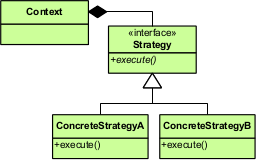
## Strategy Pattern (策略模式)
### Terence
- 目的 :
- 定義了一系列的演算法(業務規則)
- 透過介面封裝每個演算法的實作
- 各種演算法可互相替換(interchangeable )
* 優點 :
* 靈活的替換不同的行為(演算法)
* 策略拓展容易
* 避免使用很多if else
- 缺點 :
- 必須自行決定要使用哪種策略
```java=
interface Skill {
void doAction();
}
class FireSkill implements Skill {
@Override
public void doAction() {
System.out.println("Use fire to attack");
}
}
class HealSkill implements Skill {
@Override
public void doAction() {
System.out.println("Heal myself");
}
}
class SkillService {
private Map<String, Skill> skillMap = new HashMap<>();
public SkillService() {
skillMap.put("FireAttack", new FireSkill());
skillMap.put("Heal", new HealSkill());
}
public void doAction(String skillType) {
Skill skill = skillMap.get(skillType);
skill.doAction();
}
}
public class Strategy {
public static void main(String[] args) {
SkillService skillService = new SkillService();
skillService.doAction("FireAttack");
skillService.doAction("Heal");
}
}
```
## Template Method Pattern (模板模式)
### Terence
- 目的 :
- 封裝父類別主要方法或流程,子類別各自實作抽象方法,確保子類別無法覆寫模板方法。
* 優點 :
* 封裝不變部分,拓展可變部分
* 行為由父類別控制,子類別實作
- 缺點 :
- 每個子類別都要實作各自邏輯,不好維護
- 使用場景 :
- 多個子類別都有的方法,且邏輯相同
- 重要的、複雜的方法,可考慮用模板模式

```C#
public abstract class Game
{
public void Run()
{
Start();
while (!HaveWinner)
TakeTurn();
WriteLine($"Player {WinningPlayer} wins.");
}
protected abstract void Start();
protected abstract bool HaveWinner { get; }
protected abstract void TakeTurn();
protected abstract int WinningPlayer { get; }
protected int currentPlayer;
protected readonly int numberOfPlayers;
public Game(int numberOfPlayers)
{
this.numberOfPlayers = numberOfPlayers;
}
}
// simulate a game of chess
public class Chess : Game
{
public Chess() : base(2)
{
}
protected override void Start()
{
WriteLine($"Starting a game of chess with {numberOfPlayers} players.");
}
protected override bool HaveWinner => turn == maxTurns;
protected override void TakeTurn()
{
WriteLine($"Turn {turn++} taken by player {currentPlayer}.");
currentPlayer = (currentPlayer + 1) % numberOfPlayers;
}
protected override int WinningPlayer => currentPlayer;
private int maxTurns = 10;
private int turn = 1;
}
public class Demo
{
static void Main(string[] args)
{
var chess = new Chess();
chess.Run();
}
}
```
## Visitor Pattern (訪問者模式)
### Yusheng
#### UML
假設有一組資料結構
```C#
public abstract class Expression
{
}
public class DoubleExpression : Expression
{
public double Value;
public DoubleExpression(double value)
{
Value = value;
}
}
public class AdditionExpression : Expression
{
public Expression Left;
public Expression Right;
public AdditionExpression(Expression left, Expression right)
{
Left = left ?? throw new ArgumentNullException(paramName: nameof(left));
Right = right ?? throw new ArgumentNullException(paramName: nameof(right));
}
}
```
如果想印出 1+(2+3)
情境1 - 可以改code時,直接補上print方法
```C#
abstract class Expression
{
// adding a new operation
public abstract void Print(StringBuilder sb);
}
class DoubleExpression : Expression
{
public override void Print(StringBuilder sb)
{
sb.Append(value);
}
}
class AdditionExpression : Expression
{
public override void Print(StringBuilder sb)
{
sb.Append(value: "(");
left.Print(sb);
sb.Append(value: "+");
right.Print(sb);
sb.Append(value: ")");
}
}
internal static void Demo(string[] args)
{
var e = new AdditionExpression(
left: new DoubleExpression(1),
right: new AdditionExpression(
left: new DoubleExpression(2),
right: new DoubleExpression(3)));
var sb = new StringBuilder();
e.Print(sb);
}
```
情境2 不改既有結構的code時
- 用type去判斷對應的資料
```C#
public static class ExpressionPrinter
{
public static void Print(Expression e, StringBuilder sb)
{
if (e is DoubleExpression de)
{
sb.Append(de.Value);
}
else
if (e is AdditionExpression ae)
{
sb.Append("(");
Print(ae.Left, sb);
sb.Append("+");
Print(ae.Right, sb);
sb.Append(")");
}
}
}
```
- Visitor pattern

```C#
abstract class Expression
{
public abstract void Accept(IExpressionVisitor visitor);
}
interface IExpressionVisitor
{
void Visit(DoubleExpression de);
void Visit(AdditionExpression ae);
}
class DoubleExpression : Expression
{
public double Value;
public DoubleExpression(double value)
{
Value = value;
}
public override void Accept(IExpressionVisitor visitor)
{
visitor.Visit(this);
}
}
class AdditionExpression : Expression
{
public Expression Left;
public Expression Right;
public AdditionExpression(Expression left, Expression right)
{
Left = left ?? throw new ArgumentNullException(paramName: nameof(left));
Right = right ?? throw new ArgumentNullException(paramName: nameof(right));
}
public override void Accept(IExpressionVisitor visitor)
{
visitor.Visit(this);
}
}
class ExpressionPrinter : IExpressionVisitor
{
StringBuilder sb = new StringBuilder();
public void Visit(DoubleExpression de)
{
sb.Append(de.Value);
}
public void Visit(AdditionExpression ae)
{
sb.Append("(");
ae.Left.Accept(this);
sb.Append("+");
ae.Right.Accept(this);
sb.Append(")");
}
public override string ToString() => sb.ToString();
}
```
- 優點
- 當要遍歷有階層的資料結構時
- 避免修改既有資料結構的程式碼
- 避免type判斷資料
- 缺點
- 使用情境不多
- Accept, Visit 初見時不太容易理解(double dispatch)
- 補充
* Overload and cast dynamic
* Acyclic Visitor
```c#
class AdditionExpression : Expression
{
public Expression Left;
public Expression Right;
public AdditionExpression(Expression left, Expression right)
{
Left = left ?? throw new ArgumentNullException(paramName: nameof(left));
Right = right ?? throw new ArgumentNullException(paramName: nameof(right));
}
}
class ExpressionPrinter
{
public void Print(AdditionExpression ae, StringBuilder sb)
{
sb.Append("(");
Print((dynamic)ae.Left, sb);
sb.Append("+");
Print((dynamic)ae.Right, sb);
sb.Append(")");
}
public void Print(DoubleExpression de, StringBuilder sb)
{
sb.Append(de.Value);
}
}
```
繼承的缺點就是必須實作,講師這邊有提到泛型的方式
```C#
interface IVisitor<TVisitable>
{
void Visit(TVisitable obj);
}
interface IVisitor { }
class DoubleExpression : Expression
{
public override void Accept(IVisitor visitor)
{
if (visitor is IVisitor<DoubleExpression> typed)
typed.Visit(this);
}
}
class AdditionExpression : Expression
{
public override void Accept(IVisitor visitor)
{
if (visitor is IVisitor<AdditionExpression> typed)
typed.Visit(this);
}
}
class ExpressionPrinter : IVisitor,
IVisitor<Expression>,
/*IVisitor<DoubleExpression>,*/
IVisitor<AdditionExpression>
{
StringBuilder sb = new StringBuilder();
public void Visit(DoubleExpression de)
{
sb.Append(de.Value);
}
public void Visit(AdditionExpression ae)
{
sb.Append("(");
ae.Left.Accept(this);
sb.Append("+");
ae.Right.Accept(this);
sb.Append(")");
}
public void Visit(Expression obj)
{
// default handler?
}
public override string ToString() => sb.ToString();
}
```
這裡假設不需要實作DoubleExpression Visit就直接拔掉IVisitor<DoubleExpression>
## CPS(Continuous passing style)
### Min
**CPS - Wiki**
In functional programming, **continuation-passing style (CPS)** is a style of programming in which control is passed explicitly in the form of a continuation. This is contrasted with **direct style**, which is the usual style of programming.
舉例來說,假設現在要從資料庫**獲取某個會員的資料**,然後把裡面的**大頭照片輸出**。
Javascript直接風格的寫法:
```javascript
function getAvatar(user){
//...一些程式碼
return user
}
function display(avatar){
console.log(avatar)
}
const avatar = getAvatar('eddy')
display(avatar)
```
用CPS風格的寫法,像下面這樣:
```javascript
function getAvatar(user, cb){
//...一些程式碼
cb(user)
}
function display(avatar){
console.log(avatar)
}
getAvatar('eddy', display)
```
C#直接風格
```C#
static int Max(int n, int m)
{
if (n > m)
return n;
else
return m;
}
Console.WriteLine(Max(3, 4));
```
CPS
```C#
static void Max(int n, int m, Action<int> k)
{
if (n > m)
k(n);
else
k(m);
}
Max(3, 4, x => Console.WriteLine(x));
```
**CPS風格相較於直接風格還有一些明顯的缺點:**
在愈複雜的應用情況時,程式碼愈不易撰寫與組織,維護性與閱讀性也很低
在錯誤處理上較為困難
**JavaScript中會大量使用CPS風格,除了它本身可以使用這種風格外,其實是有原因:**
只有單執行緒,在瀏覽器端只有一個使用者,但事件或網路要求(AJAX)要求不能阻塞其他程式的進行,但這也僅限在這些特殊的情況。不過在伺服器端的執行情況都很嚴峻,要能同時讓多人連線使用,必需要達到不能阻塞I/O,才能與以多執行緒執行的伺服器一樣的執行效益。
一開始就是以CPS風格來設計事件異步處理的模型,用於配合異步回調函式的執行使用。
Ref:
[尾递归与Continuation](http://blog.zhaojie.me/2009/03/tail-recursion-and-continuation.html)
[探索c#之遞迴APS和CPS](https://iter01.com/34677.html)
## DI Container and Event Broker Integration
### Min

**Ninjects message broaker extension**
```C#
public class Service1
{
[Publish("message://an-event")]
public event Event<EventParams> AnEvent;
public void DoSomething()
{
// do something
// [...]
// publish message
if (AnEvent != null)
AnEvent(this, new EventParams(something))
}
}
public class Service2
{
[Subscribe("message://an-event")]
public OnAnEvent(object sender, EventParams eventParams)
{
Console.WriteLine("Hello World from Service2")
}
}
public class Service3
{
[Subscribe("message://an-event")]
public OnAnEvent(object sender, EventParams eventParams)
{
Console.WriteLine("Hello World from Service3")
}
}
```
Ref:
[Unity Application Block Event Broker](https://www.cnblogs.com/shanyou/archive/2008/07/31/1257649.html)
[Autofac: publish/subscribe extension](https://stackoverflow.com/questions/14675832/autofac-publish-subscribe-extension)
## CQRS and Event Sourcing
### Min
**CQRS**
Command Query Responsibility Segregation(命令查詢職責分離)

**pros**
寫入性能更好(畢竟讀寫算是分離了)
讀取性能更好(因為會用適當的儲存做查詢)
歷史紀錄追蹤(Event sourcing)
滿足單一職責, 因為都滿足了對各自的業務做封裝
兩邊允許各自擴展
查詢端的儲存已經是存查詢所返回的DTO了, 不必再做Model->DTO的轉換
**cons**
架構複雜
資料同步需要一些時間, 但保障最終一致性
很需要DDD的相關領域知識
**Event Sourcing**

**pros**
事件溯源:想知道某個時間點,user當下的狀態,可以從event store去還原user,方便debug
提高性能:只有新增event,沒有更新event...效能更好,event直接帶物件最終狀態,不用等待db更新後再讀取,效能提昇
**cons**
思維轉變:要拋棄三層式架構、強一致性思維,改用DDD、event driven、最終一致性思維…
Ref:
[DDD里面的CQRS到底是什么?](https://www.51cto.com/article/644144.html)
CQRS Sample Code
```C#
namespace CQRS
{
public class Person
{
private int age;
private EventBroker broker;
public Person( EventBroker broker)
{
this.broker = broker;
broker.Commands += BrokerOnCommands;
broker.Queries += QueryOnCommands;
}
private void QueryOnCommands(object? sender, Query e)
{
var cb = e as AgeQuery;
if (cb !=null && cb.Target == this)
{
e.Result = age;
}
}
private void BrokerOnCommands(object sender, Command c)
{
var cb = c as ChangeAgeCommand;
if (cb != null && cb.Target == this)
{
broker.AllEvents.Add(new AgeChangeEvent(cb.Target,age,cb.Age));
age = cb.Age;
}
}
}
public class EventBroker
{
public List<Event> AllEvents = new List<Event>();
public event EventHandler<Command> Commands;
public event EventHandler<Query> Queries;
public void Command(Command c)
{
Commands?.Invoke(this,c);
}
public T Query<T>(Query q)
{
Queries?.Invoke(this,q);
return (T)q.Result;
}
public void UnDoLastEvent()
{
var lastEvent = AllEvents.LastOrDefault();
var et = lastEvent as AgeChangeEvent;
if (et != null)
{
Command(new ChangeAgeCommand(et.Target,et.OldValue));
}
}
}
public class Query
{
public object Result;
}
public class AgeQuery : Query
{
public Person Target;
}
public class Command:EventArgs
{
}
public class ChangeAgeCommand : Command
{
public Person Target;
public int Age;
public ChangeAgeCommand(Person target, int age)
{
Target = target;
Age = age;
}
}
public class Event
{
}
public class AgeChangeEvent : Event
{
public Person Target;
public int OldValue, NewValue;
public AgeChangeEvent(Person target, int oldValue, int newValue)
{
Target = target;
OldValue = oldValue;
NewValue = newValue;
}
}
internal class Program
{
static void Main(string[] args)
{
var eb = new EventBroker();
var p = new Person(eb);
eb.Command(new ChangeAgeCommand(p,123));
var age = eb.Query<int>(new AgeQuery(){Target = p});
Console.WriteLine(age);
eb.Command(new ChangeAgeCommand(p, 313));
age = eb.Query<int>(new AgeQuery() { Target = p });
Console.WriteLine(age);
eb.UnDoLastEvent();
age = eb.Query<int>(new AgeQuery() { Target = p });
Console.WriteLine(age);
}
}
}
```
## Duck Typing and Mixins
### Kevin
**Duck Typing**
鴨子型別:如果你看到一隻鳥走起來像鴨子;游泳起來像鴨子;叫起來也像鴨子;那麼這隻鳥就可以被稱為鴨子。
優點:程式更有彈性,只要有符合的屬性或者方法就可以執行,不用繼承。
缺點:Run time error,程式碼不好維護,需要仰賴大量的測試保證程式的品質
```C#
public class Duck
{
public void Quack()
{
Console.WriteLine("Quaaaaaack!");
}
public void Feathers()
{
Console.WriteLine("The duck has white and gray feathers.");
}
}
public class Person
{
public void Quack()
{
Console.WriteLine("The person imitates a duck.");
}
public void Feathers()
{
Console.WriteLine("The person takes a feather from the ground and shows it.");
}
}
public class Program
{
private static void InTheForest(dynamic duck)
{
duck.Quack();
duck.Feathers();
}
private static void Game()
{
Duck donald = new Duck();
Person john = new Person();
InTheForest(donald);
InTheForest(john);
}
private static void Main()
{
Game();
Console.ReadLine();
}
}
```
**Mixin**
```C#
interface IMyDisposable<T> : IDisposable
{
void IDisposable.Dispose()
{
Console.WriteLine($"Disposing {typeof(T).Name}");
}
}
public class MyClass : IMyDisposable<MyClass>
{
}
public static void Main()
{
using var mc = new MyClass();
}
```
----------------------------------------------------------
```C#
public interface ILight
{
void SwitchOn();
void SwitchOff();
bool IsOn();
}
public interface ITimerLight : ILight
{
public async Task TurnOnFor(int duration)
{
Console.WriteLine("Using the default interface method for the ITimerLight.TurnOnFor.");
SwitchOn();
await Task.Delay(duration);
SwitchOff();
Console.WriteLine("Completed ITimerLight.TurnOnFor sequence.");
}
}
public class HalogenLight : ITimerLight
{
private enum HalogenLightState
{
Off,
On,
TimerModeOn
}
private HalogenLightState state;
public void SwitchOn() => state = HalogenLightState.On;
public void SwitchOff() => state = HalogenLightState.Off;
public bool IsOn() => state != HalogenLightState.Off;
public async Task TurnOnFor(int duration)
{
Console.WriteLine("Halogen light starting timer function.");
state = HalogenLightState.TimerModeOn;
await Task.Delay(duration);
state = HalogenLightState.Off;
Console.WriteLine("Halogen light finished custom timer function");
}
public override string ToString() => $"The light is {state}";
}
public class Demo
{
public static void Main(string[] args)
{
var halogenLight = new HalogenLight();
halogenLight.TurnOnFor(1);
Console.ReadLine();
}
}
```
## An ASCII C# String
### Kevin
Decrator 的範例
```C#
public class str : IEquatable<str>, IEquatable<string>
{
protected readonly byte[] buffer;
public str()
{
buffer = new byte[] { };
}
public str(string s)
{
buffer = Encoding.ASCII.GetBytes(s);
}
protected str(byte[] buffer)
{
this.buffer = buffer;
}
public char this[int index]
{
get => (char)buffer[index];
set => buffer[index] = (byte)value;
}
public bool Equals(str other)
{
if (other == null) return false;
return ((IStructuralEquatable)buffer)
.Equals(other.buffer,
StructuralComparisons.StructuralEqualityComparer);
}
public override bool Equals(object obj)
{
if (ReferenceEquals(null, obj)) return false;
if (ReferenceEquals(this, obj)) return true;
if (obj.GetType() != this.GetType()) return false;
return Equals((str)obj);
}
public static bool operator ==(str left, str right)
{
return Equals(left, right);
}
public static bool operator !=(str left, str right)
{
return !Equals(left, right);
}
// state space explosion here
public static str operator +(str first, str second)
{
byte[] bytes = new byte[first.buffer.Length + second.buffer.Length];
first.buffer.CopyTo(bytes, 0);
second.buffer.CopyTo(bytes, first.buffer.Length);
return new str(bytes);
}
public override int GetHashCode()
{
return ToString().GetHashCode();
}
public static implicit operator str(string s)
{
return new str(s);
}
public bool Equals(string other)
{
return ToString().Equals(other);
}
public override string ToString()
{
return Encoding.ASCII.GetString(buffer);
}
}
```
## Local Inversion of Control
### Kevin
IoC比較常見的用在DI,降低物件之間的耦合度,這裡比較指用在一般型別上
```C#
public static class CustomExtended
{
public static T AddTo<T>(this T self, ICollection<T> collection)
{
collection.Add(self);
return self;
}
public static string ToJsonString<T>(this T self)
{
return Newtonsoft.Json.JsonConvert.SerializeObject(self);
}
public static bool IsOneOf<T>(this T self, params T[] variants)
{
return ((IList) variants).Contains(self);
}
}
```
* 優點:
* Extension methods may take generic arguments, thus letting you define inverted operations on groups of similar objects.
* The params keyword lets your API behave in a ‘variadic’ fashion by unchaining you from explicit collection initialization.
* Additional level of expressiveness can be gained from passing in lambdas or expressions.
* 缺點:
* Having to manage separate classes containing extension methods.
* API pollution — any time you define an extension method on a generic type, all objects get an additional IntelliSense popup member.
* Possible performance overhead — for example, in cases where you use a lambda instead of direct member access.
* 建議:
* 有限度並且充分了解內部的邏輯後使用
* 確保功能單純不要有太複雜的邏輯
## Beyond the Elvis Operator
### Kevin
```C#
public void Test1(Person p)
{
// string postcode;
// if (p != null)
// {
// if (HasMedicalRecord(p) && p.Address != null)
// {
// CheckAddress(p.Address);
// if (p.Address.PostCode != null)
// postcode = p.Address.PostCode.ToString();
// else
// postcode = "UNKNOWN";
// }
// }
string postcode = p.With(x => x.Address).With(x => x.PostCode);
postcode = p
.If(HasMedicalRecord)
.With(x => x.Address)
.Do(CheckAddress)
.Return(x => x.PostCode, "UNKNOWN");
}
public static class ElvisExtend
{
public static TResult With<TInput, TResult>(this TInput o,
Func<TInput, TResult> evaluator)
where TResult : class
where TInput : class
{
if (o == null) return null;
else return evaluator(o);
}
public static TInput If<TInput>(this TInput o,
Func<TInput, bool> evaluator)
where TInput : class
{
if (o == null) return null;
return evaluator(o) ? o : null;
}
public static TInput Do<TInput>(this TInput o, Action<TInput> action)
where TInput : class
{
if (o == null) return null;
action(o);
return o;
}
public static TResult Return<TInput, TResult>(this TInput o,
Func<TInput, TResult> evaluator, TResult failureValue)
where TInput : class
{
if (o == null) return failureValue;
return evaluator(o);
}
public static TResult WithValue<TInput, TResult>(this TInput o,
Func<TInput, TResult> evaluator)
where TInput : struct
{
return evaluator(o);
}
}
```
 Google Drive
Gist
Clipboard
Google Drive
Gist
Clipboard
 Sign in with Wallet






