近来 NebulaGraph 社区在 LLM + Graph 和 Graph RAG 领域进行了深入的探索和分享。在 LlamaIndex 和 LangChain 中,NebulaGraph 引入了一系列知识图谱和图存储工具,支持编排、图谱与大模型间的交互。之前,NebulaGraph 布道师古思为作为这项工作的主要贡献者已向大家详细介绍了如何构建图谱、Text2Cypher、GraphRAG、GraphIndex 等方法,并展示了相关示例与效果。
最近,ArisGlobal 公司的工程师 Wenqi Glantz 对基于 NebulaGraph 和 LlamaIndex 的所有 Graph + LLM、RAG 方法进行了全面的实验、评估、综述、总结和分析,并给出了深刻的结论。
此文在 Twitter 和 LinkedIn 上获得了广泛认可。在得到 Wenqi 的同意后,我们为大家提供了中文翻译,期望为大家在 Graph + LLM 方法的探索和实践中提供更多的洞见和参考。
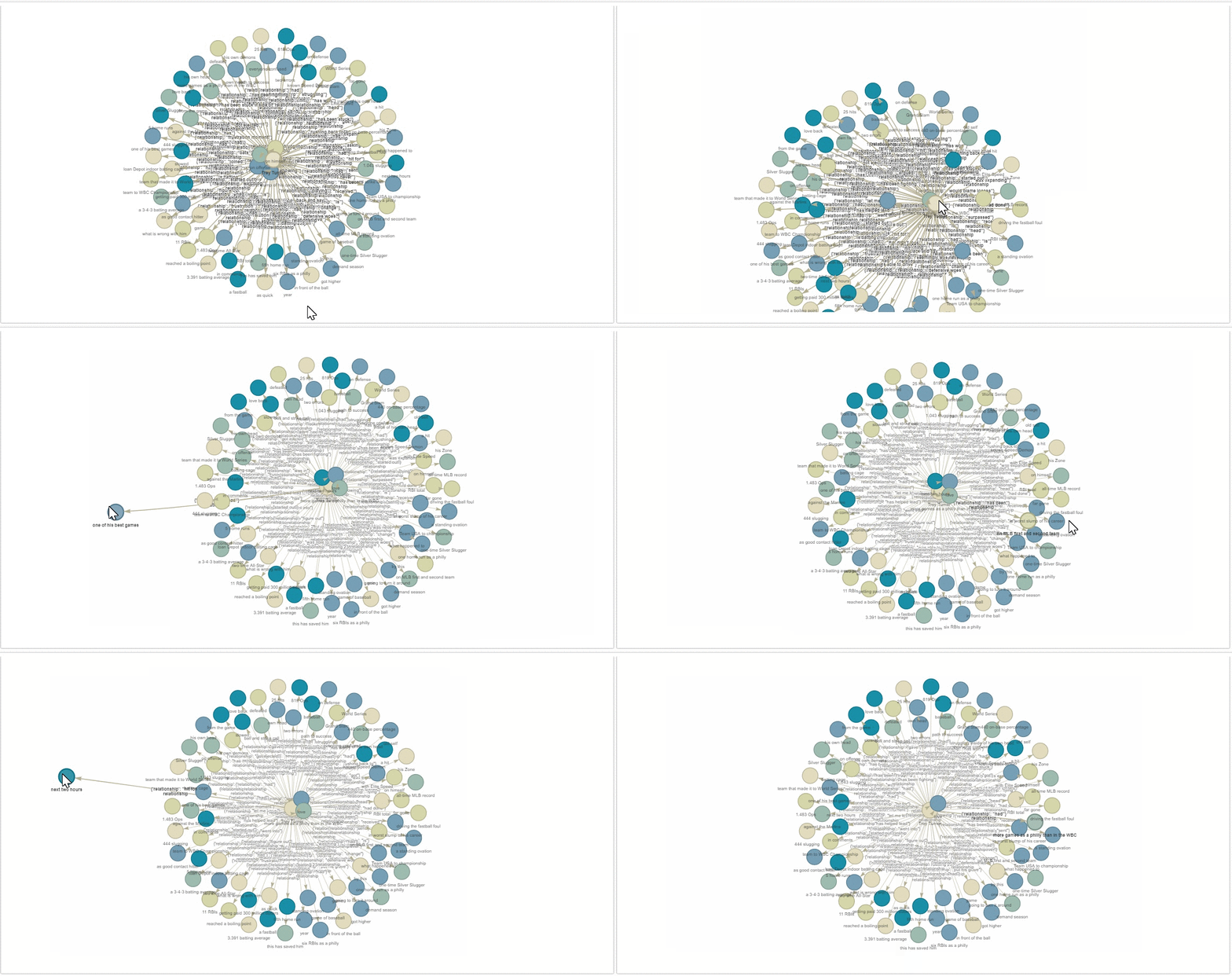
由于 Wenqi Glantz 全家都是 Philadelphia Phillies(费城费城人棒球队,下文仅做英文展示)的铁杆粉丝,因此,在本文中她将会使用知识图谱,确切点是图数据库 NebulaGraph 来查询这只位于费城的 Major League Baseball(大联盟棒球队,下文仅做英文展示)Philadelphia Phillies 的信息。
## 架构思路
这里,我们将使用维基百科·[Philadelphia Phillies](https://en.wikipedia.org/wiki/Philadelphia_Phillies) 页面作为其中一个数据源。此外,因为最近费城球迷为我们喜爱的球员 Trea Turner 发起了 [standing ovation](https://zh.wikipedia.org/zh-cn/%E8%B5%B7%E7%AB%8B%E8%87%B4%E6%95%AC)(起立致敬是指演奏、比赛等项目结束时,听众或观众起立鼓掌之行为)事件,我们还将使用一段评论[这个大事件的 YouTube 视频](https://www.youtube.com/watch?v=k-HTQ8T7oVw)作为另一个数据源。
现在,我们的架构图是这样的:
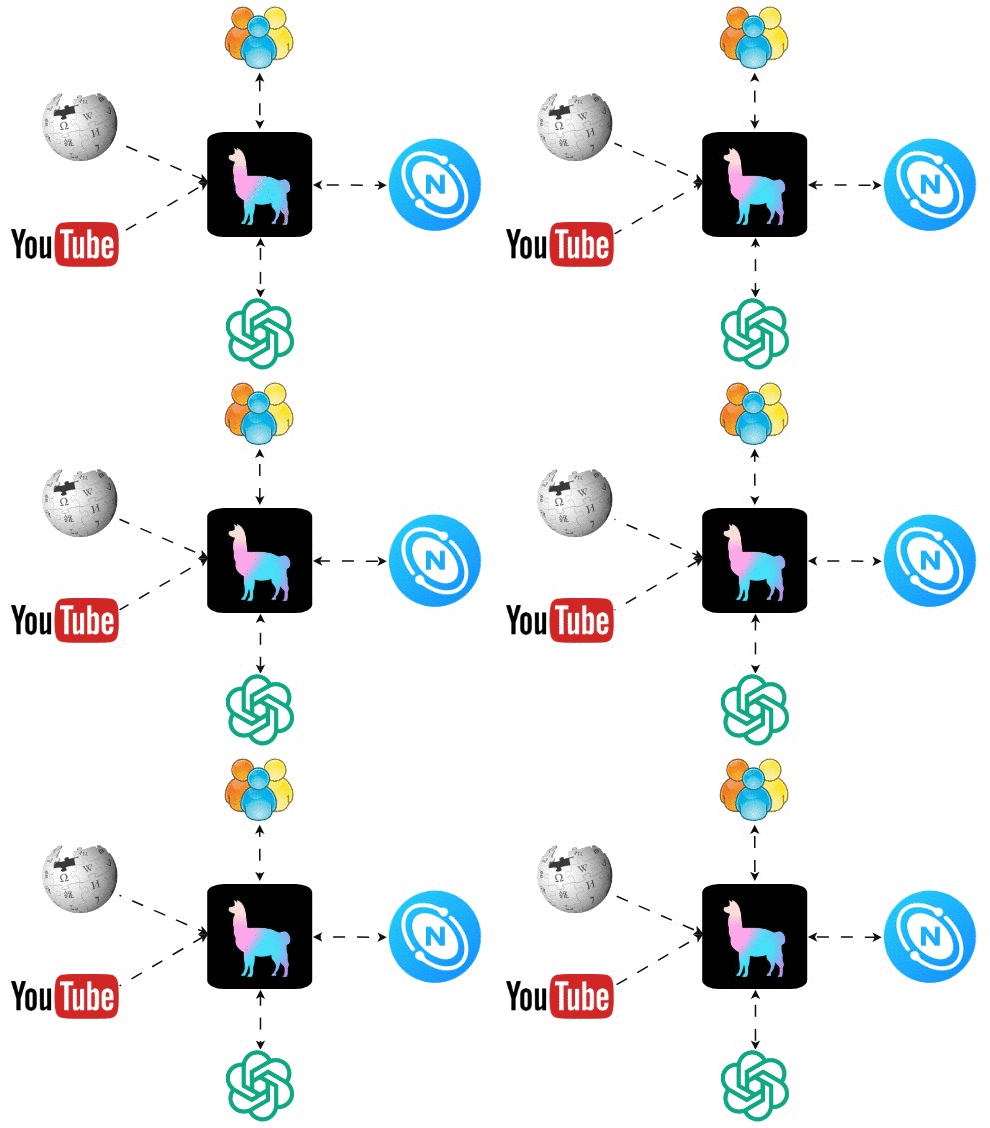
(作者提供的架构图)
如果你熟悉知识图谱和图数据库 NebulaGraph,可以直接跳到“RAG 具体实现”章节。如果你不熟悉 NebulaGraph,请继续往下读。
## 什么是知识图谱(Knowledge Graph,KG)
知识图谱是一种使用图结构的数据模型或拓扑来集成数据的知识库。它是一种表示现实世界实体及其相互关系的方式。知识图谱常用来实现搜索引擎、推荐系统、社交网络等业务场景。
### 知识图谱的组成
知识图谱一般有两个主要组成部分:
* 顶点/节点:英文对应是 Vertex 和 Node,无论是顶点还是节点,都表示知识领域中的实体或对象。每个节点对应一个唯一的实体,并通过唯一标识符进行标识。例如,本例的棒球队知识图谱中,节点可能有“Philadelphia Phillies”和“Major League Baseball”。
* 边:表示两个节点之间的关系。例如,一条边 `compete in`(参赛)可能连接 “Philadelphia Phillies” 的节点和 “Major League Baseball” 的节点。
### 三元组
三元组是知识图谱的基本数据单元,由三个部分组成:
* 主体(Subject):三元组所描述的节点
* 客体(Object):关系指向的节点
* 谓词(Predicate):主体和客体之间的关系
在下面的三元组示例中,“Philadelphia Phillies”是主体,“compete in”是谓词,“Major League Baseball”是客体。
```shell=
(Philadelphia Phillies)--[compete in]->(Major League Baseball)
```
而图数据库通过存储三元组来高效地存储和查询复杂的图数据。
## 什么是 Cypher
Cypher 是由图数据库支持的一种声明性图查询语言。通过 Cypher,我们告诉知识图谱我们想要什么数据,而不是如何得到结果数据。这使得 Cypher 查询更易读、更好维护。此外,Cypher 易上手使用,且能够表达复杂的图查询。
以下,是一个 Cypher 的简单的查询示例:
```cypher
%%ngql
MATCH (p:`entity`)-[e:relationship]->(m:`entity`)
WHERE p.`entity`.`name` == 'Philadelphia Phillies'
RETURN p, e, m;
```
该查询语句将找到与棒球队“Philadelphia Phillies”相关的所有实体。
## 什么是 NebulaGraph
[NebulaGraph](https://github.com/vesoft-inc/nebula) 是市面上最好的图数据库之一。它是开源、分布式的,并且能处理包含万亿条边和顶点的大规模图,而延迟仅为毫秒级。很多大公司在广泛地使用它,进行各种应用开发,包括社交媒体、推荐系统、欺诈检测等。
### 安装 NebulaGraph
要实现 Philadelphia Phillies 的 RAG,我们需要在本地安装 NebulaGraph。借助 Docker Desktop 安装 NebulaGraph 是最便捷的方式之一。详细的安装说明可以在 [NebulaGraph 的文档](https://docs.nebula-graph.com.cn/3.6.0/2.quick-start/1.quick-start-overview/)中找到。
如果你不了解 NebulaGraph,强烈建议去熟悉下文档。
## 知识图谱 RAG 具体实现
NebulaGraph 的首席布道师古思为,以及 LlamaIndex 团队精心撰写了一份关于[知识图谱 RAG 开发的综合指南](https://colab.research.google.com/drive/1tLjOg2ZQuIClfuWrAC2LdiZHCov8oUbs?usp=sharing#scrollTo=iDjEGsguhCzw)。从这本指南中我学到了很多知识,我建议你在读完本文之后也去读下这个指南。
现在,利用我们从指南中学到的知识,开始逐步地介绍使用 LlamaIndex、NebulaGraph 和 GPT-3.5 构建 Philadelphia Phillies RAG。
源码可参考我的 GitHub 仓库:[https://github.com/wenqiglantz/llamaindex_nebulagraph_phillies](ttps://github.com/wenqiglantz/llamaindex_nebulagraph_phillies),当中包括了项目完整的 JupyterNote。
### 实现第 1 步:安装和配置
除了 LlamaIndex,我们还要安装一些库:
* `ipython-ngql`:一个 Python 包,帮你更好地从 Jupyter Notebook 或 iPython 连接到 NebulaGraph;
* `nebula3-python`:连接和管理 NebulaGraph 的 Python 客户端;
* `pyvis`:用最少的 Python 代码快速生成可视化网图的工具库;
* `networkx`:研究图和网络的 Python 库;
* `youtube_transcript_api`:可获取 YouTube 视频的转录/字幕的 Python API。
```shell
%pip install llama_index==0.8.33 ipython-ngql nebula3-python pyvis networkx youtube_transcript_api
```
我们还要设置 OpenAI API 密钥并配置应用程序的日志记录:
```py
import os
import logging
import sys
os.environ["OPENAI_API_KEY"] = "sk-####################"
logging.basicConfig(stream=sys.stdout, level=logging.INFO)
```
### 实现第 2 步:连接到 NebulaGraph 并新建图空间
假设你已经在本地安装了 NebulaGraph,现在我们可以从 JupyterNote 连接它(注意:不要尝试从 Google Colab 连接到本地的 NebulaGraph,由于某些原因,它无法工作)。
按照下面的步骤和代码片段来操作下:
* 连接到本地的 NebulaGraph(默认账号密码为 root、nebula)
* 创建一个名为 `phillies_rag` 的图空间
* 在新的图空间中创建标签、边和标签索引
```python
os.environ["GRAPHD_HOST"] = "127.0.0.1"
os.environ["NEBULA_USER"] = "root"
os.environ["NEBULA_PASSWORD"] = "nebula"
os.environ["NEBULA_ADDRESS"] = "127.0.0.1:9669"
%reload_ext ngql
connection_string = f"--address {os.environ['GRAPHD_HOST']} --port 9669 --user root --password {os.environ['NEBULA_PASSWORD']}"
%ngql {connection_string}
%ngql CREATE SPACE IF NOT EXISTS phillies_rag(vid_type=FIXED_STRING(256), partition_num=1, replica_factor=1);
%%ngql
USE phillies_rag;
CREATE TAG IF NOT EXISTS entity(name string);
CREATE EDGE IF NOT EXISTS relationship(relationship string);
%ngql CREATE TAG INDEX IF NOT EXISTS entity_index ON entity(name(256));
```
创建新的图空间后,再来构建下 `NebulaGraphStore`。参考下面的代码段:
```python
from llama_index.storage.storage_context import StorageContext
from llama_index.graph_stores import NebulaGraphStore
space_name = "phillies_rag"
edge_types, rel_prop_names = ["relationship"], ["relationship"]
tags = ["entity"]
graph_store = NebulaGraphStore(
space_name=space_name,
edge_types=edge_types,
rel_prop_names=rel_prop_names,
tags=tags,
)
storage_context = StorageContext.from_defaults(graph_store=graph_store)
```
### 实现第 3 步:加载数据并创建 KG 索引
是时候加载数据了。我们的源数据来自 Philadelphia Phillies 的维基百科页面和一个关于 Trea Turner 在 2023 年 8 月收到 standing ovation 的 YouTube 视频。
为了节省时间和成本,我们先检查下本地 `storage_context` 来加载 KG 索引。如果存在索引,我们就加载索引。如果不存在索引(例如初次访问应用程序时),我们需要加载这两个源文档(上文提到的维基百科页面和 YouTube 视频),再构建 KG 索引,并在项目 root 目录的本地 storage_graph 中持久化地存储 doc、index 和 vector。
```python
from llama_index import (
LLMPredictor,
ServiceContext,
KnowledgeGraphIndex,
)
from llama_index.graph_stores import SimpleGraphStore
from llama_index import download_loader
from llama_index.llms import OpenAI
# define LLM
llm = OpenAI(temperature=0.1, model="gpt-3.5-turbo")
service_context = ServiceContext.from_defaults(llm=llm, chunk_size=512)
from llama_index import load_index_from_storage
from llama_hub.youtube_transcript import YoutubeTranscriptReader
try:
storage_context = StorageContext.from_defaults(persist_dir='./storage_graph', graph_store=graph_store)
kg_index = load_index_from_storage(
storage_context=storage_context,
service_context=service_context,
max_triplets_per_chunk=15,
space_name=space_name,
edge_types=edge_types,
rel_prop_names=rel_prop_names,
tags=tags,
verbose=True,
)
index_loaded = True
except:
index_loaded = False
if not index_loaded:
WikipediaReader = download_loader("WikipediaReader")
loader = WikipediaReader()
wiki_documents = loader.load_data(pages=['Philadelphia Phillies'], auto_suggest=False)
print(f'Loaded {len(wiki_documents)} documents')
youtube_loader = YoutubeTranscriptReader()
youtube_documents = youtube_loader.load_data(ytlinks=['https://www.youtube.com/watch?v=k-HTQ8T7oVw'])
print(f'Loaded {len(youtube_documents)} YouTube documents')
kg_index = KnowledgeGraphIndex.from_documents(
documents=wiki_documents + youtube_documents,
storage_context=storage_context,
max_triplets_per_chunk=15,
service_context=service_context,
space_name=space_name,
edge_types=edge_types,
rel_prop_names=rel_prop_names,
tags=tags,
include_embeddings=True,
)
kg_index.storage_context.persist(persist_dir='./storage_graph')
```
在构建 KG 索引时,需要注意以下几点:
* `max_triplets_per_chunk`:每个块提取三元组的最大数。将其设置为 15,可覆盖大多数(可能不是所有)块中的内容;
* `include_embeddings`:说明创建 KG 索引时,是否包含数据的 Embedding。Embedding 是一种将文本数据表示为数据语义的向量法。它们通常用来让模型理解不同文本片段之间的语义相似性。当设置 `include_embeddings=True` 时,`KnowledgeGraphIndex` 会在索引中包含这些嵌入。当你想在知识图谱上执行语义搜索时,`include_embeddings=True` 会很有用,因为 Embedding 可用来找到与查询在语义上相似的节点和边。
### 实现第 4 步: 通过查询来探索 NebulaGraph
现在,让我们跑一个简单的查询。
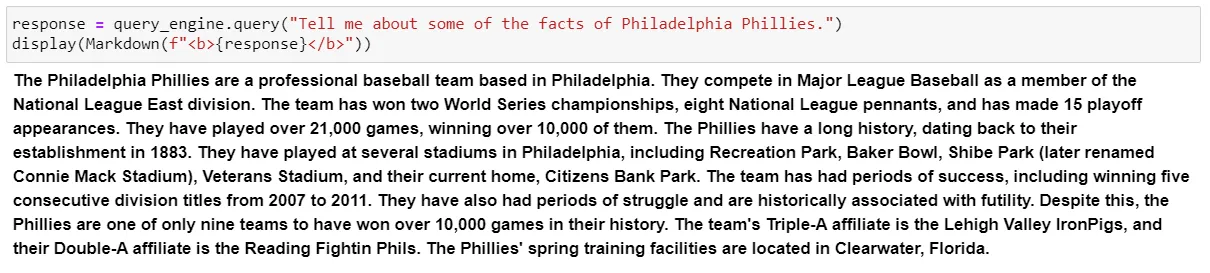
比如说,告知一些 Philadelphia Phillies 队的信息:
```python
query_engine = kg_index.as_query_engine()
response = query_engine.query("Tell me about some of the facts of Philadelphia Phillies.")
display(Markdown(f"<b>{response}</b>"))
```
这是从 Philadelphia Phillies 队的维基百科页面中得到的概述,是个非常不错的简述:
再用 Cypher 查询下:
```cypher
%%ngql
MATCH (p:`entity`)-[e:relationship]->(m:`entity`)
WHERE p.`entity`.`name` == 'Philadelphia Phillies'
RETURN p, e, m;
```
该查询将匹配与 Philadelphia Phillies 相关的所有实体。查询结果将会返回与 Philadelphia Phillies 队相关的所有实体、它们与 Philadelphia Phillies 队的关系,以及 Philadelphia Phillies 队实体本身的列表。
现在,让我们在 Jupyter Notebook 中执行下这个 Cypher 查询:
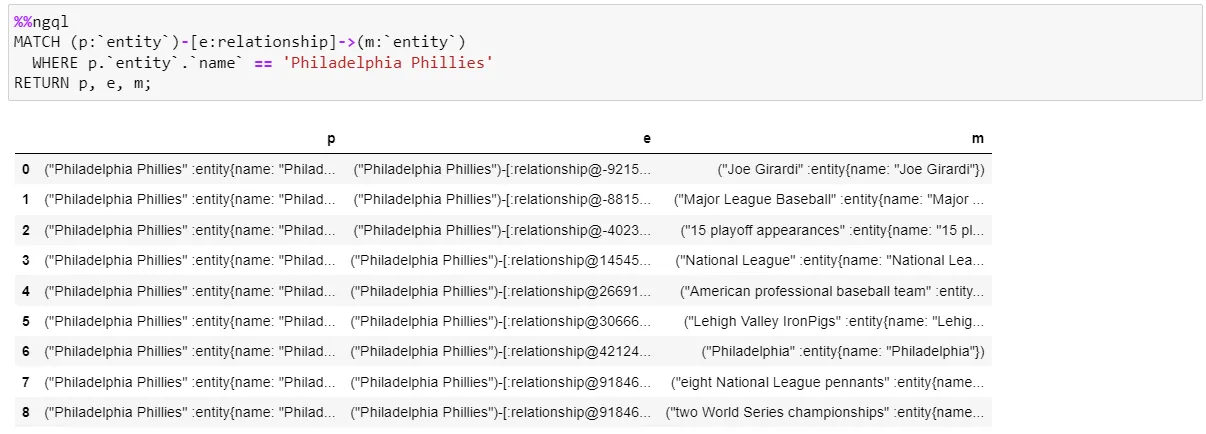
可以看到,结果返回了 9 条数据。
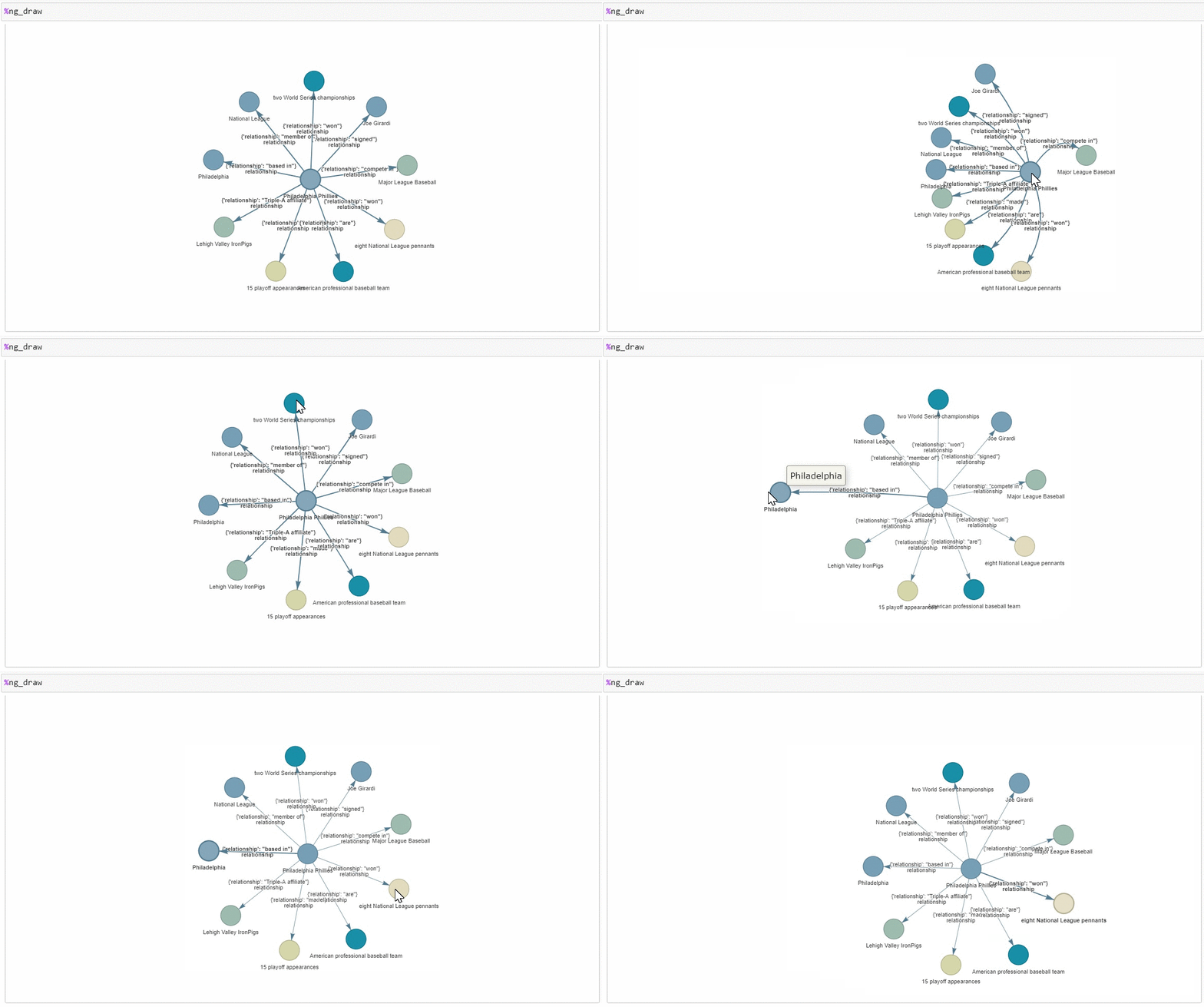
下面,运行 `ipython-ngql` 包中的 `ng_draw` 命令,它能在一个单独的 HTML 文件中渲染NebulaGraph 查询的结果;我们得到了以下的图形。以 Philadelphia Phillies 节点为中心,它延伸出 9 个其他节点,每个节点代表 Cypher 查询结果中的一行数据。连接每个节点到中心节点的是边,表示两个节点之间的关系。
非常酷的是,你还可以拖动节点来操作图形!
现在,我们对 NebulaGraph 的基本知识有了初步的了解,让我们深入一点。
### 实现第 5 步: 图探索的 7 种方式
下面根据 KG 索引,让我们使用不同的方法查询知识图谱并观察它们的结果。
#### 图探索的方法 1:KG 基于向量的检索
```python
query_engine = kg_index.as_query_engine()
```
这种方法通过向量相似性查找 KG 实体,获取连接的文本块,并选择性探索关系。是 LlamaIndex 基于索引构建的默认查询方式。它非常简单、开箱即用,不用额外的参数。
#### 图探索的方法 2:KG 基于关键词的检索
```python
kg_keyword_query_engine = kg_index.as_query_engine(
# setting to false uses the raw triplets instead of adding the text from the corresponding nodes
include_text=False,
retriever_mode="keyword",
response_mode="tree_summarize",
)
```
这个查询用了关键词来检索相关的 KG 实体,来获取连接的文本块,并选择性地探索关系以获取更多的上下文。而参数`retriever_mode="keyword"` 指定了本次检索采用关键词形式。
* `include_text=False`:查询引擎只用原生三元组进行查询,查询不包含对应节点的文本信息;
* `response_mode="tree_summarize"`:返回结果(响应形式)是知识图谱的树结构的总结。这个树以递归方式构建,查询作为根节点,最相关的答案作为叶节点。`tree_summarize` 响应模式对于总结性任务非常有用,比如:提供某个话题的高度概括,或是回答某个需要考虑周全的问题。当然,它还可以生成更复杂的响应,比如:解释某个事物发生的真实原因,或者解释某个过程涉及了哪些步骤。
#### 图探索方法 3:KG 混合检索
```python
kg_hybrid_query_engine = kg_index.as_query_engine(
include_text=True,
response_mode="tree_summarize",
embedding_mode="hybrid",
similarity_top_k=3,
explore_global_knowledge=True,
)
```
通过设定 `embedding_mode="hybrid"`,指定查询引擎为基于向量的检索和基于关键词的检索二者的混合方式,从知识图谱中检索信息,并进行去重。KG 混合检索方式不仅使用关键词找到相关的三元组,它也使用基于向量的检索来找到基于语义相似性的相似三元组。所以,本质上,混合模式结合了关键词搜索和语义搜索,并利用这两种方法的优势来提高搜索结果的准确性和相关性。
* `include_text=True`:同上文的字段一样,用来指定是否包含节点的文本信息;
* `similarity_top_k=3`:Top K 设定,它将根据 Embedding 检索出最相似结果的前三个结果。你可以根据你的使用场景弹性地调整这个值;
* `explore_global_knowledge=True`:指定查询引擎是否要考虑知识图谱的全局上下文来检索信息。当设置 `explore_global_knowledge=True`时,查询引擎不会将其搜索限制在本地上下文(即,一个节点的直接邻居),而是会考虑知识图谱的更广泛的全局上下文。当你想检索与查询不直接相关,但在该知识图谱的更大上下文中有关的信息时,这可能很有用。
基于关键词的检索和混合检索二者主要区别,在于我们从知识图谱中检索信息的方法:基于关键词的检索使用关键词方法,而混合检索使用结合 Embedding 和关键词的混合方法。
#### 图探索方法 4:原生向量索引检索
```python
vector_index = VectorStoreIndex.from_documents(wiki_documents + youtube_documents)
vector_query_engine = vector_index.as_query_engine()
```
这种方式完全不处理知识图谱。它基于向量索引,会先构建文档的向量索引,再从向量索引构建向量查询引擎。
#### 图探索方法 5:自定义组合查询引擎(KG 检索和向量索引检索的组合)
```python
from llama_index import QueryBundle
from llama_index.schema import NodeWithScore
from llama_index.retrievers import BaseRetriever, VectorIndexRetriever, KGTableRetriever
from typing import List
class CustomRetriever(BaseRetriever):
def __init__(
self,
vector_retriever: VectorIndexRetriever,
kg_retriever: KGTableRetriever,
mode: str = "OR",
) -> None:
"""Init params."""
self._vector_retriever = vector_retriever
self._kg_retriever = kg_retriever
if mode not in ("AND", "OR"):
raise ValueError("Invalid mode.")
self._mode = mode
def _retrieve(self, query_bundle: QueryBundle) -> List[NodeWithScore]:
"""Retrieve nodes given query."""
vector_nodes = self._vector_retriever.retrieve(query_bundle)
kg_nodes = self._kg_retriever.retrieve(query_bundle)
vector_ids = {n.node.node_id for n in vector_nodes}
kg_ids = {n.node.node_id for n in kg_nodes}
combined_dict = {n.node.node_id: n for n in vector_nodes}
combined_dict.update({n.node.node_id: n for n in kg_nodes})
if self._mode == "AND":
retrieve_ids = vector_ids.intersection(kg_ids)
else:
retrieve_ids = vector_ids.union(kg_ids)
retrieve_nodes = [combined_dict[rid] for rid in retrieve_ids]
return retrieve_nodes
from llama_index import get_response_synthesizer
from llama_index.query_engine import RetrieverQueryEngine
from llama_index.retrievers import VectorIndexRetriever, KGTableRetriever
# create custom retriever
vector_retriever = VectorIndexRetriever(index=vector_index)
kg_retriever = KGTableRetriever(
index=kg_index, retriever_mode="keyword", include_text=False
)
custom_retriever = CustomRetriever(vector_retriever, kg_retriever)
# create response synthesizer
response_synthesizer = get_response_synthesizer(
service_context=service_context,
response_mode="tree_summarize",
)
custom_query_engine = RetrieverQueryEngine(
retriever=custom_retriever,
response_synthesizer=response_synthesizer,
)
```
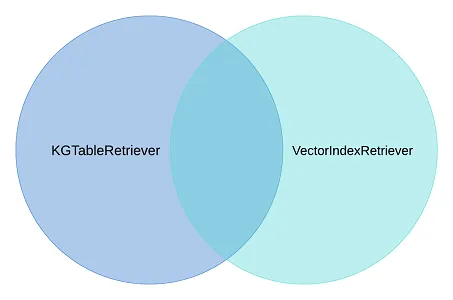
LlamaIndex 构建了一个 `CustomRetriever`。如上所示,你可以看到它的具体实现。它用来进行知识图谱搜索和向量搜索。默认的 `mode` `OR` 保证了两种搜索结果的并集,结果是包含了这两个搜索方式的结果,且进行了结果去重:
* 从知识图谱搜索(`KGTableRetriever`)获得的细节;
* 从向量索引搜索(`VectorIndexRetriever`)获得的语义相似性搜索的详情。
#### 图探索方法 6:KnowledgeGraphQueryEngine
到目前为止,我们已经探索了使用 KG 索引构建的不同查询引擎。现在,来看看另一个由 LlamaIndex 构建的知识图谱查询引擎——`KnowledgeGraphQueryEngine`。看下面的代码片段:
```python
query_engine = KnowledgeGraphQueryEngine(
storage_context=storage_context,
service_context=service_context,
llm=llm,
verbose=True,
)
```
`KnowledgeGraphQueryEngine` 是一个可让我们用自然语言查询知识图谱的查询引擎。它使用 LLM 生成 Cypher 查询语句,再在知识图谱上执行这些查询。这样,我们可以在不学习 Cypher 或任何其他查询语言的情况下查询知识图谱。
`KnowledgeGraphQueryEngine` 接收 `storage_context`,`service_context` 和 `llm`,并构建一个知识图谱查询引擎,其中 `NebulaGraphStore` 作为 `storage_context.graph_store`。
#### 图探索方法 7:KnowledgeGraphRAGRetriever
`KnowledgeGraphRAGRetriever` 是 LlamaIndex 中的一个 `RetrieverQueryEngine`,它在知识图谱上执行 Graph RAG 查询。它接收一个问题或任务作为输入,并执行以下步骤:
1. 使用关键词在知识图谱中提取或 Embedding 搜索相关实体;
2. 从知识图谱中获取那些实体的子图,默认深度为 2;
3. 基于子图构建上下文。
一个下游任务,如:LLM,可以使用这个上下文生成一个反馈。看下下面的代码片段是如何构建一个 KnowledgeGraphRAGRetriever:
```python
graph_rag_retriever = KnowledgeGraphRAGRetriever(
storage_context=storage_context,
service_context=service_context,
llm=llm,
verbose=True,
)
kg_rag_query_engine = RetrieverQueryEngine.from_args(
graph_rag_retriever, service_context=service_context
)
```
好了,现在我们对 7 种查询方法有了不错的了解。下面,我们用一组问题来测试下它们的效果。
## 使用 3 个问题测试 7 种图查询
> 问题 1:告诉我 Bryce Harper 相关信息
下图展示了 7 种查询方式对这一问题的回复,我用不同的颜色对查询语言进行了标注:
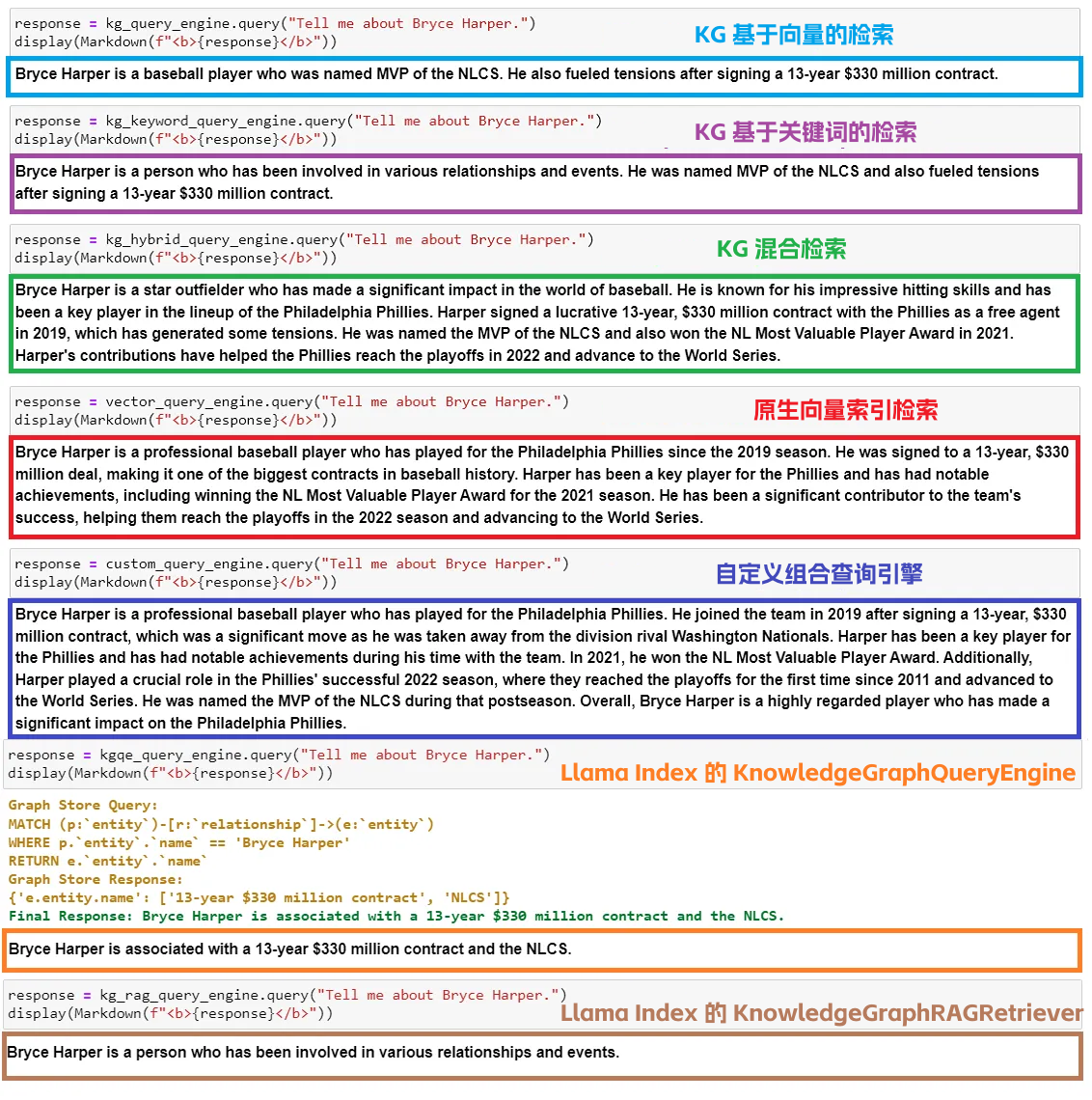
这是我基于结果的一些看法:
* KG 基于向量的检索、基于关键词的检索,`KnowledgeGraphQueryEngine` 和 `KnowledgeGraphRAGRetriever`,都返回了我们正在查询的主题——Bryce Harper 的关键事实——只有关键事实,没有详情的阐述;
* KG 混合检索,原生向量索引检索和自定义组合查询引擎都返回了与主题相关的大量信息,主要是因为它们能够访问查询 Embedding;
* 原生向量索引检索返回的回答速度更快(约 3 秒),比其他 KG 查询引擎(4+ 秒)快。KG 混合实体检索是最慢的(约 10 秒)。
> 问题 2:Trey Turner 收到的 standing ovation 是如何影响他的赛季表现?
这个问题是特意设计的,来自 [YouTube 视频](https://www.youtube.com/watch?v=k-HTQ8T7oVw),这个视频专门讲述了这个 standing ovation 事件——Philly 的粉丝们对 Trea Turner(因为 YouTube 把他的名字误写为“Trey”而不是“Trea”,所以我们在问题中使用“Trey”)的支持。
看下 7 种查询方法的回答列表:
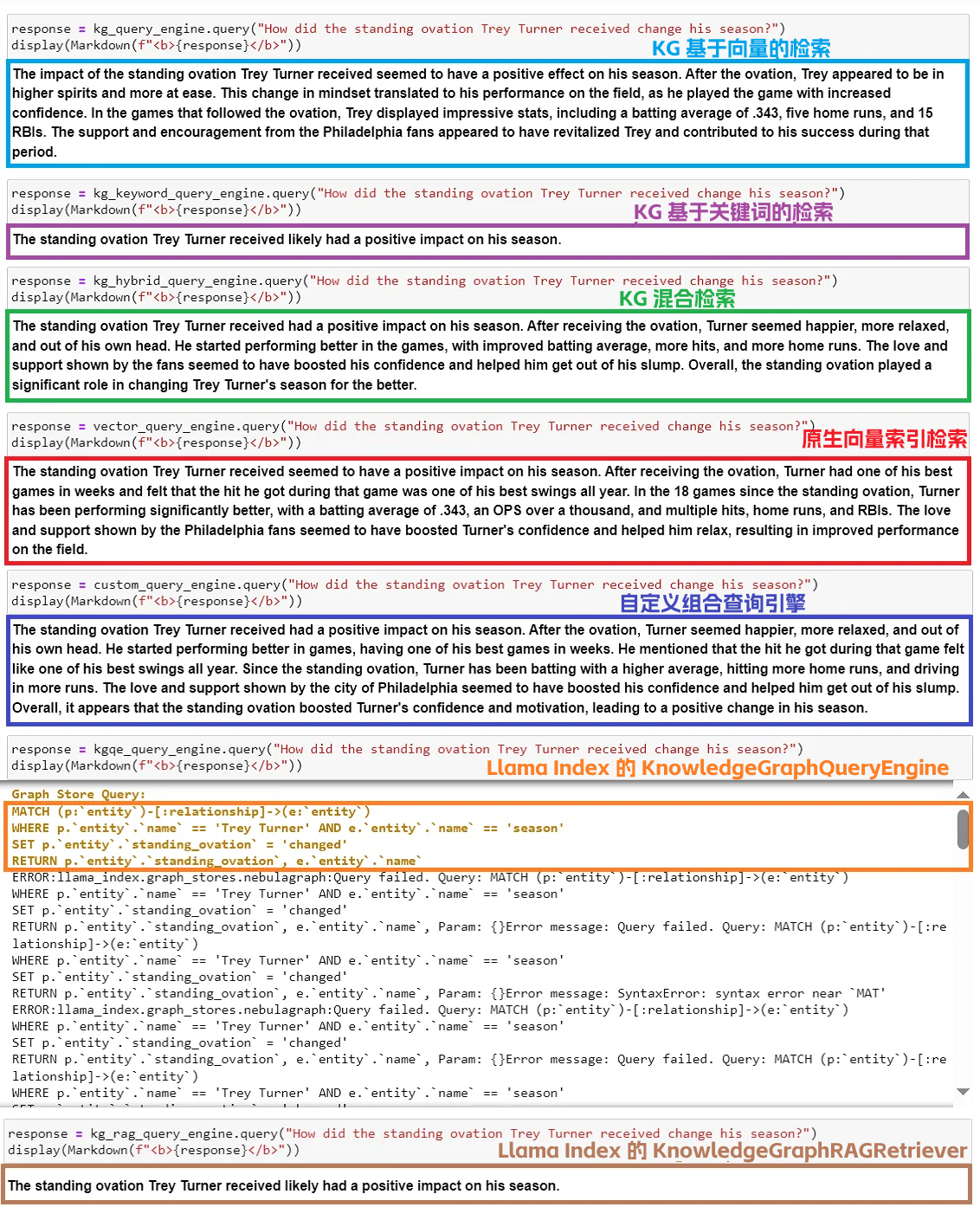
这是我基于结果的一些看法:
* KG 基于向量的检索返回了一个完美的回答,所有支持的事实和详细的统计数据都显示出 Philly 的粉丝是如何帮助 Trea Turner 的赛季。而这些事实(解释原因)都存储在 NebulaGraph 中,取自 YouTube 视频的内容;
* KG 基于关键词的检索返回了一个非常简短的回答,没有支持的事实;
* KG 混合检索返回了良好的回答,尽管缺乏 Turner 在 standing ovation 后表现的详细事实信息。个人认为这个回答稍微逊于 KG 基于向量的检索返回的回答;
* 原生向量索引检索和自定义组合查询引擎返回了不错的回答,有更详细的事实信息,但不如 KG 基于向量的检索返回的回答完整。为什么自定义组合查询引擎没有比 KG 基于向量的检索更好的回答?我能想到的主要原因是,维基百科页面没有关于 Turner 的 standing ovation 事件的信息。只有 YouTube 视频有,YouTube 视频专门讲述了 standing ovation 事件,这些都被加载到了知识图谱中。知识图谱有足够的相关内容来返回一个坚实的回答。原生向量索引检索或自定义组合查询引擎没有更多的内容可以输入做事实支撑;
* `KnowledgeGraphQueryEngine` 返回了以下语法错误。可能原因是 Cypher 生成不正确,如下面的摘要截图所示。看起来 `KnowledgeGraphQueryEngine` 在提高其 Text2Cypher 能力上还有提升空间;
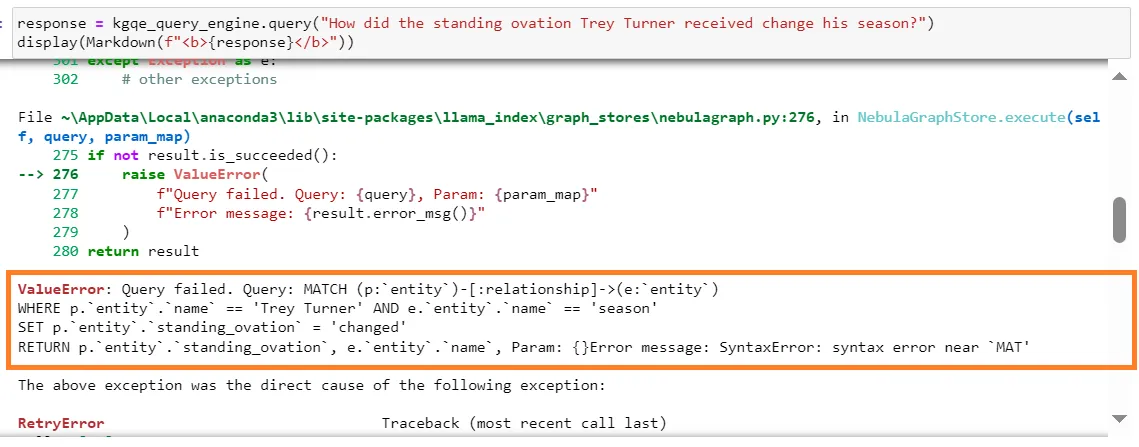
* `KnowledgeGraphRAGRetriever` 返回了关于 Trea Turner 的 standing ovation 事件的最基础信息,显然这个回答是不理想的;
* 原生向量索引检索返回的回答速度(约 5 秒)比其他 KG 查询引擎(10+ 秒)快,除了 KG 基于关键词的检索(约 6 秒)。自定义组合查询引擎是最慢的(约 13 秒)。
小结下:如果将全面的上下文数据正确地加载到知识图谱中,KG 基于向量的检索似乎比上述任何其他查询引擎做得更好。
> 问题 3:告诉我一些 Philadelphia Phillies 当前球场的事实。
看下 7 种查询方法的回答列表:
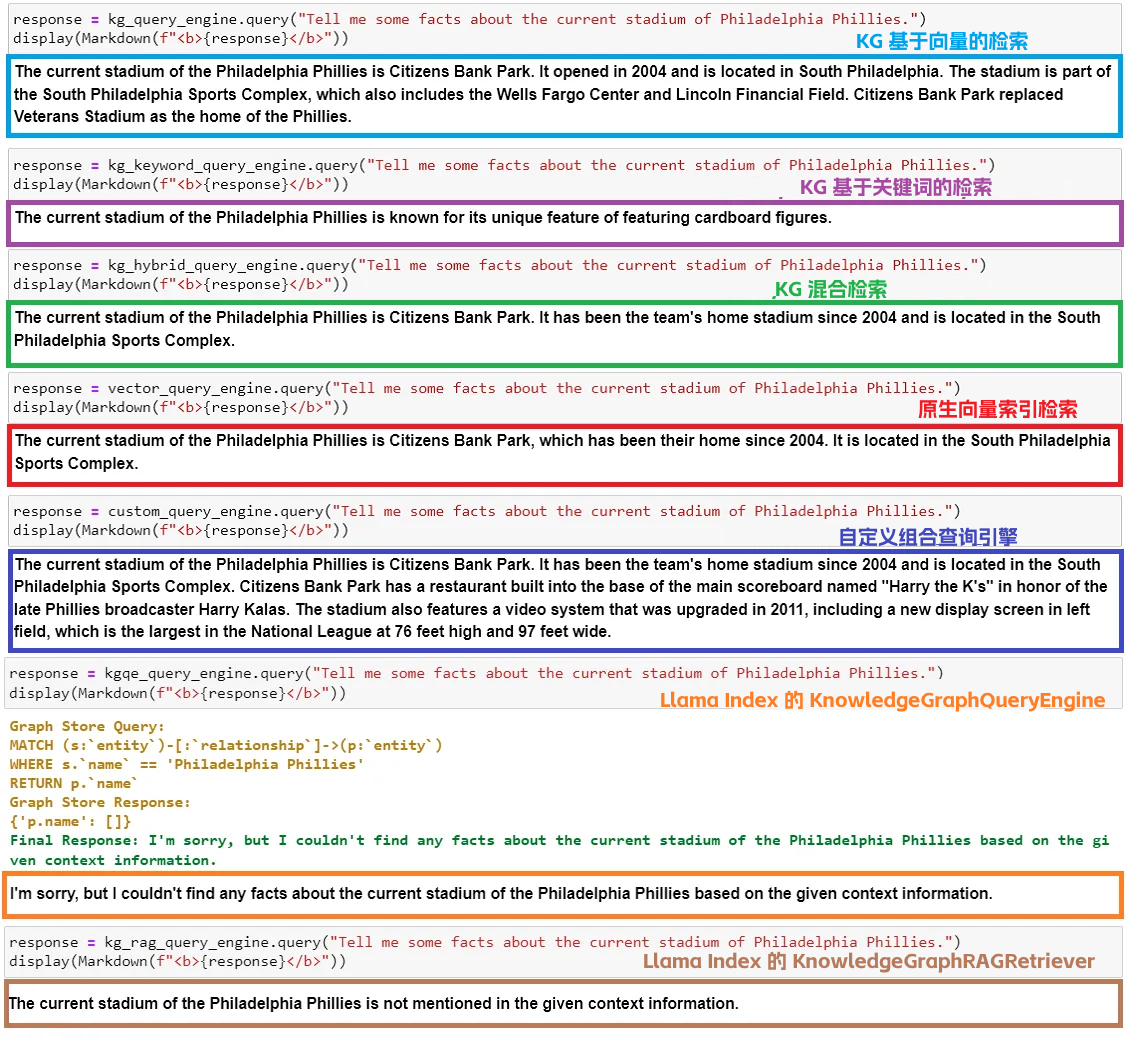
这是我基于结果的一些看法:
* KG 基于向量的检索返回了一个不错的回答,有一些球场的历史背景;
* KG 基于关键词的检索搞错了答案,它甚至没有提到当前球场的名字;
* 混合检索只返回了关于当前球场的最基本的事,如名字,年份和位置,这让我怀疑知识图谱中的 Embedding 实现是否可以改进。于是,我联系了 NebulaGraph 的 Wey(古思为),他反馈未来会优化 Embedding,支持 NebulaGraph 的向量搜索。太赞了!
* 原生向量检索返回了关于当前球场的一些事实,与混合检索返回的结果类似;
* 自定义组合查询引擎给出了最好的回答,详细且全面,由许多关于球场的统计数据和事实支持。这是所有查询引擎中最好的回答;
* 基于给定的上下文信息,`KnowledgeGraphQueryEngine` 找不到任何关于 Philadelphia Phillies 队当前球场的事。似乎这又是一次自然语言自动生成 Cypher 有问题;
* 基于给定的上下文信息,`KnowledgeGraphRAGRetriever` 找不到任何关于当前球场的事实;
* 原生向量检索返回结果的速度(约 3 秒),比 KG 查询引擎(6+ 秒)快。自定义组合查询引擎是最慢的(约 12 秒)。
## 关键收获
基于上面 3 个问题在 7 个查询引擎上的实验,比较了 7 个查询引擎的优点和缺点:
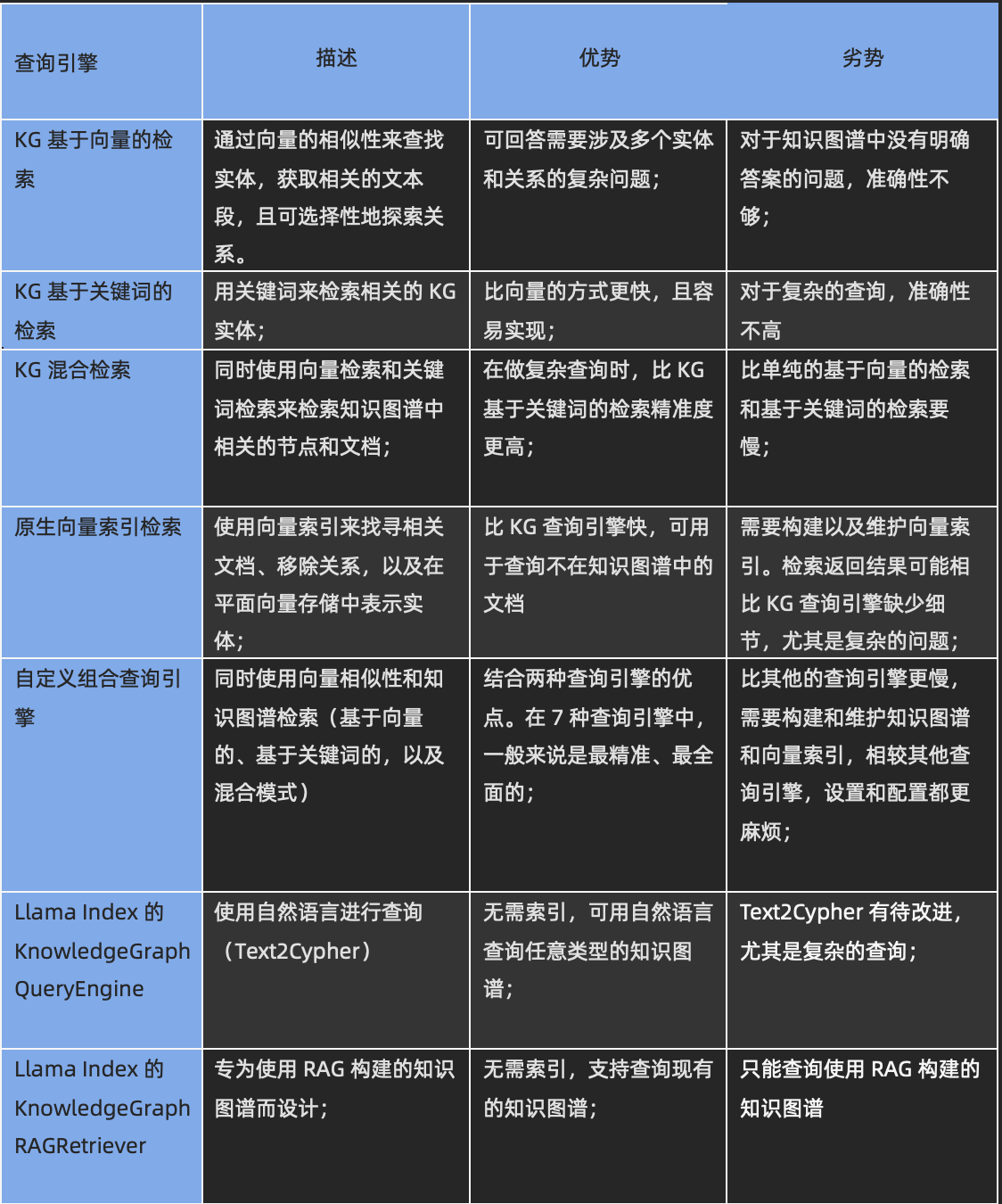
哪个查询引擎最适合,将取决于你的特定使用情况。
* 如果你的数据源中的知识片段是分散和细粒度的,并且你需要对你的数据源进行复杂的推理,如提取实体和它们在网格中的关系,如在欺诈检测、社交网络、供应链管理,那么知识图谱查询引擎是一个更好的选择。当你的 Embedding 生成假相关性,导致幻觉时,KG 查询引擎也很有帮助。
* 如果你需要相似性搜索,如找到所有与给定节点相似的节点,或找到在向量空间中最接近给定节点的所有节点,那么向量查询引擎可能是你的最佳选择;
* 如果你需要一个能快速响应的查询引擎,那么向量查询引擎可能是一个更好的选择,因为它们通常比 KG 查询引擎更快。即使没有 Embedding,任务的提取(运行在 NebulaGraph 单个 storage 服务上的子任务)也可能是 KG 查询引擎延迟高的主要原因;
* 如果你需要高质量的回答,那么自定义组合查询引擎,它结合了 KG 查询引擎和向量查询引擎的优势,是你最好的选择。
## 总结
我们在这篇文章中探讨了知识图谱,特别是图数据库 NebulaGraph,是如何结合 LlamaIndex 和 GPT-3.5 为 Philadelphia Phillies 队构建了一个 RAG。
此外,我们还探讨了 7 种查询引擎,研究了它们的内部工作,并观察了它们对三个问题的回答。我们比较了每个查询引擎的优点和缺点,以便更好地理解了每个查询引擎设计的用例。
希望本篇文章对你有所启发,相关代码请查看 GitHub 仓库:[https://github.com/wenqiglantz/llamaindex_nebulagraph_phillies/tree/main](https://github.com/wenqiglantz/llamaindex_nebulagraph_phillies/tree/main)
Happy coding!
## 参考资料
* NebulaGraph:[https://github.com/vesoft-inc/nebula](https://github.com/vesoft-inc/nebula)
* Graph RAG LlamaIndex Workshop:[https://colab.research.google.com/drive/1tLjOg2ZQuIClfuWrAC2LdiZHCov8oUbs?usp=sharing](https://colab.research.google.com/drive/1tLjOg2ZQuIClfuWrAC2LdiZHCov8oUbs?usp=sharing)
* NebulaGraph Store:[https://gpt-index.readthedocs.io/en/stable/examples/index_structs/knowledge_graph/NebulaGraphKGIndexDemo.html](https://gpt-index.readthedocs.io/en/stable/examples/index_structs/knowledge_graph/NebulaGraphKGIndexDemo.html)
* Knowledge Graph Index:[https://gpt-index.readthedocs.io/en/stable/examples/index_structs/knowledge_graph/KnowledgeGraphDemo.html#knowledge-graph-index](https://gpt-index.readthedocs.io/en/stable/examples/index_structs/knowledge_graph/KnowledgeGraphDemo.html#knowledge-graph-index)
* Knowledge Graph Query Engine:[https://gpt-index.readthedocs.io/en/stable/examples/query_engine/knowledge_graph_query_engine.html](https://gpt-index.readthedocs.io/en/stable/examples/query_engine/knowledge_graph_query_engine.html)
* Knowledge Graph RAG Query Engine:[https://gpt-index.readthedocs.io/en/stable/examples/query_engine/knowledge_graph_rag_query_engine.html](https://gpt-index.readthedocs.io/en/stable/examples/query_engine/knowledge_graph_rag_query_engine.html)
* Custom Retriever combining KG Index and VectorStore Index:[https://gpt-index.readthedocs.io/en/stable/examples/index_structs/knowledge_graph/KnowledgeGraphIndex_vs_VectorStoreIndex_vs_CustomIndex_combined.html](https://gpt-index.readthedocs.io/en/stable/examples/index_structs/knowledge_graph/KnowledgeGraphIndex_vs_VectorStoreIndex_vs_CustomIndex_combined.html)
* LlamaIndex Webinar: Graph Databases, Knowledge Graphs, and RAG with Wey (NebulaGraph):[https://www.youtube.com/watch?v=bPoNCkjDmco](https://www.youtube.com/watch?v=bPoNCkjDmco)
* Enhancing Large Language Models with Knowledge Graphs: The Role of Graph Algorithms:[]()
* Wikipedia Knowledge Graph:[https://en.wikipedia.org/wiki/Knowledge_graph](https://en.wikipedia.org/wiki/Knowledge_graph)
* ipython-ngql:[https://pypi.org/project/ipython-ngql/](https://pypi.org/project/ipython-ngql/)
* Nebula Python:[https://docs.nebula-graph.io/master/14.client/5.nebula-python-client/](https://docs.nebula-graph.io/master/14.client/5.nebula-python-client/)
* pyvis Tutorial:[https://pyvis.readthedocs.io/en/latest/tutorial.html](https://pyvis.readthedocs.io/en/latest/tutorial.html)
* Wikipedia NetworkX:[https://en.wikipedia.org/wiki/NetworkX](https://en.wikipedia.org/wiki/NetworkX)
* youtube-transcript-api:[https://pypi.org/project/youtube-transcript-api/](https://pypi.org/project/youtube-transcript-api/)
 Google Drive
Gist
Clipboard
Google Drive
Gist
Clipboard
 Sign in with Wallet






