Jose Carlos Urra Llanusa
    • Create new note
    • Create a note from template
      • Sharing URL Link copied
      • /edit
      • View mode
        • Edit mode
        • View mode
        • Book mode
        • Slide mode
        Edit mode View mode Book mode Slide mode
      • Customize slides
      • Note Permission
      • Read
        • Only me
        • Signed-in users
        • Everyone
        Only me Signed-in users Everyone
      • Write
        • Only me
        • Signed-in users
        • Everyone
        Only me Signed-in users Everyone
      • Engagement control Commenting, Suggest edit, Emoji Reply
    • Invite by email
      Invitee

      This note has no invitees

    • Publish Note

      Share your work with the world Congratulations! 🎉 Your note is out in the world Publish Note

      Your note will be visible on your profile and discoverable by anyone.
      Your note is now live.
      This note is visible on your profile and discoverable online.
      Everyone on the web can find and read all notes of this public team.
      See published notes
      Unpublish note
      Please check the box to agree to the Community Guidelines.
      View profile
    • Commenting
      Permission
      Disabled Forbidden Owners Signed-in users Everyone
    • Enable
    • Permission
      • Forbidden
      • Owners
      • Signed-in users
      • Everyone
    • Suggest edit
      Permission
      Disabled Forbidden Owners Signed-in users Everyone
    • Enable
    • Permission
      • Forbidden
      • Owners
      • Signed-in users
    • Emoji Reply
    • Enable
    • Versions and GitHub Sync
    • Note settings
    • Note Insights New
    • Engagement control
    • Make a copy
    • Transfer ownership
    • Delete this note
    • Save as template
    • Insert from template
    • Import from
      • Dropbox
      • Google Drive
      • Gist
      • Clipboard
    • Export to
      • Dropbox
      • Google Drive
      • Gist
    • Download
      • Markdown
      • HTML
      • Raw HTML
Menu Note settings Note Insights Versions and GitHub Sync Sharing URL Create Help
Create Create new note Create a note from template
Menu
Options
Engagement control Make a copy Transfer ownership Delete this note
Import from
Dropbox Google Drive Gist Clipboard
Export to
Dropbox Google Drive Gist
Download
Markdown HTML Raw HTML
Back
Sharing URL Link copied
/edit
View mode
  • Edit mode
  • View mode
  • Book mode
  • Slide mode
Edit mode View mode Book mode Slide mode
Customize slides
Note Permission
Read
Only me
  • Only me
  • Signed-in users
  • Everyone
Only me Signed-in users Everyone
Write
Only me
  • Only me
  • Signed-in users
  • Everyone
Only me Signed-in users Everyone
Engagement control Commenting, Suggest edit, Emoji Reply
  • Invite by email
    Invitee

    This note has no invitees

  • Publish Note

    Share your work with the world Congratulations! 🎉 Your note is out in the world Publish Note

    Your note will be visible on your profile and discoverable by anyone.
    Your note is now live.
    This note is visible on your profile and discoverable online.
    Everyone on the web can find and read all notes of this public team.
    See published notes
    Unpublish note
    Please check the box to agree to the Community Guidelines.
    View profile
    Engagement control
    Commenting
    Permission
    Disabled Forbidden Owners Signed-in users Everyone
    Enable
    Permission
    • Forbidden
    • Owners
    • Signed-in users
    • Everyone
    Suggest edit
    Permission
    Disabled Forbidden Owners Signed-in users Everyone
    Enable
    Permission
    • Forbidden
    • Owners
    • Signed-in users
    Emoji Reply
    Enable
    Import from Dropbox Google Drive Gist Clipboard
       Owned this note    Owned this note      
    Published Linked with GitHub
    • Any changes
      Be notified of any changes
    • Mention me
      Be notified of mention me
    • Unsubscribe
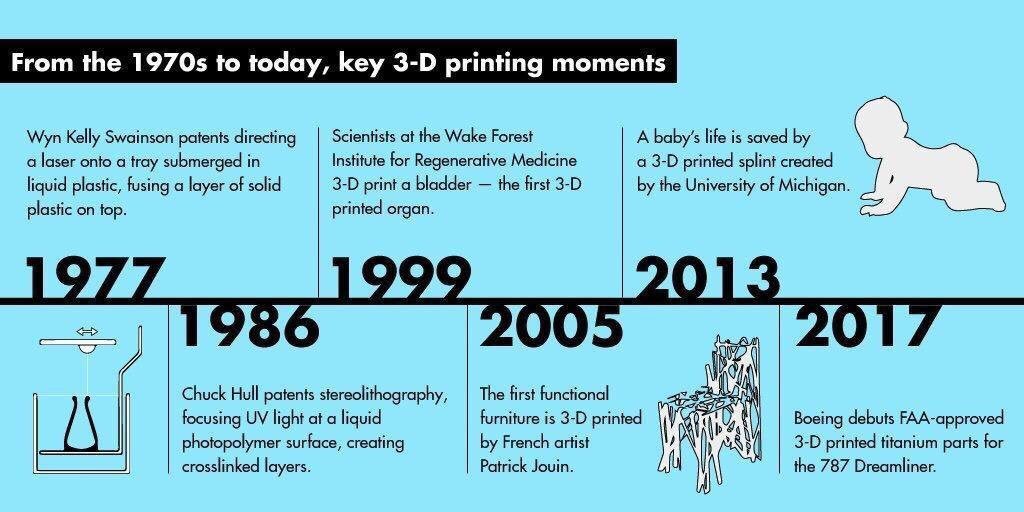
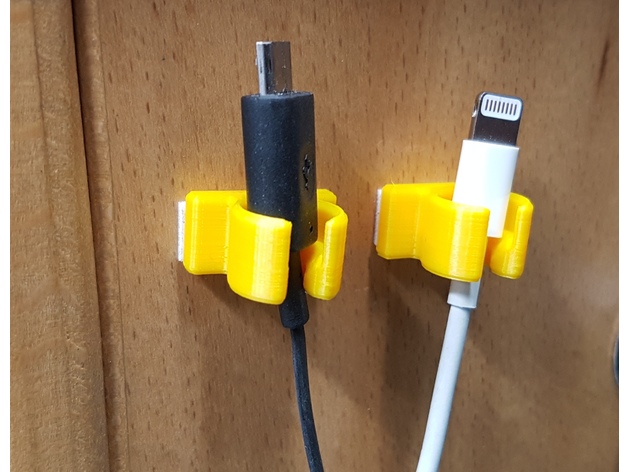
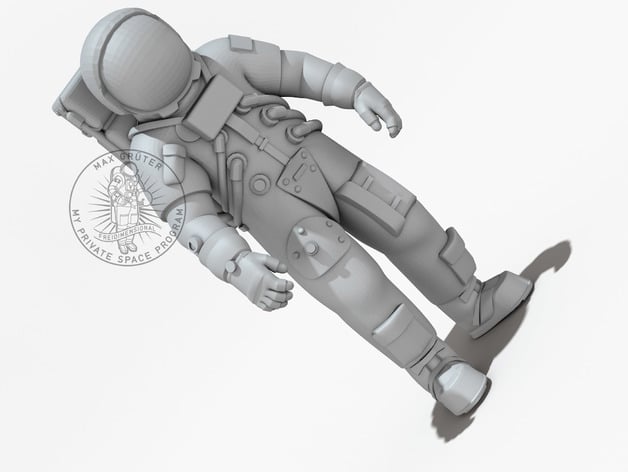
    ## Workshop #008 Delft Open Hardware: # 3D printing Date: 22 April 2022 Time: 13:30 - 16:30 Location: Orange room Organizers: Jannes-Anđela [Presentation](https://docs.google.com/presentation/d/1uc0uODKfUWTZoC64XyXLQRHfnL_K6mDkXofnGaf6S-4/edit) ### Agenda :::info 13:30-13:40 Welcome 13:40-14:00 Quick history and theory on 3D printing 14:00-14:20 Slicer software 14:20-14:35 Exercise 1: Preparing a print 14:35-14:45 Break - intermission 14:45-15:05 Design for 3D printing 15:05-15:35 Exercise 2: Designing in TinkerCAD 15:35-15:45 Questions, help with models, break 15:45 till done Printing the models made in the exercises 16:00-16:15 Closing ::: [**Click here to go to Q&A box or scroll down.**](https://hackmd.io/bdCYBZ2VSjeT90-NVfiX_A?both#12-QA) ## To do first: - Download and install Cura: [link](https://ultimaker.com/nl/software/ultimaker-cura) - Sign up to TinkerCAD: [link](https://www.tinkercad.com/join) ### Learning goals - Basic understanding of what 3D printing is and when you can use it. - Know how to design simple models in CAD - Know how to prepare your design for printing - Get some basic tips and tricks ## 1. History on 3D printing. &emsp;There are 3D printed objects that are thousands and thousands years old. They have been printed by nature through the simple process of dripping the water. Yes those are stalagmites and it takes 100 years to make 1 cm layer (0.0007 – 0.929 mm/yr) , with this natural 3D printer. For us humans that is too long, so we had to come up with a better solution. Dreaming about 3D printing is almost century old. There were and still are plenty mechanical tools that can cut metal, wood and other materials following the simple or more complex paths and shapes. With the industrial revolution, all different machines came in place. Some of them were “programmable” to cut and modify wood or metal in certain way. ![](https://pbs.twimg.com/media/DZOhLMOWkAA2iG5?format=jpg&name=medium) ### 2. First attempts to 3D print Real boom happened in ‘70 last century when computers and new materials came on the technological development stage. First 3D printers were huge ![](https://upload.wikimedia.org/wikipedia/commons/d/d8/3dprinter.jpg) ### 3. Historical moment of twist ### 4. Different 3D printing techologies &emsp;• Stereolithography (SLA) &emsp;• Selective Laser Sintering (SLS) &emsp;• Digital Light Process (DLP) &emsp;• Multi Jet Fusion (MJF) &emsp;• PolyJet &emsp;• Direct Metal Laser Sintering (DMLS) &emsp;• Electron Beam Melting (EBM) &emsp;• Fused Deposition Modeling (FDM) ### 5. What is PLA and why PLA? ### 6. Slicer software - why we need it ### 7. CURA - examples ### 8. Practical slicing exercise - exercise 1 (#Excercises) - advance exercise 2 ### 10. Screen share, and CURA functions ### 11. Mentioning the advanced part and G-Code ## 12. Q&A --- Just start typing here. Add a number. 1. 2. --- ### 13. **Design for 3D printing**: Design guidelines and considerations to design products that can be (FDM) printed. ### 14. **Exercises** in TinkerCAD: - Novice: name tag - Intermediate: cable clasp for 7 mm cable with 1 screwhole - Intermediate to advanced: ring with intricate design - Anywhere in between: your own project **Critical Requirement:** printable in >10 minutes [TinkerCAD](https://www.tinkercad.com/join) or use the software you already have. # Future readings https://www.hubs.com/knowledge-base/key-design-considerations-3d-printing/ https://www.hubs.com/knowledge-base/enclosure-design-3d-printing-step-step-guide/ https://all3dp.com/1/types-of-3d-printers-3d-printing-technology/ # Free 3D objects on the internet https://www.thingiverse.com/ https://grabcad.com/ # Video of the event This will be added later ## Future events 20 May - Seminar: Open Hardware programme (Aug till October) 24 June - Workshop: TBD <br> <br> <hr> # Excercises <div id="Excercises"></div> ## 1. Slicing exercise - cable holder To prepare: - Download and install Cura: [link](https://ultimaker.com/nl/software/ultimaker-cura) - Download 3D object - Cable Holder: [link](https://www.thingiverse.com/thing:2798023) Exercise: try to prepare this object for printing. Try to create as much as you can copies of the same object in one print. ![](https://cdn.thingiverse.com/renders/31/af/b5/16/66/f03443d359ecfbd7e5360951f10ad8df_preview_featured.jpg) ## 2. Advance slicing exercise - an astronaut To prepare: - Download and install Cura (if you don't have it already): [link](https://ultimaker.com/nl/software/ultimaker-cura) - Download 3D object - An Astronaut: [link](https://www.thingiverse.com/thing:230305) Exercise: try to prepare this object for printing, and think what the additional parameters and settings you need to change in CURA to be able to get the correct and good print. ![](https://cdn.thingiverse.com/renders/92/e8/1a/b3/18/149b3e2d982ae830db8ae7b57ef6b8ec_preview_featured.jpg) ## 3. Exercise with openscad How would you make the TU Delft sticker using a different software. - Download openscad You can try recreating this model by downloading openscad and running this script. ![](https://i.imgur.com/hZAJpQh.png) This was my label scad code: ```openscad $fn=60; laag=0.4; fsize=12; d=fsize+2; l=55; tekst="TUDelft"; offset=l-2; dikte=laag*3; translate([offset,(d-fsize)/2,dikte-laag]) linear_extrude(height=laag*3) text(text=tekst,size=fsize,font="Arial",halign="right"); color("red") difference() { hull() { translate([-d/2,d/2,0]) cylinder(h=dikte,d=d); cube([l,d,dikte]); } translate([-d/2,d/2,-1]) cylinder(h=laag*10,d=d-4); ``` ### CAD software Here are a few links - [FreeCAD](https://www.freecadweb.org/):oo - [Fusion360](https://www.autodesk.eu/products/fusion-360/overview?term=1-YEAR&tab=subscription): - [Onshape](https://www.onshape.com/en/): - [TinkerCAD](https://www.tinkercad.com/):o - [Vectary](https:/app.vectary.com/): - [Sketchup](https://www.sketchup.com/): - [Figuro](https://figuro.io//): - [OpenSCAD](https://openscad.org/): # Feedback ## What is your background? Put an o next to the option bellow: Phd: Bachelor: Master: Staff: oooo Researcher: Other: ## What motivated you from joining the workshop? - I've heard a lot about 3D-printing, but I did not actually know anything about it, so I thought it would be nice to see what it's about. ## Share one thing you liked about the workshop - I liked that there was the opportunity to actually make something small and print it. It makes it more real, in a sense. ## Share what you didnt like or could be improved # Thanks to Andjela Tomic, Jannes Nelissen, Jerry de Vos, Santosh Ilhamparuthi, Arco Van Geest, Jose Urra,


    Import from clipboard

    Paste your markdown or webpage here...

    Advanced permission required

    Your current role can only read. Ask the system administrator to acquire write and comment permission.

    This team is disabled

    Sorry, this team is disabled. You can't edit this note.

    This note is locked

    Sorry, only owner can edit this note.

    Reach the limit

    Sorry, you've reached the max length this note can be.
    Please reduce the content or divide it to more notes, thank you!

    Import from Gist

    Import from Snippet

    or

    Export to Snippet

    Are you sure?

    Do you really want to delete this note?
    All users will lose their connection.

    Create a note from template

    Create a note from template

    Oops...
    This template has been removed or transferred.
    Upgrade
    All
    • All
    • Team
    No template.

    Create a template

    Upgrade

    Delete template

    Do you really want to delete this template?
    Turn this template into a regular note and keep its content, versions, and comments.

    This page need refresh

    You have an incompatible client version.
    Refresh to update.
    New version available!
    See releases notes here
    Refresh to enjoy new features.
    Your user state has changed.
    Refresh to load new user state.

    Sign in

    Forgot password

    or

    By clicking below, you agree to our terms of service.

    Sign in via Facebook Sign in via Twitter Sign in via GitHub Sign in via Dropbox Sign in with Wallet
    Wallet ( )
    Connect another wallet

    New to HackMD? Sign up

    Help

    • English
    • 中文
    • Français
    • Deutsch
    • 日本語
    • Español
    • Català
    • Ελληνικά
    • Português
    • italiano
    • Türkçe
    • Русский
    • Nederlands
    • hrvatski jezik
    • język polski
    • Українська
    • हिन्दी
    • svenska
    • Esperanto
    • dansk

    Documents

    Help & Tutorial

    How to use Book mode

    Slide Example

    API Docs

    Edit in VSCode

    Install browser extension

    Contacts

    Feedback

    Discord

    Send us email

    Resources

    Releases

    Pricing

    Blog

    Policy

    Terms

    Privacy

    Cheatsheet

    Syntax Example Reference
    # Header Header 基本排版
    - Unordered List
    • Unordered List
    1. Ordered List
    1. Ordered List
    - [ ] Todo List
    • Todo List
    > Blockquote
    Blockquote
    **Bold font** Bold font
    *Italics font* Italics font
    ~~Strikethrough~~ Strikethrough
    19^th^ 19th
    H~2~O H2O
    ++Inserted text++ Inserted text
    ==Marked text== Marked text
    [link text](https:// "title") Link
    ![image alt](https:// "title") Image
    `Code` Code 在筆記中貼入程式碼
    ```javascript
    var i = 0;
    ```
    var i = 0;
    :smile: :smile: Emoji list
    {%youtube youtube_id %} Externals
    $L^aT_eX$ LaTeX
    :::info
    This is a alert area.
    :::

    This is a alert area.

    Versions and GitHub Sync
    Get Full History Access

    • Edit version name
    • Delete

    revision author avatar     named on  

    More Less

    Note content is identical to the latest version.
    Compare
      Choose a version
      No search result
      Version not found
    Sign in to link this note to GitHub
    Learn more
    This note is not linked with GitHub
     

    Feedback

    Submission failed, please try again

    Thanks for your support.

    On a scale of 0-10, how likely is it that you would recommend HackMD to your friends, family or business associates?

    Please give us some advice and help us improve HackMD.


    Thanks for your feedback

    Remove version name

    Do you want to remove this version name and description?

    Transfer ownership

    Transfer to
      Warning: is a public team. If you transfer note to this team, everyone on the web can find and read this note.

        Link with GitHub

        Please authorize HackMD on GitHub
        • Please sign in to GitHub and install the HackMD app on your GitHub repo.
        • HackMD links with GitHub through a GitHub App. You can choose which repo to install our App.
        Learn more  Sign in to GitHub

        Push the note to GitHub Push to GitHub Pull a file from GitHub

          Authorize again
         

        Choose which file to push to

        Select repo
        Refresh Authorize more repos
        Select branch
        Select file
        Select branch
        Choose version(s) to push
        • Save a new version and push
        • Choose from existing versions
        Include title and tags
        Available push count

        Pull from GitHub

         
        File from GitHub
        File from HackMD

        GitHub Link Settings

        File linked

        Linked by
        File path
        Last synced branch
        Available push count

        Danger Zone

        Unlink
        You will no longer receive notification when GitHub file changes after unlink.

        Syncing

        Push failed

        Push successfully

