---
title: Sprout 1D Array Slides
tags: Sprout
type: slide
---
<style>
.dbg {
color: white;
background: rgba(255,255,255, 0.25);
border-radius: 1rem;
text-align: center;
}
.sdbg {
color: white;
background: rgba(255,255,255, 0.25);
border-radius: 1rem;
box-shadow: 0 0 20px #5680db;
text-shadow:
0 0 80px rgb(192 219 255 / 90%),
0 0 32px rgb(65 120 255 / 90%);
text-align: center;
}
.gt {
background:
linear-gradient(
to right, #30CFD0, #c43ad6
);
-webkit-background-clip: text;
-webkit-text-fill-color: transparent;
}
.warning {
color: red;
font-weight: bold;
}
body {
font-family: 'Courier New', monospace;
}
.rd {
border-radius: 2rem;
}
</style>

<p class="dbg">(´>∀)人(´・ω・)ノヽ(・ε・*)人(-д-`)</p>
###### <p class="gt">Ruby @Sprout 2022</p>
----

<p class="dbg">(´>∀)人(´・ω・)ノ日主ヽ(・ε・*)人(-д-`)</p>
###### <p class="gt">Ruby @Sprout 2022</p>
----

<p class="dbg">(´>∀)人(´・ω・)ノ今日主題ヽ(・ε・*)人(-д-`)</p>
###### <p class="gt">Ruby @Sprout 2022</p>
----

<p class="dbg">人(´・ω・)ノ 今日主題 ヽ(・ε・*)人</p>
###### <p class="gt">Ruby @Sprout 2022</p>
----

<p class="dbg">ω・)ノ 今日主題 ヽ(・ε</p>
###### <p class="gt">Ruby @Sprout 2022</p>
----

<p class="dbg">)ノ 今日主題 ヽ(</p>
###### <p class="gt">Ruby @Sprout 2022</p>
----

<p class="dbg">今日主題</p>
###### <p class="gt">Ruby @Sprout 2022</p>
----

<p class="sdbg">陣列 Array</p>
###### <p class="gt">Ruby @Sprout 2022</p>
----
## Outline
<!-- .slide: data-background="https://s3.amazonaws.com/hakim-static/reveal-js/reveal-parallax-1.jpg" -->
----
<!-- .slide: data-background="https://i.imgur.com/0XZMqhg.jpg" -->
<p class="dbg">
什麼是陣列?
</p>
<p class="dbg">
為什麼需要陣列?
</p>
<p class="dbg">
陣列在 C/C++ 中的語法
</p>
<p class="dbg">
陣列的常見使用情境
</p>
<p class="dbg">
陣列在記憶體中的特性
</p>
<p class="dbg">
陣列在 C/C++ 中的本質
</p>
----

Before we start...
---
<!-- .slide: data-background="https://s3.amazonaws.com/hakim-static/reveal-js/reveal-parallax-1.jpg" -->
## Review
----
### 流程控制 Flow Control
***
「條件判斷」&「迴圈」
Conditionals & Loops
----
#### 條件判斷
***
if
if / else
if / else if
if / else if / else
----
Example code
***
```cpp
int main() {
int yourMumsAge = 30;
if (yourMumsAge <= 18)
std::cout << "That's illegal!" << std::endl;
else if (18 < yourMumsAge && yourMumsAge < 30)
std::cout << "Your mum is young." << std::endl;
else
std::cout << "Your mum is old" << std::endl;
if (yourMumsAge == 30)
std::cout << "Your mum is fat." << std::endl;
else if (yourMumsAge == 30)
std::cout << "Your mum is fat." << std::endl;
return 0;
}
```
----
#### 迴圈
***
==for==
while
do-while
----
#### For Loops
***
`for (初始化; 條件; 操作) { 敘述 }`
```cpp
#include <iostream>
int main() {
for (int i = 0; i < 100; ++i)
std::cout << i << " Hello World!" << std::endl;
return 0;
}
```
```cpp
#include <iostream>
int main() {
// 不一樣的實作方法,一樣的效果。
{
int i;
for (i = 0; i < 100; ++i)
std::cout << i << " Hello Sprout!" << std::endl;
}
return 0;
}
```
----
#### While Loops & Do-while Loops
***
```cpp
#include <iostream>
int main() {
int i = -1;
while (i != -1) {
std::cin >> i;
std::cout << i << std::endl;
}
return 0;
}
```
```cpp
#include <iostream>
int main() {
int i = -1;
do {
std::cin >> i;
std::cout << "Your Number: " << i << std::endl;
} while (i != -1);
return 0;
}
```
----

---
<!-- .slide: data-background="https://i.imgur.com/0XZMqhg.jpg" -->
<p class="sdbg">
什麼是陣列?
</p>
<p class="dbg">
為什麼需要陣列?
</p>
<p class="dbg">
陣列在 C/C++ 中的語法
</p>
<p class="dbg">
陣列的常見使用情境
</p>
<p class="dbg">
陣列在記憶體中的特性
</p>
<p class="dbg">
陣列在 C/C++ 中的本質
</p>
----
### $\text{什麼是陣列?}$
***
> 陣列(英語:Array),是電腦科學中常見的一種資料結構,由零至多個相同類型的元素所組成。[name=維基百科 wiki]
----
一般變數
***

只能有「一個」值 (Value)
----
陣列
***
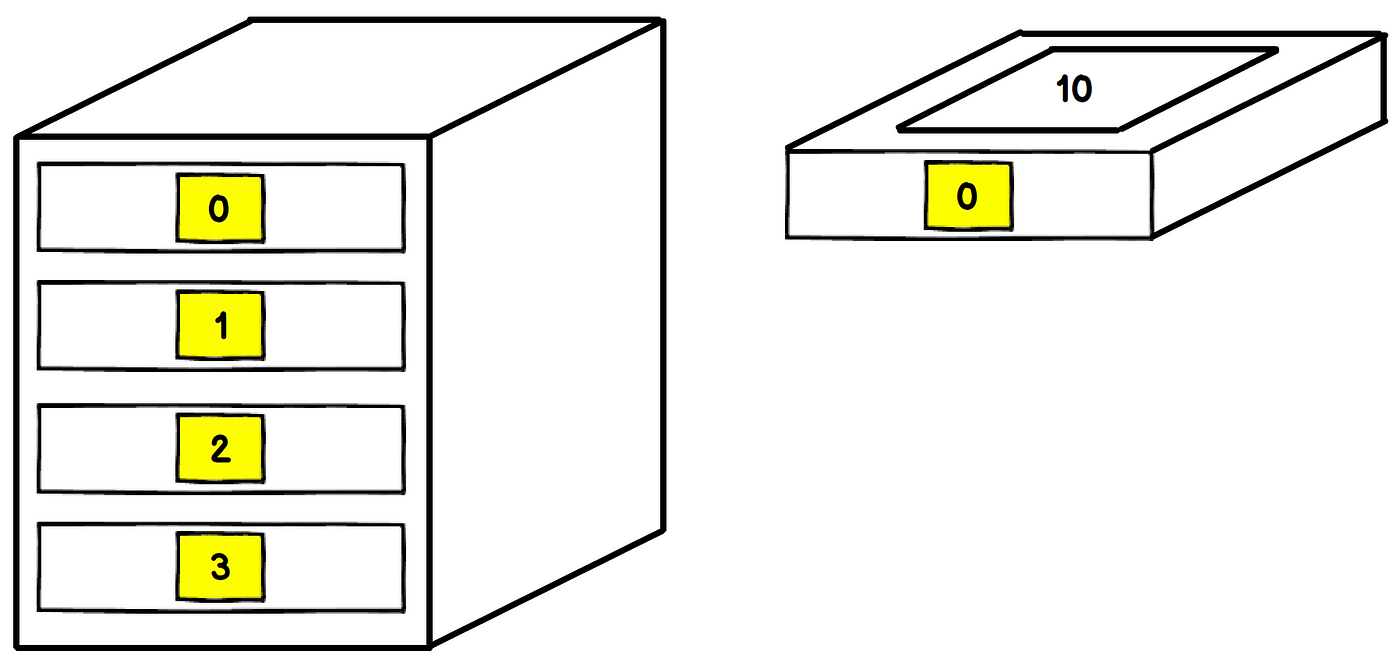
可有「多個」被區隔開的抽屜,各有一值
----

<p class="gt">
Any questions?
</p>
---
<!-- .slide: data-background="https://i.imgur.com/0XZMqhg.jpg" -->
<p class="dbg">
什麼是陣列?
</p>
<p class="sdbg">
為什麼需要陣列?
</p>
<p class="dbg">
陣列在 C/C++ 中的語法
</p>
<p class="dbg">
陣列的常見使用情境
</p>
<p class="dbg">
陣列在記憶體中的特性
</p>
<p class="dbg">
陣列在 C/C++ 中的本質
</p>
----
#### 範例題目一
***
> 老師依序給了小明五個整數,並要求小明將這五個數以倒反的順序唸出來,請你寫一段程式幫助小明。
----
```cpp
#include <iostream>
int main() {
int num1, num2, num3, num4, num5;
std::cin >> num1 >> num2 >> num3
>> num4 >> num5;
std::cout << num5 << num4 << num3
<< num2 << num1;
return 0;
}
```
----
小菜一碟,沒什麼問題,對吧?
----
#### 範例題目二
***
> 老師依序給了小明二十個整數,並要求小明將這些數以倒反的順序唸出來,請你寫一段程式幫助小明。
----
```cpp
#include <iostream>
int main() {
int num1, num2, num3, num4, num5, num6, num7, num8,
num9, num10, num11, num12, num13, num14, num15, num16,
num17, num18, num19, num20;
std::cin >> num1 >> num2 >> num3 >> num4 >> num5
>> num6 >> num7 >> num8 >> num9 >> num10
>> num11 >> num12 >> num13 >> num14 >> num15
>> num16 >> num17 >> num18 >> num19 >> num20;
std::cout << num20 << num19 << num18 << num17 << num16
<< num15 << num14 << num13 << num12 << num11
<< num10 << num9 << num8 << num7 << num6
<< num5 << num4 << num3 << num2 << num1;
return 0;
}
```
----
感覺還可以?
----
#### 範例題目三
***
> 老師依序給了小明一百個整數,並要求小明將這些數以倒反的順序唸出來,請你寫一段程式幫助小明。
----

```cpp
...
```
----

<p class="gt">This is why we need "Array".</p>
----

<p class="gt">
Any questions?
</p>
---
<!-- .slide: data-background="https://i.imgur.com/0XZMqhg.jpg" -->
<p class="dbg">
什麼是陣列?
</p>
<p class="dbg">
為什麼需要陣列?
</p>
<p class="sdbg">
陣列在 C/C++ 中的語法
</p>
<p class="dbg">
陣列的常見使用情境
</p>
<p class="dbg">
陣列在記憶體中的特性
</p>
<p class="dbg">
陣列在 C/C++ 中的本質
</p>
----
### 宣告 Declaration
***
`元素型態 變數名稱[長度];`
```cpp
int arr[10];
char str[100];
bool flags[20];
double balances[50];
float numbers[25];
```
----
#### Example code
```cpp
#include <iostream>
int main() {
int normalVariable;
normalVariable = 5;
std::cout << normalVariable << std::endl;
// declares an array of length 5
// 宣告一個長度為 5 的陣列
int arr[5];
return 0;
}
```
[Visualization](https://pythontutor.com/cpp.html#code=%23include%20%3Ciostream%3E%0Aint%20main%28%29%20%7B%0A%20%20int%20normalVariable%3B%0A%20%20normalVariable%20%3D%205%3B%0A%20%20std%3A%3Acout%20%3C%3C%20normalVariable%20%3C%3C%20std%3A%3Aendl%3B%0A%20%20int%20arr%5B5%5D%3B%0A%20%20return%200%3B%0A%7D&mode=edit&origin=opt-frontend.js&py=cpp_g%2B%2B9.3.0&rawInputLstJSON=%5B%5D)
----
### 賦值 Assignment
***
```cpp
int main() {
int arr[5];
arr[0] = 1;
arr[1] = 2;
arr[2] = 3;
arr[3] = 4;
arr[4] = 5;
return 0;
}
```
[Visualization](https://pythontutor.com/cpp.html#code=int%20main%28%29%20%7B%0A%20%20%20%20int%20arr%5B5%5D%3B%0A%20%20%20%20arr%5B0%5D%20%3D%201%3B%0A%20%20%20%20arr%5B1%5D%20%3D%202%3B%0A%20%20%20%20arr%5B2%5D%20%3D%203%3B%0A%20%20%20%20arr%5B3%5D%20%3D%204%3B%0A%20%20%20%20arr%5B4%5D%20%3D%205%3B%0A%20%20%20%20return%200%3B%0A%7D&mode=edit&origin=opt-frontend.js&py=cpp_g%2B%2B9.3.0&rawInputLstJSON=%5B%5D)
----
### 初始化 Initialization
***
`元素型態 變數名稱[(長度)] = {(內容)};`
```cpp=
int arr1[10] = { 0, 1, 2, 3, 4, 5, 6, 7, 8, 9 };
/*若有初始化,長度可略*/
int arr2[ ] = { 0, 1, 2, 3, 4, 5, 6, 7, 8, 9 };
// 長度為 10
bool flags[] = { true, false, false, true };
// 長度為 4
float numbers1[2] = { 1.23f, 2.5f };
float numbers2[ ] = { 1.23f, 2.5f };
// 等價
```
----
### 存取元素 Indexing
***

> index (n.)(v.) 索引;索引值
----
Example code
***
`變數名稱[索引值];`
```cpp=
#include <iostream>
#define print(x) std::cout << x << std::endl
int main() {
int arr[5] = { 1, 2, 3, 4, 5};
print(arr[0]);
print(arr[1]);
print(arr[2]);
print(arr[3]);
print(arr[4]);
return 0;
}
```
[Visualization](https://pythontutor.com/cpp.html#code=%23include%20%3Ciostream%3E%0A%23define%20print%28x%29%20std%3A%3Acout%20%3C%3C%20x%20%3C%3C%20std%3A%3Aendl%0Aint%20main%28%29%20%7B%0A%20%20%20%20int%20arr%5B5%5D%20%3D%20%7B%201,%202,%203,%204,%205%20%7D%3B%0A%20%20%20%20print%28arr%5B0%5D%29%3B%20print%28arr%5B1%5D%29%3B%20print%28arr%5B2%5D%29%3B%20%0A%20%20%20%20print%28arr%5B3%5D%29%3B%20print%28arr%5B4%5D%29%3B%0A%20%20%20%20return%200%3B%0A%7D&mode=edit&origin=opt-frontend.js&py=cpp_g%2B%2B9.3.0&rawInputLstJSON=%5B%5D)
----
#### 範例題目三
***
> 老師依序給了小明一百個整數,並要求小明將這些數以倒反的順序唸出來,請你寫一段程式幫助小明。
----
Example code
***
```cpp=
#include <iostream>
#define print(x) std::cout << x << std::endl
int main() {
int arr[100];
std::cin >> arr[0] >> arr[1] >> arr[2] >> arr[3]
>> ... >> arr[97] >> arr[98] >> arr[99];
print(arr[99]);
print(arr[98]);
...
print(arr[0]);
return 0;
}
```
----

老師你騙我,根本就沒有比較快啊!!!
----
### 如何有效率地存取陣列元素?
----

回想上堂課,有什麼可以幫我們完成重複性工作?
----

<p class="gt">
Anyone?
</p>
----
流程控制 Control Flow
----
More specifically,

迴圈 Loops
----
#### Example Code
***
```cpp
#include <iostream>
int main() {
int arr[100];
for (int i = 0; i < 100; ++i)
std::cin >> arr[i];
for (int i = 99; i >= 0; --i)
std::cout << arr[i] << std::endl;
return 0;
}
```
[Visualization](https://pythontutor.com/cpp.html#code=%23include%20%3Ciostream%3E%0Aint%20main%28%29%20%7B%0A%20%20%20%20int%20arr%5B100%5D%3B%0A%20%20%20%20for%20%28int%20i%20%3D%200%3B%20i%20%3C%20100%3B%20%2B%2Bi%29%0A%20%20%20%20%20%20%20%20arr%5Bi%5D%20%3D%20i%3B%0A%20%20%20%20for%20%28int%20i%20%3D%2099%3B%20i%20%3E%3D%200%3B%20--i%29%0A%20%20%20%20%20%20%20%20std%3A%3Acout%20%3C%3C%20arr%5Bi%5D%20%3C%3C%20std%3A%3Aendl%3B%0A%20%20%20%20return%200%3B%0A%7D&mode=edit&origin=opt-frontend.js&py=cpp_g%2B%2B9.3.0&rawInputLstJSON=%5B%5D)
----
結合上節課所學「迴圈」,陣列將是強大工具!
***

<p class="gt">
Much better!
</p>
----
#### 範例題目四
***
> 這次請你幫小明寫段程式,首先接收一個整數,代表老師即將要給他的數字個數。後再接收所有輸入的整數,並以倒反順序印出。
----
你可能遇到以下問題...
***
```cpp
#include <iostream>
int main() {
int n;
std::cin >> n;
int arr[n]; // compilation error(編譯錯誤)
return 0;
}
```
----
#### 宣告的注意事項
***
<p class="warning">陣列長度必須是「常數 Constant」</p>
----
#### 正確示範
***
```cpp
#define LENGTH 10 // Preprocessor 前置處理器
int main() {
const int LEN = 5;
int arr1[10]; // 字面常數 Literal Value
int arr2[LEN]; // 常數變數 Constant Variable
int arr3[LENGTH] // 編譯前會被置換成字面常數
int arr4[2+3]; // 字面常數 Literal Value
int arr5[10/3]; // 字面常數 Literal Value
return 0;
}
```
----
#### 錯誤示範
***
```cpp=
#include <iostream>
int main() {
int len1 = 5;
int arr1[len];
int len2;
std::cin >> len2;
int arr2[len2];
int arr3[len1 + len2];
return 0;
}
```
----
#### 範例題目四
***
> 這次請你幫小明寫段程式,首先接收一個整數,代表老師即將要給他的數字個數。後再接收所有輸入的整數,並以倒反順序印出。
----
Example code
***
```cpp
#include <iostream>
int main() {
int n;
std::cin >> n;
int arr[10000]; // works fine as long as n <= 10000.
for (int i = 0; i < n; ++i)
std::cin >> arr[i];
for (int i = n-1; i >= 0; --i)
std::cout << i << std::endl;
return 0;
}
```
----
#### 初始化注意事項
***
<p class="warning">初始化時,給定陣列長度卻未給齊元素,預設為 0</p>
<div style="background: #FFF;">

</div>
----
Example code
***
```cpp=
#include <iostream>
int main() {
int arr[10] = { 5, 2, 3 };
std::cout << arr[1] << '\n'
<< arr[2] << '\n'
<< arr[3] << '\n'
<< arr[4] << '\n'
<< arr[5] << '\n';
return 0;
}
```
[Visualization](https://pythontutor.com/cpp.html#code=%23include%20%3Ciostream%3E%0Aint%20main%28%29%20%7B%0A%20%20%20%20int%20arr%5B10%5D%20%3D%20%7B%205,%202,%203%20%7D%3B%0A%20%20%20%20std%3A%3Acout%20%3C%3C%20arr%5B1%5D%20%3C%3C%20'%5Cn'%0A%20%20%20%20%20%20%20%20%20%20%20%20%20%20%3C%3C%20arr%5B2%5D%20%3C%3C%20'%5Cn'%20%0A%20%20%20%20%20%20%20%20%20%20%20%20%20%20%3C%3C%20arr%5B3%5D%20%3C%3C%20'%5Cn'%0A%20%20%20%20%20%20%20%20%20%20%20%20%20%20%3C%3C%20arr%5B4%5D%20%3C%3C%20'%5Cn'%0A%20%20%20%20%20%20%20%20%20%20%20%20%20%20%3C%3C%20arr%5B5%5D%20%3C%3C%20'%5Cn'%3B%0A%20%20%20%20return%200%3B%20%20%20%20%0A%7D&mode=edit&origin=opt-frontend.js&py=cpp_g%2B%2B9.3.0&rawInputLstJSON=%5B%5D)
----
<p class="warning">未初始化之陣列,其元素為殘值</p>
***
```cpp=
#include <iostream>
#define print(x) std::cout << x << '\n'
int main() {
int uninitializedArr[10];
print( uninitializedArr[1] );
print( uninitializedArr[2] );
print( uninitializedArr[3] );
return 0;
}
```
[Try it yourself](https://onlinegdb.com/KRQwCyamD)
----

<p class="gt">
Any questions?
</p>
---
<!-- .slide: data-background="https://i.imgur.com/0XZMqhg.jpg" -->
<p class="dbg">
什麼是陣列?
</p>
<p class="dbg">
為什麼需要陣列?
</p>
<p class="dbg">
陣列在 C/C++ 中的語法
</p>
<p class="sdbg">
陣列的常見使用情境
</p>
<p class="dbg">
陣列在記憶體中的特性
</p>
<p class="dbg">
陣列在 C/C++ 中的本質
</p>
----
### 陣列的常見使用情境
***
需儲存多個性質相同且型別相同之資料時
----
### 注意事項
***
<p class="warning">確認「必要」儲存資料才使用陣列</p>
----
#### 常見誤用範例
***
[Sprout OJ No. 803](https://neoj.sprout.tw/problem/803/)
----

解題策略
----
變異數公式一
***
$${1\over n}\sum\limits_{i=0}^{n}{(x_i-\mu_x)^2}$$
> 元素均差平方和的平均
----

感覺一定要用到陣列...嗎?
----
變異數公式二
***
$$\sum\limits_{i=0}^{n}{{x_i}^2\over n}-{\mu_x}^2$$
> 平方的平均 - 平均的平方
----
```cpp
#include <iostream>
int main() {
int sum = 0, squareSum = 0, score;
for (int i = 0; i < 10; ++i) {
std::cin >> score;
sum += score;
squareSum += score * score;
}
double avg = sum / 10.;
std::cout << avg << " "
<< squareSum / 10. - avg * avg << '\n';
return 0;
}
```
----

<p class="gt">
Any questions?
</p>
---
## 插播:課堂練習
----
小蘋果
***
[Sprout OJ No.602](https://neoj.sprout.tw/problem/602/)
----
σ.σ
***
[Sprout OJ No.209](https://neoj.sprout.tw/problem/209/)
---
<!-- .slide: data-background="https://i.imgur.com/0XZMqhg.jpg" -->
<p class="dbg">
什麼是陣列?
</p>
<p class="dbg">
為什麼需要陣列?
</p>
<p class="dbg">
陣列在 C/C++ 中的語法
</p>
<p class="dbg">
陣列的常見使用情境
</p>
<p class="sdbg">
陣列在記憶體中的特性
</p>
<p class="dbg">
陣列在 C/C++ 中的本質
</p>
----
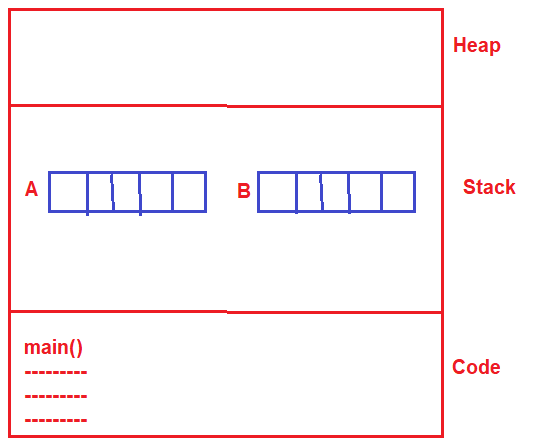
連續記憶體區段
Consecutive Memory Location
***

----
為什麼陣列無法伸縮?
***
----

<p class="gt">
Any questions?
</p>
---
<!-- .slide: data-background="https://i.imgur.com/0XZMqhg.jpg" -->
<p class="dbg">
什麼是陣列?
</p>
<p class="dbg">
為什麼需要陣列?
</p>
<p class="dbg">
陣列在 C/C++ 中的語法
</p>
<p class="dbg">
陣列的常見使用情境
</p>
<p class="dbg">
陣列在記憶體中的特性
</p>
<p class="sdbg">
陣列在 C/C++ 中的本質
</p>
----
曾否想過直接把陣列變數整個印出來會怎麼樣?
----
Printing The Array Variable
***
```cpp
#include <iostream>
int main() {
int arr[10];
std::cout << arr << std::endl;
return 0;
}
```
----
The outputs... What are these...?
***
```
0x7ffff8608eb0
```
```
0x7ffdd493e890
```
```
0x7ffc56b5cd00
```
```
0x7ffedfc50bb0
```
```
0x7ffe6433c020
```
```
0x7fffaa2f34b0
```
```
0x7fff2769d940
```
----
記憶體位址 Memory Address
***

> "0x" denotes ==hexadecimal==
----
有記憶體位置可以做什麼?
***
```cpp
#include <iostream>
int main() {
int arr[10];
std::cout << arr << std::endl;
std::cout << arr + 1 << std::endl;
std::cout << arr + 2 << std::endl;
return 0;
}
```
[Try it yourself](https://coliru.stacked-crooked.com/a/8ceb586a16676e37)
----
輸出 Output
***
```
0x7ffe8d7ec910
0x7ffe8d7ec914
0x7ffe8d7ec918
```
為什麼記憶體位址 + 1 是差 4?
----
位址運算
***
一個 `int` 型態的儲存格地址 + 1
會是指向「下一格」 `int` 儲存格的地址
`int` 在記憶體中所佔大小是「實作定義」,但在大部分的編譯器中, `int` 佔 `4bytes`
因此,想要將地址指向下一個儲存格,地址要 + 4
----
說這些要幹嘛...?
***
```cpp
#include <iostream>
#define addr(var) &(var)
#define val(addr) *(addr)
int main() {
int arr[10] = { 8, 7, 6, 5 };
std::cout << arr << std::endl;
std::cout << addr(arr[0]) << std::endl;
std::cout << val(arr) << std::endl;
std::cout << arr[2] << std::endl;
std::cout << val(arr+2) << std::endl;
return 0;
}
```
[Try it yourself](https://coliru.stacked-crooked.com/a/7150256be9a43737)
----
將陣列當作參數傳入函式
Passing array as a parameter
***
```cpp
#include <iostream>
void printArr(int arr[], int n) {
if (n <= 0) return;
std::cout << "[ ";
for (int i = 0; i < n; ++i)
std::cout << arr[i] << " ";
std::cout << ']' << std::endl;
}
int main() {
int arr[5] = { 3, 0, 6, 7, 8 };
printArr(arr, 5);
return 0;
}
```
[Try it yourself](https://coliru.stacked-crooked.com/a/079d6cf94611155f)
----
### 將陣列傳入函式的注意數項
----
#### 將一般變數傳入函式
***
```cpp
#include <iostream>
void printNum(int num) {
std::cout << num << '\n';
num = 0;
}
int main() {
int myNum = 87;
printNum(myNum);
printNum(myNum);
return 0;
}
```
[Try it yourself](https://coliru.stacked-crooked.com/a/b9cd045d7a5d51a4)
----
#### 將陣列傳入函式
***
```cpp
#include <iostream>
void printArr(int arr[], int n) {
std::cout << "[ ";
for (int i = 0; i < n; ++i)
std::cout << arr[i] << " ";
std::cout << ']' << std::endl;
for (int i = 0; i < n; ++i) arr[i] = 0;
}
int main() {
int arr[4] = { 5, 4, 8, 7 };
printArr(arr, 4);
printArr(arr, 4);
return 0;
}
```
[Try it yourself](https://coliru.stacked-crooked.com/a/fc5c56f92e2ab4e6)
----
#### 良好的習慣
***
```cpp
#include <iostream>
void printArr(const int arr[], int n) {
std::cout << "[ ";
for (int i = 0; i < n; ++i)
std::cout << arr[i] << " ";
std::cout << ']' << std::endl;
}
int main() {
int arr[4] = { 5, 4, 8, 7 };
printArr(arr, 4);
return 0;
}
```
[Try it yourself](https://coliru.stacked-crooked.com/a/e567e6d48c756b57)
----
講這些的目的不是要教會你們「指標」
只是為日後埋下伏筆,也希望激起你們的興趣
如果非常想了解,不妨上網自學~
---
## Quick Review
----
## Takeaways
***
- 陣列是數個相同型別元素組成之資料結構
- 陣列在記憶體中佔有連續的位置
- 陣列宣告時需有常數的長度
- 陣列未初始化與變數一樣會是殘值
- 結合迴圈以有效率地存取陣列元素
- 陣列變數的本質是記憶體位址
- 陣列的本質是一串地址所以可傳入函式
----
<!-- .slide: data-background="#FFF" -->
感謝參與!
***

[⬆問卷調查](https://www.surveycake.com/s/YxaAo)
 Google Drive
Gist
Clipboard
Google Drive
Gist
Clipboard
 Sign in with Wallet






