# 2023q1 Homework3 (quiz3)
contributed by <[`Shiritai`](https://github.com/Shiritai)>
## 測驗一
### 完成紅黑樹 parent 指標之指標、對齊、顏色等相關操作。
1. `AAAA` 考慮對齊,取得親代指標
指標以 `long` (64 bits) 對齊,由於每個地址指向一 byte (8 bits),故真正對齊的地址需為 $\frac{64}{8} = 8$ 的倍數,也就是最低 $3$ 位元應為零。
不過考慮 `long` 在不同 ABI 下長度不一,此時可以利用 `sizeof` 處理跨平台的情況。
```c
#define rb_parent(r) ((node_t *) ((r)->color & ~(sizeof(long) - 1)))
```
2. `BBBB` 設定顏色為紅色
單純對最低位進行標記。
```c
(r)->color &= CMAP_RED; // CMAP_RED = 0
```
3. `CCCC` 設定顏色為黑色
單純對最低位進行標記。
```c
(r)->color |= CMAP_BLACK; // CMAP_BLACK = 1
```
### 完成走訪邏輯
`DDDD`、`EEEE` 走訪左右子樹,當非走訪至葉節點且與當前節點相比較小/大時,往左/右子節點走訪。
```c
if (res < 0) {
if (!cur->left) {
cur->left = node;
rb_set_parent(node, cur);
cmap_fix_colors(obj, node);
break;
}
cur = cur->left;
} else {
if (!cur->right) {
cur->right = node;
rb_set_parent(node, cur);
cmap_fix_colors(obj, node);
break;
}
cur = cur->right;
}
```
### 完成 treesort 邏輯
1. 保存間接指標以利收尾
```c
node_t **record = list;
```
2. 將欲排序資料放入 `cmap`
```c
cmap_t map = cmap_new(sizeof(long), sizeof(NULL), cmap_cmp_int);
while (*list) {
cmap_insert(map, *list, NULL);
list = &(*list)->next; // TODO: FFFF
}
```
3. 中序遍歷整顆紅黑樹,重建 `list`
```c
node_t *node = cmap_first(map), *first = node;
for (; node; node = cmap_next(node)) {
*list = node;
list = &(*list)->next; // TODO: GGGG
}
```
4. 收尾
將 `list` 末個 `next` 設為 `NULL` 後,重設間接指標的起點。
```c
*list = NULL; // TODO: HHHH
*record = first;
free(map);
```
### 圖示化分析以間接指標遍歷的邏輯
以中序遍歷重建 `list`,為例,其使用間接指標的技巧,避免邊界條件判斷的必要。假設從 a 走訪到 c,行為如下圖所示:
* `*list = node (1), list = &(*list)->next`
```graphviz
digraph dg {
graph[rankdir=LR]
node [shape=record]
first[shape=circle]
first -> node1:c
list[shape=circle]
node1[label="<c> node1|<n> next ptr"]
node2[label="<c> node2|<n> next ptr"]
node3[label="<c> node3|<n> next ptr"]
list -> node1:n [weight=0]
}
```
* `*list = node (2), list = &(*list)->next`
```graphviz
digraph dg {
graph[rankdir=LR]
node[shape=record]
first[shape=circle]
first -> node1:c
list[shape=circle]
node1[label="<c> node1|<n> next ptr"]
node2[label="<c> node2|<n> next ptr"]
node3[label="<c> node3|<n> next ptr"]
node1:n -> node2:c
list -> node2:n [weight=0]
}
```
* `*list = node (3), list = &(*list)->next`
```graphviz
digraph dg {
graph[rankdir=LR]
node [shape=record]
first[shape=circle]
first -> node1:c
list[shape=circle]
node1[label="<c> node1|<n> next ptr"]
node2[label="<c> node2|<n> next ptr"]
node3[label="<c> node3|<n> next ptr"]
node1:n -> node2:c
node2:n -> node3:c
list -> node3:n [weight=0]
}
```
* 假設遍歷完樹,收尾時將最後一個 `next` 設為 `NULL` ~~是業界常態~~
```graphviz
digraph dg {
graph[rankdir=LR]
node [shape=record]
first[shape=circle]
first -> node1:c
list[shape=circle]
node1[label="<c> node1|<n> next ptr"]
node2[label="<c> node2|<n> next ptr"]
node3[label="<c> node3|<n> next ptr"]
node1:n -> node2:c
node2:n -> node3:c
list -> node3:n [weight=0]
NULL[shape=plaintext]
node3:n -> NULL
}
```
## 測驗二
### 節點與平衡標記相關
取親代指標的邏輯與測驗一同理,利用 sizeof 完成跨平台的指標對齊。
```c
static inline struct avl_node *avl_parent(struct avl_node *node)
{
// TODO: IIII
return (struct avl_node *) (node->parent_balance & ~(sizeof(unsigned long) - 1));
}
```
取顏色直接取最低兩位元即可,之所以是兩位元是因為平衡因子有 `0`, `1`, `2` 三種可能,佔 $2$ bits。
```c
static inline enum avl_node_balance avl_balance(const struct avl_node *node)
{
// TODO: JJJJ
return (enum avl_node_balance)(node->parent_balance & 3);
}
```
### 指派 `parent_balance` 成員
為其指派親代節點指標可利用之前實作的 `avl_balance` 函式保留平衡因子的部分:
```c
static void avl_set_parent(struct avl_node *node, struct avl_node *parent)
{
// TODO: KKKK
node->parent_balance =
(unsigned long) parent | (avl_balance(node));
}
```
指派平衡因子時同理可複用之前實作過的 `avl_parent` 函式來保留親代指標的部分:
```c
static void avl_set_balance(struct avl_node *node,
enum avl_node_balance balance)
{
// TODO: LLLL
node->parent_balance =
((enum avl_node_balance) avl_parent(node)) | balance;
}
```
### AVL 樹插入節點的平衡操作
旋轉比較難畫,就直接引用維基百科的圖了。
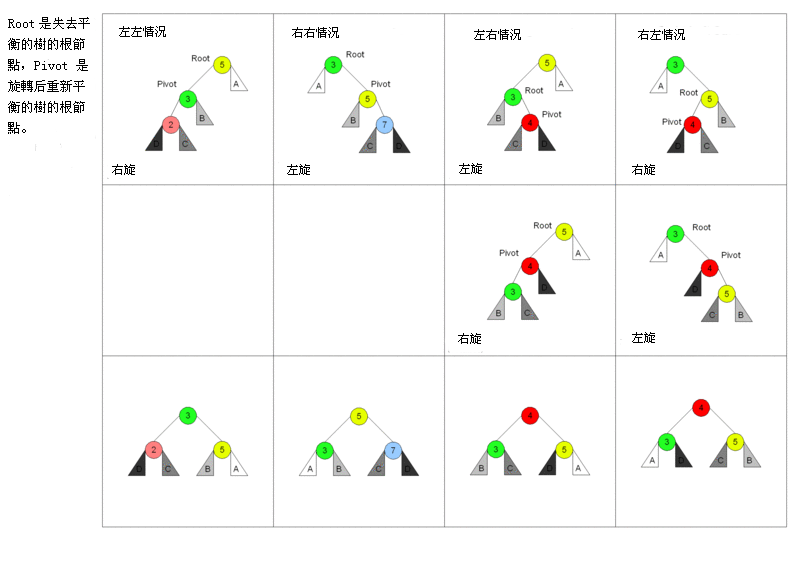
觀察 `MMMM`, `NNNN` 所在之迴圈中較前面,針對 RR/RL 所執行的左旋轉/右旋後左旋,推斷 `MMMM` 和 `NNNN` 為處理 LL/LR 的情況,故為對應的右旋轉/左旋後右旋,實作如下:
```c
// inside while loop
if (avl_is_right_child(node)) { ... } else {
switch (avl_balance(parent)) {
...
case AVL_LEFT:
/* compensate double left balance by rotation
* and stop afterwards
*/
switch (avl_balance(node)) {
default:
case AVL_LEFT:
case AVL_NEUTRAL:
// TODO: MMMM
avl_rotate_right(node, parent, root);
break;
case AVL_RIGHT:
// TODO: NNNN
avl_rotate_leftright(node, parent, root);
break;
}
...
}
}
```
## 測驗三
:::info
TODO
:::
## 測驗四
### 測驗四題目
以下程式碼應實現 $\lceil \log_2(x) \rceil$。
```c
int ceil_log2(uint32_t x)
{
uint32_t r, shift;
x--;
r = (x > 0xFFFF) << 4;
x >>= r;
shift = (x > 0xFF) << 3;
x >>= shift;
r |= shift;
shift = (x > 0xF) << 2;
x >>= shift;
r |= shift;
shift = (x > 0x3) << 1;
x >>= shift;
return (KKKK) + 1;
}
```
### 測驗四分析
觀察程式碼,由其行為可見當 `x` 大於某二的冪長度之全一時,便以 `shift` 蒐集某長度之全一的長度,記錄 `shift` 於 `r` 後將 `x` 位移 `shift`。從 $16$ 個 $1$ 開始,推測最後會處理一個 1 的情況,故我們應該看到:
```c
// collect result of 0x3 part
// ...
r |= shift;
// collect result of 0x1 part
shift = (x > 0x1) << 0;
x >>= shift;
r |= shift;
```
上述程式碼對 `x` 的操作沒有必要,因為後續不再使用,故 (不考慮註解的) 第 3 行可去除,並可將 1, 2, 3 行簡化為:
```c
r |= shift | x > 0x1;
```
至於 `r` 紀錄了什麼?當 `x` 為無號最大值 $x_{max}$ (全一) 時,`shift` 一路下來捕獲了 $16, 8, 4, 2, 1$,並將其以 or 運算紀錄於 `r`,結果為 $31$,與 $\lceil \log_2(x_{max}) \rceil = 32$ 差一,由此認為 `return (KKKK) + 1;` 的 `+ 1` 因此出現。
這樣一來 `KKKK` 為何就比較明朗了。考慮前方簡化版邏輯,由於直接回傳,不需要將結果存入 `r`,故改為 expression 版如下:
```c
return (r | shift | (x > 0x1)) + 1;
```
再來我們簡化 `x > 0x1` 的部分。由於我們已經使用 $2^1, 2^1, 2^3, 2^4$ 這幾把拿來左移的尺,對於 $32$ 位元的數字而言只可能還沒碰到原本最高的兩位,此時 `x` 只剩 $0 \sim 3$ 這四種可能,故可替換其邏輯為 `x >> 1`,捕獲未觸碰的原最高位。
:::success
所以答案為
* `KKKK = r | shift | x >> 1`
:::
 Google Drive
Gist
Clipboard
Google Drive
Gist
Clipboard
 Sign in with Wallet






