Victor Barberan
    • Create new note
    • Create a note from template
      • Sharing URL Link copied
      • /edit
      • View mode
        • Edit mode
        • View mode
        • Book mode
        • Slide mode
        Edit mode View mode Book mode Slide mode
      • Customize slides
      • Note Permission
      • Read
        • Only me
        • Signed-in users
        • Everyone
        Only me Signed-in users Everyone
      • Write
        • Only me
        • Signed-in users
        • Everyone
        Only me Signed-in users Everyone
      • Engagement control Commenting, Suggest edit, Emoji Reply
    • Invite by email
      Invitee

      This note has no invitees

    • Publish Note

      Share your work with the world Congratulations! 🎉 Your note is out in the world Publish Note

      Your note will be visible on your profile and discoverable by anyone.
      Your note is now live.
      This note is visible on your profile and discoverable online.
      Everyone on the web can find and read all notes of this public team.
      See published notes
      Unpublish note
      Please check the box to agree to the Community Guidelines.
      View profile
    • Commenting
      Permission
      Disabled Forbidden Owners Signed-in users Everyone
    • Enable
    • Permission
      • Forbidden
      • Owners
      • Signed-in users
      • Everyone
    • Suggest edit
      Permission
      Disabled Forbidden Owners Signed-in users Everyone
    • Enable
    • Permission
      • Forbidden
      • Owners
      • Signed-in users
    • Emoji Reply
    • Enable
    • Versions and GitHub Sync
    • Note settings
    • Note Insights New
    • Engagement control
    • Make a copy
    • Transfer ownership
    • Delete this note
    • Save as template
    • Insert from template
    • Import from
      • Dropbox
      • Google Drive
      • Gist
      • Clipboard
    • Export to
      • Dropbox
      • Google Drive
      • Gist
    • Download
      • Markdown
      • HTML
      • Raw HTML
Menu Note settings Note Insights Versions and GitHub Sync Sharing URL Create Help
Create Create new note Create a note from template
Menu
Options
Engagement control Make a copy Transfer ownership Delete this note
Import from
Dropbox Google Drive Gist Clipboard
Export to
Dropbox Google Drive Gist
Download
Markdown HTML Raw HTML
Back
Sharing URL Link copied
/edit
View mode
  • Edit mode
  • View mode
  • Book mode
  • Slide mode
Edit mode View mode Book mode Slide mode
Customize slides
Note Permission
Read
Only me
  • Only me
  • Signed-in users
  • Everyone
Only me Signed-in users Everyone
Write
Only me
  • Only me
  • Signed-in users
  • Everyone
Only me Signed-in users Everyone
Engagement control Commenting, Suggest edit, Emoji Reply
  • Invite by email
    Invitee

    This note has no invitees

  • Publish Note

    Share your work with the world Congratulations! 🎉 Your note is out in the world Publish Note

    Your note will be visible on your profile and discoverable by anyone.
    Your note is now live.
    This note is visible on your profile and discoverable online.
    Everyone on the web can find and read all notes of this public team.
    See published notes
    Unpublish note
    Please check the box to agree to the Community Guidelines.
    View profile
    Engagement control
    Commenting
    Permission
    Disabled Forbidden Owners Signed-in users Everyone
    Enable
    Permission
    • Forbidden
    • Owners
    • Signed-in users
    • Everyone
    Suggest edit
    Permission
    Disabled Forbidden Owners Signed-in users Everyone
    Enable
    Permission
    • Forbidden
    • Owners
    • Signed-in users
    Emoji Reply
    Enable
    Import from Dropbox Google Drive Gist Clipboard
       Owned this note    Owned this note      
    Published Linked with GitHub
    • Any changes
      Be notified of any changes
    • Mention me
      Be notified of mention me
    • Unsubscribe
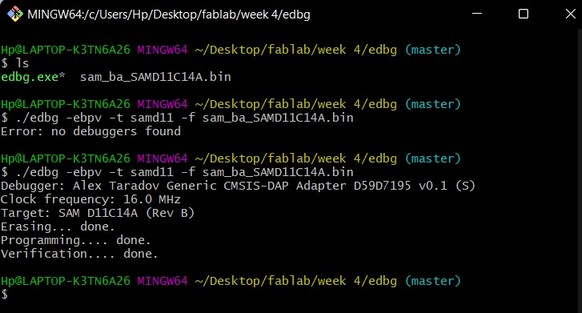
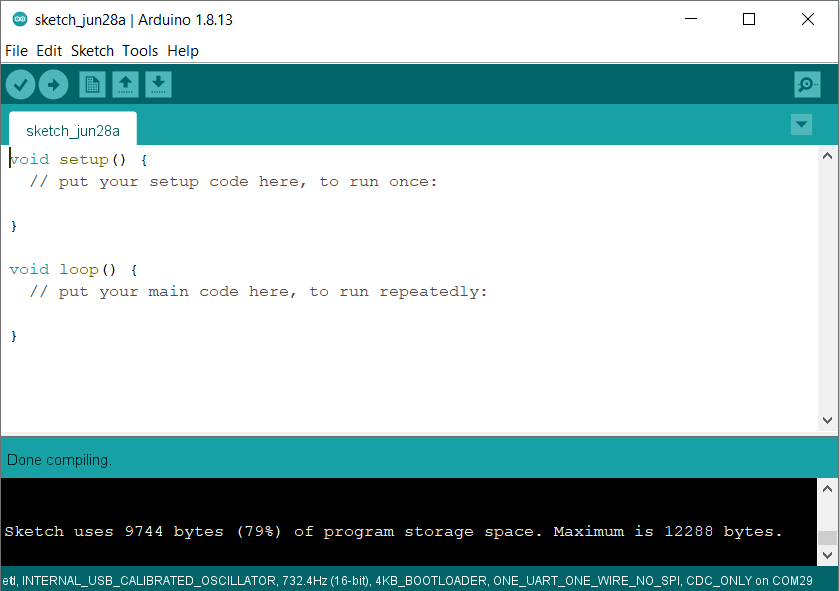
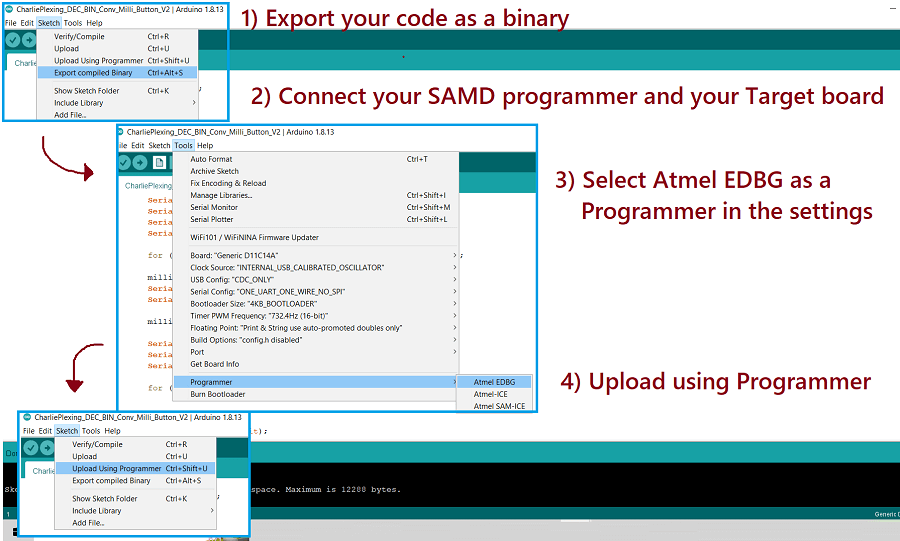
    --- tags: fabacademy, blender --- # Embedded programming ## ![](https://i.imgur.com/2L1FSCv.png =x70) ATSAMD11C ### What's in the box * 16KB of flash memory and 4KB of SRAM * Up to 48MHz operating frequency, internal and external clock options. * Two serial communication modules (SERCOM) configurable as UART/USART, SPI or I2C, * Two 16-bit timer/counters * 32-bit Real-Time Clock and calendar * 12 PWM channels * One 5-channel 12-bit ADC * One 10-bit DAC * Full-Speed USB device * 1.62V to 3.63V * 8 external interrupts * Two-pin Serial Wire Debug (SWD) programming, test and debugging interface * Watchdog Timer (WDT) * 12 GPIO pins * 14-pin SOIC ![](https://i.imgur.com/8qQCeva.jpg =x300) ### Pinout ![](https://i.imgur.com/HpeeqNm.png) *Usable pins with arduino bootloader* ![](https://gitlab.com/fablabbcn-projects/learning/fabacademy-local-docs/-/raw/master/docs/material/extras/week08/assets/atsam11.png) :::info [Datasheet](https://ww1.microchip.com/downloads/aemDocuments/documents/OTH/ProductDocuments/DataSheets/Atmel-42363-SAM-D11_Datasheet.pdf) ::: --- --- ## Board ## Arduino IDE setup ### Installing board definitions To be able to program XXX boards in Arduino IDE you need to install the [Arduino Fab SAM](https://github.com/qbolsee/ArduinoCore-fab-sam) core. Inside the _File_ → _Preferences_ window ont he _Additional Boards Manager URLs_ copy this address: ~~~ https://raw.githubusercontent.com/qbolsee/ArduinoCore-fab-sam/master/json/package_Fab_SAM_index.json ~~~ After that open the **Boards Manager** window located in _Tools_ → _Board_ → _Boards Manager_ and search for _Fab SAM_, just click install! ![](https://i.imgur.com/pLKNXVE.png) ## Programming a programmer The programmer board will allow us to upload sketches to any SAMD board via the SWD interface. To upload the Free DAP code to your board you need another programer, either the DIY version or a commercial one like the [SAM ICE](https://www.digikey.es/en/product-highlight/a/atmel/atmel-ice-programmer-debugger). You can also do it with a raspberry Pi using OpenOCD [here](https://learn.adafruit.com/programming-microcontrollers-using-openocd-on-raspberry-pi/overview) you can find more info. [Free DAP](https://github.com/ataradov/free-dap) > This is a free and open implementation of the CMSIS-DAP debugger firmware. Free DAP [binary](http://academy.cba.mit.edu/classes/embedded_programming/SWD/free_dap_d11c_mini.bin) file. Uploading the code via edbg: ~~~ edbg -b -t samd11 -epv -f free_dap_d11c_mini.bin ~~~ ## Sketch upload ### Arduino IDE Config settings: - Serial Config to TWO_UART_NOSPI - Programmer to Atmel EDBG ![](https://i.imgur.com/ZeinMPz.png) ### EDBG FLASHING BOOTLOADER 1. Connect the board to the Programmer and plug it into the computer. 2. Download the sam_ba_Generic_D11C14A bootloader[here is a list of all the binaries for ATMSAM FAMILY](https://github.com/qbolsee/ArduinoCore-fab-sam/tree/master/bootloaders/zero/binaries). You need to have the [EDBG downloaded](https://github.com/ataradov/edbg). The bootloader has to be inside the EDBG folder. 3. Open GitBash Terminal in the same folder and run, edbg-windows-r24.exe -ebpv -t samd11 -f sam_ba_SAMD11C14A.bin ![](http://fabacademy.org/2022/labs/barcelona/students/dhanushree-prakash/images/WEEK%208/bootloader.jpg) 4. Disconnect the programmer and connect the new board. 5. Open Arduino program. ### EDBG ~~~ CMSIS-DAP SWD programmer. Built Mar 15 2022 10:51:34. Usage: edbg [options] Options: -h, --help print this help message and exit -b, --verbose print verbose messages -x, --reset <duration> assert the reset pin before any other operation (duration in ms) -e, --erase perform a chip erase before programming -p, --program program the chip -v, --verify verify memory -k, --lock lock the chip (set security bit) -u, --unlock unlock the chip (forces chip erase in most cases) -r, --read read the whole content of the chip flash -f, --file <file> binary file to be programmed or verified; also read output file name -t, --target <name> specify a target type (use '-t list' for a list of supported target types) -l, --list list all available debuggers -s, --serial <number> use a debugger with a specified serial number or index in the list -c, --clock <freq> interface clock frequency in kHz (default 16000) -o, --offset <offset> offset for the operation -z, --size <size> size for the operation -F, --fuse <options> operations on the fuses (use '-F help' for details) ~~~ To find out your chip target name do `edbg -t list`: ~~~ Supported device families: Atmel SAM C/D/L/R series: samd09 samd10 samd11 samd20 samd21 samc21 saml21 saml22 samr21 samr30 samr34 samr35 samda1 pic32cm Atmel SAM3X/A/U series: sam3x sam3a sam3u Atmel SAM G and SAM4 series: samg51 samg53 samg54 samg55 sam4sd sam4sa sam4s sam4e sam4n Atmel SAM E7x/S7x/V7x series: same70 sams70 samv71 samv70 Atmel SAM D5x/E5x: same51 samd51 same53 same54 Microchip SAM L10/L11: saml10 saml11 STMicroelectronics STM32G0 series: stm32g0 GigaDevice GD32F4xx series: gd32f4xx Nuvoton M480 series: m480 Lattice LCMXO2 series: lcmxo2 ~~~ So the command for uploading our binary file is: ~~~ edbg -b -t samd11 -epv -f binary.bin ~~~ :::info Command reference program: edbg -b -t target_type -epv -f binary_file read fuses: edbg -b -t target_type -F r,*,file_name write fuses: edbg -b -t target_type -F w,high_bit:low_bit,bit_value disable SAMD bootloader protection: edbg -b -t target_type -F w,2:0,7 ::: ## Coding in arduino - Space saving/no bootloader Seems that any code we upload is very voluminous for the SAMD11C, in fact, as you can see in the following image, it uses almost all of the microcontroller memory. ![](http://fabacademy.org/2022/labs/barcelona/students/marcoantonio-sardo/images/week10/10wA0.png) **That's because there are a series of libraries uploaded to the SAMD11C each time you upload a program code you wrote with arduino IDE.** These libraries are needed for you to program the microcontroller using directly the Arduino IDE, but only they occupy 79% of the SAMD11C's entire memory. To overcome this problem, we can save some space by removing the bootloader from the memory of the SAMD11C. This way we save about 25% of memory that we can use to load a more substantial code at the cost, however, of a little inconvenience in loading codes. ![](http://fabacademy.org/2022/labs/barcelona/students/marcoantonio-sardo/images/week10/10wA1.png) That's because without the bootloader we could no longer upload programs to the SAMD11C directly by clicking the "Upload Code" button in the Arduino IDE, instead we need to firstly convert the code in a .bin and then upload it via a programmer. Although the whole procedure is certainly longer, it can still be done very easily through the arduino IDE. *Documentation- Fabacademy2022-Marco Antonio Sardo*

    Import from clipboard

    Paste your markdown or webpage here...

    Advanced permission required

    Your current role can only read. Ask the system administrator to acquire write and comment permission.

    This team is disabled

    Sorry, this team is disabled. You can't edit this note.

    This note is locked

    Sorry, only owner can edit this note.

    Reach the limit

    Sorry, you've reached the max length this note can be.
    Please reduce the content or divide it to more notes, thank you!

    Import from Gist

    Import from Snippet

    or

    Export to Snippet

    Are you sure?

    Do you really want to delete this note?
    All users will lose their connection.

    Create a note from template

    Create a note from template

    Oops...
    This template has been removed or transferred.
    Upgrade
    All
    • All
    • Team
    No template.

    Create a template

    Upgrade

    Delete template

    Do you really want to delete this template?
    Turn this template into a regular note and keep its content, versions, and comments.

    This page need refresh

    You have an incompatible client version.
    Refresh to update.
    New version available!
    See releases notes here
    Refresh to enjoy new features.
    Your user state has changed.
    Refresh to load new user state.

    Sign in

    Forgot password

    or

    By clicking below, you agree to our terms of service.

    Sign in via Facebook Sign in via Twitter Sign in via GitHub Sign in via Dropbox Sign in with Wallet
    Wallet ( )
    Connect another wallet

    New to HackMD? Sign up

    Help

    • English
    • 中文
    • Français
    • Deutsch
    • 日本語
    • Español
    • Català
    • Ελληνικά
    • Português
    • italiano
    • Türkçe
    • Русский
    • Nederlands
    • hrvatski jezik
    • język polski
    • Українська
    • हिन्दी
    • svenska
    • Esperanto
    • dansk

    Documents

    Help & Tutorial

    How to use Book mode

    Slide Example

    API Docs

    Edit in VSCode

    Install browser extension

    Contacts

    Feedback

    Discord

    Send us email

    Resources

    Releases

    Pricing

    Blog

    Policy

    Terms

    Privacy

    Cheatsheet

    Syntax Example Reference
    # Header Header 基本排版
    - Unordered List
    • Unordered List
    1. Ordered List
    1. Ordered List
    - [ ] Todo List
    • Todo List
    > Blockquote
    Blockquote
    **Bold font** Bold font
    *Italics font* Italics font
    ~~Strikethrough~~ Strikethrough
    19^th^ 19th
    H~2~O H2O
    ++Inserted text++ Inserted text
    ==Marked text== Marked text
    [link text](https:// "title") Link
    ![image alt](https:// "title") Image
    `Code` Code 在筆記中貼入程式碼
    ```javascript
    var i = 0;
    ```
    var i = 0;
    :smile: :smile: Emoji list
    {%youtube youtube_id %} Externals
    $L^aT_eX$ LaTeX
    :::info
    This is a alert area.
    :::

    This is a alert area.

    Versions and GitHub Sync
    Get Full History Access

    • Edit version name
    • Delete

    revision author avatar     named on  

    More Less

    Note content is identical to the latest version.
    Compare
      Choose a version
      No search result
      Version not found
    Sign in to link this note to GitHub
    Learn more
    This note is not linked with GitHub
     

    Feedback

    Submission failed, please try again

    Thanks for your support.

    On a scale of 0-10, how likely is it that you would recommend HackMD to your friends, family or business associates?

    Please give us some advice and help us improve HackMD.


    Thanks for your feedback

    Remove version name

    Do you want to remove this version name and description?

    Transfer ownership

    Transfer to
      Warning: is a public team. If you transfer note to this team, everyone on the web can find and read this note.

        Link with GitHub

        Please authorize HackMD on GitHub
        • Please sign in to GitHub and install the HackMD app on your GitHub repo.
        • HackMD links with GitHub through a GitHub App. You can choose which repo to install our App.
        Learn more  Sign in to GitHub

        Push the note to GitHub Push to GitHub Pull a file from GitHub

          Authorize again
         

        Choose which file to push to

        Select repo
        Refresh Authorize more repos
        Select branch
        Select file
        Select branch
        Choose version(s) to push
        • Save a new version and push
        • Choose from existing versions
        Include title and tags
        Available push count

        Pull from GitHub

         
        File from GitHub
        File from HackMD

        GitHub Link Settings

        File linked

        Linked by
        File path
        Last synced branch
        Available push count

        Danger Zone

        Unlink
        You will no longer receive notification when GitHub file changes after unlink.

        Syncing

        Push failed

        Push successfully

