# openai-function-calling
Function calling
================
Enable models to fetch data and take actions.
**Function calling** provides a powerful and flexible way for OpenAI models to interface with your code or external services. This guide will explain how to connect the models to your own custom code to fetch data or take action.
Get weather
Function calling example with get\_weather function
```python
from openai import OpenAI
client = OpenAI()
tools = [{
"type": "function",
"name": "get_weather",
"description": "Get current temperature for a given location.",
"parameters": {
"type": "object",
"properties": {
"location": {
"type": "string",
"description": "City and country e.g. Bogotá, Colombia"
}
},
"required": [
"location"
],
"additionalProperties": False
}
}]
response = client.responses.create(
model="gpt-4.1",
input=[{"role": "user", "content": "What is the weather like in Paris today?"}],
tools=tools
)
print(response.output)
```
```javascript
import { OpenAI } from "openai";
const openai = new OpenAI();
const tools = [{
"type": "function",
"name": "get_weather",
"description": "Get current temperature for a given location.",
"parameters": {
"type": "object",
"properties": {
"location": {
"type": "string",
"description": "City and country e.g. Bogotá, Colombia"
}
},
"required": [
"location"
],
"additionalProperties": false
}
}];
const response = await openai.responses.create({
model: "gpt-4.1",
input: [{ role: "user", content: "What is the weather like in Paris today?" }],
tools,
});
console.log(response.output);
```
```bash
curl https://api.openai.com/v1/responses \
-H "Content-Type: application/json" \
-H "Authorization: Bearer $OPENAI_API_KEY" \
-d '{
"model": "gpt-4.1",
"input": "What is the weather like in Paris today?",
"tools": [
{
"type": "function",
"name": "get_weather",
"description": "Get current temperature for a given location.",
"parameters": {
"type": "object",
"properties": {
"location": {
"type": "string",
"description": "City and country e.g. Bogotá, Colombia"
}
},
"required": [
"location"
],
"additionalProperties": false
}
}
]
}'
```
Output
```json
[{
"type": "function_call",
"id": "fc_12345xyz",
"call_id": "call_12345xyz",
"name": "get_weather",
"arguments": "{\"location\":\"Paris, France\"}"
}]
```
Send email
Function calling example with send\_email function
```python
from openai import OpenAI
client = OpenAI()
tools = [{
"type": "function",
"name": "send_email",
"description": "Send an email to a given recipient with a subject and message.",
"parameters": {
"type": "object",
"properties": {
"to": {
"type": "string",
"description": "The recipient email address."
},
"subject": {
"type": "string",
"description": "Email subject line."
},
"body": {
"type": "string",
"description": "Body of the email message."
}
},
"required": [
"to",
"subject",
"body"
],
"additionalProperties": False
}
}]
response = client.responses.create(
model="gpt-4.1",
input=[{"role": "user", "content": "Can you send an email to ilan@example.com and katia@example.com saying hi?"}],
tools=tools
)
print(response.output)
```
```javascript
import { OpenAI } from "openai";
const openai = new OpenAI();
const tools = [{
"type": "function",
"name": "send_email",
"description": "Send an email to a given recipient with a subject and message.",
"parameters": {
"type": "object",
"properties": {
"to": {
"type": "string",
"description": "The recipient email address."
},
"subject": {
"type": "string",
"description": "Email subject line."
},
"body": {
"type": "string",
"description": "Body of the email message."
}
},
"required": [
"to",
"subject",
"body"
],
"additionalProperties": false
}
}];
const response = await openai.responses.create({
model: "gpt-4.1",
input: [{ role: "user", content: "Can you send an email to ilan@example.com and katia@example.com saying hi?" }],
tools,
});
console.log(response.output);
```
```bash
curl https://api.openai.com/v1/responses \
-H "Content-Type: application/json" \
-H "Authorization: Bearer $OPENAI_API_KEY" \
-d '{
"model": "gpt-4.1",
"input": "Can you send an email to ilan@example.com and katia@example.com saying hi?",
"tools": [
{
"type": "function",
"name": "send_email",
"description": "Send an email to a given recipient with a subject and message.",
"parameters": {
"type": "object",
"properties": {
"to": {
"type": "string",
"description": "The recipient email address."
},
"subject": {
"type": "string",
"description": "Email subject line."
},
"body": {
"type": "string",
"description": "Body of the email message."
}
},
"required": [
"to",
"subject",
"body"
],
"additionalProperties": false
}
}
]
}'
```
Output
```json
[
{
"type": "function_call",
"id": "fc_12345xyz",
"call_id": "call_9876abc",
"name": "send_email",
"arguments": "{\"to\":\"ilan@example.com\",\"subject\":\"Hello!\",\"body\":\"Just wanted to say hi\"}"
},
{
"type": "function_call",
"id": "fc_12345xyz",
"call_id": "call_9876abc",
"name": "send_email",
"arguments": "{\"to\":\"katia@example.com\",\"subject\":\"Hello!\",\"body\":\"Just wanted to say hi\"}"
}
]
```
Search knowledge base
Function calling example with search\_knowledge\_base function
```python
from openai import OpenAI
client = OpenAI()
tools = [{
"type": "function",
"name": "search_knowledge_base",
"description": "Query a knowledge base to retrieve relevant info on a topic.",
"parameters": {
"type": "object",
"properties": {
"query": {
"type": "string",
"description": "The user question or search query."
},
"options": {
"type": "object",
"properties": {
"num_results": {
"type": "number",
"description": "Number of top results to return."
},
"domain_filter": {
"type": [
"string",
"null"
],
"description": "Optional domain to narrow the search (e.g. 'finance', 'medical'). Pass null if not needed."
},
"sort_by": {
"type": [
"string",
"null"
],
"enum": [
"relevance",
"date",
"popularity",
"alphabetical"
],
"description": "How to sort results. Pass null if not needed."
}
},
"required": [
"num_results",
"domain_filter",
"sort_by"
],
"additionalProperties": False
}
},
"required": [
"query",
"options"
],
"additionalProperties": False
}
}]
response = client.responses.create(
model="gpt-4.1",
input=[{"role": "user", "content": "Can you find information about ChatGPT in the AI knowledge base?"}],
tools=tools
)
print(response.output)
```
```javascript
import { OpenAI } from "openai";
const openai = new OpenAI();
const tools = [{
"type": "function",
"name": "search_knowledge_base",
"description": "Query a knowledge base to retrieve relevant info on a topic.",
"parameters": {
"type": "object",
"properties": {
"query": {
"type": "string",
"description": "The user question or search query."
},
"options": {
"type": "object",
"properties": {
"num_results": {
"type": "number",
"description": "Number of top results to return."
},
"domain_filter": {
"type": [
"string",
"null"
],
"description": "Optional domain to narrow the search (e.g. 'finance', 'medical'). Pass null if not needed."
},
"sort_by": {
"type": [
"string",
"null"
],
"enum": [
"relevance",
"date",
"popularity",
"alphabetical"
],
"description": "How to sort results. Pass null if not needed."
}
},
"required": [
"num_results",
"domain_filter",
"sort_by"
],
"additionalProperties": false
}
},
"required": [
"query",
"options"
],
"additionalProperties": false
}
}];
const response = await openai.responses.create({
model: "gpt-4.1",
input: [{ role: "user", content: "Can you find information about ChatGPT in the AI knowledge base?" }],
tools,
});
console.log(response.output);
```
```bash
curl https://api.openai.com/v1/responses \
-H "Content-Type: application/json" \
-H "Authorization: Bearer $OPENAI_API_KEY" \
-d '{
"model": "gpt-4.1",
"input": "Can you find information about ChatGPT in the AI knowledge base?",
"tools": [
{
"type": "function",
"name": "search_knowledge_base",
"description": "Query a knowledge base to retrieve relevant info on a topic.",
"parameters": {
"type": "object",
"properties": {
"query": {
"type": "string",
"description": "The user question or search query."
},
"options": {
"type": "object",
"properties": {
"num_results": {
"type": "number",
"description": "Number of top results to return."
},
"domain_filter": {
"type": [
"string",
"null"
],
"description": "Optional domain to narrow the search (e.g. 'finance', 'medical'). Pass null if not needed."
},
"sort_by": {
"type": [
"string",
"null"
],
"enum": [
"relevance",
"date",
"popularity",
"alphabetical"
],
"description": "How to sort results. Pass null if not needed."
}
},
"required": [
"num_results",
"domain_filter",
"sort_by"
],
"additionalProperties": false
}
},
"required": [
"query",
"options"
],
"additionalProperties": false
}
}
]
}'
```
Output
```json
[{
"type": "function_call",
"id": "fc_12345xyz",
"call_id": "call_4567xyz",
"name": "search_knowledge_base",
"arguments": "{\"query\":\"What is ChatGPT?\",\"options\":{\"num_results\":3,\"domain_filter\":null,\"sort_by\":\"relevance\"}}"
}]
```
Experiment with function calling and [generate function schemas](/docs/guides/prompt-generation) in the [Playground](/playground)!
Overview
--------
You can give the model access to your own custom code through **function calling**. Based on the system prompt and messages, the model may decide to call these functions — **instead of (or in addition to) generating text or audio**.
You'll then execute the function code, send back the results, and the model will incorporate them into its final response.
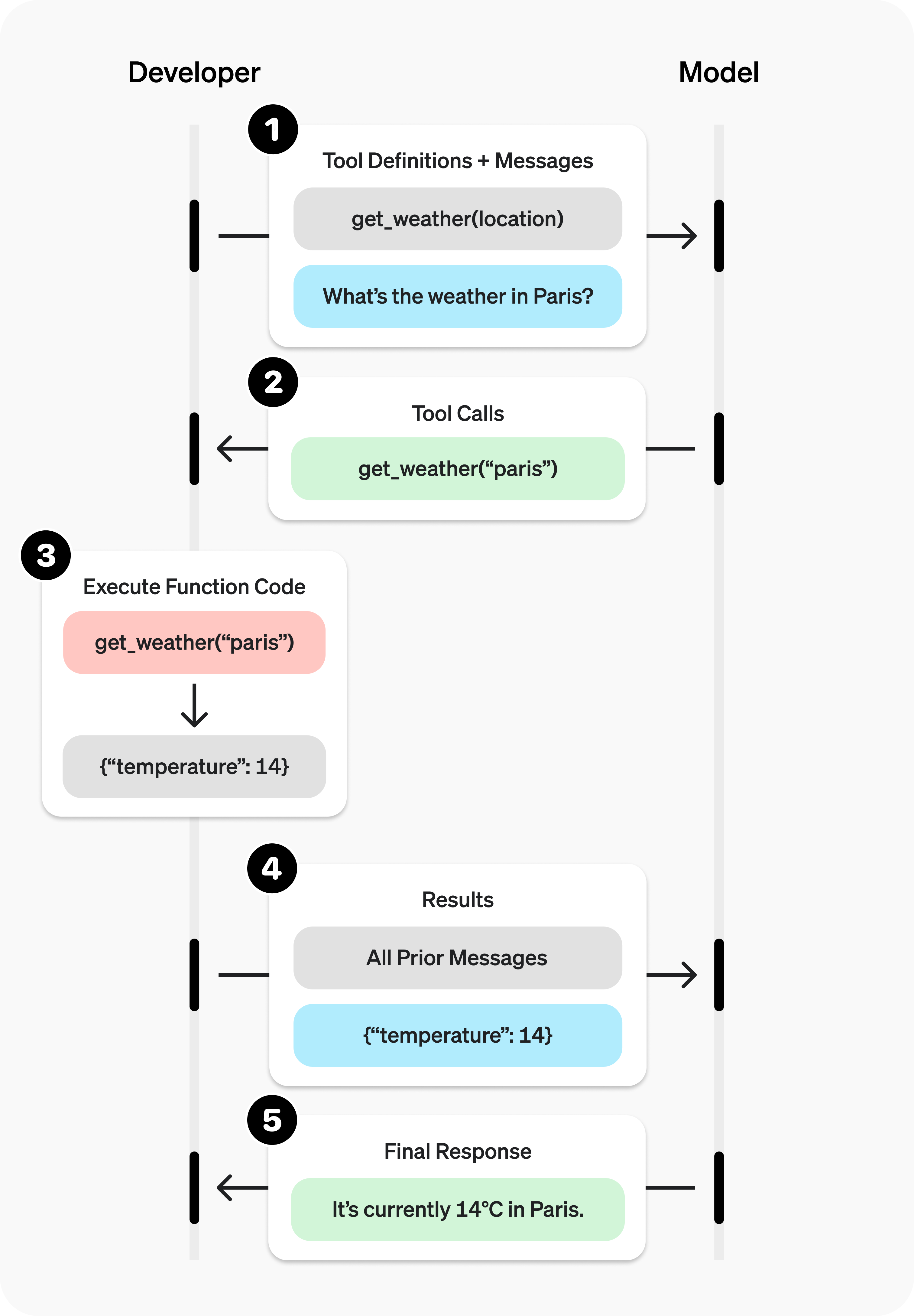
Function calling has two primary use cases:
|||
|---|---|
|Fetching Data|Retrieve up-to-date information to incorporate into the model's response (RAG). Useful for searching knowledge bases and retrieving specific data from APIs (e.g. current weather data).|
|Taking Action|Perform actions like submitting a form, calling APIs, modifying application state (UI/frontend or backend), or taking agentic workflow actions (like handing off the conversation).|
### Sample function
Let's look at the steps to allow a model to use a real `get_weather` function defined below:
Sample get\_weather function implemented in your codebase
```python
import requests
def get_weather(latitude, longitude):
response = requests.get(f"https://api.open-meteo.com/v1/forecast?latitude={latitude}&longitude={longitude}¤t=temperature_2m,wind_speed_10m&hourly=temperature_2m,relative_humidity_2m,wind_speed_10m")
data = response.json()
return data['current']['temperature_2m']
```
```javascript
async function getWeather(latitude, longitude) {
const response = await fetch(`https://api.open-meteo.com/v1/forecast?latitude=${latitude}&longitude=${longitude}¤t=temperature_2m,wind_speed_10m&hourly=temperature_2m,relative_humidity_2m,wind_speed_10m`);
const data = await response.json();
return data.current.temperature_2m;
}
```
Unlike the diagram earlier, this function expects precise `latitude` and `longitude` instead of a general `location` parameter. (However, our models can automatically determine the coordinates for many locations!)
### Function calling steps
* **Call model with [functions defined](#defining-functions)** – along with your system and user messages.
Step 1: Call model with get\_weather tool defined
```python
from openai import OpenAI
import json
client = OpenAI()
tools = [{
"type": "function",
"name": "get_weather",
"description": "Get current temperature for provided coordinates in celsius.",
"parameters": {
"type": "object",
"properties": {
"latitude": {"type": "number"},
"longitude": {"type": "number"}
},
"required": ["latitude", "longitude"],
"additionalProperties": False
},
"strict": True
}]
input_messages = [{"role": "user", "content": "What's the weather like in Paris today?"}]
response = client.responses.create(
model="gpt-4.1",
input=input_messages,
tools=tools,
)
```
```javascript
import { OpenAI } from "openai";
const openai = new OpenAI();
const tools = [{
type: "function",
name: "get_weather",
description: "Get current temperature for provided coordinates in celsius.",
parameters: {
type: "object",
properties: {
latitude: { type: "number" },
longitude: { type: "number" }
},
required: ["latitude", "longitude"],
additionalProperties: false
},
strict: true
}];
const input = [
{
role: "user",
content: "What's the weather like in Paris today?"
}
];
const response = await openai.responses.create({
model: "gpt-4.1",
input,
tools,
});
```
* **Model decides to call function(s)** – model returns the **name** and **input arguments**.
response.output
```json
[{
"type": "function_call",
"id": "fc_12345xyz",
"call_id": "call_12345xyz",
"name": "get_weather",
"arguments": "{\"latitude\":48.8566,\"longitude\":2.3522}"
}]
```
* **Execute function code** – parse the model's response and [handle function calls](#handling-function-calls).
Step 3: Execute get\_weather function
```python
tool_call = response.output[0]
args = json.loads(tool_call.arguments)
result = get_weather(args["latitude"], args["longitude"])
```
```javascript
const toolCall = response.output[0];
const args = JSON.parse(toolCall.arguments);
const result = await getWeather(args.latitude, args.longitude);
```
* **Supply model with results** – so it can incorporate them into its final response.
Step 4: Supply result and call model again
```python
input_messages.append(tool_call) # append model's function call message
input_messages.append({ # append result message
"type": "function_call_output",
"call_id": tool_call.call_id,
"output": str(result)
})
response_2 = client.responses.create(
model="gpt-4.1",
input=input_messages,
tools=tools,
)
print(response_2.output_text)
```
```javascript
input.push(toolCall); // append model's function call message
input.push({ // append result message
type: "function_call_output",
call_id: toolCall.call_id,
output: result.toString()
});
const response2 = await openai.responses.create({
model: "gpt-4.1",
input,
tools,
store: true,
});
console.log(response2.output_text)
```
* **Model responds** – incorporating the result in its output.
response\_2.output\_text
```json
"The current temperature in Paris is 14°C (57.2°F)."
```
Defining functions
------------------
Functions can be set in the `tools` parameter of each API request.
A function is defined by its schema, which informs the model what it does and what input arguments it expects. It comprises the following fields:
|Field|Description|
|---|---|
|type|This should always be function|
|name|The function's name (e.g. get_weather)|
|description|Details on when and how to use the function|
|parameters|JSON schema defining the function's input arguments|
|strict|Whether to enforce strict mode for the function call|
Take a look at this example or generate your own below (or in our [Playground](/playground)).
Generate
Example function schema
```json
{
"type": "function",
"function": {
"name": "get_weather",
"description": "Retrieves current weather for the given location.",
"parameters": {
"type": "object",
"properties": {
"location": {
"type": "string",
"description": "City and country e.g. Bogotá, Colombia"
},
"units": {
"type": "string",
"enum": [
"celsius",
"fahrenheit"
],
"description": "Units the temperature will be returned in."
}
},
"required": [
"location",
"units"
],
"additionalProperties": false
},
"strict": true
}
}
```
Because the `parameters` are defined by a [JSON schema](https://json-schema.org/), you can leverage many of its rich features like property types, enums, descriptions, nested objects, and, recursive objects.
### Best practices for defining functions
1. **Write clear and detailed function names, parameter descriptions, and instructions.**
* **Explicitly describe the purpose of the function and each parameter** (and its format), and what the output represents.
* **Use the system prompt to describe when (and when not) to use each function.** Generally, tell the model _exactly_ what to do.
* **Include examples and edge cases**, especially to rectify any recurring failures. (**Note:** Adding examples may hurt performance for [reasoning models](/docs/guides/reasoning).)
2. **Apply software engineering best practices.**
* **Make the functions obvious and intuitive**. ([principle of least surprise](https://en.wikipedia.org/wiki/Principle_of_least_astonishment))
* **Use enums** and object structure to make invalid states unrepresentable. (e.g. `toggle_light(on: bool, off: bool)` allows for invalid calls)
* **Pass the intern test.** Can an intern/human correctly use the function given nothing but what you gave the model? (If not, what questions do they ask you? Add the answers to the prompt.)
3. **Offload the burden from the model and use code where possible.**
* **Don't make the model fill arguments you already know.** For example, if you already have an `order_id` based on a previous menu, don't have an `order_id` param – instead, have no params `submit_refund()` and pass the `order_id` with code.
* **Combine functions that are always called in sequence.** For example, if you always call `mark_location()` after `query_location()`, just move the marking logic into the query function call.
4. **Keep the number of functions small for higher accuracy.**
* **Evaluate your performance** with different numbers of functions.
* **Aim for fewer than 20 functions** at any one time, though this is just a soft suggestion.
5. **Leverage OpenAI resources.**
* **Generate and iterate on function schemas** in the [Playground](/playground).
* **Consider [fine-tuning](https://platform.openai.com/docs/guides/fine-tuning) to increase function calling accuracy** for large numbers of functions or difficult tasks. ([cookbook](https://cookbook.openai.com/examples/fine_tuning_for_function_calling))
### Token Usage
Under the hood, functions are injected into the system message in a syntax the model has been trained on. This means functions count against the model's context limit and are billed as input tokens. If you run into token limits, we suggest limiting the number of functions or the length of the descriptions you provide for function parameters.
It is also possible to use [fine-tuning](/docs/guides/fine-tuning#fine-tuning-examples) to reduce the number of tokens used if you have many functions defined in your tools specification.
Handling function calls
-----------------------
When the model calls a function, you must execute it and return the result. Since model responses can include zero, one, or multiple calls, it is best practice to assume there are several.
The response `output` array contains an entry with the `type` having a value of `function_call`. Each entry with a `call_id` (used later to submit the function result), `name`, and JSON-encoded `arguments`.
Sample response with multiple function calls
```json
[
{
"id": "fc_12345xyz",
"call_id": "call_12345xyz",
"type": "function_call",
"name": "get_weather",
"arguments": "{\"location\":\"Paris, France\"}"
},
{
"id": "fc_67890abc",
"call_id": "call_67890abc",
"type": "function_call",
"name": "get_weather",
"arguments": "{\"location\":\"Bogotá, Colombia\"}"
},
{
"id": "fc_99999def",
"call_id": "call_99999def",
"type": "function_call",
"name": "send_email",
"arguments": "{\"to\":\"bob@email.com\",\"body\":\"Hi bob\"}"
}
]
```
Execute function calls and append results
```python
for tool_call in response.output:
if tool_call.type != "function_call":
continue
name = tool_call.name
args = json.loads(tool_call.arguments)
result = call_function(name, args)
input_messages.append({
"type": "function_call_output",
"call_id": tool_call.call_id,
"output": str(result)
})
```
```javascript
for (const toolCall of response.output) {
if (toolCall.type !== "function_call") {
continue;
}
const name = toolCall.name;
const args = JSON.parse(toolCall.arguments);
const result = callFunction(name, args);
input.push({
type: "function_call_output",
call_id: toolCall.call_id,
output: result.toString()
});
}
```
In the example above, we have a hypothetical `call_function` to route each call. Here’s a possible implementation:
Execute function calls and append results
```python
def call_function(name, args):
if name == "get_weather":
return get_weather(**args)
if name == "send_email":
return send_email(**args)
```
```javascript
const callFunction = async (name, args) => {
if (name === "get_weather") {
return getWeather(args.latitude, args.longitude);
}
if (name === "send_email") {
return sendEmail(args.to, args.body);
}
};
```
### Formatting results
A result must be a string, but the format is up to you (JSON, error codes, plain text, etc.). The model will interpret that string as needed.
If your function has no return value (e.g. `send_email`), simply return a string to indicate success or failure. (e.g. `"success"`)
### Incorporating results into response
After appending the results to your `input`, you can send them back to the model to get a final response.
Send results back to model
```python
response = client.responses.create(
model="gpt-4.1",
input=input_messages,
tools=tools,
)
```
```javascript
const response = await openai.responses.create({
model: "gpt-4.1",
input,
tools,
});
```
Final response
```json
"It's about 15°C in Paris, 18°C in Bogotá, and I've sent that email to Bob."
```
Additional configurations
-------------------------
### Tool choice
By default the model will determine when and how many tools to use. You can force specific behavior with the `tool_choice` parameter.
1. **Auto:** (_Default_) Call zero, one, or multiple functions. `tool_choice: "auto"`
2. **Required:** Call one or more functions. `tool_choice: "required"`
3. **Forced Function:** Call exactly one specific function. `tool_choice: {"type": "function", "name": "get_weather"}`
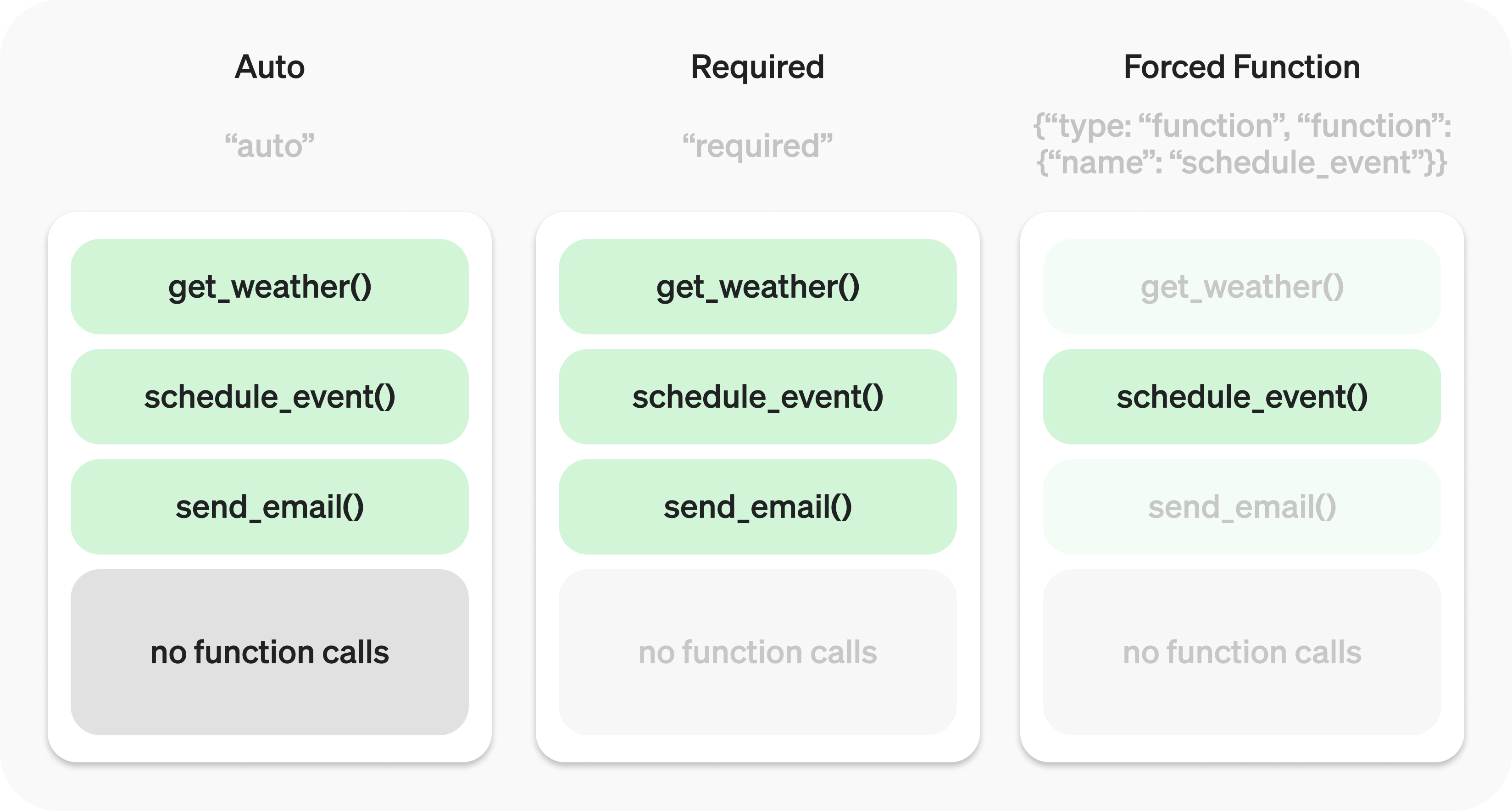
You can also set `tool_choice` to `"none"` to imitate the behavior of passing no functions.
### Parallel function calling
The model may choose to call multiple functions in a single turn. You can prevent this by setting `parallel_tool_calls` to `false`, which ensures exactly zero or one tool is called.
**Note:** Currently, if the model calls multiple functions in one turn then [strict mode](#strict-mode) will be disabled for those calls.
**Note for `gpt-4.1-nano-2025-04-14`:** This snapshot of `gpt-4.1-nano` can sometimes include multiple tools calls for the same tool if parallel tool calls are enabled. It is recommended to disable this feature when using this nano snapshot.
### Strict mode
Setting `strict` to `true` will ensure function calls reliably adhere to the function schema, instead of being best effort. We recommend always enabling strict mode.
Under the hood, strict mode works by leveraging our [structured outputs](/docs/guides/structured-outputs) feature and therefore introduces a couple requirements:
1. `additionalProperties` must be set to `false` for each object in the `parameters`.
2. All fields in `properties` must be marked as `required`.
You can denote optional fields by adding `null` as a `type` option (see example below).
Strict mode enabled
```json
{
"type": "function",
"name": "get_weather",
"description": "Retrieves current weather for the given location.",
"strict": true,
"parameters": {
"type": "object",
"properties": {
"location": {
"type": "string",
"description": "City and country e.g. Bogotá, Colombia"
},
"units": {
"type": ["string", "null"],
"enum": ["celsius", "fahrenheit"],
"description": "Units the temperature will be returned in."
}
},
"required": ["location", "units"],
"additionalProperties": false
}
}
```
Strict mode disabled
```json
{
"type": "function",
"name": "get_weather",
"description": "Retrieves current weather for the given location.",
"parameters": {
"type": "object",
"properties": {
"location": {
"type": "string",
"description": "City and country e.g. Bogotá, Colombia"
},
"units": {
"type": "string",
"enum": ["celsius", "fahrenheit"],
"description": "Units the temperature will be returned in."
}
},
"required": ["location"],
}
}
```
All schemas generated in the [playground](/playground) have strict mode enabled.
While we recommend you enable strict mode, it has a few limitations:
1. Some features of JSON schema are not supported. (See [supported schemas](/docs/guides/structured-outputs?context=with_parse#supported-schemas).)
2. Schemas undergo additional processing on the first request (and are then cached). If your schemas vary from request to request, this may result in higher latencies.
3. Schemas are cached for performance, and are not eligible for [zero data retention](/docs/models#how-we-use-your-data).
Streaming
---------
Streaming can be used to surface progress by showing which function is called as the model fills its arguments, and even displaying the arguments in real time.
Streaming function calls is very similar to streaming regular responses: you set `stream` to `true` and get different `event` objects.
Streaming function calls
```python
from openai import OpenAI
client = OpenAI()
tools = [{
"type": "function",
"name": "get_weather",
"description": "Get current temperature for a given location.",
"parameters": {
"type": "object",
"properties": {
"location": {
"type": "string",
"description": "City and country e.g. Bogotá, Colombia"
}
},
"required": [
"location"
],
"additionalProperties": False
}
}]
stream = client.responses.create(
model="gpt-4.1",
input=[{"role": "user", "content": "What's the weather like in Paris today?"}],
tools=tools,
stream=True
)
for event in stream:
print(event)
```
```javascript
import { OpenAI } from "openai";
const openai = new OpenAI();
const tools = [{
type: "function",
name: "get_weather",
description: "Get current temperature for provided coordinates in celsius.",
parameters: {
type: "object",
properties: {
latitude: { type: "number" },
longitude: { type: "number" }
},
required: ["latitude", "longitude"],
additionalProperties: false
},
strict: true
}];
const stream = await openai.responses.create({
model: "gpt-4.1",
input: [{ role: "user", content: "What's the weather like in Paris today?" }],
tools,
stream: true,
store: true,
});
for await (const event of stream) {
console.log(event)
}
```
Output events
```json
{"type":"response.output_item.added","response_id":"resp_1234xyz","output_index":0,"item":{"type":"function_call","id":"fc_1234xyz","call_id":"call_1234xyz","name":"get_weather","arguments":""}}
{"type":"response.function_call_arguments.delta","response_id":"resp_1234xyz","item_id":"fc_1234xyz","output_index":0,"delta":"{\""}
{"type":"response.function_call_arguments.delta","response_id":"resp_1234xyz","item_id":"fc_1234xyz","output_index":0,"delta":"location"}
{"type":"response.function_call_arguments.delta","response_id":"resp_1234xyz","item_id":"fc_1234xyz","output_index":0,"delta":"\":\""}
{"type":"response.function_call_arguments.delta","response_id":"resp_1234xyz","item_id":"fc_1234xyz","output_index":0,"delta":"Paris"}
{"type":"response.function_call_arguments.delta","response_id":"resp_1234xyz","item_id":"fc_1234xyz","output_index":0,"delta":","}
{"type":"response.function_call_arguments.delta","response_id":"resp_1234xyz","item_id":"fc_1234xyz","output_index":0,"delta":" France"}
{"type":"response.function_call_arguments.delta","response_id":"resp_1234xyz","item_id":"fc_1234xyz","output_index":0,"delta":"\"}"}
{"type":"response.function_call_arguments.done","response_id":"resp_1234xyz","item_id":"fc_1234xyz","output_index":0,"arguments":"{\"location\":\"Paris, France\"}"}
{"type":"response.output_item.done","response_id":"resp_1234xyz","output_index":0,"item":{"type":"function_call","id":"fc_1234xyz","call_id":"call_2345abc","name":"get_weather","arguments":"{\"location\":\"Paris, France\"}"}}
```
Instead of aggregating chunks into a single `content` string, however, you're aggregating chunks into an encoded `arguments` JSON object.
When the model calls one or more functions an event of type `response.output_item.added` will be emitted for each function call that contains the following fields:
|Field|Description|
|---|---|
|response_id|The id of the response that the function call belongs to|
|output_index|The index of the output item in the response. This respresents the individual function calls in the response.|
|item|The in-progress function call item that includes a name, arguments and id field|
Afterwards you will receive a series of events of type `response.function_call_arguments.delta` which will contain the `delta` of the `arguments` field. These events contain the following fields:
|Field|Description|
|---|---|
|response_id|The id of the response that the function call belongs to|
|item_id|The id of the function call item that the delta belongs to|
|output_index|The index of the output item in the response. This respresents the individual function calls in the response.|
|delta|The delta of the arguments field.|
Below is a code snippet demonstrating how to aggregate the `delta`s into a final `tool_call` object.
Accumulating tool\_call deltas
```python
final_tool_calls = {}
for event in stream:
if event.type === 'response.output_item.added':
final_tool_calls[event.output_index] = event.item;
elif event.type === 'response.function_call_arguments.delta':
index = event.output_index
if final_tool_calls[index]:
final_tool_calls[index].arguments += event.delta
```
```javascript
const finalToolCalls = {};
for await (const event of stream) {
if (event.type === 'response.output_item.added') {
finalToolCalls[event.output_index] = event.item;
} else if (event.type === 'response.function_call_arguments.delta') {
const index = event.output_index;
if (finalToolCalls[index]) {
finalToolCalls[index].arguments += event.delta;
}
}
}
```
Accumulated final\_tool\_calls\[0\]
```json
{
"type": "function_call",
"id": "fc_1234xyz",
"call_id": "call_2345abc",
"name": "get_weather",
"arguments": "{\"location\":\"Paris, France\"}"
}
```
When the model has finished calling the functions an event of type `response.function_call_arguments.done` will be emitted. This event contains the entire function call including the following fields:
|Field|Description|
|---|---|
|response_id|The id of the response that the function call belongs to|
|output_index|The index of the output item in the response. This respresents the individual function calls in the response.|
|item|The function call item that includes a name, arguments and id field.|
 Google Drive
Gist
Clipboard
Google Drive
Gist
Clipboard
 Sign in via Facebook
 Sign in via X(Twitter)
 Sign in via GitHub
 Sign in via Dropbox
 Sign in with Wallet






