---
tags: 作業
---
# Smallsys 期末版
[TOC]
## 參考資料
### [linux-kernel-module-cheat](https://github.com/cirosantilli/linux-kernel-module-cheat)
* video: [Debugging an ARM64 linux kernel using QEMU](https://www.youtube.com/watch?v=swniLhXg-3U)
* video: [Tracing linux kernel on QEMU with GDB-stub](https://www.youtube.com/watch?v=H19VM_uwzEY)
### VirtIO + 9P
* [Example Sharing Host files with the Guest](https://www.linux-kvm.org/page/9p_virtio)
* [v9fs](https://www.kernel.org/doc/Documentation/filesystems/9p.txt): Plan 9 Resource Sharing for Linux
* [Plan 9: Not (Only) A Better UNIX](https://www.slideshare.net/jserv/plan-9-not-only-a-better-unix)
* [9psetup](https://wiki.qemu.org/Documentation/9psetup)
* [An Updated Overview of the QEMU Storage Stack](https://events.static.linuxfound.org/slides/2011/linuxcon-japan/lcj2011_hajnoczi.pdf)
## 自我檢查
### 1. 你是否詳閱 [手機裡頭的 ARM 處理器:系列講座](http://hackfoldr.org/arm/) 呢?請紀錄學習過程中遇到的問題
參考資料:
* [ARM Cortex‑M3 Processor Technical Reference Manual](http://infocenter.arm.com/help/topic/com.arm.doc.100165_0201_00_en/arm_cortexm3_processor_trm_100165_0201_00_en.pdf)
* [ARM Cortex‑M4 Processor Technical Reference Manual](http://infocenter.arm.com/help/topic/com.arm.doc.100166_0001_00_en/arm_cortexm4_processor_trm_100166_0001_00_en.pdf)
* [ARM Cortex-M7 Processor Technical Reference Manual](http://infocenter.arm.com/help/topic/com.arm.doc.ddi0489f/DDI0489F_cortex_m7_trm.pdf)
* [ARM Debug Interface (ADIv5) Architecture Specification](https://static.docs.arm.com/ihi0031/d/debug_interface_v5_2_architecture_specification_IHI0031D.pdf)
### 1.1. On-chip Memory Space 每個區域可能使用不同的 physical buses
以下圖為例,這裡的 Bus Matrix 對應 Code Space 就分成兩部分,一個給 insruction 一個給 data,M3 與 M4 都可看到使用三個 Advanced High-performance Bus-Lite (AHB-Lite) interfaces 的設計

### 1.2. Private Peripharals 與 Debug Interface 的關係
Private Peripharal Bus (PPB) 提供了幾個存取管道:
* internal:
* The Instrumentation Trace Macrocell (ITM):
支援 printf() 風格的 debug 去追蹤 OS 和應用程式的事件,並產生診斷的系統資訊。ITM 會將資訊以 packets 形式追蹤,並有四種優先度的追蹤:software traces、hardware traces、time stamping、global
system timestamping sources.
* The Data Watchpoint and Trace (DWT):
提供四種元件:hardware watchpoint、an ETM trigger、a PC sampler event trigger、a data address sampler event trigger,以及數種計數器
* The Flashpatch and Breakpoint (FPB):
實作 hardware breakpoints、打包 code 和 data 從 Code space 到 System space
* The System Control Space (SCS), including the Memory Protection Unit (MPU) and the Nested Vectored Interrupt Controller (NVIC)
* external:
* The Trace Point Interface Unit (TPIU)
* The Embedded Trace Macrocell (ETM)
* The ROM table
* Implementation-specific areas of the PPB memory map

上圖為 debug 元件的運作
* 透過存取 ROM table 確認處理器與其 debug 功能,像是上述所列的幾個元件,通常數值尾數 3 表示可使用,反之尾數為 2
* Watchpoint unit 支援一或四個 comparator,對應 DWT_COMP,可作為 watchpoint 或 trigger,透過這些計數器的 overflow 來觸發事件
* Breakpoint unit 支援兩個 literal comparators 和六或兩個 instruction comparators,對應 FP_COMP,都是從 Code space 拿取資料並 remap 到 System space
### 1.3. 指令的 immediate operands 通常為小的常數
參考資料:
* [手機裡的ARM:ARM指令](http://hackfoldr.org/arm/https%253A%252F%252Fhackmd.io%252Fs%252FBkGRdKmsg)
* [ARM immediate value encoding](https://alisdair.mcdiarmid.org/arm-immediate-value-encoding/)
以 `addi` 為例,在 MIPS 和 PowerPC 都使用 16-bit immediate,數值可為 0~65535


而 ARM 沒有直接使用 immediate 的指令,所以像 `ADD` 透過 bit 25 來得知 operand2 為 register 還是 immediate
如果直接使用這 12-bit,數值只能 0~4095,對於 32 bits 的操作是相當不夠的

所以 ARM 將這 12-bit 拆成了 8-bit 的 value 加上 4-bit 的 rotate
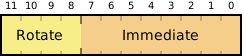
但是 4-bit 只有 16 種可能,不可能將 8-bit 值位移到 32-bit 的任何位置,所以通常會將 rotate 再乘上 2,一次位移 2 格,這樣就能將 16 種數字擴展到 32-bit
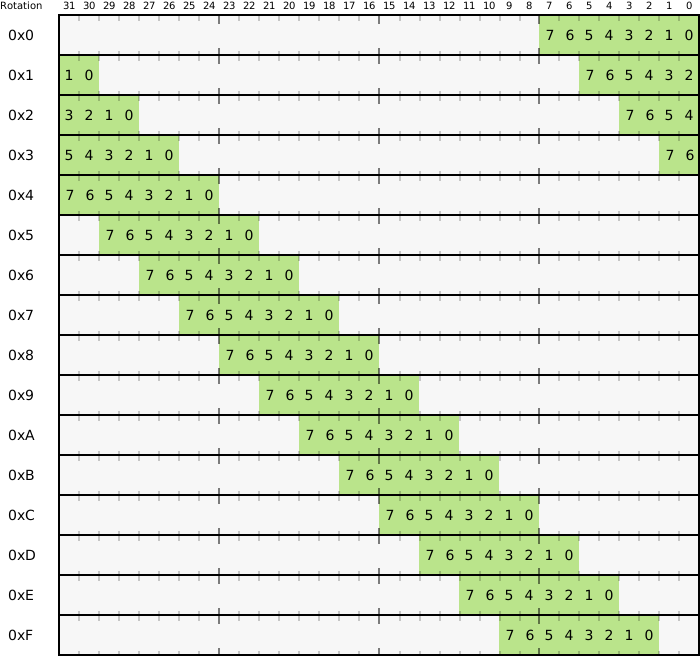
由於 ARM 的 immediate 可以表示任何 2 的次方 (0~31),使得可以輕易透過一個指令來 set、clear 或 toggle 任意的 bit
```
AND r0, r0, #&ff000000 ; 只保留 r0 的頭 byte (8-bit)
```
### 1.4.
## 2. 請解釋 AArch64 個別通用暫存器的作用,依據 [Linux on AArch64 ARM 64-bit Architecture](https://events.static.linuxfound.org/images/stories/pdf/lcna_co2012_marinas.pdf) 的描述,搭配實際的程式碼說明。提示: 簡報第 19 頁附有參考資訊
Armv8 總共支援三個指令集:A64、A32、T32
AArch64 為 Armv8 架構下的一個執行環境 (execution state),相較於 AArch32 能執行 A32 (ARM)、T32 (Thumb) 指令集,AArch64 只能執行 A64 指令集
>A64 為固定 32-bit 長度的指令集

### General-purpose registers:

在 AArch64 總共有 31 個 64-bit General-purpose register (X0-X30),也可以存取這些暫存器的 bottom 32-bit (W0-W30),當讀取 W 暫存器的時候 higher 32-bits 會保持不變,當寫入 W 暫存器時 higher 32-bits 會被設為 0 (i.e. 在 W0 寫入 `0xffffffff` 的數值,X0 會被設為 `0x00000000ffffffff`),以下圖說明:

根據 [ARM Architecture Procedure Call Standard for 64-bit (AAPCS64)](http://infocenter.arm.com/help/topic/com.arm.doc.ihi0055b/IHI0055B_aapcs64.pdf) 可以看到這些暫存器的用途 (文件中稱通用暫存器為 R0-R30,在 64-bit context 為 X0-X30),表格如下:
| Register | Special (特殊名稱) | Role in the procedure call standard |
| ---- | ---- | -------- |
| R0-R7 | | Parameter/result 暫存器,在 subroutine 中傳遞參數或回傳值 |
| R8 | | Indirect result location 暫存器,當 callee 回傳一個 struct,caller 會將配置記憶體的位址放入 R8,以回傳 struct 給 caller |
| R9-R15 | | Temporary 暫存器,如計算中間值 (intermediate value)、區域變數|
| R16-R17 | IP0-IP1 | 用於 intra-procedure-call (保存 Veneer code ([詳見](https://hackmd.io/ES9ZOdizTxKkmtCMkeCMKw?view#Veneer-code)) 與 PLT code 之位置),也可當作 temporary 暫存器用。 |
| R18 | | Platform 暫存器,也可作為 temporary 暫存器 |
| R19-R28 | | Callee-saved registers |
| R29 | FP | The Frame Pointer |
| R30 | LR | The Link Register (儲存函式呼叫的 return address) |
| SP | | The Stack Pointer (每個 exception level 各有一個)
> callee-saved registers 代表當 callee 要使用這些暫存器時必須先將其存到 stack 上,等到要回傳之前再取回原值。
>
> [ref](https://developer.arm.com/architectures/learn-the-architecture/armv8-a-instruction-set-architecture/single-page): In the A32 and T32 instruction sets, the PC and SP are general purpose registers. This is not the case in A64 instruction set.
總結 AArch64 的 General-purpose registers

以及浮點數的暫存器,也是使用相似的規則

<br>
---
### AArch64 special registers
- Zero register (**ZR**): always read as 0 and ignore writes,在絕大多指令都可以使用,**XZR** 和 **WZR** 分別對應 64-bits 和 32-bits
- Exception Link Register: holds the <ins>exception return address</ins>.

:::info
沒有編號第 31 的暫存器,在不同的指令下使用 R31 (X31/W31) 可能代表 Zero register (**ZR**) 或 Stack pointer (**SP**)
:::
#### PSTATE (Process state)
PSTATE 為抽象的行程狀態資訊,主要是指在 AArch64 行程狀態,並提供相對應的指令,如 `MRS (讀取 PSTATE)`、`MSR (寫入PSTATE)` 操作 PSTATE,在 AArch32 下則是使用 CPSR。
Armv8 reference manual J1.3 *<ins>shared/functions/system/ProcState</ins>* 中以 pesudo code 定義 PSTATE:

其中幾個重要的欄位描述如下
- ***The Condition flags (<ins>NZCV</ins> Register):***

> RES0 代表欄位保留
| Flag | Name | Description |
| -------- | -------- | ------- |
| N | Negative | Set to the same value as bit[31] of the result. For a 32-bit signed integer, bit[31] being set indicates that the value is negative. |
| Z | Zero | Set to 1 if the result is zero, otherwise it is set to 0. |
| C | Carry | Set to the carry-out value from result, or to the value of the last bit shifted out from a shift operation. |
| V | Overflow | Set to 1 if signed overflow or underflow occurred, otherwise it is set to 0. (對有號數操作) |
算術指令如 `ADC, ADCS, SBC, SBCS`等 會用到 **C** flag (suffix S 代表指令會設定 conditional flags)。
```c
ADC{S}: Rd = Rn + Rm + C
SBC{S}: Rd = Rn - Rm - 1 + C
```
> Rd 可以是 32-bit (Wd) 或 64-bit (Xd) 的暫存器
其他欄位可能會被用到的時機如:
1. <ins>Conditional branch</ins>
- `B.cond label` - label is the PC-relative offset in the range ±1MB
2. <ins>Conditional select (move)</ins>
- **Conditional Select**
`CSEL Xd, Xn, Xm, cond` : return `Xn` to `Xd` if `cond` is true, otherwise `Xm`
- **Conditional Set**
`CSET <Xd>, <cond>` : set `Xd` to 1 if the condition is TRUE, and otherwise sets it to 0. (an alias of `CSINC`)
equivalent to `CSINC <Xd>, XZR, XZR, invert(<cond>)`
- **Conditional Select Increment, negate, or invert**
`CSINC <Xd>, <Xn>, <Xm>, <cond>` : return `Xn` to `Xd` if condition is TRUE, otherwise return `Xm` + 1.
`CSNEG` and `CSINV`.
3. <ins>Conditional compare</ins>
> Xd 等前有 X 的暫存器都代表 64-bit,Wd 等則代表 32-bit。
:::info
`cond` 可以是下列其中一個:
| code | meaning (when set by CMP) | A, B | sign | flags |
| ------- | ------------------------------ | --------------- | --------------- | ------------------- |
| eq | equal | A == B | - | Z == 1 |
| ne | not equal | A != B | - | Z == 0 |
| cs,hs | carry set | A >= B | unsigned | C == 1 |
| cc,lo | carry clear | A < B | unsigned | C == 0 |
| hi | higher | A > B | unsigned | C == 1 && Z == 0 |
| ls | lower or same | A <= B | unsigned | !(C == 1 && Z == 0) |
| ge | greater than or equal | A >= B | signed | N == V |
| lt | less than | A < B | signed | N != V |
| gt | greater than | A > B | signed | Z == 0 && N == V |
| le | less than or equal | A <= B | signed | !(Z == 0 && N == V) |
| mi | minus, negative | A < B | - | N == 1 |
| pl | plus or zero | A >= B | - | N == 0 |
| vs | overflow set | - | - | V == 1 |
| vc | overflow clear | - | - | V == 0 |
| al | always | true | - | - |
| nv | always | true | - | - |
:::
:::warning
A64 adds **NV** (0b1111), though it behaves the same as its complement, AL (0b1110). This is different in ARMv7-A A32.
:::
<br>
- ***The exception mask bits (<ins>DAIF</ins> Register)***

Flag 為 1 皆代表中斷被遮蔽,當系統重置或處理例外進入 AArch64 state (exception level) 時會被設為 1。
| Flag | Decription |
| -------- | -------- |
| D | Debug exception mask bit. 。 |
| A | SError (System error) interrupt mask bit. |
| U | IRQ interrupt mask bit. |
| F | FIQ (Fast Interrupt reQuest 快速中斷請求) interrupt mask bit. |
> A, I, F 稱為 **Asynchronous exception** mask bits。PSTATE.{A, I, F} 可以遮蔽實體中斷或虛擬中斷。
<br>
---
#### Saved Process Status Register (SPSR)
當例外發生時,目前 exception level 的 PSTATE 的資料會被保存到**目標** exception level 的 SPSR 中,而當例外處理完成後,會使用 ELR 暫存器儲存的回傳值位址,且之前的 PSTATE 就能透過 SPSR 恢復。
在 AArch64 state 中,每個 exception level 都有一個 SPSR。
- `SPSR_EL1`
- `SPSR_EL2`
- `SPSR_EL3`
當處理例外時可能從 AArch32 state、AArch64 state 切換到 AArch64 state (只有可能是 AArch64),不同模式間切換會有不同的 SPSR 欄位的分配也會不一樣:
- Exception taken to AArch64 state from AArch64 state

- Exception taken to AArch64 state from AArch32 state

當在不同的 exception level 運行時,可以選擇 `SP_EL0` 或 `SP_ELx` stack pointer. 針對 AArch64 的 SPSR,M[3:0] 代表 stack pointer register (**SP**) 的選擇,如下圖。

不同後綴代表使用不同 SP
- t - 使用 `SP_EL0` stack pointer.
- h - 使用 `SP_ELx` stack pointer
<br>
---
### 切換 CPU context 的 <span style="background-color:#c0ffee; padding:5px;">__`cpu_switch_to`__</span>
Linux 的 <mark>`context_switch()`</mark> 實作在 kernel/sched.c,基本上必須做到兩件事:
- `switch_mm()`,切換兩個行程的 virtual address space,如果目標行程是 kernel thread 則會有不同的操作。
- `switch_to()`,切換處理器狀態到目標行程,包括 FPSIMD registers、TLS (thread local storage),通用暫存器等。
`switch_to()` 最後會呼叫 [`__switch_to()`](https://github.com/torvalds/linux/blob/v5.1/arch/arm64/kernel/process.c#L473-L498) 將處理器狀態切換成目標 `task_struct`,當 FPSIMD、TLS 等都切換完之後,才會呼叫 `cpu_switch_to`。
```c
__notrace_funcgraph struct task_struct *__switch_to(struct task_struct *prev,
struct task_struct *next)
{
...
last = cpu_switch_to(prev, next);
...
}
```
`cpu_switch_to` 的原型在 [arch/arm64/include/asm/processor.h](https://github.com/torvalds/linux/blob/v5.1/arch/arm64/include/asm/processor.h#L245-L246):
```c
extern struct task_struct *cpu_switch_to(struct task_struct *prev,
struct task_struct *next);
```
下列則是 `cpu_switch_to` 的定義,`x0`、`x1` 暫存器存放 task_struct 型態的指標,分別代表要被切換的 task 和要切換到的目標 task。
定義在 [arch/arm64/kernel/entry.S](https://github.com/torvalds/linux/blob/v5.1/arch/arm64/kernel/entry.S#L1074-L1097)
```c=
ENTRY(cpu_switch_to)
mov x10, #THREAD_CPU_CONTEXT
add x8, x0, x10
mov x9, sp
stp x19, x20, [x8], #16 // store callee-saved registers
stp x21, x22, [x8], #16
stp x23, x24, [x8], #16
stp x25, x26, [x8], #16
stp x27, x28, [x8], #16
stp x29, x9, [x8], #16
str lr, [x8]
add x8, x1, x10
ldp x19, x20, [x8], #16 // restore callee-saved registers
ldp x21, x22, [x8], #16
ldp x23, x24, [x8], #16
ldp x25, x26, [x8], #16
ldp x27, x28, [x8], #16
ldp x29, x9, [x8], #16
ldr lr, [x8]
mov sp, x9
msr sp_el0, x1
ret
ENDPROC(cpu_switch_to)
NOKPROBE(cpu_switch_to)
```
先看第 2 行的 `THREAD_CPU_CONTEXT`,用 gdb 可以觀察到此值為 2000:
```c
gef> x/i $pc
=> 0xffffff801008552c <cpu_switch_to>: mov x10, #0x7d0 // #2000
```
詳細可參考 [行程切換分析(1):基本框架](http://www.wowotech.net/process_management/context-switch-arch.html)
:::info
參考資料:
[1] [armv8-a-instruction-set-architecture](https://developer.arm.com/architectures/learn-the-architecture/armv8-a-instruction-set-architecture/single-page)
[2] [ARM Cortex-A Series Programmer’s Guide for ARMv8-A](https://static.docs.arm.com/den0024/a/DEN0024A_v8_architecture_PG.pdf?_ga=2.12457588.1974140664.1561205415-981517861.1558457080)
[3] [ARM Architecture Reference Manual ARMv8, for ARMv8-A architecture profile](https://static.docs.arm.com/ddi0487/db/DDI0487D_b_armv8_arm.pdf?_ga=2.257290955.1974140664.1561205415-981517861.1558457080)
[4] [ARM Compiler armasm Reference Guide](https://developer.arm.com/docs/dui0802/latest/a64-general-instructions)
[5] [**<ins>The A64 Instruction set (Overview)</ins>**](https://static.docs.arm.com/100898/0100/the_a64_Instruction_set_100898_0100.pdf) (A64入門文件,但有些地方有錯)
:::
## 3. AArch64 定義四種例外等級: EL0, EL1, EL2, EL3,請找出相關文件 (儘量是 Arm 公司的第一手材料) 並搭配 Linux 核心原始程式碼解說
### Armv8 Exception model:
| Exception level | Description |
| -------- | -------- |
| EL0 | Normal user applications. |
| EL1 | Operating system kernel typically described as privileged. |
| EL2 | Hypervisor. |
| EL3 | Low-level firmware, including the Secure Monitor |
## 4. [linux-kernel-module-cheat](https://github.com/cirosantilli/linux-kernel-module-cheat) 提及透過 GDB 對 QEMU 模擬的虛擬硬體之上的 Linux 核心進行追蹤和除錯,請解釋具體原理。提示: 應一併說明 GDB stub 和 [QEMU/Debugging with QEMU](https://en.wikibooks.org/wiki/QEMU/Debugging_with_QEMU) 的運作機制
參考資料:
* [QEMU User Document](https://qemu.weilnetz.de/doc/qemu-doc.html)
* [QEMU man page](https://www.mankier.com/1/qemu)
* [QEMU wikibook](https://en.wikibooks.org/wiki/QEMU)
* [編譯 linux 0.11,並且使用 QEMU + GDB 調試 kernel](https://wwssllabcd.github.io/blog/2012/08/03/compile-linux011/)
* [QEMU+gdb调试Linux内核全过程](https://blog.csdn.net/jasonLee_lijiaqi/article/details/80967912)
* [Debugging ARM programs inside QEMU](https://balau82.wordpress.com/2010/08/17/debugging-arm-programs-inside-qemu/)
如下圖所示,QEMU 使用了 GDB 遠端除錯的功能,要除錯的程式在一台機器上運行並加裝 GDB Stub,另一台則執行 GDB 透過 gdbserver 連結,中間經由 serial line 或 TCP/IP 來傳輸
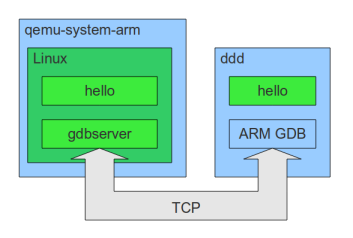
在 QEMU 與 gem5 模擬器使用 GDB,首先必須要先讓模擬器與 GDB 建立連結
```
$ ./run --gdb-wait
or
$ ./run --gdb
```
在 tmux 下使用,則會分割成兩邊,左邊為 QEMU 終端,右邊則為 GDB 介面
```
$ tmux
$ ./run --gdb
or
$ ./run --gdb-wait --tmux --tmux-args start_kernel
```
[**run**](https://github.com/cirosantilli/linux-kernel-module-cheat/blob/master/run):
這段主要是在對引數做各種 parsing 與 alias 的處理,一般跑預設的話就會是以模擬器為 QEMU、tmux 為 GDB、中斷點為 start_kernel
```python=
if not self.env['_args_given']['tmux_program']:
if self.env['emulator'] == 'qemu':
self.env['tmux_program'] = 'gdb'
elif self.env['emulator'] == 'gem5':
self.env['tmux_program'] = 'shell'
if self.env['gdb']:
if not self.env['_args_given']['gdb_wait']:
self.env['gdb_wait'] = True
if not self.env['_args_given']['tmux_args']:
if self.env['userland'] is None and self.env['baremetal'] is None:
self.env['tmux_args'] = 'start_kernel'
else:
self.env['tmux_args'] = 'main'
if not self.env['_args_given']['tmux_program']:
self.env['tmux_program'] = 'gdb'
```
因為 `--gdb`,最終都會導至這行,對 QEMU 來說:
* `-s` 代表 `-gdb tcp::1234` 的縮寫,指定運行時的接口,
* `-S` 代表啟動虛擬機時會先暫停,等待 gdbserver 的連結
* `LF` 則是在處理 cmd 結尾
```python=
if self.env['gdb_wait']:
extra_qemu_args.extend(['-S', LF])
...
cmd.extend(extra_emulator_args)
```
這邊先只考慮 QEMU 的部分,userland 的情況比較單純,可以看到只是簡單的加上一些引數到 cmd 上
* `-g port` 和 `-gdb dev` 類似,只是前者只有指定接口
* 對於動態連結的程式,需要加上 `-L` 與根目錄,才能找到 linker 和 library
```python=
elif self.env['emulator'] == 'qemu':
qemu_user_and_system_options = [
'-trace', 'enable={},file={}'.format(trace_type, self.env['qemu_trace_file']), LF,
]
if self.env['userland'] is not None:
if self.env['gdb_wait']:
debug_args = ['-g', str(self.env['gdb_port']), LF]
else:
debug_args = []
cmd.extend(
[
self.env['qemu_executable'], LF,
'-L', self.env['userland_library_dir'], LF,
'-r', self.env['kernel_version'], LF,
'-seed', '0', LF,
] +
qemu_user_and_system_options +
debug_args
)
```
再來看看 kernel 部分,`debug-vm` 可以對模擬器追蹤
`-serial` 對應 [TTY](https://github.com/cirosantilli/linux-kernel-module-cheat#tty) 的部分,會有不同的 shell 跑在不同的 serial port:
* `/dev/ttyS0`: first shell that was used to run QEMU, corresponds to QEMU’s `-serial mon:stdio` or `-serial stdio`
* `/dev/ttyS1`: second shell running telnet
* `/dev/ttyS2`: go on the GUI and enter `Ctrl-Alt-2`, corresponds to QEMU’s `-serial vc`
`-virtfs` 對應 [9P](https://github.com/cirosantilli/linux-kernel-module-cheat#9p),讓訪客可以掛載 host 資料夾
`-machine` 決定要模擬的機型,種類可參考 [Documentation/Platforms/ARM](https://wiki.qemu.org/Documentation/Platforms/ARM)
```python=
else:
extra_emulator_args.extend(extra_qemu_args)
self.make_run_dirs()
if self.env['debug_vm']:
serial_monitor = []
else:
if self.env['background']:
serial_monitor = ['-serial', 'file:{}'.format(self.env['guest_terminal_file']), LF]
if self.env['quiet']:
show_stdout = False
else:
if self.env['ctrl_c_host']:
serial = 'stdio'
else:
serial = 'mon:stdio'
serial_monitor = ['-serial', serial, LF]
if self.env['kvm']:
extra_emulator_args.extend([
'-cpu', 'host', LF,
'-enable-kvm', LF,
])
extra_emulator_args.extend([
'-serial',
'tcp::{},server,nowait'.format(self.env['extra_serial_port']), LF
])
virtfs_data = [
(self.env['p9_dir'], 'host_data'),
(self.env['out_dir'], 'host_out'),
(self.env['out_rootfs_overlay_dir'], 'host_out_rootfs_overlay'),
(self.env['rootfs_overlay_dir'], 'host_rootfs_overlay'),
]
virtfs_cmd = []
for virtfs_dir, virtfs_tag in virtfs_data:
if os.path.exists(virtfs_dir):
virtfs_cmd.extend([
'-virtfs',
'local,path={virtfs_dir},mount_tag={virtfs_tag},security_model=mapped,id={virtfs_tag}' \
.format(virtfs_dir=virtfs_dir, virtfs_tag=virtfs_tag),
LF,
])
if self.env['machine2'] is not None:
# Multiple -machine options can also be given comma separated in one -machine.
# We use multiple because the machine is used as an identifier on baremetal tests
# build paths, so better keep them clean.
machine2 = ['-machine', self.env['machine2'], LF]
else:
machine2 = []
cmd.extend(
[
self.env['qemu_executable'], LF,
'-machine', self.env['machine'], LF,
] +
machine2 +
[
'-device', 'rtl8139,netdev=net0', LF,
'-gdb', 'tcp::{}'.format(self.env['gdb_port']), LF,
'-kernel', self.env['image'], LF,
'-m', self.env['memory'], LF,
'-monitor', 'telnet::{},server,nowait'.format(self.env['qemu_monitor_port']), LF,
'-netdev', 'user,hostfwd=tcp::{}-:{},hostfwd=tcp::{}-:22,id=net0'.format(
self.env['qemu_hostfwd_generic_port'],
self.env['qemu_hostfwd_generic_port'],
self.env['qemu_hostfwd_ssh_port']
), LF,
'-no-reboot', LF,
'-smp', str(self.env['cpus']), LF,
] +
virtfs_cmd +
serial_monitor +
vnc
)
```
[Debugging with QEMU](https://en.wikibooks.org/wiki/QEMU/Debugging_with_QEMU) 的這個例子:
* `add-symbol-file` 將兩個 ELF 檔加到 symbol table,存到對應的 text address,可以參考 [使用 GDB 來除錯可載入模組](http://hkbsd.net/www/freebsd/x23799.html)
* `target-remote` 是 GDB 用來連接 serial line、local Unix domain socket 或 IP network using TCP or UDP,對應後面 `qemu` 所連接的接口
* `-gdb stdio` 將接口接到預設的 serial stdio
* `-m 16` 指定記憶體大小
* `-boot c` 指定啟動 driver 的順序,x86 PC 使用下列代號:
* a, b (floppy 1 and 2)
* c (first hard disk)
* d (first CD-ROM)
* n-p (Etherboot from network adapter 1-4)
* hard disk boot 為預設
* `-hda drive0.img` 表示讀取該映像檔至 floppy disk 0 (可以到 `-hdd`)
```
(gdb) add-symbol-file stage0.elf 0x7c00
(gdb) add-symbol-file stage1.elf 0x7e00
(gdb) target remote | qemu -S -gdb stdio -m 16 -boot c -hda drive0.img
```
建立與 GDB 的連結後,接著決定中斷點,看是要 kernel 還是 userland 程序的某一行
```
$ ./run-gdb start_kernel
or
$ ./run-gdb init/main.c:1088
```
[**run-gdb**](https://github.com/cirosantilli/linux-kernel-module-cheat/blob/master/run-gdb)
* `-before` 和 `-after` 主要就是指定哪些引數要附加在整個引數的前面還後面
* `image` 為要除錯的程式
* `target` 為前述設定好的 serial line 或 TCP/IP 來遠端除錯
* `cmd_file` 會把這些指令寫到指定的檔案
關於 `sh` 相關的函式可以查看 [shell_helpers.py](https://github.com/cirosantilli/linux-kernel-module-cheat/blob/99901460455540ba1431bd85cf23b0c2338e2bd7/shell_helpers.py)
```python=
after = self.sh.shlex_split(self.env['after'])
before = self.sh.shlex_split(self.env['before'])
...
cmd = (
[self.env['gdb_path'], LF] +
before
)
...
target = 'remote localhost:{}'.format(port)
cmd.extend([
'-ex', 'file {}'.format(image), LF,
'-ex', 'target {}'.format(target), LF,
])
...
cmd.extend(after)
...
return self.sh.run_cmd(
cmd,
cmd_file=os.path.join(self.env['run_dir'], 'run-gdb.sh'),
cwd=self.env['linux_build_dir']
)
```
# 作業要求
## 1. 透過 [buildroot](https://github.com/buildroot/buildroot) 工具產生針對 AArch64 的 linux kernel image (需要是 5.0 以上版本) 和 root file system,確保滿足以下要求:
* 得以透過 `qemu-system-aarch64` 開機並正確地執行 userspace 套件 (如 Busybox)
* 確認 QEMU + GDB 能夠單步執行和設定中斷點
* 確保 VirtIO + 9P 得以運作
* 閱讀 [Embedded Linux size reduction
techniques](http://events17.linuxfoundation.org/sites/events/files/slides/opdenacker-embedded-linux-size-reduction-techniques_0.pdf),嘗試建構出更小但仍可符合上述需求的 Linux 核心
參考共筆:
* [atlantis0914](https://hackmd.io/@6bf81R1bTbKnWvnInTaKcQ/HJb80Rdt4):介紹了如何架設 Aarch64 的 QEMU 環境,以及如何編譯 Aarch64 的 kernel image
* [0xff07](https://hackmd.io/@d4cWS3kPSNiNdRbaqbKmqQ/ryQIj1MKV):解釋如何調整至 Linux 5.0,以及如何開啟 9P 與使用 QEMU+GDB
## 2. 參照 [Linux 核心設計: 透過 eBPF 觀察作業系統行為](https://hackmd.io/s/SJTuuG9a7),在上述 `(2)` 的環境開啟 eBPF 核心設定和準備必要的 userspace 開發工具,做對應的實驗
 Google Drive
Gist
Clipboard
Google Drive
Gist
Clipboard
 Sign in via Google
 Sign in via Facebook
 Sign in via X(Twitter)
 Sign in via GitHub
 Sign in via Dropbox
 Sign in with Wallet






