# SQL Server 語法
###### tags: `SQL` `自學` `程式語言`
[TOC]
## SELECT
### 從資料表中取得整列資料
- SELECT 命令也稱為「查詢」或「Query」。
- SELECT 命令會從資料表中==選擇==資料,是SQL中最基本的命令。
```sql=
SELECT * FROM [資料表名稱];
```
>若想取得資料表中**所有欄位**的資料時,可以用「*」符號來指定。
- 利用**半形逗號**「,」指定多個欄位或資料表。
```sql=
SELECT 欄位名, 欄位名,... FROM [資料表名稱, 資料表名稱,...];
```
### 決定要取得的欄位
- SELECT之後,接著寫想要取得的欄位名。
```sql=
SELECT [ALL|DISTINCT] 欄位名 FROM [資料表名稱];
```
- 指定DISTINCT
```sql=
SELECT DISTINCT 欄位名 FROM [資料表名稱];
```
>表中若有內容重複的資料列並非好事,可能會造成查詢資料時,得到重複的資料;因此,會使用「DISTINCT」除去重複的資料。
- 指定前N筆資料
```sql=
SELECT TOP 數字 * FROM [資料表名稱];
```
### FROM 子句
:::info
決定要查詢的資料表。
:::
> 在FROM 子句中需要寫上資料表名:table_name
- 資料表的別名:table_alias
```sql=
SELECT * FROM [資料表名稱] [別名1], [資料表名稱] [別名2];
WHERE 別名1.A = 別名2.A
```
- 用AS設定別名(可以省略)
```sql=
SELECT * FROM [資料表名稱] AS [別名1], [資料表名稱] AS [別名2];
WHERE 別名1.A = 別名2.A
```
- 寫在FROM 子句裡的==結合條件==
> 分為內結合(INNER JOIN)及外結合(LEFT/RIGHT JOIN)。
> 條件式則皆在「ON」之後寫,
>> LEFT與RIGHT的差別在於,要讓左側資料表的資料留下,還是右側資料表的資料。
[](https://www.dofactory.com/sql/inner-join)
`範例`:資料表 A 和 B ,以 A.t = B.t 的條件式進行內結合
```sql=
SELECT * FROM A INNER JOIN B ON A.t = B.t;
```
> 3個(含)以上的資料表結合
>> 用**括號**將**INNER JOIN... ON...** 括號起來,使他被當成是一個資料表並進行結合。
`範例`:將資料表 A、B 和 C 結合
```sql=
SELECT * FROM (A INNER JOIN B ON A.t = B.t)
INNER JOIN C ON A.t = C.t;
```
`選自 HackerRank 範例`:

```sql=
select sum(city.population) from city
join country on city.countrycode = country.code
where
continent = 'Asia';
```

`選自 HackerRank 範例`:

```sql=
select city.name from city
join country on city.countrycode = country.code
where
continent = 'Africa';
```

> 使用 LEFT JOIN 及 RIGHT JOIN 時,要注意資料表寫的順序。
>> 如範例,「A RIGHT JOIN B」會把寫在右側的 B 資料表的所有資料留下。
>> 因為屬於外結合,所以亦可用代表外部的「OUTER」來寫。
[](https://www.dofactory.com/sql/left-join) [](https://www.dofactory.com/sql/right-join)
`範例`:省略 OUTER 和不省略的寫法
```sql=
SELECT * FROM A RIGHT JOIN B ON A.t = B.t;
SELECT * FROM A RIGHT OUTER JOIN B ON A.t = B.t;
```
>「FULL OUTER JOIN」類似合併使用LEFT、RIGHT JOIN,也是外結合的一種。
>> [](https://www.dofactory.com/sql/full-join)
`範例`:用 FULL OUTER 進行結合
```sql=
SELECT * FROM A FULL OUTER JOIN B ON A.t = B.t;
```
> 「CROSS JOIN」能進行「交叉結合」,沒有結合條件。
>> 若把 A 和 B 做交叉結合,就會得到 A 資料表之全部資料再接上 B 資料表之全部資料。
>> [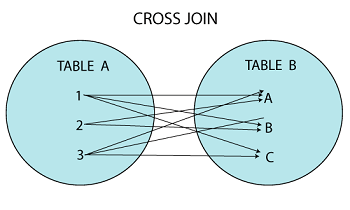](https://www.javatpoint.com/mysql-cross-join)
`範例`:將 A 和 B 資料表做交叉結合
```sql=
SELECT * FROM A CROSS JOIN B;
```
#### SUMMARY
1. 兩個table之間找出完整資料時,可以用INNER JOIN;會消除1對0(落單)的資料。
2. 當其中一個table的資料是必須完整保留時,可以用LEFT JOIN/RIGHT JOIN。
3. 想找出所有可能的==排列==時,用CROSS JOIN。
4. FULL OUTER JOIN (完全外連結): LEFT JOIN 與 RIGHT JOIN 的==連集==。
- USING
> 若結合之條件是同名的欄位,可以用「USING」指定結合條件。
`範例`:將 A 和 B 資料表依 a 欄位進行內結合
```sql=
SELECT * FROM A INNER JOIN B USING (a);
```
### WHERE 子句
:::info
指定抽出或結合條件。
:::
> 寫上選擇列資料的條件式;如此只有條件符合的列資料才會作為結果被傳回。
> 除了欄位名,亦可用運算子和函式來寫。
```sql=
SELECT * FROM [資料表名稱]
WHERE 任意邏輯判斷式;
```
- 篩選條件
> 想要取得符合某種條件的列資料。
`範例`:將商品資料表中,單價為100的商品列出
```sql=
SELECT * FROM 商品
WHERE 單價 = 100;
```
- 結合
### GROUP BY 子句
> 可以指定要群組化的欄位名,或是含有欄位名的陳述式。
```sql=
GROUP BY 任意陳述式 [, 任意陳述式]
```
`範例`:將資料表 foo 中的 a 欄位進行群組化,在統計其列數
```sql=
SELECT COUNT(*) FROM foo
GROUP BY a;
```
`範例`:合計投票結果
```sql=
SELECT 姓氏, COUNT(*) FROM 投票結果
GROUP BY 姓氏;
```
`選自 HackerRank 範例`:

```sql=
select country.continent, round(avg(city.population), -0.5)
from city
join country on city.countrycode = country.code
group by country.continent;
```

### GROUPING SETS ROLLUP CUBE
> OLAP 合計選項
```sql=
GROUP BY 任意陳述式 [, 任意陳述式] WITH ROLLUP
GROUP BY 任意陳述式 [, 任意陳述式] WITH CUBE
```
- SQL Server
無法利用 GROUPING SETS 來指定加入任意群組的合計列。
### HAVING 子句
> 用統計函式的結果值作為條件來篩選
> 含有統計函式的條件式,不能使用WHERE子句的條件式來寫
```sql=
HAVING [任意邏輯判斷式]
```
`範例`:群組合計值大於100者,才傳回作為查詢結果。
```sql=
SELECT x, sum(i) FROM foo
GROUP BY x HAVING sum(i) > 100;
```
`選自 HackerRank 範例`:

```sql=
select h.hacker_id, h.name from submissions s join challenges c
on s.challenge_id = c.challenge_id
join difficulty d on c.difficulty_level = d.difficulty_level
join hackers h on s.hacker_id = h.hacker_id
where s.score = d.score
group by h.hacker_id, h.name
having count(s.hacker_id) > 1
order by count(s.hacker_id) desc, s.hacker_id;
```

### ORDER BY 子句
> 指定取得之資料的順序
```sql=
SELECT * FROM [資料表名稱]
ORDER BY 任意陳述式1 [ASC|DESC], 任意陳述式2 [ASC|DESC], ...;
```
- ASC(由小至大,升冪)/DESC(由大至小,降冪)
`範例`:將資料表 A 中的所有資料依 a 欄位之值,==由小到大排序==
```sql=
SELECT * FROM A
ORDER BY a ASC;
```
`範例`:將資料表 A 中的所有資料依 a 欄位之值,==由大到小排序==
```sql=
SELECT * FROM A
ORDER BY a DESC;
```
- NULL值的排序
> 依資料庫種類不同而異。
>> 在 **SQL Server、MySQL** 和 **Access**中,會被當作**最小值**排序。
>> 在 **Oracle、DB2、PostgrSQL**中,NULL則會被當作**最大值**來排序。
`範例`:將資料表 A 中的所有資料依 a 欄位之值,==由大到小排序,NULL值排在最後== `Oracle`
```sql=
SELECT * FROM A
ORDER BY a DESC NULLS LAST;
```
- 依欄位編號來作ORDER BY的動作
> 可以指定欄位的編號,欄位編號是從1開始的任意數值。
`範例`:依要選取之欄位名清單中的第2個欄位作排序
```sql=
SELECT a, b FROM A
ORDER BY 2;
```
`範例`:依要選取之欄位名清單中的第2個運算是作排序
```sql=
SELECT a, c*b FROM A
ORDER BY 2;
```
`選自 HackerRank 範例`:

```sql=
SELECT CITY, length(CITY) FROM STATION
ORDER BY length(CITY), CITY ASC
LIMIT 1;
SELECT CITY, length(CITY) FROM STATION
ORDER BY length(CITY) DESC
LIMIT 1;
```

### LIMIT 子句 `MySQL`
> 限制查詢結果
> 讓SELECT查詢到的資料不全部全回,而只傳回特定的部分。
`語法`
```sql=
LIMIT [start,] count
```
> count:取得的資料筆(列)數
> start:從第幾筆(列)資料開始使用
`範例`:只取得所有查詢結果中,第5列開始的3列資料。
```sql=
SELECT * from foo
limit 5, 3;
```
`範例`:只取得查詢結果排序後的最前頭3筆資料。
```sql=
SELECT * from foo
order by a
limit 3;
```
`選自 HackerRank 範例`:

```sql=
select salary * months as earnings, count(*) from employee
group by earnings
order by earnings desc
limit 1;
```

> `相關語法` [Group by](https://hackmd.io/LtqRKErKTTGeoWOVU7r0NA?both#GROUP-BY-%E5%AD%90%E5%8F%A5)、[Order by](https://hackmd.io/LtqRKErKTTGeoWOVU7r0NA?both#ORDER-BY-%E5%AD%90%E5%8F%A5)
### 子查詢(SUN QUERY)
> [color=#3b75c6] SELECT 中的 SELECT 命令
`語法`
```sql=
(select_statement)
```
> 利用子查詢能進行複雜的查詢動作。
`範例`:將bar資料表中b欄位之最大值拿來與foo資料表之a值表較,然後列出foo資料表中兩值相同的資料。
```sql=
SELECT * from foo
where a = (select max(b) from bar);
```
`範例`:將select 命令所得的結果存到變數中後,再於下一個select命中使用。
```sql=
maxvalue = select max(b) from bar
select * from foo where a = maxvalue;
```
`選自 HackerRank 範例`:

```sql=
select round(long_w, 4) from station
where
lat_n = (select max(lat_n) from station
where
lat_n < 137.2345);
```

`範例`:子查詢依存於主查詢的情況。
```sql=
select * from foo
where
a = (select max(b) from bar
where
bar.c = foo.c);
```
> 指定了bar之b欄位最大值,必須從bar和foo資料表中的c欄位值相同的資料裡找出。
`選自 HackerRank 範例`:

```sql=
select w.id, p.age, w.coins_needed, w.power from wands w
join wands_property p on w.code = p.code
where p.is_evil = 0 and w.coins_needed = (select min(coins_needed)
from wands w1 join wands_property p1 on (w1.code = p1.code)
where w1.power = w.power and p1.age = p.age)
order by w.power desc, p.age desc;
```

`選自 HackerRank 範例`:

```sql=
select h.hacker_id, h.name, sum(score) from (
select hacker_id, challenge_id, max(score) as score from submissions
group by hacker_id, challenge_id) t
join hackers h on t.hacker_id = h.hacker_id
group by h.hacker_id, h.name
having sum(score) > 0
order by sum(score) desc, hacker_id;
```

- 使用了**EXISTS**的子查詢
想確認與某資料表有關聯的一資料表中,是否有某筆特定資料,並進一步據此確認結果作為查詢條件時使用。
`範例`:在foo資料表中,若有1筆以上的資料其a欄位值和bar資料表中的a欄位值相同,就把該筆資料傳回。
```sql=
select * from foo
where exists (select * from bar
where
bar.a = foo.a);
```
- 在要選取之欄位名清單中使用子查詢
```sql=
select (select count(*) from foo), (select count(*) from bar);
```
- 在FROM子句中使用子查詢
```sql=
select * from (select a, b from bar) as subq;
```
---
## PIVOT
面對數筆有意義資料要匯總成橫式資料時,可以考慮使用 PIVOT 來扭轉資料,讓資料呈現上更貼近人性。
`語法`
```sql=
SELECT <column/s> FROM
(
<source_query>
) as src
PIVOT
(
<aggr_function>
(
<aggr_column>
FOR <spreading_column> IN (<spreading_elements>)
)
) as ret
```
`選自 HackerRank 範例`:

```sql=
select [doctor], [professor], [singer], [actor]
from(
select row_number() over (partition by occupation order by name) [rownumber],
* from occupations
) as temptable
pivot(
max(name)
for occupation in ([doctor], [actor], [singer], [professor])
) as pivottable;
```

## 比較運算子
| 運算子 | 意思 |
| -------- | -------- |
| < | 小於 |
| > | 大於 |
| < | 小於 |
| >= | 大於等於 |
| <= | 小於等於 |
| <> | 不相等 |
| != | 不相等 |
> 主要用在SELECT命令的WHERE子句中。
> 運算式若含有NULL值,就無法獲得確實的結果。
`選自 HackerRank 範例`:

```sql=
SELECT NAME FROM EMPLOYEE
WHERE SALARY > 2000 AND MONTHS < 10
ORDER BY EMPLOYEE_ID ASC;
```

`選自 HackerRank 範例`:

```sql=
select count(name) from city
where population > 100000;
```

> `相關語法`:[COUNT](https://hackmd.io/LtqRKErKTTGeoWOVU7r0NA?both#COUNT-%E5%87%BD%E5%BC%8F)
## 邏輯運算子
### LIKE 運算子
> 比對搜尋
```sql=
SELECT [欄位名] FROM [資料表名稱]
WHERE [欄位名] LIKE 字串陳述式;
SELECT [欄位名] FROM [資料表名稱]
WHERE [欄位名] LIKE 字串陳述式 ESCAPE 跳脫文字;
```
- 萬用字元表
| | Oracle | SQL Server | DB2 | MySQL |
| -------------------- | ------ |:----------:| --- | ----- |
| 任意字串 | % | % | % | % |
| 任意單一文字 | _ | _ | _ | _ |
| 指定範圍中的單一文字 | 無 | [a-f] | 無 | 無 |
| 指定範圍外的單一文字 | 無 | [^a-f] | 無 | 無 |
`選自 HackerRank 範例`:

```sql=
SELECT DISTINCT CITY FROM STATION
WHERE CITY LIKE '[aeiou]%';
```

- 跳脫萬用字元
> 檢索 % 或 _ 萬用字元符號時,要進行「跳脫」的動作。
1. 跳脫文字為`\`,寫成`LIKE '%\%'`條件,便可用來查詢 100% 或 25% 此類的字串資料。
2. 亦可以指定跳脫文字,像是`LIKE '%e%' ESCAPE 'e'`,是指定將e作為跳脫文字。
`選自 HackerRank 範例`:

```sql=
SELECT DISTINCT CITY FROM STATION
WHERE CITY LIKE '[aeiou]%[aeiou]';
```

### NOT 運算子
> 否定(非)
```sql=
SELECT [欄位名] FROM [資料表名稱]
WHERE NOT 陳述式;
```
`選自 HackerRank 範例`:

```sql=
SELECT DISTINCT CITY FROM STATION
WHERE NOT CITY LIKE '[aeiou]%';
```

### AND 運算子
> 邏輯的且
>> 「AND」運算子在其==左右兩邊的值都為TRUE==,會傳回TRUE。
```sql=
SELECT [欄位名] FROM [資料表名稱]
WHERE 陳述式 AND 陳述式;
```
`選自 HackerRank 範例`:

```sql=
SELECT DISTINCT CITY FROM STATION
WHERE NOT CITY LIKE '[aeiou]%' AND NOT CITY LIKE '%[aeiou]';
```

## 其他運算子
### CASE 運算子
```sql=
CASE [欄位名] WHEN [陳述式] THEN [陳述式]
[WHEN 陳述式 THEN 陳述式][ELSE 陳述式] END -> 值
CASE WHEN [陳述式] THEN [陳述式]
[WHEN 陳述式 THEN 陳述式][ELSE 陳述式] END -> 值
```
> **CASE** 後寫上作為轉換來源的陳述式
> **WHEN** 後寫上轉換來源實際上的值
> 當轉換來源之值符合WHEN後所寫的值,**THEN**後所記述的值就會作為結果回傳
> WHEN後之值不符合時,所要傳回的結果值,寫在**ELSE**後
> 最後寫上**END**,CASE的運算結束
`範例`:將通訊錄資料表的性別資料轉換成英文表示的SELECT查詢。
```sql=
SELECT 姓名, CASE 性別
WHEN '男' THEN 'male'
WHEN '女' THEN 'female'
END
FROM 通訊錄;
```
`範例`:檢索出年齡在20歲以上的,標為成人,不滿20歲的標為未成年。
```sql=
SELECT 姓名, CASE
WHEN 年齡 >= 20 THEN '成年'
WHEN 年齡 < 20 THEN '未成年'
END
FROM 通訊錄;
```
`範例`:變換NULL值。
```sql=
SELECT 姓名, CASE
WHEN 年齡 IS NULL THEN '不詳'
ELSE CAST (年齡 AS CHAR(2))
END
FROM 通訊錄;
```
`選自 HackerRank 範例`:


```sql=
select case
when A+B > C and B+C > A and A+C > B then
case
when A=B and B=C then 'Equilateral'
when A=B or B=C or A=C then 'Isosceles'
else 'Scalene'
end
else 'Not A Triangle'
end
from triangles;
```

---
## 統計函式
### AVG 函式
> 求平均值 Average
```sql=
AVG([ distinct | all ] 數值陳述式)
```
`選自 HackerRank 範例`:

```sql=
select avg(population) from city
where
district = 'California';
```

### COUNT 函式
> 算出資料筆數
```sql=
count([ distinct | all ] 陳述式)
```
`範例`:計算通訊錄資料表的資料筆數。
```sql=
SELECT count(*) FROM 通訊錄;
```
`選自 HackerRank 範例`:

```sql=
select c.company_code, c.founder,
count(distinct l.lead_manager_code), count(distinct s.senior_manager_code),
count(distinct m.manager_code),count(distinct e.employee_code)
from Company c, Lead_Manager l, Senior_Manager s, Manager m, Employee e
where c.company_code = l.company_code
and l.lead_manager_code=s.lead_manager_code
and s.senior_manager_code=m.senior_manager_code
and m.manager_code=e.manager_code
group by c.company_code, c.founder order by c.company_code;
```

### MAX & MIN 函式
> 求最大值 Maximum及最小值 Minimum
`選自 HackerRank 範例`:

```sql=
select max(population) - min(population) from city;
```

`選自 HackerRank 範例`:

```sql=
select round(min(lat_n), 4) from station
where
lat_n > 38.7780;
```

### SUM 函式
> 求合計值
```sql=
sum([ distinct | all ] 陳述式)
```
`範例`:算出年齡欄位的合計值。
```sql=
SELECT sum(年齡) FROM 通訊錄;
```
`選自 HackerRank 範例`:

```sql=
select sum(population) from city
where district = 'California';
```

`選自 HackerRank 範例`:

```sql=
select sum(population) from city
where
countrycode = 'JPN';
```

---
## 字串函式
### CONCAT 函式
> 結合字串
> 會將參數所指定的字串結合在一起,並傳回結果值。
```sql=
concat(s, t)
concat(s, t [,u...])
```
`範例`:利用CONCAT來結合a欄位和b欄位的字串值。
```sql=
SELECT a, b, concat(a, b)
FROM foo;
```
- MySQL
將字串s, t, u結合後傳回結果。由於參數個數不拘,所以可以寫成concat('a' 'b' 'c' 'd'),指定多個字串結合。
`範例`:利用CONCAT來結合a,b,c各欄位的字串值。
```sql=
SELECT a, b, c, concat(a, b, c)
FROM foo;
```
`選自 HackerRank 範例`:

```sql=
select concat (name, "(", left(occupation, 1), ")") from occupations
order by name asc;
select concat ("There are a total of ", count(occupation), " ", lower(occupation), "s.") from occupations
group by occupation
order by count(occupation) asc, occupation asc;
```

`選自 HackerRank 範例`:

```sql=
SELECT CASE
WHEN P IS NULL THEN CONCAT(N, 'Root')
WHEN N IN (SELECT DISTINCT P FROM BST) THEN CONCAT(N, 'Inner')
ELSE CONCAT(N, 'Leaf')
END
FROM BST
ORDER BY N ASC;
```

### LOWER 函式
> 轉換成小寫
```sql=
lower(s)
```
> s:字串陳述式
只有英文字母可以做為轉換對象;反之,欲將小寫文字轉成大寫,就要用「UPPER」函式。
`範例`:將欄位a 之字串都轉換成小寫。
```sql=
select a, lower(s) from foo;
```
### REPEAT/REPLICATE 函式
> 重複字串,會將指定給 s 參數的字串重複 n 此後傳回。
```sql=
repeat(s, n)
replicate(s, n)
```
> s:字串陳述式
> n:數值陳述式
:::warning
:star:「REPEAT」是在DB2、PostgreSQL、MySQL下使用;「REPLICATE」則是在SQL Server下使用。
:::
`範例`:將欄位a的字串值,重複欄位b之值的次數後,建立新字串。
```sql=
SELECT a, b
replicate(a, b)
FROM foo;
```
### REPLACE 函式
> 置換字串,把字串s中含有的字串t,通通置換成字串u
```sql=
replace(s, t, u)
```
> s:要進行置換的主要字串陳述式
> t:置換前要找出的字串陳述式
> u:要置換進去的字串陳述式
`範例`:將欄位a的字串值裡的欄位b之字串值,都換成字串c。
```sql=
SELECT a, b, c, replace(a, b, c)
FROM foo;
```
### REVERSE 函式
> 反轉字串,把s參數所提供的字串,左右反轉後,傳回新產生的字串
```sql=
reverse(s)
```
`範例`:將欄位a的字串資料值反轉。
```sql=
SELECT a, reverse(a)
FROM foo;
```
### SUBSTRING 函式
> 抽出字串的某部分
```sql=
substring(欄位名, n, m)
substring(欄位名 FROM n FOR m)
```
> n:要抽出文字之起始位置
> m:要抽出之文字數
`選自 HackerRank 範例`:

```sql=
SELECT NAME FROM STUDENTS
WHERE MARKS > 75
ORDER BY substring(NAME, len(name)-2, 3), ID ASC;
```

### LEN/LENGTH 函式
> 取得字串長度
```sql=
len(欄位名)
length(欄位名)
```
> 可以算出字串的「文字數」或是字串的「位元組數」
- SQL Server、Access
> 當字串資料為固定長度的CHAR資料類型,SQL Server中的LEN函式會忽略右側多餘的空白數,指傳回有效文字數。
`範例`:算出欄位 a 的字串長度
```sql=
SELECT a, len(a) FROM A;
```
- MySQL
> SQL Server中的LENGTH函式會傳回字串的位元組數。
`範例`:算出欄位 a 的字串長度
```sql=
SELECT a, length(a) FROM A;
```
---
## 轉換函式
### CAST 函式
> 轉換資料類型,是由ANSI所規定的。
`語法`
```sql=
CAST(e AS t)
```
> e:要轉換的值
> t:轉換成的類型
- SQL Server
和「CONVERT」函式相同。
`範例`:將數值資料轉換成字串資料類型。
```sql=
SELECT CAST(0.245 AS varchar);
```
`範例`:將字串資料轉換成日期資料類型。
```sql=
SELECT CAST('99/01/25' AS datetime);
```
---
## 數學函式
### ABS 函式
> 求絕對值 Absolute
`語法`
```sql=
ABS( n )
```
`選自 HackerRank 範例`:

```sql=
select round(abs(max(lat_n) - min(lat_n)) + abs(max(long_w) - min(long_w)), 4)
from station;
```

### CEIL/CEILING 函式
> 傳回無條件==進位==後的整數值
```sql=
CEILING(n)
```
> 會算出參數n 無條件進位後之整數值(大於等於參數n之最小整數)。
> :warning: 為無條件進位,而非小數點後四捨五入。
`選自 HackerRank 範例`:

```sql=
select ceil(avg(salary)-avg(replace(salary,'0','')))
from employees;
```

> `相關語法`:[AVG](https://hackmd.io/LtqRKErKTTGeoWOVU7r0NA?both#AVG-%E5%87%BD%E5%BC%8F)、[REPLACE](https://hackmd.io/LtqRKErKTTGeoWOVU7r0NA?both#REPLACE-%E5%87%BD%E5%BC%8F)
### FLOOR 函式
> 傳回無條件==捨去==後的整數值
```sql=
FLOOR(n)
```
> 會算出參數n 無條件捨去後之值(小於等於參數n之最大整數)。
`範例`:將欄位 a 之值小數點以下無條件捨去。
```sql=
SELECT a, floor(a) FROM foo;
```
`選自 HackerRank 範例`:

```sql=
select floor(avg(population)) from city;
```

> `相關語法`:[AVG](https://hackmd.io/LtqRKErKTTGeoWOVU7r0NA?both#AVG-%E5%87%BD%E5%BC%8F)
### MEDIAN 函式
> 取中位數,**ORACLE適用**。
```sql=
MEDIAN([欄位名])
```
`選自 HackerRank 範例`:

```sql=
select round(median(lat_n), 4) from station;
```

### MOD 函式
> 取得餘數
`語法`
```sql=
MOD( n, m )
```
> n:被除數之值
> m:除數之值
`範例`:求出欄位a / 欄位b之餘數。
```sql=
SELECT a, b, MOD(a, b) FROM foo;
```
:::danger
在SQL Sercer中,沒有MOD函式可用,要用「%」來計算餘數。
:::
### ROUND 函式
> 四捨五入
```sql=
ROUND(n, m [, t])
```
> n:任意數值陳述式
> m:要在小數點以下保留幾位數
> t:執行之形式(四捨五入或無條件捨去)
- SQL Server
1. 一定要指定參數m,以決定要保留小數點以下幾位數。
指定正數時,表要保留小數點以下m位;指定負數時,則表保留小數點之前幾位。
2. 參數t是用來指定四捨五入還是無條件捨去。
指定為0(或省略不指定)時,表四捨五入;指定0以外的值,表無條件捨去。
`範例`:把欄位a之值小數點以下的部分四捨五入。
```sql=
SELECT a, round(a, 0) from foo;
```
`範例`:把欄位a之值到小數點以下第2位四捨五入,保留到小數點以下第1位。
```sql=
SELECT a, round(a, 1) from foo;
```
`選自 HackerRank 範例`:

```sql=
select round(sum(lat_n), 2) ,round(sum(long_w), 2)
from STATION;
```

`選自 HackerRank 範例`:

```sql=
select round(sum(lat_n), 4) from station
where
38.7880 < lat_n and lat_n < 137.2345;
```

`選自 HackerRank 範例`:

```sql=
select max(round(lat_n, 4)) from station
where
lat_n < 137.2345;
```

`選自 HackerRank 範例`:

```sql=
select round(long_w, 4) from station
where
lat_n = (select min(lat_n) from station
where
lat_n > 38.7780);
```

### SQRT
> 平方根
`語法`
```sql=
SQRT( n )
```
> n 不能是負數。
### SQUARE
> 平方
`語法`
```sql=
SQUARE( n )
```
> 也可以用「POWER(n, 2)」
`選自 HackerRank 範例`:

```sql=
DECLARE @a FLOAT;
DECLARE @b FLOAT;
DECLARE @c FLOAT;
DECLARE @d FLOAT;
DECLARE @distance FLOAT;
SET @a = (SELECT MIN(lat_n) FROM station);
SET @b = (SELECT MAX(lat_n) FROM station);
SET @c = (SELECT MIN(long_w) FROM station);
SET @d = (SELECT MAX(long_w) FROM station);
SET @distance = SQRT(SQUARE(@a - @b) + SQUARE(@c - @d));
SELECT FORMAT(@distance, 'F4');
```

---
## 定義變數
### DECLARE
- SQL Server
定義變數要用「DECLARE命令」。變數名稱==最前面要加「@」符號==;連續加上2個@符號,就代表「全域(Global)變數」。
全域變數並不是用來定義使用者資料,而是在參照系統資訊時使用:寫成@@FETCH_STATUS、@@VERSION等。
> 要代入值到變數中,可以寫成「SELECT @variable_name = 值」,以**SELECT**命令來代入;或者,「SET @variable_name = 值」,利用**SET**命令來代入。
`範例`:定義i, j兩個變數,並把1代入i,把2代入j。
```sql=
DECLARE @i int, @j int
SELECT @i = 1
SET @j = 2;
```
`選自 HackerRank 範例`:

```sql=
DECLARE @i int=2, @prime int = 0, @result nvarchar(1000) = ''
WHILE (@i<=1000)
begin
DECLARE @j int = @i-1;
SET @prime = 1;
WHILE(@j > 1)
begin
IF @i % @j = 0
begin
SET @PRIME = 0;
end
set @j = @j - 1;
end
IF @PRIME = 1
BEGIN
set @result += cast(@i as nvarchar(1000)) + '&';
END
set @i = @i + 1;
end
set @result = SUBSTRING(@result, 1, LEN(@result) - 1)
select @result
```

---
## 迴圈處理
### WHILE
`語法`
```sql=
WHILE [迴圈執行之條件式]
[要重複執行之命令];
```
- SQL Server
在指定重複執行的條件式之後,要接著想重複執行之命令句。
想重複執行多個命令的話,要用 **BEGIN、END** 把這些命令句都包起來,此範圍就稱「命令句區塊」。
`範例`:用WHILE將變數i從0到100為止,進行迴圈處理,並以print來輸出i之值。
```sql=
declare @i int
set @i = 0
while @i < 100
begin
set @i = @i + 1
print @i
end
```
`選自 HackerRank 範例`:

```sql=
declare @i int = 20
while (@i > 0)
begin
print replicate(' * ', @i)
set @i = @i - 1
end;
```

`選自 HackerRank 範例`:

```sql=
declare @i int = 1
while (@i < 21)
begin
print replicate(' * ', @i)
set @i = @i + 1
end;
```

> `相關語法`:[REPLICATE](https://hackmd.io/LtqRKErKTTGeoWOVU7r0NA?both#REPEATREPLICATE-%E5%87%BD%E5%BC%8F)、[DECLARE](https://hackmd.io/LtqRKErKTTGeoWOVU7r0NA?both#DECLARE)
---
## 條件判斷
### IF
`語法`
```sql=
IF [條件式] then_statement
ELSE else_statement;
```
`選自 HackerRank 範例`:

```sql=
select if(grade < 8, null, name), grade, marks
from students join grades
where marks between min_mark and max_mark
order by grade desc, name;
```

---
## 外部連結/參考文獻
- [HackerRank](https://www.hackerrank.com/dashboard) 線上練習(需註冊帳號)
- SQL 語法範例辭典 (2013版)
 Google Drive
Gist
Clipboard
Google Drive
Gist
Clipboard
 Sign in with Wallet






