# A Practical Implementation of ALLOSAUR Revocation That Might Be Privacy Preserving
This document outlines a proposed "practical" implementation of the [ALLOSAUR](https://eprint.iacr.org/2022/1362) verifiable credential (VC) revocation scheme based on cryptographic accumulators for scaled use cases. "Practical" in this context means that is manageable from a deployment and governance perspective, and sufficiently performant for all participants. We then consider the privacy characteristics of the design -- what do the participants learn about one another in processing the data? The goal is to determine if there is sufficient unlinkability and privacy in the approach. Is the approach practical and safe?
## \<tl;dr\>
For those with a knowledge of VCs, revocation, and the use of cryptographic accumulators, here is a quick summary of the idea, and participants and a diagram of the flow:
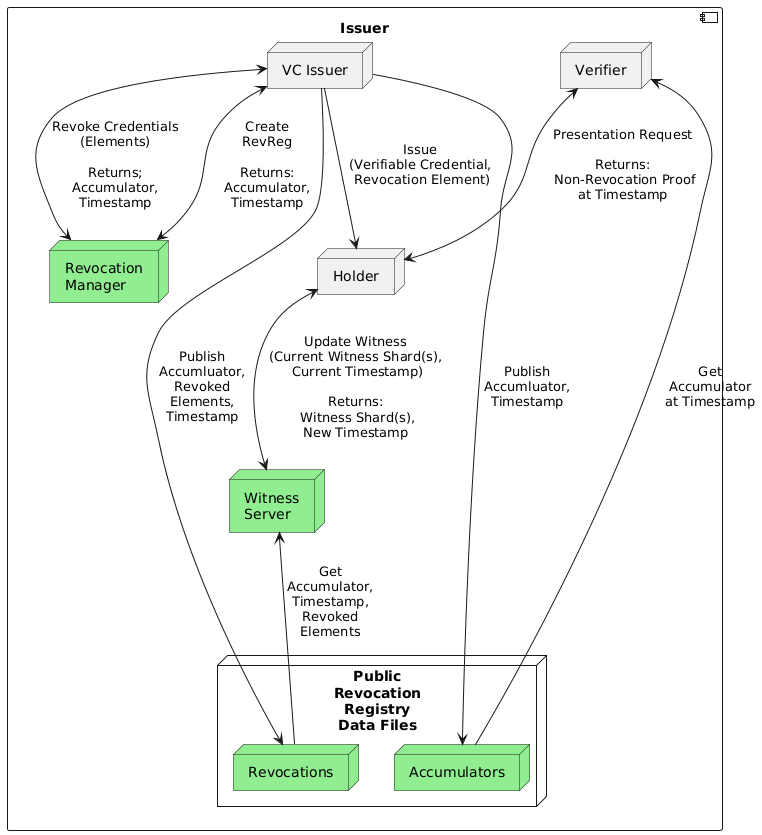
- The issuer issues credentials that reference a revocation registry (a URL resolving to a couple of data files), and includes for the holder a unique revocation element (a GUID) their current witness, and the timestamp of that witness.
- The holder gets a wallet from a wallet vendor.
- The wallet vendor (or other parties) operate Witness Servers, purpose built for this scheme that allow holders to get regular updates to their revocation witnesses. The holders get updates regularly, ideally **NOT** at the time they create a verification for presentation. Further, the holder **MAY** update their witness independent of the witness server.
- The issuer publishes files that include batches of revocations with a given accumulator and timestamp. One of the files lists all of the elements (GUIDs) of the revoked credentials in each batch.
- Holders request that a Witness Server(s) update their witnesses, providing the RevRegId and witness for each witness to be updated. This is not a one time request-response, but an ongoing activity by the WS to keep all of the witnesses for all holders update across multiple batches.
- A Witness Server monitors all of the Revocation Registries for all of its client holders, retrieves the batches of revocations for each, and updates each of the witnesses.
- Periodically, such as in the background or on app startup, the holder requests from the Witness Server all of their updated witnesses. The goal is to separate getting updated witnesses from the generation of a proof using those witnesses.
- On request from a verifier, the holder uses their updated witnesses to generate a non-revocation proof as part of a verifiable presentation.
- This assumes that their on-hand updated witness is "fresh enough" for the verifier. If not, at presentation time the holder could retrieve the data needed to update the witness themselves (no Witness Server involvement), or could get another update from the Witness Server.
The remainder of this document describes in greater detail the approach, participants, data models, and flow.
## The Cryptography
The revocation scheme is based on the use of Accumulators, as first described in [Nyugen (2005)](https://link.springer.com/chapter/10.1007/978-3-540-30574-3_19).
The layman's description of the process, without getting into the math, is as follows:
- The issuer generates a private key for a revocation registry (RevReg), and as it issues VCs, it includes in each credential an element, and a resolvable identifier for the RevReg. The RevReg includes the information needed for all holders to generate non-revocation proofs about their VC.
- Peridocially, the issuer revokes a batch (1 or more) of VCs. To do so, it calculates a new accumulator (using its private key) to include the elements of the newly revoked VCs, and publishes an update to the published RevReg.
- To prove their (unrevoked) VC is not revoked at a given point in time, the holder must get a list of all revoked elements and generate from those a `witness` (a number) for their VC. Given their element and witness, the holder can generate a proof that their credential is not revoked without sharing either their element or witness.
- The verifier gets the accumulator for the point in time used by the holder, and uses the accumulator and public key to verify the proof from the holder.
The challenging part of this process is the calculation of the holder's witness. For a sufficiently scaled use case (millions of credentials with many revocations), the calculation of a witness is beyond the capabilities of a mobile wallet. When the issuer publishes the accumulator and list of elements of newly revoked credentials, holders using that accumulator must update their witness based on all the revocation elements since their last witness update. If that list is large, the calculation could take a long time -- many seconds to minutes -- on a mobile phone. As such, ALLOSAUR proposes the use of a "Witness Service" (WS in this article) to do the witness calculations on behalf of the holder. The Holder provides the WS with their witness and the timestamp it was last updated, and the WS returns a new witness and timestamp based on the revocations done between the two timestamps.
## ALLOSAUR Features
ALLOSAUR defines key two enhancements to the core approach, one for security, and one for privacy.
For security, the private key used for a Revocation Registry can be generated and used by multi-parties using a multi-party computation (MPC). That way, no individual holds the private key, and multiple parties must be compromised to get the key.
For privacy, the ALLOSAUR WS can be implemented such that instead of the holder giving its entire witness, it shards the witness and makes a set of calls to one or more WS instances, passing to each a shard and its last update timestamp. The holder receives back a set of responses (shard of new witness and timestamp) and from those, can assemble a new witness at a new timestamp.
In this article, we are neutral on whether the security feature is used (irrelevant for the discussion) and only consider the case of **not** using the privacy feature. The use of the privacy features changes the timing and flow of the process, and so requires a significant recalculation of the process.
## A Practical Unlinkable Revocation Scheme
The proposed design is summarized in the earlier diagram that shows a single instance of each participant.
### The Participants
- There are many VC Issuers.
- A VC Issuer may issue 1 or more types of VCs.
- Each type of VC issued by a VC issuer may have 0 or more revocation registries. If the population is sufficiently large (many million) with a sufficiently high revocation rate, a Issuer may choose to have multiple RevRegs for that type of VC.
- There are many Holders.
- Holders hold many revocable (and non-revocable) credentials.
- A holder may have the ability to update a witness themselves, and in some cases can (and should) do so instead of calling a WS.
- There can be many Witness Servers (WS)
- A WS may handle many witnesses for a set of holders.
- A holder should use one WS for all their witnesses, but they could use several WS's.
- The most likely operator of a WS is a wallet vendor, since they (in theory) are already "entrusted" with lots of credentials (and embedded attributes) about the holder.
- Others could operate WS instances, and holders could even self-host their WS.
### Details of the Process
#### Issuer Details
The issuer creates a RevReg as needed, and publishes it as two data files (`revocations` and `accumulators`). The RevReg identifier is resolvable to the location of the RevReg files. Both files grow over time, as the issuer revokes batches of credentials. The formats of the two files are defined below.
In creating a RevReg, the Issuer generates a key pair. The public key will go into the `accumulators` file as the first record in the file.
The issuer must interact with the Revocation Manager (which it will likely operate) as follows:
- Create the RevReg -- including defining it's location, initial parameters. The Revocation Manager generates a keypair for the RevReg and returns the public key to the Issuer, and the initial timestamp and accumulator for the RevReg.
- Register a batch of credentials to be issued. Each credential is represented as a GUID (16-byte string) from which the credential element is generated. The Revocation Manager calculates and returns for each the Witness for the element. Calculating the witness requires access to the private key for the RevReg.
GUID and corresponding witness to the holder.
- The credentials from the batch are issued as new credentials are created. The issuer requests more credentials periodically (up to the planned size of the entire RevReg) to make sure they don't run out of credentials to issue.
- Revoke a batch of credentials. The GUID for each revoked credential is passed in by the Issuer, and the Revocation Manager calculates a `delta` for each revoked credential, returning the batch of deltas, the timestamp, and new accumulator at that timestamp.
- Each delta is 48 bytes long, and is base64 encoded into a string 64 characters long.
On issueance of a credential to a holder, the issuer includes in the issued VC the revocation GUID for the credential, plus the calculated witness and its corresponding timestamp.
The `accumulators` file contains:
- an initial record with metadata about the revocation registry, including at least the public key of the RevReg (e.g. `{ "pk" : "<mulitkey public key>" }`).
- Likely additional fields will be defined and included -- such as the expected frequency of batch revocations and perhaps the expected average revocation batch sizes. Such information is useful to the Witness Servers in determing how often to check for updates to the registry, and for the verifier requesting sufficiently fresh non-revocation proofs.
- additional records each containing the timestamp (`ts`) for the batch (matching the batch's`ts` value in the `revocations` file), the number of revoked credentials in the batch, and the accumulator for that batch.
The `accumulators` file is needed by the verifier to verify the presentations from holders whose credentials are in the RevReg.
```json
{
"ts": "<timestamp>",
"metadata": [ "ver" : "1.0", "pk" : "<multikey>" ],
"accumulator": "<base64 accum>"
}
```
The `revocations` file contains a record for each batch (1 or more) credential revocations. Each record contains the timestamp (`ts`) of the batch, and an array containing the GUIDs and`deltas` from the credentials revoked in this batch. Each `guid` is 16 characters, then a literal `-`, and each delta is a 64-character base64 value, for a total of 65 bytes per revoked credential.
```json
{
"ts": <timestamp>,
"revoked": [
"<guid>-<delta>",
"<guid>-<delta>",
...
]
}
```
The `revocations` file is used to update holder witnesses, either by the holders themselves, or by Witness Servers. The revocations file **might** also have a specially defined signal to indicate that **all** of the credentials in the Revocation Registry have been revoked. That can be accomplished by an update to the accumulator such that all non-revocation proofs fail to verify, but an indicator in the `revocations` file would notify all of the holders of the situation without each having to check to see if their proof could be verified.
A record for a new batch is appended to the end of the two data files, using [JSON Lines](https://jsonlines.org).
An interesting optimization is that instead of using time-based (using Unix Time) timestamps, the value of `ts` could be the length of the `revocations` file at the end of the current record. Given such a "timestamp", a witness updater could make an HTTP request to retrieve the file starting from the next record to the end of the file, reducing the transmitted data. We'll see where that might come into play shortly.
#### Holder Details
The holder retrieves an issued VC from the issuer. In addition to storing the VC, the holder stores the RevReg data it needs:
- The RevReg ID.
- Their RevReg GUID from which can be derived their Revocation element.
- Their current witness.
- The `ts` associated with their current witness.
When presenting a revokable credential, the holder must have a witness for a sufficiently recent (ideally, the most recent) batch of revocations. Ideally, the verifier will tell the holder how fresh their proof of non-revocation must be based on the business case.
We'll get to how the holder stays up to date with its witness later.
#### Verifier Details
The verifier sends a presentation request to the holder. The verifier may or may specify what specific credential (type and/or issuer) they will accept, and may or may not know what RevReg the holder will need to use. The verifier may not even know if a holder will respond with credentials that are revokable, non-revokable or a combination of both.
Ideally, the verifier provides an indicator of how fresh any non-revocation proofs need be. Only the most mission critical use cases should need "up to the minute" revocation proofs, and the more lenient the verifier can be, the better for all. For example, a week would be ideal.
#### Witness Server Details
A Witness Server (WS) serves one more holders, each of whom may be in one or more RevRegs. We propose that the WS be designed to continually monitor all of the RevRegs asked for by its holder clients, and update the witnesses for those clients. This might work as follows:
- A holder requests that the WS update its witnesses, getting back a token for future identity.
- At the same time or later, the holder can request that the WS update one or more witnesses, providing for each the RevRegID and the holder's most recent timestamp and witness. Over time, the holder can request other witnesses be monitored.
- The WS updates each new witness to the latest batch it has for that RevReg (if any).
- Peridocially, the holder requests updates to its witnesses. The WS responds with the list of monitored RevRegs and for each, the new witness and timestamp for the holder.
The WS updates all the of the witnesses for all of its holders. It does something like:
- For each RevReg it knows about, retrieve all batches it has not previously processed from the RevReg (if any).
- Record the timestamp of the latest batch.
- For each witness within that RevReg, update the witness and the timestamp using the set of deltas in the batches not previously processed.
### Holder - Witness Server Interactions
As part of the installation process of a holder's wallet, it would request the services of one or more WSs. It might want to use several Witness Servers so that each only knows about some of the credentials it holds. That said, the use of multiple WS might create UX challenges.
On receiving a revokable credential, a holder would decide if and which WS will be used to update its witness.
- It could check the metadata of the RevReg (from the `defintion`) and learn that the rate of revocations is low enough that it doesn't need the services of a WS for that credential.
- If a WS is needed, it sends a request to a WS to monitor and update its witness for that credential.
Periodically, it updates its witnesses.
 Google Drive
Gist
Clipboard
Google Drive
Gist
Clipboard
 Sign in via Facebook
 Sign in via X(Twitter)
 Sign in via GitHub
 Sign in via Dropbox
 Sign in with Wallet






