zzzzzz
    • Create new note
    • Create a note from template
      • Sharing URL Link copied
      • /edit
      • View mode
        • Edit mode
        • View mode
        • Book mode
        • Slide mode
        Edit mode View mode Book mode Slide mode
      • Customize slides
      • Note Permission
      • Read
        • Only me
        • Signed-in users
        • Everyone
        Only me Signed-in users Everyone
      • Write
        • Only me
        • Signed-in users
        • Everyone
        Only me Signed-in users Everyone
    • Invite by email
      Invitee

      This note has no invitees

    • Publish Note

      Share your work with the world Congratulations! 🎉 Your note is out in the world Publish Note No publishing access yet

      Your note will be visible on your profile and discoverable by anyone.
      Your note is now live.
      This note is visible on your profile and discoverable online.
      Everyone on the web can find and read all notes of this public team.

      Your account was recently created. Publishing will be available soon, allowing you to share notes on your public page and in search results.

      Your team account was recently created. Publishing will be available soon, allowing you to share notes on your public page and in search results.

      Explore these features while you wait
      Complete general settings
      Bookmark and like published notes
      Write a few more notes
      Complete general settings
      Write a few more notes
      See published notes
      Unpublish note
      Please check the box to agree to the Community Guidelines.
      View profile
    • Commenting
      Permission
      Disabled Forbidden Owners Signed-in users Everyone
    • Enable
    • Permission
      • Forbidden
      • Owners
      • Signed-in users
      • Everyone
    • Suggest edit
      Permission
      Disabled Forbidden Owners Signed-in users Everyone
    • Enable
    • Permission
      • Forbidden
      • Owners
      • Signed-in users
    • Emoji Reply
    • Enable
    • Versions and GitHub Sync
    • Note settings
    • Note Insights New
    • Make a copy
    • Transfer ownership
    • Delete this note
    • Save as template
    • Insert from template
    • Import from
      • Dropbox
      • Google Drive
      • Gist
      • Clipboard
    • Export to
      • Dropbox
      • Google Drive
      • Gist
    • Download
      • Markdown
      • HTML
      • Raw HTML
Menu Note settings Note Insights Versions and GitHub Sync Sharing URL Create Help
Create Create new note Create a note from template
Menu
Options
Make a copy Transfer ownership Delete this note
Import from
Dropbox Google Drive Gist Clipboard
Export to
Dropbox Google Drive Gist
Download
Markdown HTML Raw HTML
Back
Sharing URL Link copied
/edit
View mode
  • Edit mode
  • View mode
  • Book mode
  • Slide mode
Edit mode View mode Book mode Slide mode
Customize slides
Note Permission
Read
Only me
  • Only me
  • Signed-in users
  • Everyone
Only me Signed-in users Everyone
Write
Only me
  • Only me
  • Signed-in users
  • Everyone
Only me Signed-in users Everyone
  • Invite by email
    Invitee

    This note has no invitees

  • Publish Note

    Share your work with the world Congratulations! 🎉 Your note is out in the world Publish Note No publishing access yet

    Your note will be visible on your profile and discoverable by anyone.
    Your note is now live.
    This note is visible on your profile and discoverable online.
    Everyone on the web can find and read all notes of this public team.

    Your account was recently created. Publishing will be available soon, allowing you to share notes on your public page and in search results.

    Your team account was recently created. Publishing will be available soon, allowing you to share notes on your public page and in search results.

    Explore these features while you wait
    Complete general settings
    Bookmark and like published notes
    Write a few more notes
    Complete general settings
    Write a few more notes
    See published notes
    Unpublish note
    Please check the box to agree to the Community Guidelines.
    View profile
    Engagement control
    Commenting
    Permission
    Disabled Forbidden Owners Signed-in users Everyone
    Enable
    Permission
    • Forbidden
    • Owners
    • Signed-in users
    • Everyone
    Suggest edit
    Permission
    Disabled Forbidden Owners Signed-in users Everyone
    Enable
    Permission
    • Forbidden
    • Owners
    • Signed-in users
    Emoji Reply
    Enable
    Import from Dropbox Google Drive Gist Clipboard
       Owned this note    Owned this note      
    Published Linked with GitHub
    1
    • Any changes
      Be notified of any changes
    • Mention me
      Be notified of mention me
    • Unsubscribe
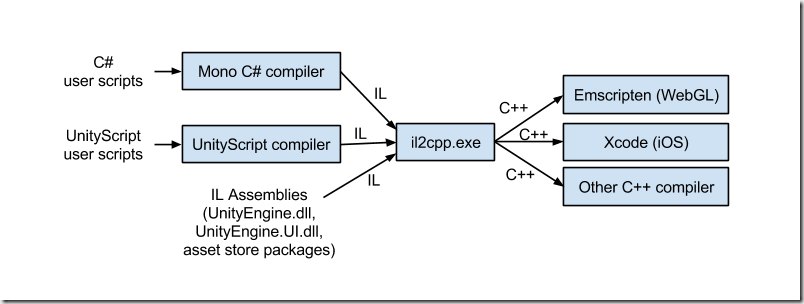
    ## Introduction Before we dive into the details, let's start by understanding what [IL2CPP](https://docs.unity3d.com/Manual/IL2CPP.html) is and how it differs from the Mono backend. IL2CPP stands for Intermediate Language To C++ and serves as an alternative scripting backend to Mono in Unity Engine. It offers enhanced support for applications across a wide range of platforms. The IL2CPP backend converts MSIL (Microsoft Intermediate Language) code (for example, C# code in scripts) into C++ code, then uses the C++ code to create a native binary file (for example, .exe, .apk) for your chosen platform. This process, known as ahead-of-time ([AOT](https://en.wikipedia.org/wiki/Ahead-of-time_compilation)) compilation. The Mono backend, instead, compiles code at runtime, with a technique called just-in-time compilation ([JIT](https://en.wikipedia.org/wiki/Just-in-time_compilation)). ![](https://infiniteblogs.blob.core.windows.net/medias/10/il2cpp-toolchain-smaller_thumb_70632422.png) Note that, this scripting backend will generate a file called "global-metadata.dat", this file is platform-independent, created by this scripting backend containing all the metadata for the application ( such as methods, properties, fields... ). I won't go further about this, I would like to keep this beginner friendly, but in case you are interested [here](https://katyscode.wordpress.com/2020/12/27/il2cpp-part-2/) is an interesting write up about it. But also a native binary compiled from C++, named "GameAssembly.dll". This is going to be a basic tutorial that covers the basics of IL2CPP game hacking, there will be more posts, more in depth, but in the meantime if you have any questions, feel free to ask them under this post. From now on, throughout this post, we'll attack a game called "Redmatch 2", but you can apply it for the game you want. ## [I] Reversing the game. In this section, we will explore the tools we can use to reverse this game and after we will attack it. The first tool that we will need is [Il2CppDumper](https://github.com/Perfare/Il2CppDumper), we will also need IDA or [Ghidra](https://github.com/NationalSecurityAgency/ghidra) (free) if you don't have it and last thing we need is [dnSpy](https://github.com/dnSpy/dnSpy) We will simply try to get our local player, instance. 1. Starting from scratch (Recon) - Looking at the game directory, we can see different files ![](https://hackmd.io/_uploads/SkumXRUuh.png) With the information we aknowledged earlier, we are certain that we are facing an IL2CPP compiled game. 2. Dumping the game. - For this step, we are going to use Il2Cpp Dumper because, this is a great tool and it will simplify a lot of work for us. It will basically extract all the metadata information and try to restore the .Net dlls that we can look into using dnSpy, but we won't have function bodies. Run Il2CppDumper.exe, and import the GameAssembly.dll or libil2cpp.so and then the file containing all the metadata. This should be your output : ![](https://hackmd.io/_uploads/B1y2YAIuh.png) 3. Analysis of the game with dnSpy and IDA. - Open dnSpy and drag the Assembly-CSharp.dll inside dnSpy which is typically the assembly containing the core game code. To put it simply, an assembly refers to compiled code that make up to a .NET application. - When we open that assembly, we get all these namespaces, those will be useful later on. ![](https://hackmd.io/_uploads/BkiY2RLO3.png) - the "-" namespace, most of the time, will hold the game code, we can open it and search for strings like "Player", if it isn't obfuscated. ![](https://hackmd.io/_uploads/ryc0ekw_h.png) Here we can see a private field, most likely our networked local player, that we can verify using the next tool, IDA. - Il2Cpp Dumper has some helper scripts, like "ida_with_struct.py" or "ghidra_with_struct", that we can use to simplify the process. These scripts will use 2 files that we generated previously "script.json" and "il2cpp.h", the scripts will parse the script.json and rename all the data he could restore before but inside IDA or Ghidra. In order to verify our previous theory, we can either search for the class and function name, or use the RVA (relative virtual address) and then look for references of the function. ![](https://hackmd.io/_uploads/Bk5q8kwun.png) And yeah, it is used in many place which means it may be what we are looking for, but let me spoil, it isn't what we're looking for really haha. What we are really looking for is this : ![](https://hackmd.io/_uploads/B1LyJLvu3.png) because this class has a lot of methods and fields, its name is what we might look for, and after reversing it a bit I can tell that's what we want. Make sure to make good of use of Cheat Engine, because it makes things even simpler, you can basically use the Mono dissector, to get information about anything you want in the game :) And that's about it for getting our local player, we will now see, how we can use that information to attack the game, we will try to get our positions, but be aware that the game has a small anticheat that I did not try look at because I wasn't planning on modifying my speed or anything :D ## [II] Attacking the game. In this section, we will explore on how we can access our local player and we will try to get our position ! (Internal) Earlier we have learnt about getting our local player, for this game, keep in mind that it can be a little bit different for your game but it should be quite the same. There are 2 main ways of accessing our local player, we could either scaffold the IL2CPP api, with the exported functions from the dll, or we could use the data from our dump. I'll opt for the latter choice, because it will be easier to get things going and I can reserve the scaffolding for another post :D Let's start creating a new project and making our dll. We can import some of our structures that are inside il2cpp.h, that we find useful, for me it's this one : ```cpp struct PlayerController_StaticFields { bool _IsStandingOnTeammate_k__BackingField; struct System_Action_MyceliumPlayer__DamageData____o* OnDie; struct System_Action_ItemEnum__o* OnSuccessfulShot; struct System_Action_PlayerController__o* OnSpawn; struct System_Action_MyceliumPlayer__int__o* OnWeaponSwitched; struct System_Action_o* OnShotTeammate; struct PlayerController_o* LocalInstance; bool Interacting; bool WasInteracting; }; struct PlayerController_c { Il2CppClass_1 _1; struct PlayerController_StaticFields* static_fields; void* rgctx_data; Il2CppClass_2 _2; void** vtable; }; bool WINAPI DllMain(HMODULE mod, DWORD ul_reason_for_call, LPVOID lpReserved) { if (ul_reason_for_call == DLL_PROCESS_ATTACH) { const HANDLE thread_handle = CreateThread(0, 0, reinterpret_cast<LPTHREAD_START_ROUTINE>(main_thread), mod, 0, 0); if (thread_handle) { DisableThreadLibraryCalls(mod); CloseHandle(thread_handle); } } return TRUE; } ``` because that's what I'm going to use in order to get, make sure to also import the structure for Il2CppClass_1 and Il2CppClass_2.. also set up our entry point ```cpp struct Vector3 { float x, y, z; Vector3(float _x, float _y, float _z) : x(_x), y(_y), z(_z) {} std::string ToString() { return "(" + std::to_string(x) + ", " + std::to_string(y) + ", " + std::to_string(z) + ")"; } }; bool WINAPI main_thread(HMODULE module) { FILE* io_stream; AllocConsole(); freopen_s(&io_stream, "CONOUT$", "w", stdout); SetConsoleTitleA("[DEBUG]@RedMatch 2"); const uintptr_t game_assembly = reinterpret_cast<uintptr_t>(GetModuleHandleA("GameAssembly.dll")); // base address of gameassembly using unity_component_get_transform_t = uintptr_t(*)(uintptr_t component); // external function from Unity Engine using unity_transform_get_position = Vector3(*)(uintptr_t transform); unity_component_get_transform_t unity_get_transform = reinterpret_cast<unity_component_get_transform_t>(game_assembly + 14839136); // UnityEngine.Component$$get_transform" inside.json unity_transform_get_position unity_get_position = reinterpret_cast<unity_transform_get_position>(game_assembly + 14970016); // UnityEngine.Transform$$get_position inside script.json while (true) { PlayerController_c* player_class = *reinterpret_cast<PlayerController_c**>(game_assembly + 30097512); // the 30097512, comes from PlayerController_TypeInfo, which is used to access the static fields, but not only that :D uintptr_t local_player_instance = reinterpret_cast<uintptr_t>(player_class->static_fields->LocalInstance); if (local_player_instance == 0 || *reinterpret_cast<uintptr_t*>(local_player_instance + 0x10) == 0) // m_cachedptr [0x10] to make sure that we will not attempt to do something with an invalid object, and local player can be null if we inject while in main menu std::cout << "We are not in game.\n"; else { uintptr_t local_player_transform = unity_get_transform(local_player_instance); Vector3 local_player_position = unity_get_position(local_player_transform); std::cout << "Our local player class is at: 0x" << local_player_instance << " pos: " << local_player_position.ToString() << std::endl; } if (GetAsyncKeyState(VK_INSERT)) break; std::this_thread::sleep_for(std::chrono::milliseconds(200)); } FreeConsole(); FreeLibraryAndExitThread(module, 0); } ``` The Unity Engine make use of a lot of abstraction, for instance this class inherits from many other classes, meaning that we can get their fields, like I did for getting "m_Cachedptr" which is inside the Object class. You can also stack components on a gameobject, basically our Player Controller may hold another component that we could such as the Camera, but up to you to figure out how to do it :D ![](https://hackmd.io/_uploads/By8zd8PO2.png) And moment of truth : ![](https://hackmd.io/_uploads/r1LYdUDO3.png) We did it !1!1!1!! All we did is just read our position, but with a few lines (3) we can make a teleport hack :O, I'll let you and your creativity to make it happen :D I hope you guys enjoyed, if you have any questions, feel free to ask them under this post.

    Import from clipboard

    Paste your markdown or webpage here...

    Advanced permission required

    Your current role can only read. Ask the system administrator to acquire write and comment permission.

    This team is disabled

    Sorry, this team is disabled. You can't edit this note.

    This note is locked

    Sorry, only owner can edit this note.

    Reach the limit

    Sorry, you've reached the max length this note can be.
    Please reduce the content or divide it to more notes, thank you!

    Import from Gist

    Import from Snippet

    or

    Export to Snippet

    Are you sure?

    Do you really want to delete this note?
    All users will lose their connection.

    Create a note from template

    Create a note from template

    Oops...
    This template has been removed or transferred.
    Upgrade
    All
    • All
    • Team
    No template.

    Create a template

    Upgrade

    Delete template

    Do you really want to delete this template?
    Turn this template into a regular note and keep its content, versions, and comments.

    This page need refresh

    You have an incompatible client version.
    Refresh to update.
    New version available!
    See releases notes here
    Refresh to enjoy new features.
    Your user state has changed.
    Refresh to load new user state.

    Sign in

    Forgot password
    or
    Sign in via Google Sign in via Facebook Sign in via X(Twitter) Sign in via GitHub Sign in via Dropbox Sign in with Wallet
    Wallet ( )
    Connect another wallet

    New to HackMD? Sign up

    By signing in, you agree to our terms of service.

    Help

    • English
    • 中文
    • Français
    • Deutsch
    • 日本語
    • Español
    • Català
    • Ελληνικά
    • Português
    • italiano
    • Türkçe
    • Русский
    • Nederlands
    • hrvatski jezik
    • język polski
    • Українська
    • हिन्दी
    • svenska
    • Esperanto
    • dansk

    Documents

    Help & Tutorial

    How to use Book mode

    Slide Example

    API Docs

    Edit in VSCode

    Install browser extension

    Contacts

    Feedback

    Discord

    Send us email

    Resources

    Releases

    Pricing

    Blog

    Policy

    Terms

    Privacy

    Cheatsheet

    Syntax Example Reference
    # Header Header 基本排版
    - Unordered List
    • Unordered List
    1. Ordered List
    1. Ordered List
    - [ ] Todo List
    • Todo List
    > Blockquote
    Blockquote
    **Bold font** Bold font
    *Italics font* Italics font
    ~~Strikethrough~~ Strikethrough
    19^th^ 19th
    H~2~O H2O
    ++Inserted text++ Inserted text
    ==Marked text== Marked text
    [link text](https:// "title") Link
    ![image alt](https:// "title") Image
    `Code` Code 在筆記中貼入程式碼
    ```javascript
    var i = 0;
    ```
    var i = 0;
    :smile: :smile: Emoji list
    {%youtube youtube_id %} Externals
    $L^aT_eX$ LaTeX
    :::info
    This is a alert area.
    :::

    This is a alert area.

    Versions and GitHub Sync
    Get Full History Access

    • Edit version name
    • Delete

    revision author avatar     named on  

    More Less

    Note content is identical to the latest version.
    Compare
      Choose a version
      No search result
      Version not found
    Sign in to link this note to GitHub
    Learn more
    This note is not linked with GitHub
     

    Feedback

    Submission failed, please try again

    Thanks for your support.

    On a scale of 0-10, how likely is it that you would recommend HackMD to your friends, family or business associates?

    Please give us some advice and help us improve HackMD.


    Thanks for your feedback

    Remove version name

    Do you want to remove this version name and description?

    Transfer ownership

    Transfer to
      Warning: is a public team. If you transfer note to this team, everyone on the web can find and read this note.

        Link with GitHub

        Please authorize HackMD on GitHub
        • Please sign in to GitHub and install the HackMD app on your GitHub repo.
        • HackMD links with GitHub through a GitHub App. You can choose which repo to install our App.
        Learn more  Sign in to GitHub

        Push the note to GitHub Push to GitHub Pull a file from GitHub

          Authorize again
         

        Choose which file to push to

        Select repo
        Refresh Authorize more repos
        Select branch
        Select file
        Select branch
        Choose version(s) to push
        • Save a new version and push
        • Choose from existing versions
        Include title and tags
        Available push count

        Pull from GitHub

         
        File from GitHub
        File from HackMD

        GitHub Link Settings

        File linked

        Linked by
        File path
        Last synced branch
        Available push count

        Danger Zone

        Unlink
        You will no longer receive notification when GitHub file changes after unlink.

        Syncing

        Push failed

        Push successfully

