FabLab EDP
    • Create new note
    • Create a note from template
      • Sharing URL Link copied
      • /edit
      • View mode
        • Edit mode
        • View mode
        • Book mode
        • Slide mode
        Edit mode View mode Book mode Slide mode
      • Customize slides
      • Note Permission
      • Read
        • Only me
        • Signed-in users
        • Everyone
        Only me Signed-in users Everyone
      • Write
        • Only me
        • Signed-in users
        • Everyone
        Only me Signed-in users Everyone
      • Engagement control Commenting, Suggest edit, Emoji Reply
    • Invite by email
      Invitee

      This note has no invitees

    • Publish Note

      Share your work with the world Congratulations! 🎉 Your note is out in the world Publish Note

      Your note will be visible on your profile and discoverable by anyone.
      Your note is now live.
      This note is visible on your profile and discoverable online.
      Everyone on the web can find and read all notes of this public team.
      See published notes
      Unpublish note
      Please check the box to agree to the Community Guidelines.
      View profile
    • Commenting
      Permission
      Disabled Forbidden Owners Signed-in users Everyone
    • Enable
    • Permission
      • Forbidden
      • Owners
      • Signed-in users
      • Everyone
    • Suggest edit
      Permission
      Disabled Forbidden Owners Signed-in users Everyone
    • Enable
    • Permission
      • Forbidden
      • Owners
      • Signed-in users
    • Emoji Reply
    • Enable
    • Versions and GitHub Sync
    • Note settings
    • Note Insights
    • Engagement control
    • Transfer ownership
    • Delete this note
    • Save as template
    • Insert from template
    • Import from
      • Dropbox
      • Google Drive
      • Gist
      • Clipboard
    • Export to
      • Dropbox
      • Google Drive
      • Gist
    • Download
      • Markdown
      • HTML
      • Raw HTML
Menu Note settings Versions and GitHub Sync Note Insights Sharing URL Create Help
Create Create new note Create a note from template
Menu
Options
Engagement control Transfer ownership Delete this note
Import from
Dropbox Google Drive Gist Clipboard
Export to
Dropbox Google Drive Gist
Download
Markdown HTML Raw HTML
Back
Sharing URL Link copied
/edit
View mode
  • Edit mode
  • View mode
  • Book mode
  • Slide mode
Edit mode View mode Book mode Slide mode
Customize slides
Note Permission
Read
Only me
  • Only me
  • Signed-in users
  • Everyone
Only me Signed-in users Everyone
Write
Only me
  • Only me
  • Signed-in users
  • Everyone
Only me Signed-in users Everyone
Engagement control Commenting, Suggest edit, Emoji Reply
  • Invite by email
    Invitee

    This note has no invitees

  • Publish Note

    Share your work with the world Congratulations! 🎉 Your note is out in the world Publish Note

    Your note will be visible on your profile and discoverable by anyone.
    Your note is now live.
    This note is visible on your profile and discoverable online.
    Everyone on the web can find and read all notes of this public team.
    See published notes
    Unpublish note
    Please check the box to agree to the Community Guidelines.
    View profile
    Engagement control
    Commenting
    Permission
    Disabled Forbidden Owners Signed-in users Everyone
    Enable
    Permission
    • Forbidden
    • Owners
    • Signed-in users
    • Everyone
    Suggest edit
    Permission
    Disabled Forbidden Owners Signed-in users Everyone
    Enable
    Permission
    • Forbidden
    • Owners
    • Signed-in users
    Emoji Reply
    Enable
    Import from Dropbox Google Drive Gist Clipboard
       owned this note    owned this note      
    Published Linked with GitHub
    Subscribed
    • Any changes
      Be notified of any changes
    • Mention me
      Be notified of mention me
    • Unsubscribe
    Subscribe
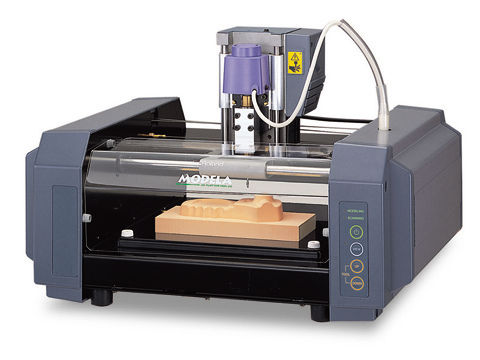
    # MODELA - Milling Machine **[Wiki Home](https://hackmd.io/@fablabedp/home)** ###### tags: `equipment` `CNC` ![](https://image.rolanddga.com/-/media/roland/images/support/product_shots/mdx20.jpg?rev=ad5a6994f3014e0caeb868ef89af134e&hash=6FBAB694BE0AE2FDF4A5E23672C632743844CC68) **Roland MODELA MDX-20 - Milling Machine** https://www.rolanddga.com/support/products/milling/modela-mdx-20-3d-milling-machine ### Technical Specs - Build Area: 203.2 x 152.4 x 62.4mm - Max Weight: 1000 g - Milling - Chuck: 6 or 1/8in OEM - Sindle motor: 10W - RPM: 6500 - Accepted material: Wood, Plaster, Resin, Chemical Wood, Aluminum (A5052), Brass - Scanning - Sensor: Piezoeletric - Method: Probing Contact, mesh - Speed: 4 - 15mm/sec - Interface - Standard: RS-232C - Baudrate: 9600 bps - Data Bits: 8 bits ## How to setup Modela Player [Do not use modela player for PCB] Modela has a dedicated software for the Roland Modela MDX-20 in which you have access to the materials available and you can define your tool arsenal. The software also allows you to prepare your model to be machined. Step 1: Open Modela Player Step 2: Select the machine Go to [File] and click on [Select machine...] to appear a new window Define the following: Model name: MDX-20 Command set: RML-1 Spindle Unit: Standard Printer Name: Find "Roland MODELA MDX-20" Step 3: Go to [File] and select [Open] It will open a File Explorer window in which you will select the model to input in the player. Modela Player allows the following formats: .mpj, .dxf, .igs, .mdj . Step 4: Go to [Set] and select [Model] It is now necessary to define the model orientation and its origin. In the Size and Orientation tap make sure of the following: Model Size: Length Check if the model dimensions are accurate and keep the ratio. If the model wasn’t modeled in the way that respects the coordinates, make use of the Orientation area to define the top surface by clicking on the dot that shows the right position in relation to the X/Y axis. Go to the [Origin] tab You can see that in a simple and clear way it allows to select the model origin just by clicking the dot , to define the origin. It is recommended to select the lower left corner. Click [Ok] Step 5: Make sure that the tools needed for the job are defined in the [Add/Remove Tool] option. If the tools selected for the task aren't already in the library please insert them as specified below: -Go to [Options] and select [Add/Remove Tool] a window will pop up. -Select [New]. A new tool slot will appear allowing to select the parameters according to the specs of the tool. -Give your tool a name keeping the following pattern: *tool diameter* *type of tool tip* eg: 1mm Square -Define the tool material. Typically the material is HSS (High Speed Steel). The CC (cemented carbide) is usually a special material and more expensive. - Set the flute diameter. - Click on [Cutting Parameters...] - Select the material through clicking on the list in front of the material. - Click on [Set Parameters] - Double check the cutting parameters and feel free to adjust according to the material of choice. It is recommended to leave them asdefault. - Officialize the parameters by clicking on "Register" Now your tool is ready to use? Step 6: Defining a new process This will allow you to choose the order and which processes you would like to make. It is strongly recommended to respect the following order: Surfacing -> Roughing -> Drilling* -> Finishing** * -The rilling depends on the part it can be ignored if not needed. ** - It is recommended to make a finishing process only after the part as been machined to that stage. Select the New process button with a ladder figure. A window will appear with the following options: o Surfacing o Roughing o Finishing o Drilling As the processes is very similar, setup-wise the following will be a generic followthrough in that new window. - Choose the type of process - Select the cutting surface - Choose the tool for the process - Select the area and depth - Choose the type of tool path to create - Select the cutting parameters - Enter a name for the process ### Throubleshooting - Doesn't operate: Is the STANDBY key on? Press the STANDBY key. Has operation not been paused by pressing the VIEW key (lighting up the VIEW LED)? Press the VIEW key to cancel the View state. Are the cables connected correctly? Check MODELA outputs to make sure they are connected correctly. Is the cable for the connection with the computer suited to the MODELA and the computer? For the cable, use a ptionally aveilable serial cable (such as XY-RS-34). A straight serial cable suchb as is commonly used to connect a modem cannot be used. Are the settings for the computer and the software correct? Check the following and make the correct settings. Data output port :Port connected to any one of COM1 throught COM4 Communication parameters:Bit rate of 9600, no parity, one data bit, stop bit 8, and hardware handshaking Select output device :MDX-15 or MDX-20 - Modeling mode LED/Scanning LED flashing (10x sec): Was the power switched on in the correct sequence? First turn on the computer, then turn on MODELA. This indicates a communications error. Switch off the power, then check the cable connections and the port setting for the driver. Was the computer restarted? When the computer has been restarted, switch the power to the MODELA off, wait a few seconds, then switch it back on. - All LEDs fashing slowly: Has the power cord come loose from the tool? Switch off power and connect the cords to the jacks. - Errors during printing - Speed drops during cutting When cutting a workpiece of uneven hardness, such as wood, the MODELA may slow down automatically (to a minimum speed of 0.1mm). Once the MODELA has gone beyond the hard area, cutting continues at normal speed. - The standby LED is flashing slowly The workpiece cannot be cut, even when the speed is reduced. Switch the power off and back on. Make sure the cutting tool being used is appropriate for the hardness of the workpiece in use. Modify the software settings to cut the workpiece a little at a time. - Actual tool moviment diffent than data If an attempt is made to cut more deeply then the rage of moviment for the MODELA allows, the tool automaticallyt rises to te uppermost point. Check to make sure that the erpt settings in the cutting data are not too dseep, and that the tool extending from te sinde unit is not too short. - Correct cutting is impossible Are the tool, spindle, and workpiece all installed and loaded securely? Rethighten ghe setting screw for the tool and the mounting screws for the spindle. - Unusual noise is heard from the spindle The spindle unit is a consumebla part. Replace with a new spindle after 700 hours of use. - The sindle motor does not run The sindle motor is a consumable part. Replace with a new spindle motor after 700 hours of use. - The VIEW LED is flashing slowly (1 sec. interval) Is the fornt cover emovet? Install the front cover. When a sensor unit is installed, The VIEW LED does not flash. - Scanning LEDs flashing twice repeatedly: - Unexpect Program Operation - I can't open a file - The included software doesn't function - If an error mensage appears _All units in milimeters_

    Import from clipboard

    Paste your markdown or webpage here...

    Advanced permission required

    Your current role can only read. Ask the system administrator to acquire write and comment permission.

    This team is disabled

    Sorry, this team is disabled. You can't edit this note.

    This note is locked

    Sorry, only owner can edit this note.

    Reach the limit

    Sorry, you've reached the max length this note can be.
    Please reduce the content or divide it to more notes, thank you!

    Import from Gist

    Import from Snippet

    or

    Export to Snippet

    Are you sure?

    Do you really want to delete this note?
    All users will lose their connection.

    Create a note from template

    Create a note from template

    Oops...
    This template has been removed or transferred.
    Upgrade
    All
    • All
    • Team
    No template.

    Create a template

    Upgrade

    Delete template

    Do you really want to delete this template?
    Turn this template into a regular note and keep its content, versions, and comments.

    This page need refresh

    You have an incompatible client version.
    Refresh to update.
    New version available!
    See releases notes here
    Refresh to enjoy new features.
    Your user state has changed.
    Refresh to load new user state.

    Sign in

    Forgot password

    or

    By clicking below, you agree to our terms of service.

    Sign in via Facebook Sign in via Twitter Sign in via GitHub Sign in via Dropbox Sign in with Wallet
    Wallet ( )
    Connect another wallet

    New to HackMD? Sign up

    Help

    • English
    • 中文
    • Français
    • Deutsch
    • 日本語
    • Español
    • Català
    • Ελληνικά
    • Português
    • italiano
    • Türkçe
    • Русский
    • Nederlands
    • hrvatski jezik
    • język polski
    • Українська
    • हिन्दी
    • svenska
    • Esperanto
    • dansk

    Documents

    Help & Tutorial

    How to use Book mode

    Slide Example

    API Docs

    Edit in VSCode

    Install browser extension

    Contacts

    Feedback

    Discord

    Send us email

    Resources

    Releases

    Pricing

    Blog

    Policy

    Terms

    Privacy

    Cheatsheet

    Syntax Example Reference
    # Header Header 基本排版
    - Unordered List
    • Unordered List
    1. Ordered List
    1. Ordered List
    - [ ] Todo List
    • Todo List
    > Blockquote
    Blockquote
    **Bold font** Bold font
    *Italics font* Italics font
    ~~Strikethrough~~ Strikethrough
    19^th^ 19th
    H~2~O H2O
    ++Inserted text++ Inserted text
    ==Marked text== Marked text
    [link text](https:// "title") Link
    ![image alt](https:// "title") Image
    `Code` Code 在筆記中貼入程式碼
    ```javascript
    var i = 0;
    ```
    var i = 0;
    :smile: :smile: Emoji list
    {%youtube youtube_id %} Externals
    $L^aT_eX$ LaTeX
    :::info
    This is a alert area.
    :::

    This is a alert area.

    Versions and GitHub Sync
    Get Full History Access

    • Edit version name
    • Delete

    revision author avatar     named on  

    More Less

    Note content is identical to the latest version.
    Compare
      Choose a version
      No search result
      Version not found
    Sign in to link this note to GitHub
    Learn more
    This note is not linked with GitHub
     

    Feedback

    Submission failed, please try again

    Thanks for your support.

    On a scale of 0-10, how likely is it that you would recommend HackMD to your friends, family or business associates?

    Please give us some advice and help us improve HackMD.


    Thanks for your feedback

    Remove version name

    Do you want to remove this version name and description?

    Transfer ownership

    Transfer to
      Warning: is a public team. If you transfer note to this team, everyone on the web can find and read this note.

        Link with GitHub

        Please authorize HackMD on GitHub
        • Please sign in to GitHub and install the HackMD app on your GitHub repo.
        • HackMD links with GitHub through a GitHub App. You can choose which repo to install our App.
        Learn more  Sign in to GitHub

        Push the note to GitHub Push to GitHub Pull a file from GitHub

          Authorize again
         

        Choose which file to push to

        Select repo
        Refresh Authorize more repos
        Select branch
        Select file
        Select branch
        Choose version(s) to push
        • Save a new version and push
        • Choose from existing versions
        Include title and tags
        Available push count

        Pull from GitHub

         
        File from GitHub
        File from HackMD

        GitHub Link Settings

        File linked

        Linked by
        File path
        Last synced branch
        Available push count

        Danger Zone

        Unlink
        You will no longer receive notification when GitHub file changes after unlink.

        Syncing

        Push failed

        Push successfully

