# OpenTuner
video :
[2016/6/14] [](https://www.youtube.com/watch?v=uY1X3Iv2UVA)https://www.youtube.com/watch?v=uY1X3Iv2UVA
[OpenTuner](http://opentuner.org/): An extensible framework for program autotuning
目的
1. 延續之前 raytracing 的實驗,透過 OpenTuner,找到更快的編譯器選項來加速程式執行
2. 重現 OpenTuner 論文中的實驗,並更新若干 gcc-6 支援的新編譯參數
1. 像是 LTO, auto-vectorization
3. 找出自動改善程式效能的機制
## 文件
* [](http://groups.csail.mit.edu/commit/papers/2014/ansel-pact14-opentuner-slides.pdf)[http://groups.csail.mit.edu/commit/papers/2014/ansel-pact14-opentuner-slides.pdf](http://groups.csail.mit.edu/commit/papers/2014/ansel-pact14-opentuner-slides.pdf)
* [](http://groups.csail.mit.edu/commit/papers/2013/MIT-CSAIL-TR-2013-026.pdf)[http://groups.csail.mit.edu/commit/papers/2013/MIT-CSAIL-TR-2013-026.pdf](http://groups.csail.mit.edu/commit/papers/2013/MIT-CSAIL-TR-2013-026.pdf)
* Tutorials
* [Optimizing Block Matrix Multiplication](http://opentuner.org/tutorial/gettingstarted/)
* [Creating OpenTuner Techniques](http://opentuner.org/tutorial/techniques/).

* 用機器/程式自己學習,並自己去調整編譯器參數。
## 論文閱讀及整理
參考資料:
* [](http://groups.csail.mit.edu/commit/papers/2014/ansel-pact14-opentuner-slides.pdf)[http://groups.csail.mit.edu/commit/papers/2014/ansel-pact14-opentuner-slides.pdf](http://groups.csail.mit.edu/commit/papers/2014/ansel-pact14-opentuner-slides.pdf)
* [](http://groups.csail.mit.edu/commit/papers/2013/MIT-CSAIL-TR-2013-026.pdf)[http://groups.csail.mit.edu/commit/papers/2013/MIT-CSAIL-TR-2013-026.pdf](http://groups.csail.mit.edu/commit/papers/2013/MIT-CSAIL-TR-2013-026.pdf)
* [](http://opentuner.org/slides/opentuner-cgo2015-ansel-opentuner-intro.pdf)[http://opentuner.org/slides/opentuner-cgo2015-ansel-opentuner-intro.pdf](http://opentuner.org/slides/opentuner-cgo2015-ansel-opentuner-intro.pdf)
對GCC Optimizations來說,大約共有10^806個組合。而OpenTuner可以讓user決定search spaces及參數,這樣能捨去某些沒意義的組合。再透過AUC Bandit technique的方法來找出最佳的參數跟組合。
* OpenTuner introduces the concept of ensembles of search techniques to program autotuning, which allow many search techniques to work together to find an optimal solution.
* OpenTuner provides more sophisticated search techniques than typical program autotuners. This enables expanded uses of program autotuning to solve more complex search problems and pushes the state of the art forward in program autotuning in a way that can easily be adopted by other projects.
* We show that OpenTuner is able to succeed both in massively large search spaces, exceeding 10^3600 possible configurations in size, and in smaller search spaces using less than 2% of the tests required for exhaustive search.
<undefined style="color: rgb(0, 0, 0); font-family: Helvetica; font-size: medium; letter-spacing: normal;">* **Objectives **</undefined><span style="color: rgb(0, 0, 0); font-family: Helvetica; font-size: medium; letter-spacing: normal;"></span>
OpenTuner supports multiple user defined objectives. Result records have fields for time, accuracy, energy, size, confidence, and user defined data. The default objective is to minimize time.
## 搜尋方式
* AUC Bandit Meta Techinque:
* opentuner 使用 multi-armed bandit 搭配 sliding window 來進行參數的選擇. sliding window 會考慮歷史選擇的子集. 這樣的技巧會去使用exploitation 和 exploration 的方法來找出最佳的參數.
* multiarmed bandit problem :一個關於選擇要玩幾個玩哪些吃角子老虎機的問題

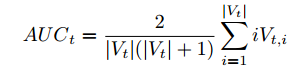
H : sliding window 的長度
Ht : 這個方法被使用的次數
C : 決定要往exploitation(利用目前的最佳方法)還是exploration(都找一找)的常數
If the technique yielded a new global best, a upward line is draw, otherwise a flat line is drawn
Vt : t的使用次數
Vti : t在第i次的使用,變快為1,變慢為0
**Opentuner AUCBandit實作方式:**
1. 在SearchDriver的main method 被tuningmain.py呼叫的時候, 主要執行兩個searchdriver 的method, 分別是run_generation_techniques 和 run_generation_result, 在run_generation_result 裡面會呼叫desired_result去找出要進行編譯的參數config檔, 然後在使用DesireResult這個class, 將資料傳送至DB裡面, 再由measureinterface取出這個參數檔在進行compile的動作.
2. 在預設的執行裡面, 程式的預設方法名字為AUCBanditMetaTechniqueA, 這個方法是由AUCBandit的演算法去計算和評估不同演算法執行效果, 然後決定下一個要用什麼方法來找出答案.
3. 在AUCBanditMetaTechniqueA會評估的演算法分別是:
* DifferentialEvolutionAlt
* UniformGreedyMutation
* NormalGreedyMutation
* RandomNelderMead
4\. 在AUCBanditMetaTechnique.desired_result裡面, 他會回傳下一個要使用的方法, 而這個方法是由AUCBanditQueue.bantid_score所計算出來的分數來排序, 計算如下:
* def bandit_score(self, key):
* return (self.exploitation_term(key) +
* self.C * self.exploration_term(key))
1. exploitation_term 是繼續使用這個方法的權重, 計算方法為: 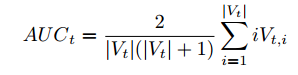
* def exploitation_term_fast(self, key):
* score = self.auc_sum[key]
* pos = self.use_counts[key]
* if pos:
* return score * 2.0 / (pos * (pos + 1.0))
* else:
* return 0.0
* score: 該方法目前的分數
* pos: 該方法的使用次數
* 在進行測量完後, 如果這個方法的使用是成功的, 應該是執行的cost time 是有實際時間(並非timeout or error), 會將目前的使用次數加到這個方法的分數, 所以這個方法如果一直成功的找到參數, 權重值將會越來越大
1. exploration_term 是探索別的方法的權重值, 在於下面這個算式的後一項
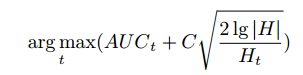
* def exploration_term(self, key):
* if self.use_counts[key] > 0:
* return math.sqrt((2.0 * math.log(len(self.history), 2.0))
/ self.use_counts[key])
* else:
* return float(’inf’)
1. 計算出所有權重值並排序後, 將最大的排在前面優先執行.
* def ordered_keys(self):
* """select the next technique to use"""
* keys = list(self.keys)
* random.shuffle(keys) # break ties randomly
* keys.sort(key=self.bandit_score)
* (中間有一些debug code)
* return reversed(keys)
* Other Techniques:
* differential evolution
* Torczon hillclimbers
* pattern search
* particle swarm optimization
* random search
* Approximate computing
## 實驗過程
* 取得 opentuner
* $ **git clone **[](https://github.com/jansel/opentuner)**[https://github.com/jansel/opentuner](https://github.com/jansel/opentuner)**
* 設定 opentuner 和安裝相關套件
* $ **sudo apt-get install python-pip**
* $ **cd opentuner**
* $ **sudo pip2 install -r requirements.txt**
* $ **python2 ./venv-bootstrap.py**
* 檢驗[OpenTuner](https://embedded2016.hackpad.com/M4DGFtNnwcR)安裝是否正確
* $ **python2 examples/rosenbrock/rosenbrock.py**
* (請耐心等待)
* 預期會看到類似以下輸出:
* [ 11s] INFO opentuner.search.plugin.DisplayPlugin: tests=408, best {0: -23.143668049049325, 1: 539.7559014160715}, cost time=2285.7422, found by RandomNelderMead
* [ 14s] INFO opentuner.search.metatechniques: AUCBanditMetaTechniqueA: [(’UniformGreedyMutation’, 169), (’NormalGreedyMutation’, 169), (’RandomNelderMead’, 82), (’DifferentialEvolutionAlt’, 81)]
* [ 21s] INFO opentuner.search.plugin.DisplayPlugin: tests=696, best {0: -21.526731974511335, 1: 463.16217035120485}, cost time=513.1190, found by RandomNelderMead
* ...
* Final configuration {0: 1.0000000000001137, 1: 1.000000000000341}
* 測試 gccflags
* $ cd examples/gccflags
* 修改 `gccflags.py`:
* PARAMS_DEF_PATH = ’params.def’
* 設定 gcc params.def 的路徑,可以切換至自己的 params.def
* $ **./gccflags.py apps/matrixmultiply.cpp**
* 經過漫長的等待,會看到以下訊息:
* Best flags written to gccflags_final_config.{json,cmd}
## 實際安裝
得到:
* SAWarning: Got None for value of column configuration.id; this is unsupported for a relationship comparison and will not currently produce an IS comparison (but may in a future release)
* "(but may in a future release)" % column)
* [ 14s] INFO opentuner.search.plugin.DisplayPlugin: tests=400, best {0: -16.23205449352747, 1: 253.35928930209252}, cost time=10538.9986, found by DifferentialEvolutionAlt
* [ 17s] INFO opentuner.search.metatechniques: AUCBanditMetaTechniqueA: [(’NormalGreedyMutation’, 209), (’UniformGreedyMutation’, 131), (’DifferentialEvolutionAlt’, 107), (’RandomNelderMead’, 54)]
* ......
* [ 169s] INFO opentuner.search.plugin.DisplayPlugin: tests=5004, best {0: 0.9999999999977263, 1: 0.9999999999954525}, cost time=0.0000, found by RandomNelderMead
* Final configuration {0: 0.9999999999977263, 1: 0.9999999999954525}
* 官方說明文件顯示此問題已被解決,類似警告在之後的版本會被移除。
## 使用學習
* references:
* [Tutorial: Optimizing Block Matrix Multiplication](http://opentuner.org/tutorial/gettingstarted/)
* [Creating OpenTuner Techniques](http://opentuner.org/tutorial/techniques/)
**Optimizing Block Matrix Multiplication**
* $ **./gccflags.py apps/matrixmultiply.cpp**
* 等了很久會得到類似資訊可是停不下來:
* 加上 --no-dups --stop-after=xxx 就不會這些warning訊息了,加上stopafter就會在規定的時間內停止
* [ 4638s] INFO opentuner.search.plugin.DisplayPlugin: tests=1628, best #313, cost time=0.0809, found by NormalGreedyMutation
* [ 4639s] WARNING gccflags: gcc error apps/matrixmultiply.cpp:1:0: warning: variable tracking requested, but useless unless producing debug info
* // based on: [](http://blogs.msdn.com/b/xiangfan/archive/2009/04/28/optimize-your-code-matrix-multiplication.aspx)http://blogs.msdn.com/b/xiangfan/archive/2009/04/28/optimize-your-code-matrix-multiplication.aspx
* ^
* apps/matrixmultiply.cpp:1:0: warning: -fassociative-math disabled; other options take precedence
* isl_ctx.c:245: isl_ctx freed, but some objects still reference it
* apps/matrixmultiply.cpp: In function ‘T** make_test_matrix() [with T = float]’:
* apps/matrixmultiply.cpp:11:5: internal compiler error: 已經終止
* T** make_test_matrix() {
* ^
* Please submit a full bug report,
* with preprocessed source if appropriate.
* See <[](file:///usr/share/doc/gcc-5/README.Bugs)file:///usr/share/doc/gcc-5/README.Bugs> for instructions.
* [ 4639s] WARNING gccflags: gcc error apps/matrixmultiply.cpp:1:0: warning: variable tracking requested, but useless unless producing debug info
* // based on: [](http://blogs.msdn.com/b/xiangfan/archive/2009/04/28/optimize-your-code-matrix-multiplication.aspx)http://blogs.msdn.com/b/xiangfan/archive/2009/04/28/optimize-your-code-matrix-multiplication.aspx
* ^
* apps/matrixmultiply.cpp:1:0: warning: -fassociative-math disabled; other options take precedence
* isl_ctx.c:245: isl_ctx freed, but some objects still reference it
* apps/matrixmultiply.cpp: In function ‘T** make_test_matrix() [with T = float]’:
* apps/matrixmultiply.cpp:11:5: internal compiler error: 已經終止
* T** make_test_matrix() {
* ^
* Please submit a full bug report,
* with preprocessed source if appropriate.
* See <[](file:///usr/share/doc/gcc-5/README.Bugs)file:///usr/share/doc/gcc-5/README.Bugs> for instructions.
* [ 4676s] WARNING gccflags: gcc timeout
* [ 4677s] INFO opentuner.search.plugin.DisplayPlugin: tests=1644, best #313, cost time=0.0809, found by NormalGreedyMutation
* [ 4708s] WARNING gccflags: gcc timeout
* [ 4709s] INFO opentuner.search.plugin.DisplayPlugin: tests=1648, best #313, cost time=0.0809, found by NormalGreedyMutation
使用時間限制:
* $ ./gccflags.py apps/matrixmultiply.cpp --no-dups --stop-after=600
得到的最佳化結果爲:
* [ 633s] INFO opentuner.search.plugin.DisplayPlugin: tests=240, best #2429, cost time=0.0759, found by NormalGreedyMutation
比起-O3 時間提升一倍
* [ 2s] INFO gccflags: baseline perfs-O0=0.4963 -O1=0.1581 -O2=0.1596 -O3=0.1594
指令:
* g++ apps/matrixmultiply.cpp -o ./tmp.bin -lpthread -O2 -fno-aggressive-loop-optimizations -falign-jumps -fno-associative-math ............ --param=tree-reassoc-width=3 --param=uninit-control-dep-attempts=538 --param=unlikely-bb-count-fraction=25 --param=use-canonical-types=1 --param=vect-max-version-for-alias-checks=12 --param=vect-max-version-for-alignment-checks=20
**Creating OpenTuner Techniques**
## 實驗與分析
利用opentuner提供的其中3項範例,以1800秒對其進行測試:
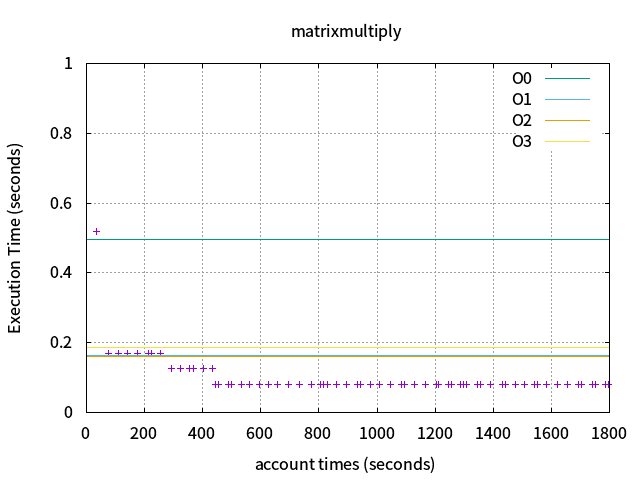
1\. matrixmultiply
baseline perfs : -O0=0.4966,-O1=0.1627,-O2=0.1612,-O3=0.1849
opentuner:0.5185 -> 0.0793
* [ 1832s] INFO opentuner.search.plugin.DisplayPlugin: tests=932, best #3414, cost time=0.0793, found by NormalGreedyMutation
利用opentuner對編譯選項進行調整與組合,執行時間比-O3快了2.33倍,執行時間也會隨著實驗次數的增加與調整遞減(與論文相同),以下為圖例:
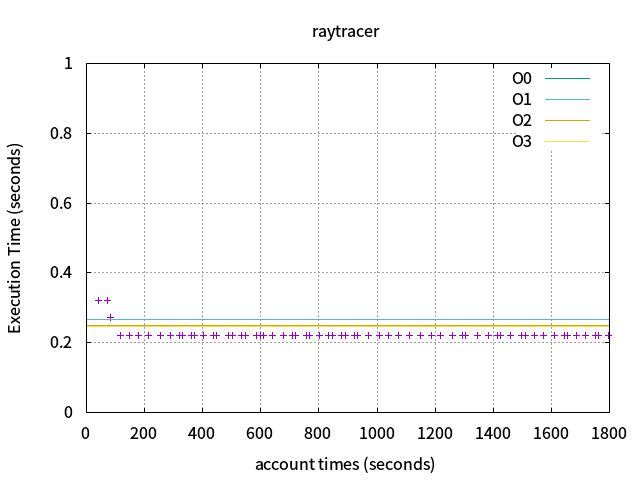
2\. raytracer
baseline perfs :-O0=1.2775,-O1=0.2655,-O2=0.2489,-O3=0.2475
opentuner:0.3214 -> 0.2215
* [ 1805s] INFO opentuner.search.plugin.DisplayPlugin: tests=584, best #6063, cost time=0.2215, found by NormalGreedyMutation
利用opentuner對編譯選項進行調整與組合,執行時間比-O3快了1.09倍,執行時間也會隨着實驗次數的增加與調整遞減(與論文相同),以下爲圖例:
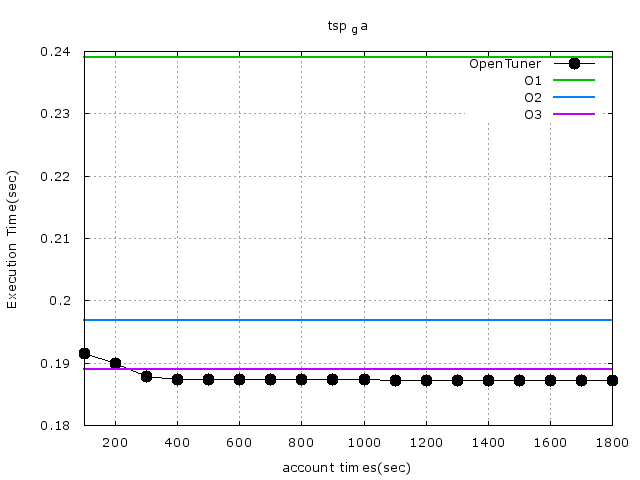
3\. tsp_ga
baseline perfs:-O0=0.6443,-O1=0.2390,-O2=0.1969,-O3=0.1890
opentuner:0.2213 -> 0.2203
* [ 1807s] INFO opentuner.search.plugin.DisplayPlugin: tests=1280, best #4365, cost time=0.2203, found by NormalGreedyMutation
利用opentuner對編譯選項進行調整與組合,執行時間比-O3慢了0.03s,執行時間也會隨着實驗次數的增加與調整遞減(與論文相同),以下爲圖例:

* 想問一下 每一點的數據計算方法是什麼呢? 是取目前的最低執行時間嗎?
* 是的,cost time會紀錄最快的執行速度,每個點皆爲cost time的值
* 嗯嗯 了解了 之前看論文有有畫出每一分鐘range 所以用單一分鐘的平均來表示 看起來我想錯了 Orz...不過還是很好奇他的論文中每一點的計算方法, 如果都取最低執行時間的話, 那應該都會取到最低點才是, 但是他取的點又都在range中靠近中間的部位
* 會在研究看看@@ 而且我們畫出的數據與論文中差別有點多哈哈
* 應該是如何取數值的問題, 因為在每一分鐘之內, 有些點的數值是timeout的, 目前我是忽略掉, 但是感覺又不太對
* 我的數據也會有一部分是time out的,所以圖例上的間隔不平均
* 嗯嗯 我想應該要看看其他相關論文 看他們是怎麼取數值的

除了第一個點,後面的點的數值都一樣
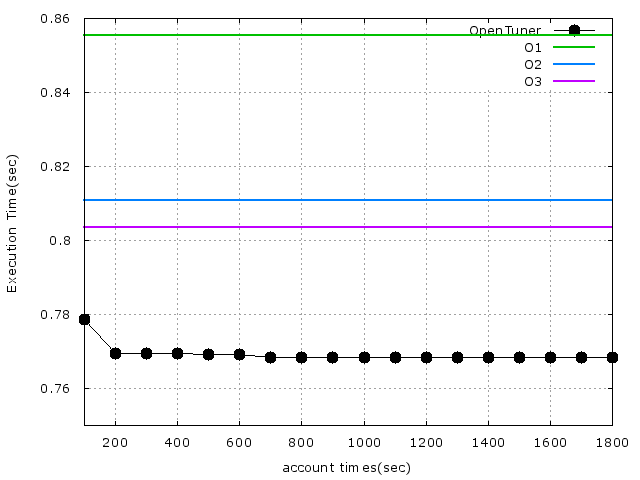
利用gccflags_minimal所跑出來的結果圖:
* 有點接近論文上的結果了,但還需要進一步研究,gccflags跟gccflags_minimal的差別在哪?
* 看了一下發現,gccflags_minimal是gccflags的精簡版
**小結**
可以看到除了matrixmultimply之外,raytracer和tsp_ga並沒有獲得很好的改善。
## 對Raytracing進行測試
利用opentuner延續對raytracing程式碼進行測試,找出最優化的編譯參數方案。
思維:除了調整 gcc flags,可以建立一個表格,讓 OpenTuner 透過嘗試,在視覺上相似的前提,決定某些點可以不去進行運算
* [An Attempt at Adaptive Sampling for Photorealistic Image Generation: Learning Sampling Schemes for Monte Carlo Rendering](http://cs229.stanford.edu/proj2015/175_report.pdf)
* 圖片的相似性,只要安裝 [imagemagick](http://www.imagemagick.org/),就有 [compare 工具](http://www.imagemagick.org/script/compare.php)能夠輸出原圖和新圖片的相似性
* sudo apt-get install imagemagick
**<u>實做</u>**
先使用opentuner example裡的gccflag_minimal做測試。
在Makefile加入多一個變數:
* $(TUNE)
* CC ?= g++
* CFLAGS = \
* -std=gnu99 -Wall -g
* LDFLAGS = \
* -lm
* CFLAGS += $(TUNE)
修改gccflag的code:
* gcc_cmd = ’make TUNE="’ //For Makefile
* gcc_cmd += ’ -O{0}’.format(cfg[’opt_level’])
* for flag in GCC_FLAGS:
* if cfg[flag] == ’on’:
* gcc_cmd += ’ -f{0}’.format(flag)
* elif cfg[flag] == ’off’:
* gcc_cmd += ’ -fno-{0}’.format(flag)
* for param, min, max in GCC_PARAMS:
* gcc_cmd += ’ --param {0}={1}’.format(
* param, cfg[param])
* gcc_cmd += ’"’
執行數據結果圖如下:
**調整gccflag**
首先修改gccflag裏的code:
* argparser.add_argument(’--compile-template’,
* default=’make EXEC={output} TUNE="{flags}"’,
* /* 設定默認編譯指令 */
* <s> def run_precompiled(self, desired_result, input, limit, compile_result,result_id):</s>
* <s> ...</s>
* <s> ...</s>
* <s> os.system(’make clean’) /* 每執行一次就make clean一次 */</s>
* <s>return Result(time=run_result[’time’])</s>
* <s> 對python不熟悉,所以不確定make clean放在這是否正確,但經過執行測試發現是正確的</s>
因爲對python不熟悉,因此不冒險,改從比較熟悉的Makefile下手:
* .PHONY: all
* all: clean $(EXEC) #[ ](https://embedded2016.hackpad.com/ep/search/?q=%23%E6%AF%8Fmake%E4%B8%80%E6%AC%A1&via=M4DGFtNnwcR)每次make之前都先clean
指令:
* ./gccflags.py raytracing.c --stop-after=1800 --cc=gcc --no-dups --output=raytracing
* 這裏第一個一定要吃一個參數爲source(raytracing.c),其實不太瞭解這個source會不會有很大的影響。但在example裏的其它3個程式測試後,發現source不會有影響,就算source吃的參數是不存在的,主要是--compile-template 要寫好。因此在這裏我就拿raytracing.c當source先
第一次測試:
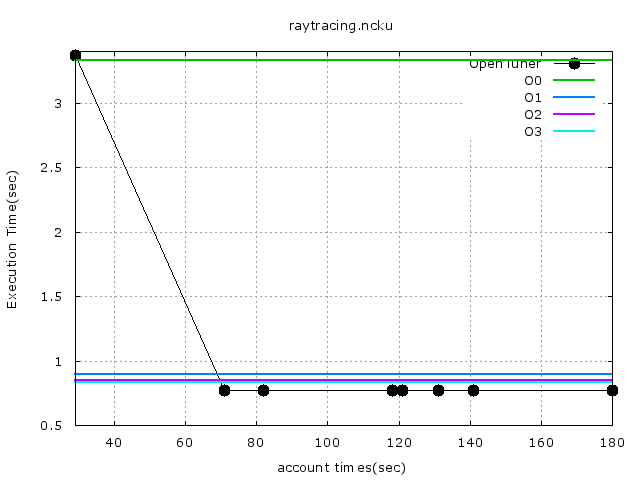
指令,先只跑個180秒測試看:
* ./gccflags.py raytracing.c --stop-after=180 --cc=gcc --no-dups --output=raytracing
發現有很多gccflag只能對C++/ObjC++使用,對C程式是不能使用的,因此便可以將它們從搜尋範圍裏排除掉:
* cc1: warning: command line option ‘-fno-rtti’ is valid for C++/ObjC++ but not for C
* cc1: warning: command line option ‘-fno-strict-enums’ is valid for C++/ObjC++ but not for C
* cc1: warning: command line option ‘-fno-threadsafe-statics’ is valid for C++/ObjC++ but not for C
* cc1: warning: command line option ‘-fnothrow-opt’ is valid for C++/ObjC++ but not for C
第一次測試的結果圖:
第二次測試:
將剛剛那些C語言不支援的gccflag刪後執行,發現又多了幾個warning:
* warning: -fassociative-math disabled; other options take precedence
* #include <stdlib.h>
* WARNING gccflags: gcc error objects.c:1:0: warning: var-tracking-assignments changes selective scheduling
* #include <stdlib.h>
* objects.c:34:1: warning: branch target register load optimization is no t intended to be run twice
* <s>這些warning是不能正常執行的,因此也決定把這兩個也從gccflag搜尋範圍內刪除</s>
* 還需要在研究看看這些警告訊息,但opentuner會將這些警告訊息直接轉成gcc error,導致整個過程的數據很少,因此爲了讓這些編譯選項能順利通過,我多加了 -w 的選項,禁止所有警告訊息的出現。
再來是發現-funroll-loops 搭配O1、O2跟O3跟-fopt-info時,會有一堆關於
的訊息:
* math-toolkit.h:49:5: note: loop turned into non-loop; it never loops.
* math-toolkit.h:49:5: note: loop with 3 iterations completely unrolled
* math-toolkit.h:65:5: note: loop turned into non-loop; it never loops.
* math-toolkit.h:65:5: note: loop with 3 iterations completely unrolled
* math-toolkit.h:35:5: note: loop turned into non-loop; it never loops.
* math-toolkit.h:35:5: note: loop with 3 iterations completely unrolled
* ...
* ...
這些訊息並不會影響到整個編譯過程,但數量有點多。爲了更好的查看其它編譯訊息,因此決定將這些都隱藏起來,把-fopt-info給排除,這樣就不會看到這些訊息了。
最後還有一些錯誤:
* WARNING gccflags: gcc error raytracing.o: file not recognised: File truncated
* collect2: error: ld returned 1 exit status
* gcc error collect2: fatal error: ld terminated with signal 11 [Segmentation fault], core dumped
* compilation terminated.
* /usr/bin/ld: error in raytracing.o(.eh_frame); no .eh_frame_hdr table will be created.
* /usr/bin/ld: raytracing.o: invalid string offset 757084210 >= 231 for section `.strtab’
* 還需要在研究下...
以下爲第二次的結果圖,已經找到超越Ofast的gccflag組合了:
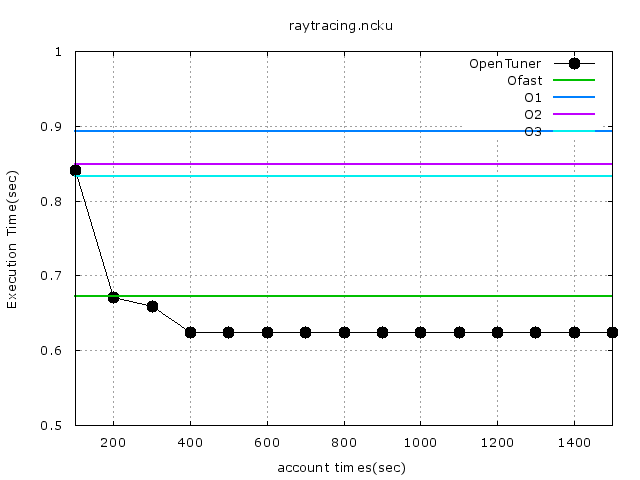
將存在gccflags_final_config.cmd裏最好的組合抓出來實際測試下的結果:
* # Rendering scene
* Done!
* Execution time of raytracing() : 0.620907 sec
## 對火箭程式進行測試:
O0 = 271.5187
O1 = 229.0346
O2 = 220.2001
O3 = 199.2868
1. 因為火箭的模擬程式執行時間較長, 所以將測試時間拉長至一個半小時, 但是應該要執行更久一點, 因為執行的次數比之前使用範例的執行次數少, 這樣會有樣本數不足的問題
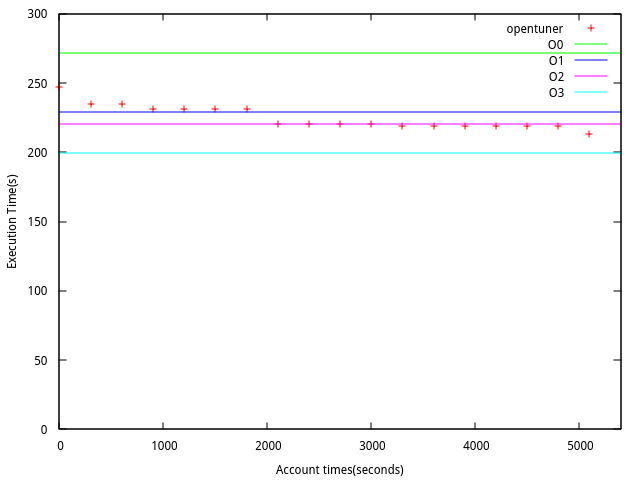
1. 在Makefile 原有的參數維持不變, 然後使用opentuner 加入參數進去, 在經過1個半小時實驗的結果.
2. 如果測試的時間拉長, 可能會有機會找到更低的執行時間?
3. 在執行的過程中, 有一些編譯會造成錯誤, 可能是在是不同編譯參數的組合時候, 產生編譯上的錯誤?
* [2016-06-22 16:35:25,909] WARNING gccflags: gcc error src/execution.cpp:1:0: warning: variable tracking requested, but useless unless producing debug info
* ///////////////////////////////////////////////////////////////////////////////
* ^
* In file included from include/class_hierarchy.hpp:14:0,
* from src/execution.cpp:18:
* include/global_header.hpp: In constructor â<80><98>Variable::Variable()â<80><99>:
* include/global_header.hpp:68:13: warning: unused variable â<80><98>dumâ<80><99> [-Wunused-variable]
* int dum = 1;
* ^
* In file included from src/execution.cpp:18:0:
* include/class_hierarchy.hpp: At global scope:
* include/class_hierarchy.hpp:224:5: warning: non-static data member initializers only available with -std=c++11 or -std=gnu++11
* };
* ^
* include/class_hierarchy.hpp:225:33: warning: non-static data member initializers only available with -std=c++11 or -std=gnu++11
* double slot[4] = {0, 0, 0, 0}; //SV slot# of quadriga
* ^
* include/class_hierarchy.hpp:226:31: warning: non-static data member initializers only available with -std=c++11 or -std=gnu++11
* int islot[4] = {0, 0, 0, 0}; //SV slot# of quadriga stored as integer
* ^
* include/class_hierarchy.hpp:224:5: warning: extended initializer lists only available with -std=c++11 or -std=gnu++11
* };
* ^
* ^
* include/class_hierarchy.hpp:225:33: warning: non-static data member initializers only available with -std=c++11 or -std=gnu++11
* double slot[4] = {0, 0, 0, 0}; //SV slot# of quadriga
* ^
* include/class_hierarchy.hpp:226:31: warning: non-static data member initializers only available with -std=c++11 or -std=gnu++11
* int islot[4] = {0, 0, 0, 0}; //SV slot# of quadriga stored as integer
* ^
* include/class_hierarchy.hpp:224:5: warning: extended initializer lists only available with -std=c++11 or -std=gnu++11
* };
* ^
* include/class_hierarchy.hpp:225:33: warning: extended initializer lists only available with -std=c++11 or -std=gnu++11
* double slot[4] = {0, 0, 0, 0}; //SV slot# of quadriga
* ^
* include/class_hierarchy.hpp:226:31: warning: extended initializer lists only available with -std=c++11 or -std=gnu++11
* int islot[4] = {0, 0, 0, 0}; //SV slot# of quadriga stored as integer
* ^
* src/execution.cpp: In function â<80><98>int main()â<80><99>:
* src/execution.cpp:469:20: warning: ignoring return value of â<80><98>int system(const char*)â<80><99>, declared with attribute warn_unused_result [-Wunused-result]
* 812484,27 99%
baseline perfs -O0 = 116.7274 -O1 = 119.1181 -O2 = 116.6796 -O3 = 118.7813
執行時間: 持續執行, 但取十個小時的結果
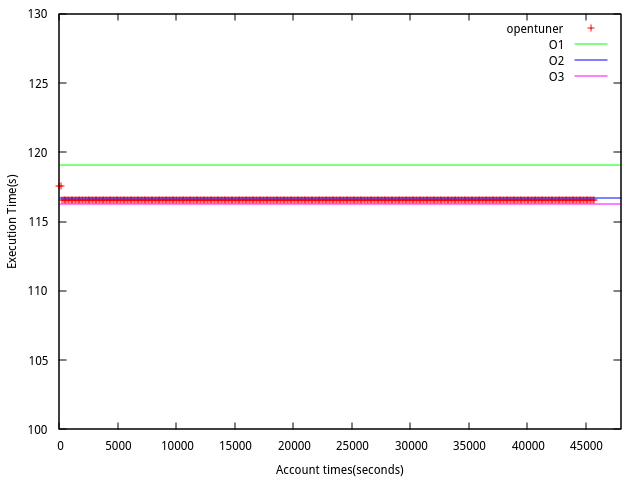
1. **Imagemagick**
* references:
* [An Attempt at Adaptive Sampling for Photorealistic Image Generation: Learning Sampling Schemes for Monte Carlo Rendering](http://cs229.stanford.edu/proj2015/175_report.pdf)
CTYPES & CLOCK_GETTIME實作
* 透過 Python ctypes & clock_gettime 得到精準程式執行時間
* [初步的實做](https://hackpad.com/opentuner-MlEYyIGbTtk)
* 在TuningrunMain這個class裡面, results_wait 會在search_driver裡面被呼叫, 接著會呼叫measurement_driver 的method process_all, 在這個method裡面會先進行compile的動作, 然後在使用run_desired_result執行他的執行檔, 這時會呼叫gccflags.py所寫的run_precompiled
* 在gccflags.py的run_precompiled裡面, 他會呼叫call_program這個method, 這個method 被寫在measurement/interface.py裡面, 會有兩個時間的變數 t0, t1, 原本是使用python的time.time(), 將其換成ctypes+monotonic_time()
* [](https://github.com/Knight-X/opentuner/blob/master/opentuner/measurement/interface.py)https://github.com/Knight-X/opentuner/blob/master/opentuner/measurement/interface.py
* 可參考gccflags_minimal.py, 因為沒有override measurementInterface 的run_precompiled, 所以會直接呼叫measurementinterface的run_precompiled, 此時會呼叫gccflags_minimal中的run method, 在其中直接呼叫了兩次call_program去進行compile 和執行的動作
TODO:
* 1\. 減少Search Space 試試看結果會不會有改善, 因為有些flags作用的可能性不高.
Further reading:
* **[autotuning-gce-docs](https://github.com/phrb/autotuning-gce-docs): **Documentation and drafts for autotuning-gce
* sudo apt-get install texlive-xetex
* cd doc && make
* 在 `doc` 目錄產生了 `relatorio.pdf`,文件標題 "A New Program Autotuning Methodology Using Cloud Computing and OpenTuner"
A New Program Autotuning Methodology Using Cloud Computing and OpenTuner:
文件閱讀
* Methodology and Protocol
* 方法主要是採用client-server的架構, 在幾個VM中去執行MeasurementServer, 這些server 等待client的請求, 然後將優化過的程式資訊保存下來
* client端主要運行MeasurementClient, 這是從MeasurementDriver所延伸出來的class.
* client 和 server透過GCEInterface進行溝通
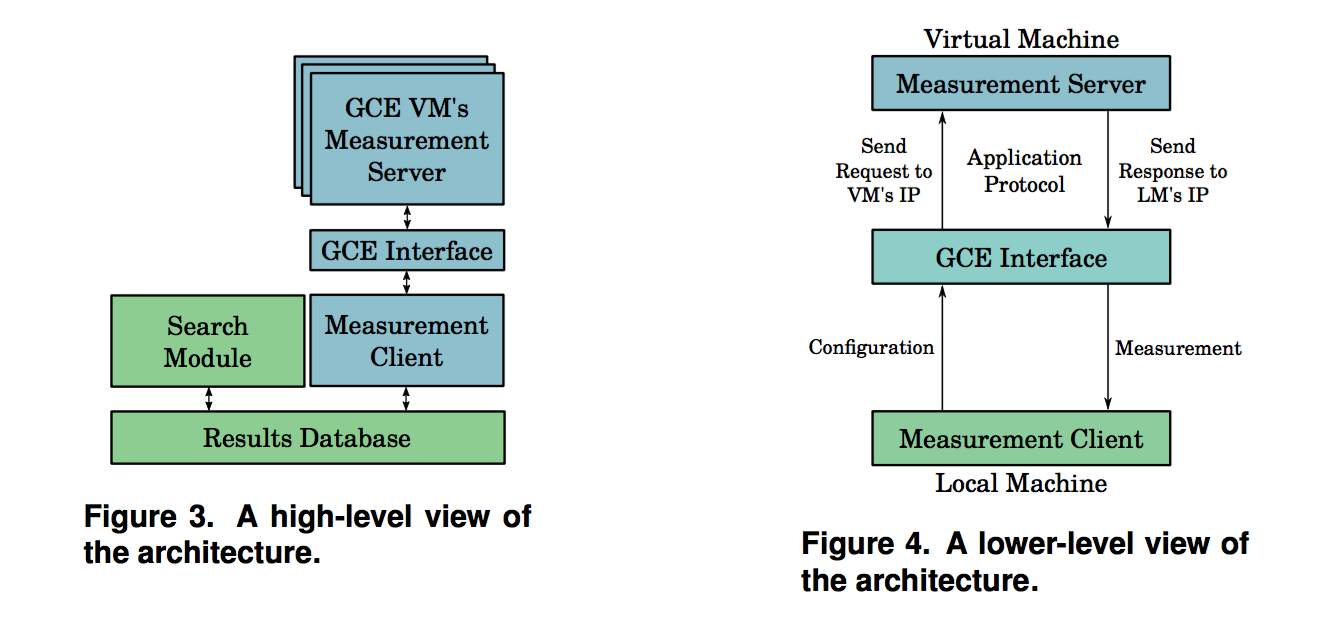
架構主要可以分為幾個部分:
1. Measurement Server and Client:
* 主要的流程是由OpenTuner中TuningRunMain中的main method所控制的, 然後透過覆寫過的process_all 和 run_desired_results將結果透過GCEInterface傳至VM中
2\. GCE Interface:
GCEInterace 是一組api 用來溝通MeasurementClient和MeasurementServers
3\. Application Protocol:
Message:client 和server主要傳遞下列的資訊, client主要傳送MEASURE訊息, server主要傳遞GET, 主要的訊息如下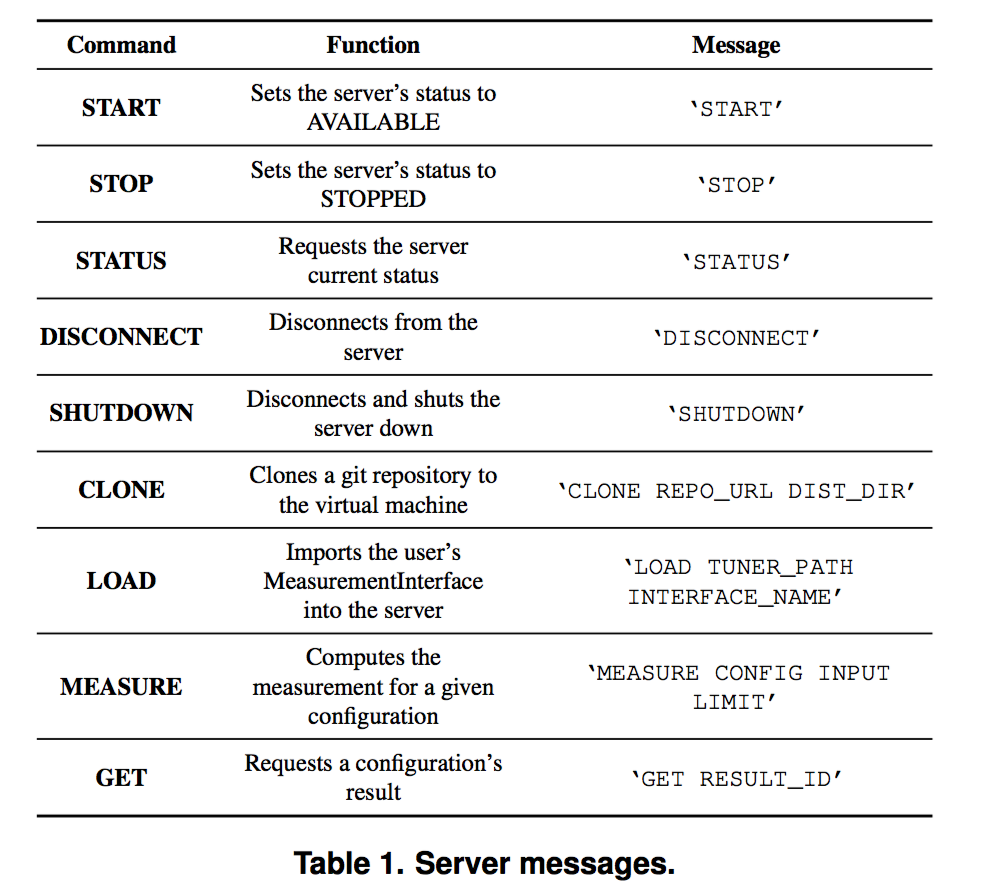
Server Response: 傳遞的格式
* COMMAND ERROR_STATUS SERVER_STATUS [args] [MESSAGE]
 Google Drive
Gist
Clipboard
Google Drive
Gist
Clipboard
 Sign in via Google
 Sign in via Facebook
 Sign in via X(Twitter)
 Sign in via GitHub
 Sign in via Dropbox
 Sign in with Wallet






