---
tags: 発表, 機械学習名古屋, Julia, CIFAR-10
slideOptions:
transition: slide
---
Julia で CIFAR-10 データセットと触れあってみた
===
<!-- .slide: data-background="#5E5E5E" -->
2018/02/03 機械学習 名古屋 第14回勉強会
antimon2(後藤 俊介)
<aside class="notes">Juliaで今回のテーマ CIFAR-10 のデータセットと触れあってみた、の紹介っ!</aside>
----
<!-- .slide: data-background="#5E5E5E" -->
## お品書き
+ 自己紹介
+ Julia とは?
+ CIFAR-10
---
<!-- .slide: data-background="#1A7E82" -->
# 自己紹介
----
<!-- .slide: data-background="#1A7E82" -->
## 自己紹介
+ 名前:後藤 俊介
+ 所属:有限会社 来栖川電算
+ コミュニティ:**[機械学習名古屋](https://machine-learning.connpass.com/)**, [NGK2017B](https://ngk2017b.connpass.com/), Python東海, Ruby東海, [Rails Girls Nagoya](http://railsgirls.com/nagoya)(コーチ), …
+ 言語:**Julia**, Python, Ruby, Scala(勉強中), …
+ <!-- .element: class="plain" style="vertical-align:middle;background:transparent" --> [@antimon2](https://twitter.com/antimon2) / <!-- .element: class="plain" style="vertical-align:middle;background:transparent" --> [antimon2](https://www.facebook.com/antimon2)
+ <!-- .element: class="plain" style="vertical-align:middle;background:transparent" --> [antimon2](https://github.com/antimon2/) / <!-- .element: class="plain" style="vertical-align:middle;background:transparent" --> [@antimon2](http://qiita.com/antimon2)
<aside class="notes">今回も Julia の紹介。Julia 良いよ Julia っ</aside>
---
<!-- .slide: data-background="#213e98" -->
# Julia とは?
<aside class="notes">簡単な紹介っ</aside>
----
<!-- .slide: data-background="#213e98" -->
[<!-- .element: style="background:white;max-width:80%" -->](https://julialang.org)
----
<!-- .slide: data-background="#213e98" -->
## Julia とは?(1)
+ [公式サイト(英語) https://julialang.org](https://julialang.org)
+ Python/Ruby/R 等の「いいとこどり」言語!
+ 動作が速い!(LLVM JIT コンパイル)
+ 2017/12/14 に最新 v0.6.2 リリース!
+ もうすぐ [v1.0 が出る](https://nbviewer.jupyter.org/github/bicycle1885/JuliaTokyo7/blob/master/%E6%9C%80%E6%96%B0Julia%E3%83%81%E3%83%A5%E3%83%BC%E3%83%88%E3%83%AA%E3%82%A2%E3%83%AB.ipynb#Julia-1.0?)(はず)
+ 検索するときは [`julialang`](https://www.google.co.jp/search?q=julialang) もしくは [`julia言語`](https://twitter.com/search?vertical=default&q=%23julia%E8%A8%80%E8%AA%9E) で!
<aside class="notes">科学技術計算に強い!っ<br>あとググるとき最近 <code>julia</code> でもトップに表示されるようになってきた♪</aside>
----
<!-- .slide: data-background="#213e98" -->
## Julia とは?(2)
> + Rのように中身がぐちゃぐちゃでなく、
> + Rubyのように遅くなく、
> + Lispのように原始的またはエレファントでなく、
> + Prologのように変態的なところはなく、
> + Javaのように硬すぎることはなく、
> + Haskellのように抽象的すぎない
>
> ほどよい言語である
<!-- .element: style="font-size:66%" -->
引用元:http://www.slideshare.net/Nikoriks/julia-28059489/8
<!-- .element: style="font-size:71%" -->
----
<!-- .slide: data-background="#213e98" -->
## Julia とは?(3)
> + C のように高速だけど、
Ruby のような動的型付言語である
> + Lisp のようにプログラムと同等に扱えるマクロがあって、しかも
Matlab のような直感的な数式表現もできる
> + Python のように総合的なプログラミングができて、
R のように統計処理も得意で、
Perl のように文字列処理もできて、
Matlab のように線形代数もできて、
shell のように複数のプログラムを組み合わせることもできる
> + 超初心者にも習得は簡単で、
超上級者の満足にも応えられる
> + インタラクティブにも動作して、コンパイルもできる
<!-- .element: style="font-size:50%" -->
([Why We Created Julia](http://julialang.org/blog/2012/02/why-we-created-julia) から抜粋・私訳)
<!-- .element: style="font-size:71%" -->
----
<!-- .slide: data-background="#213e98" -->
## 主な機能
+ [多重ディスパッチ](https://ja.wikipedia.org/wiki/%E5%A4%9A%E9%87%8D%E3%83%87%E3%82%A3%E3%82%B9%E3%83%91%E3%83%83%E3%83%81)
+ 動的型システム
+ [並行・並列処理](https://docs.julialang.org/en/stable/manual/parallel-computing/)、コルーチン
+ 組込パッケージマネージャ
<aside class="notes">っ</aside>
---
<!-- .slide: data-background="#633978" -->
# CIFAR-10
<aside class="notes">と触れあうことによる Julia のプログラミング例の紹介っ</aside>
----
<!-- .slide: data-background="#633978" -->
## CIFAR-10 とは?
+ [CIFAR-10 とは?](https://qiita.com/antimon2/private/b136c29e192be5c68dbc#cifar-10-%E3%81%A8%E3%81%AF)(今回のハンズオン資料より)
<aside class="notes">重複になるので今回のハンズオン資料を見てねっ</aside>
---
<!-- .slide: data-background="#872724" -->
## Julia で CIFAR-10 データ読込・表示
----
<!-- .slide: data-background="#872724" -->
### CIFAR-10 データ型の定義
```julia=
# 24584bits(=3073bytes)の Primitive Type を定義
primitive type CIFAR10Record 24584 end
```
<aside class="notes">Juliaではビット数を指定したデータ型を自分で定義できますっ<br>ちなみに今回のスライドは Julia v0.6.x 用のコードしか示しません v0.5.x 以前では動作しませんっ</aside>
----
<!-- .slide: data-background="#872724" -->
### CIFAR-10 データの読込
```julia=
function Base.read(stream::IO, ::Type{CIFAR10Record})
bytes = read(stream, UInt8, 3073)
reinterpret(CIFAR10Record, bytes)[1]
end
```
<aside class="notes">Juliaでは `read()` 関数を多重定義することで独自データ型の値をファイル等から読み込む記述ができますっ</aside>
----
<!-- .slide: data-background="#872724" -->
```julia
# 例:
record0 = open("test_batch.bin", "r") do f
return read(f, CIFAR10Record)
end
```
<aside class="notes">簡単ですねっ</aside>
----
<!-- .slide: data-background="#872724" -->
### CIFAR-10 データの概要表示
```julia=
function Base.show(io::IO, record::CIFAR10Record)
bytes = reinterpret(UInt8, [record])
print(io, "CIFAR10Record(")
# show 1st byte(=label)
show(io, bytes[1])
print(io, ", ")
# show hashcode of the rest of bytes(=image)
show(io, hash(bytes[2:end]))
print(io, ')')
end
```
<aside class="notes">Juliaでは `show()` 関数を多重定義することで独自データ型の文字列表現を設定することができますっ</aside>
----
<!-- .slide: data-background="#872724" -->
```julia
# 例:
string(record0)
# => "CIFAR10Record(0x03, 0xd0b45b812aae12b1)"
```
<aside class="notes">簡単ですねっ</aside>
----
<!-- .slide: data-background="#872724" -->
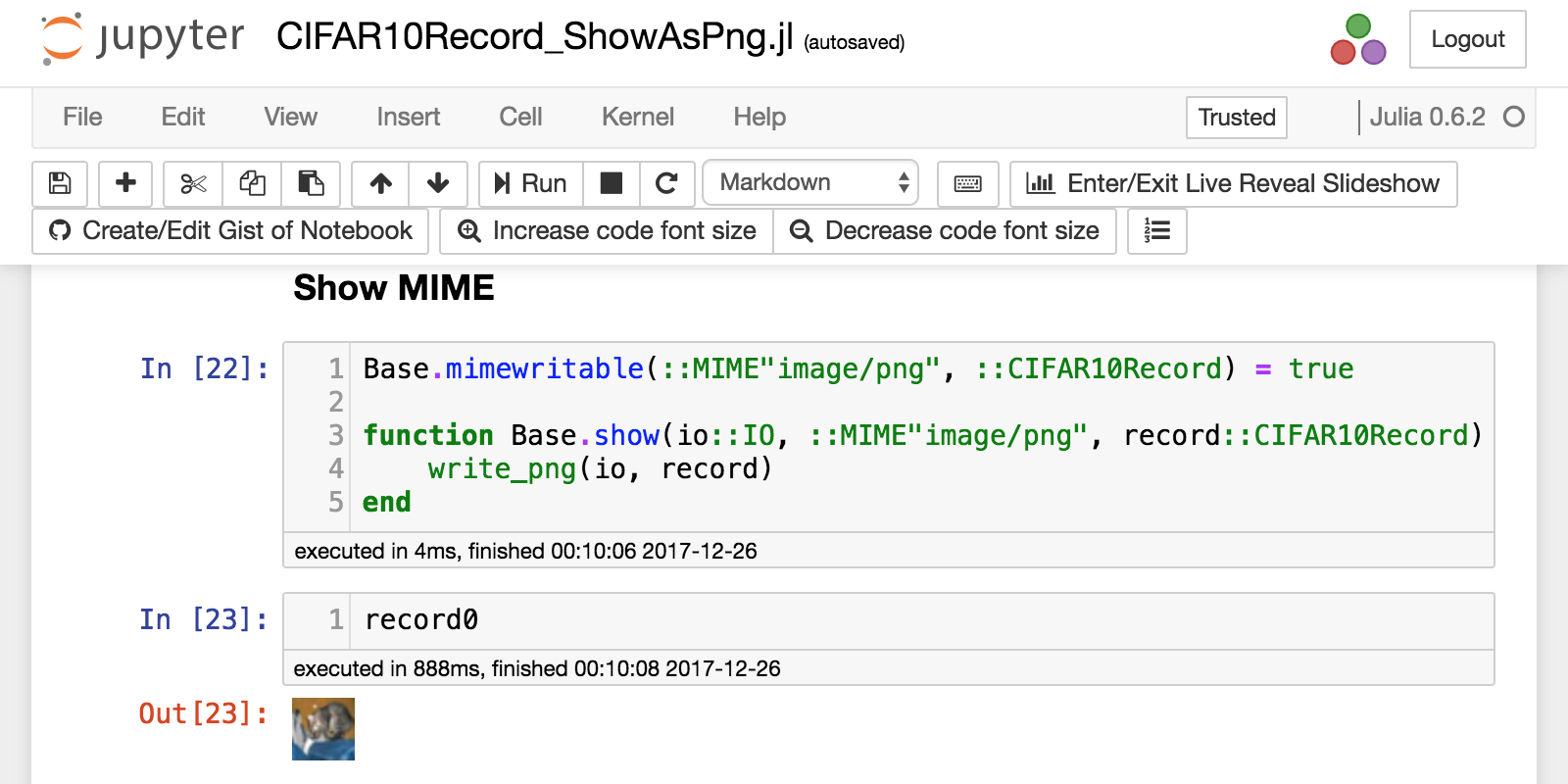
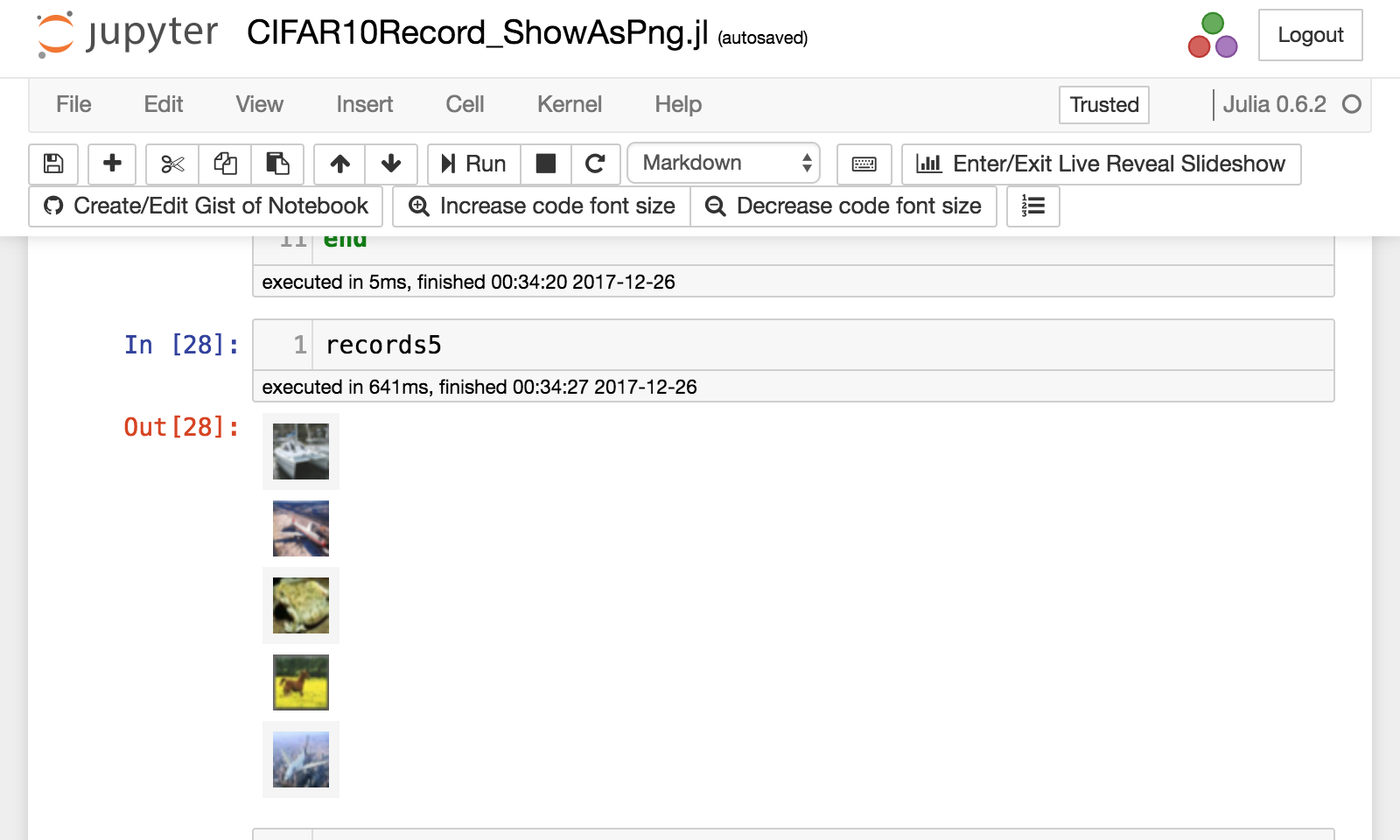
### CIFAR-10 データの画像としての表示
+ Jupyter notebook とかだと 画像として表示できると分かりやすい。
+ 冬休みにその実験をした(→ [Julia で CIFAR-10 データを画像として表示してみる(外部パッケージ無しで)](https://qiita.com/antimon2/items/315c88299fce7a73c052))
+ ここでは結果のみ紹介↓
----
<!-- .slide: data-background="#872724" -->
----
<!-- .slide: data-background="#872724" -->
---
<!-- .slide: data-background="#27641e" -->
## Julia で CIFAR-10 データで学習
----
<!-- .slide: data-background="#27641e" -->
### CIFAR-10 データの読込(バッチ処理編)
<aside class="notes">前回発表した「データのバッチ生成 with Julia」の内容も参考にっ</aside>
----
<!-- .slide: data-background="#27641e" -->
```julia=
function readtrain(channel::Channel{Tuple{CIFAR10Record}},
fid::Int, datadir::String=datadir)
if isopen(channel)
filepath = joinpath(datadir, "data_batch_$(fid).bin")
open(filepath, "r") do f
while isopen(channel)
for idx in shuffle(0:9999)
seek(f, idx * 3073)
record = read(f, CIFAR10Record)
put!(channel, (record,))
end
end
end
end
end
```
<!-- .element: style="font-size:45%" -->
<aside class="notes">指定した訓練用データファイルからランダムアクセスで固定長レコードを読み込んで <code>Channel</code> に送出(例外処理省略)っ</aside>
----
<!-- .slide: data-background="#27641e" -->
```julia=
function train_batch_produce(channel::Channel{Tuple{CIFAR10Record}},
datadir=datadir)
train_channels = [Channel{Tuple{CIFAR10Record}}(32) for _=1:5]
for fid in 1:5
@schedule readtrain(train_channels[fid], fid, datadir)
end
while true
try
put!(channel, take!(rand(train_channels)))
catch ex
for ch in train_channels
close(ch)
end
return
end
end
end
```
<!-- .element: style="font-size:45%" -->
<aside class="notes">5つの各訓練用データファイルから読み込んだレコードを乱択して <code>Channel</code> に送出っ</aside>
----
<!-- .slide: data-background="#27641e" -->
```julia=
struct CF10Batch
channel::Channel{Tuple{CIFAR10Record}}
batchsize::Int
end
function (f::CF10Batch)()
buf = reshape(reinterpret(
UInt8,
collect(Iterators.take(f.channel, f.batchsize))
), (:, f.batchsize))
return (buf[2:3073, :], buf[1, :])
end
```
<!-- .element: style="font-size:45%" -->
<aside class="notes">指定したバッチサイズ分のデータを取得して data と labels に分けて返すっ</aside>
----
<!-- .slide: data-background="#27641e" -->
```julia=
train_channel = Channel{Tuple{CIFAR10Record}}(32)
@schedule train_batch_produce(train_channel)
trainbatch = CF10Batch(train_channel, 128)
# data, label = trainbatch()
# ↑実行する度に新しいデータが返ってくる
```
<!-- .element: style="font-size:45%" -->
----
<!-- .slide: data-background="#27641e" -->
### CNNの構築
----
<!-- .slide: data-background="#27641e" -->
+ Julia 用 Deep Learning F/W(いくつか):
+ [MXNet.jl](https://github.com/dmlc/MXNet.jl)(軽量・効率性・柔軟性がウリ)
+ [TensorFlow.jl](https://github.com/malmaud/TensorFlow.jl)([TensorFlow](https://www.tensorflow.org/) のラッパー)
+ [Merlin.jl](https://github.com/hshindo/Merlin.jl)(最近出てきた、日本製)
+ 今回は、書籍 [ゼロから作る Deep Learning](https://www.oreilly.co.jp/books/9784873117584/) を参考にスクラッチ実装(!)
<aside class="notes">行列演算も簡単高速だから自分でも(がんばれば)実装出来ますよっ</aside>
----
<!-- .slide: data-background="#27641e" -->
### CNNの構築
+ いろいろやったけれど時間が無いので結果だけ↓
+ [Cifar10TrainSample.jl.ipynb](https://gist.github.com/antimon2/32f7d9951865f5748e7a9afbfbf556a5#file-cifar10trainsample-jl-ipynb) ([nbviewer](https://nbviewer.jupyter.org/gist/antimon2/32f7d9951865f5748e7a9afbfbf556a5/Cifar10TrainSample.jl.ipynb))
+ [Cifar10PredictSample.jl.ipynb](https://gist.github.com/antimon2/32f7d9951865f5748e7a9afbfbf556a5#file-cifar10predictsample-jl-ipynb) ([nbviewer](https://nbviewer.jupyter.org/gist/antimon2/32f7d9951865f5748e7a9afbfbf556a5/Cifar10PredictSample.jl.ipynb))
<aside class="notes">っ</aside>
----
<!-- .slide: data-background="#27641e" -->
#### 考察
+ 思ったより遅い(学習も推測も)
+ Convolution や Pooling が forward/backward ともに時間かかってる
→ im2col/col2im あんまし速くない?
+ 特別な正則化してない(入力を255で割って0.0〜1.0の範囲内にしただけ)
+ cropping やその他 data-augmentation も何もしてない
+ でも取り敢えず学習動いたっぽい
<aside class="notes">っ</aside>
---
<!-- .slide: data-background="#213e98" -->
## A. 参考
+ [Julia Documentation](https://docs.julialang.org/)
+ [Julia で CIFAR-10 データを画像として表示してみる(外部パッケージ無しで)](https://qiita.com/antimon2/items/315c88299fce7a73c052)
+ [TensorFlow の CIFAR-10で実際に予測してみる](http://blog.suprsonicjetboy.com/entry/2017/04/30/204951)
+ [Gist](https://gist.github.com/antimon2/32f7d9951865f5748e7a9afbfbf556a5):
+ [Cifar10TrainSample.jl.ipynb](https://gist.github.com/antimon2/32f7d9951865f5748e7a9afbfbf556a5#file-cifar10trainsample-jl-ipynb) ([nbviewer](https://nbviewer.jupyter.org/gist/antimon2/32f7d9951865f5748e7a9afbfbf556a5/Cifar10TrainSample.jl.ipynb))
+ [Cifar10PredictSample.jl.ipynb](https://gist.github.com/antimon2/32f7d9951865f5748e7a9afbfbf556a5#file-cifar10predictsample-jl-ipynb) ([nbviewer](https://nbviewer.jupyter.org/gist/antimon2/32f7d9951865f5748e7a9afbfbf556a5/Cifar10PredictSample.jl.ipynb))
---
<!-- .slide: data-background="#213e98" -->
ご清聴ありがとうございます。
 Google Drive
Gist
Clipboard
Google Drive
Gist
Clipboard
 Sign in with Wallet






