---
tags: 1082, lsa
---
# Coordinated Computing With GPU
- Book mode https://hackmd.io/@ncnu-opensource/By4H6JLNW
[TOC]
what we want to discuss:
~~~~
1. Cluster Computing
2. CPU VS GPU
3. What the Main Different between CPU and GPU
4. What is GPGPU
5. OpenCL VS CUDA
6. What is Networking
7. What is Server
8. Type of network for coordinated computing
9. Computer network types and How Network Work
10. Benchmarking Process
11. The way to create the cluster Computing
~~~~
## Intro
Firstly, we choose cluster computing as our topic. because we are interested in how GPU and Network server work.
i think cluster computing is really helpful. let's say we need more computing or processing power to run a heavy software or video render, there are 2 way we can solve this. buying a capable high-end hardware, or we can cluster our computer.
example :
GeForce GTX 280(theoretical gflops 1000)for 525us$
GeForce 8800 GTX(theoretical gflops 650)for 200us$
1000(525 $) < 2*650(400 $)
(flops = floating point operations)
```
basic idea :
connect computer 1 and computer 2 in a single network
install some clustering driver
and boom our server become 1 machine with high spec
```
and now at this session we will discuss about GPU and Server.
because cluster computing is all about GPU and Server.
# Cluster computing
benefit: cluster can increase processing time, faster data storing and retrieval time.
and we have 3 main goal of cluster computing:
* High Performance Cluster:
clustering our computer and focusing the resource to a single machine, resulting in single powerful machine. often called supercomputer
* High Availability Cluster:
with many shared resource, if one node goes down, the other node can still support the system.
> this High Availability Cluster also often used for critical databases, file sharing on a network, business applications, and customer services such as electronic commerce websites.
* Load Balancing Cluster:
The computational workload is shared between the nodes for better overall performance.
>best examples = web server cluster, It can divide new request to a different node for overall increase in performance.
Most common known examples of loadbalancing and failover clusters are webfarms, databases or firewalls. People want to have a 99,9% uptime for their services.
* Basic concepts of cluster computing
A computer cluster may be a simple two-node system which just connects two personal computers, or may be a very fast supercomputer.
* History of cluster computing
* Uses of Clustering
Computer clusters can configured for different reason from general purpose business needs such as web-service support, to computation-intensive scientific calculations. we can use "Load-balancing" clusters because the configurations in which cluster-nodes share computational workload to provide better overall performance.
# CPU VS GPU

| CPU | GPU |
| -------- | -------- |
|High Clock Speed | Low Clock Speed|
| Multiple Core | Thousand of Core |
| good hard tasks |good simple tasks |
|good memory management|poor memory management|
|Access data from HD or user input | Plot Graphic data|
* What is CPU?
CPU is the primary component of a computer that processes instructions.
The CPU contains at least one processor, which is the actual chip inside the CPU that performs calculations.
* What is GPU?
A processor that specialized for rendering(computing) images on the computer. A GPU provides the fastest graphics processing. now days are programmable and also used to compute mathematical or large data.
> [why GPU are so fast in computing? because they are made to compute. GPU need to compute graphics or images which are just combination of pixel.GPU are designed to compute those pixels]
* GPU features include:
1. 2-D or 3-D graphics
2. Digital output to flat panel display monitors
3. Texture mapping
4. Application support for high-intensity graphics software
## CPU vs GPU - Computation Power

# THE MAIN DIFFERENT BETWEEN CPU AND GPU

(ALU = arithmetic logic unit)
1. Caches
CPU usually manages caches, but the old GPU only manage software-managed local memories.
2. Register file
GPU have a very large register files, which allow them to reduce context-switching latency. Register file size is also increasing over different GPU generations. By comparison, the size of a register file on CPU is small, maybe around tens or hundreds of kilobytes.
3. Energy efficiency
The high performance of GPU comes at the cost of high power consumption, which under full load is in fact as much power as the rest of the PC system combined.
* What Is A GPGPU?
GPGPU is the utilisation of a GPU (graphics processing unit), which would typically only handle computer graphics, to assist in performing tasks that are traditionally handled solely by the CPU (central processing unit).
* # Why use GPGPU?
Since a single GPU can perform calculations at a much higher rate than a CPU, pairing multiple GPU together exponentially increases computational performance. It is a much more common practice to integrate multiple GPU in a system rather than multiple CPU.

The newly introduced RTX graphic card are able to use real time raytracing in many games. In computer graphics, ray tracing generates an image by tracing rays cast through pixels of an image plane and simulating the effects of its encounters with virtual objects.
RTX works by using acceleration structures and algorithms to build and update spatial search data structures.

(Left picture with raytracing | right picture without raytracing)
so how it works is that by tracing the path of light as pixels in an image plane and simulating the effects of its encounters with virtual objects.
# Difference between GPU and GPGPU
| GPU | GPGPU |
| -------- | -------- |
| Fixed Function | Flexible |
| Unable to code | Able to code |
> [The main uses of GPGPU is Plot graphical data. But also able to do Shaders, AI, and Machine learning]
>


>[Vertex Transformation. Vertices are transformed to their final clip space position in the vertex shader, by multiplying their. position vector by the matrix formed by multiplying the model, view, and projection matrices together.]
>[Primitive Assembly is the stage in the OpenGL rendering pipeline where Primitives are divided into a sequence of individual base primitives. After some minor processing they are passed along to the rasterizer to be rendered.]
* # WHY MOST PEOPLE CHOOSE GPGPU
1. Large number of cores : 100-1000 cores in a single card
2. Low cost – less than $100-$1500
3. Green computing
4. Low power consumption: 135watts/card
5. 1 card can perform > 100 desktops

> [NVIDIA and AMD comparison]

# GPU API
* OpenGL
* CUDA
* METAL
* DirectCompute
> application program interface = API
## OPENGL VS CUDA VS METAL VS DIRECTCOMPUTE
| OPENGL | CUDA | Metal| DirectCompute|
| -------- | -------- |------ |---|
| Available to all GPU | Only NVIDIA | Apple | Windows|
| open-source | Nvidia | Apple |Nvidia|
| every OS | Windows | macOS | Windows |
|C and C++|C, C++, and Fortran|MSL [Metal Shading Language] (C++)|High-Level Shading Language|
Install OPENGL ubuntu
The compiler and The basic library
> sudo apt-get install build-essential
Install OpenGL Library.
> sudo apt-get install libgl1-mesa-dev
C Code for drawing triangle
```
#include "GL/freeglut.h"
#include "GL/gl.h"
void drawTriangle()
{
glClearColor(0.4, 0.4, 0.4, 0.4);
glClear(GL_COLOR_BUFFER_BIT);
glColor3f(1.0, 1.0, 1.0);
glOrtho(-1.0, 1.0, -1.0, 1.0, -1.0, 1.0);
glBegin(GL_TRIANGLES);
glVertex3f(-0.7, 0.7, 0);
glVertex3f(0.7, 0.7, 0);
glVertex3f(0, -1, 0);
glEnd();
glFlush();
}
int main(int argc, char **argv)
{
glutInit(&argc, argv);
glutInitDisplayMode(GLUT_SINGLE);
glutInitWindowSize(500, 500);
glutInitWindowPosition(100, 100);
glutCreateWindow("OpenGL - Creating a triangle");
glutDisplayFunc(drawTriangle);
glutMainLoop();
return 0;
}
```
Compile the C code
```
$ g++ triangle.cc -lglut -o triangle
```

># what is networking (補充)
>A computer network comprises two or more computers that are connected—either by cables (wired) or WiFi (wireless)—with the purpose of transmitting, exchanging, or sharing data and resources. You build a computer network using hardware.
>* Benefits of Networking
> 1. It allows us to share data and resources.
2. It helps us in reducing the required number of devices.
3. It provides us a platform to communicate with other users in network.
>* # Protocol Stacks and Packets
>
>
>* # Networking Infrastructure
>
>* # Internet Infrastructure
>NSP is required to connect to 3 Network Access Points. NSPs also interconnect at Metropolitan Area Exchanges. MAEs serve the same purpose as the NAPs but are privately owned.

>## what is server
>A server is a software or hardware that can accepts and responds to requests from a client or a host.
>* What are they used for?
- **Servers are used to manage network resources.**
- for example: we want to search something from google, then we will sending a request for the server on the google. and the server on google will responds by sending back our response.
# Type of network for coordinated computing
1. Cluster computing network(super computer)
2. Grid computing network
3. Distributed computing network
---
1. Cluster Computing network
A network of same type computers whose target is to work as a single unit. Such a network is used to compute task that requires high computing power or memory.
- mostly of same type and spec, mostly LAN connected.
- slave node doesn't have any input output device
- each node focus their resource to a single main node
- program have to be executed from the main node

2. Grid Computing network
Grid network are network of same or different types of computers.The focus are to maximize utilization.
- mostly LAN connected
- Each computer can work independently and have their
- can detect each node process and utilize idle resource
- can work on multiple process each or giant process as single machine

3. Distributed Computing network
Distributed Computing consist of many same or different type of computers connected by network which can be as wide as globally.
- can be losely(WAN)/tightly(LAN) connected or both.
- node can be of different type and spec.
- can be distributed in the form of application.
[help scientist analyze corona virus here](https://www.sciencealert.com/help-scientists-beat-coronavirus-by-lending-them-your-unused-computing-power)
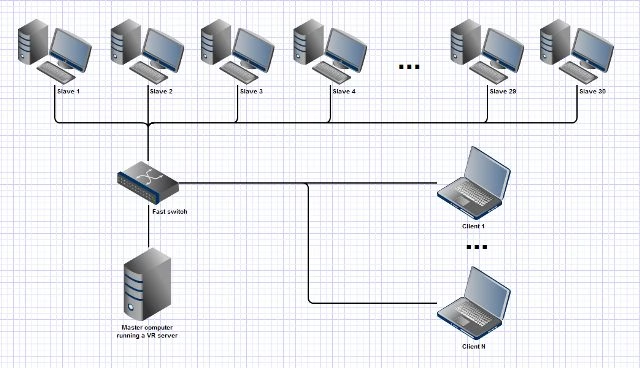
all three type has the advantage of :
* high availability
* higher performance, especially in multi-threaded process
* load-balancing
disadvantages :
* cost more than just single computer.
* high maintenance cost.
# What are required for the network and how it work
* it needs 2 or more node(server or computer)
* it needs message passing interface(MPI) between node
>from mpi4py import MPI
comm = MPI.COMM_WORLD
rank = comm.Get_rank()
>
>if rank == 0:
idata = 1
comm.send(idata, dest=1)
elif rank == 1:
idata = comm.recv(source=0)
print('On process 1, data is ',idata)
* it usually need load-balancing software for smoother and higher performances.
the main way the network work :
1. the network will connect the node and depends on the network type, there might be a master node.
2. the node will be able to access one another in the network and can also pass messages or instructions.
3. the load-balancer will then separate process of executed program and divide it between the node.
># Computer network types(補充)
>Here are the most common and widely used computer network types:
>1. LAN (local area network): A LAN connects computers over a relatively short distance, allowing them to share data, files, and resources. For example, a LAN may connect all the computers in an office building, school, or hospital. Typically, LANs are privately owned and managed.
>2. WLAN (wireless local area network): A WLAN is just like a LAN but connections between devices on the network are made wirelessly.
>
>3. WAN (wide area network): As the name implies, a WAN connects computers over a wide area, such as from region to region or even continent to continent. The internet is the largest WAN, connecting billions of computers worldwide. You will typically see collective or distributed ownership models for WAN management.
>
>4. MAN (metropolitan area network): MANs are typically larger than LANs but smaller than WANs. Cities and government entities typically own and manage MANs.
>
>5. PAN (personal area network): A PAN serves one person. For example, if you have an iPhone and a Mac, it’s very likely you’ve set up a PAN that shares and syncs content—text messages, emails, photos, and more—across both devices.
>
>6. SAN (storage area network): A SAN is a specialized network that provides access to block-level storage—shared network or cloud storage that, to the user, looks and works like a storage drive that’s physically attached to a computer.
>
>7. CAN (campus area network): A CAN is also known as a corporate area network. A CAN is larger than a LAN but smaller than a WAN. CANs serve sites such as colleges, universities, and business campuses.
>
>8. VPN (virtual private network): A VPN is a secure, point-to-point connection between two network end points (see ‘Nodes’ below). A VPN establishes an encrypted channel that keeps a user’s identity and access credentials, as well as any data transferred.

# Benchmarking Process on both ubuntu
> if using virtual box : can clone the main ubuntu. so we have 2 virtual machine.
* we need to install sysbench on the Ubuntu terminal
*so we can do CPU benchmarking and File IO benchmarking*
`sudo apt-get install sysbench`

* if we want to see the function of the manual of the sysbench we need to input the code:
`man sysbench`

* for the CPU Benchmarking
`sysbench --test=cpu --cpu-max-prime=20000 run`

* for the file IO Benchmarking preparing file
`sysbench --test=fileio --file-total-size=150G prepare`

* file IO Benchmakring :
`sysbench --test=fileio --file-total-size=150G --file-test-mode=rndrw --init-rng=on --max-time=300 --max-requests=0 run`

*clean up the memory after benchmarking IO
`sysbench --test=fileio --file-total-size=150G cleanup`

# The way to create the cluster Computing
* Configuring Local DNS Settings on Each Server:
*To setup a cluster, we need at least two servers. so we can connect to the server each and another.*
```
$ sudo vim /etc/hosts
or
$ sudo nano /etc/hosts
```
input :
```
192.168.10.10 test1.example.com
192.168.10.11 test2.example.com
```

1. Installing Nginx Web Server
`$ sudo apt install nginx `

* we can simply enable it by type:
```
$ sudo systemctl enable nginx
$ sudo systemctl start nginx
$ sudo systemctl status nginx
```

* Now we modify so this nginx show this message :
```
echo "This is the default page for test1.example.com" | sudo tee /usr/share/nginx/html/index.html #VPS1
echo "This is the default page for test2.example.com" | sudo tee /usr/share/nginx/html/index.html #VPS2
```
*starting the Nginx service, we create custom webpages for identifying and testing operations on both servers.*
* now we Installing and Configuring Corosync and Pacemaker
*The pcs daemon is used to work with the pcs command-line interface to manage synchronizing the corosync configuration across all nodes in the cluster. Before the cluster can be configured, the pcs daemon must be started and enabled to start at boot time on each node*
`sudo apt install corosync pacemaker pcs `

* now we make sure that pcs daemon is running on both servers.
```
$ sudo systemctl enable pcsd
$ sudo systemctl start pcsd
$ sudo systemctl status pcsd
```

* Creating the Cluster :
`$ sudo passwd hacluster`
* we must make a new password for the hacluster

* set up the authentication needed for pcs:
```
$ sudo pcs cluster auth test1.example.com test2.example.com -u hacluster -p password_here --force
```
* populate it with some nodes:
```
$ sudo pcs cluster setup --name examplecluster node1.example.com node2.example.com `
```
* Now enable the cluster on boot and start the service using :
```
$ sudo pcs cluster enable --all
$ sudo pcs cluster start --all
```

* the Server are ready to connect to the different device to do cluster:
`$ sudo pcs status`

**Configuring Cluster Options**
* disable STONITH (or Shoot The Other Node In The Head), the fencing implementation on Pacemaker. This component helps to protect your data from being corrupted by concurrent access
`$ sudo pcs property set stonith-enabled=false`
* ignore the Quorum policy:
`$ sudo pcs property set no-quorum-policy=ignore`
* make sure stonith and the quorum policy are disabled :
`sudo pcs property list`

**Adding a Resource/Cluster Service**
We will add two cluster resources: the floating IP address resource called “floating_ip” and a resource for the Nginx web server called “http_server”.
*We will configure a floating IP which is the IP address that can be instantly moved from one server to another within the same network or data center. In short, a floating IP is a technical common term, used for IPs which are not bound strictly to one single interface.*
master:
* adding the floating_ip
`$ sudo pcs resource create floating_ip ocf:heartbeat:IPaddr2 ip=192.168.10.20 cidr_netmask=24 op monitor interval=60s`
slave:
* adding the http_server
`$ sudo pcs resource create http_server ocf:heartbeat:nginx configfile="/etc/nginx/nginx.conf" op monitor timeout="20s" interval="60s"`
```
where:
1. floatingip: is the name of the service.
2. “ocf:heart beat:IPaddr2”: tells Pacemaker which script to use, IPaddr2 in this case, which namespace it is in (pacemaker) and what standard it conforms to ocf.
3. “op monitor interval=60s”: instructs Pacemaker to check the health of this service every one minutes by calling the agent’s monitor action.
```
* now check the resource
`$ sudo pcs status resources`

**master make : If you have firewall enabled on your system, you need to allow all traffic to Nginx**!
```
$ sudo ufw allow http
$ sudo ufw reload
```

* testing the clustering
type : 192.168.10.20
`output : This is the default page for test2.example.com
# CPU BENCHMARKING BEFORE & AFTER
cpu speed before : 282.63
cpu speed after : 392.26
and we know that if we opening another tab when we are benchmarking, the benchmakring result will be affected.

# FILE IO BENCHMAKRING BEFORE & AFTER

.
.
.
**we have shown the basics of how to deploy, configure clustering in Ubuntu 16.04/18.04. We demonstrated how to add Nginx HTTP service to a cluster and how to do benchmarking process of cpu benchmarking and FILE IO benchmarking**
 Google Drive
Gist
Clipboard
Google Drive
Gist
Clipboard
 Sign in with Wallet






