# State Management without Vuex (or other dependencies) using Quasar.
Cover Inspired By [State Management Angular](https://2muchcoffee.com/blog/state-management-angular/)
# Table of Contents
* [Source - Vault Slim](https://github.com/TobyMosque/vue-vault-demo/tree/stage-1)
* [Source - Vault | Vue App](https://github.com/TobyMosque/vue-vault-demo/tree/stage-2)
* [Source - Vault | Mimic Vuex](https://github.com/TobyMosque/vue-vault-demo/tree/stage-3)
* [1 Motivation](#1-motivation)
* [2 Service Injection](#2-service-injection)
* [3 The Vault](#3-the-vault)
* [4 PreFetch and Hydratation](#4-prefetch-and-hydratation)
* [5 Putting everything together.](#5-putting-everything-together)
* [6 Registering global modules to the vault.
](#6-registering-global-modules-to-the-vault)
* [7 getters and actions equivalents](#7-getters-and-actions-equivalents)
* [8 mimic and/or droping vuex](#8-mimic-vuex-droping-vuex)
* [9 About Quasar](#9-about-quasar)
##1 - Motivation
If you've already worked on an SPA (single-page application) app without SSR (server-side rendered) with a framework like Quasar, and after you've finished your app, you might have later realized you need SSR (for SEO, UX or whatever). But, after you try to convert your app, you get into trouble because of the hydration requirements:
> This feature is especially useful for the SSR mode (but not limited to it). During SSR, we are essentially rendering a “snapshot” of our app, so if the app relies on some asynchronous data, then this data needs to be pre-fetched and resolved before we start the rendering process.
> Another concern is that on the client, the same data needs to be available before we mount the client side app - otherwise the client app would render using a different state and the hydration would fail.
_Source: [How PreFetch Helps SSR Mode](https://quasar.dev/quasar-cli/prefetch-feature#How-PreFetch-Helps-SSR-Mode)_
Since you'll need to adopt Vuex on every single page, you'll probably end up rewriting your whole application, or worse, the Vuex state can't be mutated directly, which will add a completely new set of bugs to your app.
In this article, we'll go over an alternative to Vuex that can be much easier to implement. And, this new technique can become our primary tool to handle state management.
##2 Service Injection
This article is a continuation of the article [Quasar - SSR and using cookies](https://dev.to/quasar/quasar-ssr-using-cookies-with-other-libs-services-4nkl#7-simplified-injection), and we'll be using the `Simplified` Injection helper.
_Note: reference to some of the methods below can be found in the above link._
First, we'll need to do a little modification to the axios boot file.
instead of something like:
```
import axios from 'axios'
import Vue from 'vue'
Vue.prototype.$axios = axios.create()
```
We'll need something like:
```js
import axios from 'axios'
import inject from './inject'
export default inject((_) => {
return {
axios: axios.create()
}
})
```
This way, the axios will be injected within the store and thus, in the pages, which is required by the "vault" implementation.
##3 The Vault
Since initialy the Vault solution is aimed to be used in a ready-for-production SPA app that needs SSR, we will assume you are already using Vuex in some way. So for now, the Vault will need to be dependent on the store. If you're not using Vuex at all, then chapter 8 is for you, but don't jump to it quite yet.
For our first step, we'll create the Vault class/service:
**src/services/vault.js**
```js
import Vue from 'vue'
export default class Vault {
constructor ({ state = {} } = {}) {
this.state = state
}
registerState (namespace, { data }) {
if (!this.state[namespace]) {
const state = Vue.observable(typeof data === 'function' ? data() : data)
this.state[namespace] = typeof state === 'function' ? state() : state
}
}
registerModule (namespace, { data }) {
this.registerState(namespace, { data })
}
unregisterModule (namespace) {
const isRegistered = !!this.state.[namespace]
if (isRegistered) {
delete this.state[namespace]
}
}
replaceState (data) {
if (process.env.CLIENT) {
const keys = Object.keys(data)
for (const key of keys) {
this.registerState(key, { data: data[key] })
}
}
}
static page (namespace, { data, destroyed, preFetch, ...options }) {
return {
async preFetch (context) {
const { store } = context
const vault = store.$vault
if (!vault.state[namespace]) {
vault.registerModule(namespace, { data })
context.vault = store.$vault
context.data = store.$vault.state[namespace]
context.axios = store.$axios
if (preFetch) {
await preFetch(context)
}
}
},
data () {
return this.$vault.state[namespace]
},
destroyed () {
delete this.$vault.unregisterModule(namespace)
if (preFetch) {
destroyed.bind(this)()
}
},
...options
}
}
}
```
##4 PreFetch and Hydratation
Now that we have a Vault to do the state management, we need ensure the data will be prefetched from the server and hydrated at the client. To achieve this, we'll need to create a boot file and do a little modification to `index.template.html`
```
quasar new boot vault
```
**src/boot/vault.js**
```js
import inject from './inject'
import Vault from 'src/services/vault'
// "async" is optional;
// more info on params: https://quasar.dev/quasar-cli/boot-files
export default inject(async ({ ssrContext }) => {
const vault = new Vault()
if (!ssrContext) {
vault.replaceState(window.__VAULT_STATE__)
} else {
ssrContext.rendered = () => {
ssrContext.vaultState = JSON.stringify(vault.state)
}
}
return {
vault: vault
}
})
```
Now, add a `script` tag after the `div#q-app` in the template file
**src/index.template.html**
```html
<!DOCTYPE html>
<html>
<head>
<!-- DO NOT need to do any change to the head content -->
</head>
<body>
<!-- DO NOT touch the following DIV -->
<div id="q-app"></div>
<script>
// this script is all what you need to add to the template.
window.__VAULT_STATE__ = {{{ vaultState }}};
</script>
</body>
</html>
```
##5 Putting everything together.
We need to test if the vault is working correctly.:
Create a new project and modify `src/pages/index.vue` to look like this:
**src/pages/Index.vue**
```html
<template>
<q-page class="flex flex-center">
{{uid}}
</q-page>
</template>
```
```js
import { uid } from 'quasar'
export default {
name: 'PageIndex',
data () {
return {
uid: ''
}
},
async mounted () {
await this.getData()
setInterval(() => {
this.uid = uid()
}, 1000)
},
methods: {
async getData () {
// const { data } = await this.$axios.get('...' + this.$route.params.id)
// this.uid = data
// the promise with setTimeout tries to mimic a http request, like the above one.
await new Promise(resolve => setTimeout(resolve, 1000))
this.uid = uid()
}
}
}
```
Now, all we need to do is:
* 1 - wrap the component with the `Vault.page(namespace, component)` helper
* 2 - make sure a unique namespace is used
* 3 - move any async operation that is being called at the mounted/created hooks to the prefetch hook.
* 4 - `this[fieldName]` and `this.$axios` won't be avaliable at the preFetch, so we need replace them with `data[fieldName]` and `axios`, with what is being injected at the preFetch.
**src/pages/Index.vue**
```js
import Vault from 'src/services/vault'
import { uid } from 'quasar'
export default Vault.page('page-index', {
name: 'PageIndex',
async preFetch ({ data, vault, axios, store, currentRoute, redirect }) {
// const { data } = await axios.get('...' + currentRoute.params.id)
// this.uid = data
// the promise with setTimeout tries to mimic a http request, like the above one.
await new Promise(resolve => setTimeout(resolve, 1000))
data.uid = uid()
},
data () {
return {
uid: ''
}
},
mounted () {
console.log(this.uid, this.$vault)
setInterval(() => {
this.uid = uid()
}, 1000)
}
})
```
As a side effect, we'll be able to access the state of a page/layout from anywhere. For example, you'll be able to update the uid of the PageIndex from a random component (as long the desired page is active):
```js
export default {
props: {
namespace: {
type: String,
default: 'page-index'
}
},
methods: {
updateUid () {
this.$vault.state[this.namespace].uid = this.$q.uid()
}
}
}
```
Now, run the app and check the `page source`:
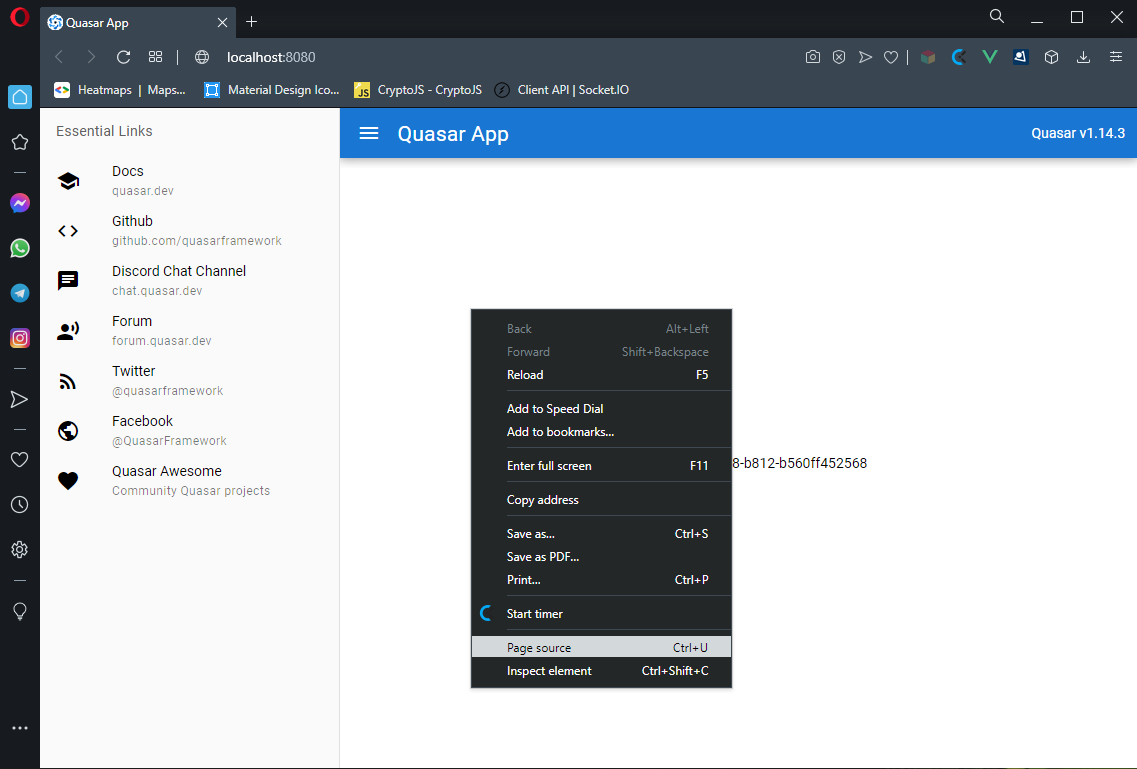
Check if a unique uid is being fetched from the server.
* 1 - this uid would be inside a div, as it was at the Index.vue.
* 2 - the same uid would be present at the window.__VAULT_STATE__

##6 Registering global modules to the vault
Until now, the modules have had to be registered in a very coupled way, but what if we need to use them globally?
Just call the `vault.registerModule` somewhere, again, make sure the namespace is unique in your application:
```bash
quasar new boot modules
```
**src/boot/modules.js**
```js
// make sure that boot is registered after the vault
import { uid } from 'quasar'
export default async ({ app }) => {
const vault = app.vault
vault.registerModule('app', {
data () {
return {
uid: ''
}
}
})
await new Promise(resolve => setTimeout(resolve, 1000))
vault.state.app.uid = uid()
}
```
To test, we need to update the `src/page/Index.js`
```html
<template>
<q-page class="flex flex-center">
<div class="row">
<div class="col col-12">
page: {{uid}}
</div>
<div class="col col-12">
app: {{appId}}
</div>
</div>
</q-page>
</template>
```
```js
import Vault from 'src/services/vault'
import { uid } from 'quasar'
export default Vault.page('page-index', {
/* DOT NOT touch in the name, preFetch, data and mounted */
computed: {
appId () {
return this.$vault.state.app.uid
}
}
})
```
##7 getters and actions equivalents
If we want to go even further and share much more than just the state, we can create a new Vue instances to serve the modules, so we'll be able to access methods and computeds from anywhere.
This doesn't just work for the methods and computed properties, but everything, like watch'ers, events, etc.
All we need to do is create a new Vue app while calling the `registerModule` method. We'll also need to destroy this app on unregister:
**src/services/vault.js**
```js
import Vue from 'vue'
export default class Vault {
/* DON'T need to touch in the other methods */
registerModule (namespace, { data }) {
this.registerState(namespace, { data })
if (!this[namespace]) {
const self = this
const options = {
name: `module-${namespace}`,
data () {
return self.state[namespace]
},
render: h => h('div'),
...props
}
this[namespace] = new Vue(options)
this[namespace].$mount()
}
}
unregisterModule (namespace) {
if (!this.state[namespace]) {
this[namespace].$destroy()
delete this[namespace]
delete this.state[namespace]
}
}
}
```
In order to test, we'll make some changes to the boot modules:
**src/boot/modules.js**
```js
import { uid } from 'quasar'
export default async ({ app }) => {
const vault = app.vault
vault.registerModule('app', {
data () {
return {
uid: ''
}
},
computed: {
reversed () {
return this.uid.split('').reverse().join('')
}
},
methods: {
newId () {
this.uid = uid()
}
}
})
await new Promise(resolve => setTimeout(resolve, 1000))
vault.app.newId()
}
```
Now that we have the computed property methods, we can either access the state directly (using `vault.state.app.uid`) or through the Vue app (using `vault.app.uid`). Remember, both are reactive. And of course, we'll be able to access the computed properties and the methods from anywhere.
here is an example:
**src/page/Index.vue**
```html
<template>
<q-page class="flex flex-center">
<div class="row">
<div class="col col-12">
page: {{uid}}
</div>
<div class="col col-12">
app: {{appId}}
</div>
<div class="col col-12">
app direct: {{$vault.app.uid}}
</div>
<div class="col col-12">
app reversed: {{$vault.app.reversed}}
</div>
</div>
</q-page>
</template>
```
```js
import Vault from 'src/services/vault'
import { uid } from 'quasar'
export default Vault.page('page-index', {
/* DOT NOT touch in the name, preFetch, data and computed */
mounted () {
setInterval(() => {
this.uid = uid()
this.$vault.app.newId()
}, 1000)
}
})
```
##8 mimic vuex / droping vuex
Finally, we'll mimic some fields/methods of Vuex (`mutations`, `getters`, `actions`, `commit` and `dispatch`).
We'll need to do some improvements in the methods `registerModule` and `unregisterModule`, as well add the new methods `commit` and `dispatch`.
**src/services/vault**
```js
import Vue from 'vue'
export default class Vault {
constructor ({ state = {} } = {}) {
this.state = state
this.gettersMap = new Map()
this.getters = {}
this.modules = modules
}
registerModule (namespace, { data, methods, computed, state, mutations, actions, getters, ...props }) {
this.registerState(namespace, { data })
if (!this[namespace]) {
data = data || state
methods = methods || {}
computed = computed || {}
mutations = mutations || {}
actions = actions || {}
getters = getters || {}
const self = this
const mutationKeys = Object.keys(mutations)
const actionKeys = Object.keys(actions)
const getterKeys = Object.keys(getters)
for (const mutation of mutationKeys) {
methods[`mutation/${mutation}`] = function (payload) {
return mutations[mutation](self.state[namespace], payload)
}
}
for (const action of actionKeys) {
methods[`action/${action}`] = function (payload) {
return actions[action](this.__context, payload)
}
}
const __getters = {}
for (const getter of getterKeys) {
methods[`getter/${getter}`] = function () {
const { state, getters: __getters, rootState, rootGetters } = this.__context
return getters[getter](state, __getters, rootState, rootGetters)
}
computed[getter] = function () {
return this[`getter/${getter}`]()
}
const property = {
get () {
return self[namespace][getter]
}
}
Object.defineProperty(self.getters, `${namespace}/${getter}`, property)
Object.defineProperty(__getters, getter, property)
}
this.gettersMap.set(namespace, __getters)
const options = {
name: `module-${namespace}`,
data () {
return self.state[namespace]
},
render: h => h('div'),
computed: {
...computed,
__context () {
return {
state: self.state[namespace],
rootState: self.state,
dispatch: this.dispatch,
commit: this.commit,
getters: self.gettersMap.get(namespace),
rootGetters: self.getters
}
}
},
methods: {
...methods,
dispatch (name, payload, { root = false } = {}) {
return self.dispatch(root ? name : `${namespace}/${name}`, payload)
},
commit (name, payload, { root = false } = {}) {
return self.commit(root ? name : `${namespace}/${name}`, payload)
}
},
...props
}
this[namespace] = new Vue(options)
this[namespace].$mount()
}
}
unregisterModule (namespace) {
const isRegistered = !!this[namespace]
if (isRegistered) {
const keys = Object.keys(this.getters)
for (const key of keys) {
if (key.startsWith(`${namespace}/`)) {
delete this.getters[key]
}
}
this.gettersMap.delete(namespace)
this[namespace].$destroy()
delete this[namespace]
delete this.state[namespace]
}
}
dispatch (name, payload) {
let [type, method] = name.split('/')
const instance = this[type]
instance.$emit(`action:${name}`, payload)
return new Promise(resolve => {
if (instance[`action/${method}`]) {
method = `action/${method}`
}
const response = instance[method](payload)
if (response && response.then) {
return response.then(resolve)
} else {
return resolve(response)
}
})
}
commit (name, payload) {
let [type, method] = name.split('/')
const instance = this[type]
instance.$emit(`mutation:${name}`, payload)
if (instance[`mutation/${method}`]) {
method = `mutation/${method}`
}
return instance[method](payload)
}
configure () {
const keys = Object.keys(this.modules)
for (const key of keys) {
this.registerModule(key, this.modules[key])
}
}
static install (Vue, options) {
Vue.mixin({
beforeCreate () {
const options = this.$options
if (options.store) {
this.$store = options.store
} else if (options.parent) {
this.$store = options.parent.$store
}
}
})
}
}
```
As you can see, the `actions`, `mutations` and `getters` will be transformed in `methods` and `computed properties`, and the `dispatch` and the `commit` will invoke the `methods`.
The `install` method will inject the store in the Vue instances. The `configure` is a `workaround` to initialize the modules (to ensure the modules will be initilized only after the states are rehydrated).
> Vue3 note: In the `commit` and `dispatch` methods, we're emitting some events and both are optional. They are here, only to help Vue DevTools users to track when the actions and/or mutations are called.
> But since the [Events API](https://v3.vuejs.org/guide/migration/events-api.html#_3-x-update) got removed from the Vue instances, you'll need to remove them.
Now that everything is set up, let's define a Vuex module:
**src/store/global.js**
```js
import { uid } from 'quasar'
export default {
state () {
return {
uid: ''
}
},
mutations: {
uid (state, value) {
state.uid = value
}
},
getters: {
reversed (state) {
return state.uid.split('').reverse().join('')
}
},
actions: {
newId ({ commit }) {
commit('uid', uid())
}
}
}
```
We need to modify the `src/store/index.js`, removing any dependencies of the Vuex package.
```js
import Vue from 'vue'
import Vault from 'src/services/vault'
import global from './global'
Vue.use(Vault)
export default async function ({ ssrContext }) {
const Store = new Vault({
modules: {
global
},
// enable strict mode (adds overhead!)
// for dev mode only
strict: process.env.DEBUGGING
})
return Store
}
```
As you can see, we just replaced the Vuex with the Vault, but in order to make that work, we need to call the configure method later (recommended in a boot file):
**src/boot/modules**
```js
export default async ({ app, store }) => {
store.configure()
store.dispatch('global/newId')
}
```
Finally, in order to test the store, let's modify the `src/page/index.vue`.
**src/page/Index.vue**
```html
<template>
<q-page class="flex flex-center">
<div class="row">
<div class="col col-12">
page: {{uid}}
</div>
<div class="col col-12">
app: {{appId}}
</div>
<div class="col col-12">
app direct: {{$vault.app.uid}}
</div>
<div class="col col-12">
app reversed: {{$vault.app.reversed}}
</div>
<div class="col col-12">
store state: {{storeUid}}
</div>
<div class="col col-12">
store getters: {{reversed}}
</div>
</div>
</q-page>
</template>
```
```js
import Vault from 'src/services/vault'
import { uid } from 'quasar'
export default Vault.page('page-index', {
name: 'PageIndex',
async preFetch ({ data, axios, store, currentRoute, redirect }) {
// const { data } = await this.$axios.get('...' + this.$route.params.id)
// this.uid = data
// the promise with setTimeout tries to mimic a http request, like the above one.
await new Promise(resolve => setTimeout(resolve, 1000))
data.uid = uid()
},
data () {
return {
uid: ''
}
},
mounted () {
setInterval(() => {
this.uid = uid()
this.$vault.app.newId()
this.newId()
}, 1000)
},
computed: {
storeUid () {
return this.$store.state.global.uid
},
appId () {
return this.$vault.state.app.uid
},
reversed () {
return this.$store.getters['global/reversed']
}
},
methods: {
newId () {
this.$store.dispatch('global/newId')
}
}
})
```
Since you have decided to mimic Vuex, you don't need the boot vault, since the store itself will be a vault instance. As a result, the static method page will require some changes.
```js
static page (namespace, { data, destroyed, preFetch, ...options }) {
return {
async preFetch (context) {
const { store } = context
if (!store.state[namespace]) {
store.registerModule(namespace, { data })
context.data = store.state[namespace]
context.axios = store.$axios
if (preFetch) {
await preFetch(context)
}
}
},
data () {
return this.$store.state[namespace]
},
destroyed () {
delete this.$store.unregisterModule(namespace)
if (preFetch) {
destroyed.bind(this)()
}
},
...options
}
}
```
##9 About Quasar
Interested in Quasar? Here are some more tips and information:
More info: https://quasar.dev
GitHub: https://github.com/quasarframework/quasar
Newsletter: https://quasar.dev/newsletter
Getting Started: https://quasar.dev/start
Chat Server: https://chat.quasar.dev/
Forum: https://forum.quasar.dev/
Twitter: https://twitter.com/quasarframework
Donate: https://donate.quasar.dev
 Google Drive
Gist
Clipboard
Google Drive
Gist
Clipboard
 Sign in with Wallet






