# Django學習記錄
太久沒有碰網頁後端框架了,真的忘的很快,記錄一下各項配製方法。
而且網路上很多Django的教學為舊版本,希望這篇教學可以幫助到有需要的人們!!
這篇僅是Django最基礎的操作以及運作原理,幫助大家快速上手這個好用的後端框架。
## 0. Why Django? Django和PHP的差別?
Django是一個以Python構建的後端大型框架,可以用各種Python的Package做一些進階功能,而且Python處理字串的能力遠比PHP強的多。
Django是一種MTV的框架:
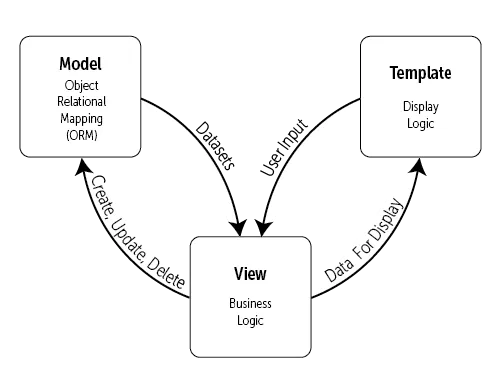
整個框架由Model(資料庫), template(html), View(前端畫面)構成。不同於PHP一個檔案對應到一個網頁(後端),Django則是view.py內的一個function對應到一個網頁,多個function組成一個app,所有app有組成一個Project。
Django的另一特點就是所有的路徑都由後端設定,而不仰仗于檔案實際的位置,因此就算某些檔案路徑不同了也不會影響到網頁。
## 1. 關於Django的Project和App
### Project
一個Project共用網路層面的設定,也就server的主要設定,例如資料庫、網頁Request、或是Url導向。
建立Django project指令如下:
```bash!
django-admin startproject project_name
```
會產生以下的檔案:
```
project_name
├── manage.py //指令集
└── project_name
├── settings.py //主要設定
├── urls.py // 網址路徑設定
├── wsgi.py //web request 設定
├── asgi.py //asynchronize request 設定
```
看不懂檔案的用途沒關係,僅有settings.py比較常用到而已。
wsgi.py用來設定要連到哪一個server(通常是Nginx)。
Project建好使用runserver指令:
```bash!
python manage.py runserver
```
localhost:8000 如果有以下畫面就是成功了!!

備註:
這個runserver只是跑一個暫時性的python server, 方便debug而已。其效能跟安全性都非常差,要上架時還是會需要其他server幫助!!
### App
一個App就是多個功能比較相近的網頁,那究竟哪些網頁才算是功能相近?這沒有一定的規則,只要自己覺得好管理就可以了。
當然想要把所有網頁放在同一個App或是一個網頁一個App也是沒問題的啦~。
創建App的指令:
```bash!
python manage.py startapp app_name
```
記得要跟manage.py同一個路徑下執行。
整個專案資料夾會變成這樣:
```
project_name
├── manage.py //指令集
├── project_name
└── app_name
├── admin.py
├── apps.py
├── models.py
├── tests.py
└── views.py
```
最後記得把新創建的App加到settings.py的installed_app列表內:
```python!
INSTALLED_APPS = [
"django.contrib.admin",
"django.contrib.auth",
"django.contrib.contenttypes",
"django.contrib.sessions",
"django.contrib.messages",
"django.contrib.staticfiles",
"app_name", #新創建的app
]
```
1. admin.py
用來設定Django admin內要顯示的東西,也可以自定義一些csv匯入之類,詳細會在後面Django admin細講。
2. apps.py
幾乎不會動到的設定,可以定義app啟動時的一些function等等。
3. models.py
資料庫的table定義,後面資料庫操作會再細談。
4. tests.py
用來寫一些測試小腳本的檔案,可以用來測試資料庫又不影響到真正的資料,不過我也不會用QQ。
官方文檔:
https://docs.djangoproject.com/en/5.0/intro/tutorial05/
5. views.py
定義各個網頁要怎麼顯示,最重要的一個檔案!!。
可以發現一個App內會有共用的view, models。所以通常我會把常用到一樣table的網頁定義成一個App,或者常用到同一個function的頁面放在同一個App內。
## 2. template和View。
### 構建前端的第一步
先在App資料夾底下新增一個templates資料夾,把index.html檔案放進去:
```
app_name
├──templates
├──index.html
├── admin.py
├── apps.py
├── models.py
├── tests.py
└── views.py
```
index.html如下:
```
<!doctype html>
<html>
<head>
<title>This is the title of the webpage!</title>
</head>
<body>
<p>This is an example paragraph. Anything in the <strong>body</strong> tag will appear on the page, just like this <strong>p</strong> tag and its contents.</p>
</body>
</html>
```
配置好了template, 就要把這個畫面給選染到view上面啦~
view.py:
```python!
from django.shortcuts import render
#新加入的function
def testPage(request):
return render(request, "index.html")
```
這樣就完成了view function跟template的對應,最後把function配置一個url。
urls.py:
```python!
from django.contrib import admin
from django.urls import path
from app_name import views #記得要import app的view
urlpatterns = [
path("admin/", admin.site.urls),
path("home", views.testPage) #給剛剛寫好的function設定一個url
]
```
這時候runserver後,瀏覽器網址輸入localhost:8000/home就可以看到剛剛寫的網頁啦!

所有檔案要被瀏覽器存取,一定都要經過urls.py的分配,這種方法也加強了網頁的安全性。
如果urls內path放空字串,網頁就會被map到localhost:8000。
urls dispatch還有其他進階的用法,詳細看一下官方document:
https://docs.djangoproject.com/en/5.0/topics/http/urls/
### static files
Django內的static files(JS, CSS, IMG)也是統一由框架管理,不再透過file system的相對路徑去存取。
在settings.py裡面找到以下設定:
```python!
STATIC_URL = "static/"
```
這段定義每個app內的static資料夾,可以作為static file存取的路徑。我們在App建立一個static 資料夾,裡面放我們要的css檔案(或是任何靜態文件):
```
app_name
├──templates
├──index.html
├── static
├──index.css
├── admin.py
├── apps.py
├── models.py
├── tests.py
└── views.py
```
index.css:
```css
p {
color: rebeccapurple;
}
```
可以用網址localhost:8000/static/index.css確定是否能存取檔案,若可以則代表static配置正確。

那html中如何引用呢?
首先要在html的最上面加上:
{% load static %}
只要放在static資料夾內的檔案都能用{% static "path_to_file"%}去存取。
```htmlembedded
<link href='{% static "index.css" %}' rel="stylesheet"/>
```

可以看到我們的網頁已經有吃到CSS檔案啦~
img的src也是用同樣的方法去存取。
### include template
如果有一些常用的html code可以獨立成一個html檔案,在需要的時候include就好。像是網站的許多頁面都會用相同的navbar和footer,我們可以分別為footer和navbar創建html檔案。
```
app_name
├──templates
├──index.html
├──navbar.html
├──footer.html
├── static
├──index.css
├── admin.py
├── apps.py
├── models.py
├── tests.py
└── views.py
```
然後在需要的位置include就好:
```htmlembedded!
{% include "navbar.html"%}
<p>This is an example paragraph. Anything in the <strong>body</strong> tag will appear on the page, just like this <strong>p</strong> tag and its contents.</p>
{% include "footer.html"%}
```
但有些template不只一個App需要,需要跨App也能存取該怎麼辦呢?這時候我們就要定義global template dirctory。
在settings.py裡面找到template的設定,把global template dir放到DIRS選項的位置:
```python!
TEMPLATES = [
{
"BACKEND": "django.template.backends.django.DjangoTemplates",
"DIRS": [BASE_DIR / "templates"], #定義global templates的位置
"APP_DIRS": True,
"OPTIONS": {
"context_processors": [
"django.template.context_processors.debug",
"django.template.context_processors.request",
"django.contrib.auth.context_processors.auth",
"django.contrib.messages.context_processors.messages",
],
},
},
]
```
BASE_DIR代表的是Project的位置。有趣的是Django setting內的所有路徑都可以直接用 **/** 符號連接,不需要用OS.path.join()。
APP_DIRS 如果改成False,django就不會再從App內找templates資料夾了,只有DIRS裡面的會被當成template檔案。
***備註***
我常常網頁會用到一大堆plugin,jquery、boostrap、jspanel....,每次都要複製一大堆link code很麻煩,我就會把這些引用的code做成一個template,每個網頁去include就好。
### Global static file
剛剛有提到跨App要存取template要設定Global template,同理跨App要存取static也要設定global static dirs。直接在settings.py加入以下設定:
```python!
STATICFILES_DIRS = [
BASE_DIR / "static_file",
]
```
就可以把project file底下的static_file資料內的開放給所有App存取。
### send data to template
Django可以將要用的資料打包成一個dictionary傳給前端。只要在view function return render時把資料放在最後一個參數。
view.py:
```python!
def testPage(request):
i = [x for x in range(1,10)] #一個0~9的list
data = {
"data1":"資料1",
"data2":"資料2",
"list":i,
}
return render(request, "index.html", data)
```
前端用{{變數}}:
```htmlembedded!
<!doctype html>
{% load static %}
<html>
<head>
<title>This is the title of the webpage!</title>
<link href='{% static "index.css" %}' rel="stylesheet" />
</head>
<body>
{{data2}}
<p>This is an example paragraph. Anything in the <strong>body</strong> tag will appear on the page, just like this <strong>p</strong> tag and its contents.</p>
{{list}}
</body>
</html>
```

如果要取出list內特定index:
```htmlembedded!
{{list.3}}
```
### for tag
或是用for loop tag:
```htmlembedded!
<!doctype html>
{% load static %}
<html>
<head>
<title>This is the title of the webpage!</title>
<link href='{% static "index.css" %}' rel="stylesheet" />
</head>
<body>
{{data2}}
<p>This is an example paragraph. Anything in the <strong>body</strong> tag will appear on the page, just like this <strong>p</strong> tag and its contents.</p>
{% for item in list%}
<p>{{item}}</p>
{% endfor %}
</body>
</html>
```

### if tag
當然有for tag也有if else tag:
```htmlembedded!
{% if ... %}
{% else if ...%}
{% else %}
{% endif %}
```
像是宿舍公共空間借用系統的空間選擇欄位,要依據目前選擇的空間改變selected:

```htmlembedded!
<select class="wide" id="dropdown">
<option value="1" selected="">雨樹L棟會議室</option>
<option value="10">雨樹藝文空間</option>
</select>
```
就是使用for tag以及 if tag完成的:
```htmlembedded=
<select class="wide" id="dropdown">
{% for space in region_space %}
<option value={{space.id}} {% if space.id == request.GET.space_id %} selected {% endif %}>{{space.space_name}}</option>
{% endfor %}
</select>
```
要特別注意的是,對於Django前端的變數還是有資料型態的差別的,所以如果==兩端的資料型態不同,是需要資料型態轉換的!
基本上都和python語法差不多,只是最後都要加上一個end tag。
還有很多酷酷tag和filter,包括變數資料型態的轉換(stringformat)或是變數的運算(add),請參考官方文檔:
https://docs.djangoproject.com/en/5.0/ref/templates/builtins
備註:
MTV這種形式的好處就是前後端做到完全分離,前端code只會有變數跟一些必要的for loop。
### 什麼?前端可以存取POST?
不只是POST, GET、session、cookie,這些跟request有關的都可以直接在template用變數存取。
不過要確定setting.py內的templates context_processors有沒有這個設定:
```python!
"django.template.context_processors.request"
```
這樣就可以在前端用request.POST.name存取POST的內容!!(session, get, cookie同理)
```htmlembedded!
<p id="hidden_id" >{{request.GET.space_id}}</p>
```
### url tag
**補充**:
還有很重要的tag是url tag, 用法:
{% url "site_name" %}
只要給頁面一個別名,就可以用這個tag自動生成去往這個頁面的url。
這東西好用在哪裡呢?以宿服借用系統的navbar為例,點擊navbar上的標題就可以回到主頁。
但是如果用相對路徑,有一些頁面可能../就可以回到主頁,有一些要../../兩次才可以或是更多,如果用絕對路徑domain更改時又要改code,所以我們可以直接給主頁一個url name,在urls.py裡面:
```python!
path("", views.home, name="home"),
```
這樣我們就可以用{% url "home" %}回到主頁:
```htmlembedded=
<nav class="navbar navbar-expand-lg navbar-dark bg-516464">
<div class="container px-5">
<a class="navbar-brand" href="{% url 'home'%}">中山大學宿舍公共空間借用系統</a>
<button class="navbar-toggler" type="button" data-bs-toggle="collapse" data-bs-target="#navbarSupportedContent" aria-controls="navbarSupportedContent" aria-expanded="false" aria-label="Toggle navigation"><span class="navbar-toggler-icon"></span></button>
<div class="collapse navbar-collapse" id="navbarSupportedContent">
<ul class="navbar-nav ms-auto mb-2 mb-lg-0">
<li class="nav-item"><a class="nav-link" href="https://housing-osa.nsysu.edu.tw/">宿服組網站</a></li>
<li class="nav-item"><a class="nav-link" href="https://housing-osa.nsysu.edu.tw/p/412-1092-18050.php?Lang=zh-tw">借用須知</a></li>
</ul>
</div>
</div>
</nav>
```
## 3.資料庫
### 資料庫設定
Django 原先預設是使用sqllite,不過我自己習慣使用MySQL。
在 settings.py內找到DATABASES的設定,並改成:
```python!
DATABASES = {
"default": {
"ENGINE": "django.db.backends.mysql",
"NAME": "databaseName",
"USER": "databaseUser",
"PASSWORD": "databasePassword",
"HOST": "localhost",
"PORT": "portNumber",
}
}
```
若沒有安裝pymysql package:
```bash!
pip install pymysql
```
最後記得要在project/__init__.py 或是 settings.py的最上面補上以下程式,
這段程式的目的是讓python可以直接透過pymysql package去連結資料庫:
```python!
import pymysql
pymysql.install_as_MySQLdb()
```
Django不管你連接什麼資料庫,都會轉為ORM,簡單來說就是一個table就會是一個Python class,table內的column就是class的attribute,這些class定義在app的models.py裡面。
**ps:** ***model就沒分local model或是global model了,如果要用到別的app的model, 直接from app import model就好了。***
```python=
class Space(models.Model):
id = models.AutoField(primary_key=True) # Field name made lowercase.
space_name = models.CharField(max_length=255) # Field name made lowercase.
region = models.CharField(max_length=255)
link = models.CharField(max_length=255, blank=True, null=True)
eng_name = models.CharField(max_length=255)
class Meta:
managed = True #代表需要Django幫你在資料庫建立這個table
db_table = 'Space' #資料庫內table的名字,預設會是django_space
class Register(models.Model):
signature = models.CharField(max_length=255, primary_key=True, null=False, blank=False)
start_time = models.IntegerField() # Field name made lowercase.
space = models.ForeignKey(Space, on_delete=models.CASCADE) # Field name made lowercase. The composite primary key (Space_id, Start_time, Date) found, that is not supported. The first column is selected.
date = models.CharField(max_length=20) # Field name made lowercase.
usable = models.IntegerField()
user_id = models.CharField(max_length=255, blank=True, null=True)
user_name = models.CharField(max_length=255, blank=True, null=True)
user_phone = models.CharField(max_length=255, blank=True, null=True)
user_dormnumber = models.IntegerField(blank=True, null=True)
change_pwd = models.CharField(max_length=255, blank=True, null=True)
class Meta:
managed = True
db_table = 'Register'
unique_together = ('space', 'start_time', 'date') #這三個欄位合在一起必須唯一
class BlackList(models.Model):
stu_id = models.CharField(primary_key=True, max_length=20)
expire_time = models.DateField(blank=True, null=True)
banned_reason = models.CharField(max_length=20, blank=True, null=True)
class Meta:
managed = True
db_table = 'black_list'
```
定義或是修改class後輸入指令:
```bash!
python manage.py makemigrations
python manage.py migrate
```
這時就會看到我們的資料庫多了許多table:

除了Space, Register, black_list以外,其他都可以不用管,那些是django自己產生的一些紀錄。
### 常見的資料庫欄位格式
資料欄位Options常用的有:
<table>
<tr>
<th>選項</th>
<th>意義</th>
</tr>
<tr>
<td>null</td>
<td>是否可以為null</td>
</tr>
<tr>
<td>blank</td>
<td>是否可以為空白字串</td>
</tr>
<tr>
<td>primary_key</td>
<td>是否為pk</td>
</tr>
<tr>
<td>default</td>
<td>欄位預設值</td>
</tr>
<tr>
<td>choices</td>
<td>限定欄位值只能填哪些, 很好用</td>
</tr>
<tr>
<td>unique</td>
<td>欄位值是否唯一</td>
</tr>
</table>
常用的資料型態則有:
```python=
models.AutoField() #autoIncrement Integer
models.CharField() #varchar
models.IntegerField() #Integer
models.DateField() #Date, 在python內可以當datetime.date物件處理
#偷偷抱怨一下,php要處理date真的超級麻煩,所以之前我都用varchar去存日期
models.DateTimeField() #Datetime, 時間加上日期,在python內可以當datetime.datetime物件處理
models.FileField() #Mysql沒有這種欄位,直接可以handle檔案的存取!超讚!!
```
**備註:**
Django不支援multi-key primary key, 所以只能放一個autoincrement的pk, 然後再用unique_together
### 特殊的資料欄位
這些欄位是用來定義relational DB表格之間的關係,像是1對1資料、1對多資料...
Django都會自動轉換成對應的表格,不需要自己從ER diagram轉成table。並且當資料違反原則時會自動報錯。
```python=
models.OneToOneField() #1對1關係
models.ForeignKey() #1對多關係
models.ManyToManyField() #多對多關係,資料庫會自動多建立一個表格
```
這些特殊欄位除了上面提到Option,還多了幾個:
<table>
<tr>
<th>選項</th>
<th>意義</th>
</tr>
<tr>
<td>to</td>
<td>有關係的table</td>
</tr>
<tr>
<td>on_delete</td>
<td>連結的資料消失時採去的動作</td>
</tr>
<tr>
<td> parent_link</td>
<td>繼承用的,不重要我也不會用QQ</td>
</tr>
</table>
詳細更多的Field還有Options請見官方文檔:
https://docs.djangoproject.com/en/5.0/ref/models/fields/#django.db.models.FileField
### Query
Django支援原本的SQL語法或是ORM對資料庫進行Query,個人建議簡單的操作像是SELECT, DELETE, INSERT用ORM,至於比較複雜的JOIN, GROUP_BY, 甚至是AGGREGATION就還是乖乖寫SQL吧!!
#### SELECT
```python!
#SELECT * from space where id = 1 AND space_name = "武嶺會議室";
space = Space.object.filter(id=1, space_name="武嶺會議室")
#SELECT id, space_name from space where id = 1;
space = Space.object.filter(id=1).values("id", "space_name")
```
注意!!以上兩種function回傳不太一樣,前者是QuerySet(類似list的物件),裡面包著Space object;後者是QuerySet裡面包著dict。
例如:
```python!
>>> Blog.objects.filter(name__startswith='Beatles').values('id', 'name', 'tagline')
[{'id': 1, 'name': 'Beatles Blog', 'tagline': 'All the latest Beatles news.'}]
```
注意!!雖然QuerySet物件類似list, 操作也差不多,但在某些function只能接受list還是得要轉換。
**補充(不怎麼重要,可以跳過):**
如果使用values_list,則所有值會攤開成一個tuple:
```python!
>>> Blog.objects.filter(name__startswith='Beatles').values_list('id', 'name')
[(1, 'Beatles Blog')]
```
如果再加上flat=TRUE就會攤開變成:
```python!
>>> Blog.objects.filter(name__startswith='Beatles').values_list('id', 'name', flat=True)
[1, 'Beatles Blog']
```
**補充結束**
#### INSERT INTO/UPDATE
```python!
new_space = Space(id=2, space_name="武嶺交誼廳")
new_space.save()
#INSERT INTO Space (id, space_name) values (2, space_name);
```
也可以用dic創建一個物件,在該物件有一大堆Fields時比較省力:
```python!
record = {
'start_time' : request.POST.get('Start_time'),
'user_id' : request.POST.get('user_id'),
'user_dormnumber' : request.POST.get('user_dormnumber'),
'user_phone' : request.POST.get('user_phone'),
'change_pwd' : request.POST.get('change_pwd'),
'date' : request.POST.get('date'),
'user_name' : request.POST.get('name'),
'usable': 1
}
new_record = Register(**record)
new_record.save()
```
如果要update,只要把物件Query出來修改後,用save()就可以了
#### DELET FROM
```python!
space = Space.object.filter(id=1, space_name="武嶺會議室")
space.delete()
#DELET FROM Space where id=1;
```
### 用SQL QUERY
```python!
from django.db import connection
with connection.cursor() as cursor:
cursor.execute("YOUR SQL STATEMENT")
result = cursor.fetchall()
```
**補充**:
以防有人不知道,python的with是一個專門把檔案、連線物件關住的東西,在離開with時會自動執行cursor.close(),避免連線資源未關閉。
更多進接或是常用操作可以看:
https://www.twblogs.net/a/5b8793c82b71775d1cd7d91c
## 4. 其他網頁response
前面我們view function回傳都是render(),也就是一個網頁頁面。但有時候我們不希望回傳一整個頁面,像是是Ajax request就不需要回傳一個整個頁面,只要一個字串或是一些資料而已,這時候我們就會用HttpResponse(回傳一個字串)或是JsonResponse。
### HttpResponse
例如登入管理者模式的Ajax:
```javascript!
$.ajax({
url : "{% url 'private'%}",
type: "post",
data: {"pwd": pwd, "mode": "login"},
success: function(response) {
alert(response);
location.reload();
},
error: function(jqXHR, textStatus, errorThrown){
alert("AJAX error" + errorThrown);
console.log('Error: ' + errorThrown);
}
});
```
這時private這個view function就會是這樣:
```python!
def admin_mode(request):
if request.method == "POST":
if request.POST.get("mode") == "login":
if request.POST.get("pwd") == "76211194":
request.session['identity'] = "private"
return HttpResponse("登入成功,切換為管理者模式")
else:
return HttpResponse("密碼錯誤!")
else:
request.session['identity'] = "normal"
return HttpResponse("登出成功,切換為一般模式")
else:
raise Http404("Page not exit")
```
### JsonResponse
通常用來回傳資料庫的內容給端。例如我們的預約介面是用Ajax取得預約資料的,view function就會長這樣:
```python=
def get_regist(request):
if request.method == "POST":
space = request.POST.get('id')
all_regist = Register.objects.filter(space=space).values("start_time", "space_id", "date", "user_id", "user_name", "user_phone", "user_dormnumber")
all_regist = list(all_regist)
if request.session['identity'] == "normal":
for record in all_regist:
record['user_id'] = record['user_id'][:-5] + "XXXXX"
record['user_name'] = record['user_name'][0] + "X" + record['user_name'][2:]
record['user_phone'] = ""
return JsonResponse(all_regist, safe=False)
else:
raise Http404("Page not exit")
```
## 5. 那些有點重要但我懶得打的內容
以下這些有可能會用到(和網站安全有關)但是較為繁瑣我懶得打,要麻煩各位自己找一下資料:
1. CSRF token --- Django避免跨站攻擊的機制
2. Django form --- 也是Django避免sql injection的一個東東
## 6. Utility codes
這裡放一些常常用的function和code:
### cursor dicfetchall
cursor.fetchall()回傳的會是一個tuple(tuple()),這樣會不利於取得資料欄位(只能用index很不方便),以下是讓cursor回傳tuple(dict())的code。
```python=
def dicfetchall(cursor):
colums = [col[0] for col in cursor.description]
return [
dict(zip(colums, row))
for row in cursor.fetchall()
]
```
 Google Drive
Gist
Clipboard
Google Drive
Gist
Clipboard
 Sign in via Google
 Sign in via Facebook
 Sign in via X(Twitter)
 Sign in via GitHub
 Sign in via Dropbox
 Sign in with Wallet






