# Afro Fighter OLD VERSION
Atari ST game
Tobias Wondwossen & Jayden Mingle
## 1. General Game Overview
Afro fighter is a 2d combat game that takes alot of insperation from the popular "Street Fighter" in the 80s. The player is placed in a flat arena with an opponent they must defeat with a combination of hand to hand combat and super powers while ensuring their own health is not depleted.
Future updates will feature a 2 - player game mode allowing players to put their skills to the test against their friends

## 2. Game Play Details for 1-Player Mode
### 2.1 Menu UI and Logic
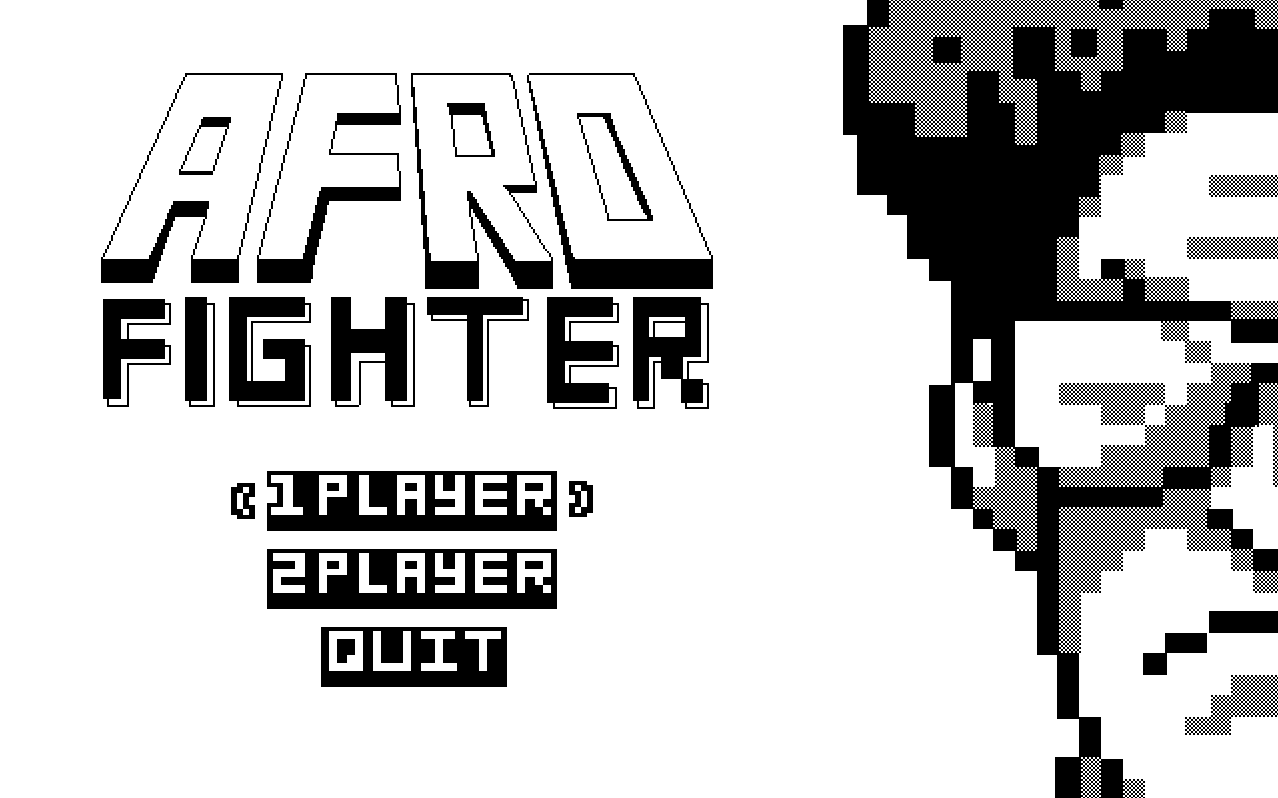
The game will launch into a menu screen with the Afro Fighters logo and two game mode options; `1-player` and `2-player`.
#### 2.1.2 Start State Logic and Game View UI
The `1-Player` game mode beings with the players avatar and the cpu controlled opponent rendered in the arena along with their health bars and a count down starting from 3 in the center of the arena. After the count down has reached one "Fight" will be displayed in the center of the arena; player controls become active and the cpu opponent begins executing its scripted movesets.


#### 2.1.3 Game Over State and UI
There are two possible `Game Over` states, one for a `Win` and a `Loss`
***Win (WIP)***
  
   
***Loss Message (WIP)***
    
    
### 2.2 Objectives and Rules
#### 2.2.1 Health and Damage
Player and Cpu opponent will begin with 100% health depicted by the `P-Health Bar` displayed in the top right corner of the screen and `CPU-Health Bar` displayed in the top left corner. When Damage is dealt the health bar of the player who was damaged will be re-renderd with a length `Damage-Value%` shorter.
Damage is based on collision detection between the `Hit Boxes` of the player Objects. See 2.4.1 for more details on implementation.
Below is a table defining all the offensive moves and their damage values.
| Move | Damage |
| ------------- | ------------- |
| `Light Attack` | 2% |
| `Heavy Attack` | 6% |
| `Ranged / Super` | 16% |
#### 2.2.2 Combat Mechanics
***Offense***
`Player`
- Can use a combination of light and heavy as many times as they wish to deal damage to the opponent.
- see 2.3.1 for implementation details
`Cpu-Player`
- This will be the players opponent. It will be "controlled" by the cpu.
- it is not intelligent since its offense and defense is not a reaction to is enviroment but a scripted set of moves and actions.
- see 2.3.2 for implementation details
***Defense***
- If any of the players is hit by an attack while they're in the blocking state, damage is reduced by 50%
*Ability and Combat Balancing*
In order to discourage a playstyle that spams the `Ranged / Super` attack, this move will only be avaible if the play can block two consecutive `Heavy Attacks` from the opponent.
- When this event is completed a small star will appear below the players health bar to indicate that a their `Ranged / Super` attack is avaiable
- Once this attack is used the star will diseappear untill the event is completed again.
- The event can be completed multiple times, but each play can only have at most 3 stars at once.
***Movement***
- The player has full control over which direction they're facing. This is indicated by the direction of the most recently pressed movement key (see 2.5.1).
### 2.3 Scene Objects
`Scene` will display all objects to a `640px x 400px` screen, below are all the current `Scene Objects`
- `Afro Fighter` ``(2x)``
- `Health bar`
- `Arena floor`
- `Count Down Numbers`
- `Super Indicator`
- `Fire Beam`
- `Avatar Profile Image`
- `Avatar Name`
This means that at any given time during a fight there at least 6 scene objects being displayed on the screen.
#### 2.3.1 Afro Fighter Avatar and Functional Components
<p align="center">
<img src="https://i.imgur.com/HEpC0ON.png" width="200" >
</p>
Every Afro Fighter is an object that encompasses various `States` and `Offensive and Defensive Animations`.
#### *Movement States*
`Idle State`
- This is the default state for the `Afro Fighter`
- This state has animations for both left and right side sprites
Effect| <span style="font-weight:normal">Changes Afro Fighter position to the right</span> | <span style="font-weight:normal">Changes Afro Fighter position to the left</span> |
|--------------------|-------------------|----------|
|**Animation** |`RS-Idle-Animation`|`LS-Idle-Animation`|
**Sprite Sheet (WIP)**| <img src="https://i.imgur.com/5agMmcv.png" width="125" > | <img src="https://i.imgur.com/PFUl1Ct.png" width="125" >
`Running State`
- This state is triggerd by the player
- This state has animations for both left and right side sprites
Effect| <span style="font-weight:normal">Changes Afro Fighter `x-coordinate`</span> |
|--------------------|-------------------|
|**Animation** |`RS-Running-Animation` and `LS-Running-Animation`|
**Sprite Sheet (WIP)**| <img src="https://i.imgur.com/AUfBU45.png" width="400" >|
`Jumping State`
- This state is triggerd by the player
- `Lift Off` Animation has both left and right Variants
Effect| <span style="font-weight:normal">None</span> | <span style="font-weight:normal">Changes `x-coordinate` and `y-coordinate` of Afro Fighter</span> |
|--------------------|-------------------|----------|
|**Animation** |`"Lift Off" Animation`|`Jump Pose`|
|**Sprite Sheet (WIP)**|qq|<img src="https://i.imgur.com/Km4LfZc.png" width="80" >
`Crouch State`
- This State is triggerd by the player when Afro Fighter is in the `Idle State`
Effect| <span style="font-weight:normal">Decreases height on `y-axis` of `Hit-Box` </span> |
|-------|----------|
|**Animations** |`LS-Crouch` and `RS-Crouch`|
|**Sprite Sheet**| <img src="https://i.imgur.com/TYm0Utr.png" width="100" > <img src="https://i.imgur.com/VtJPOVl.png" width="100" > |
`Slide State`
- The State is triggered by the player when Afro Fighter is in the`Running State`
Effect| <span style="font-weight:normal">Changes `x-coordinate` of Afro Fighter and decreases height on `y-axis` of `Hit-Box` </span> |
|--------------------|----------|
|**Animations** |`LS-Slide` and `RS-Slide`|
|**Sprite Sheet (WIP)**| 
`Death State`
- This State is triggerd when the Health of a Afro Fighter is depleted.
Effect| <span style="font-weight:normal">Ends Game, `Scene` will switch to `Game Over State`</span> |
|--------------------|----------|
|**Animations** |`LS-Death` and `RS-Death`|
|**Sprite Sheet (WIP)**| <img src="https://i.imgur.com/Xj7RIQ4.png" width="200" > <br> `Source` Street Fighter 2|
#### *Offensive States*
`Light Attack`
- Consists of a alternating punches from `Left Hand` and `Right Hand` of the Afro Fighter]
- Has Variants for both left and right orientations of the Afro Fighter
Effect| <span style="font-weight:normal">Increases `Hit box` of `Afro Fighter Object`</span> |
|--------------------|----------|
|**Animations** |`Left Hand Punch` and `Right Hand Punch`|
|**Sprite Sheet**| <img src="https://i.imgur.com/xyAbEjb.png" width="125" > <img src="https://i.imgur.com/1n10Zlo.png" width="125" >
`Heavy Attack`
- Single kick from Right foot
Effect| <span style="font-weight:normal">Increases `Hit box` of `Afro Fighter Object`</span> |
|--------------------|----------|
|**Animation** | `Right Foot Kick`|
|**Sprite Sheet (WIP)**| <img src="https://i.imgur.com/axsQb4j.png" width="200" >
`Super / Ranged Attack`
- Triggerd by player when they have a star (two consecutive `Heavy Attack` blocks)
Effect| <span style="font-weight:normal">Create `Fire Beam` Object, see</span> |
|--------------------|----------|
|**Animation** |`Fire Beam Imbue` |
|**Sprite Sheet (WIP)**|<br>`Source` "Goku Kamehameha Sprite Animation"
#### *Defensive States*
`Block`
- Can be triggerd by player in any other state but `Death State`.
Effect| <span style="font-weight:normal">Reduces damage inflected on `Afro Fighter` by `50%` </span> |
|--------------------|----------|
|**Animation** |`Ls-Block` and `Rs-Block` |
|**Sprite Sheet (WIP)**| <img src="https://i.imgur.com/hs9Qqv3.png" width="180" > <br>`Source` "DreamsTime(dot)com"
#### 2.3.2 Fire Beam Projectile
- This is a beam object created after a player has been granted a `Super / Ranged` attack
| Object | Properties | Behaviour|Image|
|-----------|----------|---------|-----|
|`Fire-Beam`|<ul><li>Position Integers, `x` and `y` coordinate </li></ul> |Travels accross `y-vector` until it undegoes a collision | `Source` "Pixel art maker"
#### 2.3.3 CPU-Player
Since the CPU player isn't controlled by a user's inputs, it operates under the following states:
***Approach***
The `Cpu-Player` will be facing the `Player` at all times. If the distance between the `Player` and the `Cpu-Player` is greater than 50px, the `Cpu-Player` Moves forward towards the player using the appropriate movement input.
***Combo***
This is the default state that the`Cpu-Player` will be in. In this state, it will perform a series of moves that go as follows: punch, punch, block, kick, crouch, jump, kick, move forward, block. Each move will be performed 1 second apart.
#### 2.3.4 Arena and HUD
#### *Arena*

| Object | Properties | Behaviour|Image|
|-----------|----------|---------|-----|
|`Arena-Floor` |<ul><li>Size: `640 x 48 px` </li><li>Position Integers, `x` and `y` coordinate</li></li></ul> | None ||
<br/><br/>
#### *Health and Info bar*

| Object | Properties | Behaviour|Image|
|-------------|----------|---------|-----|
|`Health-bar` |<ul><li>Size: `248 x 36 px` </li><li>Position Integers, `x` and `y` coordinate</li></li></ul> |<ul><li>Represents Players current Health </li><li>When damage is delt to player it is rerenders with the its `current length - (damage-value% x current length)` </li></ul> |
|`Avatar-Name`|<ul><li>Size: `26 x 8 px` </li><li>Position Integers, `x` and `y` coordinate</li></li></ul> | None||
|`Avatar-Profile-Img` |<ul><li>Size: `48 x 48 px` </li><li>Position Integers, `x` and `y` coordinate</li></li></ul> | None||
### 2.4 Physics
#### 2.4.1 Collision detection and Hitboxes
`Collision detection` is used to keep the `Afro Fighter` avatar contained in the bounds of the arena and determine when an attack was succesfully laned on the oppponent.
***Bounds Checking for Arena***
The arena has a real width of `640px` if any portion of the `Afro Fighter` collides with either end of this boundary their will not be able to change their `x-coordinate` in the direction where the boundary is violated. The same Rules apply for the `Arena Floor`.
***Hit Boxes***
`Hit-boxes` are used to determine the area of a character's sprite that will register a hit when it comes into contact with an opponent's hit box.
They will not be visible. When two hit boxes collide, the game registers a hit and applies the appropriate damage or knockback (dependant on the `Afro Fighters` current `Offensive state` and opponents `Defensive state`). The size and shape of the hit boxes can vary depending the `Afro Fighters` `State` .
#### 2.4.2 Jump Mechanics
The `Afro Figther` has the ability to jump at any time during the fight, every jump will reach the `Maximum Jump Height` of `250 px`, this is the displacment from the intial/ground position of the`Afro Fighters` feet.
While `accending` and `decending` (change in `+/- y-coordinate of sprite` )the player is able to control the `x displacement` of the `Afro Fighter`.
### 2.5 Asynchronous Events
#### 2.5.1 Movement
1. Move right: `A`
- changes players position 1 unit to the right and triggers `Rs Running Animation`
2. Move left: `D`
- changes players position 1 unit to the left and triggers `Ls Running Animation`
3. Slide: `↓`
- triggers `Slide pose`
4. Jump: `Space`
#### 2.5.2 Combat
5. Light attack (Alternating): `W`
- On 1st click
- Triggers `Left Punch` pose
- On 2nd Click
- Triggers `Right Punch` pose
6. Heavy attack: `←`
- Triggers `Left Foot Kick` pose
7. Super / Ranged attack: `F`
- Triggers `Imbue` pose
- Triggers `Fire Beam Imbue` Sprite
- `Fire Beam` projectile object travels across its intial y-axis until a collision is encounterd
8. Block: `→`
- Triggers `Block` pose
- Player can not take damage in this state
### 2.6 Synchronous Events
| Event Name | Triggering Input Event | Description|
|-------------|----------|---------|
| Intro prompt | 1 second between each part| "3,2,1, FIGHT!"|
### 2.7 Condition Based Events
| Event Name | Triggering Input Event | Description|
|-------------|----------|---------|
| `Health-Bar` Updates | A collision is detected following an attack input | The player who was hit by an attack has their healthbar decrease based on the damage values in 2.2.1 |
| `Hit-Marker` shows | A collision is detected following an attack input | The player who was hit by an attack has their in 2.2.1 |
### 2.8 Hypothetical Gaming Session
The user is given the choice of a 1-player or 2-player game on the title screen when the game first launches. When a game mode is selected, the screen switches to the relevant game version (as explained in sections 2 and 3).
Upon entering a game mode, the arena with the players and their respective healthbars will be displayed. A prompt reading "3, 2, 1, FIGHT!" will be appear and the player(s) will be given control of their respective characters.
As described in 2.2.1, 2.2.2, and 2.5, the players will have different moves they can make based on the set inputs. A combination of attacks can be used to damage the opposing player. The match continues until one of the player's healthbars reach 0% and that player is on the ground. The player that is still standing is the winner. This results in a prompt reading "Player 1/Player 2 Wins!" according to the appropriate player. If both players happen to take each other out at the same time the prompt will read "Draw" instead.
After a winner is declared via the prompt, the user is sent back to the starting title screen.
## 3. Game Play details for 2-player Mode
All the gameplay elements of 1-Player Mode apply to 2-Player Mode but the CPU-Player is replaced with a second actual player. The second player will have the same moveset and controls as the first player
***P1 WINS (WIP)***


***P2 WINS (WIP)***


## 4. Sound Effects
| Sound effect name | Brief Description | Event that triggers playback |
| ------------- | ------------- | ------------- |
| Main Theme | "Help urself Dyn remix" found on youtube | User starts the game |
| Attack | "woosh" sound effect like swinging a bat through the air - duration of a second | any of the players inputs an attack key |
| Attack connects | sound of a boxing glove hitting a punching bag - duration of a second | any of the players inputs an attack key and a collision is detected |
| Super | charge up sound effect - duration of a second | Super/Ranged attack input is pressed |
## 5. Additional Features (Time Permitting)
#### 5.1.1 More attacks:
- crouching punch/kick
- jumping punch/kick
- elbow
- energy blast (smaller than ultimate move)
#### 5.1.2 Multiple rounds:
A round is over when 1 player's health reaches 0%. The first player with 2 ko's wins the match. The Number of player ko's is displayed next to their name and healthbar. If both players are tied in ko's entering the 3rd round and the 3rd round ends in a draw, a sudden death round will occur with both players having decreased health.
#### 5.1.3 Stun meter:
As a player takes hits that aren't blocked, a meter next to the healthbar fills up. When this meter fills up, the next hit a player takes will knock them to the ground and put them in a state where they can't do anything for 2 seconds.
The meter will fill up at the following rates:
| Move | Stun |
| ------------- | ------------- |
| `Light Attack` | 10% |
| `Heavy Attack` | 30% |
| `Ranged / Super` | 60% |
#### 5.1.4 Finishing move:
When a player is knocked out at match point, the player that's still standing will have the option to perform a mortal kombat style finishing move.
#### 5.1.5 "Smarter" CPU:
The `CPU-Player` has a chance to perfectly counter the player by reading input. For example the real player could enter the input to punch and the cpu would block. Outside of this phase the CPU will perform actions based on distance to the player and a predetermined sequence of moves.
#### 5.1.6 Difficulty levels
As difficulty increases, the probablitiy of a perfect counter also increases (should never be 100% or the CPU will be unbeatable)
#### 5.1.7 Character select:
If any player picks a character, that character is grayed out and cannot be selected by someone else. The cpu will pick a character out of the remaining ones at random. The player also has this option.
#### 5.1.8 Announcer:
| Voiceline | Event that triggers playback |
| ------------- | ------------- |
| "Round 1/2, Fight!" | The start of the first or second round |
| "Final Round, Fight!" | The start of the third round |
| "Player 1/2 Wins!" | Match is over and winner is declared |
#### 5.1.9 Graphics Overhaul:
- better background (stack implementation to know when pixels are overlapping)
- psuedo 3d floor
- shaded characters
---
 Google Drive
Gist
Clipboard
Google Drive
Gist
Clipboard
 Sign in with Wallet






