---
slideOptions:
spotlight:
enabled: true
theme : "night"
transition: "slide"
highlightTheme: "monokai"
# logoImg: "logo.png"
slideNumber: true
---
---
# Hablemos del internet en Marte
---
<!-- .element: style=" height: 35vh; margin-bottom: 0" -->
#### Pablo Andrés Dorado Suárez
@pandres95
---
## Antes de Empezar
Note:
Hablaremos de algunos conceptos básicos acerca de comunicaiones y telecomunicaciones.
----
### Mensaje
Información a transmitir (enviar y recibir).
----
### Medio
<!-- .element: style=" height: 35vh; margin-bottom: 0" -->
<span>Fuente: _Chinh Le Duc_ (via Unsplash)</span><!-- .element: style="font-size: 1.2rem" -->
Note:
Un contexto físico del que se sirve el _mensaje_ para ser transmitido.
----
### Emisor
El origen del _mensaje_ transmitido (quién lo envía).
### Receptor
El destinatario del _mensaje_ (quién lo debería recibir).
----
<!-- .element: style=" height: 35vh; margin-bottom: 0" -->
<span>Fuente: ChatGPT</span><!-- .element: style="font-size: 1.2rem" -->
Note:
El receptor debe ser capaz de poder capturar el mensaje por el medio en que se lo envían (ej. Un ciego no puede recibir un mensaje óptico) y descifrarlo (ej. No le hables en japonés a un hispanohablante).
----
De ahora en adelante, a ambos los llamaremos **dispositivos** o **transmisores**.
----
### Enlace
La conexión entre dos _dispositivos_ a través de un _medio_ para transmitir _mensajes_.
----
### Velocidad de enlace (_delay, ping_)
Qué tan rápido se transmite un mensaje (de ida), y está determinada por la distancia y el medio del enlace.
----
.jpg)
Note:
Estás en un estadio viendo un partido de fútbol, y a tu lado hay otra persona con un radio portátil. ¿A quién le llegarán primero las notas del himno nacional que está tocando una banda en el campo?
- ¿A ti, que las escuchas directamente?
- ¿O a la persona a tu lado, que las escucha a través de la transmisión radial?
----
### Ancho de banda
El tamaño del mensaje que cabe a la vez en un _medio_.
Note:
Usar la analogía del tubo.
---
## Medios de comunicación
Cualquier medio físico que sirva para transmitir un mensaje.
----
- **Aire**
- **Electricidad**
- **Electromagnetismo**
- **Luz**
- **Quantum particles**
Note:
### Ejemplos
- Aire: Voz
- Electricidad: Teléfono, Ethernet, Cable coaxial.
- Electromagnetismo: Radio, WiFi, Bluetooth.
- Luz: Visible, IR, Láser.
### Notas aparte
1. Menciona que las señales de humo, por ejemplo, son una _manera_ de comunicar un mensaje a través del aire, pero captar el mensaje por un medio óptico.
2. Por ahí tienes un paper que habla de por qué las partículas cuánticas son potencialmente un medio de comunicación.
----
### Algunas consideraciones
- **Latencia**
- **Pérdida de paquetes**
- **Corrección de errores**
- **Ancho de banda**
Note:
→ **Latencia:** "Si llamas a alguien en Marte, habrá un silencio incómodo antes de que te respondan, como si la llamada tuviera un gran eco."
→ **Pérdida de paquetes:** "Es como si enviaras un mensaje de voz por WhatsApp y algunas palabras se cortaran en el camino."
→ **Corrección de errores:** "Cuando un mensaje se escucha entrecortado, algunas apps intentan 'rellenar' lo que falta para que se entienda mejor."
---
## ¿Cómo comunicar cosas?
----
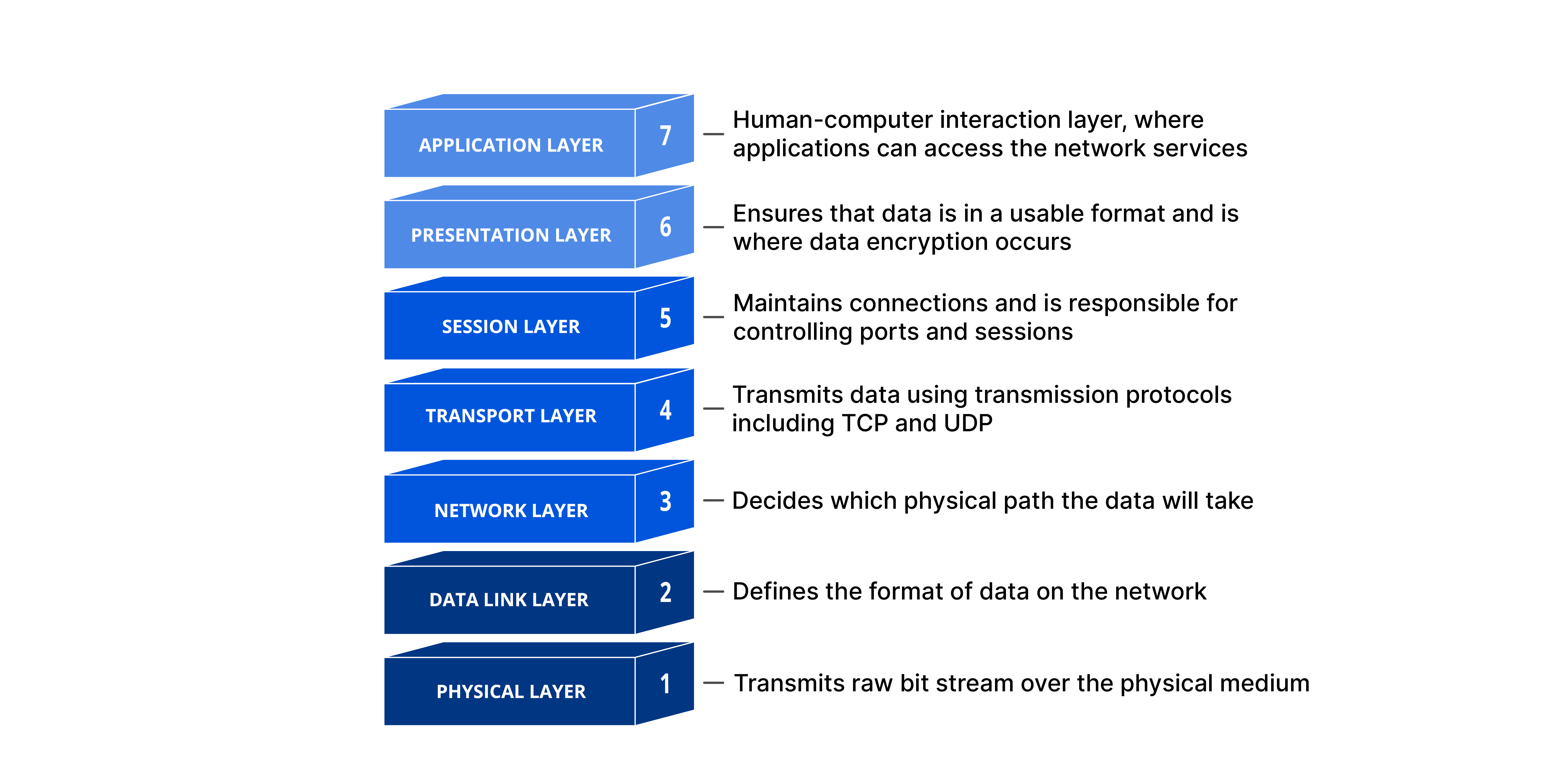
Note:
Explicar qué es el modelo OSI, y que en esta presentación nos enfocaremos en las capas 1-4.
Explicar que para esta presentación, sólo hablaremos de medios de comunicación bidireccionales (lo cuál excluye medios como la radio, por ejemplo).
----
### Conectando dos dispositivos
<!-- .element: style="height: 35vh; margin-bottom: 0" -->
<span>Fuente: _Andrea Tummons_ (via Unsplash)</span><!-- .element: style="font-size: 1.2rem" -->
Note:
**Capa física:** Aire.
**Capa de enlace:** Hablar.
**Capa de red:** Yo miro a la persona y le hablo.
**Capa de transporte:** No aplica.
**Capa de sesión:** Inicio de la conversación. ¿Qué idioma? ¿Qué tema?
**Latencia:** Inmediata.
**Pérdida de paquetes:** Variable. ¿Qué pasa si estoy hablando con alguien en un bar y la música está alta?
**Corrección de errores:** Altísima.
**Ancho de banda:** Depende de qué tan rápido se puede hablar el idioma que escogieron.
----
### Conectando dos dispositivos
<!-- .element: style="height: 35vh; margin-bottom: 0" -->
<span>Fuente: G·OLD Collection (YouTube)</span><!-- .element: style="font-size: 1.2rem" -->
Note:
**Capa física:** Óptica (IR).
**Capa de enlace:** IrDA (Infrared Data Association)
**Capa de red:** No aplica.
**Capa de transporte:** TCP/UDP
**Latencia:** Baja.
**Pérdida de paquetes:** Variable.
**Corrección de errores:** Alta (CRC, ARQ, FEC).
**Ancho de banda:** Depende (IrDA SIR: 115kbps —el de los celulares—, IrDA FIR: 4Mbps)
----
### Conectando dos dispositivos
<!-- .element: style="height: 35vh; margin-bottom: 0" -->
<span>Fuente: WikiHow</span><!-- .element: style="font-size: 1.2rem" -->
Note:
**Capa física:** Electricidad (Cable de red).
**Capa de enlace:** Ethernet
**Capa de red:** IP
**Capa de transporte:** TCP/UDP
**Latencia:** Baja
**Pérdida de paquetes:** Baja o nula.
**Corrección de errores:** Altísima.
**Ancho de banda:** Depende del cable.
----
### Conectando cosas cercanas
<!-- .element: style="height: 35vh; margin-bottom: 0" -->
<span>Fuente: _Boitumelo_ (via Unsplash)</span><!-- .element: style="font-size: 1.2rem" -->
Note:
**Capa física:** Electromagnética (ondas de radio 2.4GHz o 5GHz).
**Capa de enlace:** IEEE 802.11
**Capa de red:** IP
**Capa de transporte:** TCP/UDP
**Latencia:** Baja (aunque fíjate que si estás detrás de varias paredes, se puede volver alta).
**Pérdida de paquetes:** Susceptible a interferencias (microondas, bluetooth, otras redes WiFi).
**Corrección de errores:** Altísima (ARQ, FEC).
**Ancho de banda:** Depende del protocolo.
- Wi-Fi 4 (802.11n) → hasta 600 Mbps
- Wi-Fi 5 (802.11ac) → hasta 6.9 Gbps
- Wi-Fi 6 (802.11ax) → hasta 9.6 Gbps
----
### Conectando cosas (no tan) cercanas
<!-- .element: style="height: 35vh; margin-bottom: 0" -->
<span>Fuente: _Julian Hochgesang_ (via Unsplash)</span><!-- .element: style="font-size: 1.2rem" -->
Note:
**Capa física:** Electricidad (Cobre/PSTN) u Óptica (Fibra).
**Capa de enlace:** ISDN o VoIP
**Capa de red:** IP
**Capa de transporte:** UDP
**Latencia:** Muy Baja (10ms~100ms).
**Pérdida de paquetes:** Susceptible a interferencias (electricidad), o a pérdidas (VoIP).
**Corrección de errores:** Alta (FEC, G.711, G.729).
**Ancho de banda:** Baja
- Telefonía tradicional: 64 kbps por llamada (G.711 estándar).
- VoIP con compresión (G.729): 8 kbps por llamada.
----
### Conectando cosas (no tan) cercanas
<!-- .element: style="height: 35vh; margin-bottom: 0" -->
<span>Fuente: _Clem Onojeghuo_ (via Unsplash)</span><!-- .element: style="font-size: 1.2rem" -->
Note:
**Capa física:** Electromagnetismo (ondas de radio).
- Usa ondas de radio en bandas de 800 MHz a 3.5 GHz según la red (2G, 3G, 4G, 5G).
- En 5G, también puede usar ondas milimétricas (24-100 GHz) para conexiones rápidas.
**Capa de enlace:** GSM (2G), UMTS (3G), LTE (4G) y NR (5G).
**Capa de red:** IP
**Capa de transporte:** UDP
**Capa de sesión:** VoLTE usa SIP
**Latencia:** Variable, según el tipo de red.
- 2G/3G: Alta (~100-300 ms).
- 4G: Media (~50-100 ms).
- 5G: Baja (~1-10 ms).
**Pérdida de paquetes:** Susceptible a interferencias, congestión y mala señal.
**Corrección de errores:** Alta (HARQ, FEC).
**Ancho de banda:** Depende del tipo de red.
- 2G (GPRS/EDGE): 50-200 kbps.
- 3G (UMTS/HSPA+): hasta 42 Mbps.
- 4G (LTE): hasta 1 Gbps.
- 5G: hasta 10 Gbps (en condiciones óptimas).
----
### Conectando cosas lejanas
<!-- .element: style="height: 35vh; margin-bottom: 0" -->
<span>Fuente: _Compare Fibre_ (via Unsplash)</span><!-- .element: style="font-size: 1.2rem" -->
Note:
**Capa física:** Optica (fibra óptica).
**Capa de enlace:** GPON, Centros de datos
**Capa de red:** IP
**Capa de transporte:** TCP/UDP
**Latencia:** Depende de la distancia.
**Pérdida de paquetes:** Mínima. Puede haber daños en un cable.
**Corrección de errores:** Altísima.
**Ancho de banda:** Depende del tipo de conexión.
- 2.5Gbps
- 400Gbps+
----
### Conectando cosas lejanas
<!-- .element: style="margin-bottom: 0" -->
<span>Fuente: Wikipedia</span><!-- .element: style="font-size: 1.2rem" -->
Note:
**Capa física:** Optica (Láser IR).
**Capa de enlace:** Depende del proveedor
**Capa de red:** IP
**Capa de transporte:** TCP/UDP
**Latencia:** Suele ser más baja que los cables submarinos (20ms~40ms).
**Pérdida de paquetes:** Mal clima, desalineación de los láseres.
**Corrección de errores:** Altísima (FEC, redirección a otros satélites).
**Ancho de banda:** Depende del tipo de contrato (1Gbps~Tbps+).
----
### BONUS: Conexiones imposibles?
<!-- .element: style="margin-bottom: 0" -->
<span>Fuente: _Dynamic Wang_ (via Unsplash)</span><!-- .element: style="font-size: 1.2rem" -->
Note:
**Capa física:** Entrelazamiento Cuántico.
**Capa de enlace:** Depende del proveedor
**Capa de red:** IP
**Capa de transporte:** TCP/UDP
**Latencia:** Inmediata (teóricamente).
**Pérdida de paquetes:** Colapso de onda.
**Corrección de errores:** No se sabe.
**Ancho de banda:** Depende del _"módem"_ (unos cuántos qbits).
----
<!-- .element: style="height: 50vh" -->
---
## Ahora sí. Marte.
----
### ¿Necesitamos una red interplanetaria?
Note:
Sí. Explicar por qué.
----
<!-- .element: style="height: 35vh; margin-bottom: 0" -->
<span>Fuente: _SpaceX_ (via NasaSpaceFlight)</span><!-- .element: style="font-size: 1.2rem" -->
Note:
- Marte, check.
- Colonia marciana, check.
- Conexión a Internet, check?
----
Problemas, y más problemas.
Note:
No tan rápido.
----
### Marte está RE lejos
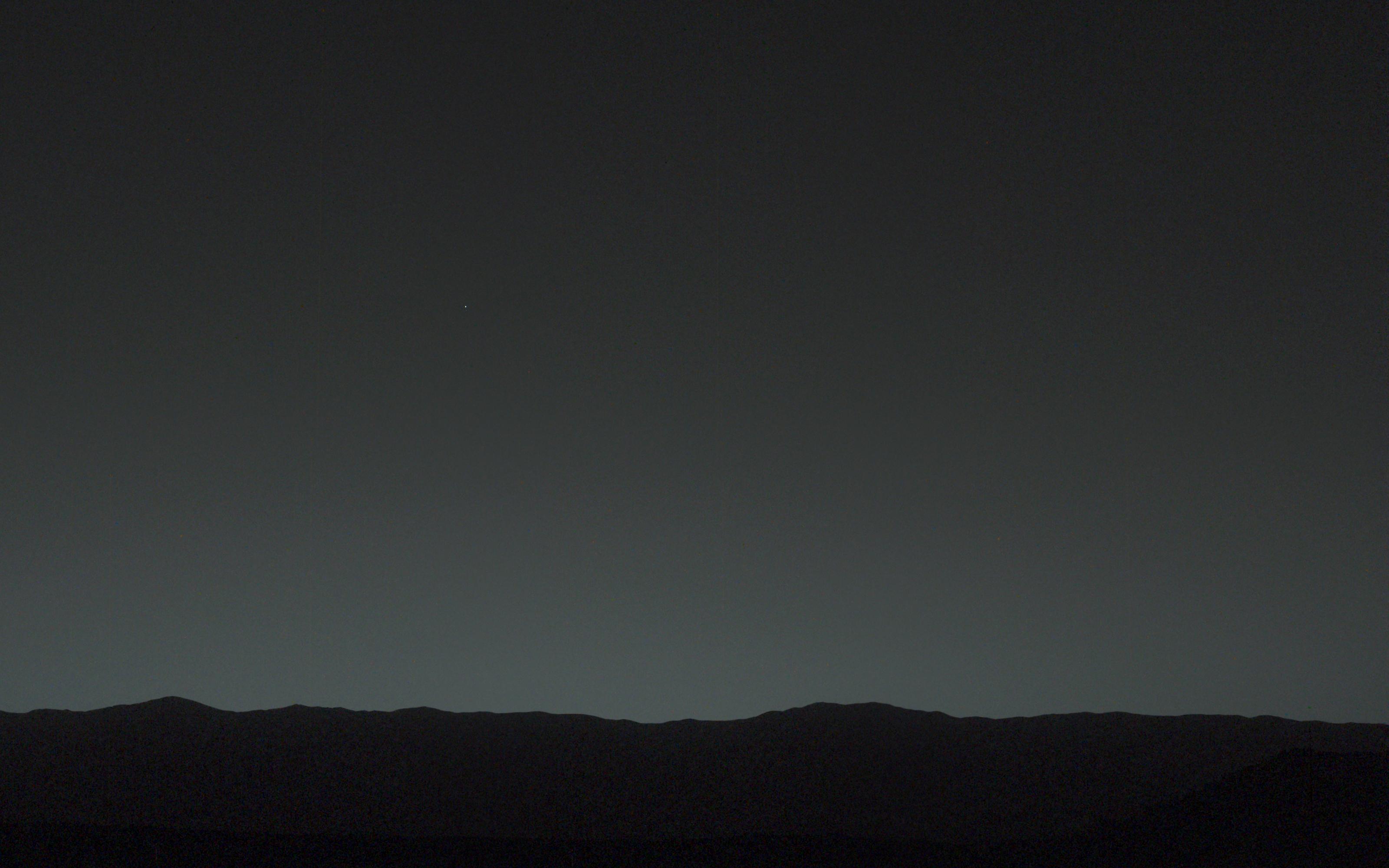<!-- .element: style="height: 35vh; margin-bottom: 0" -->
<span>Fuente: Jet Propulsion Laboratory (NASA)</span><!-- .element: style="font-size: 1.2rem" -->
Note:
¿Se acuerdan de la latencia?
Reto: espacio = distancia
Distancia = Latencia
Recordar: latencia es el "ping". Falta el "pong".
----
### Marte está RE lejos
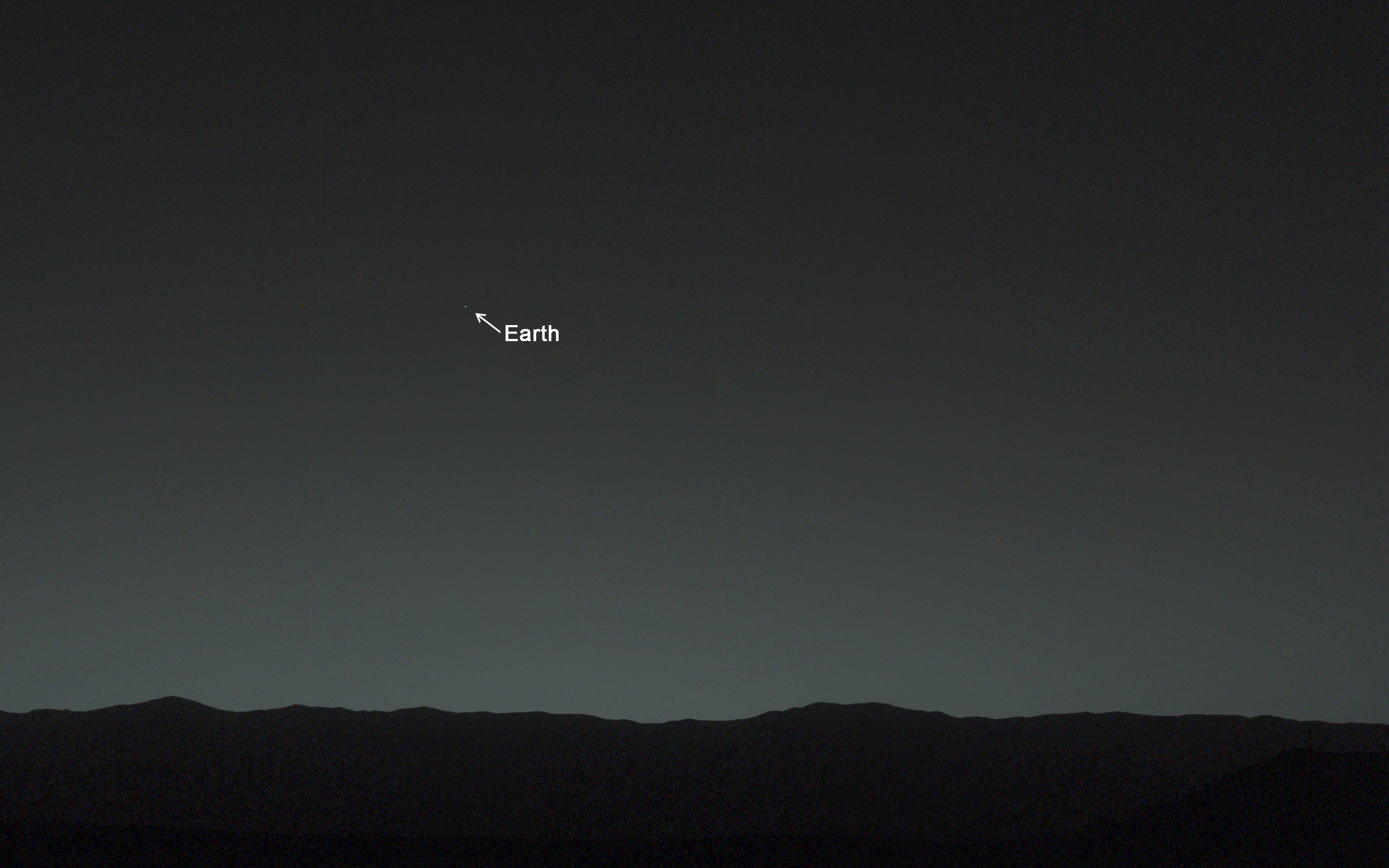<!-- .element: style="height: 35vh; margin-bottom: 0" -->
<span>Fuente: Jet Propulsion Laboratory (NASA)</span><!-- .element: style="font-size: 1.2rem" -->
Note:
Y sí… eso es la tierra, vista desde el cielo marciano.
Pregunta: ¿de qué tanto hablamos?
----
¡24 minutos!<!-- .element style="font-size: 3.5em" -->
Note:
Latencia tierra-marte durante su apogeo.
Por comparación: el sol está a 8 minutos.
Ping-Pong. Serían 48 minutos.
Entonces no: no es posible jugar LoL con tu amigo marciano.
Pregunta: ¿qué pasa si se pierden datos en el camino?
----
### Un entorno extremo
<!-- .element: style="margin-bottom: 0" -->
<span>Fuente: Wikipedia</span><!-- .element: style="font-size: 1.2rem" -->
Note:
El espacio NO está vacío.
- Mucha radiación.
- Polvo interestelar.
- Aliens (ok, no).
En resumen, los datos se pierden.
Ese NO es el problema más grande.
En la tierra, se corta un cable, y el mensaje toma otro camino.
----
### Problema: Se corta el "cable"
<!-- .element: style="margin-bottom: 0" -->
<span>Fuente: Jet Propulsion Laboratory (NASA)</span><!-- .element: style="font-size: 1.2rem" -->
---
## ¿Qué tenemos hoy?
----
<!-- .element: style="height: 40vh" -->
<span>Fuente: Consultative Committee for Space Data Systems</span><!-- .element: style="font-size: 1.2rem" -->
Note:
Plot twist: YA TENEMOS conexión de internet con Marte hoy en día.
> Space Communications Protocol Specifications (SCPS)
----
Fin.
----
### Redes en tierra ✅
<div style="display: flex; flex-direction: row; width: 100%; justify-content: space-around;">
<img style="width: 45%" src="https://stl.tech/wp-content/uploads/2023/03/5e309ec3-69ae-4e2c-b4f9-3979a97f0a8e.webp">
<img style="width: 45%; height: auto;" src="https://igp.net/wp-content/uploads/2018/05/Satellite_Networks_-_Featured_-Image_500x500.jpg">
</div>
----
### Redes en marte ✅
<iframe id="smd-iframe-smd-iframe-0936adbe-53c4-4693-b56e-3fc97bd346a7" src="https://eyes.nasa.gov/apps/mrn/index.html" title="" class="smd-iframe-iframe border-0" style="width: 100%; height: 46.25vh;" loading="lazy" allow="fullscreen" data-gtm-yt-inspected-15="true">Unable to render the provided source</iframe>
Note:
Mars Relay Network
----
### Conectar a los planetas ✅
<iframe loading="lazy" class="w-full border-none print:!border print:border-gray-dark" title="Deep Space Now" src="https://eyes.nasa.gov/dsn/dsn.html" style="width: 100%; height: 56.25vh;" allow="accelerometer; autoplay; encrypted-media; gyroscope; picture-in-picture" allowfullscreen=""></iframe>
Note:
Deep Space Network.
Listo, esto funciona muy bien y todo. Pero, para lo que hay hoy en día (algunos cuántos rovers y misiones científicas).
¿Y el internet de verdad?
---
## Construyendo EL INTERNET interplanetario
----
<!-- .element: style="margin-bottom: 0" -->
<span>Fuente: NASA</span><!-- .element: style="font-size: 1.2rem" -->
Note:
Ignoremos todo lo demás que hace falta para mandar estos satélites.
----
### Relays
<!-- .element: style="margin-bottom: 0; height: 35vh;" -->
<span>Fuente: NASA</span><!-- .element: style="font-size: 1.2rem" -->
Note:
Relays = Puntos en el camino
----
### Relays: ¿Cómo?
<!-- .element: style="margin-bottom: 0; height: 35vh;" -->
<span>Fuente: NASA</span><!-- .element: style="font-size: 1.2rem" -->
Note:
Ahora mismo: Radio
Ventajas: It works.
Desventajas: Todo lo demás (bandwidth, interferencias).
----
### Relays: ¿Cómo?
<!-- .element: style="margin-bottom: 0; height: 35vh;" -->
<span>Fuente: NASA</span><!-- .element: style="font-size: 1.2rem" -->
Note:
Futuro: Láser.
Ventajas: TODO (más ancho de banda ~1Gbps, la luz no la afecta el electromagnetismo).
Desventajas: Hay MUCHO por hacer. Avances desde 2011.
----
### Relays: ¿Cómo?
Una combinación
Note:
- WhatsApp y _"texto"_ puede ir por el canal más _"estrecho"_ de radio.
- Imágenes, videos, telemetría pesada puede ir por el canal más _"ancho"_ de láser.
----
### Relays: ¿Dónde?
<!-- .element: style="margin-bottom: 0; height: 37dvh;" -->
<span>Fuente: NASA</span><!-- .element: style="font-size: 1.2rem" -->
Note:
Un tanto tricky.
Puntos de Lagrange.
Ventaja: Puntos estables. Perfectas para comunicación precisa (que necesitamos para láser).
Desventaja: La bendita conjunción solar.
----
### Relays: ¿Dónde?
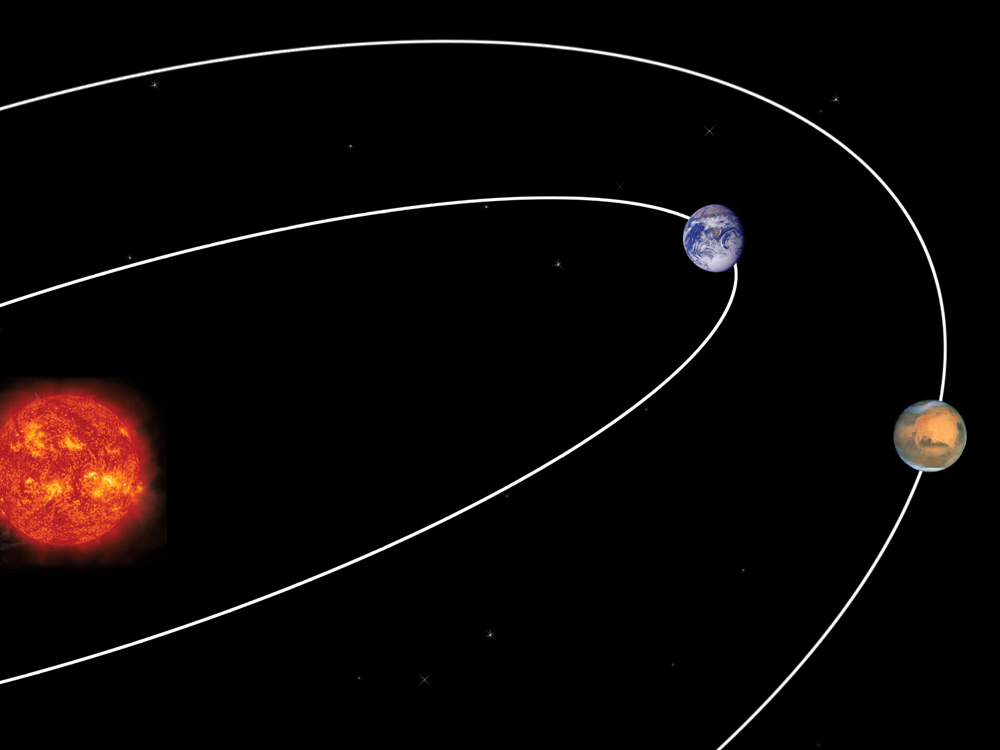<!-- .element: style="margin-bottom: 0; height: 35dvh;" -->
<span>Fuente: Harvard/NASA</span><!-- .element: style="font-size: 1.2rem" -->
Note:
Órbitas Solares.
Ventaja: Orbitas estables. Aguantan la conjunción solar. 🎉
Desventaja: Son órbitas, no puntos fijos. Igual sirven para radio.
----
### Relays: ¿Dónde?
<!-- .element: style="margin-bottom: 0; height: 35vh;" -->
<span>Fuente: NASA</span><!-- .element: style="font-size: 1.2rem" -->
Note:
Una combinación.
Usar varias aproximaciones nos permite tener más maneras de enviar mensajes de manera más estable.
----
### Protocolos a prueba de balas
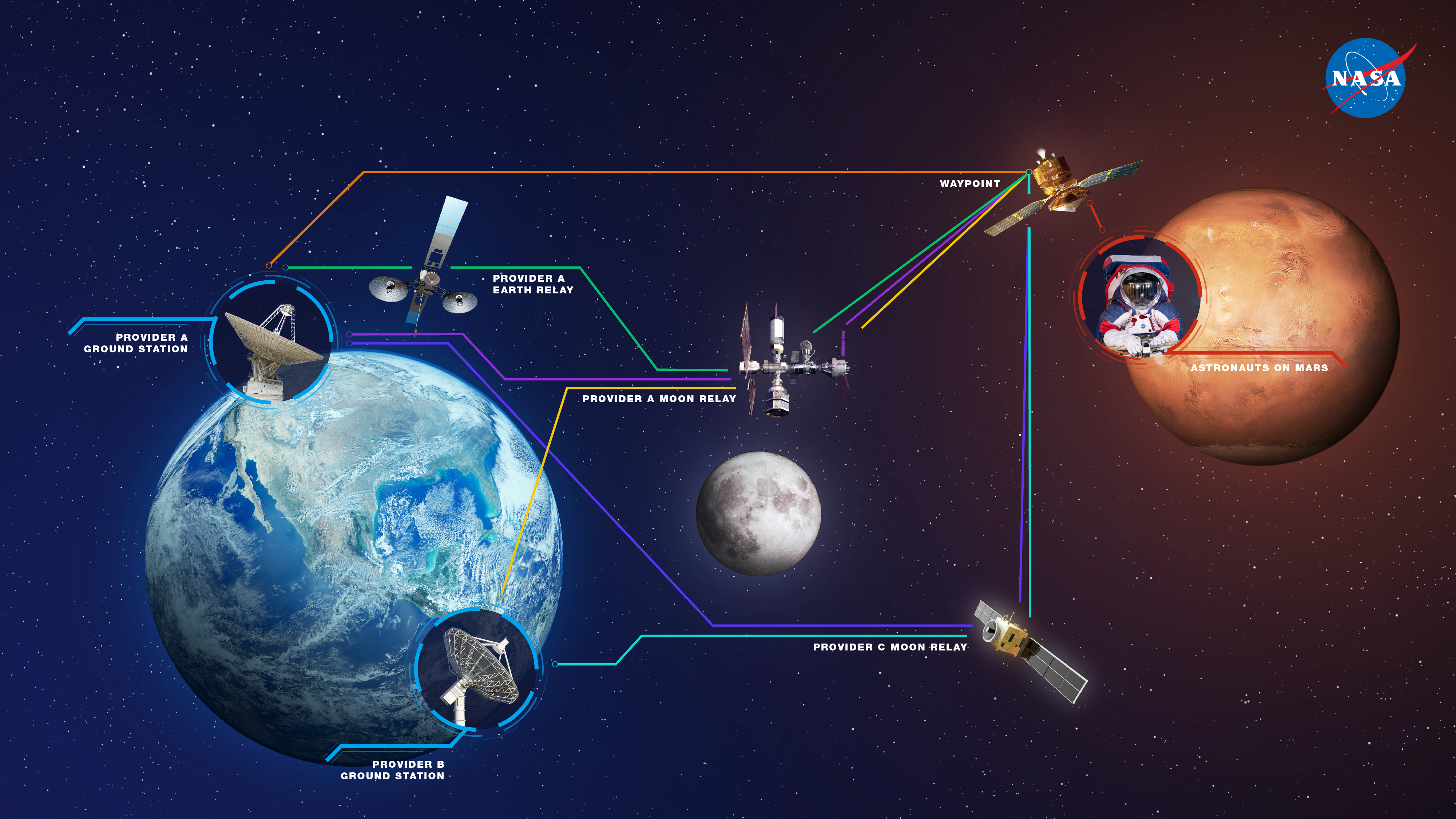<!-- .element: style="margin-bottom: 0; height: 35vh;" -->
<span>Fuente: NASA</span><!-- .element: style="font-size: 1.2rem" -->
Note:
DTN (Disruption Tolerant Network)
IP -> BP
---
## Internet tierra-marte ✅
----
## Internet tierra-marte ✅
¿Y ahora qué?
----
### Mensajería
<!-- .element: style="margin-bottom: 0; height: 35vh;" -->
<span>Fuente: Techgainer</span><!-- .element: style="font-size: 1.2rem" -->
Note:
Suposición: Estamos _"cerca de marte"_.
Tiempo entre chulo y doble chulo, 6 minutos
Tiempo para el leído, 6 minutos.
Tiempo para recibir la respuesta… ¿otros 6 minutos? ¿O nos llegaría de una con el chulo azul?
> Acordarse de DTN
¿Y las llamadas?
----
### Llamadas

Note:
Nope. Nein. Olvídenlo.
----
### Adaptarnos
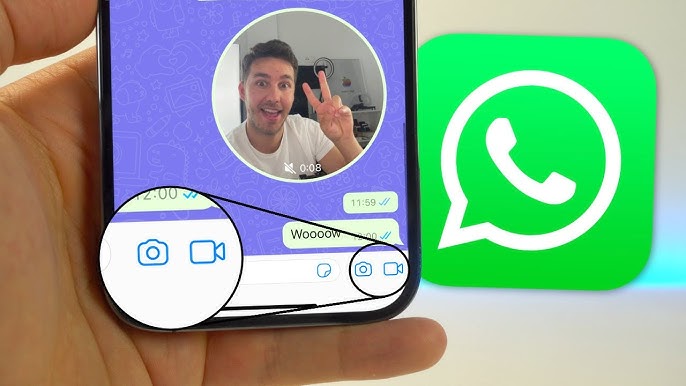<!-- .element: style="margin-bottom: 0; height: 35vh;" -->
<span>Fuente: WhatsApp (via _YouTube_)</span><!-- .element: style="font-size: 1.2rem" -->
----
Y esperar.
----
Y esperar.
Un rato largo.
----
### Finanzas
<!-- .element: style="margin-bottom: 0; height: 35vh;" -->
<span>Fuente: Blake Wisz (via _Unsplash_)</span><!-- .element: style="font-size: 1.2rem" -->
Note:
Situación hipotética: estas en Marte de vacaciones. ¿Cómo usas tu tarjeta de crédito en Marte?
----
### Finanzas
<!-- .element: style="margin-bottom: 0; height: 35vh;" -->
<span>Fuente: Hitesh Choudhary (via _Unsplash_)</span><!-- .element: style="font-size: 1.2rem" -->
Note:
Blockchain presenta múltiples ventajas para este tipo de problemas.
Y como esto, podemos imaginarnos muchos escenarios a futuro.
Felicitaciones, hemos construido una red, ahora tenemos los problemas de tener una red.
---
## Conclusión
Note:
📌 ¿Es posible conectar Marte a la Tierra?
✅ Sí, pero con limitaciones (latencia y ancho de banda bajos).
📌 ¿Cómo se puede hacer?
✅ Radio (lo actual), Láser (futuro), Satélites (para mejorar cobertura).
📌 ¿Cómo será el Internet interplanetario?
✅ DTN + satélites + redes locales en Marte.
📌 ¿Se animan a hacer parte de este futuro?
✅ Telecomunicaciones + Software + Otras disciplinas.
----
## ¿Preguntas?
 Google Drive
Gist
Clipboard
Google Drive
Gist
Clipboard
 Sign in via Google
 Sign in via Facebook
 Sign in via X(Twitter)
 Sign in via GitHub
 Sign in via Dropbox
 Sign in with Wallet






