Mariya Peychinova
  • NEW!
    NEW!  Connect Ideas Across Notes
    Save time and share insights. With Paragraph Citation, you can quote others’ work with source info built in. If someone cites your note, you’ll see a card showing where it’s used—bringing notes closer together.
    Got it
      • Create new note
      • Create a note from template
        • Sharing URL Link copied
        • /edit
        • View mode
          • Edit mode
          • View mode
          • Book mode
          • Slide mode
          Edit mode View mode Book mode Slide mode
        • Customize slides
        • Note Permission
        • Read
          • Only me
          • Signed-in users
          • Everyone
          Only me Signed-in users Everyone
        • Write
          • Only me
          • Signed-in users
          • Everyone
          Only me Signed-in users Everyone
        • Engagement control Commenting, Suggest edit, Emoji Reply
      • Invite by email
        Invitee

        This note has no invitees

      • Publish Note

        Share your work with the world Congratulations! 🎉 Your note is out in the world Publish Note No publishing access yet

        Your note will be visible on your profile and discoverable by anyone.
        Your note is now live.
        This note is visible on your profile and discoverable online.
        Everyone on the web can find and read all notes of this public team.

        Your account was recently created. Publishing will be available soon, allowing you to share notes on your public page and in search results.

        Your team account was recently created. Publishing will be available soon, allowing you to share notes on your public page and in search results.

        Explore these features while you wait
        Complete general settings
        Bookmark and like published notes
        Write a few more notes
        Complete general settings
        Write a few more notes
        See published notes
        Unpublish note
        Please check the box to agree to the Community Guidelines.
        View profile
      • Commenting
        Permission
        Disabled Forbidden Owners Signed-in users Everyone
      • Enable
      • Permission
        • Forbidden
        • Owners
        • Signed-in users
        • Everyone
      • Suggest edit
        Permission
        Disabled Forbidden Owners Signed-in users Everyone
      • Enable
      • Permission
        • Forbidden
        • Owners
        • Signed-in users
      • Emoji Reply
      • Enable
      • Versions and GitHub Sync
      • Note settings
      • Note Insights New
      • Engagement control
      • Make a copy
      • Transfer ownership
      • Delete this note
      • Save as template
      • Insert from template
      • Import from
        • Dropbox
        • Google Drive
        • Gist
        • Clipboard
      • Export to
        • Dropbox
        • Google Drive
        • Gist
      • Download
        • Markdown
        • HTML
        • Raw HTML
    Menu Note settings Note Insights Versions and GitHub Sync Sharing URL Create Help
    Create Create new note Create a note from template
    Menu
    Options
    Engagement control Make a copy Transfer ownership Delete this note
    Import from
    Dropbox Google Drive Gist Clipboard
    Export to
    Dropbox Google Drive Gist
    Download
    Markdown HTML Raw HTML
    Back
    Sharing URL Link copied
    /edit
    View mode
    • Edit mode
    • View mode
    • Book mode
    • Slide mode
    Edit mode View mode Book mode Slide mode
    Customize slides
    Note Permission
    Read
    Only me
    • Only me
    • Signed-in users
    • Everyone
    Only me Signed-in users Everyone
    Write
    Only me
    • Only me
    • Signed-in users
    • Everyone
    Only me Signed-in users Everyone
    Engagement control Commenting, Suggest edit, Emoji Reply
  • Invite by email
    Invitee

    This note has no invitees

  • Publish Note

    Share your work with the world Congratulations! 🎉 Your note is out in the world Publish Note No publishing access yet

    Your note will be visible on your profile and discoverable by anyone.
    Your note is now live.
    This note is visible on your profile and discoverable online.
    Everyone on the web can find and read all notes of this public team.

    Your account was recently created. Publishing will be available soon, allowing you to share notes on your public page and in search results.

    Your team account was recently created. Publishing will be available soon, allowing you to share notes on your public page and in search results.

    Explore these features while you wait
    Complete general settings
    Bookmark and like published notes
    Write a few more notes
    Complete general settings
    Write a few more notes
    See published notes
    Unpublish note
    Please check the box to agree to the Community Guidelines.
    View profile
    Engagement control
    Commenting
    Permission
    Disabled Forbidden Owners Signed-in users Everyone
    Enable
    Permission
    • Forbidden
    • Owners
    • Signed-in users
    • Everyone
    Suggest edit
    Permission
    Disabled Forbidden Owners Signed-in users Everyone
    Enable
    Permission
    • Forbidden
    • Owners
    • Signed-in users
    Emoji Reply
    Enable
    Import from Dropbox Google Drive Gist Clipboard
       Owned this note    Owned this note      
    Published Linked with GitHub
    • Any changes
      Be notified of any changes
    • Mention me
      Be notified of mention me
    • Unsubscribe
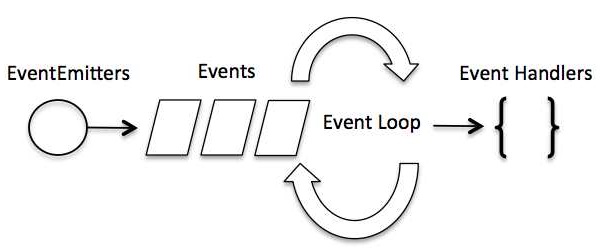
    # Node architecture --- ## What is the event loop? --- Node.js is a single-threaded application, but it can support concurrency via the concept of event and callbacks. Every API of Node.js is asynchronous and being single-threaded, they use async function calls to maintain concurrency. <img src="https://miro.medium.com/max/700/1*FA9NGxNB6-v1oI2qGEtlRQ.png" width="600"> --- Node uses observer pattern. Node thread keeps an event loop and whenever a task gets completed, it fires the corresponding event which signals the event-listener function to execute. --- ![image alt](https://thumbs.gfycat.com/CloseDopeyKestrel-small.gif) --- ### Event-Driven Programming Node.js uses events heavily and it is also one of the reasons why Node.js is pretty fast compared to other similar technologies. As soon as Node starts its server, it simply initiates its variables, declares functions and then simply waits for the event to occur. --- In an event-driven application, there is generally a main loop that listens for events, and then triggers a callback function when one of those events is detected. ![](https://www.tutorialspoint.com/nodejs/images/event_loop.jpg) --- Although events look quite similar to callbacks, the difference lies in the fact that callback functions are called when an asynchronous function returns its result, whereas event handling works on the observer pattern. The functions that listen to events act as Observers. Whenever an event gets fired, its listener function starts executing. --- Node.js has multiple in-built events available through events module and EventEmitter class which are used to bind events and event-listeners as follows − ``` // Import events module var events = require('events'); // Create an eventEmitter object var eventEmitter = new events.EventEmitter(); // Bind event and event handler as follows eventEmitter.on('eventName', eventHandler); // Fire an event eventEmitter.emit('eventName'); ``` --- ![image alt](https://i.imgur.com/YW3oyA9.gif) --- Michael --- JavaScript is a 'Single Threaded' coding language.This means it has one call stack and one memory heap. It executes code in order and must finish executing a piece of code before moving onto the next. --- On a deeper level, this also means there is one single "thread" that executes _everything_ on the page --- ![](https://i.imgur.com/raZYpta.png) --- ![](https://i.imgur.com/hB9z5GT.png) --- ![](https://i.imgur.com/YqLb2JK.png) --- The 'Event _Queue_' is like a to-do list of actions to be performed. The 'Event _Loop_' is the single thread checking the queue and doing those actions until there's nothing left to do. --- ![](https://i.imgur.com/98zrBT9.png) --- ![](https://i.imgur.com/sj112vw.png) --- How the Event Loop handles Promises and setTimeout --- ![](https://i.imgur.com/jGu9SMo.png) --- ![](https://i.imgur.com/K9kCrz1.png) --- ![](https://i.imgur.com/0ySwCWf.png) --- - Main task - MicroTask - Task Queue --- ## Why should we prefer asynchronous code? What would happen if we had slow blocking code in our request handlers? <img style="float: right;" src="https://media.giphy.com/media/2L1KmLRW5HOY9NRxqM/giphy.gif" width="300"> Mariya --- <img style="float: right;" src="https://media.giphy.com/media/sAIkDl62pTDswX2NHT/giphy.gif" width="540"> - ### Blocking - ### Non-Blocking --- - When javascript execution in Node.js process has to wait until a non-javascript operation completes is called blocking. In general if we execute in Synchronous manner i.e one after another, we unnecessarily stop the execution of those code which is not depended on the one you are executing. Non-Javascript execution refers to mainly Input/Output operations (communication between two processing systems). So, in the nutshell, I/O operations are blocking. --- - Non-Blocking is the opposite of the blocking i.e. javascript execution do not wait until the non-javascript operation completes. JavaScript is asynchronous in nature and so is Node. Asynchronous programming is a design pattern which ensures the non-blocking code execution. --- ### When writing asynchronous code we make that code non-blocking and the single threaded Javascript run with efficiency. ### This improves the system efficiency and throughput. --- ``` javascript function doTask1(){ // do something here } function doTask2(){ // do something else here } // perform some task doTask1() doTask2() ``` ###### In this example code doTask1() function executes first and after it returns then doTask2() function executes. ###### __This is not a blocking code in javascript__ even if doTask1 takes a long time before returning. --- ```javascript function doTask1(){ const users = getAllUsers() // do something with users here } function doTask2(){ const services = getAllServices() // do something with services here } // perform some task doTask1() doTask2() ``` ###### In this example, doTask1 internally calls getAllUser which makes the database connection and fetch the list of users. ###### Also, doTask2 internally calls getAllServices which makes an HTTP request to get the list of available services of some 3rd party through their API. ###### Here doTask2 will be __blocked__ till doTask1 returns because a single thread can execute only one thing at a time. --- <img style="float: right;" src="https://media.giphy.com/media/fUqfaPVjiAQcfticZH/giphy.gif" width="540"> Now, do you want to know how Node.js converts this blocking calls into a non-blocking execution? --- Node.js uses the __event loop__ and __callback__ mechanism to lift off I/O operations from the javascript's thread to the system's __kernel__. Since most modern kernels are multi-threaded, they can handle multiple operations executing in the background concurrenlty. When one of these operations completes, the kernel notifies Node.js and then the appropriate callback is eventually executed. https://www.ssla.co.uk/operating-system-kernel/ --- We can make the blocking code into non-blocking in Node.js using callbacks. ```javascript function doTask1() { const users = getAllUsers((err, data) => { // do something with users here }) } function doTask2() { const services = getAllServices((err, data) => { // do something with services here }) } // perform some task doTask1() doTask2() ``` ###### Here, getAllUsers and getAllServices now take callbacks. ###### These callbacks are then used by the Node.js and called when the Kernel is finished with the I/O operations. --- If an error is thrown then it will have to be caught, else the process will crash. In asynschronous version author is responsible for choosing the way of error handlling. We should always choose non-blocking version over the blocking varient of the function. --- We know that callback function is called at the completion of a given task. Node.js has some convention for this callback function: ![](https://media.giphy.com/media/vN3fMMSAmVwoo/giphy.gif) --- 1. ##### The callback is passed as the __last__ parameter to any function. 2. ##### The callback gets called __after__ the function is done with all of its operations. 3. ##### If there is an error, the first parameter is passed an __Error object__ with all the details. If there is no error then the first parameter is set to __null__ and rest being the return value. ```javascript var isTrue = function(value, callback) { if (value === true) { callback(null, "Value was true."); } else { callback(new Error("Value is not true!")); } } ``` --- That's why we should always prefer asynchronous code, because using a non-blocking approach gives superior performance over the synchronous scenario, and gives you more flexibility in structuring your code. --- ## How does Node use callbacks to manage asynchronous code? Sevda --- ### Callbacks ![](https://media.giphy.com/media/QBGYWFjnggIZ8fMjdt/giphy.gif) --- <!-- You can't know when a user is going to click a button. So, you define an event handler for the click event. This event handler accepts a function, which will be called when the event is triggered: ![](https://i.imgur.com/b2Ajl1z.png) This is the so-called callback. --> Callbacks are great for simple cases! However every callback adds a level of nesting, and when you have lots of callbacks, the code starts to be complicated very quickly: <img src="https://i.imgur.com/WlJHRIy.png" alt="drawing" width="500"/> --- :sparkles: **How do we solve this complication?** --- Instead of the callback-hell, we can use promises to refactor our code, as we have already learned: <img src="https://i.imgur.com/UbjACwD.png" alt="drawing" width="500"/> --- ### Let's take it a step further! --- Rewrite it to use the ==_async_== and ==_await_== keywords: --- The async/await keywords provide an alternative syntax when working with promises. They allow you to structure your code in a way that is almost synchronous looking, saving us the ~~.then~~ chaining as well as ~~callbacks~~: --- ![](https://media.giphy.com/media/h8y3cSO62Bdk6Gb4qj/giphy.gif) --- <img src="https://i.imgur.com/P3CFSzh.png" alt="drawing" width="400"/> We define a function with the async keyword to tell JavaScript that it’s an asynchronous function that returns a promise. Instead of having the result of a promise available in the then() method, the result is returned as a value using await keyword like in any other function. --- ![](https://media.giphy.com/media/14tCeoSGpXCWrQvixk/giphy.gif) --- [Node.js - Event Loop](https://www.tutorialspoint.com/nodejs/nodejs_event_loop.htm)




    Import from clipboard

    Paste your markdown or webpage here...

    Advanced permission required

    Your current role can only read. Ask the system administrator to acquire write and comment permission.

    This team is disabled

    Sorry, this team is disabled. You can't edit this note.

    This note is locked

    Sorry, only owner can edit this note.

    Reach the limit

    Sorry, you've reached the max length this note can be.
    Please reduce the content or divide it to more notes, thank you!

    Import from Gist

    Import from Snippet

    or

    Export to Snippet

    Are you sure?

    Do you really want to delete this note?
    All users will lose their connection.

    Create a note from template

    Create a note from template

    Oops...
    This template has been removed or transferred.
    Upgrade
    All
    • All
    • Team
    No template.

    Create a template

    Upgrade

    Delete template

    Do you really want to delete this template?
    Turn this template into a regular note and keep its content, versions, and comments.

    This page need refresh

    You have an incompatible client version.
    Refresh to update.
    New version available!
    See releases notes here
    Refresh to enjoy new features.
    Your user state has changed.
    Refresh to load new user state.

    Sign in

    Forgot password
    or
    Sign in via Google Sign in via Facebook Sign in via X(Twitter) Sign in via GitHub Sign in via Dropbox Sign in with Wallet
    Wallet ( )
    Connect another wallet

    New to HackMD? Sign up

    By signing in, you agree to our terms of service.

    Help

    • English
    • 中文
    • Français
    • Deutsch
    • 日本語
    • Español
    • Català
    • Ελληνικά
    • Português
    • italiano
    • Türkçe
    • Русский
    • Nederlands
    • hrvatski jezik
    • język polski
    • Українська
    • हिन्दी
    • svenska
    • Esperanto
    • dansk

    Documents

    Help & Tutorial

    How to use Book mode

    Slide Example

    API Docs

    Edit in VSCode

    Install browser extension

    Contacts

    Feedback

    Discord

    Send us email

    Resources

    Releases

    Pricing

    Blog

    Policy

    Terms

    Privacy

    Cheatsheet

    Syntax Example Reference
    # Header Header 基本排版
    - Unordered List
    • Unordered List
    1. Ordered List
    1. Ordered List
    - [ ] Todo List
    • Todo List
    > Blockquote
    Blockquote
    **Bold font** Bold font
    *Italics font* Italics font
    ~~Strikethrough~~ Strikethrough
    19^th^ 19th
    H~2~O H2O
    ++Inserted text++ Inserted text
    ==Marked text== Marked text
    [link text](https:// "title") Link
    ![image alt](https:// "title") Image
    `Code` Code 在筆記中貼入程式碼
    ```javascript
    var i = 0;
    ```
    var i = 0;
    :smile: :smile: Emoji list
    {%youtube youtube_id %} Externals
    $L^aT_eX$ LaTeX
    :::info
    This is a alert area.
    :::

    This is a alert area.

    Versions and GitHub Sync
    Get Full History Access

    • Edit version name
    • Delete

    revision author avatar     named on  

    More Less

    Note content is identical to the latest version.
    Compare
      Choose a version
      No search result
      Version not found
    Sign in to link this note to GitHub
    Learn more
    This note is not linked with GitHub
     

    Feedback

    Submission failed, please try again

    Thanks for your support.

    On a scale of 0-10, how likely is it that you would recommend HackMD to your friends, family or business associates?

    Please give us some advice and help us improve HackMD.


    Thanks for your feedback

    Remove version name

    Do you want to remove this version name and description?

    Transfer ownership

    Transfer to
      Warning: is a public team. If you transfer note to this team, everyone on the web can find and read this note.

        Link with GitHub

        Please authorize HackMD on GitHub
        • Please sign in to GitHub and install the HackMD app on your GitHub repo.
        • HackMD links with GitHub through a GitHub App. You can choose which repo to install our App.
        Learn more  Sign in to GitHub

        Push the note to GitHub Push to GitHub Pull a file from GitHub

          Authorize again
         

        Choose which file to push to

        Select repo
        Refresh Authorize more repos
        Select branch
        Select file
        Select branch
        Choose version(s) to push
        • Save a new version and push
        • Choose from existing versions
        Include title and tags
        Available push count

        Pull from GitHub

         
        File from GitHub
        File from HackMD

        GitHub Link Settings

        File linked

        Linked by
        File path
        Last synced branch
        Available push count

        Danger Zone

        Unlink
        You will no longer receive notification when GitHub file changes after unlink.

        Syncing

        Push failed

        Push successfully

