---
title: Analyze Infrastructure Networks with Dynamic Betweenness Centrality
description: Online algorithms are key for rapid response to changes in streamed graph data
author: Ante Pusic
parentCategory: Tutorials
---
Remember when undersea internet cables came under attack by... sharks?!
In this blog post, you will explore how the loss of a connection can affect the global submarine internet cable network, and learn how to use **dynamic betweenness centrality** to efficiently analyze **streamed data** in Memgraph.
The loss of a cable is a textbook example of how a single change can immediately disrupt the *entire* network. To enable rapid response in such situations, our [**MAGE**](https://memgraph.com/docs/mage/) 🧙♂️ team has been adding *online* graph algorithms ([**Node2Vec**](https://memgraph.com/docs/mage/algorithms/dynamic-graph-analytics/node2vec-online-algorithm), [**PageRank**](https://memgraph.com/docs/mage/algorithms/dynamic-graph-analytics/pagerank-online-algorithm) & [**community detection**](https://memgraph.com/docs/mage/algorithms/dynamic-graph-analytics/community-detection-online-algorithm)), whose magic ✨ is in updating previous outputs instead of computing everything anew.
## Explore the Global Shipping Network
### Prerequisites
In this tutorial, you will use Memgraph with:
* [**Docker**](https://hub.docker.com/r/memgraph/memgraph-platform),
* [**GQLAlchemy**](https://pypi.org/project/gqlalchemy/),
* and [**Jupyter Notebook**](https://jupyter.org/install) installed.
### Data
The dataset used in this blogpost represents the global network of submarine internet cables in the form of a graph whose nodes stand for landing points, the cables connecting them represented as relationships.
Landing points and cables have unique identifiers (`id`), and the
landing points also have names (`name`).
A giant thank you to [TeleGeography](https://www2.telegeography.com/) for sharing the dataset for their [submarine cable map](https://www.submarinecablemap.com). ❤️
### Exploration
#### Our Setup
With Docker installed, we will start Memgraph through it using the following command:
```bash
docker run -it -p 7687:7687 -p 3000:3000 memgraph/memgraph-platform
```
We will be working with Memgraph from a Jupyter notebook. To interact with Memgraph from there, we use [GQLAlchemy](https://pypi.org/project/gqlalchemy/).
#### Betweenness Centrality
Before we start exploring our graph, let’s quickly refresh that **betweenness centrality** of a node is the fraction of shortest paths between all pairs pairs of nodes in the graph that pass through it:
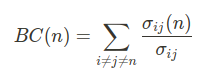
In the above expression, *n* is the node of interest, *i*, *j* are any two distinct nodes other than *n*, and *σ<sub>ij</sub>(n)* is number of shortest paths from *i* to *j* (going through *n*).
The analysis of (internet) traffic flows, like what we are doing here, is an established use case for this metric.
### Jupyter notebook
The Jupyter notebook is [**here**](https://github.com/memgraph/jupyter-memgraph-tutorials/tree/main/internet_infrastructure_analysis) – we can now go for a deep dive 🤿 in the data!
#### Preliminaries
First, let’s connect to our instance of Memgraph with GQLAlchemy and load the dataset.
```python
from gqlalchemy import Memgraph
```
```python
def load_dataset(path: str):
with open(path, mode='r') as dataset:
for statement in dataset:
memgraph.execute(statement)
```
```python
memgraph = Memgraph("127.0.0.1", 7687) # connect to running instance
memgraph.drop_database() # make sure it’s empty
load_dataset('data/input.cyp') # load dataset
```
#### Example
With everything set up, calling the `betweenness_centrality_online` module is a matter of a single Cypher query.
As we are analyzing how changes affect the undersea internet cable network, we save the computed betweenness centrality scores for later.
```python
memgraph.execute(
"""
CALL betweenness_centrality_online.set()
YIELD node, betweenness_centrality
SET node.bc = betweenness_centrality;
"""
)
```
Let’s see which landing points have the highest betweenness centrality score in the network:
```python
most_central = memgraph.execute_and_fetch(
"""
MATCH (n: Node)
RETURN n.id AS id, n.name AS name, n.bc AS bc_score
ORDER BY bc_score DESC, name ASC
LIMIT 5;
"""
)
for node in most_central:
print(node)
```
```
{'id': 15, 'name': 'Tuas, Singapore', 'bc_score': 0.29099145440251273}
{'id': 16, 'name': 'Fortaleza, Brazil', 'bc_score': 0.13807572163430684}
{'id': 467, 'name': 'Toucheng, Taiwan', 'bc_score': 0.13361801370831092}
{'id': 62, 'name': 'Manado, Indonesia', 'bc_score': 0.12915295031722301}
{'id': 123, 'name': 'Balboa, Panama', 'bc_score': 0.12783714460527598}
```
Two of the above results, Singapore and Panama, have become international trade hubs owing to their favorable geographic position. They are highly influential nodes in other networks as well.
#### Dynamic Operation
This part brings us to MAGE’s newest algorithm – **iCentral** dynamic betweenness centrality by [Fuad Jamour](http://www.fuadjamour.com/) and others.[<sup>[1]</sup>](https://repository.kaust.edu.sa/bitstream/handle/10754/625935/08070346.pdf).
After each graph update, iCentral can be run to update previously computed values without having to process the entire graph, going hand in hand with Memgraph’s **graph streaming** capabilities.
You can set this up in Memgraph with [**triggers**](https://memgraph.com/docs/memgraph/reference-guide/triggers) – pieces of Cypher code that run after database transactions.
```python
memgraph.execute(
"""
CREATE TRIGGER update_bc
BEFORE COMMIT EXECUTE
CALL betweenness_centrality_online.update(createdVertices, createdEdges, deletedVertices, deletedEdges)
YIELD *;
"""
)
```

Let’s now see what happens when a shark (or something else) cuts off a submarine internet cable between Tuas in Singapore and Jeddah in Saudi Arabia.
```python
memgraph.execute("""MATCH (n {name: "Tuas, Singapore"})-[e]-(m {name: "Jeddah, Saudi Arabia"}) DELETE e;""")
```
The above transaction activates the `update_bc` trigger, and previously computed betweenness centrality scores are updated using iCentral.
With the cable out of function, internet data must be transmitted over different routes. Some nodes in the network are bound to experience increased strain and internet speed might thus deteriorate. These nodes likely saw their betweenness centrality score increase. To inspect that, we’ll retrieve the new scores with `betweenness_centrality_online.get()` and compare them with the previously saved ones.
```python
highest_deltas = memgraph.execute_and_fetch(
"""
CALL betweenness_centrality_online.get()
YIELD node, betweenness_centrality
RETURN
node.id AS id,
node.name AS name,
node.bc AS old_bc,
betweenness_centrality AS bc,
betweenness_centrality - node.bc AS delta
ORDER BY abs(delta) DESC, name ASC
LIMIT 5;
"""
)
for result in highest_deltas:
print(result)
memgraph.execute("DROP TRIGGER update_bc;")
```
```
{'id': 111, 'name': 'Jeddah, Saudi Arabia', 'old_bc': 0.061933737931979434, 'bc': 0.004773934386713466, 'delta': -0.057159803545265966}
{'id': 352, 'name': 'Songkhla, Thailand', 'old_bc': 0.05259842296405675, 'bc': 0.07514804741735281, 'delta': 0.022549624453296065}
{'id': 15, 'name': 'Tuas, Singapore', 'old_bc': 0.29099145440251273, 'bc': 0.2730690696075149, 'delta': -0.017922384794997803}
{'id': 175, 'name': 'Yanbu, Saudi Arabia', 'old_bc': 0.0648358824682235, 'bc': 0.07561992914231867, 'delta': 0.010784046674095174}
{'id': 210, 'name': 'Dakar, Senegal', 'old_bc': 0.08708567541545133, 'bc': 0.09412362761485257, 'delta': 0.007037952199401246}
```
As seen above, the network landing point in Songkhla, Thailand had its score increase by **42.87%** after the update. Conversely, other landing points became less connected to the rest of the network: the centrality of the Jeddah node in Saudi Arabia almost dropped to zero.
#### Performance
iCentral builds upon the Brandes algorithm[<sup>[2]</sup>](https://pdodds.w3.uvm.edu/research/papers/others/2001/brandes2001a.pdf) and adds the following improvements in order to increase performance:
* **Process only the nodes whose betweenness centrality values change**: after an update, betweenness centrality scores stay the same outside the affected [**biconnected component**](https://memgraph.com/docs/mage/algorithms/traditional-graph-analytics/biconnected-components-algorithm).
* **Avoid repeating shortest-path calculations**: use prior output if it’s possible to tell it’s still valid; if new shortest paths are needed, update the prior ones instead of recomputing.
* Breadth-first search for computing graph dependencies does not need to be done out of nodes equidistant to both endpoints of the updated relationship.
* The BFS tree used for computing new graph dependencies (the contributions of a node to other nodes’ scores) can be determined from the tree obtained while computing old graph dependencies.
```python
bcc_partition = memgraph.execute_and_fetch(
"""
CALL biconnected_components.get()
YIELD bcc_id, node_from, node_to
RETURN
bcc_id,
node_from.id AS from_id,
node_from.name AS from_name,
node_to.id AS to_id,
node_to.name AS to_name
LIMIT 15;
"""
)
for relationship in bcc_partition:
print(relationship)
```
Graphs of infrastructural networks, such as this one, fairly often consist of a number of smaller biconnected components (BCCs). As iCentral recognizes that betweenness centrality scores are unchanged outside the affected BCC, this can result in a significant speedup.
#### Algorithms: Online vs. Offline
An important property of algorithms is whether they are *online* or *offline*. Online algorithms can update their output as more data becomes available, whereas offline algorithms have to redo the entire computation.
The gold-standard offline algorithm for betweenness centrality is the one by Ulrik Brandes[<sup>[2]</sup>](https://pdodds.w3.uvm.edu/research/papers/others/2001/brandes2001a.pdf): it works by building a shortest path tree from each node of the graph and efficiently counting the shortest paths through dynamic programming.
> In [How to Identify Essential Proteins using Betweenness Centrality](https://memgraph.com/blog/identifying-essential-proteins-betweenness-centrality) we built a web app to visualize protein-protein interaction networks with help of betweenness centrality.
However, we can easily see that updates often change only a tiny piece of the whole graph. Scalability means that one needs to take advantage of this by cutting down on repetition.
To this end, we employed the fastest algorithm so far: **iCentral**.
Let’s now see how it stacks up against the Brandes algorithm in complexity.
* Brandes: runs in *O*(|*V*||*E*|) time and uses *O*(|*V*| + |*E*|) space on a graph with |*V*| nodes and |*E*| relationships,
* iCentral: runs in *O*(|*Q*||*E<sub>BC</sub>*|) time and uses *O*(|*V<sub>BC</sub>*| + |*E<sub>BC</sub>*|) space. |*V<sub>BC</sub>*| and |*E<sub>BC</sub>*| are the counts of nodes and relationships in the affected portion of the graph; |*Q*| ≤ |*V<sub>BC</sub>*| (see [Performance](https://hackmd.io/BNXZgIjxREGb07LisUf0Fg#Performance) for the |*Q*| set).
NB: iCentral also saves time by avoiding repeated shortest-path calculations where possible; this varies by graph.
Another key trait of iCentral is that it can be run **fully in parallel**, just like the Brandes algorithm. With *N* parallel instances, this has the algorithm run *N* times faster, at the expense of requiring *N* times more space (each thread keeps a copy of the data structures).
## Takeaways
Betweenness centrality is a very common graph analytics tool, but it is nevertheless challenging to scale up to dynamic graphs. To solve this, Memgraph has implemented the fastest yet online algorithm for it – [iCentral](https://github.com/memgraph/mage/tree/T080-MAGE-dynamic-BC/cpp/betweenness_centrality_module); it joins our growing suite of streaming graph analytics.
Our R&D team is working hard on streaming graph ML and analytics. We’re happy to discuss it with you – ping us at [**Discord**](https://memgr.ph/join-discord)!
## What’s Next?
It’s time to build with Memgraph! 🔨
Check out our [**MAGE**](https://github.com/memgraph/mage) open-source graph analytics suite and don’t hesitate to give a star ⭐ or contribute with new ideas. If you have any questions or you want to share your work with the rest of the community, join our [**Discord server**](https://memgr.ph/join-discord).
## References
[1] Jamour, F., Skiadopoulos, S., & Kalnis, P. (2017). Parallel algorithm for incremental betweenness centrality on large graphs. *IEEE Transactions on Parallel and Distributed Systems*, 29(3), 659-672.
[2] Brandes, U. (2001). A faster algorithm for betweenness centrality. *Journal of Mathematical Sociology*, 25(2), 163-177.
 Google Drive
Gist
Clipboard
Google Drive
Gist
Clipboard
 Sign in with Wallet






