# AIS3 Pre-Exam 2025

分數貶值很嚴重耶w 是AI的緣故嗎
第一次打,雖然只有166名,但比賽當下解出了7題還算滿意吧
> 比賽過程中曾經最高排名:66
> 更:很幸運的得到了備取資格,雖然沒有成功備上😭可能上天要我先好好準備學測吧w
> 
## Misc
### Welcome

這裡不能直接複製,直接複製會變成
```
AIS3{This_Is_Just_A_Fake_Flag_~~}
```
所以要自己手動輸入
Flag:
```
AIS3{Welcome_And_Enjoy_The_CTF_!}
```
> 原因解釋:
> 右鍵檢查就可以發現,他用了一些HTML和CSS的技巧
> 
> 這裡放假的flag
> 
> 這裡才是真flag
> 其實另有方法可以直接把flag取出來喔!
> 在Web Console輸入
> ```javascript
> [...document.querySelectorAll('.flag > span')].map(
> (e, i) => window.getComputedStyle(e, '::before').content
> ).join('').replace(/"/g, '')
> ```
> 
### Ramen CTF

題目給了一張圖片

可以眼尖的注意到右上角有一張發票,將發票右邊的QR Code掃出來可以得到
```
MF1687991111404137095000001f4000001f40000000034785923VG9sG89nFznfPnKYFRlsoA==:**********:2:2:1:蝦拉
```
稍微Google一下可以查到發票的格式如下圖
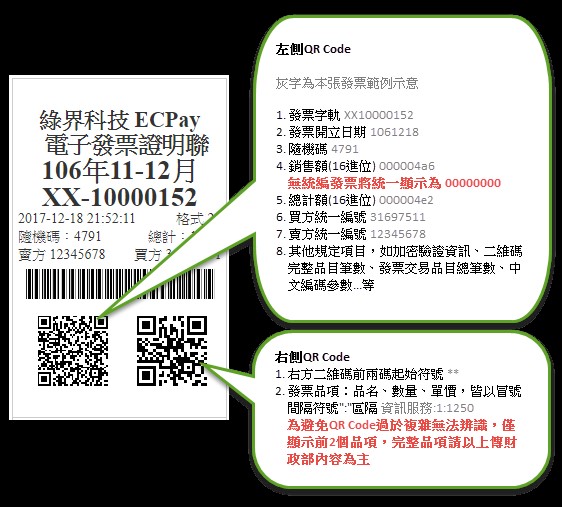
圖片來源:[查詢發票明細 - MIG 4.0 - ECPay Developers](https://developers.ecpay.com.tw/?p=49903)
因此我們可以將掃出來的結果整理為:
```
發票:MF16879911
日期:1140413
隨機碼:7095
銷售額:000001f4
總計額:000001f4
買方統一編號:00000000
賣方統一編號:34785923
其他:VG9sG89nFznfPnKYFRlsoA==:**********:2:2:1:蝦拉
```
我們將發票、日期、隨機碼輸入到[全民稽核專區-一般性發票查詢-電子發票整合服務平台](https://www.einvoice.nat.gov.tw/portal/btc/audit/btc601w/search)

接著到Google Map查詢那個地址,找出商家名稱

Flag:
```
AIS3{樂山溫泉拉麵:蝦拉麵}
```
### AIS3 Tiny Server - Web / Misc

開啟Challenge Instancer,進入網站後會看到提示,此時網址為
```
http://chals1.ais3.org:20889/index.html
```


由題目和提示,我們知道要想辦法到根目錄底下。先到以下網址
```
http://chals1.ais3.org:20889/
```

發現只有`index.html`,並沒有在根目錄。
接著便是通靈出
```
http://chals1.ais3.org:20889/檔案
```
能開啟該檔案
```
http://chals1.ais3.org:20889/資料夾
```
能跳轉到該資料夾
那如果我們在網址欄輸入
```
http://chals1.ais3.org:20889//
```

找到Flag啦!
Flag:
```
AIS3{tInY_we8_seRv3R_wI7H_fIle_BROWs1ng_@$_@_feAtURE}
```
> 其實我在解的時候就是try try see,突然試到//就對了
## Web
### Tomorin db 🐧

進入網站,有四個檔案

題目給的原始碼很簡單
main.go
```golang=
package main
import "net/http"
func main() {
http.Handle("/", http.FileServer(http.Dir("/app/Tomorin")))
http.HandleFunc("/flag", func(w http.ResponseWriter, r *http.Request) {
http.Redirect(w, r, "https://youtu.be/lQuWN0biOBU?si=SijTXQCn9V3j4Rl6", http.StatusFound)
})
http.ListenAndServe(":30000", nil)
}
```
我們也知道要找的flag就藏在flag這個檔案中

我們只要想辦法讀到伺服器上flag的內容就好了
但只要我們一訪問/flag就會被重新導向到YouTube上,該怎麼繞過重新導向呢?
我試了很久,諸如:
1. 雙斜線: http://chals1.ais3.org:30000//flag => 跳轉
2. http://chals1.ais3.org:30000/.flag => 404
3. `.`代表目前目錄: http://chals1.ais3.org:30000/./flag => 跳轉
4. 回上一層再進入:http://chals1.ais3.org:30000/../Tomorin/flag => 404
5. `%66`為f的URL編碼:http://chals1.ais3.org:30000/%66lag => 跳轉
6. 二次URL編碼:http://chals1.ais3.org:30000/%2566lag => 404
最終,我終於通靈出來:
`%2f`為`/`的URL編碼:http://chals1.ais3.org:30000/%2fflag
Flag:
```!
AIS3{G01ang_H2v3_a_c0O1_way!!!_Us3ing_C0NN3ct_M3Th07_L0l@T0m0r1n_1s_cute_D0_yo7_L0ve_t0MoRIN?}
```
## Crypto
### Hill

題目給了以下加密程式碼
```python=
#!/usr/bin/python3
import numpy as np
p = 251
n = 8
def gen_matrix(n, p):
while True:
M = np.random.randint(0, p, size=(n, n))
if np.linalg.matrix_rank(M % p) == n:
return M % p
A = gen_matrix(n, p)
print("Matrix A:")
print(A)
B = gen_matrix(n, p)
print("Matrix B:")
print(B)
def str_to_blocks(s):
data = list(s.encode())
length = ((len(data) - 1) // n) + 1
data += [0] * (n * length - len(data)) # padding
blocks = np.array(data, dtype=int).reshape(length, n)
return blocks
def encrypt_blocks(blocks):
C = []
for i in range(len(blocks)):
if i == 0:
c = (A @ blocks[i]) % p
else:
c = (A @ blocks[i] + B @ blocks[i-1]) % p
C.append(c)
return C
flag = "AIS3{Fake_FLAG}"
blocks = str_to_blocks(flag)
print("Flag blocks:")
for b in blocks:
print(b)
ciphertext = encrypt_blocks(blocks)
print("Encrypted flag:")
for c in ciphertext:
print(c)
t = input("input: ")
blocks = str_to_blocks(t)
ciphertext = encrypt_blocks(blocks)
for c in ciphertext:
print(c)
```
類似於CBC加密,不過不是用XOR進行加密,而是使用矩陣乘法
加密方式如下:
1. 隨機生成兩個8(=n)階方陣,每個元$\in \{ x\in\mathbb{Z}\space|\space 0\leq x<251 (=p) \}$
2. 將資料從頭開始每八個一組形成若干個$8\times 1$的行向量$m_i$,然後計算
$$
\left\{
\begin{matrix}
c_1 &=& &Am_1& &&\mod p& \\
c_i &=& &Am_i& + &Bm_{i-1} &\mod p&, \forall i\geq 2
\end{matrix}
\right.
$$
得到的若干個$8\times 1$的行向量$c_i$就是密文。
題目的最後可以讓我們輸入訊息,並告訴我們加密後的結果,我們只需要精心構造輸入,便能從已知的明文和返回的加密結果將$A, B$ 矩陣推算出來。
我們令 $e_0$ 為零向量,即每個元都為0的向量,$e_1, e_2,\cdots,e_8$ 為八個單位向量,其中 $e_i$ 表示只有第 $i$ 元是1,其他都是0的向量。
也就是
$$
\begin{matrix}
e_0 = \left(\begin{matrix}0 & 0 & 0 & 0 & 0 & 0 & 0 & 0\end{matrix}\right)^T \\
e_1 = \left(\begin{matrix}1 & 0 & 0 & 0 & 0 & 0 & 0 & 0\end{matrix}\right)^T \\
e_2 = \left(\begin{matrix}0 & 1 & 0 & 0 & 0 & 0 & 0 & 0\end{matrix}\right)^T \\
e_3 = \left(\begin{matrix}0 & 0 & 1 & 0 & 0 & 0 & 0 & 0\end{matrix}\right)^T \\
\vdots
\end{matrix}
$$
我們有密文和明文的結果如下:
$$
\left\{
\begin{matrix}
c_1 &=& &Am_1& &&\mod p& \\
c_2 &=& &Am_2& + &Bm_1 &\mod p& \\
c_3 &=& &Am_1& + &Bm_2 &\mod p& \\
c_4 &=& &Am_4& + &Bm_3 &\mod p& \\
&&&&\vdots\\
c_k &=& &Am_k& + &Bm_{k-1} &\mod p&
\end{matrix}
\right.
$$
我們的策略是每次都丟單位向量或零向量進去,如此便能一行一行的求出矩陣$A,B$
如$Ae_1$的結果即為$A$矩陣的第一行。
舉例如下:設$A=[a_{ij}]_{8\times8}$,則
$$
Ae_1=
\left(
\begin{matrix}
a_{11} & a_{12} & a_{13} & \cdots & a_{18} \\
a_{21} & a_{22} & a_{23} & \cdots & a_{28}\\
a_{31} & a_{32} & a_{33} & \cdots & a_{38}\\
\vdots &\vdots & \vdots & \ddots & \vdots\\
a_{81} & a_{82} & a_{83} & \cdots & a_{88}\\
\end{matrix}
\right)
\left(
\begin{matrix}
1 \\
0 \\
0 \\
\vdots \\
0 \\
\end{matrix}
\right)=
\left(
\begin{matrix}
a_{11} \\
a_{21} \\
a_{31} \\
\vdots \\
a_{81} \\
\end{matrix}
\right)
$$
為$A$矩陣的第一行。為了方便說明,我們將$A$矩陣的第$k$行記作$Ak$
如果我們輸入向量是$e_1,e_2,\cdots,e_8$依序各一個,那麼
$$
\left\{
\begin{matrix}
c_1 &=& &Ae_1& &&=& A1 & &&\mod p& \\
c_2 &=& &Ae_2& + &Be_1 &=& A2 &+& B1 &\mod p& \\
c_3 &=& &Ae_3& + &Be_2 &=& A3 &+& B2 &\mod p& \\
&&&&&&\vdots \\
c_8 &=& &Ae_8& + &Be_7 &=& A8 &+& B7 &\mod p&
\end{matrix}
\right.
$$
我們將只能求出$A$的第一行(注意,我們能知道的只有$c_1, c_2, \cdots, c_8$)
但已經十分接近,我們只要稍做修改便能交錯的求出 $A, B$ 的每一行
我們讓輸入向量依序為$e_0, e_1, e_1, e_2, e_2, e_3, e_3, \cdots, e_8, e_8$
也就是第一個是零向量,之後每個單位向量依序各兩個,共17個,則
$$
\left\{
\begin{matrix}
c_1 &=& &Ae_0& &&=& e_0 & &&\mod p& \\
c_2 &=& &Ae_1& + &Be_0 &=& A1 && &\mod p& \\
c_3 &=& &Ae_1& + &Be_1 &=& A1 &+& B1 &\mod p& \\
c_4 &=& &Ae_2& + &Be_1 &=& A2 &+& B1 &\mod p& \\
c_5 &=& &Ae_2& + &Be_2 &=& A2 &+& B2 &\mod p& \\
&&&&&&\vdots \\
c_{16} &=& &Ae_8& + &Be_7 &=& A8 &+& B7 &\mod p& \\
c_{17} &=& &Ae_8& + &Be_8 &=& A8 &+& B8 &\mod p&
\end{matrix}
\right.
$$
第1式:結果顯然,從第二式($c_2$)開始看:
第2式:$A1 = c_2$ => 求出 $A$ 的第一行
第3式:$B1 = c_3 - A1$ => $A1$ 已知,因而求出 $B1$
第4式:$A2 = c_4 - B1$ => $B1$ 已知,因而求出 $A2$
$\vdots$
第16式:$A8 = c_{16} - B7$ => $B7$ 已知,因而求出 $A8$
第17式:$B8 = c_{17} - A8$ => $A8$ 已知,因而求出 $B8$
如此便能依照順序$A1\rightarrow B1\rightarrow A2 \rightarrow B2 \rightarrow\cdots \rightarrow B7 \rightarrow A8 \rightarrow B8$
求出 $A,B$ 矩陣的每一行。
> 欲使輸入向量為$e_0, e_1, e_1, e_2, e_2, \cdots, e_8, e_8$,我們要輸入的字元為
> ```!
> \x00\x00\x00\x00\x00\x00\x00\x00\x01\x00\x00\x00\x00\x00\x00\x00\x01\x00\x00\x00\x00\x00\x00\x00\x00\x01\x00\x00\x00\x00\x00\x00\x00\x01\x00\x00\x00\x00\x00\x00\x00\x00\x01\x00\x00\x00\x00\x00\x00\x00\x01\x00\x00\x00\x00\x00\x00\x00\x00\x01\x00\x00\x00\x00\x00\x00\x00\x01\x00\x00\x00\x00\x00\x00\x00\x00\x01\x00\x00\x00\x00\x00\x00\x00\x01\x00\x00\x00\x00\x00\x00\x00\x00\x01\x00\x00\x00\x00\x00\x00\x00\x01\x00\x00\x00\x00\x00\x00\x00\x00\x01\x00\x00\x00\x00\x00\x00\x00\x01\x00\x00\x00\x00\x00\x00\x00\x00\x01\x00\x00\x00\x00\x00\x00\x00\x01
> ```
然後就能來寫exploit囉!
```python=
#!/usr/bin/python3
from pwn import *
import numpy as np
from sympy import Matrix
# ------------------------ Server and file setup ------------------------
server = "chals1.ais3.org"
port = 18000
binaryfile = "./chall.py"
# ------------------------ function defind ------------------------
p = 251
n = 8
context.log_level = 'warning' # 可改成 'debug' 看詳細訊息
# 接收密文向量(pwntool的process, 行數)
def recv_matrix(io, num_blocks):
C = []
while len(C) < num_blocks:
line = io.recvline().strip().decode()
if '[' not in line:
continue # 跳過非密文
line = line.replace('[', '').replace(']', '')
row = np.array(list(map(int, line.split())), dtype=int)
C.append(row)
return C
# 使用 sympy 精確求模反矩陣
def modinv_matrix_sympy(M, p):
M_sym = Matrix(M.tolist())
try:
M_inv_sym = M_sym.inv_mod(p)
except ValueError:
raise ValueError("Matrix is not invertible mod p")
return np.array(M_inv_sym).astype(int) % p
# 明文轉換為區塊
def str_to_blocks(s):
data = list(s.encode())
length = ((len(data) - 1) // n) + 1
data += [0] * (n * length - len(data)) # padding with zeros
blocks = np.array(data, dtype=int).reshape(length, n)
return blocks
# 區塊轉回字串
def blocks_to_str(blocks):
data = blocks.flatten()
return bytes(data).decode(errors="replace").replace('\x00', '')
# 解密
def decrypt_blocks(ciphertext, A, B, p):
A_inv = modinv_matrix_sympy(A, p)
P = []
for i in range(len(ciphertext)):
if i == 0:
pt = A_inv @ ciphertext[0] % p
else:
temp = (ciphertext[i] - B @ P[i - 1]) % p
pt = A_inv @ temp % p
P.append(pt)
return np.array(P)
# ------------------------ start to attack ------------------------
if args.REMOTE:
io = remote(server, port)
num_blocks = 5 # 經實測,遠端的flag加密後的加密向量有五行
else:
io = process(binaryfile)
num_blocks = 2 # AIS3{Fake_FLAG} 加密後只有兩行
# 1. 讀取 flag 密文
print(io.recvuntil(b'Encrypted flag:\n').decode())
flag_ct = recv_matrix(io, num_blocks)
print(flag_ct)
# 2. 輸入測試資料
test = b'\x00'*8 # 零向量
for i in range(8):
test += (b'\x00'*i + b'\x01' + b'\x00'*(7-i))*2 # 兩個e_i
print("Test input:", test)
io.sendline(test)
# 3. 從密文回推 A 和 B
io.recvline() # 第一列全為0
A1 = recv_matrix(io, 1)[0]
B1 = recv_matrix(io, 1)[0] - A1
A2 = recv_matrix(io, 1)[0] - B1
B2 = recv_matrix(io, 1)[0] - A2
A3 = recv_matrix(io, 1)[0] - B2
B3 = recv_matrix(io, 1)[0] - A3
A4 = recv_matrix(io, 1)[0] - B3
B4 = recv_matrix(io, 1)[0] - A4
A5 = recv_matrix(io, 1)[0] - B4
B5 = recv_matrix(io, 1)[0] - A5
A6 = recv_matrix(io, 1)[0] - B5
B6 = recv_matrix(io, 1)[0] - A6
A7 = recv_matrix(io, 1)[0] - B6
B7 = recv_matrix(io, 1)[0] - A7
A8 = recv_matrix(io, 1)[0] - B7
B8 = recv_matrix(io, 1)[0] - A8
A = np.array([A1, A2, A3, A4, A5, A6, A7, A8]).T % p
B = np.array([B1, B2, B3, B4, B5, B6, B7, B8]).T % p
# 因為收到的是列向量,所以要將其轉置
print("A matrix:")
print(A)
print("B matrix:")
print(B)
# 4. 解密 flag
decrypted_blocks = decrypt_blocks(flag_ct, A, B, p)
recovered_flag = blocks_to_str(decrypted_blocks)
print("Recovered flag:", recovered_flag)
```

Flag:
```
AIS3{b451c_h1ll_c1ph3r_15_2_3z_f0r_u5}
```
### Random_RSA

題目給了加密用的程式碼:
```python=
# chall.py
from Crypto.Util.number import getPrime, bytes_to_long
from sympy import nextprime
from gmpy2 import is_prime
FLAG = b"AIS3{Fake_FLAG}"
a = getPrime(512)
b = getPrime(512)
m = getPrime(512)
a %= m
b %= m
seed = getPrime(300)
rng = lambda x: (a*x + b) % m
def genPrime(x):
x = rng(x)
k=0
while not(is_prime(x)):
x = rng(x)
return x
p = genPrime(seed)
q = genPrime(p)
n = p * q
e = 65537
m_int = bytes_to_long(FLAG)
c = pow(m_int, e, n)
# hint
seed = getPrime(300)
h0 = rng(seed)
h1 = rng(h0)
h2 = rng(h1)
with open("output.txt", "w") as f:
f.write(f"h0 = {h0}\n")
f.write(f"h1 = {h1}\n")
f.write(f"h2 = {h2}\n")
f.write(f"M = {m}\n")
f.write(f"n = {n}\n")
f.write(f"e = {e}\n")
f.write(f"c = {c}\n")
```
以及輸出結果(output.txt)
```
h0 = ...(省略)
h1 = ...(省略)
h2 = ...(省略)
M = ...(省略)
n = ...(省略)
e = 65537
c = ...(省略)
```
程式碼第15行定義的rng其實是線性同餘方法(LCG),也就是
$$
rng(x)\equiv ax+b\pmod{m}
$$
我們能藉由hint的內容列出同餘方程式,並解出$a,b$,也就是LCG的參數
$$
\left\{
\begin{matrix}
h_1 &=& &ah_0& + & b&\mod m& \\
h_2 &=& &ah_1& + &b &\mod m&
\end{matrix}
\right.
$$
兩式相減可消去$b$,進而得到
$$
h_2-h_1=a(h_1-h_0)\mod{m} \Rightarrow \Delta_2=\Delta_1\cdot a \mod m\Rightarrow a = \Delta_1^{-1}\Delta_2 \mod m
$$
其中$\Delta_1 = h_1-h_0, \Delta_2 = h_2-h_1$
再將結果代回第一式則可求$b$
$$
b = h_1-ah_0 \mod m
$$
> 註:由原程式的11, 12行可知$a,b<m$,所以不用考慮其餘的同餘情形
觀察genPrime程式是用LCG迭代取得RSA加密中的兩個大質數$p,q$
也就是
$$
x_{i+1} = ax_i+b \mod m
$$
重複迭代直到$x_{i+1}$是質數。
我們先將此遞迴式解出來,我們用迭代法求解:
$$
\begin{matrix}
x_k &=& ax_{k-1}+b=a(ax_{k-2}+b)+b=a^2x_{k-2}+ab+b \mod m \\
&=& a^2(ax_{k-3}+b)+ab+b=a^3x_{k-3}+a^2b+b \mod m \\
&=& \cdots \\
&=& a^kx_1+a^{k-1}b+a^{k-2}b+a^{k-3}b+\cdots+ab+b \mod m \\
&=& a^kx_1+(1+a+a^2+a^3+\cdots+a^{k-1})b \mod m\\
&=& a^{k}x_1+\frac{a^k-1}{a-1}b \mod m
\end{matrix}
$$
因此我們解出
$$
x_k = Ax_1+B \mod m
$$
其中 $A=a^k, B=\frac{a^k-1}{a-1}b$
由於我們無法掌握生成$p$的種子(seed),因此我們從$p$經過LCG迭代生成$q$的過程
(也就是`q = genPrime(p)`)的部分進行觀察。
假設從$p$開始達到$q$經過了$l$次迭代,因此
$$
q = Ap+B \mod m
$$
此處 $A=a^l, B=\frac{a^l-1}{a-1}b$
注意到
$$
\begin{matrix}
n \equiv pq \equiv p(Ap+B) \equiv Ap^2+Bp \pmod n \\
\Rightarrow Ap^2+Bp-n \equiv 0 \pmod m
\end{matrix}
$$
因此我們只要對上述同餘方程求解,就能得出$p$,進而求出$q$
> 而且由程式碼$p<m$,因此我們只要考慮$p$的最小正整數解就好
進行配方法可得到
$$
(2Ap+B)^2 \equiv D \pmod m
$$
其中 $D=B^2-4AC$ 為判別式。
最後還剩一個問題:我們不知道迭代次數 $l$ 式多少,因而也不知道係數$A, B$
不過由於LCG生成質數的迭代次數通常不多,因此我們可以對 $l$ 進行小範圍的爆破。
解出 $p,q$ 後,便能計算$\phi(n)=(p-1)(q-1)$,進而求出私鑰進行解密。
以下即完整的破解程式碼:
```python=
#!/usr/bin/env python3
from gmpy2 import invert, powmod, is_prime, lcm
from Crypto.Util.number import long_to_bytes
from sympy import sqrt_mod
# --------------- 從 output.txt 讀取輸出 ---------------
data = {}
with open('output.txt') as f:
for line in f:
k, v = line.strip().split('=', 1)
data[k.strip()] = int(v)
m = data['M']
h0 = data['h0']
h1 = data['h1']
h2 = data['h2']
n = data['n']
e = data['e']
c = data['c']
# --------------- 開始破解 ---------------
# 1) 解出 a, b
Δ1 = (h1 - h0) % m
Δ2 = (h2 - h1) % m
a = (Δ2 * invert(Δ1, m)) % m
b = (h1 - a * h0) % m
# 2) 爆破 ℓ
for l in range(1, 2001):
A = powmod(a, l, m)
inv_am1 = invert(a-1, m) # 也就是 1/(a - 1)
B = (b * (A - 1) * inv_am1) % m # 也就是 (a^l - 1)/(a - 1)
# 二次同餘方程為 A*p^2 + B*p - n ≡ 0 (mod m)
D = (B*B + 4*A*n) % m # 判別式
try:
roots = sqrt_mod(D, m, all_roots=True) # 求出所有二次同餘方程的根
except ValueError:
continue # 若 D 非模 m 的平方剩餘,則跳過此 ℓ
# 測試每個根
for r in roots:
inv2A = invert(2*A, m) # 也就是 1/(2A)
for sign in (1, -1): # (-B ± r) / (2A),p_cand 有兩個解
p_cand = ((-B + sign*r) * inv2A) % m # (-B ± r) / (2A)
if n % p_cand == 0 and is_prime(p_cand): # p | n 且 p 為質數
# 3) 找到 p, q
p = int(p_cand)
q = int(n // p)
print(f"Found p={p}\n q={q}\n(l = {l})")
# 4) 恢復明文
phi = (p-1)*(q-1) # 計算 φ(n)
d = invert(e, phi) # 計算私鑰
m_int = pow(c, d, n) # 解密
flag = long_to_bytes(m_int)
print("FLAG =", flag.decode())
exit(0)
```

Flag:
```
AIS3{1_d0n7_r34lly_why_1_d1dn7_u53_637pr1m3}
```
> 比賽當下我自己只想出了如何還原出 $a,b$,並且把迭代的結果拿去模 $a$ 或 $b$ 看看,問了AI好幾次才知道要觀察 $n \mod m$,並得出二次同餘方程
### SlowECDSA
> 比賽時趕時間,所以當時直接整題丟給AI答案就出來了
> 但比完還是認真來解釋一下吧
題目給的程式碼:
```python=
#!/usr/bin/env python3
import hashlib, os
from ecdsa import SigningKey, VerifyingKey, NIST192p
from ecdsa.util import number_to_string, string_to_number
from Crypto.Util.number import getRandomRange
from flag import flag
FLAG = flag
class LCG:
def __init__(self, seed, a, c, m):
self.state = seed
self.a = a
self.c = c
self.m = m
def next(self):
self.state = (self.a * self.state + self.c) % self.m
return self.state
curve = NIST192p
sk = SigningKey.generate(curve=curve)
vk = sk.verifying_key
order = sk.curve.generator.order()
lcg = LCG(seed=int.from_bytes(os.urandom(24), 'big'), a=1103515245, c=12345, m=order)
def sign(msg: bytes):
h = int.from_bytes(hashlib.sha1(msg).digest(), 'big') % order
k = lcg.next()
R = k * curve.generator
r = R.x() % order
s = (pow(k, -1, order) * (h + r * sk.privkey.secret_multiplier)) % order
return r, s
def verify(msg: str, r: int, s: int):
h = int.from_bytes(hashlib.sha1(msg.encode()).digest(), 'big') % order
try:
sig = number_to_string(r, order) + number_to_string(s, order)
return vk.verify_digest(sig, hashlib.sha1(msg.encode()).digest())
except:
return False
example_msg = b"example_msg"
print("==============SlowECDSA===============")
print("Available options: get_example, verify")
while True:
opt = input("Enter option: ").strip()
if opt == "get_example":
print(f"msg: {example_msg.decode()}")
example_r, example_s = sign(example_msg)
print(f"r: {hex(example_r)}")
print(f"s: {hex(example_s)}")
elif opt == "verify":
msg = input("Enter message: ").strip()
r = int(input("Enter r (hex): ").strip(), 16)
s = int(input("Enter s (hex): ").strip(), 16)
if verify(msg, r, s):
if msg == "give_me_flag":
print("✅ Correct signature! Here's your flag:")
print(FLAG.decode())
else:
print("✔️ Signature valid, but not the target message.")
else:
print("❌ Invalid signature.")
else:
print("Unknown option. Try again.")
```
題目用了ECDSA(橢圓曲線數位簽章算法)對訊息進行簽名
在ECDSA中,$k$的隨機性至關重要,他卻用LCG來生成,因而可以輕易地用求解聯立同餘方程式得出私鑰d。
> 關於ECDSA的算法可以看這個影片[ECDSA 椭圆曲线数字签名算法 - YouTube](https://youtu.be/nZXVYT0AKjM)
我們可以先送出兩次`get_example`,取得兩組r,s,分別為$r_1, s_1$和$r_2, s_2$,設他們對應的隨機數k分別為$k_1, k_2$,且假設$d$為私鑰(也就是`sk.privkey.secret_multiplier`),而$n$為階數(也就是order),則由ECDSA簽名的最後一步驟,我們有
$$
\left\{
\begin{matrix}
s_1 = k_1^{-1}(h+r_1d) \mod n& \Rightarrow k_1 = (h+r_1d)s_1^{-1} \mod n \\
s_2 = k_2^{-1}(h+r_2d) \mod n& \Rightarrow k_2 = (h+r_2d)s_2^{-1} \mod n \\
\end{matrix}
\right.
$$
將其代入LCG的公式
$$
k_2 = ak_1+c \mod n
$$
中,得到
$$
\begin{matrix}
&(h+r_2d)s_2^{-1} = a(h+r_1d)s_1^{-1}+c \mod n \\
\Rightarrow &(h+r_2d)s_2^{-1} - a(h+r_1d)s_1^{-1}=c \mod n \\
\Rightarrow &(hs_2^{-1}-ahs_1^{-1}) + d(r_2s_2^{-1}-ar_1s_1^{-1})=c \mod n \\
\Rightarrow &d(r_2s_2^{-1}-ar_1s_1^{-1})=c-hs_2^{-1}+ahs_1^{-1} \mod n \\
\Rightarrow &Ad = B \mod m \Rightarrow d=A^{-1}B
\end{matrix}
$$
其中$A=r_2s_2^{-1}-ar_1s_1^{-1}, B=c-hs_2^{-1}+ahs_1^{-1}$
如此便求出了$d$,接著我們只要用這個私鑰跑一次ECDSA簽名的流程就可以了
以下為exploit
```python=
from pwn import remote
from hashlib import sha1
from ecdsa import NIST192p
# --------------- 設定參數 ---------------
# 曲線參數 (NIST192p)
curve = NIST192p
g = curve.generator
n = g.order() # 曲線階數
# LCG 參數
a = 1103515245
c = 12345
# --------------- 初始化 process ---------------
# connect
host = 'chals1.ais3.org'
port = 19000
p = remote(host, port)
# --------------- 函數定義 ---------------
def modinv(x, n): # 模反元素
return pow(x, -1, n)
def get_sig(): # 獲取簽名範例
p.sendlineafter(b"Enter option:", b"get_example")
p.recvline_contains(b"msg:") # msg 恆為 "example_msg"
# 讀取 r, s
r_line = p.recvline_contains(b"r:")
s_line = p.recvline_contains(b"s:")
r = int(r_line.split(b"r: ")[1].strip(), 16)
s = int(s_line.split(b"s: ")[1].strip(), 16)
return r, s
# --------------- 破解私鑰d ---------------
# 取得兩次簽名範例
r1, s1 = get_sig()
r2, s2 = get_sig()
# 計算 h = sha1(example_msg)
h = int(sha1(b"example_msg").hexdigest(), 16) % n
# 計算 s1, s2 的模反元素
s1_inv = modinv(s1, n)
s2_inv = modinv(s2, n)
# 解出 d: (a*h*s1_inv + c - h*s2_inv) * (r2*s2_inv - a*r1*s1_inv)^{-1} mod n
A = (r2 * s2_inv - a * r1 * s1_inv) % n
B = (a * h * s1_inv + c - h * s2_inv) % n
priv = (B * modinv(A, n)) % n
print(f"[+] Recovered private key d = {hex(priv)}")
# --------------- Forging signature ---------------
# 對 give_me_flag 簽名
msg = b"give_me_flag"
h2 = int(sha1(msg).hexdigest(), 16) % n
# choose random k
k = 123456789 # 任意的 k 值,滿足 1 <= k < n
# 計算 R = k * g
R = k * g
# 計算 r = R.x() % n
r_f = R.x() % n
# 計算 s = k^{-1} * (h + r * d) mod n
s_f = (modinv(k, n) * (h2 + r_f * priv)) % n
# 輸出 Forged signature
print(f"[+] Forged signature r = {hex(r_f)}, s = {hex(s_f)}")
# 送出 verify
p.sendlineafter(b"Enter option:", b"verify")
p.sendlineafter(b"Enter message:", msg)
p.sendlineafter(b"Enter r (hex):", hex(r_f).encode())
p.sendlineafter(b"Enter s (hex):", hex(s_f).encode())
# 讀取flag
p.interactive()
```

Flag:
```
AIS3{Aff1n3_nounc3s_c@N_bE_broke_ezily...}
```
---
以下是在比賽後才做出來的題目
### STREAM

題目給了加密程式:
```python=
from random import getrandbits
import os
from hashlib import sha512
from flag import flag
def hexor(a: bytes, b: int):
return hex(int.from_bytes(a)^b**2)
for i in range(80):
print(hexor(sha512(os.urandom(True)).digest(), getrandbits(256)))
print(hexor(flag, getrandbits(256)))
```
和執行後的全部輸出(共81行),放在output.txt裡面
python中的random模組使用MT19937來生成隨機數,只要有一定數量,連續生成的隨機數,就能預測下一個隨機數是多少。因此我們需要想辦法回推出output前80行每行對應到的隨機數getrandbits(256),藉由這些隨機數來預測下一個,也又是在第12行中用來加密flag的隨機數。
那我們要如何回推前80個隨機數呢?
注意到`hexor`的定義
```python=
def hexor(a: bytes, b: int):
return hex(int.from_bytes(a)^b**2)
```
如果我們將`hexor(a,b)`的輸出結果再與`int.from_bytes(a)`XOR一次,會得到$b^2$,開根號後即得$b$。
再看到
```python
hexor(sha512(os.urandom(True)).digest(), getrandbits(256))
```
因為`os.urandom(True)`只有`/x00`~`/xFF`256種可能,因此`sha512(os.urandom(True)).digest()`也只有256種可能。我們只需要窮舉這256種可能,看哪個與hexor的輸出結果XOR出來的結果是完全平方數(因為$b$為整數,所以XOR後得到的$b^2$必為完全平方數)即可。
有了連續的80個,由getrandbits(256)生成的隨機數,我們就能預測第81個了
接著再將此隨機數平方,與第81行的結果XOR,再把XOR後的輸出轉回bytes(也就是hexor的逆操作)並decode就能得到flag了
> 這題很可惜,差點就在比賽時做出來了
> 比賽時有想到如何還原出前80行的加密金鑰,也有想到要藉此預測第81行用來加密flag的隨機數,但當時不熟怎麼用randcrack模組進行預測,直到賽後才發現更易於使用的mt19937predictor
以下是破解腳本
```python=
from hashlib import sha512
from gmpy2 import iroot
import os
from random import getrandbits
from mt19937predictor import MT19937Predictor
# --------------- 從 output.txt 讀取81行輸出 ---------------
with open("output.txt", "r") as f:
lines = [line.strip() for line in f.readlines()]
# --------------- b 復原函式 ---------------
def recover_b(hex_string):
c = int(hex_string, 16)
for byte in range(256): # 對 os.urandom(True) 的 256 種可能進行窮舉
test_input = byte.to_bytes(1, 'big')
digest = sha512(test_input).digest()
digest_int = int.from_bytes(digest, 'big')
b_squared = c ^ digest_int # 可能的 b**2
b, tf = iroot(b_squared, 2)
b = int(b) # iroot出來是mpz類型,無法用於predictor.setrandbits
if tf: # 若 b 是完全平方數
return b
return None
# --------------- 隨機數預測 ---------------
predictor = MT19937Predictor()
# 送入前80行的隨機數 b (用recover_b()求出)
for _ in range(80):
b = recover_b(lines[_])
predictor.setrandbits(b, 256)
b = predictor.getrandbits(256) # 預測下一個 getrandbits(256)
print(f"Predicted key:\n {b}")
# --------------- 解密 flag ---------------
line_80 = lines[80]
flag_c = int(line_80, 16)
# 利用預測的 b 解密 flag
flag_int = flag_c ^ (b ** 2)
# sha512 digest 大小是 64 bytes
flag_bytes = flag_int.to_bytes(64, 'big')
# 嘗試用 utf-8 decode
try:
flag_decoded = flag_bytes.decode(errors='ignore')
print("Flag:", flag_decoded)
except Exception as e:
print("Failed to decode flag:", e)
```

Flag:
```
AIS3{no_more_junks...plz}
```
 Google Drive
Gist
Clipboard
Google Drive
Gist
Clipboard
 Sign in via Google
 Sign in via Facebook
 Sign in via X(Twitter)
 Sign in via GitHub
 Sign in via Dropbox
 Sign in with Wallet






