# 第九講:檔案系統概念及實作手法
> 本筆記僅為個人紀錄,相關教材之 Copyright 為[jserv](http://wiki.csie.ncku.edu.tw/User/jserv)及其他相關作者所有
* 直播:
* ==[Linux 核心設計:檔案系統概念及實作手法 (上) - 2020/10/25](https://www.youtube.com/watch?v=d8ZN5-XTIJM)==
* ==[Linux 核心設計:檔案系統概念及實作手法 (下) - 2020/11/19](https://www.youtube.com/watch?v=BCPe0EICfwI)==
* 詳細共筆:[Linux 核心設計:檔案系統概念及實作手法](https://hackmd.io/@sysprog/linux-file-system?type=view)
* 主要參考資料:
* [I/O Multiplexing](http://www.cs.toronto.edu/~krueger/csc209h/f05/lectures/Week11-Select.pdf)
* [Virtual File System](http://www.cs.unc.edu/~porter/courses/cse506/s16/slides/vfs.pdf)
* [Ext3/4 file systems](http://www.cs.unc.edu/~porter/courses/cse506/s16/slides/ext4.pdf)
* [Encrypted File Systems](http://www.cs.unc.edu/~porter/courses/cse506/s16/slides/cryptfs.pdf)
---
## 前言:檔案系統的重要性與目標
檔案系統是作業系統中歷史最悠久且最核心的概念之一。自 1969 年 Ken Thompson 進行 UNIX 早期實驗以來,其基本設計哲學歷經五十餘年,仍為今日的 Linux 核心所繼承。檔案系統作為一種邏輯抽象,將各式各樣的實體儲存裝置 (如硬碟、網路儲存、主記憶體) 統一管理,並以檔案、目錄、路徑等概念呈現給使用者。
<center>
<img src="https://developer.ibm.com/developer/default/tutorials/l-linux-filesystem/images/figure1.gif" alt="image" width="70%" />
</center>
本課深入探討 Linux 檔案系統的關鍵概念與實作手法,從 UNIX 的歷史淵源、核心設計哲學,到現代 Linux 核心中強大的 Virtual File System (VFS) 介面,再到基於此介面的各種檔案系統實作,建構一個完整而深入的知識體系。
---
## 核心概念釐清
在深入技術細節之前,我們首先需要釐清幾個 foundational 的概念,這些概念是理解 UNIX/Linux 檔案系統設計哲學的基石。
### `file` 的真義:「檔案」而非「文件」
在作業系統的語境中,將 `file` 翻譯為「文件」會偏離其核心意義。
* 根據 [Cambridge Dictionary](https://dictionary.cambridge.org/dictionary/english/file),`file` 指的是用於有序儲存文件的「容器 (container)」。
* 根據 [國家教育研究院的解釋](http://terms.naer.edu.tw/detail/1278441/?index=9),它是一個「資訊集合」。
因此,將 `file` 翻譯為 **檔案** 更能體現其作為「保存資訊的容器」的本質,這也是作業系統看待 `file` 的視角。
### UNIX 哲學:"Everything is a file" vs. "Everything is a file descriptor"
UNIX 一個廣為人知的設計哲學是 **Everything is a file (一切皆檔案)**。在 [The Linux Programming Interface](http://man7.org/tlpi/) 一書中,此概念被稱為 **Universality of I/O (I/O 的通用性)**,意指所有類型的 I/O 操作,無論是讀寫磁碟上的檔案,還是與終端機、網路等裝置互動,都可以透過一組統一的系統呼叫 (System Calls) 來完成:`open()` 、 `read()` 、 `write()` 、 `close()` 、 `link()` 、 `unlink()` 、 `mount()` 等,大大簡化了程式設計模型。
> 然而,在實際的 UNIX 和 Linux 系統中,此理念並未完全落實。例如,早期的訊號 (signal) 或行程 (process) 管理就無法用檔案操作來處理。
因此,一個更精確的描述是 **Everything is a file descriptor (一切皆檔案描述符)**。File Descriptor (檔案描述符,簡稱 `fd`) 是一個非負整數,由核心在打開檔案時回傳給 process,作為後續操作該檔案的唯一識別碼,後續所有操作都憑此號碼進行。
Linux 核心貫徹了此理念,並將其發揚光大,實作出多種以 `fd` 結尾的核心機制,將原本非檔案的物件也納入檔案描述符的管理體系 (如 `select`, `poll`, `epoll`):
* **[eventfd](http://man7.org/linux/man-pages/man2/eventfd.2.html)**:將 **核心的事件通知機制** 封裝,讓應用程式可以像讀寫檔案一樣等待或觸發事件。
* **[timerfd](http://man7.org/linux/man-pages/man2/timerfd_settime.2.html)**:將 **計時器** 封裝,時間到期時,該 `fd` 變得可讀。
* **[signalfd](http://man7.org/linux/man-pages/man2/signalfd.2.html)**:將 **傳統的 signal 機制** 封裝,讓程式可以透過 `read()` 來同步等待並接收訊號,而非使用有風險的 signal handler。
* **[pidfd](https://lwn.net/Articles/801319/)**:將 **PID** 封裝,使得監控 process 狀態 (如等待其結束) 可以整合到 `poll`/`epoll` 等 I/O 多工機制中。
### Plan 9 的影響:真正的分散式檔案系統
真正徹底實現「Everything is a file」哲學的是 Bell Labs 在 UNIX 之後開發的 [Plan 9 from Bell Labs](https://en.wikipedia.org/wiki/Plan_9_from_Bell_Labs) 作業系統。在 Plan 9 中,所有系統資源,包括網路連線 (Telnet, FTP)、process、服務等,**都以檔案的形式呈現在一個統一的階層式命名空間 (namespace) 中**。儘管 Plan 9 在商業上未獲成功,其前瞻性的設計思想卻深刻影響了後來的系統,**特別是 Linux 與虛擬化技術**。
* **9P (protocol)**
Plan 9 透過一個 **統一的通訊協定 [9P](https://en.wikipedia.org/wiki/9P_(protocol))**,讓任何程式都能將其提供的服務呈現為一組虛擬檔案,供其他程式存取。這種設計使得行程間通訊 (IPC) 和網路通訊都能簡化為檔案的 I/O 操作。
* **Virtio**
Linux 核心中的 **[Virtio](https://developer.ibm.com/articles/l-virtio/)** 為虛擬化環境 (如 QEMU/KVM) 中的各種裝置 (網路、block 儲存等) 提供了一個通用的 I/O 虛擬化框架。
* 為了實現 Host 與 Guest 之間的檔案分享,Virtio 最初便採用了基於 9P 協定的 [v9fs](https://www.kernel.org/doc/Documentation/filesystems/9p.txt),將 Plan 9 的資源共享精神在 Linux 虛擬化中發揚光大。
* 後來發展的 [VirtIO-FS](https://virtio-fs.gitlab.io/) 效能更佳,它結合了 FUSE 與共享記憶體,讓 Guest OS 能高效存取 Host 端的檔案。
> 延伸閱讀:
> * [An Updated Overview of the QEMU Storage Stack](https://events.static.linuxfound.org/slides/2011/linuxcon-japan/lcj2011_hajnoczi.pdf)
> * [溫柔的教你用 QEMU 開始寫系統軟體](https://hackmd.io/@VIRqdo35SvekIiH4p76B7g/rkVzoomyx)
> * [測試 Linux 核心的虛擬化環境](https://hackmd.io/@sysprog/linux-virtme) - jserv
---
## 檔案存取的內部機制
當應用程式透過 `open()`、`read()` 等系統呼叫操作檔案時,其背後涉及三個核心的資料結構,它們共同構成了 Linux **檔案存取** 的骨架。
### 三大核心元件:File Descriptor、Open File Table、Inode
1. **Per-process File Descriptor Table (檔案描述符表):一切操作的起點**
* **定義**:每個 process 內部都有一個 **File Descriptor Table**,它是一個陣列,儲存了指向 **System-wide Open File Table** 的指標。`fd` 本身就是這個陣列的索引,是一個非負整數。
* **範疇**:`fd` 是 **行程級別 (per-process)** 的。不同的 process 可以擁有相同的 `fd` 數字,但它們指向的檔案實體可以完全不同。依照慣例:
* `fd 0`:Standard Input (標準輸入)
* `fd 1`:Standard Output (標準輸出)
* `fd 2`:Standard Error (標準錯誤)
3. **System-wide Open File Table (開啟檔案表):共享與隔離的關鍵**
* **定義**:這是由核心維護的一個 **系統級別 (system-wide)** 的全域表格。當任何 process 呼叫 `open()` 時,核心會在此表格中建立一個條目 (entry),這個條目被稱為 `file` 物件。
* **內容**:`file` 物件包含了檔案的狀態資訊,如:
* **檔案的開啟模式**:控制存取權限,例如 `O_RDONLY`, `O_WRONLY`, `O_RDWR` 等,在 `open()` 時傳入。
* **檔案狀態旗標 (Status Flags)**:控制行為/特性,例如 `O_APPEND`、`O_NONBLOCK` 等,在 `open()` 時傳入。
* **目前讀寫位移 (Current file offset/cursor)**:記錄下一次 `read()` 或 `write()` 將從檔案的哪個位置開始。
* **指向 inode 物件的指標**:連結到該檔案的具體資訊。
* **共享**:多個 `fd` (可能來自不同 process) 可以指向同一個 Open File Table 中的條目,實現了檔案共享。
4. **Inode (索引節點)**:
* **定義**:`inode` 代表了儲存在 disk 上的一個 **實際檔案或目錄**。
* **儲存內容 (檔案的 metadata)**:
* 檔案的 **類型、擁有者、大小、時間戳**
* **檔案權限 (Permission)**:「read、write、execute」權限,以及對應「user、group、others」的權限劃分。在 C 語言中,常使用八進位數值 (如 `0755`) 來表示這些權限組合 (幾乎是八進位在作業系統中的唯一用途,除了加密系統)。
* 指向 **儲存檔案內容的資料區塊 (data blocks)** 的指標
* **連結計數 (Link count)**:有多少個檔案名稱 (dentry) 指向這個 `inode`
* **唯一性**:在同一個檔案系統中,每個檔案對應唯一的 `inode`。不同的 `file` 物件可以指向同一個 `inode`,這意味著多個 process 開啟了同一個檔案。

### 行程與檔案:`fork()` 與 `dup()` 的角色
* **`fork()`:複製描述符,共享檔案狀態**
當一個父行程透過 `fork()` 系統呼叫建立一個子行程時:
* 子行程會「複製」父行程的檔案描述符表 (File Descriptor Table)。
* **關鍵點**:父子行程中對應的 `fd`,會指向 **同一個 Open File Table Entry**,使該條目的引用計數 (reference count) 加一。
* **結果**:父子行程 **共享** 同一個檔案的位移量 (offset) 和狀態旗標 (如讀寫模式)。如果父行程讀取了 100 個位元組,子行程接著讀取將會從第 101 個位元組開始。這種共享行為在某些協作場景中有用,但也可能導致非預期的讀寫混亂。
* **`dup()`/`dup2()`:在「同一個 process 內」複製描述符**
在 **同一個 process 內** 建立一個新的檔案描述符 (`new_fd`)。
* **關鍵點**:新描述符 (`new_fd`) 和舊描述符 (`old_fd`),都會指向 **同一個 Open File Table Entry**,使該條目的引用計數 (reference count) 加一。
* **主要用途**:**I/O 重導向 (I/O Redirection)**
最常見的場景是在 `fork()` 之後、`exec()` 之前,將子行程的標準輸入/輸出 (stdin/stdout) 重新導向到一個檔案或管道 (pipe)。例如,執行 `ls > output.txt` 命令。
---
## I/O 事件模型
在 UNIX 這類從設計之初就支援多人多工的系統中,I/O 操作極為頻繁且是效能的關鍵。為了應對不同的 I/O 場景,發展出了多種事件處理模型。
<!-- 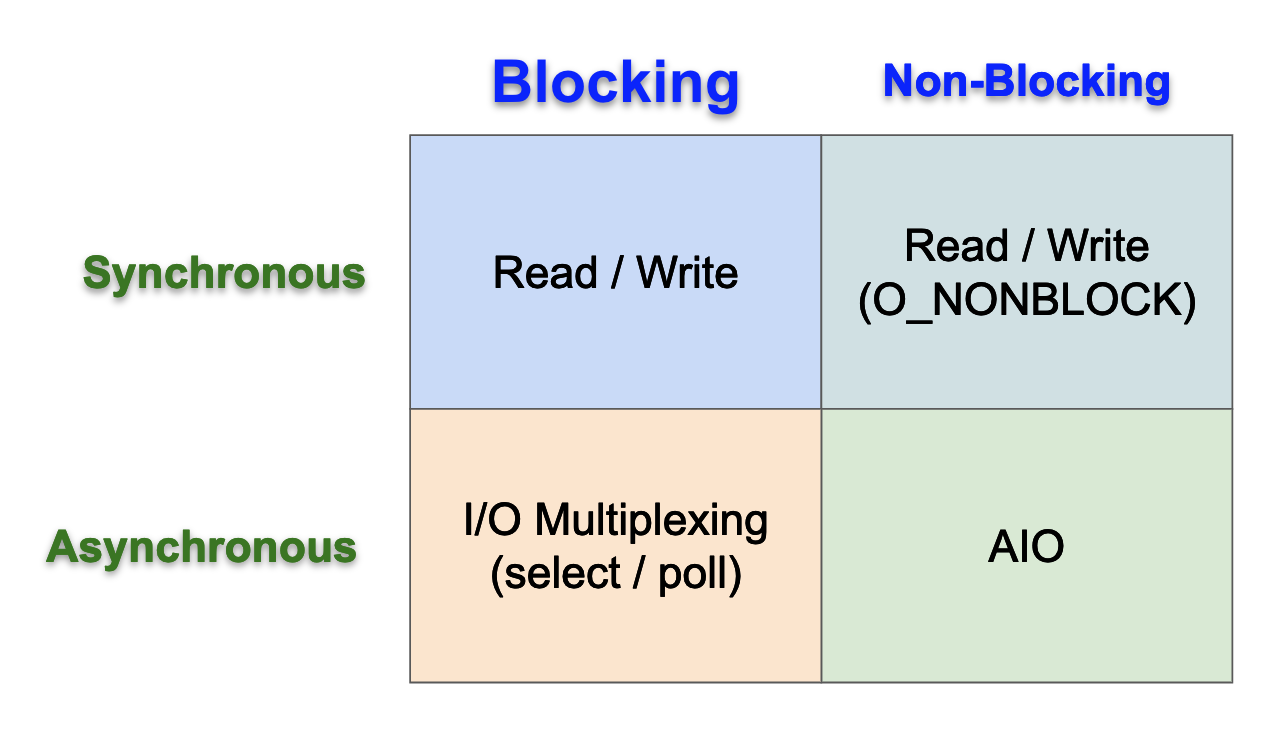 -->
### Blocking (阻塞式) vs. Non-blocking (非阻塞式) I/O
:::info
**區分點**:在 **等待資料準備就緒** 的階段,應用程式 process 是否會被核心阻塞 (blocked)。
:::
* **Blocking I/O**:當應用程式發起 `read()` 請求,若核心緩衝區沒有資料,則應用程式會 **被阻塞,直到資料到達為止**。這是最常見的預設模式。
* **Non-blocking I/O**:若透過 `fcntl()` 設定了 `O_NONBLOCK` 旗標,發起 `read()` 時如果沒有資料,核心會立刻返回一個錯誤碼 (如 `EAGAIN`),應用程式不會被阻塞,而是 **需要自己不斷地輪詢 (polling) 檢查資料是否就緒**。
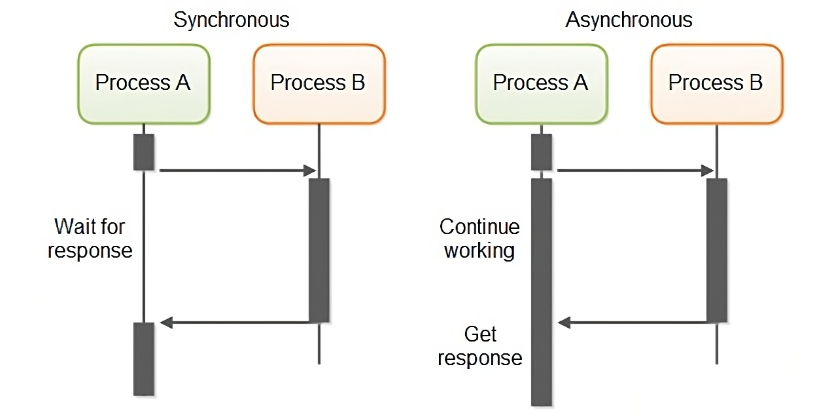
### Synchronous (同步) vs. Asynchronous (非同步) I/O
:::info
**區分點**:在 **實際進行資料傳輸** (從 kernel 複製到 user) 的階段,應用程式 process 是否會被阻塞。
:::
* **Synchronous I/O**:即便資料已準備就緒,應用程式在呼叫 `read()` 後,仍需等待資料從核心複製到應用程式緩衝區的過程完成,此期間應用程式是阻塞的。**Blocking I/O**、**Non-blocking I/O**、**I/O Multiplexing** 都屬於同步 I/O。
* **Asynchronous I/O**:應用程式發起 `aio_read()` 後,核心會立即返回,應用程式可以繼續執行其他任務。核心會在背景完成資料的讀取與複製,**完成後再透過訊號 (signal) 或回呼函式 (callback) 通知應用程式**。在整個過程中,應用程式都不會被阻塞。
### I/O Multiplexing (I/O 多路復用)
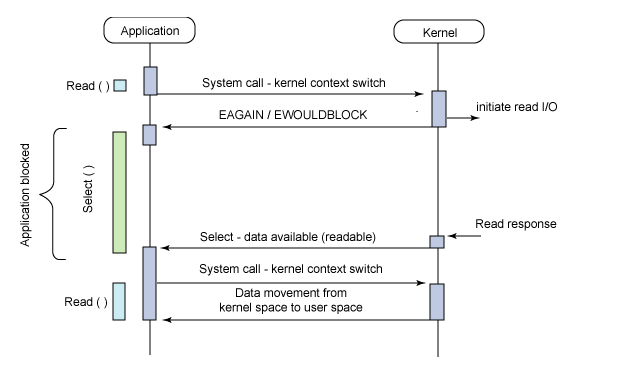
I/O Multiplexing 是一種常見的高效能 I/O 模型,它屬於 **同步 I/O** 的一種。其核心思想是 **允許單一 process 同時監視多個 `fd` 的狀態**。
* **select()**:
```c
int select(int nfds, fd_set *readfds, fd_set *writefds,
fd_set *exceptfds, struct timeval *timeout);
```
* **運作模式**:
1. 應用程式將所有感興趣的 `fd` 集合 (`readfds`, `writefds` 等) 傳遞給 `select()`。
2. `select()` 呼叫本身是 **阻塞** 的,它會阻塞應用程式,直到集合中有至少一個 `fd` 準備就緒 (例如,有資料可讀),或等待超時。
3. 當 `select()` 返回後,應用程式需要遍歷 `fd` 集合,找出是哪些 `fd` 準備就緒了。
4. 接著對這些就緒的 `fd` 呼叫 `read()` 或 `write()` 進行實際的 I/O 操作。此時的讀寫通常不會阻塞,因為資料已經準備好了。
* **優勢**:能用單一 process 高效管理大量連線,避免了為每個連線建立一個 process 或 thread 的巨大開銷。
* **限制**:
* 可監控的 `fd` 數量有上限 (通常是 `FD_SETSIZE` == 1024)。
* 每次呼叫都需要將整個 `fd` 集合從 user space 複製到 kernel space。
* 每次返回後,應用程式都需要線性掃描整個 `fd` 集合,當 `fd` 數量龐大時效率低下。
> 為了解決這些問題,Linux 後續引入了更高效的 `poll()` 以及 `epoll()` 機制,使得單一 thread 的程式也能高效地處理成千上萬的並行連線,成為 **現代高效能網路伺服器 (如 Nginx) 的基石**。
* **poll()**:本質與 `select()` 相同,但它基於 Linked-list 來管理 `fd`,**沒有了 `FD_SETSIZE` 的數量限制**。但它仍有 `select()` 的後兩個缺點。
* **epoll()**:Linux 特有的機制,是目前最高效的 I/O Multiplexing 實作。透過 `epoll_create()`, `epoll_ctl()`, `epoll_wait()` 三個系統呼叫來運作,解決了 `select()` 的所有缺點:
1. 沒有理論上的 `fd` 數量限制 (Linked-list)。
2. `fd` 集合由核心維護,並 **利用 `mmap()` 加速 user 與 kernel 的訊息傳遞**,不需每次都複製。
3. `epoll_wait()` **只返回已就緒的 `fd`**,不需應用程式遍歷。
> 參考:
> * [I/O Multiplexing](http://www.cs.toronto.edu/~krueger/csc209h/f05/lectures/Week11-Select.pdf)
> * [I/O Models 中文解說](https://rickhw.github.io/2019/02/27/ComputerScience/IO-Models/)
> * [IO 多路複用之 select、poll、epoll 詳解](https://www.cnblogs.com/jeakeven/p/5435916.html)
> 延伸閱讀:
> * [高效 Web 伺服器開發](https://hackmd.io/@sysprog/fast-web-server) - jserv
> * [透過 timerfd 處理週期性任務](https://hackmd.io/@sysprog/linux-timerfd) - jserv
> * [signalfd is useless](https://ldpreload.com/blog/signalfd-is-useless)
---
## Linux 虛擬檔案系統 (VFS)
為了讓核心能同時支援多種不同的檔案系統 (如 ext4, XFS, Btrfs, NFS 等),Linux 引入了一個抽象層,即 **Virtual File System (VFS)**,有時也稱為 Virtual Filesystem Switch。
<center>
<img src="https://i.imgur.com/UJ9oSGe.png" alt="image" width="80%" />
</center>
### VFS 的設計目標與架構
* **對上層應用程式**:
VFS 的核心目標是 **定義一組通用的、抽象的檔案操作介面**。任何實體的檔案系統,只要遵循這組介面規範來開發,就能夠在執行時期動態地掛載到 Linux 核心中,並被應用程式以統一的方式存取。
* **對下層檔案系統**
從開發者的角度來看,VFS 是一個 **實現了物件導向思想的框架**。它定義了幾個核心的物件類型,以及與這些物件相關的操作函式指標集合 (類似於 C++ 中的虛擬函式表)。一個新的檔案系統實作者,其主要工作就是提供這些物件的具體實例,並填寫對應的操作函式。
<center>
<img src="https://hackmd.io/_uploads/BJfOX7dNxl.png" alt="image" width="85%" />
</center>
> [Linux Storage Stack Diagram](https://www.thomas-krenn.com/en/wiki/Linux_Storage_Stack_Diagram)
### 核心物件:`superblock`, `inode`, `dentry`, `file`
<center>
<img src="https://i.sstatic.net/daHCZ.gif" alt="image" width="70%" />
</center>
VFS 主要透過以下四個核心物件來抽象檔案系統:
* **superblock 物件**:
* 代表一個 **已掛載的檔案系統實例**。
* 儲存 **整個檔案系統的全域性資訊**,例如:
* 檔案系統類型、區塊大小、總空間
* inode 總數、可用 inode 數
* 一組操作函數指標,指向由具體檔案系統 (如 ext4) 實作的管理整個檔案系統的函數 (如 `alloc_inode()`, `destroy_inode()`) 等
* 核心會維護一個 `superblock` 物件的 linked-list,來追蹤所有已掛載的檔案系統。
* **inode 物件**:
* 代表一個 **檔案或目錄的 metadata**,是檔案系統中區分每個檔案的唯一標識。
* 儲存了 **檔案的通用屬性**,例如:權限、擁有者、大小、時間戳 等。
* 在核心中,inode 的實作被分為兩個層次:
* **VFS inode**:一個通用的 in-memory 結構,為上層提供了一致的抽象介面。它包含所有檔案系統都共通的資訊。
* **特定檔案系統的 inode**:儲存在 disk 的具體結構 (如 ext4 的 ext4_inode)。除了包含 VFS inode 的資訊外,還額外加入了該檔案系統特有的資料,例如指向實體資料區塊 (data blocks) 的指標。
* **dentry (Directory Entry) 物件**:
* 代表一個 **目錄項**,它是一個檔案名稱與其對應 `inode` 之間的連結。
> 例如,路徑 `/home/user/file.txt` 會被 VFS 解析成 `dentry` `/`、`home`、`user` 和 `file.txt` 的 linked-list。
* `dentry` 的存在極大地優化了路徑查詢的效能。核心會維護一個 `dentry` 快取 (dcache),加速路徑解析過程。
* **file 物件**:
* 代表一個 **由 process 開啟的檔案實例**。
* 由 `open()` 在核心創建,並與一個 `fd` 關聯。
* 儲存 **檔案的動態資訊**,例如:
* 指向對應 `dentry` 的指標
* 指向一組檔案操作函數 (file_operations) 的指標 (如 `read()` 、 `write()` 等)
* 讀寫位移量 (curser/offset)
* 同一個檔案可以被開啟多次,每次都會產生一個新的 `file` 物件,但它們都指向同一個 `dentry` 和 `inode`。
```graphviz
digraph VFS_structure {
graph [rankdir=LR, fontname="Arial", splines=polyline];
node [shape=plain, fontname="Arial"];
task_struct [label=<
<TABLE BORDER="1" CELLBORDER="1" CELLSPACING="0">
<TR><TD PORT="task_struct" WIDTH="100"><b>task_struct</b></TD></TR>
<TR><TD height="30"></TD></TR>
<TR><TD PORT="files">files</TD></TR>
<TR><TD height="120"></TD></TR>
</TABLE>
>];
files_struct [label=<
<TABLE BORDER="1" CELLBORDER="1" CELLSPACING="0">
<TR><TD PORT="files" WIDTH="100"><b>files_struct</b></TD></TR>
<TR><TD height="10"></TD></TR>
<TR><TD PORT="fd0">fd[0]</TD></TR>
<TR><TD>fd[1]</TD></TR>
<TR><TD>fd[2]</TD></TR>
<TR><TD>...</TD></TR>
<TR><TD>...</TD></TR>
<TR><TD>fd[N-1]</TD></TR>
<TR><TD height="10"></TD></TR>
</TABLE>
>];
file [label=<
<TABLE BORDER="1" CELLBORDER="1" CELLSPACING="0" BGCOLOR="#e1f3fd">
<TR><TD PORT="file" WIDTH="120"><b>file</b></TD></TR>
<TR><TD height="10"></TD></TR>
<TR><TD PORT="dentry">dentry</TD></TR>
<TR><TD height="10"></TD></TR>
<TR><TD>pos</TD></TR>
<TR><TD height="10"></TD></TR>
<TR><TD PORT="f_ops">f_ops</TD></TR>
<TR><TD height="10"></TD></TR>
</TABLE>
>];
file_operations [label=<
<TABLE BORDER="1" CELLBORDER="1" CELLSPACING="0" BGCOLOR="#e1f3fd">
<TR><TD PORT="f_ops" WIDTH="120"><b>file_operations</b></TD></TR>
<TR><TD>read()</TD></TR>
<TR><TD>write()</TD></TR>
<TR><TD>open()</TD></TR>
<TR><TD>release()</TD></TR>
<TR><TD>mmap()</TD></TR>
<TR><TD>fsync()</TD></TR>
<TR><TD>...</TD></TR>
</TABLE>
>];
dentry [label=<
<TABLE BORDER="1" CELLBORDER="1" CELLSPACING="0" BGCOLOR="#cde7ca">
<TR><TD PORT="dentry" WIDTH="150"><b>dentry</b></TD></TR>
<TR><TD height="10"></TD></TR>
<TR><TD>d_name</TD></TR>
<TR><TD height="10"></TD></TR>
<TR><TD PORT="d_inode">d_inode</TD></TR>
<TR><TD height="10"></TD></TR>
<TR><TD PORT="d_sb">d_sb</TD></TR>
<TR><TD height="10"></TD></TR>
<TR><TD PORT="d_ops">d_ops</TD></TR>
<TR><TD height="10"></TD></TR>
</TABLE>
>];
dentry_operations [label=<
<TABLE BORDER="1" CELLBORDER="1" CELLSPACING="0" BGCOLOR="#cde7ca">
<TR><TD PORT="d_ops" WIDTH="150"><b>dentry_operations</b></TD></TR>
<TR><TD>hash()</TD></TR>
<TR><TD>compare()</TD></TR>
<TR><TD>...</TD></TR>
</TABLE>
>];
super_block [label=<
<TABLE BORDER="1" CELLBORDER="1" CELLSPACING="0" BGCOLOR="#ffe0bf">
<TR><TD PORT="sb" WIDTH="140"><b>super_block</b></TD></TR>
<TR><TD height="10"></TD></TR>
<TR><TD>s_dirt</TD></TR>
<TR><TD PORT="s_root">s_root</TD></TR>
<TR><TD>s_type</TD></TR><TR><TD height="10"></TD></TR>
<TR><TD PORT="s_op">s_op</TD></TR>
<TR><TD height="10"></TD></TR>
</TABLE>
>];
super_operations [label=<
<TABLE BORDER="1" CELLBORDER="1" CELLSPACING="0" BGCOLOR="#ffe0bf">
<TR><TD PORT="s_op" WIDTH="140"><b>super_operations</b></TD></TR>
<TR><TD>alloc_inode()</TD></TR>
<TR><TD>dirty_inode()</TD></TR>
<TR><TD>write_inode()</TD></TR>
<TR><TD>freeze_fs()</TD></TR>
<TR><TD>statfs()</TD></TR>
<TR><TD>...</TD></TR>
</TABLE>
>];
inode [label=<
<TABLE BORDER="1" CELLBORDER="1" CELLSPACING="0" BGCOLOR="#fffbcc">
<TR><TD PORT="inode" WIDTH="140"><b>inode</b></TD></TR>
<TR><TD height="10"></TD></TR>
<TR><TD>i_mode</TD></TR>
<TR><TD>i_uid</TD></TR>
<TR><TD>i_gid</TD></TR>
<TR><TD>i_ino</TD></TR>
<TR><TD>i_nlink</TD></TR>
<TR><TD>i_size</TD></TR>
<TR><TD>i_atime</TD></TR>
<TR><TD>i_mtime</TD></TR>
<TR><TD>i_ctime</TD></TR>
<TR><TD>...</TD></TR>
<TR><TD PORT="i_sb_list">i_sb_list</TD></TR>
<TR><TD>...</TD></TR>
<TR><TD PORT="i_ops">i_ops</TD></TR>
<TR><TD height="10"></TD></TR>
</TABLE>
>];
inode_operations [label=<
<TABLE BORDER="1" CELLBORDER="1" CELLSPACING="0" BGCOLOR="#fffbcc">
<TR><TD PORT="i_ops" WIDTH="140"><b>inode_operations</b></TD></TR>
<TR><TD>lookup()</TD></TR>
<TR><TD>create()</TD></TR>
<TR><TD>mkdir()</TD></TR>
<TR><TD>getattr()</TD></TR>
<TR><TD>setattr()</TD></TR>
<TR><TD>...</TD></TR>
</TABLE>
>];
task_struct:task_struct:e -> files_struct:files:w [style="invis"];
task_struct:files:e -> files_struct:files:w;
files_struct:files:e -> file:file:w [style="invis"];
files_struct:fd0:e -> file:file:w;
file:file:e -> dentry:dentry:w [style="invis"];
file:dentry:e -> dentry:dentry:w;
file:f_ops:s -> file_operations:f_ops:n;
dentry:dentry:e -> super_block:sb:w [style="invis"];
super_block:sb:e -> inode:inode:w [style="invis"];
dentry:d_inode:e -> inode:inode:w;
dentry:d_sb -> super_block:sb;
dentry:d_ops:s -> dentry_operations:d_ops:n;
super_block:s_root -> dentry:dentry:e;
super_block:s_op:s -> super_operations:s_op:n;
inode:i_ops:s -> inode_operations:i_ops:n;
inode:i_sb_list:w -> super_block:sb:e;
{rank=same; file; file_operations;}
{rank=same; dentry; dentry_operations;}
{rank=same; super_block; super_operations;}
{rank=same; inode; inode_operations;}
}
```
<!-- <center>
<img src="https://www.coins.tsukuba.ac.jp/~yas/coins/os2-2013/2014-01-30/images/task-files-file-dentry-inode.png" alt="image" width="70%" />
</center> -->
### Virtual 檔案系統 vs. Pseudo 檔案系統
* **Virtual File System (VFS)**:是一個 **抽象介面框架**。它本身不儲存資料,而是 **定義了一套規則,讓真正的檔案系統能夠接入**。它著重於「構成現實的要素」,即定義了檔案系統應具備的標準操作。
* **Pseudo File System**:是一種 **特殊的檔案系統實作**。它們看起來像檔案系統,但其 **內容並非儲存在持久化的儲存裝置上,而是由核心在記憶體中動態生成**,用以揭露核心或 process 的狀態資訊。它們存在的目的是為了特定目標,例如:
* `/proc` (**procfs**):揭露 process 相關資訊。
* `/sys` (**sysfs**):揭露裝置驅動程式和系統匯流排的階層結構。
* `/tmp` (**tmpfs**):一種基於記憶體的檔案系統,利用核心的 Page Cache 來儲存檔案,重開機後內容會消失,但讀寫效能極高。
### Hard link vs. Soft link
| | 硬連結 (Hard link) | 符號連結 (Soft / Symbolic link) |
|:--------------:|------------------------------------------------|----------------------------------------------------------|
| **定義** | 多個目錄項 **指向完全相同的 inode** | **一種特殊的檔案**,內容為指向目標檔案路徑的字串 |
| **鏈結目標** | inode (實體檔案內容) | 另一個檔案或目錄的路徑 |
| **自身 inode** | 無 (目錄項僅是指向既有 inode) | 有 (在目錄中作為獨立檔案,可被 `ls` 辨認) |
| **跨檔案系統** | 不行 | 可以 |
| **修改內容** | 改動即改變同一 inode 的資料,所有硬連結同步可見 | 只能修改目標檔案,無法直接在符號連結上改動指向 (需重建) |
| **刪除目標** | 刪除單一硬連結只減 refcount,refcount 清零後才釋放空間 | 刪除目標後符號連結仍在,但變成 broken link,需手動或工具清理 |
| **用途** | 為同一檔案建立多個別名 (aliases) | 1. 類似 Windows 捷徑;<br>2. 方便重命名或移動目標而不改動 link 本身 |
### 實作解析:`fibdrv` char device 驅動程式如何掛鉤 VFS
> 參照:[2020 年春季 Linux 核心設計課程作業 —— fibdrv](https://hackmd.io/@sysprog/linux2020-fibdrv)
可以透過一個簡單的字元裝置驅動程式 [fibdrv](https://github.com/sysprog21/fibdrv) 來理解裝置如何與 VFS 互動。`fibdrv` 的功能是計算並回傳費波那契數列。
1. **觀察 inode 結構**:
`include/linux/fs.h`
```c=672
struct inode {
...
dev_t i_rdev;
...
union {
struct pipe_inode_info *i_pipe;
struct cdev *i_cdev;
char *i_link;
unsigned i_dir_seq;
};
...
} __randomize_layout;
```
若這個 `inode` 指向一個裝置,其 `i_rdev` 會儲存裝置的 major number 和 minor number。並根據裝置的類型,`inode` 內的 union 會指向對應的結構。以 `fibdrv` 來說,它屬於字元裝置 (char device),所以核心會將 `i_cdev` 指向對應的 `struct cdev`。
2. **觀察 file_operations 結構**:
```c=2268
struct file_operations {
struct module *owner;
fop_flags_t fop_flags;
loff_t (*llseek) (struct file *, loff_t, int);
ssize_t (*read) (struct file *, char __user *, size_t, loff_t *);
ssize_t (*write) (struct file *, const char __user *, size_t, loff_t *);
...
int (*mmap) (struct file *, struct vm_area_struct *);
int (*open) (struct inode *, struct file *);
int (*flush) (struct file *, fl_owner_t id);
int (*release) (struct inode *, struct file *);
int (*fsync) (struct file *, loff_t, loff_t, int datasync);
int (*fasync) (int, struct file *, int);
int (*lock) (struct file *, int, struct file_lock *);
...
} __randomize_layout;
```
對裝置進行 (系統呼叫) 操作時,底層會呼叫的函式。
3. **定義檔案操作集合**:
驅動程式首先需要定義一個 `struct file_operations` 結構的實例,並填充它所支援的操作函式指標。
`fibdrv.c`
```c=112
const struct file_operations fib_fops = {
.owner = THIS_MODULE,
.read = fib_read, // 對應 read() 系統呼叫
.write = fib_write, // 對應 write() 系統呼叫
.open = fib_open, // 對應 open() 系統呼叫
.release = fib_release, // 對應 close() 系統呼叫
.llseek = fib_device_lseek, // 對應 lseek() 系統呼叫
};
```
3. **註冊字元裝置 (Character Device)**:
在模組初始化函式中,驅動程式使用 `register_chrdev()` 函式來註冊此字元裝置。這個函式會動態分配一個主裝置號 (major number),並將 `fib_fops` 註冊到核心。這是一種較傳統的方法,核心會自動處理 `cdev` 的相關設定 (如 `cdev_alloc()`、`cdev_add()` 等)。
`fibdrv.c`
```c=121
static int __init init_fib_dev(void)
{
int rc = 0;
mutex_init(&fib_mutex);
// Let's register the device
// This will dynamically allocate the major number
rc = major = register_chrdev(major, DEV_FIBONACCI_NAME, &fib_fops);
...
```
4. **建立裝置節點**:
最後,驅動程式透過 `class_create()` 建立裝置類別,再用 `device_create()` 建立裝置。使用者空間的服務 (如 udev) 會偵測到這些操作,並在 `/dev` 目錄下建立對應的裝置檔案 (例如 `/dev/fibonacci`)。程式碼中使用了預處理器指令來相容不同版本的核心。
`fibdrv.c`
```c=136
fib_class = class_create(DEV_FIBONACCI_NAME);
if (!fib_class) {
...
}
if (!device_create(fib_class, NULL, fib_dev, NULL, DEV_FIBONACCI_NAME)) {
...
}
```
當 User space 的應用程式對 `/dev/fibonacci` 呼叫 `open()`、`read()` 等系統呼叫時,VFS 會:
1. 根據路徑找到對應的 `inode`。
2. 發現這個 `inode` 是一個字元裝置。
3. 從 `inode` 中找到對應的 `cdev` 結構。
4. 從 `cdev` 結構中找到 `file_operations` 指標 (`fib_fops`)。
5. 呼叫 `file_operations` 中對應的函式 (如 `fib_open`, `fib_read`),從而將控制權轉交給我們的驅動程式。
這個過程展示了 VFS 作為一個 **執行時期分派中心 (Runtime Dispatcher)** 的角色,將通用的系統呼叫路由到特定的驅動程式實作。
---
## 依循 VFS 的檔案系統實作
基於 VFS 的靈活架構,Linux 生態系中發展出各式各樣的檔案系統,以滿足不同場景的需求。
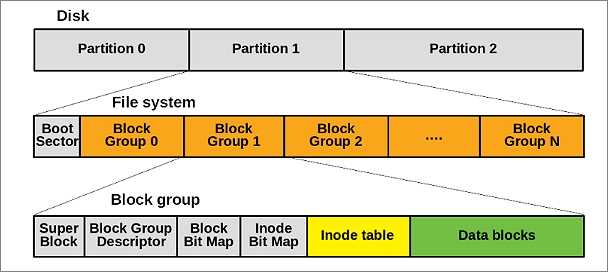
### Ext2/3/4 的演進:從 FSCK 到 Journaling
* **Ext2**:一個經典的傳統檔案系統。
* **缺點**:系統意外斷電或崩潰後,檔案系統的 metadata 可能不一致。為了修復這種不一致,每次開機時都需要執行一個耗時的 **`fsck` (file system check)** 工具來掃描並修復整個 disk partition,對於需要快速啟動的伺服器或嵌入式裝置是不可接受的。
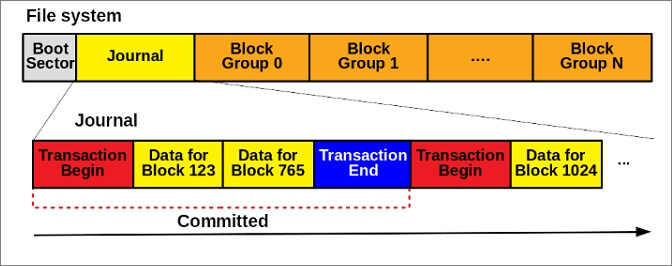
* **Ext3**:為了解決 `fsck` 的效能問題,Ext3 引入 **Journaling (日誌)** 機制:
* **核心思想**:對檔案系統的 metadata 進行實際修改前,先將這次操作的意圖 (一個交易, transaction) 寫入一個稱為 `journal` 的專門日誌 disk 區域。
* **運作流程**:
1. **Journal Write**:將「我要修改 inode A 和 data block B」這個操作寫入 journal。
2. **Commit**:確認 journal 寫入成功。
3. **Checkpoint**:將 journal 中的操作實際寫入到disk 的 inode 和 data block 區域。
* **修復方式**:如果系統在操作中途崩潰,下次啟動時,只需檢查 `journal` 的內容,就能恢復檔案系統的一致性。
* **replay (重放)**:未完成的交易
* **undo (回滾)**:已部分執行但未提交的交易
* **優點**:只需處理一小塊日誌區域,無需掃描整個檔案系統,大大縮短了恢復時間。
* **Ext4**:作為 Ext3 的後繼者,Ext4 進行了多項重要改進,以支援更大的儲存容量和更高的效能,是目前許多 Linux 發行版的預設檔案系統:
* **Extents**:取代了傳統的間接區塊對映 (indirect block mapping),`extent` 將大量連續的資料區塊表示為「起始區塊 + 長度」,大大提高了大檔案的存取效率並減少了 metadata 的碎片化。
* **更大的檔案系統支援**:將 32 位元的區塊編號擴展到 48 位元,使得檔案系統的最大容量從 16TB 提升到 1EB。
> 值得注意的是,Ext4 選擇 48 位元而非 64 位元是因為還有一些技術限制需要在未來版本中解決。
* **目錄索引**:針對包含大量檔案的目錄,引入了基於 hashing 的 HTree 索引,將目錄查詢的演算法從線性掃描 $O(n)$ 優化到對數時間 $O(log n)$。
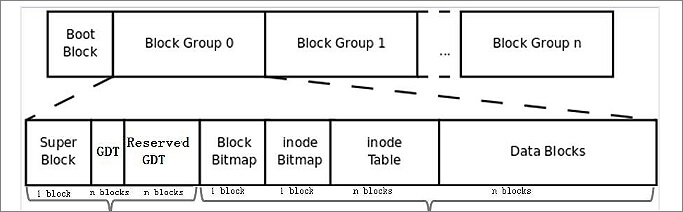
> 圖源:[What Is Ext2/Ext3/Ext4 File System Format?](https://www.idiskhome.com/resource/partition/ext2-ext3-ext4-file-system-format-and-difference.shtml)
> 延伸閱讀:[Ext3/4 file systems](http://www.cs.unc.edu/~porter/courses/cse506/s16/slides/ext4.pdf)
### 加密檔案系統 (Encrypted File System)
為了保護 disk 上靜態資料的機密性,加密檔案系統應運而生。主要有兩種實現方式:
1. **區塊裝置加密 (Block Device Encryption)**:
* **層級**:在 VFS 和底層檔案系統 (如 Ext4) **之下** 運作 (Overlay)。
* **原理**:建立一個虛擬的區塊裝置,所有寫入這個虛擬裝置的資料都會被透明地加密,然後再寫入到實體 disk。讀取時則反向操作。
* **優點**:對上層的檔案系統完全透明,可以 **加密整個分割區**,隱藏目錄結構和空間使用情況。
* **範例**:Linux 的 `dm-crypt`、Windows 的 `BitLocker`、MacOS 的 `FileVault 2`。
<center>
<img src="https://hackmd.io/_uploads/rJItmZYNgl.png" alt="image" width="30%" />
</center>
2. **檔案級加密 (File System Encryption)**:
* **層級**:在 VFS 和底層檔案系統 **之間** 運作 (Stackable)。
* **原理**:應用程式透過 VFS 寫入檔案,這個請求會先被加密檔案系統攔截,將資料加密後,再以普通檔案的形式交給底層的 Ext4 等檔案系統儲存。
* **優點**:更具靈活性,可以實現 **基於使用者、目錄或單一檔案的加密**,且可以將已加密的檔案直接透過網路傳輸,在遠端解密。
* **範例**:Linux 的 `eCryptFS`、Windows 的 `EFS`、MacOS 的 `FileVault 1`。
<center>
<img src="https://hackmd.io/_uploads/HJPCQ-KElg.png" alt="image" width="30%" />
</center>
> 延伸閱讀:[Encrypted File Systems](http://www.cs.unc.edu/~porter/courses/cse506/s16/slides/cryptfs.pdf)
### 使用者空間檔案系統 (FUSE) 應用案例
**FUSE (Filesystem in Userspace)** 是一個強大的框架,允許開發者在 **User space** 使用任何偏好的高階語言 (如 Python, Go) 編寫檔案系統邏輯,而無需修改核心程式碼。極大地降低了開發門檻並催生了眾多創新的檔案系統。
* **[MezzFS](https://medium.com/netflix-techblog/mezzfs-mounting-object-storage-in-netflixs-media-processing-platform-cda01c446ba)**:Netflix 開發的 FUSE 檔案系統,用於將其後端的雲端物件儲存 (如 AWS S3) 掛載為本地檔案系統。使其龐大的 **媒體處理平台** 可以像操作本地檔案一樣,無縫地存取雲端上的海量媒體資源。
* **[VirtIO-FS](https://virtio-fs.gitlab.io/)**:Red Hat 為了提升 **虛擬機** 中的檔案分享效能而開發的技術。利用 FUSE 結合 VirtIO 的共享記憶體機制,讓 Guest OS 可以直接存取 Host OS 的 Page Cache,從而避免了傳統 `v9fs` 中頻繁的資料複製,顯著提高了 I/O 效能。
* **[vramfs](https://github.com/Overv/vramfs)**: 一個實驗性的 FUSE 檔案系統,利用 OpenCL 將 GPU 的視訊記憶體 (Video RAM) 掛載為一個儲存裝置,展示了 FUSE 的極高彈性。
* **[simplefs](https://github.com/jserv/simplefs)**:jserv 團隊研發的簡易檔案系統,全部程式碼僅約 1500 行,具備完整基礎功能。主要的目的是讓學生可以理解一個小型的檔案系統是怎麼運作。
---
## 延展性 (Scalability) 議題
隨著多核心處理器的普及,作業系統的 **延展性 (Scalability,** 系統在增加硬體資源 (如 CPU 核心) 時,其整體效能能否隨之線性增長的能力) 變得至關重要。檔案系統中的鎖 (lock) 機制是影響延展性的常見瓶頸。
### 掛載表 (Mount Table) 的鎖定問題
Linux 核心需要維護一個全域的掛載表 (mount table),以追蹤所有已掛載的檔案系統。當程式需要 **解析路徑時,可能會頻繁地查詢這個掛載表**。在早期的核心中,對這個表的存取是透過一個全域性的 **spinlock** 來保護的。
spinlock 的問題在於,當多個核心高併發地嘗試獲取同一個鎖時,未獲取到鎖的核心會處於「忙碌等待 (busy-waiting)」狀態,不斷消耗 CPU 週期,導致嚴重的效能下降。這是一個典型的延展性瓶頸:核心數越多,鎖的競爭越激烈,整體效能不增反減。
### 從 spinlock 到 per-cpu 資料的優化策略
為了解決這個問題,核心開發者觀察到掛載表的特性:**讀取頻繁,寫入稀少**。基於此,採用了 per-cpu 資料的優化策略:
1. 為每個 CPU 核心建立一個掛載表資訊的 **本地快取**。
2. 當需要查詢時,首先檢查本地 per-cpu 快取。由於存取的是本地資源,無需加鎖,速度極快。
3. 只有 **在本地快取未命中 (cache miss) 時,才去獲取全域的鎖**,查詢全域掛載表。
4. 查詢到結果後,將其更新到本地 per-cpu 快取中,以備後續快速查詢。
這種優化策略,將高成本的全域鎖定操作,轉化為絕大多數情況下的無鎖本地操作,從而極大地提升了檔案系統在多核心環境下的延展性。
> 延伸閱讀:[Linux 核心設計:Scalability 議題](https://hackmd.io/@sysprog/linux-scalability) - jserv
---
## 總結
Linux 的檔案系統是一個層次分明、設計精巧且充滿演化智慧的複雜系統。從 UNIX 繼承的「一切皆檔案描述符」哲學,到 VFS 提供的強大抽象介面,再到 FUSE 帶來的無限創新可能,它不僅僅是儲存資料的工具,更是整個作業系統資源管理和擴充的核心樞紐。理解其背後的概念、I/O 模型、核心物件以及效能優化策略,是深入掌握 Linux 系統運作原理的必經之路。
---
回[主目錄](https://hackmd.io/@Jaychao2099/Linux-kernel)
 Google Drive
Gist
Clipboard
Google Drive
Gist
Clipboard
 Sign in via Google
 Sign in via Facebook
 Sign in via X(Twitter)
 Sign in via GitHub
 Sign in via Dropbox
 Sign in with Wallet






